
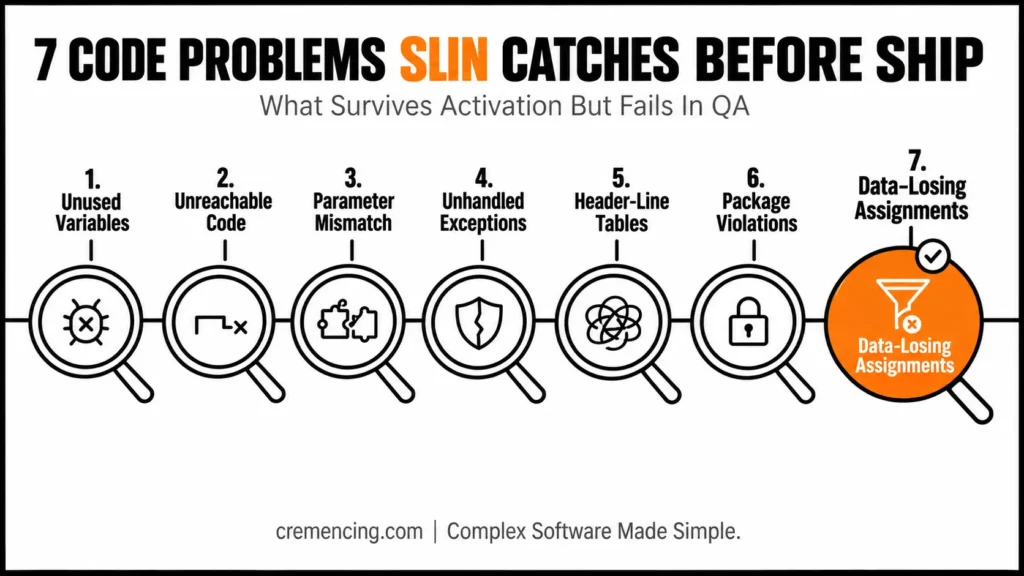
ABAP SLIN code problems compile cleanly, yet they fail after you ship. It flags seven categories of defects the standard syntax check waves through: unused declarations, unreachable statements, interface mismatches, unhandled classic exceptions, obsolete header-line tables, package boundary violations, and assignments that quietly lose data. However, none of these stop a program from activating; all seven can surface as a QA failure, a production incident, or a rejected transport. This post walks through each one with before/after ABAP code, across both ECC 6.0 and S/4HANA on-prem.
ABAP SLIN: Detecting Interface Mismatches and Hidden Errors
While standard ABAP syntax checks verify localized code grammar and internal structure during activation, SAP’s Extended Program Check (transaction SLIN) executes deep static analysis to catch cross-procedure defects that survive activation. ABAP SLIN evaluates external interface consistency, unhandled exceptions, unreachable code, and unused data declarations across function modules, subroutines, and method calls.
Because a program can activate successfully while containing mismatched call parameters or unhandled interface errors that lead to runtime short dumps, running SLIN before transport release acts as a vital developer-level quality gate. However, full release readiness still requires central SAP Analysis, Check, and Test (ATC) governance across entire transports and packages.
What Is ABAP SLIN and Why It Matters?
ABAP SLIN code review runs through the Extended Program Check transaction against ABAP source code. It performs static checks that are deeper or more time-consuming than the immediate syntax validation used during editing and activation. validates essential internal semantics. However, it does not prove that every external procedure call is correct, every exception is handled, every statement is reachable, or every package dependency follows the intended architecture. A syntax check confirms that the compiler can interpret the program, but ABAP SLIN goes deeper. That distinction matters because a program can activate successfully and still contain a serious Extended Program Check finding.
In other words, some findings indicate code that can cause an exception or runtime error, while others identify obsolete, misleading, or maintenance-heavy constructs.SLIN is most useful before releasing a transport, after changing procedure interfaces, and when reviewing older custom code. It gives a developer a focused inspection of an activated program before a wider ATC run checks the complete object set. The goal is not to remove warnings blindly. Rather, the goal is to understand whether each finding represents a real defect, an intentional exception, or a problem that belongs in another quality tool.
SLIN Findings: Severity at a Glance
| Finding Type | Typical Severity | Blocks Activation? | Risk If Ignored |
|---|---|---|---|
| Error | High | No (already activated) | Runtime exception likely |
| Warning | Medium | No | May cause defect under specific conditions |
| Information | Low | No | Maintenance/readability concern only |
How ABAP SLIN Works
ABAP SLIN code analysis works on activated repository source. Therefore, activate your latest changes before running it, or the result may reflect the previous active version instead of the code currently visible in the editor.
First, open transaction SLIN, enter the program or object selection, and choose either the standard check or selected check categories. Meanwhile, the standard check uses a predefined group of common Extended Program Check tests, while a manually configured run lets you focus on specific areas.
Results normally appear as errors, warnings, or information messages. Next, double-click a finding to navigate to the relevant source position, then inspect the surrounding logic before deciding whether to change or suppress it. However, the exact finding text and severity can differ by ABAP release and enabled checks. Treat these seven ABAP SLIN code examples below as defect categories rather than promises of one identical message in every system.
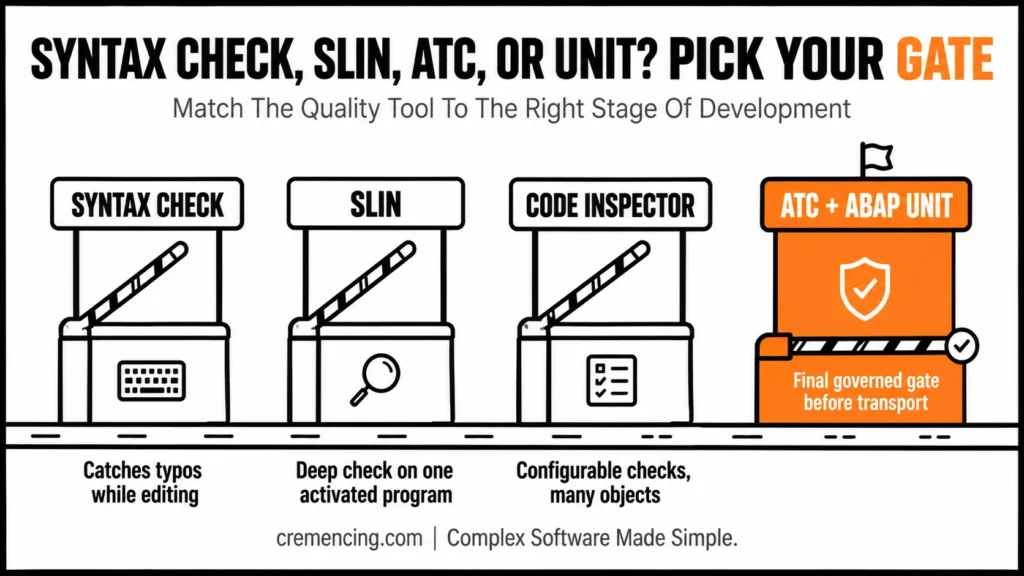
Syntax check, SLIN, ATC, and ABAP Unit
| Tool | Best use | What it does not prove |
| Syntax check | Immediate syntax and basic semantic validation | Safe external calls or complete code quality |
| SLIN | Deeper static analysis of an activated program | Package-wide or centrally governed compliance |
| Code Inspector | Configurable checks and variants | Central transport governance by itself |
| ATC | Standardized checks across objects, packages, and transports | Correct business results at runtime |
| ABAP Unit | Executable functional and component tests | Complete static quality or production performance |
For classic ECC and S/4HANA development, SLIN remains a useful local check. For ABAP Cloud work in ADT or Visual Studio Code, use ATC and ABAP Unit as the primary quality workflow rather than treating transaction SLIN as a VS Code feature.
ABAP SLIN Code Walkthrough: Seven Problems
1. Unused variables and abandoned declarations
unfinished logic. For example, a developer may have removeda validation block but left the associated control variable behind.
DATA:
lv_total TYPE p LENGTH 8 DECIMALS 2,
lv_debug_text TYPE string. ” Declared but never used
lv_total = iv_quantity * iv_price.
rv_total = lv_total.
SLIN can identify declarations that are never read or written meaningfully. Therefore, remove them unless they exist for a documented framework or interface requirement
DATA lv_total TYPE p LENGTH 8 DECIMALS 2.
lv_total = iv_quantity * iv_price.
rv_total = lv_total.
Do not dismiss every unused variable as cosmetic. In fact, it may show that required validation, logging, or branching logic was accidentally removed.
2. Unreachable code
Copied block. As a result, they mislead future developers because the code appears operational but can never execute.
IF iv_cancelled = abap_true.
RETURN. ” Processing ends here
MESSAGE s001(zorder). ” Unreachable statement
ENDIF.
Remove the dead statement or place required logic before the exit.
IF iv_cancelled = abap_true.
MESSAGE s001(zorder). ” Inform the caller before leaving
RETURN.
ENDIF.
SLIN can detect unreachable sections that the normal syntax check accepts. Consequently, removing them reduces maintenance risk and makes control flow easier to review.
3. External procedure parameter mismatch
ABAP SLIN code analysis shows that it does not match the procedure interface. In fact, the Extended Program Check can compare statically known interfaces The Extended Program Check can compare statically known interfaces.
FORM calculate_total
USING
iv_quantity TYPE i
iv_price TYPE p
CHANGING
cv_total TYPE p.
cv_total = iv_quantity * iv_price.
ENDFORM.
DATA:
lv_quantity TYPE i VALUE 5,
lv_total TYPE p LENGTH 8 DECIMALS 2.
” Incorrect: the price parameter is missing
USING iv_quantity TYPE i iv_price TYPE p OPTIONAL
USING lv_quantity
CHANGING lv_total.
Correct the call so its actual parameters match the declared interface.
DATA:
lv_quantity TYPE i VALUE 5,
lv_price TYPE p LENGTH 8 DECIMALS 2 VALUE ‘12.50’,
lv_total TYPE p LENGTH 8 DECIMALS 2.
PERFORM calculate_total
USING
lv_quantity
lv_price
CHANGING
lv_total.
Consequently, this category matters because an interface mismatch can survive editing and fail only when the call executes.
4. Classic exceptions that are never handled
Older function modules often expose classic exceptions. Therefore, ignoring them can let the program continue with an empty or incomplete result.
DATA ls_order TYPE vbak.
CALL FUNCTION ‘Z_READ_ORDER’
EXPORTING
iv_vbeln = p_vbeln
IMPORTING
es_order = ls_order.
Handle the declared exceptions and react to sy-subrc.
DATA ls_order TYPE vbak.
CALL FUNCTION ‘Z_READ_ORDER’
EXPORTING
iv_vbeln = p_vbeln
IMPORTING
es_order = ls_order
EXCEPTIONS
order_not_found = 1
no_authority = 2
OTHERS = 3.
CASE sy-subrc.
WHEN 0.
” Continue with a valid order
WHEN 1.
MESSAGE e001(zorder) WITH p_vbeln.
WHEN 2.
MESSAGE e002(zorder).
WHEN OTHERS.
MESSAGE e003(zorder).
ENDCASE.
ABAP/ABAPABAP SLIN code checks can help identify procedure exceptions that are neither handled nor propagated. The exact behaviour depends on the procedure type and selected check.
5. Obsolete internal-table header lines
ABAP SLIN code review flags header-line tables because they compile in classic ABAP but mix the table body and work area under one name. This creates ambiguous statements and makes refactoring harder.
DATA gt_materials TYPE TABLE OF mara WITH HEADER LINE.
SELECT *
FROM mara
INTO TABLE gt_materials
WHERE matnr IN s_matnr.
LOOP AT gt_materials.
WRITE: / gt_materials-matnr.
ABAP SLIN flags this pattern because
Use an explicit line type, table, and work area or field symbol.
ENDLOOP.
TYPES:
BEGIN OF ty_material,
matnr TYPE mara-matnr,
mtart TYPE mara-mtart,
END OF ty_material.
DATA lt_materials TYPE STANDARD TABLE OF ty_material.
SELECT matnr,
mtart
FROM mara
INTO TABLE @lt_materials
WHERE matnr IN @s_matnr.
LOOP AT lt_materials ASSIGNING FIELD-SYMBOL(<ls_material>).
WRITE: / <ls_material>-matnr.
ENDLOOP.
ABAP SLIN flags this correction because it also narrows the selected columns. Header-line declarations are not allowed in the ABAP Cloud language version.
6. Package-interface and use-access violations
However, a class can be globally visible yet still sit outside the package interface that the caller is allowed to use. Package checks can expose architecture violations before transport release.
” Direct dependency on a provider’s internal implementation
DATA(lo_service) = NEW zcl_private_pricing_service().
DATA(lv_price) = lo_service->calculate(
iv_material = p_matnr ).
Consume a released package interface or public factory instead.
DATA lo_service TYPE REF TO zif_pricing_service.
” Factory returns the released service contract
lo_service = zcl_pricing_factory=>get_service( ).
DATA(lv_price) = lo_service->calculate(
iv_material = p_matnr).
The exact correction depends on package design. Instead, do not make an internal class public only to silence the check; expose a stable interface that callers are intended to use
7. Assignments that may lose data
An ABAP SLIN code check on silently changes their meaning. However, the source remains syntactically valid, but the target cannot store the complete content.
DATA:
lv_external_id TYPE c LENGTH 30,
lv_short_id TYPE c LENGTH 8.
lv_external_id = ‘CUSTOMER-REFERENCE-2026-001’.
” Risk: the target cannot hold the complete identifier
lv_short_id = lv_external_id.
Use a compatible type or validate the conversion explicitly.
DATA:
lv_external_id TYPE c LENGTH 30,
lv_target_id TYPE c LENGTH 30.
lv_external_id = ‘CUSTOMER-REFERENCE-2026-001’.
lv_target_id = lv_external_id.
Some SLIN findings in this category depend on data types and release-specific checks. Therefore, review the actual business meaning before changing or suppressing the warning. Meaning before changing or suppressing the warning.
| # | Problem | SLIN Catches | Quick Fix |
|---|---|---|---|
| 1 | Unused declarations | Never-read/written variables | Delete unless framework-required |
| 2 | Unreachable code | Statements after RETURN/EXIT | Remove or reorder before exit |
| 3 | Parameter mismatch | FORM/PERFORM interface gaps | Match actual to formal params |
| 4 | Unhandled exceptions | Missing EXCEPTIONS + sy-subrc check | Add CASE sy-subrc handling |
| 5 | Header-line tables | WITH HEADER LINE usage | Use TYPES + explicit work area |
| 6 | Package violations | Direct access to internal classes | Use released interface/factory |
| 7 | Lossy assignments | Truncating type conversions | Match target type length |
Use ABAP SLIN when you need a deeper static review
Review ABAP SLIN code findings when you need a deeper static review of one activated classic ABAP program.In fact, it works well after interface changes, before releasing a transport, and during cleanup of older custom developments
Do not use SLIN as the only approval step for a package, application, or S/4HANA conversion. It does not replace centrally governed ATC variants, ABAP Unit tests, runtime analysis, authorization testing, or functional validation.
| Situation | Recommended tool |
| Check code while editing | Syntax check |
| Review one activated classic program | SLIN |
| Run configurable checks across many objects | Code Inspector |
| Enforce release or transport quality rules | ATC |
| Validate business behavior | ABAP Unit and integration tests |
| Analyze SQL or runtime cost | ST05, SAT, or SQL Monitor |
| Develop in ABAP Cloud using ADT or VS Code | ATC and ABAP Unit |
Suppress a finding only after proving that the construct is intentional and safe. Use the narrow pseudo-comment proposed by the finding where supported, document the reason, and avoid disabling a complete check area.
Run the final ATC variant after SLIN. After all, a clean local check does not guarantee that the object satisfies package, security, cloud-readiness, performance, or transport-level rules.SLIN is especially useful when working with performance-heavy code like AMDP for high-performance HANA logic.
Conclusion
An ABAP SLIN code review shows that a program that activates has only cleared the lowest bar. The seven findings in this post unused declarations, unreachable code, interface mismatches, unhandled exceptions, header-line tables, package violations, and lossy assignments all pass the syntax check and still carry real risk into QA or production. Run SLIN after interface changes and before every transport release, treat each finding as a real defect until proven otherwise, and document any suppression with the narrow pseudo-comment rather than disabling a whole check category.
And before every transport release, treat each finding as a real defect until proven otherwise, and document any suppression with the narrow pseudo-comment rather than disabling a whole check category. Then let ATC and ABAP Unit close the gap SLIN can’t: package governance, cloud-readiness, and runtime behavior. Used this way, SLIN is not a certificate; it’s the cheapest defect you’ll ever catch.
Frequently Asked Questions About ABAP SLIN
1. What is the SLIN transaction used for?
The ABAP SLIN code check transaction runs the Extended Program Check against activated source code. It detects deeper static issues such as questionable constructs, unused declarations, unreachable statements, and external-interface problems that may not appear during the immediate ABAP syntax check.
2. What is the difference between Perform Check and Perform Standard Check in SLIN?
Perform Standard Check runs on SAP’s predefined group of commonly recommended checks. On the other hand, Perform Check lets you select individual check categories. The exact categories available in the SLIN transaction in SAP depend on the ABAP release and installed components.
3. How can I find unused variables in an ABAP program?
Relevant semantic and declaration checks should be enabled. Then, review each unused variable before deleting it. Some declarations may be required by an interface, generated framework, enhancement point, or externally called routine.
4. How should intentional Extended Program Check warnings be handled?
First, confirm that the finding is intentional, document the technical reason, and apply only the specific pseudo-comment proposed for that warning where supported. Do not disable an entire ABAP static code analysis category simply to obtain a clean result.
5. What is SLIN in SAP ABAP?
SLIN is SAP’s transaction for the Extended Program Check. Specifically, it performs deeper ABAP code quality checks than the normal syntax check. It helps identify possible runtime errors, semantic defects, dead code, unused declarations, and questionable language constructs.
6. ABAP Extended Program Check?
First, activate the latest source, open transaction SLIN, enter the target program, choose the standard check or selected categories, and execute. Double-click each ABAP Extended Program Check result to navigate to the relevant source line and review its context.
7. What is the difference between SLIN and ATC?
ABAP SLIN code analysis provides an interactive deep check for an activated program. ATC applies centrally managed rules across repository objects, packages, and transports. Meanwhile, for an ABAP transport code check, use SLIN during development and ATC as the final governed quality gate.
8. Can SLIN run automatically in a CI/CD or transport pipeline?
SLIN itself is interactive, but its underlying logic is also available through ATC, which can be automated and gated into transport release or CI/CD checks.
9. Does SLIN check CDS views and AMDP methods, or only classic ABAP?
SLIN’s classic checks focus on procedural and OO ABAP. CDS views and AMDP are better covered by ATC and the CDS-specific tools in ADT, especially for S/4HANA and ABAP Cloud.
10. What’s the difference between a SLIN pseudo-comment and an ABAP Doc comment?
A pseudo-comment (e.g., "#EC NEEDED) suppresses a specific SLIN finding with a documented reason. ABAP Doc comments are documentation only and have no effect on Extended Program Check results.




