
Most SAP developers assume cloud ABAP Development only comes with a paid subscription attached. It doesn’t. SAP gives you two genuinely free ways to get hands-on with ABAP Cloud, RAP, and CDS: no credit card, no procurement approval, and no waiting on IT.
This guide walks you from zero to a running ABAP program on SAP BTP — covering everything you need to start ABAP Development the right way — and clears up the one thing that trips up almost everyone starting: which free option to actually pick.
- A valid SAP ID (S-User, P-User, or a fresh SAP Community account any of these work for sign-up)
- Eclipse IDE with ABAP Development Tools (ADT) installed
- Basic ABAP knowledge: tables, classes, CDS basics are helpful but not required
- A modern browser (Chrome or Edge)
Free ABAP Development Cloud Provisioning
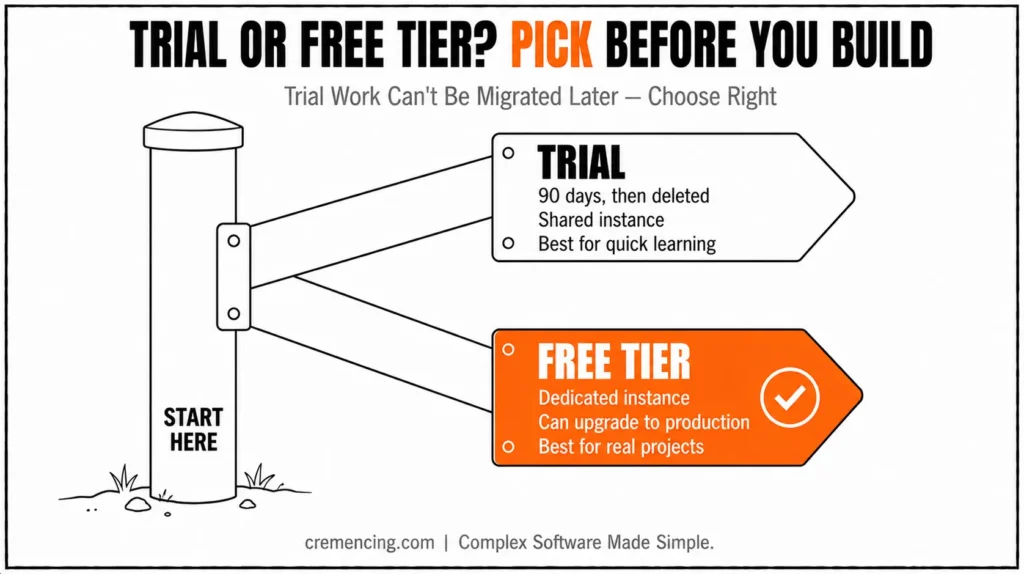
Paragraph Developing on the SAP BTP ABAP Environment without upfront license fees requires choosing between the public Trial account and the dedicated Free Tier service plan. The shared Trial environment provides rapid access for basic experimentation but auto-deletes instances after 90 days without an upgrade path.
In contrast, the Free Tier plan under a Pay-As-You-Go or CPEA account provisions a private instance that seamlessly converts to paid production without data loss.
Both options enforce language scope restrictions, limiting developers to modern ABAP Cloud syntax, Core Data Services, and RESTful Application Programming Model artifacts while blocking legacy dynpro constructs.
Connecting Eclipse via ABAP Development Tools requires configuring communication arrangements to authenticate through dedicated service keys rather than traditional SAP GUI credentials.
Way 1 — Pick the Right Free Option for ABAP Development: Trial vs. Free Tier
This is the step almost every other tutorial skips, and it’s the one that causes the most confusion later. SAP actually offers two different free ways to access the ABAP Environment, and they are not the same thing.
| Trial Account | Free Tier | |
| Cost / card required | Free, no card | Free, no card — but requires a CPEA or Pay-As-You-Go commercial account (still $0 to set up) |
| Duration | 90 days, auto-deleted after | 90 days per instance, but the account itself doesn’t expire the same way |
| Instance type | Shared — other trial users can see your dev objects | Dedicated — your own private instance |
| Can convert to production? | No | Yes, by upgrading to a paid service plan, with no data loss |
| Best for | Quick experimentation, following tutorials, one-off learning | Anyone planning a real personal project or considering production later |
If you just want to poke around and follow tutorials for a few weeks, the Trial is the fastest path — sign up with an email and you’re in. If you’re planning something you might want to keep or eventually take live, start with the Free Tier instead, since trial work cannot be migrated to a paid landscape later.
Way 2 — Sign Up and Provision Your ABAP Development Environment
For the Trial:
- Go to the SAP BTP Trial page and select ABAP Environment Trial
- Log in with your SAP ID
- Choose your region — Europe, US (AWS), or Singapore (Azure)
- Confirm and wait roughly 5–10 minutes for provisioning
For the Free Tier:
- Register a CPEA or Pay-As-You-Go account (free, no payment method needed for this tier)
- In the BTP Cockpit, create a subaccount and enable the ABAP Environment free tier service plan
- Use the booster (BTP Cockpit → Boosters → “Set up Account for ABAP Environment”) to automate most of the manual subaccount/space/instance configuration
Either way, you’ll land on a working system ready for ABAP Development with no money changing hands.
Way 3 — Create Your ABAP Development Environment Instance
- In BTP Cockpit, open your subaccount → Spaces → create a space (e.g., dev)
- Inside the space, go to ABAP Environment → Create
- Give the instance a name and confirm
- Once provisioned, download the communication arrangement details this gives you the system URL and a communication user, which is what Eclipse will use to connect (this replaces the old SAP GUI-style logon credentials)
Way 4 — Connect Eclipse/ADT to Your System
- Open Eclipse → File → New → ABAP Cloud Project
- Choose ABAP Environment on SAP BTP as the project type
- Paste in the system URL from Step 3 and authenticate with your communication user
- Once connected, your Project Explorer will show the system’s packages you’re now developing directly against the cloud instance
Once your BTP trial is running, the ABAP Cloud VS Code extension is the best way to start ABAP Development right away.
Before You Start Coding
- Environment provisioned and communication arrangement downloaded (Way 3)
- Eclipse connected via ABAP Cloud Project with system URL + communication user (Way 4)
- Demo content activated if working with
/DMO/tables (see Common Issues) - CDS annotations double-checked — no spaces inside annotation paths
Way 5 — Build Your First Program the ABAP Cloud Way
Classic REPORT programs with native SQL still exist, but the ABAP environment on BTP is built around RAP (RESTful ABAP Programming Model) and CDS; that’s what the free tier is actually designed to teach you. A simple, accurate first exercise:
Create a CDS view that exposes a basic data selection:
@AbapCatalog.sqlViewName: ‘ZHELLOFLIGHTS’
@AccessControl. authorizationCheck: #CHECK
define view ZI_HelloFlights
as select from /dmo/i_flight
{
key carrierid,
key connectionid,
key flightdate,
price,
currencycode
}
Or, for a quick connectivity check, an ABAP class using the standard ADT class-runner pattern:
CLASS zcl_hello_btp DEFINITION PUBLIC FINAL CREATE PUBLIC.
PUBLIC SECTION.
INTERFACES if_oo_adt_classrun.
ENDCLASS.
CLASS zcl_hello_btp IMPLEMENTATION.
METHOD if_oo_adt_classrun~main.
out->write( ‘Hello from ABAP Environment on BTP’ ).
ENDMETHOD.
ENDCLASS.
Right-click → Run As → ABAP Application (Console) to see the output directly in Eclipse — confirming your ABAP Development setup is working end-to-end. This confirms your environment, authorisations, and connectivity are all working — before you move on to anything more complex.
Note on data access for your ABAP Development work: The ABAP Environment doesn’t ship with the classic demo tables like SFLIGHT. SAP provides its own demo data model under the /DMO/ namespace (e.g., /DMO/I_Flight) specifically for learning RAP and CDS in this environment — that’s the standard starting point in SAP’s own tutorials, not a custom dataset you need to build yourself.
Way 6 — Connect to External Services the Correct Way
The original idea of using “environment variables” for service URLs doesn’t reflect how ABAP Cloud actually works. Service connectivity is handled through destinations, created either directly by URL or via a Communication Arrangement configured in BTP Cockpit. This matters because it’s the actual mechanism behind calling any external OData or REST service from your ABAP code.
For a public, no-auth API (quick test):
DATA(lo_destination) = cl_http_destination_provider=>create_by_url(
‘https://services.odata.org/V4/Northwind/Northwind.svc’ ).
DATA(lo_http_client) = cl_web_http_client_manager=>create_by_http_destination( lo_destination ).
For anything requiring authentication — which is most real services — you configure a Communication Arrangement in BTP Cockpit first, then reference it in code:
DATA(lo_destination) = cl_http_destination_provider=>create_by_comm_arrangement(
comm_scenario = ‘Z_MY_SCENARIO’
comm_system_id = ‘MY_SYSTEM’
service_id = ‘MY_SERVICE’ ).
This pattern — destination → HTTP client → request/response — is the standard, supported way ABAP Development on BTP talks to anything outside itself, and it’s the same approach you’ll use whether you’re calling a public API or another SAP system.
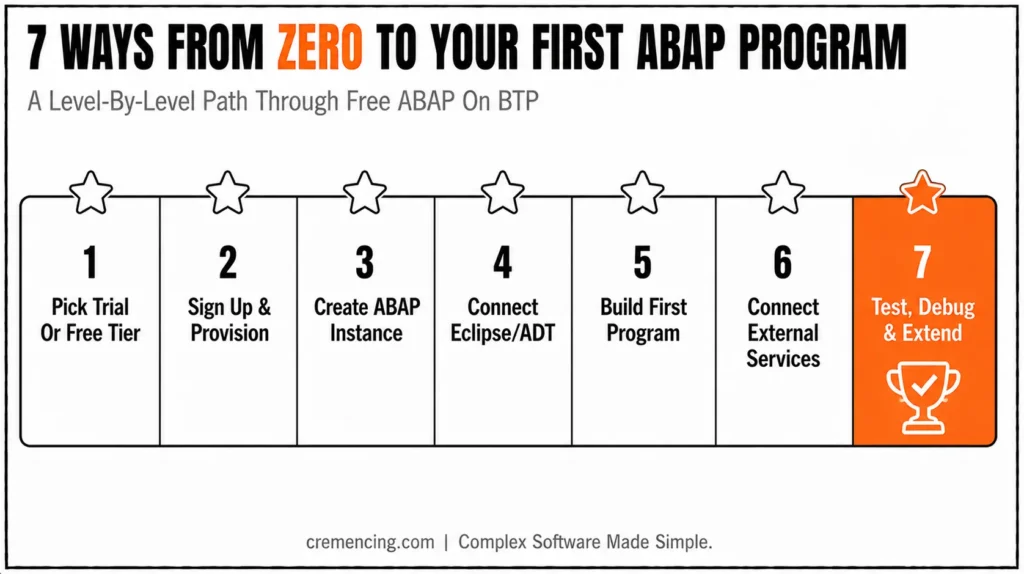
Way 7 — Test, Debug, and Push Your ABAP Development Further
- Use the ADT debugger (set breakpoints directly in your class, then run again) to step through your logic
- Check system logs and the Feed Reader app in Fiori Launchpad for runtime messages or trial-expiry notices
- Once your first program runs cleanly, extend into:
- CDS view + RAP Business Object with a generated Fiori Elements UI (the natural “next step” after Way 5)
- ALV-style output using cl_salv_table for read-only cloud-compatible list reporting
- Calling a real public API (e.g., the Northwind OData service) using the pattern from Way 6
Common Issues
| Problem | Likely Cause / Fix |
| Login fails during signup | Check you’re using the right ID type for trial vs. free tier; region availability can also block sign-up |
| Eclipse can’t connect | Corporate firewall/proxy blocking outbound HTTPS — configure Eclipse’s network proxy settings or try from an unrestricted network |
| /DMO/ tables not found | Some trial landscapes need the demo content activated first — check via the Activate Demo Content app in Fiori Launchpad |
| Communication arrangement errors | Confirm the comm scenario is actually assigned to your communication system in Cockpit; a missing assignment is the most common cause |
| Instance suddenly inaccessible | Trial/free-tier instances are deleted after 90 days unless upgraded; check your subaccount’s expiry date |
Conclusion
The fastest way into modern ABAP Cloud development isn’t a paid sandbox; it’s SAP’s own free trial or free tier offering, both genuinely free and card-free. Pick Trial for quick, throwaway learning; pick Free Tier if you want something you could eventually grow into a real project.
From there, RAP and CDS, not classic reports, are where you should spend your practice time, since that’s what the rest of the SAP ecosystem (Fiori, S/4HANA Cloud, BTP extensions) is increasingly built on.
For more insights read our blog on ABAP Development in VS Code Is Replacing Eclipse Faster Than Most SAP Developers Expect
FAQ
Can This ABAP Development Environment Be Used for Production?
No. Both the trial and Free Tier (in its free state) are for learning and ABAP Development only. Production requires upgrading to a paid service plan.
How long does it last?
Trial accounts run 90 days and are then deleted, so plan your ABAP Development work accordingly. Free Tier instances are also subject to a 90-day limit per the April 2024 policy change, though the overall account can persist longer if you stay active or upgrade.
Is a credit card required?
No — neither Trial nor Free Tier requires payment details to get started. The free tier requires registering a CPEA/PAYG account, but no card is charged unless you actively upgrade.
Can it connect to on-premise S/4HANA?
Yes, via communication arrangements, RFC-based integration, or APIs, depending on your landscape and security setup.
Which ABAP Development Version Does It Support?
Modern ABAP Development only: RAP, CDS, and object-oriented ABAP. Classic dynpro-style development and direct table access patterns from on-premises ECC/S4 don’t apply here.
Do I need SAP Business Application Studio, or is Eclipse required?
Eclipse with ABAP Development Tools (ADT) is the traditional choice and what this guide covers, but SAP Business Application Studio and the ABAP Cloud VS Code extension are also supported options depending on your workflow preference.
What happens to my code when the Trial account expires after 90 days?
Trial instances are deleted after 90 days, and trial work cannot be migrated to a paid or Free Tier landscape — treat Trial work as genuinely throwaway learning, not a starting point to preserve.
Can I use classic ABAP syntax like SELECT-OPTIONS or CALL TRANSACTION in this environment?
No. The ABAP Environment on BTP enforces ABAP Cloud syntax restrictions, which exclude classic dynpro-based constructs, direct table access outside released APIs, and several traditional statements not compatible with the RAP/CDS model.
Is there a cost after the Free Tier’s 90-day instance limit if I don’t upgrade?
The Free Tier service plan itself remains free, but individual instances are still subject to the 90-day limit per instance; check current SAP documentation for exactly how instance renewal or account-level persistence works.
Can I collaborate with a team on a Free Tier ABAP Environment instance?
The Free Tier gives you a dedicated instance rather than the shared Trial environment, making it more suitable than Trial for small team collaboration, though production-grade multi-developer workflows typically require upgrading to a paid plan.
Resources:




