Many ABAP developers can say “IDoc means Intermediate Document,” but they fail when interviewers ask about status codes, partner profiles, process codes, ports, reprocessing, and debugging. That is why idoc in SAP ABAP interview questions are still common for integration, support, EDI, and S/4HANA technical roles. This guide covers ECC 6.0, SAP NetWeaver 7.40+, and SAP S/4HANA 1909+.
What Is IDoc in SAP ABAP and Why Interviewers Ask It
An IDoc is an SAP intermediate document used to exchange business data between SAP and external systems, or between SAP systems. In ABAP interviews, IDoc questions test whether you understand real integration support, not just definitions. A good answer connects structure, configuration, processing, monitoring, and error handling.
An IDoc has three major record groups: control record, data records, and status records. The control record stores routing and administrative data such as sender, receiver, message type, IDoc type, direction, and current status. The data records store segment payload values. The status records store the processing history.
Interviewers ask IDoc in SAP ABAP interview questions because IDocs cross technical and functional boundaries. A developer may need to debug a failed inbound sales order, reprocess an outbound invoice, check partner profile settings, or explain why status 51 happened. These are real support tasks, not only theory.
IDoc is also tied to ALE. ALE means Application Link Enabling, SAP’s framework for distributing business processes and master data across systems. An ALE IDoc in SAP ABAP appears in interfaces for orders, deliveries, invoices, materials, customers, vendors, and finance documents in many projects.
If you can explain IDoc flow clearly, you show that you understand SAP integration beyond coding. You know how data leaves SAP, how it enters SAP, how it fails, how to trace it, and how to reprocess it safely. Learn more about IDoc integration in SAP and Why this skill remains valuable for modern SAP projects.
How IDoc Works — The Internals Every ABAP Developer Must Know
IDoc processing starts with business data and ends with a structured message. For outbound IDocs, SAP application logic or message control creates the IDoc. For inbound IDocs, SAP receives the IDoc from another system and processes it through a function module linked to the process code.
The control record is the routing header. It tells SAP who sent the IDoc, who receives it, which message type applies, which basic type is used, and what direction the IDoc follows. In many systems, this data appears in table EDIDC.
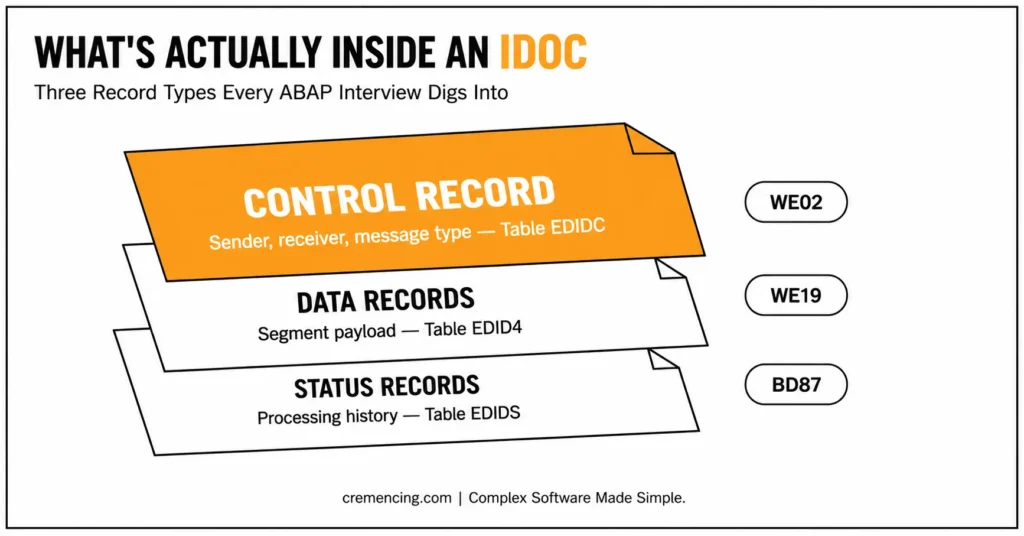
The data records hold the business payload. A sales order IDoc may have header, partner, item, schedule line, and condition segments. These segment rows are commonly stored in EDID4 in newer releases, while older examples may mention EDIDD as the ABAP structure used in processing.
The status records hold processing history. They show whether the IDoc was created, passed to a port, posted successfully, failed in application processing, or needs reprocessing. Status data is commonly read from EDIDS.
Interview-level Comparison
| Area | What It Means | Common Tables / Tools |
| Control record | Routing and administration | EDIDC, WE02 |
| Data records | Segment payload | EDID4, EDIDD, WE02 |
| Status records | Processing history | EDIDS, WE02, BD87 |
| Basic type | Technical IDoc structure | WE30 |
| Segment | Reusable data block | WE31 |
| Message type | Business meaning | WE81, WE82 |
| Partner profile | Partner-specific inbound/outbound setup | WE20 |
| Port | Technical communication path | WE21 |
| Test tool | Manual IDoc test and copy | WE19 |
| Reprocessing | Retry failed IDocs | BD87 |
WE02 is the SAP GUI transaction used to display IDocs with control, data, and status records. WE19 is the IDoc test tool used to create, copy, edit, and process test IDocs. WE20 maintains partner profiles, and WE21 maintains ports used in IDoc communication.
This is where many candidates lose marks. They memorise “IDoc has three records” but cannot explain how WE20, WE21, process code, and status 51 connect. Interviewers want the flow, not a dictionary answer.
Practical Code Walkthrough and 30 IDoc SAP ABAP Interview Questions
A developer should know how to read IDoc status quickly. The code below reads the latest status records for an IDoc number from EDIDS. It is a safe display-style example because it does not change or reprocess an IDoc.
REPORT zidoc_status_reader.
PARAMETERS p_docnum TYPE edidc-docnum OBLIGATORY. ” IDoc number entered by user
TYPES: BEGIN OF ty_status,
docnum TYPE edids-docnum, ” IDoc number
status TYPE edids-status, ” IDoc processing status
statxt TYPE edids-statxt, ” Status text
credat TYPE edids-credat, ” Status creation date
cretim TYPE edids-cretim, ” Status creation time
END OF ty_status.
DATA lt_status TYPE STANDARD TABLE OF ty_status WITH EMPTY KEY. ” Result table
DATA ls_status TYPE ty_status. ” Work area
SELECT docnum,
status,
statxt,
credat,
cretim
FROM edids
WHERE docnum = @p_docnum
ORDER BY credat DESCENDING,
cretim DESCENDING
INTO TABLE @lt_status. ” Read latest status history first
IF sy-subrc <> 0. ” No status record was found
WRITE: / ‘No status records found for IDoc:’, p_docnum.
RETURN. ” Stop report safely
ENDIF.
LOOP AT lt_status INTO ls_status. ” Display status history
WRITE: / ls_status-docnum,
ls_status-status,
ls_status-credat,
ls_status-cretim,
ls_status-statxt.
ENDLOOP.
Use this kind of code only for controlled display or training. In production support, prefer standard transactions first: WE02, WE05, WE09, standard transactions first: WE02, WE05, WE09, WE19, BD87, and application logs where available. Custom readers help learning, but SAP standard tools remain safer for support.
Now prepare these 30 IDoc in SAP ABAP interview questions. Keep answers short in the interview, then expand only when asked.
1. What is an IDoc in SAP ABAP?
An IDoc is an Intermediate Document used to transfer business data between SAP and external systems or between SAP systems. It has control, data, and status records.
2. What are the three main parts of an IDoc?
The three parts are control record, data records, and status records. Control handles routing, data records hold segments, and status records hold processing history.
3. What is the control record in IDoc?
The control record stores administrative and routing data such as sender, receiver, message type, IDoc type, direction, and current status.
4. What are IDoc data records?
Data records hold segment data. Each segment contains business fields such as header, item, partner, condition, or schedule line data depending on the IDoc type.
5. What are IDoc status records?
Status records show the IDoc processing history. They help developers identify whether an IDoc was created, sent, posted, failed, or waiting for reprocessing.
6. What is the difference between message type and basic type?
Message type shows the business meaning, such as order or invoice. Basic type defines the technical IDoc structure and segment layout.
7. What is an IDoc segment?
A segment is a reusable block of fields inside an IDoc. Segments hold business data and are arranged according to the IDoc basic type.
8. What is WE02 used for?
WE02 displays IDocs with control records, data records, and status history. It is one of the most common IDoc transactions in SAP for support.
9. What is WE19 used for?
WE19 is the IDoc test tool. Developers use it to copy, edit, create, and process test IDocs during debugging or interface validation.
10. What is WE20 used for?
WE20 maintains partner profiles. It controls inbound and outbound parameters such as partner, message type, process code, port, and processing mode.
11. What is WE21 used for?
WE21 maintains ports. A port defines the technical communication path used to send or receive IDocs.
12. What is BD87 used for?
BD87 reprocesses IDocs. It is commonly used when an IDoc fails due to application data or temporary processing errors.
13. What is status 03 in an outbound IDoc?
Status 03 usually means the outbound IDoc was passed to the port. It does not always prove the receiving system posted the business document.
14. What is status 12 in an outbound IDoc?
Status 12 means dispatch was successful in many outbound scenarios. The exact meaning should be checked in the status text and interface context.
15. What is status 51 in an inbound IDoc?
Status 51 means the application document was not posted. This is one of the most common IDoc status codes in sap during inbound support.
16. What is status 53 in an inbound IDoc?
Status 53 means the application document was posted successfully. Always check the linked business document if the process requires confirmation.
17. How do you debug an inbound IDoc?
Use WE19 to copy the IDoc and process it in the foreground when possible. You can also set breakpoints in the inbound function module linked to the process code.
18. How do you find the inbound function module for an IDoc?
Check the process code in WE20, then inspect process-code configuration in WE42 or related customizing. You can also analyze the runtime path from WE19.
19. What is a partner profile?
A partner profile defines how SAP communicates with a partner through IDocs. It stores inbound and outbound settings for message types and partners.
20. What is a process code?
A process code links an IDoc message to the function module or processing logic that handles inbound or outbound processing.
21. What is ALE in IDoc?
ALE, or Application Link Enabling, is SAP’s framework for distributed business processes. It commonly uses IDocs for asynchronous communication.
22. What is the difference between IDoc and BAPI?
IDoc is usually asynchronous and message-based. BAPI is a business interface usually called synchronously or transactionally through function modules.
23. What is the difference between IDoc and RFC?
RFC is a technical communication protocol. IDoc is a structured business message format that can use different communication mechanisms.
24. What is the use of WE30?
WE30 maintains IDoc types. It lets developers view or create basic types and extension types.
25. What is the use of WE31?
WE31 maintains IDoc segments. It is used when custom segments or segment definitions are needed.
26. What is an IDoc extension?
An IDoc extension adds custom segments to a standard basic type. Use it when standard segments do not carry required custom data.
27. How do you search IDocs by field value?
Use WE09 to search IDocs by content. It helps when you know a business value but not the exact IDoc number.
28. What are common causes of inbound IDoc failure?
Wrong master data, missing configuration, invalid partner profile, incorrect process code, missing mandatory segment, and failed application validation can cause failure.
29. What is IDoc error handling in SAP?
IDoc error handling means reading status records, checking message text, correcting data or configuration, and reprocessing through standard tools such as BD87.
30. What should you check before reprocessing an IDoc?
Check status text, application error, master data, partner profile, process code, duplicate risk, and business document status before reprocessing.
When to Use IDoc vs BAPI, RFC, OData, or API
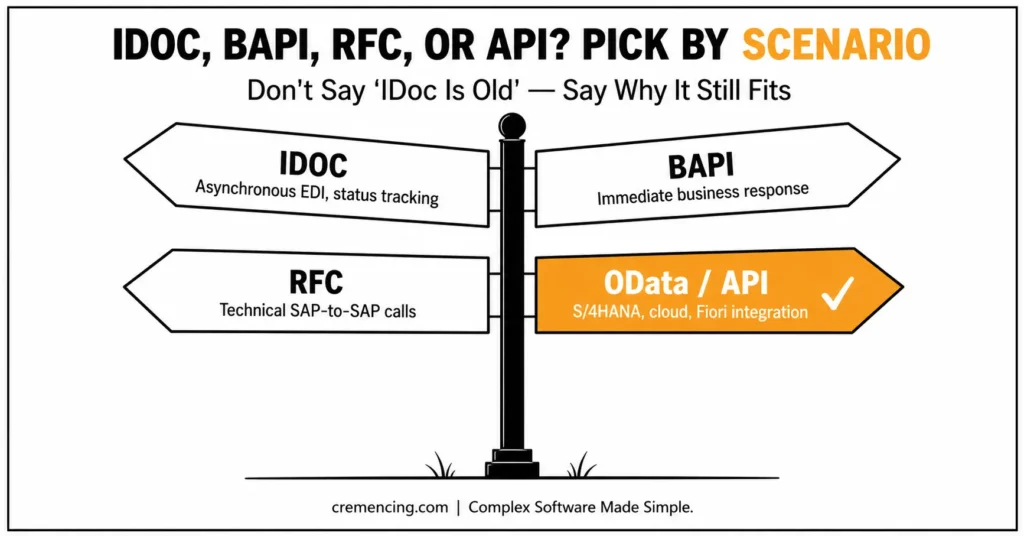
Use IDoc when you need asynchronous document-style communication and strong monitoring through IDoc status. This is common for EDI, sales orders, invoices, deliveries, master data distribution, and legacy middleware integration. IDoc works well when sender and receiver do not need an immediate business response.
Use BAPI when the caller needs a business object method and direct return messages from SAP logic. Use RFC for technical remote function calls where a formal IDoc message is not required. Use OData or released APIs when building modern service-based integration, especially in S/4HANA and cloud scenarios.
| Requirement | Better Option | Reason |
| Asynchronous EDI document | IDoc | Status tracking and message structure |
| Immediate business response | BAPI | Direct return messages |
| Technical SAP-to-SAP function call | RFC | Remote execution |
| Fiori or HTTP-based integration | OData/API | Service-based access |
| S/4HANA clean-core extension | Released API/Event | Upgrade-safe direction |
| Legacy middleware integration | IDoc | Mature ALE/EDI support |
| High-volume document monitoring | IDoc | WE02/WE05/BD87 support |
For interviews, do not say “IDoc is old, so avoid it.” Many SAP landscapes still depend on IDocs because they are reliable, monitored, and deeply connected to EDI processes. A stronger answer is choose IDoc when asynchronous document exchange and status monitoring matter; choose APIs or events when the architecture requires modern cloud-friendly integration.
This section is also useful for IDoc in SAP ABAP interview questions because senior interviewers often compare technologies. They want to know whether you understand why a project used IDoc instead of BAPI, RFC, or OData.
Conclusion
IDoc in SAP ABAP interview questions test more than memory. They check whether you understand IDoc structure, partner profiles, ports, process codes, status records, debugging, and reprocessing. A strong candidate can explain both the technical flow and the business reason behind the interface.
Prepare these 30 questions until you can answer them without guessing. Focus on WE02, WE19, WE20, WE21, BD87, status 51, status 53, control records, data records, and error handling. That is how you move from basic IDoc theory to job-ready SAP integration confidence.
Frequently Asked Questions
1. What is IDoc in SAP ABAP?
IDoc in SAP ABAP is an Intermediate Document used to exchange business data through structured records. It contains control, data, and status records. In interviews, explain the flow, transactions, and error handling instead of stopping at the definition.
2. What are IDoc status codes in SAP?
IDoc status codes in SAP show the processing state of an IDoc. Common examples include outbound status 03 and inbound statuses 51 and 53. Always read the status text because the same number alone may not explain the full business issue.
3. How do I reprocess a failed IDoc?
Use BD87 to reprocess failed IDocs after fixing the root cause. Check WE02 or WE05 first, read the status record, correct master data or configuration, then reprocess. Do not retry blindly if duplicate business documents are possible.
4. What is the difference between IDoc type and message type?
Message type represents the business meaning, such as order or invoice. IDoc type defines the technical segment structure. This is a common idoc in sap abap interview questions topic because it proves you understand both business and technical layers.
5. What are common IDoc transactions in SAP?
Common idoc transactions in sap include WE02 and WE05 for display, WE19 for testing, WE20 for partner profiles, WE21 for ports, WE30 for IDoc types, WE31 for segments, WE57 for function module assignment, and BD87 for reprocessing.
6. How do I debug an IDoc in SAP ABAP?
Use WE19 to copy and process the IDoc in foreground when possible. Set breakpoints in the inbound function module or user exit/BAdI involved in processing. [INTERNAL LINK: IDoc debugging tutorial → How to Debug Inbound IDoc in SAP ABAP]
7. What is IDoc configuration in SAP?
IDoc configuration in SAP usually includes logical systems, distribution model, partner profile, port, message type, process code, and sometimes change pointers. The exact setup depends on inbound, outbound, ALE, EDI, and middleware requirements.