
Introduction
Mainstream maintenance for SAP Solution Manager ends December 31, 2027. It’s a fixed date, with no successor version and no quiet extension. That deadline lands in the same window most teams are already mid-flight on S/4HANA moves. This is exactly why ‘SAP ALM vs Solution Manager’ has become one of 2026’s most-searched SAP planning questions. By the end of this piece, you’ll know exactly which functions carry over cleanly. You’ll also know which ones — starting with ChaRM — don’t, and what your migration order of operations should look like.
Strategic Platform Selection
The transition from SAP Solution Manager 7.2 to SAP Cloud ALM marks a fundamental shift from deeply customized, on-premises infrastructure to a standardized, cloud-native Application Lifecycle Management (ALM) SaaS architecture.
With mainstream support for SAP Solution Manager set to conclude on December 31, 2027, enterprise IT teams must evaluate platform alignment based on landscape architecture rather than feature-by-feature parity.
While Solution Manager provides highly granular governance—such as custom Change Request Management (ChaRM) workflows, legacy database monitoring, and local ABAP Workbench integration—it demands significant Basis overhead for maintenance and dual-stack updates.
Conversely, SAP Cloud ALM offers instantaneous availability, zero maintenance, bi-weekly feature updates, and native integration with SAP S/4HANA Cloud and Business Technology Platform (BTP). Organizations running heavily modified, on-premises ChaRM workflows need a structured gap analysis and a phased transition plan. Direct automated migration of historical ChaRM data and status schemas to Cloud ALM isn’t supported.
Key Takeaways
- Solution Manager’s mainstream maintenance ends December 31, 2027 — no successor version, no quiet extension.
- If your landscape is cloud-centric (S/4HANA Cloud, SuccessFactors, Ariba, BTP), move to SAP Cloud ALM now.
- If you’re on a heavy ChaRM/ITSM on-premise setup, start your gap analysis in 2026 — don’t wait for 2027.
- There’s currently no direct one-to-one equivalent for ChaRM in Cloud ALM, and no official migration path for ChaRM data.
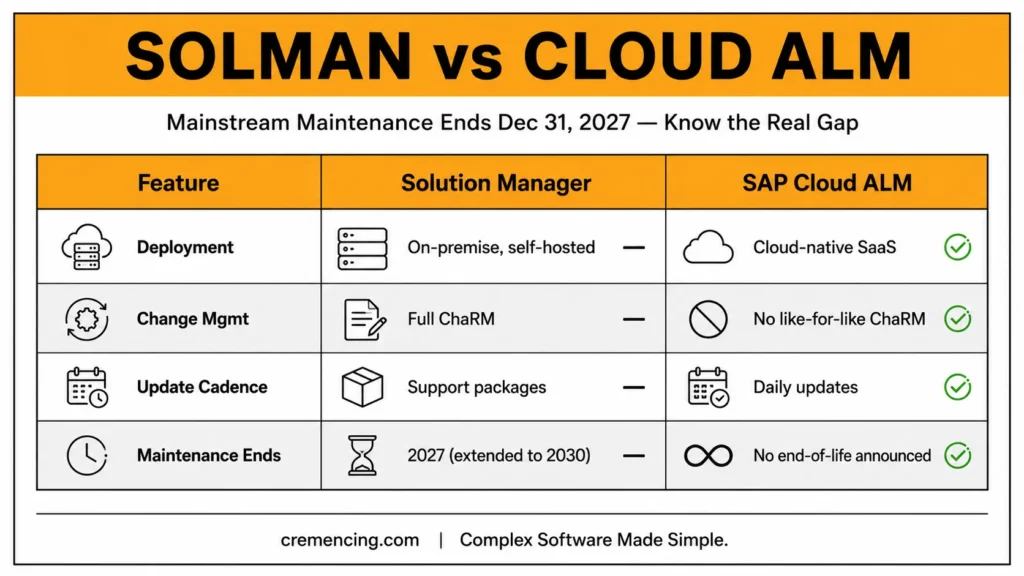
SAP ALM vs Solution Manager: Side-by-Side Comparison Table
| Feature | SAP Solution Manager (Old Way) | SAP Cloud ALM (New Way) |
| Deployment | On-premise/hybrid, self-hosted | Cloud-native SaaS, SAP-managed |
| Setup effort | Installation, Basic Config, system prep, and managed system config are typically a Basis-led project | Ready to use, instantaneously available |
| Change/transport management | Full ChaRM with document types, status schemas, custom BAdIs | ChaRM capability is not available in SAP Cloud ALM as a like-for-like feature |
| Monitoring | Deep on-premise monitoring: system monitoring, EWA reports, BPMON, Job Monitoring, DVM, Integration Monitoring | Cloud-focused monitoring; Oracle systems and some on-prem metrics are not covered the way they are in Solution Manager |
| Update cadence | Support packages, months between releases | Daily updates with no customer action required |
| Licensing | Included with on-prem support contracts | Usage rights included with SAP Enterprise Support, cloud editions, under a fair usage policy |
| Data Volume Management | Supported | Not currently planned |
| Mainstream maintenance | Ends 2027; extended maintenance available only to 2030 at extra cost | Continuously updated, no end-of-life date announced |
SAP Solution Manager
Solution Manager has run the show for two decades because it goes deep. Change request management, ITSM, solution documentation, custom code management, testing, monitoring, and root-cause analysis all live in one platform. If you’ve stood one up, you know the cost of that depth. Getting it productive means installation, basic setup, and managed system config — usually a dedicated basis consultant’s job — before you can even turn on ChaRM or EWA reporting.
The limitation isn’t functionality — it’s future-proofing. SAP has officially confirmed mainstream maintenance ends in 2027, with extended maintenance available only until 2030 and at additional cost.
Worse, SAP has confirmed no further AI investment is planned for Solution Manager—those use cases are reserved exclusively for Cloud ALM. So even teams staying on SolMan through 2030 are staying on a platform that’s functionally frozen while its replacement keeps shipping new capability every two weeks.
Solution Manager SAP ALM: What Cloud ALM Offers Instead
It launched May 29, 2020, as a SaaS offering built natively on Cloud Foundry, the Cloud Application Programming Model, and SAP HANA as a Service.
Functionally, it covers the modern SAP estate well: prescriptive SAP Activate content, requirements and task management, test management, and cloud operations such as integration and technical monitoring. SAP’s 2026 Sapphire announcements added seven migration and modernization assistants covering system analysis, custom code, data management, configuration, business process, testing, and adoption, plus made Cloud ALM the operational hub for AI agent observability under SAP’s new AI Agent Hub.
The honest gap is change and transport management. Cloud ALM offers change enablement, deployment orchestration, and, for supported ABAP and private cloud scenarios, integration with the Change and Transport System, but it does not simply replicate traditional ChaRM release and transport workflows.
There is currently no official SAP path to migrate existing ChaRM data into Cloud ALM. If ChaRM-driven audit trails are core to your compliance posture, that’s the single biggest thing to plan around not a reason to avoid the move, but a reason not to treat it as a lift-and-shift.
Confirm the current state of these assistants and the AI Agent Hub integration against SAP’s official Cloud ALM roadmap before making planning decisions based on them.
- Cloud-centric landscape (S/4HANA Cloud, BTP, SuccessFactors, Ariba) → Move to Cloud ALM now
- Heavy ChaRM/ITSM on-prem setup → Start gap analysis in 2026
- ChaRM is compliance-critical → Treat as highest-risk migration item
- No urgency, light customization → Extended maintenance to 2030 may suffice
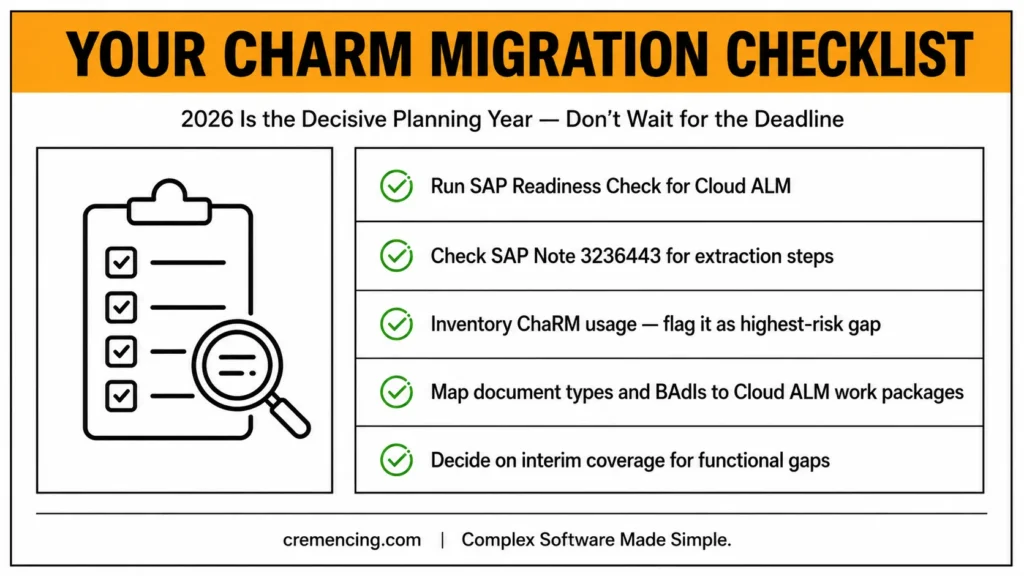
SAP ALM vs Solution Manager: Migration Checklist
- Run SAP Readiness Check for Cloud ALM.
- Check SAP Note 3236443 for the extraction steps to pull the required data out of your existing Solution Manager.
- Inventory your ChaRM usage specifically.
ChaRM is where compliance risk concentrates; it’s the audit-traceable record of who approved a change, what transport carried it, and when it reached production. Flag it as the highest-risk gap before anything else. - Map document types and BAdIs to Cloud ALM work packages. Export your ChaRM status schemas and custom logic before assuming they’ll carry over— this is exactly the kind of gap custom development work needs to account for.
- Check functional coverage against your actual landscape, not just cloud systems — Oracle-based, on-premise monitoring isn’t currently covered by Cloud ALM Health Monitoring the way it is in Solution Manager.
- Decide on interim coverage for the gap.
Weigh continued operation on Solution Manager, paid extended maintenance to 2030, or a third-party tool for the functions Cloud ALM doesn’t yet replicate. - Don’t wait for the deadline year.
2026 is the decisive planning year; starting the inventory now avoids time pressure, functional gaps, and operational uncertainty in 2027.
Conclusion
When it comes to SAP ALM vs Solution Manager, they aren’t a straight swap; they’re two different eras of ALM, and the gap that matters most is ChaRM, not features. Solution Manager earned its place over two decades by being the platform that could go as deep as your landscape needed; Cloud ALM earns its place by being the platform SAP is actually still investing in.
Neither fact cancels the other out, which is why “which one should I use” has a real, situational answer rather than a universal one.
SAP ALM vs Solution Manager was never a straight feature swap — it’s two different eras of ALM, and ChaRM is the gap that actually matters, not a checklist of missing menu items. Solution Manager earned two decades of use by going as deep as any landscape needed; Cloud ALM earns its place by being the platform SAP is still actively investing in.
The 2027 deadline isn’t really about Solution Manager disappearing — plenty of organizations will run it, supported, well past that date. It’s about the fact that nothing new is coming for it, while Cloud ALM keeps shipping. That widening gap, more than the calendar date itself, should drive your timeline.
Your Practical Next Steps:
So the practical path looks like this:
- Run the Readiness Check this year, not next.
- Get a real number on how much of your ChaRM usage is “nice-to-have” documentation versus a genuine audit-critical process — that distinction determines whether you need a bridge solution or can move cleanly.
- Loop in whoever owns your compliance and audit requirements before you loop in Basis; the technical migration is usually easier than the process one.
- If extended maintenance to 2030 genuinely fits your landscape, choose it deliberately — with a plan for 2030 — rather than defaulting into it because 2027 planning got deprioritized..
Before comparing the two, it helps to understand what SAP ALM actually does and where Solution Manager fits into that picture.
Frequently Asked Questions
1. What are the functional differences between SAP Solution Manager and SAP Cloud ALM?
Solution Manager covers deep on-premise ALM, ChaRM, and monitoring; Cloud ALM focuses on cloud-centric operations. SAP publishes a functional comparison for both implementation and operations scenarios via the Transition Centre on SAP Service Marketplace.
2. Is SAP Cloud ALM just a cloud-based version of Solution Manager?
No — SAP built Cloud ALM natively as a standardized architecture, not as a hosted port.
3. Does Cloud ALM support ChaRM?
At this time, the ChaRM capability as known from Solution Manager is not available in SAP Cloud ALM. Deployment of ABAP-based transports has progressed since the initial roadmap, but it isn’t a feature-for-feature replacement.
4. How does SAP support the transition from Solution Manager to Cloud ALM?
SAP provides various transition offerings, with some items still marked as planned for future delivery rather than available today. Run the official Readiness Check before committing to a timeline.
5. Will SAP Solution Manager Be Discontinued in 2027?
Yes — SAP has officially confirmed Solution Manager’s support and development end in 2027.
6. What is the role of a Basis consultant in SAP Cloud ALM?
Solution Manager needs Basis consultant work for setup; SAP manages Cloud ALM, ready out of the box.
Can I run Solution Manager and Cloud ALM in parallel during migration?
Yes — many organizations run both side by side during transition: they use Cloud ALM for new cloud-centric processes while Solution Manager continues handling ChaRM and on-premise monitoring until they close the gap or choose extended maintenance.
What happens to my Solution Manager data if I don’t migrate by 2027?
Existing data and functionality continue to work under extended maintenance (available to 2030 at extra cost), but no new features, fixes beyond critical support, or AI capabilities will be added.
Is SAP Cloud ALM included in my existing SAP Enterprise Support contract?
Usage rights are typically included with SAP Enterprise Support and cloud editions under a fair usage policy — confirm exact entitlements with your SAP account team.
Do I need a Basis consultant to set up SAP Cloud ALM?
Much less than for Solution Manager — Cloud ALM is SAP-managed and ready to use out of the box, though initial configuration and process alignment still benefit from experienced guidance.



One Response