

A report that runs in 30 seconds in development can take 30 minutes in production. The difference is rarely the ABAP syntax alone. It is usually the workload: more documents, more database calls, larger internal tables, different data distributions, and concurrency that your test system never reproduced.
That is why ABAP performance tuning should start with evidence rather than a list of rules. In practice, an ABAP developer working on ECC or S/4HANA may need to determine whether the real bottleneck sits in SQL execution, ABAP runtime, internal-table access, memory consumption, locks, RFC calls, or background processing.
What Is ABAP Performance Tuning and Why It Matters
ABAP performance tuning means finding the exact place where an ABAP object wastes time, memory, database resources, or application server work, then changing the code or design to reduce that cost. A serious tuning task starts with measurement, not assumptions.
In real projects, performance issues usually arrive as tickets like “ZFI_AGING takes 40 minutes,” “sales order upload hangs in the background,” or “custom ALV times out after S/4HANA conversion.” The developer must prove where the time goes before changing code.
Good SAP performance-tuning techniques split the problem into three layers. First, database time: expensive SQL, missing filters, wrong joins, or too many round trips. Second, ABAP time: nested loops, bad internal table access, unnecessary conversions, or repeated function calls. Third, system time: locks, RFC calls, update tasks, background jobs, and memory pressure.
The mistake many developers make is tuning syntax instead of tuning workload. A modern expression can still perform badly if it scans a standard table 500,000 times. An old statement can still perform well if it uses a good key and small data volume.
ABAP performance tuning matters because custom code often sits inside core business processes. A bad SELECT in a pricing exit, delivery BADI, or billing report can slow hundreds of users, not just one program. Read these performance tuning interview questions.
How It Works
Every ABAP performance issue has a cost center. The first job is to find whether that cost sits in the database, ABAP runtime, RFC layer, enqueue wait, update task, or frontend rendering.
ST05 is the Performance Trace transaction. It records SQL statements, RFC calls, enqueue operations, and buffer access. Use it when you suspect database access, repeated SELECTs, missing WHERE clauses, or bad index usage.
SAT is the ABAP runtime analysis transaction. It shows where ABAP runtime goes by method, form, function module, statement block, and internal table operation. Use it when SQL looks acceptable, but the program still spends time in loops, conversions, or calculations.
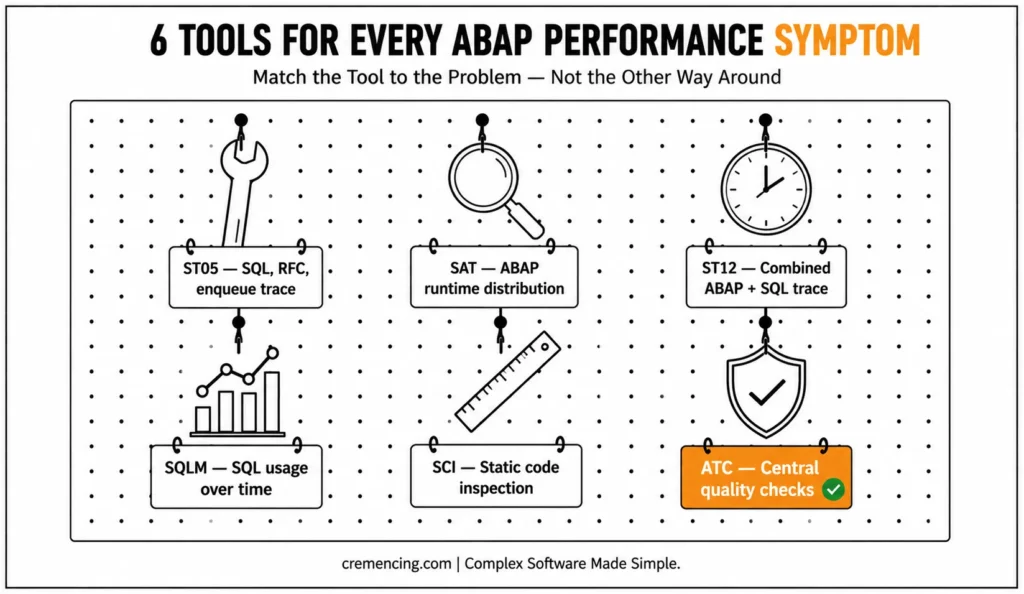
ST12 combines ABAP and SQL trace in one workflow. Use it for business transactions where you need both the SQL trace and ABAP call hierarchy. SQLM records SQL usage over time, so it helps when the slow process does not happen on demand.
SCI and ATC are static check tools. They do not prove runtime cost, but they catch risky code before it reaches production. ATC is stronger for S/4HANA projects because it can include performance, security, syntax, and simplification checks.
| Tool | What It Shows | Best Use |
| ST05 | SQL, RFC, enqueue, buffer trace | Slow SELECT or repeated DB calls |
| SAT | ABAP runtime distribution | Slow loops, methods, conversions |
| ST12 | ABAP + SQL trace together | End-to-end transaction trace |
| SQLM | SQL usage over time | Production-like workload analysis |
| SCI | Static code inspection | Local code quality checks |
| ATC | Central quality checks | S/4HANA readiness and team standards |
| STAD/ST03N | Workload statistics | User, transaction, and system workload |
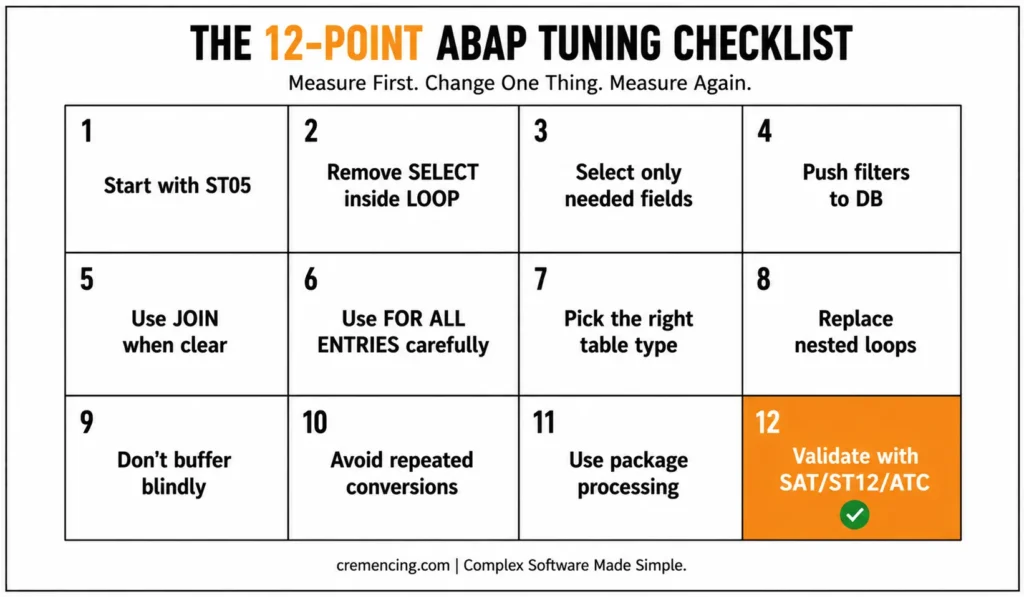
A good SAP performance tuning checklist starts with evidence, then code. The 12 points below follow that order.
Practical Code Walkthrough: The 12-Point Checklist
1. Start with ST05 before changing the code.
Do not optimize by looking at the editor first. Run ST05, execute the slow report with the same selection screen values, stop the trace, and sort by duration or executions.
Bad signs include thousands of identical SELECTs, full table scans, missing key fields, and large result sets. This is the first ABAP performance tuning t-code most developers should use for database-heavy reports.
2. Remove SELECT inside LOOP
This is the classic production killer. It works in unit testing because the loop has 20 rows, then fails in production because it runs 80,000 database calls.
Bad code:
TYPES: BEGIN OF ty_vbak,
vbeln TYPE vbak-vbeln,
kunnr TYPE vbak-kunnr,
END OF ty_vbak.
TYPES: BEGIN OF ty_kna1,
kunnr TYPE kna1-kunnr,
name1 TYPE kna1-name1,
END OF ty_kna1.
DATA: lt_vbak TYPE STANDARD TABLE OF ty_vbak,
ls_vbak TYPE ty_vbak,
ls_kna1 TYPE ty_kna1.
LOOP AT lt_vbak INTO ls_vbak.
SELECT SINGLE kunnr, name1
FROM kna1
INTO @ls_kna1
WHERE kunnr = @ls_vbak-kunnr. ” Repeated DB call per sales order
ENDLOOP.
Better code:
TYPES: BEGIN OF ty_vbak,
vbeln TYPE vbak-vbeln,
kunnr TYPE vbak-kunnr,
END OF ty_vbak.
TYPES: BEGIN OF ty_kna1,
kunnr TYPE kna1-kunnr,
name1 TYPE kna1-name1,
END OF ty_kna1.
DATA: lt_vbak TYPE STANDARD TABLE OF ty_vbak,
lt_kna1 TYPE HASHED TABLE OF ty_kna1 WITH UNIQUE KEY kunnr,
ls_vbak TYPE ty_vbak,
ls_kna1 TYPE ty_kna1.
IF lt_vbak IS NOT INITIAL.
SELECT kunnr, name1
FROM kna1
INTO TABLE @lt_kna1
FOR ALL ENTRIES IN @lt_vbak
WHERE kunnr = @lt_vbak-kunnr. ” One bulk read instead of many reads
ENDIF.
LOOP AT lt_vbak INTO ls_vbak.
READ TABLE lt_kna1 INTO ls_kna1
WITH TABLE KEY kunnr = ls_vbak-kunnr. ” Constant-time lookup with hashed key
ENDLOOP.
3. Select only the fields you use
SELECT * increases network transfer, memory, and field conversion work. In S/4HANA, wide compatibility views can make this worse because a simple-looking table access may hide extra columns or calculated fields.
TYPES: BEGIN OF ty_mara,
matnr TYPE mara-matnr,
mtart TYPE mara-mtart,
meins TYPE mara-meins,
END OF ty_mara.
DATA lt_mara TYPE STANDARD TABLE OF ty_mara.
SELECT matnr, mtart, meins
FROM mara
INTO TABLE @lt_mara
WHERE mtart = @p_mtart. ” Read only required fields
4. Push filters to the database
Filtering after SELECT wastes database, network, and ABAP memory. Put selective conditions in the WHERE clause and use indexed fields where possible.
DATA lt_vbak TYPE STANDARD TABLE OF vbak.
SELECT vbeln, erdat, auart, vkorg
FROM vbak
INTO CORRESPONDING FIELDS OF TABLE @lt_vbak
WHERE erdat BETWEEN @p_date_low AND @p_date_high
AND vkorg = @p_vkorg. ” Filter before data reaches ABAP memory
5. Use JOIN when the relationship is clear
In many S/4HANA cases, a JOIN performs better than multiple round trips because the database optimizer can plan the access in one statement. Do not create a huge join just to avoid ABAP logic.
TYPES: BEGIN OF ty_sales,
vbeln TYPE vbak-vbeln,
erdat TYPE vbak-erdat,
posnr TYPE vbap-posnr,
matnr TYPE vbap-matnr,
END OF ty_sales.
DATA lt_sales TYPE STANDARD TABLE OF ty_sales.
SELECT a~vbeln, a~erdat, b~posnr, b~matnr
FROM vbak AS a
INNER JOIN vbap AS b
ON b~vbeln = a~vbeln
INTO TABLE @lt_sales
WHERE a~erdat BETWEEN @p_low AND @p_high. ” DB handles relationship in one request
6. Use FOR ALL ENTRIES carefully
FOR ALL ENTRIES is still useful in ECC and S/4HANA, but it needs control. Always check that the driver table is not initial. Remove duplicate keys before the SELECT.
SORT lt_vbak BY kunnr.
DELETE ADJACENT DUPLICATES FROM lt_vbak COMPARING kunnr.
IF lt_vbak IS NOT INITIAL.
SELECT kunnr, name1
FROM kna1
INTO TABLE @lt_kna1
FOR ALL ENTRIES IN @lt_vbak
WHERE kunnr = @lt_vbak-kunnr. ” Prevent full read by checking driver table
ENDIF.
7. Pick the right internal table type
Standard tables are fine for append-and-display logic. Sorted tables work well for range-style reads and ordered access. Hashed tables work well for exact key lookups.
TYPES: BEGIN OF ty_stock,
matnr TYPE matnr,
werks TYPE werks_d,
labst TYPE labst,
END OF ty_stock.
DATA lt_stock TYPE HASHED TABLE OF ty_stock
WITH UNIQUE KEY matnr werks.
READ TABLE lt_stock ASSIGNING FIELD-SYMBOL(<ls_stock>)
WITH TABLE KEY matnr = p_matnr
werks = p_werks. ” Direct key lookup avoids full scan
8. Replace nested loops with keyed reads
Nested loops multiply quickly. A loop of 10,000 headers against 50,000 items can create 500 million comparisons.
TYPES: BEGIN OF ty_item,
vbeln TYPE vbap-vbeln,
posnr TYPE vbap-posnr,
matnr TYPE vbap-matnr,
END OF ty_item.
DATA lt_items TYPE SORTED TABLE OF ty_item
WITH NON-UNIQUE KEY vbeln.
LOOP AT lt_headers ASSIGNING FIELD-SYMBOL(<ls_head>).
LOOP AT lt_items ASSIGNING FIELD-SYMBOL(<ls_item>)
WHERE vbeln = <ls_head>-vbeln. ” Sorted key reduces search range
ENDLOOP.
ENDLOOP.
9. Do not buffer blindly
Buffering can help small, stable customizing tables. It can hurt tables with frequent changes, large volume, or user-specific reads. In S/4HANA, also check whether the read belongs in ABAP buffering, CDS/entity buffering, or direct HANA access.
If you are deciding between JOIN and FOR ALL ENTRIES, compare their execution behaviour before choosing one pattern.
10. Avoid repeated expensive conversions
Date, currency, unit, text, and ALPHA conversions inside large loops can consume ABAP time. Convert once before the loop or move conversion closer to the output layer.
DATA lv_kunnr TYPE kunnr.
lv_kunnr = p_kunnr.
CALL FUNCTION ‘CONVERSION_EXIT_ALPHA_INPUT’
EXPORTING
input = lv_kunnr
IMPORTING
output = lv_kunnr. ” Convert once before SELECT or loop
11. Use package processing for large data
Large background programs should not load millions of rows into memory at once. Use package size, cursor logic, or application-level batching.
DATA lt_mseg TYPE STANDARD TABLE OF mseg.
SELECT mblnr, mjahr, zeile, matnr, werks
FROM mseg
INTO TABLE @lt_mseg
PACKAGE SIZE 5000
WHERE budat_mkpf BETWEEN @p_low AND @p_high.
” Process one package, then release memory before next package
PERFORM process_package USING lt_mseg.
CLEAR lt_mseg.
ENDSELECT.
12. Validate with SAT, ST12, SQLM, SCI, and ATC
After you change code, measure again. SAT should show lower ABAP time. ST05 should show fewer SQL executions or lower SQL duration. ST12 should confirm the end-to-end transaction path. SQLM helps confirm the issue under real workload. SCI or ATC should catch static performance risks before transport.
When to Use It vs. Alternatives
ABAP performance tuning techniques depend on data volume, release, database, and business process. There is no single rule that always wins.
| Symptom | Start With | What to Check |
|---|---|---|
| Repeated SQL calls | ST05 | Execution count, duration, identical statements |
| Slow ABAP logic | SAT / ABAP Profiler | Hotspots, methods, loops, conversions |
| SQL + ABAP interaction | ST12 | End-to-end execution path |
| Unknown production SQL workload | SQLM | Frequently executed/high-cost SQL |
| Large internal table | SAT + memory analysis | Table growth, copies, peak allocation |
| SELECT in LOOP | ST05 | Number of DB executions |
| Nested internal-table loops | SAT | Runtime distribution |
| FAE performance concern | ST05 | Generated SQL and execution behaviour |
| S/4HANA Cloud development | ATC/API checks | Released objects and cloud language restrictions |
Use JOIN when the relationship is simple, the filters are selective, and the database can reduce the data early. However, use FOR ALL ENTRIES when the driver data comes from prior ABAP logic and a clean JOIN would create incorrect duplicates or make the logic harder to read. In addition, when volume matters in S/4HANA, test both approaches with ST05 before choosing the better-performing option.
First, fix the SQL and loop design before introducing parallel processing. Although parallel background tasks can reduce elapsed time, they can also increase locks, memory consumption, RFC load, and database pressure. Therefore, if the single-threaded logic is inefficient, parallel execution may simply spread the inefficient workload faster.
Similarly, use an ABAP performance tuning book or internal checklist for training; however, use system traces to make performance decisions. A book provides proven patterns, while ST05, SAT, ST12, SQLM, SCI, and ATC show what your system is actually doing.
Conclusion
ABAP performance tuning is not about collecting more optimization rules. It is about identifying the actual cost of a workload and proving that a change reduces that cost.
Start with the evidence. Use ST05 when database activity is suspected, SAT or the ABAP Profiler when ABAP runtime is the bottleneck, and ST12 or SQLM when you need a broader view of the execution path or workload. Then review the code patterns that commonly amplify that cost: repeated database access, oversized result sets, inefficient internal-table lookups, nested scans, unnecessary conversions, uncontrolled memory growth, and poorly bounded background processing. SAP’s own documentation supports using tracing and runtime analysis to identify these hotspots rather than relying on assumptions.
Most importantly, do not turn a rule such as “use JOIN,” “use FOR ALL ENTRIES,” or “use a hashed table” into a universal prescription. The correct choice depends on data volume, access patterns, release, database behaviour, and the application’s design. Measure the original workload, make one targeted change, and measure again.
For more on how to catch memory issues before they cause an OOM dump
Frequently Asked Questions
1. How do I check time performance of ABAP code?
Use SAT for ABAP runtime and ST05 for SQL trace. SAT shows which ABAP blocks, methods, or forms consume time. ST05 shows database statements, execution count, and duration. This is the safest starting point for abap performance tuning because it separates database time from ABAP processing time.
2. Is SELECT inside LOOP always bad in ABAP?
SELECT inside LOOP is usually bad when the loop can grow beyond a small volume. It creates repeated database round trips and often appears in ST05 as many identical SELECTs. Replace it with JOIN, FOR ALL ENTRIES, or one bulk SELECT plus a hashed table.
3. Which is better: INNER JOIN or FOR ALL ENTRIES?
INNER JOIN is better when the table relationship is clear, and the database can filter the data early. However, FOR ALL ENTRIES can be better when the driver set comes from prior ABAP logic or when a JOIN would create incorrect duplicates. Therefore, both are valid SAP performance tuning techniques, but you should use ST05 to compare their actual execution behaviour before choosing between them.
4. Why does FOR ALL ENTRIES cause performance issues?
FOR ALL ENTRIES causes issues when the driver table is empty, huge, or full of duplicate keys. Always check IS NOT INITIAL, sort the driver table, and delete duplicate key values. In S/4HANA, test large driver sets because HANA may handle alternatives differently.
5. What is the best ABAP performance tuning tcode?
There is no single best t-code. Use ST05 for SQL trace, SAT for ABAP runtime, ST12 for combined trace, SQLM for workload SQL monitoring, SCI for local static checks, and ATC for central quality checks. Start with the tool that matches the symptom.
6. What are the most important abap performance tuning techniques?
The most important techniques are selective SELECT fields, strong WHERE clauses, removing SELECT inside LOOP, choosing correct internal table types, avoiding nested loops, checking buffering, batching large reads, and validating with ST05 or SAT. [INTERNAL LINK: ABAP internal table performance → Standard vs Sorted vs Hashed Tables in ABAP]
7. Can I get an abap performance tuning pdf checklist?
Yes, the best PDF should be a compact checklist that maps each issue to the right tool: ST05 for SQL, SAT for runtime, ST12 for combined trace, SQLM for workload, and ATC for code checks. It should include before/after code, not just theory.
8. What is the most efficient way to filter an internal table in ABAP 7.40+?
The best method depends on table type and key. For exact lookup, use a hashed table. For range or grouped access, use a sorted table. Newer ABAP expressions can improve readability, but table keys still control performance. Modern syntax does not fix a poor access path.




