
“Which app do I even use for this?” That’s the ticket sitting in your queue right now. A maintenance planner just spent twenty minutes trying to log a breakdown and gave up. This started showing up more once teams moved to SAP S/4HANA. Plant maintenance went from a handful of transaction codes like IW21, IW28, and IW38 to a dozen-plus Fiori apps, and nobody mapped the old to the new. By the end of this guide, you’ll know exactly which of the 9 SAP Fiori apps for plant maintenance covers each stage of the process and which classic transaction each one replaces.
You need SAP S/4HANA 1909 or later with the Plant Maintenance (PM) business function active, and your user needs one of the standard PM business roles assigned. SAP_BR_MAINTENANCE_TECHNICIAN for shop-floor apps, or SAP_BR_EMPLOYEE_MAINTENANCE for request-only access. Confirm the relevant business catalogues are assigned to your Fiori Launchpad role in transaction PFCG and that the backend OData services for each app are activated in transaction /IWFND/MAINT_SERVICE. If an app tile doesn’t appear after role assignment, check the catalogue first; a missing catalogue is the most common reason a technician can’t find the tile at all.
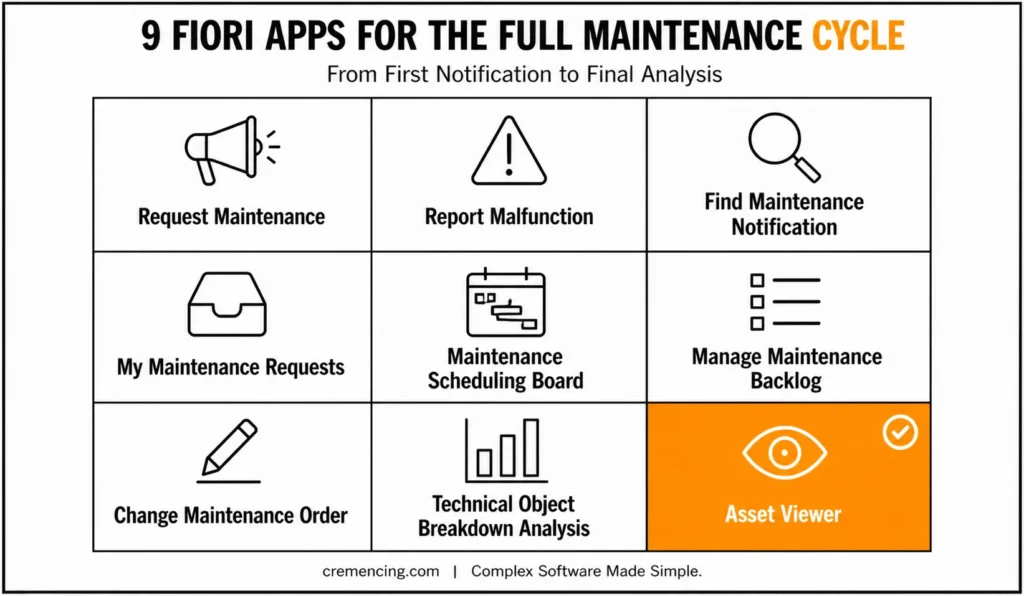
Step 1 — Capture the Problem: Request Maintenance & Report Malfunction
The lifecycle starts with a notification, and S/4HANA splits this into two apps depending on who’s reporting the issue. Request Maintenance (F1511) is designed for any employee who needs to report an issue to the maintenance department, and it’s included in the default role SAP_BR_EMPLOYEE_MAINTENANCE. Report Malfunction (F2023) has similar capabilities but is aimed mainly at technicians for the emergency breakdown process. The difference is who uses it and how much detail the form captures, not the underlying object. S/4HANA 1909+ required for the CDS-based OData service.
Both apps write to the same notification structure that classic IW21 (Create Notification) writes to, which means any custom logic you already have on notification creation still fires.
” S/4HANA 1909+ required for the CDS-based OData service behind F1511/F2023
” Purpose: BAdI implementation to default a priority on notifications
” created through Request Maintenance or Report Malfunction, based on
” the notification type — mirrors what a screen exit did on IW21 in ECC.
CLASS zcl_im_qqma_notif_create DEFINITION
PUBLIC FINAL
CREATE PUBLIC .
PUBLIC SECTION.
INTERFACES if_ex_qqma_notif_create. ” BAdI interface for notification save
ENDCLASS.
CLASS zcl_im_qqma_notif_create IMPLEMENTATION.
METHOD if_ex_qqma_notif_create~notif_save.
” QMEL-QMART holds the notification type (M1 = malfunction, M2 = maintenance request)
IF cs_qmel-qmart = ‘M1’ AND cs_qmel-priok IS INITIAL.
cs_qmel-priok = ‘1’. ” Default breakdown notifications to top priority
ENDIF.
ENDMETHOD.
ENDCLASS.
Classic Transaction → Fiori App Quick Map
| Process Step | Classic T-code | Fiori App | App ID | Who Uses It |
| Report an issue (employee) | IW21 | Request Maintenance | F1511 | Any employee (SAP_BR_EMPLOYEE_MAINTENANCE) |
| Report a breakdown (technician) | IW21 | Report Malfunction | F2023 | Maintenance technician |
| Find/filter notifications | IW28 | Find Maintenance Notification | F2071 | Planner (known search-parity gap — see below) |
| Track my own requests | IW29 (partial) | My Maintenance Requests | F4513 | Requesting employee |
| Schedule/dispatch orders | — (no direct GUI equivalent) | Maintenance Scheduling Board | — | Planner |
| Work through unscheduled demand | — | Manage Maintenance Backlog | — | Planner |
| Release, print, confirm an order | IW32 | Change Maintenance Order | — | Supervisor/technician |
| Breakdown frequency/duration analysis | Custom SE16/BW query | Technical Object Breakdown Analysis | F2812 | Planner/analyst (requires S/4HANA 1909 SP2+) |
| Consolidated object view | Multiple GUI lookups | Asset Viewer | — | Anyone needing object history |
App IDs for Maintenance Scheduling Board, Manage Maintenance Backlog, Change Maintenance Order, and Asset Viewer weren’t stated in the source post pull the exact IDs from your SAP Fiori Apps Reference Library instance before publishing this table, since they weren’t independently confirmed in this audit pass. check the relevant business catalogs are assigned to your Fiori Launchpad role in transaction PFCG.
Step 2 — Triage: Find Maintenance Notification & My Maintenance Requests
Once notifications exist, planners need to see and filter them the way IW28 (Notification List) always allowed, and this is where a known gap trips people up. <cite index=”71-1″>Find Maintenance Notification (F2071) does not return the same list as IW28 when searching by functional location or equipment combination, so don’t assume parity on every filter field; verify the specific search combination your process depends on before decommissioning IW28 access.
For the requester’s own view, My Maintenance Requests (F4513) gives an employee a personal worklist of what they’ve reported and its current status. This is the equivalent of the “Monitor Maintenance Requests” tile, which is functionally similar to IW29 but scoped to notifications relevant to that specific user.
” Purpose: validation report to compare notification counts returned by
” the classic selection logic (mirroring IW28) against what F2071’s
” OData service would return, for a given functional location.
REPORT z_compare_notif_search_f2071.
PARAMETERS: p_tplnr TYPE tplnr OBLIGATORY. ” Functional location
SELECT COUNT(*) FROM qmel
INTO @DATA(lv_iw28_count)
WHERE tplnr = @p_tplnr.
WRITE: / ‘IW28-equivalent count for’, p_tplnr, ‘:’, lv_iw28_count.
WRITE: / ‘Compare this manually against F2071 results —’,
/ ‘known gap per SAP KBA 2965464 on combined tech-object filters.’.
Step 3—Plan and Schedule: Maintenance Scheduling Board & Manage Maintenance Backlog
Planning is where the Fiori apps add capability the GUI transactions never had, rather than just replicating them. The Maintenance Scheduling Board gives planners a graphical Gantt chart view of maintenance orders, operations, and suboperations for their work centre, letting them resolve scheduling conflicts directly; filter by order type, processing status, and priority; and drill down from the order header to the operation level. Since the 2021 release, it also performs dispatching and lets planners make changes to already-dispatched orders in the same Gantt view, which previously required switching tools.
Manage Maintenance Backlog groups maintenance orders into planning buckets based on scope, time window, and attributes like planner group so planners can work through unscheduled demand in manageable chunks instead of one long flat list. This app also supports mass changes to orders and operations, including selecting stock components across multiple orders and using a “Keep Committed Quantities” action during an ATP check.
” Purpose: check for maintenance orders sitting in the backlog longer
” than a threshold, to flag them before the planning bucket review.
” AUFK = order master data, JEST = status management
REPORT z_backlog_aging_check.
PARAMETERS: p_days TYPE i DEFAULT 14.
SELECT aufnr, erdat FROM aufk
INTO TABLE @DATA(lt_orders)
WHERE auart = ‘PM01’ ” Standard PM order type
AND erdat <= @( sy-datum – p_days ).
LOOP AT lt_orders INTO DATA(ls_order).
WRITE: / ‘Order’, ls_order-aufnr, ‘created’, ls_order-erdat,
‘— review in Manage Maintenance Backlog.’.
ENDLOOP.
Step 4 — Execute: Change Maintenance Order
Once an order is scheduled, the technician or production supervisor needs to release it, confirm operations, and close it out — the work that classic IW32 (Change Order) handled. Change Maintenance Order is the Fiori equivalent, built to let a supervisor release an order, print the order documents, and confirm completed operations from one screen instead of navigating separate GUI transactions for release, printing, and confirmation.
” Purpose: confirm whether an order can be released checks that all
” required components have been assigned before allowing release status.
” RESB = reservation/component table, tied to the order’s operations
REPORT z_check_order_release_ready.
PARAMETERS: p_aufnr TYPE aufnr OBLIGATORY.
SELECT COUNT(*) FROM resb
INTO @DATA(lv_open_components)
WHERE aufnr = @p_aufnr
AND bdter = @sy-datum. ” Components still requested for today
IF lv_open_components > 0.
WRITE: / ‘Order’, p_aufnr, ‘has’, lv_open_components,
‘components not yet confirmed — resolve before release.’.
ELSE.
WRITE: / ‘Order’, p_aufnr, ‘is ready for release in Change Maintenance Order.’.
ENDIF.
Step 5 — Analyse: Technical Object Breakdown Analysis & Asset Viewer
Closing the loop means understanding what broke, how often, and where. Analytical List Page for Technical Object Breakdown Analysis (F2812) is a standard Fiori app introduced for this purpose, requiring an S/4HANA 1909 SP2 backend, and it surfaces breakdown frequency and duration trends across technical objects without needing a custom query built in SE16 or a BW extraction.
Asset Viewer works from the technical object itself, showing the whole structure with all related information, orders, notifications, and maintenance items in one consolidated, well-organised view, replacing what used to take several separate GUI lookups to assemble manually.
” S/4HANA 1909 SP2 required for the F2812 analytical query
” Purpose: quick backend check of breakdown notification counts per
” equipment, to validate what Technical Object Breakdown Analysis shows.
REPORT z_breakdown_count_by_equipment.
PARAMETERS: p_equnr TYPE equnr OBLIGATORY.
SELECT COUNT(*) FROM qmel
INTO @DATA(lv_breakdown_count)
WHERE equnr = @p_equnr
AND qmart = ””M1’—Malfunction/breakdown notification type
AND mzeit >= @(sy-datum – 90 ). ” Rolling 90-day window
WRITE: / ‘Equipment’, p_equnr, ‘had’, lv_breakdown_count,
‘Breakdown notifications in the last 90 days.’.
Testing & Validation
Validate each app against its OData service before rolling it out to end users. In transaction /IWFND/GW_CLIENT, execute the entity set behind each app (for example, the notification entity for F1511/F2023) and confirm the response matches what the tile shows in the Fiori Launchpad. For finding maintenance notifications specifically, run a side-by-side comparison against IW28 using the same functional location and equipment filters. The known gap where combined tech-object searches don’t return matching results means this comparison isn’t optional if your rollout plan assumes full parity.
For the maintenance scheduling board and managing the maintenance backlog, confirm dispatched-order changes actually commit by checking the order’s status history in JEST after making a change in the Gantt view. Run these checks in a QA client with representative order and notification volumes, not just a handful of test records; some of the analytical apps only surface issues at realistic data volumes.
Common Issues During Setup
Tile doesn’t appear after role assignment. Check that the business catalogue is assigned to the Fiori Launchpad group, not just the business role catalog, and that role assignment is a separate step in PFCG.
Find Maintenance Notification returns fewer results than IW28. This is a documented gap when searching by a combination of functional location and equipment; don’t treat it as a configuration error; adjust the search approach or file the relevant SAP incident component.
Request Maintenance only offers two notification types. M1 and M2 are the default; additional notification types require enhancing the underlying OData service, not just cataloguing or customizing changes.
The analytical app shows no data despite notifications existing. Confirm the backend release is at least S/4HANA 1909 SP2, since F2812 was introduced at that support package level and won’t populate on earlier ones.
Conclusion
These 9 SAP Fiori apps for plant maintenance map cleanly onto the notification-to-closure cycle your team already runs; they just split IW21, IW28, and IW32 into purpose-built screens for the person actually doing each step. Validate each app’s OData service against its classic-transaction equivalent before you retire GUI access, and pay particular attention to the documented search gap in Find Maintenance Notification. SAP Fiori apps for plant maintenance help maintenance teams manage work orders, maintenance notifications, equipment, assets, and preventive maintenance tasks more efficiently from a modern, role-based interface. Once the mapping is clear, the next ticket that reads “which app do I use for this” gets a one-line answer instead of a guess.
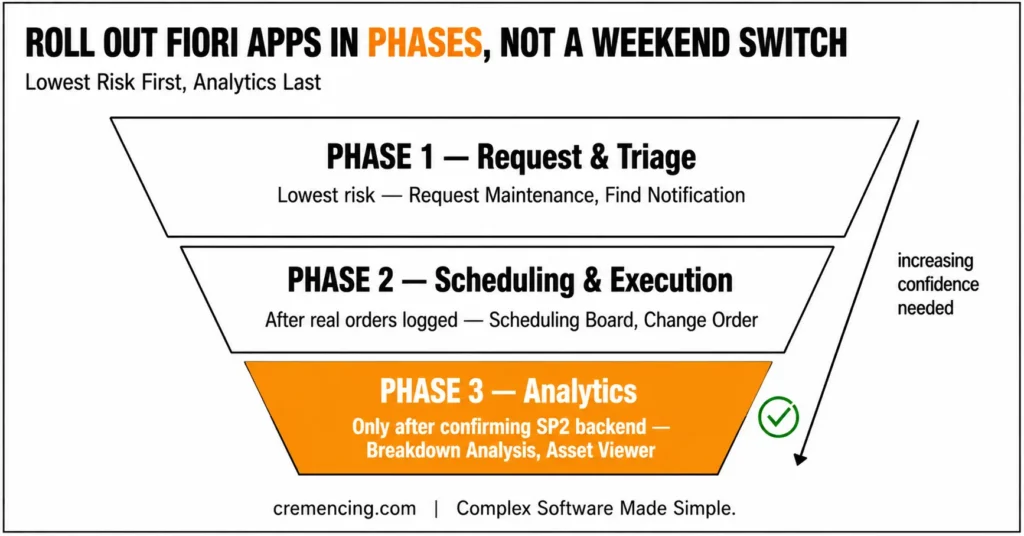
Treat this rollout as a phased cutover, not a switch you flip in one weekend. Start with the request and triage apps, since they carry the least risk if a search or filter behaves slightly differently from its GUI equivalent. Move to Change Maintenance Order and the scheduling apps once technicians and planners have logged real orders through the earlier stages, and hold the analytical apps Technical Object Breakdown Analysis and Asset Viewer until you’ve confirmed the backend support package actually populates them.
Keep the classic transactions available in parallel for at least one full maintenance cycle; that overlap is what catches the edge cases this guide can’t anticipate for your specific notification types, order types, and custom enhancements. These apps work best alongside a clear SAP cloud maintenance schedule, so updates don’t disrupt daily plant operations.
Frequently Asked Questions
1. What are the main SAP Fiori apps for plant maintenance?
The core set covers notification creation (Request Maintenance, Report Malfunction), triage (Find Maintenance Notification, My Maintenance Requests), planning (Maintenance Scheduling Board, Manage Maintenance Backlog), execution (Change Maintenance Order), and analysis (Technical Object Breakdown Analysis, Asset Viewer). Together, these SAP Fiori apps for plant maintenance cover the full notification-to-closure cycle.
2. What’s the difference between Request Maintenance and Report Malfunction?
Request Maintenance is built for any employee reporting an issue, while Report Malfunction targets technicians in emergency breakdown scenarios. The object and process are the same; the intended user and level of detail differ.
3. Why doesn’t the Find Maintenance notification match IW28 results?
A documented SAP issue means F2071 doesn’t return the same notification list as IW28 when searching by a combination of functional location and equipment
4. Does Asset Viewer replace multiple PM transactions?
Yes, it consolidates a technical object’s orders, notifications, and maintenance items into one structured view, replacing what used to require separate lookups across several GUI transactions.
5. What is the maintenance scheduling board used for?
centerIt gives maintenance planners a Gantt chart view of orders and operations for their work centre so they can resolve scheduling conflicts and drill down from header to operation level.
6. Do I need to activate anything besides the business catalog?
Yes the underlying OData service also has to be active in /IWFND/MAINT_SERVICE, separately from the catalog and role assignment in PFCG. A missing catalog and an inactive OData service produce the same symptom (no tile, or a tile that errors on open), so check both.





3 Responses