Your SAP project board says “Ready,” but the transport remains in development. This gap becomes obvious during S/4HANA Cloud and hybrid delivery. The SAP CALM vs Jira decision determines whether your system of record follows SAP processes, tests, transports, and operations or follows team-defined backlogs and workflows; by the end, you’ll know which platform should lead, where the second platform adds value, and how to stop duplicate status reporting.
If you’re still weighing Cloud ALM against your legacy platform, see our comparison of SAP ALM vs Solution Manager first.
Choose SAP Cloud ALM when SAP process traceability, fit-to-standard work, testing, deployment orchestration, and production monitoring define success. Choose Jira when cross-functional backlog control, configurable workflows, engineering boards, and team automation define success.
For many enterprises, SAP CALM vs Jira is not either-or: Cloud ALM governs SAP lifecycle evidence while Jira manages daily execution.
SAP Cloud ALM vs Jira: Which Platform Fits Your SAP Strategy?
“SAP CALM” is common shorthand, but the official product name is SAP Cloud ALM. It is SAP’s cloud-native application lifecycle management platform for implementation, operations, and service. Jira is Atlassian’s configurable work-management platform for issue tracking, agile planning, software delivery, and service workflows.
The SAP CALM vs Jira comparison starts with object ownership. A task board is not an implementation process hierarchy. A Jira issue can represent a requirement, defect, story, approval, or action — but your configuration determines what it actually means.
SAP Cloud ALM supplies SAP-specific object relationships, process content, roles, and lifecycle steps, so part of that meaning already exists in the platform.
Jira vs SAP Cloud ALM
| Decision Area | Jira-Led Model | SAP Cloud ALM-Led Model |
| Primary purpose | Configurable work and issue management across SAP and non-SAP teams | SAP lifecycle management across implementation, operations, and service |
| Delivery method | Scrum, Kanban, product, project, or custom workflows | SAP Activate-aligned, content-driven implementation and SAP operations |
| Backlog | Strong boards, issue types, filters, sprints, and automation | Requirements, stories, tasks, defects, features, and project views |
| Process content | Teams create or import their own structure | SAP process content and implementation roadmaps can structure work |
| Fit-to-Standard | Requires custom structures and linked documentation | Processes, requirements, tasks, and tests share SAP context |
| Traceability | Built through links, hierarchy, apps, and conventions | Native requirement traceability across related project entities |
| Testing | Mature control usually needs an app or connected test platform | Manual and automated test preparation, execution, and defects |
| SAP transports | Can reference transport IDs but does not replace SAP TMS | Deployment management connects features with supported transport tools |
| Operations | Needs monitoring products and integrations | SAP-focused process, integration, job, user, health, and security monitoring |
| Workflow flexibility | High-status transitions, fields, rules, and screens are configurable | More standardized around Cloud ALM objects and supported flows |
| Cross-functional work | Strong across engineering, data, infrastructure, and vendors | Strongest inside SAP transformation and SAP operations |
| Hosting | Jira Cloud or Jira Data Center | SAP-hosted cloud service |
| Commercial model | Separate subscriptions and plan and app costs apply | Included usage rights for eligible SAP customers, subject to terms and fair use |
| Integration | REST APIs, webhooks, automation, and marketplace apps | APIs, events, webhooks, BTP destinations, and Integration Suite patterns |
| Best fit | Flexible enterprise execution control | SAP-aware lifecycle control and evidence |
Trade-Offs, Reporting, and Release Scope in SAP CALM vs Jira
The central SAP CALM vs Jira trade-off is freedom versus SAP context. Jira lets teams design how work moves. SAP Cloud ALM gives SAP programs a shared model for what the work means and how it connects to process scope, testing, deployment, and operations.
In SAP CALM vs Jira, reporting quality changes. Jira can show that 84 stories are done, but the result depends on issue definitions, link discipline, workflow rules, and field quality. Cloud ALM can report against SAP-specific entities and traceability, but it gives teams less freedom to rebuild every object around local preferences.
Release scope also affects SAP CALM vs. Jira. SAP Cloud ALM supports cloud and hybrid use cases and can connect supported SAP S/4HANA and SAP Business Suite 7 systems for monitoring and transport scenarios. Capabilities differ by product, release, and setup. Check SAP’s supported-solutions matrix before making Cloud ALM the contractual record for an ECC or S/4HANA use case.
The Jira-Led Approach to SAP CALM vs Jira: Strengths and Limitations:
A Jira-led model works when developers, product owners, testers, integration teams, security engineers, data teams, and partners already use Jira as their delivery queue. SAP work enters the same portfolio as non-SAP work, with shared planning cycles, dependencies, templates, and reporting.
Why Jira Works in SAP CALM vs Jira
Jira’s main advantage is workflow control. For instance, administrators can define issue types, statuses, transitions, validators, required fields, automation, boards, filters, and permissions around the operating model. A program can separate epics, process gaps, user stories, technical enablers, defects, cutover actions, and hypercare incidents without forcing them into one lifecycle.
That flexibility suits an S/4HANA transformation that includes configuration, ABAP, BTP extensions, middleware, data migration, identity, analytics, infrastructure, business readiness, and vendors. Jira can place these streams in one delivery hierarchy. Jira Cloud and Jira Data Centre also give organizations SaaS and self-managed enterprise deployment choices.
Engineering teams gain familiar Scrum and Kanban controls. They can refine backlogs, plan sprints, estimate work, control work in progress, and review agile reports. Automation can assign issues, update fields, create linked work, notify owners, or enforce transitions. Marketplace apps add test management, portfolio planning, reporting, and integration.
Where a Jira-Only Model Breaks in SAP CALM vs Jira:
The Jira weakness in SAP CALM vs Jira appears when it must imitate SAP application lifecycle management. Teams can add fields for business process, scope item, system, transport, test case, release, and deployment window. They can link requirements, stories, tests, defects, and changes. However, those relationships still depend on design standards and user discipline.
In a Jira-only model, SAP traceability becomes an administration problem. A requirement may link to three stories, two test cases in an app, one defect, and four transport IDs stored as text.As a result, one missing link can break the audit chain even when each team updated its own issue correctly.
Transport control is another SAP CALM vs Jira boundary. Jira can store a transport number, trigger an integration, or receive status. It does not replace SAP Change and Transport System or SAP Cloud Transport Management. A Jira issue can reach “Deployed” before the SAP import finishes unless the integration validates the technical result.
Operations expose the same boundary. Jira tracks incidents and remediation well, but it does not collect SAP business process, job, integration, real-user, health, or configuration monitoring data by itself.Therefore, a monitoring platform must detect the condition and create or update the Jira work item.
When Jira Should Lead in SAP CALM vs Jira
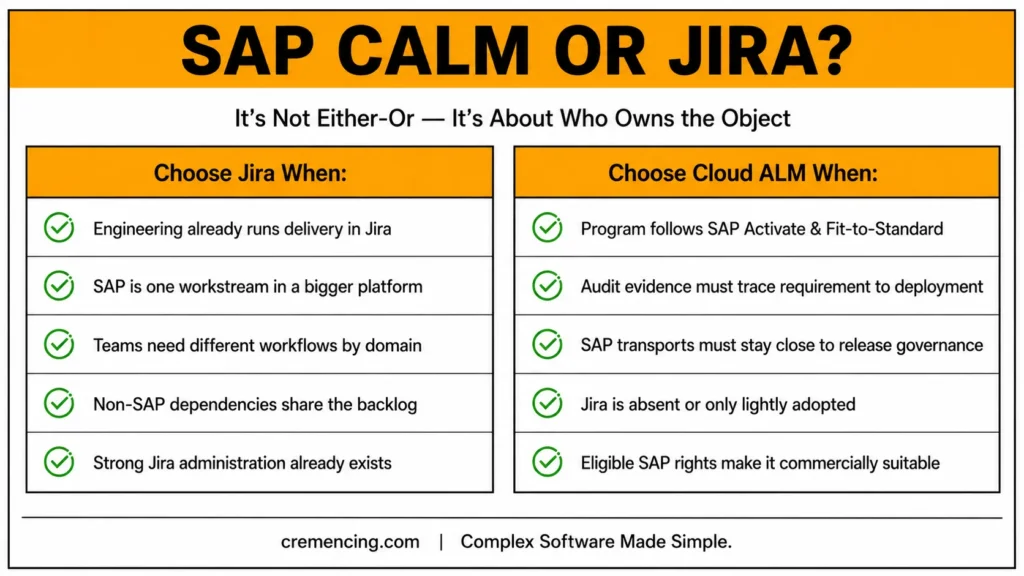
Choose the Jira-led side of SAP CALM vs Jira when:
- The enterprise already governs product and engineering delivery in Jira.
- SAP is one workstream inside a larger digital platform.
- Teams need different workflows by domain.
- Non-SAP dependencies must share the same backlog.
- Existing Jira apps already cover testing, DevOps, service, and reporting.
- SAP process, test, and transport evidence can remain in connected tools.
- The organization has strong Jira administration and data governance.
In this model, do not force Cloud ALM to replace a mature planning system. Use it for SAP-specific implementation content, traceability, deployment, or operations, then send only the execution objects and status signals Jira users need.
The Cloud ALM-Led Approach to SAP CALM vs Jira: Strengths and Limitations
A Cloud ALM-led SAP CALM vs Jira model works when the program must preserve SAP context from process design through productive operations. The project starts with scopes, processes, requirements, tasks, user stories, tests, defects, features, deployment plans, systems, and monitoring use cases rather than an empty issue schema.
Why Cloud ALM Fits SAP CALM vs Jira
SAP Cloud ALM for Implementation provides project setup, process scoping, task management, requirement realization, testing, defect handling, and deployment-related work. Requirement traceability connects project entities. Test cases can link to requirements or user stories, defects can originate from test runs, and features can connect delivery work with transports.
This structure matters in Fit-to-standard delivery. The team must know which process is in scope, where a gap appeared, what requirement addresses it, which configuration or development realizes it, which tests prove it, which defects remain, and which transports move it. Cloud ALM keeps that chain in an SAP-aware model.
Cloud ALM also extends into operations. For supported S/4HANA, Business Suite 7, and ABAP systems, available scenarios include business process monitoring, integration and exception monitoring, real-user monitoring, job and automation monitoring, configuration and security analysis, health monitoring, and transport management. Exact support depends on the product, version, prerequisites, and setup.
The SAP CALM vs Jira commercial model can favour Cloud ALM. SAP states that usage rights are included for eligible cloud subscriptions and on-premises support agreements. Still review fair-use limits, BTP or Integration Suite services, managed-system setup, test automation licensing, and third-party connector costs. Included product rights do not remove implementation and operating costs.
Where Cloud ALM Can Feel Restrictive in SAP CALM vs Jira
In SAP CALM vs Jira, SAP Cloud ALM is not Jira with SAP branding. Its value comes from a defined SAP lifecycle model, which limits how freely teams reshape every object, screen, and workflow. Teams expecting many custom issue types, specialized validators, advanced board logic, and a large app ecosystem may prefer Jira for daily work.
Cross-functional adoption can also fail. An SAP program may depend on mobile products, warehouse automation, data platforms, tax engines, banks, identity services, or logistics providers. Cloud ALM can track related work, but it may not be those teams’ established workspace. Forcing all partners into it can create parallel trackers.
Agile planning depth matters as well. Cloud ALM supports project execution, stories, tasks, and delivery tracking, but mature Jira teams may depend on detailed board configurations, marketplace planning tools, or enterprise portfolio structures. Rebuilding those habits may cost more than integrating both platforms.
Cloud ALM is also a cloud service. Organizations requiring a self-managed ALM platform for policy, isolation, or administrative control must assess SAP hosting and compliance. Jira Data Center can meet a self-managed deployment requirement that Cloud ALM cannot.
When Cloud ALM Should Lead
Choose the Cloud ALM-led side of SAP CALM vs Jira when:
- The program follows SAP Activate and Fit-to-Standard.
- Process scope must connect directly to requirements and tests.
- Audit evidence must show requirement-to-test-to-defect-to-deployment links.
- SAP transports and deployment planning must stay close to release governance.
- Operations teams want SAP-specific monitoring in the same ALM direction.
- Jira is absent, lightly adopted, or limited to specialist teams.
- SAP-standard structures matter more than highly customized workflows.
- Eligible SAP rights make Cloud ALM commercially suitable.
Jira can still support specialist engineering teams. Keep Cloud ALM as the authoritative SAP lifecycle record and synchronize only the objects required for execution. In this SAP CALM vs. Jira model, ownership matters more than feature duplication.
Tool Selection Checklist
Do not settle on SAP CALM vs Jira by counting features. Choose by assigning ownership. This checklist turns SAP CALM vs Jira into an architecture decision.
1. Name the Authoritative Objects
List business processes, requirements, stories, tasks, defects, tests, results, features, transports, releases, cutover actions, incidents, and alerts. Give each object one system of record. Do not let both tools own the same status unless you define synchronization and conflict rules.
A common SAP CALM vs Jira hybrid model uses Cloud ALM for process scope, requirements, SAP testing, deployment evidence, and monitoring. Jira owns engineering backlog items, team tasks, non-SAP defects, and sprints. Integration passes identifiers, selected fields, statuses, and links instead of copying everything.
2. Define the Delivery Model First
For an SAP Activate program centred on Fit-to-Standard, Cloud ALM should usually hold the implementation structure. For a product-led organization where SAP changes flow through persistent teams, Jira may remain the planning front door. The SAP CALM vs Jira answer can change when an implementation becomes continuous product delivery.
3. Test the Evidence Chain
Trace one real requirement end to end. Can you show process context, approval, realization, code or configuration, test case, result, defect, transport, deployment, and production validation without a spreadsheet? The point where that chain breaks identifies the missing control.
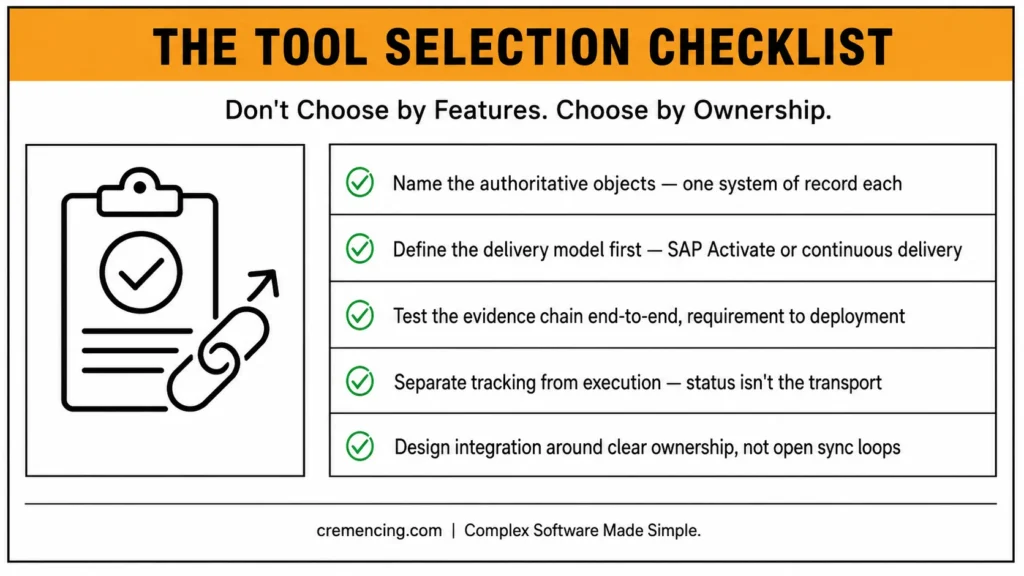
4. Separate Tracking From Execution
A workflow status does not execute a transport, run a test, or detect a failed job. SAP TMS, SAP Cloud Transport Management, test tools, pipelines, and monitoring services remain execution systems. Jira or Cloud ALM can orchestrate or report actions, but the technical source must remain clear.
5. Price the Complete Model
For Jira, include the plan, users, automation limits, Data Center infrastructure if applicable, marketplace apps, administration, integration, and reporting. For Cloud ALM, confirm entitlement, fair use, BTP services, Integration Suite, managed-system setup, test automation, connectors, and internal support. Compare the three-year operating cost.
6. Design Integration Around Ownership
SAP provides Cloud ALM APIs, events, and Jira integration patterns. A typical design uses API subscriptions, BTP destinations, webhooks, Integration Suite, or a connector. Define field mapping, identity mapping, status translation, retries, duplicate prevention, error queues, and reconciliation before production.
Avoid uncontrolled bidirectional synchronization. It creates loops and unclear ownership. For example, create the SAP requirement in Cloud ALM, create a linked Jira story for engineering, let Jira own sprint status, and return a mapped completion signal. Keep test evidence and deployment status in the governing platform.
7. Run a Proof With Real Exceptions
Test one process area, one team, one test cycle, and one deployment path. Measure duplicate updates, missing links, report effort, integration failures, adoption, and audit evidence. Include a failed test, reopened defect, delayed transport, and production alert—not only a successful sprint.
The final SAP CALM vs Jira pattern will normally be one of three:
- Cloud ALM-led: SAP lifecycle governance first; Jira supports selected teams.
- Jira-led: Enterprise execution first; Cloud ALM provides SAP-specific controls.
- Federated: Each platform owns defined objects and exchanges limited state.
Conclusion
The SAP CALM vs Jira choice is ultimately about lifecycle ownership, not simply choosing one tool over another. Use Cloud ALM when your teams need to connect SAP processes, requirements, testing, deployment, and operations in an SAP-centered lifecycle. Jira remains the better fit when software teams need flexible backlogs, sprint planning, configurable workflows, and cross-functional engineering execution.
When both platforms are necessary, define which system owns each requirement, defect, test, release, and transport instead of duplicating workflows across both tools. Therefore, the best SAP CALM vs Jira strategy is the one that gives every team clear ownership, reliable traceability, and fewer disconnected processes. Map your current lifecycle, identify where duplicate work or status conflicts occur, and then decide what should remain in Cloud ALM, what belongs in Jira, and where integration adds real value.
Frequently Asked Questions
1. Can SAP Cloud ALM and Jira be integrated?
Yes. SAP documents API and event-based Jira integration patterns, and SAP Community examples use BTP destinations, webhooks, and integration services. Define object ownership before building bidirectional updates.
2. Is SAP Cloud ALM included in existing SAP licenses?
It is included for eligible customers under specified SAP cloud subscriptions and support agreements. Confirm your exact entitlement because SAP Standard Support alone may not qualify. Fair-use limits and connected services can still affect the total SAP application lifecycle management cost.
3. Can SAP Cloud ALM and SAP Solution Manager support the same application?
They can coexist during transition or for separate use cases, but avoid overlapping ownership. One platform may handle operations while the other handles project or change processes. Document which platform controls transports, testing, monitoring, and lifecycle records. This separation prevents conflicting reports and unclear release accountability.
4. Can tasks synchronize from Jira to SAP Cloud ALM?
Yes, but reverse synchronization requires deliberate API, webhook, mapping, and status design. A working Cloud ALM-to-Jira flow does not automatically guarantee Jira-to-Cloud ALM behavior. Add loop prevention, retry handling, and reconciliation. Test every mapped transition with reopened, rejected, and cancelled states.
5. What Is the Main Difference in SAP CALM vs Jira?
SAP Cloud ALM provides SAP-specific lifecycle context across implementation and operations. Jira provides configurable work management across teams and technologies. The SAP CALM vs Jira decision depends on whether SAP traceability or enterprise execution flexibility should lead.
6. Can SAP Cloud ALM Replace Jira?
It can replace Jira for some SAP-centered programs, especially when SAP Activate content, testing, deployment, and operations matter more than custom boards. It will not replace every mature Jira workflow, marketplace app, non-SAP backlog, or product-planning practice.
Does SAP Cloud ALM support Scrum or Kanban boards like Jira?
Cloud ALM supports project execution, stories, tasks, and delivery tracking, but it doesn’t offer the same depth of configurable board logic, filters, and marketplace planning tools that mature Jira teams rely on.
Can Jira store SAP transport IDs directly?
Yes — Jira can reference transport IDs as text or custom fields, but it does not replace SAP Change and Transport System or SAP Cloud Transport Management for actual transport execution.
What happens if both Jira and Cloud ALM try to own the same status field?
This creates conflicting reports and unclear release accountability — the checklist’s core recommendation is to assign one authoritative system per object type to avoid this.
Is a Federated (hybrid) SAP CALM vs Jira model harder to maintain than choosing one platform?
It requires more upfront integration design — field mapping, identity mapping, and reconciliation — but for enterprises with both mature Jira adoption and SAP-centered programs, it often reflects real ownership boundaries better than forcing everything into one tool.