
Introduction
This SAP Event Mesh tutorial exists because synchronous APIs — long the default in traditional SAP integrations — cause delays, system entanglements, and performance issues in enterprise landscapes. As businesses strive to become real-time, these restrictions increasingly become a bottleneck rather than a solution.
SAP Event Mesh solves a specific problem: it replaces synchronous, point-to-point API calls between S/4HANA and SAP BTP with asynchronous, event-driven communication, so systems no longer sit and wait on each other to respond.
That shift matters because synchronous integration patterns — long the default in traditional SAP landscapes — create delays, tight system coupling, and cascading performance issues as transaction volume grows.
This 7-step SAP Event Mesh tutorial walks through exactly how to set that up: activating the service in BTP, exposing events from S/4HANA, defining topics and subscriptions, writing consumer logic, and testing the full event flow end to end.
How SAP Event Mesh Supports Event-Driven Integration
SAP Event Mesh, a messaging service on SAP Business Technology Platform (SAP BTP), enables event-driven integration between SAP S/4HANA and cloud applications through asynchronous messaging.
By decoupling event producers from consumers, it replaces synchronous API calls for scenarios where callers do not require an immediate blocking response. Systems communicate by publishing business events—such as sales order or invoice postings—to structured topics, which Event Mesh routes through queues to subscribed applications.
This architecture increases system resilience and scalability, as message queues persist events during downstream outages. Implementing robust retry policies, dead-letter queues, and standardized event taxonomy ensures reliable processing and prevents data loss across hybrid and cloud landscapes.
SAP Event Mesh Explained: What This Tutorial Covers
SAP Event Mesh is an event-driven messaging service offered by SAP for cloud-native and distributed applications that facilitates asynchronous communication.
But rather than calling each other directly, Event Mesh enables systems to publish and subscribe to events in real time.
Core Concept:
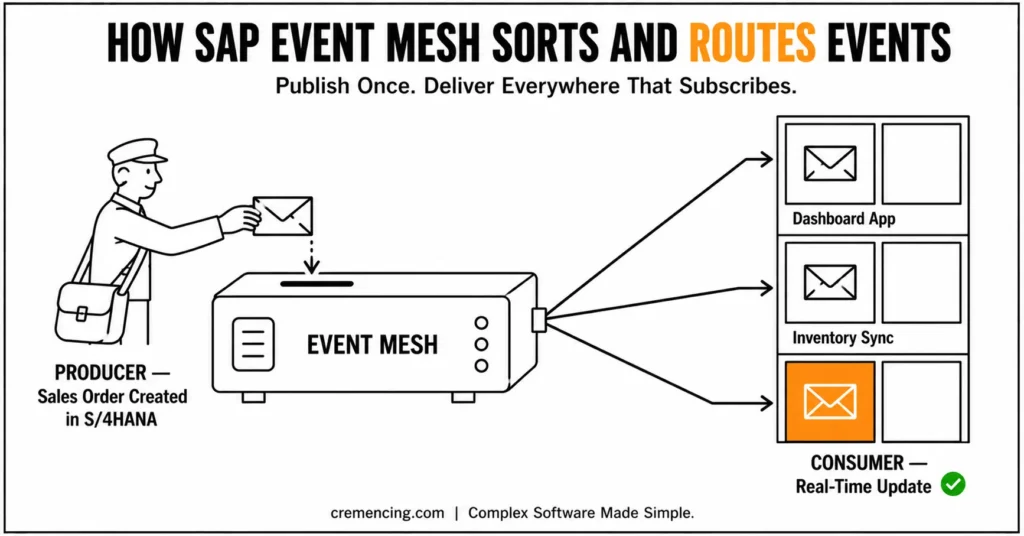
- Producer → Publishes event (e.g., Sales Order Created in S/4HANA)
- Event Mesh → Routes the message to where it needs to go
- Consumer → Responds immediately (e.g., Apps on SAP BTP update the dashboard)
Not every integration should be event-driven. APIs remain the right choice when a caller needs an immediate response — checking real-time stock availability before confirming an order, for instance.
Event-driven patterns via Event Mesh make more sense when the caller doesn’t need to wait: notifying a downstream system that a sales order was created, triggering a dashboard update, or fanning a single business event out to multiple independent consumers.
The deciding question is whether the calling process needs to block on a response — if not, an event is usually the better fit.
| Factor | Synchronous API | SAP Event Mesh (Event-Driven) |
|---|---|---|
| Response requirement | Caller needs immediate response | Caller doesn’t need to wait |
| Coupling | Tighter — caller and receiver both must be available | Looser — publisher and subscriber operate independently |
| Scalability | Limited by receiver’s real-time capacity | Higher — multiple consumers can process independently |
| Failure impact | Caller fails if receiver is down | Events queue and retry, receiver can catch up later |
| Best for | Stock checks, credit checks, real-time validation | Order notifications, dashboard updates, cross-system sync |
Key Features:
- Event-driven communication
- Loose system coupling
- High scalability
- Real-time processing
SAP Event Mesh Tutorial for S/4HANA & SAP BTP Integration
SAP Event Mesh Tutorial: 7-Step Guide
Quick Reference — Before You Start
- BTP subaccount with Event Mesh service available
- S/4HANA system with enterprise event enablement access
- Defined event topics for the business events you need (e.g., sales order created, invoice posted)
- Consumer application environment ready (Node.js or equivalent)
- Monitoring access for message tracing and queue health
Step 1 (SAP Event Mesh Tutorial): Turn On Event Mesh in SAP BTP
Activate SAP Event Mesh service in your BTP subaccount.
Key actions:
- Create an instance of Event Mesh
- Assign service plans
- Configure messaging client
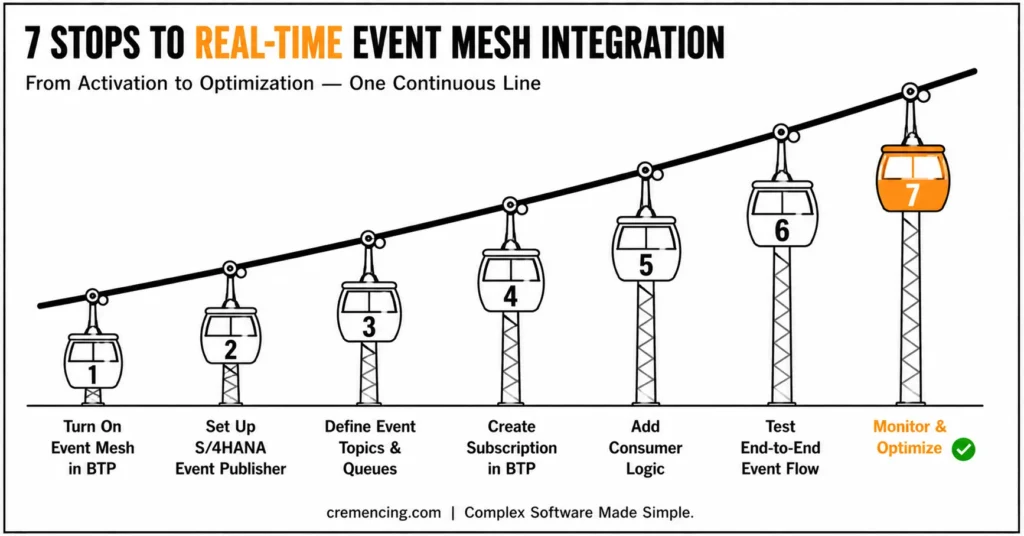
Step 2: Setting up S/4HANA Event Publisher
Activate Event Exposure from the S/4HANA system:
- Enable enterprise events
- Specify business events (such as purchase order created)
- Register event topics
Step 3 – Event Topics and Queues
Example structure:
| Event Type | Topic |
| Sales Order Created | sap/s4/order/created |
| Invoice Posted | sap/s4/invoice/posted |
This guarantees that events are routed in a structured manner.
Step 4 (SAP Event Mesh Tutorial): Create a Subscription in SAP BTP
The SAP BTP applications are subscribers to events:
- Define queue
- Bind topic
- Configure message listener
Step 5 – Add consumer logic for the event.
Example Node.js handler:
module.exports = async function(msg) {
console.log(“Event received:”, msg.data);
};
This is a real-time SAP event processing.
Step 6 – End-to-End test Event Flow
Event in S/4HANA:
- Create a sales order
- Verify event delivery
- Verify the consumption of SAP BTP
Step 7 – Monitor and Optimize
Use SAP monitoring tools:
- Message tracing
- Queue health checks
- Error handling dashboards
SAP Event Mesh Tutorial Benefits & ROI
Key Benefits:
- Real-time data synchronization
- Reduced system coupling
- Higher scalability
- More rapid time to respond for the business
- Improved system resilience
ROI Table:
| Area | Improvement |
| Data Latency | -70% reduction |
| Integration Speed | +50% faster |
| System Downtime Risk | -40% reduction |
| Operational Efficiency | +35% improvement |
Common SAP Event Mesh Tutorial Mistakes and Best Practices
Common Mistakes:
- Using Event Mesh like a synchronous API
- Overloading single topics
- Wrong naming of events
- The use of retry and error handling is ignored.
Best Practices:
- Think in terms of events first
- Apply relevant event taxonomy
- Implement idempotent consumers
- Continuously monitor queue performance
What This SAP Event Mesh Tutorial Doesn’t Cover
1. Event-Driven Architecture Strategy
- When to use events vs APIs?
2. Real Enterprise Use Cases
- Order-to-cash real-time processing
- Sync events between the supply chain.
3. Failure Handling Models
- Dead-letter queues
- Retry policies
4. Hybrid Landscape Design
- A combination of S/4HANA on-premise with the cloud integration of SAP BTP.
5. Cost & Performance Trade-offs
- Event volume optimization
- Message consumption efficiency
This is what enterprise-class SAP architecture really is. For more insight, read our blog on SAP Event Mesh Integration
Conclusion
SAP Event Mesh doesn’t replace every API in your landscape — it replaces the ones that shouldn’t have been synchronous in the first place.
Following these 7 steps gets a working event flow running between S/4HANA and BTP, but the real work is in the decisions this tutorial surfaced along the way: which business events actually warrant publishing, how topics are named and structured, and how consumer logic handles failure instead of just the happy path.
Teams that treat those as afterthoughts end up with an event-driven system that’s just as brittle as the synchronous one it replaced. Teams that get them right end up with the loosely coupled, scalable integration layer Event Mesh was built to provide.
FAQs
1. What is the difference between SAP Event Mesh and traditional API integration?
Essentially, traditional APIs rely on synchronous, point-to-point calls, whereas SAP Event Mesh uses asynchronous, event-driven communication. Consequently, systems don’t need to wait for a direct response before moving forward. As a result, this reduces coupling and improves overall system resilience.
2. Do I need SAP BTP to use SAP Event Mesh?
Yes, indeed — SAP Event Mesh is a service within SAP BTP, so a BTP subaccount is required. Furthermore, without an active BTP subaccount, you cannot provision or configure the Event Mesh instance. Therefore, setting up BTP access is the first prerequisite before beginning this tutorial.
3. Can SAP Event Mesh handle high-volume enterprise events?
Absolutely — in fact, it’s specifically designed for high-scalability, real-time enterprise scenarios. Moreover, its publish-subscribe architecture allows multiple consumers to process events independently. Consequently, this makes it well-suited for order-to-cash, supply chain, and other high-throughput business processes.
4. What happens if an event fails to deliver in SAP Event Mesh?
Generally, undelivered events require proper retry and error-handling mechanisms to avoid data loss. Otherwise, without dead-letter queues or retry policies, failed events can silently disappear. Hence, implementing robust failure handling is considered a best practice, not an optional add-on.
5. Is SAP Event Mesh suitable for hybrid landscapes with on-premise S/4HANA?
Yes, certainly — SAP Event Mesh supports hybrid architectures that combine on-premise S/4HANA with cloud-based BTP services. In other words, it bridges legacy on-premise systems with modern cloud-native applications. As a result, organizations don’t need to fully migrate to the cloud to benefit from event-driven integration.
6. How is SAP Event Mesh different from SAP Integration Suite?
Broadly speaking, SAP Integration Suite offers a wider range of integration patterns, including APIs, flows, and orchestration. SAP Event Mesh, on the other hand, focuses specifically on event-driven, publish-subscribe messaging. Nevertheless, both can be used together, since Integration Suite can consume and process events published through Event Mesh.
7. What programming languages can I use with SAP Event Mesh?
Typically, SAP Event Mesh supports standard messaging protocols like AMQP and MQTT, so it isn’t limited to one language. For instance, Node.js, Java, and Python can all be used to build consumer logic. Therefore, most modern backend stacks can integrate with Event Mesh without major limitations.
8. Is SAP Event Mesh difficult to set up for beginners?
Not necessarily — however, it does require a working understanding of BTP subaccounts, event topics, and subscription models. Initially, the learning curve may feel steep, especially for teams used to synchronous APIs. Over time, though, following a structured tutorial like this one significantly reduces setup complexity.
9. How do I monitor SAP Event Mesh performance in production?
Primarily, SAP provides monitoring tools for message tracing, queue health checks, and error dashboards. In addition, regularly reviewing these metrics helps identify bottlenecks before they impact business processes. Consequently, proactive monitoring is essential for maintaining real-time reliability at scale.
10. What are common mistakes to avoid when implementing SAP Event Mesh?
Above all, treating Event Mesh like a synchronous API is one of the most frequent mistakes. Additionally, overloading a single topic with unrelated events can cause confusion and performance issues. Consequently, following proper event taxonomy and naming conventions from the start prevents most of these problems.





One Response