
Introduction
Shutting down an SAP system does not automatically shut down the cost attached to it.
A legacy SAP environment can remain expensive long after users stop logging into it. Infrastructure may still be running, historical data may still require controlled access, interfaces may still depend on it, and support or contractual obligations may remain unresolved. The result is a system that appears retired from an application perspective but continues consuming money and operational attention.
The harder problem is that decommissioning is not simply a shutdown exercise. The organization must identify dependencies, determine which historical data must remain accessible, establish the correct retention controls, transfer or extract required data, and validate that the old environment can actually be removed.
This is where SAP Information Lifecycle Management (ILM) becomes relevant. SAP documents a system-decommissioning approach in which legacy data can be archived or extracted and transferred to a stand-alone retention warehouse environment for continued retention management, retrieval, and eventual destruction when permitted.
This article focuses on the cost leakage that occurs when those steps are incomplete and the technical controls that help turn SAP system decommissioning from a shutdown project into a controlled landscape-reduction exercise.
What is SAP System Decommissioning—Object Retirement?
SAP system decommissioning is the controlled retirement of an entire SAP system while preserving required historical data, satisfying retention obligations, and removing its infrastructure and operational dependencies. Object retirement is a separate, narrower activity focused on removing obsolete objects, interfaces, configurations, or custom developments within a system that remains in service.
It includes:
- System shutdown and retirement
- Data archiving and retention
- Interface and integration cleanup
- Infrastructure and license termination
| Activity | Scope | Primary objective | Can the source SAP system remain live? |
|---|---|---|---|
| System decommissioning | Entire SAP system | Retire the application and manage required historical data | No, the objective is eventual system retirement |
| Data archiving | Selected business data | Reduce operational data volume while preserving records | Yes |
| Object retirement | Individual objects/components | Remove redundant technical or functional components | Yes |
| ILM Retention Warehouse | Legacy data from a decommissioned system | Retain, retrieve and lifecycle-manage historical data after system retirement | The legacy source is retired; retained data is managed centrally |
Object retirement is another layer of optimization, but a more in-depth one that concentrates on removing unused SAP elements like the following:
- Redundant business objects
- Legacy modules
- Unused interfaces
- Obsolete configurations
Not limited to just shutting down, but end-to-end SAP landscape simplification and cost elimination.
Step-by-Step Process for SAP System Decommissioning
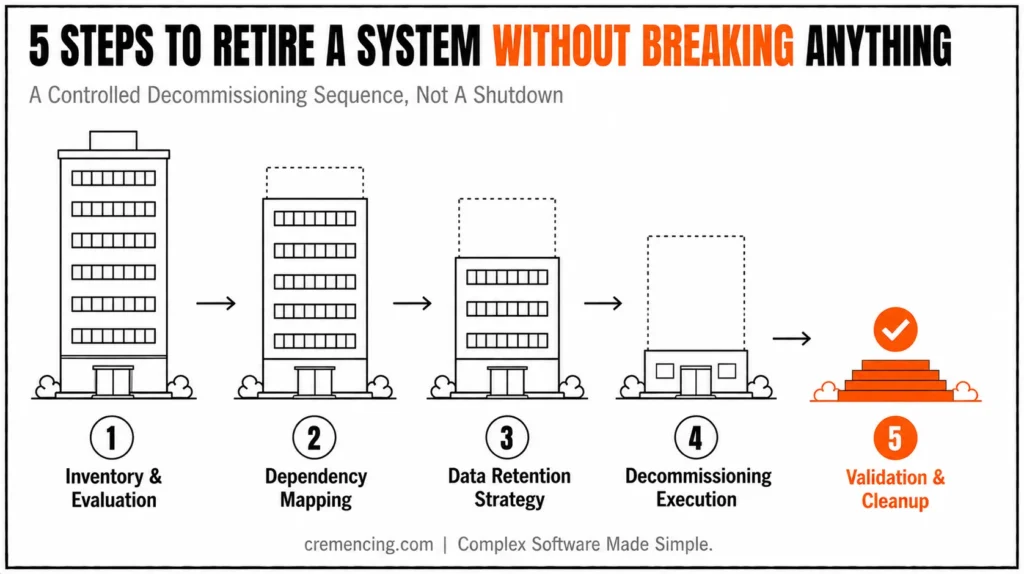
Step 1 — Systems inventory and evaluation
This is where you recognize what is in your SAP landscape and actually active use.
Key activities include:
- SAP system inventory mapping
- Active vs inactive system identification
- Application and module usage analysis
Step 2 — Dependency Mapping
This step prevents anyone from breaking something after you retire.
Key areas include:
- Interface dependencies (SAP PI/PO, CPI, APIs)
- Data flow mapping
- Business process dependency analysis
For organizations replacing older SAP integration infrastructure, dependency mapping should also account for the migration path from legacy middleware to modern integration services.
What to Validate Before Disconnecting the Legacy System
Dependency mapping should go beyond listing interfaces. A system can appear inactive while still supporting scheduled jobs, downstream reporting, file exchanges, RFC calls, IDoc processing, APIs, authentication dependencies, or historical-data access.
At minimum, validate these dependency categories:
| Dependency | What to check | Decommissioning risk |
|---|---|---|
| Interfaces | IDocs, RFCs, APIs, files, middleware flows | Transactions or downstream processes fail |
| Batch processing | Scheduled jobs and external schedulers | Background processing continues unexpectedly |
| Reporting | BW/reporting extracts and historical queries | Users lose required historical access |
| Security | SSO, technical users, certificates and destinations | Integrations fail after shutdown |
| Data access | Audit, tax, legal and operational retrieval requirements | Required historical records become inaccessible |
| Infrastructure | Database, application servers, storage, backup and monitoring | Costs continue after application retirement |
For SAP landscapes that use ILM for system decommissioning, SAP’s documented process also requires teams to retrieve and transfer the legacy data needed for the decommissioned system into the Retention Warehouse environment before retiring the source system.
The practical rule is simple: do not treat “no active users” as proof that a system has no remaining dependencies.
Step 3 — Develop a Data Retention and Archiving Strategy
For an SAP ILM-based decommissioning scenario, data retrieval is not simply a matter of copying database tables. SAP documents a process that can involve archiving through Archive Administration (transaction SARA) and extracting additional legacy data and context information with the Context Data Extractor (CDE) or Generic CDE.
Teams can then transfer the resulting legacy data to a stand-alone ILM Retention Warehouse system, where they manage retention rules, data retrieval, and eventual destruction.
- Legal and regulatory retention rules
- Data classification (critical vs non-critical)
- Archiving architecture planning
Step 4—Decommissioning execution
So this is the stage where we take it down ultimately.
It includes:
- Disabling interfaces and integrations
- Migrating or archiving required data
- Decommissioning infrastructure components
Step 5 — Validation and Cleanup
And the last steps to ensure that no residual inputs are dependent.
Key checks include:
- System monitoring validation
- Cost leakage detection
- Compliance and audit verification
What are the benefits & ROI of decommissioning the SAP System?
SAP system decommissioning makes a measurable financial and operational impact
Cost Reduction Impact
- 15–40% reduction in infrastructure costs
- 20–30% reduction in licensing expenses
This reduces significantly the overhead of support and maintenance. The same governance principle applies to the wider SAP application lifecycle: retiring one system should not create an unmanaged gap in monitoring, delivery or operational governance.
Operational Efficiency Gains
Reduced system complexity
- Faster integration cycles
- Improved SAP landscape governance
Risk Reduction
- Lower security exposure
- Reduced system failure points
- Improved compliance control
| Area | Before Decommissioning | After Decommissioning |
| Cost | High recurring spend | Optimized IT cost base |
| Complexity | Fragmented landscape | Simplified structure |
| Risk | High dependency risk | Controlled environment |
Typical Errors in Decommissioning SAP Systems
Enterprises end up not achieving the full value they could with a predictable set of mistakes:
- Hidden dependencies across middleware and APIs are ignored
- Lack of accurate system documentation
- Unsupervised: Data is treated the same with no classification
- Partial shutdown – in this case, systems are still running, albeit more limited
- No post-decommission cost validation
These errors result in continued cost leakages after apparently “successful” decommissioning.
What Competitors Never Got Around To
Much of the SAP content covers execution steps in isolation of other aspects and is siloed.
What is hardly ever mentioned, however, is the constant monetary drain that follows decommissioning.
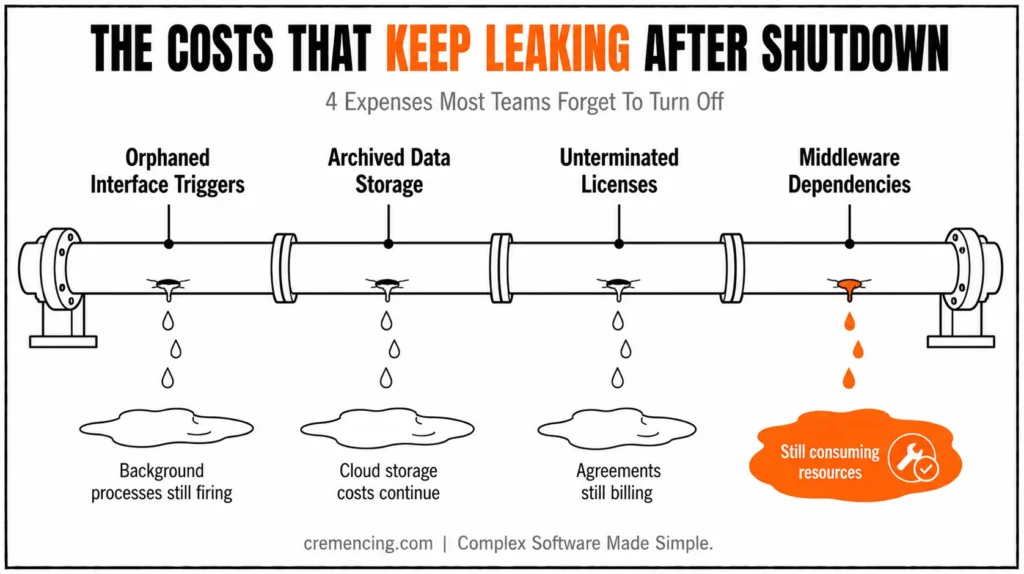
Common overlooked issues include:
- Background processes are still triggered by orphaned interfaces
- The History of Cloud Storage Costs for Archived SAP Data
- Unterminated licensing agreements
- Middleware dependencies are still consuming resources
Key insight:
SAP system decommissioning is not a one-off technical task! It is a cost governance mechanism that goes beyond the mere reduction of expenditure and requires monitoring over time to capture savings.
Conclusion
SAP system decommissioning should not be measured by whether an old system has been switched off.
The real test is whether the organization has removed the dependencies, transferred and validated the historical data it must retain, established the appropriate retention controls, and closed the recurring infrastructure and operational costs attached to the legacy environment.
That is why decommissioning is more than a shutdown task. SAP’s ILM documentation shows how organizations can archive or extract legacy data and manage it through a retention warehouse scenario, allowing them to retain required information without keeping the original application system as the permanent archive.
For IT leaders, the financial question is therefore not simply, “Can we turn this SAP system off?”
It is:
“What is still costing us money because we have not completely retired it?”
Answer that question across infrastructure, integrations, support, data retention and contractual obligations, and SAP decommissioning becomes a measurable cost-governance exercise rather than another technical shutdown project.
FAQs
What is SAP system decommissioning?
The systematic way to retire old, unused SAP Systems while meeting compliance for data retention (any systems that hold historical or sensitive information) and removing dependencies on redundant infrastructure.
Importance Of SAP System Decommissioning
This not only drives down IT costs but also simplifies the system landscapes and cuts out technical debt due to legacy systems.
What happens if SAP systems are not decommissioned?
These create ongoing hidden infrastructure, licensing, and maintenance costs.
How Long Does it Take to Decommission an SAP System?
That depends on system size and complexity but can generally be weeks to months.
What SAP transaction is used for data archiving before system decommissioning?
For applicable SAP archiving scenarios, SARA (Archive Administration) is used to execute and manage data archiving. System decommissioning scenarios may also require CDE or generic CDE for additional legacy data and context information.
What is SAP ILM Retention Warehouse?
SAP ILM Retention Warehouse provides a central environment for managing legacy data from retired systems, including retention, retrieval, and lifecycle management.
Can an SAP system be decommissioned while historical data must still be retained?
Yes. SAP documents a system-decommissioning approach in which teams archive or extract required legacy data and transfer it to a retention warehouse system, eliminating the need to keep the original application operational solely for historical-data access.
Resources
https://help.sap.com/docs
https://www.sap.com/products/erp/s4hana.html
https://www.gartner.com/en/information-technology