Introduction
Often, organizations dive directly into RISE with SAP, excited that everything will go smoothly and they avoid delays, overruns, costs, and problems with the system. However, this usually comes down to the same root cause: skipping a proper SAP Rise Technical Assessment before migration begins. Little do they know, the same can disrupt the entire migration with hidden issues, such as custom code conflicts, lingering data inconsistencies, and gaps in integrations that can only be identified through testing.
Here’s the direct answer: if you can’t yet say which of your custom Z-programs will break under S/4HANA’s simplified data model, whether your current integrations depend on APIs SAP has deprecated, or how many duplicate customer records are sitting in your data — you are not ready for RISE with SAP, no matter how ready the business case looks.
A RISE with SAP Technical Assessment exists to answer exactly those three questions before migration starts, not during it. Organizations that skip it don’t avoid the work; they just do it later, mid-migration, when fixing it costs more and delays go live. This guide walks through what the assessment actually evaluates, how to run it step by step, and the checklist to run before you commit to a migration date.
RISE Technical Assessment Strategy
According to SAP documentation, conducting a technical assessment prior to migrating under the RISE with SAP model is essential to identify architectural blockers, custom code incompatibilities, and integration risks. Utilizing diagnostic tools like SAP Readiness Check for SAP S/4HANA allows organizations to evaluate custom ABAP code against the Simplification Item Catalog, identifying deprecated APIs and database table changes before execution begins. Furthermore, assessing data quality and system dependencies helps establish business partner conversion readiness and interface compatibility with middleware layers. Conducting this structured evaluation before committing to migration timelines prevents mid-project delays, mitigates scope creep, and ensures compliance with Clean Core extension guidelines across hybrid enterprise landscapes.
SAP Rise Technical Assessment: Overview
Overview: A RISE with SAP Technical Assessment provides you a highly structured assessment of your existing SAP landscape to assess how well it will fit into the migration to S/4HANA as part of the RISE model.
It focuses on identifying:
- System compatibility issues
- Custom code dependencies
- Data quality problems
- Integration complexity
- Infrastructure readiness
To mitigate risk, enhance planning accuracy, and ensure a more seamless transition.
Key Components of SAP Rise Technical Assessment
| Component | What It Evaluates |
| System Landscape | Current SAP systems and architecture |
| Custom Code | Compatibility with S/4HANA |
| Data Quality | Accuracy and redundancy |
| Integrations | Dependencies with external systems |
| Infrastructure | Hardware and cloud readiness |
Such an assessment gives you a straightforward migration path.
SAP Rise Technical Assessment Process: Step by Step
Step 1: Review Current State System Landscape
Assess your current SAP landscape:-
ECC or legacy systems
Number of instances
System versions
How well you know your landscape is one of the things that determines migration complexity — which is exactly why this step forms the foundation of any SAP Rise Technical Assessment.
Step 2: Custom Code Analysis
Many are expected, and therefore, one of the largest struggles is Custom code.
Use tools like:
SAP Readiness Check 2.0
Simplification Item Catalog
Identify:
Obsolete code
Code requiring adaptation
Step 3: Assessing Data Quality and Quantity
The data quality standards are lower, and the migration risk.
Check for:
Duplicate data
Inconsistent records
Large data volumes
With proper data cleanup, migration time and cost can be considerably reduced.
Step 4: Assess Integration Complexity
SAP systems mostly connect with several applications.
Evaluate:
APIs and middleware
Third-party integrations
Data exchange processes
Complex integrations require additional planning.
Step 5: Infrastructure and performance recaps
Assess current infrastructure:
Server capacity
Database performance
Network readiness
Cloud migration requires optimized infrastructure.
Stage 6: Safety and compliance
Make Your System Secure-Ready
User access control
Data protection policies
Compliance requirements
Security holes may cause delays in migrating to other platforms.
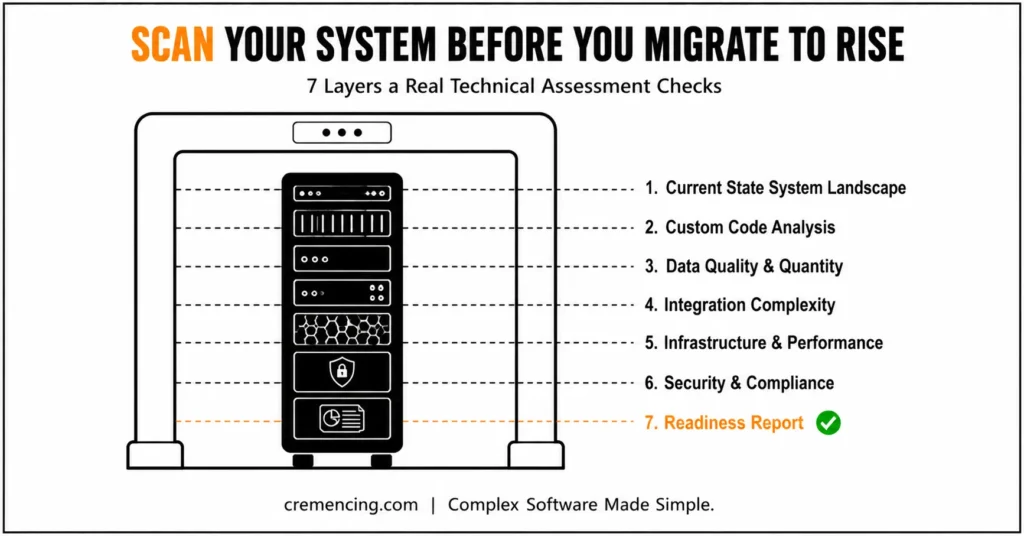
Step 7: Prepare a Readiness Report
Organize your findings into a formal report:
Identified risks
Required actions
Estimated timelines
Dev, you pick your migration strategy with this report.
SAP Rise Technical Assessment: Benefits and ROI
Reduced Migration Risk
It is good to identify problems early, rather than after they have resulted in large failures.
Migration risks have gone down from 40%
Faster Implementation
Clear planning speeds up execution.
25–35% faster project timelines
Cost Optimization
Avoid unexpected expenses during migration.
Improved System Performance
Optimized systems perform better post-migration.
Better Decision Making
Machines clarify the readiness and investment of the business.
SAP Rise Technical Assessment: Common Mistakes and Best Practices
Common Mistakes
Skipping Detailed Assessment
Migrations that are rushed into, without the right analysis, will fail.
Ignoring Custom Code Complexity
Delays and compatibility issues with custom code. More often than not, delays in delivery happen due to issues with different packages.
Underestimating Integration Challenges
Complex integrations increase project risk.
Poor Data Preparation
Dirty Data is Slowing the Migration and Performance.
Best Practices
Use SAP tools for precise analysis
Conduct detailed system audits
Clean and optimize data early
Plan integration strategy carefully
Involve experienced SAP consultants
SAP Rise Technical Assessment: Pre-Migration Readiness Scorecard
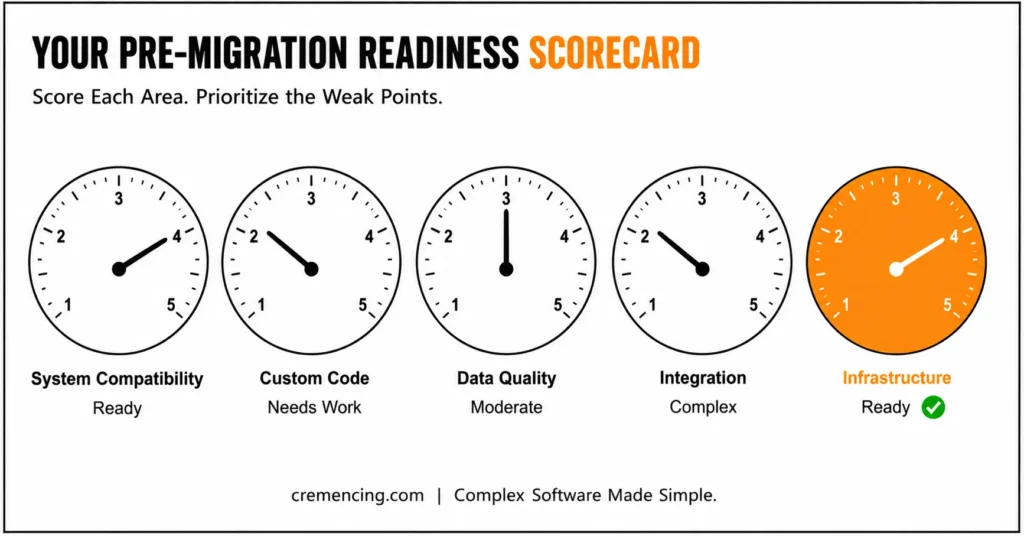
There is usually no real scoring method: Most of the blogs offer this practice.
Readiness Scorecard Example
| Area | Score (1–5) | Status |
| System Compatibility | 4 | Ready |
| Custom Code | 2 | Needs Work |
| Data Quality | 3 | Moderate |
| Integration | 2 | Complex |
| Infrastructure | 4 | Ready |
How to Use It
Score each area
Identify weak points
Prioritize improvements
It gives you a direct action plan that is very transparent.
Conclusion: Why SAP Rise Technical Assessment Matters
An assessment is an absolute must before you can start the migration journey for RISE with SAP. It helps in identifying risk, optimizing systems, and determining whether your organization is prepared enough for transformation or not.
The early assessment process has been integrated into these gaps, reducing costs, boosting effectiveness, and facilitating faster execution.
Ensure your systems are ready before jumping to RISE with SAP. Do your technical evaluation now, and avoid the cost of a nasty surprise later.
FAQ Section
What is RISE with SAP Technical Assessment?
Essentially, it is a way to assess the current system’s readiness for RISE migration to S/4HANA. In other words, it identifies whether your existing landscape can support a smooth transition before the migration actually begins.
Why is a technical assessment important?
Primarily, it allows you to spot risks, mitigate failures, and achieve a seamless migration. Therefore, addressing these issues early helps avoid costly disruptions later in the process.
What is the duration of a technical assessment?
Generally, this varies with the complexity of the system but usually takes anywhere from a few weeks to months. However, larger, more complex landscapes may naturally require additional time for a thorough evaluation.
What happens after the assessment?
Once complete, you create a readiness report, which helps with planning and executing the migration. Subsequently, this report becomes the foundation for prioritizing fixes and defining the overall migration strategy.
How is a RISE with SAP Technical Assessment different from a standard system audit?
Generally, a standard system audit focuses on overall system health, whereas a RISE with SAP Technical Assessment specifically evaluates readiness for migration to S/4HANA under the RISE model. Therefore, it goes deeper into custom code compatibility, integration complexity, and infrastructure alignment with RISE requirements. As a result, organizations get a migration-specific roadmap rather than a general system review.
Can a RISE with SAP Technical Assessment be conducted internally, or is external expertise needed?
In some cases, internal SAP teams with strong technical knowledge can perform a basic assessment on their own. However, external consultants often bring specialized tools and unbiased insight, which can help uncover risks that internal teams might overlook. Consequently, many organizations choose a hybrid approach, combining internal knowledge with external validation for a more thorough assessment.
What happens if critical issues are found during the technical assessment?
Typically, identified issues are prioritized based on risk level, complexity, and potential impact on the migration timeline. Subsequently, organizations develop a remediation plan to address these issues before proceeding with the RISE migration. Ultimately, resolving critical issues early prevents costly disruptions and delays during the actual migration process.
Is a RISE with SAP Technical Assessment a one-time activity, or should it be repeated?
Ideally, the assessment should be conducted before the initial migration to establish a clear readiness baseline. Nevertheless, as systems evolve and new custom code or integrations are added, periodic reassessments help ensure continued alignment with RISE requirements. Therefore, treating it as an ongoing practice, rather than a one-time task, supports long-term system stability and readiness.
What’s the difference between RISE with SAP and GROW with SAP in terms of technical assessment?
Generally, RISE with SAP targets existing customers moving to private or public cloud S/4HANA, so the assessment focuses heavily on custom code and legacy integration migration. GROW with SAP, by contrast, is aimed at a more standardized, greenfield-style public cloud adoption, so the assessment leans more toward fit-to-standard gap analysis than legacy remediation. [NEEDS SME VERIFICATION: confirm current SAP positioning of these two offerings before publishing.