
For many SAP teams, the difficult part of the 2026 Cloud ALM decision is not deciding whether SAP Cloud ALM is strategically important. SAP has already made its direction clear: Solution Manager 7.2 reaches the end of mainstream maintenance on December 31, 2027, and SAP recommends completing the transition to Cloud ALM before then.
The harder question is what actually moves.
A company running Solution Manager 7.2 may depend on ChaRM, ITSM, Test Suite, monitoring, process documentation, custom workflows, reports, and years of operational history. Those capabilities do not map one-for-one into Cloud ALM. At the same time, Cloud ALM now covers substantial implementation, testing, deployment, monitoring, analytics, and service-management integration scenarios across supported SAP cloud and hybrid landscapes.
That makes 2026 less about a simple SolMan replacement and more about architectural decisions. This article examines what SAP Cloud ALM actually covers, where Solution Manager still has a role, which gaps require another platform, and how teams can build a phased transition plan before the 2027 deadline.
SAP Cloud ALM vs Solution Manager:
The comparison becomes more useful when the decision is made at the use-case level, rather than at the product level.
| Feature | Old Way: SAP Solution Manager 7.2 | New Way: SAP Cloud ALM |
| Delivery model | Customer-operated on-premises ABAP and Java stack | SAP-operated public-cloud service on SAP BTP |
| Updates and maintenance | The customer plans patches, support packages, sizing, backups, and technical operations | SAP operates and updates the platform |
| Implementation method | Project and process management configured in SolMan, often with Focused Build | Content-driven implementation aligned with SAP Activate and SAP Best Practices |
| Requirements and tasks | Mature project structures, custom workflows, and Focused Build work items | Projects, requirements, user stories, tasks, sprints, milestones, and analytics |
| Testing | Test Suite, BPCA, TBOMs, manual tests, and automation integrations | Process-based tests, test plans, defects, analytics, Tricentis, and open APIs |
| Change control | ChaRM and Focused Build workflows with deep CTS integration | Feature-based change enablement and deployment orchestration |
| Operations | Broad technical monitoring and established on-premise administration scenarios | Health, integration, exception, job, business-process, and real-user monitoring |
| IT service management | Built-in ITSM and service-desk processes | External ITSM integration through APIs rather than a full SolMan-style service desk |
| Data Volume Management | Established DVM functions in the SolMan toolset | No direct one-to-one DVM replacement inside Cloud ALM |
| Customisation | Extensive ABAP-based enhancement and workflow options | Standard cloud service extended through APIs and supported integrations |
| Landscape fit | Strongest in established on-premises SAP estates | Designed for cloud-centric and hybrid SAP landscapes |
| Transition method | Source platform | Readiness Check, staged adoption, and selective transfer of supported content |
SAP’s official transition guidance and functional comparison confirm that Cloud ALM does not reproduce every Solution Manager feature in the same form. Its implementation model, change entities, testing approach, monitoring architecture, and integration strategy differ from the established SolMan design.
SAP Solution Manager and Its 2026 Limitations
SAP Solution Manager 7.2 remains useful because many companies have built real operating processes around it. ChaRM may control every transport from development to production. ITSM may route incidents through support teams and service-level rules.
The test suite may hold years of test assets, while process documentation, monitoring, early watch alert reporting, and custom enhancements support daily operations. SAP’s current documentation still identifies requirements management, project management, process management, testing, change control, ITSM, and landscape management as significant Solution Manager functions.
That installed process depth is the main reason an immediate shutdown is risky. A platform approaching the end of mainstream maintenance can still support business-critical controls.
The correct question is not whether Cloud ALM is newer. It is whether each SolMan use case has a suitable destination, data-transfer path, owner, and cutover plan.
Customer control also creates operational responsibility. The Basis team must run the underlying system, apply support packages, maintain security, handle backups, test upgrades, monitor capacity, and keep connected managed systems compatible.
That work competes with connected HANA programs, cloud integrations, clean-core projects, and broader platform modernization. LSMW can still be relevant in legacy SAP environments; however, SAP S/4HANA migration requires a different approach because data models, migration objects, and supported tools can differ from ECC.
What changed during 2026
The API layer is also changing during 2026, so integration teams should treat Cloud ALM interfaces as versioned dependencies rather than permanent contracts. SAP’s API documentation records quarterly changes; for example, Q3 2026 updates include new Requirements Analytics API dimensions and a change to the Automated Test Cases entity in which status was renamed to isPrepared
The maintenance deadline changes the decision
SAP states that mainstream maintenance for Solution Manager 7.2 ends on 31 December 2027 and recommends completing the transition to SAP Cloud ALM before that date.
Optional extended maintenance may continue until the end of 2030 for selected functions when a customer also chooses extended maintenance for SAP Business Suite 7. The extended scope does not include every Solution Manager capability under the same maintenance conditions.
That distinction matters. “Supported beyond 2027” does not mean “nothing changes.” Teams must check the maintenance scope, applicable SAP Notes, custom developments, add-ons, integrations, security obligations, and internal support expectations. “Health monitoring stands out; see how trouble gets flagged before users notice it.
Solution Manager should not be retained by accident
Keep Solution Manager during the transition when it still operates processes that have no approved replacements. Do not keep it merely because nobody has documented those processes.
The first migration deliverable should be an evidence-based inventory covering:
- Active users and assigned roles
- Productive scenarios
- Connected systems and clients
- Interfaces and APIs
- Scheduled background jobs
- Custom ABAP developments
- Operational reports and dashboards
- Solution documentation
- Test cases and test steps
- ChaRM cycles and transport routes
- ITSM queues and service levels
- Audit, validation, and retention requirements
This inventory separates real dependencies from unused configuration. It also prevents a migration team from spending months reproducing SolMan functions that the business no longer uses.
What SAP Cloud ALM Does and Why Teams Are Moving
SAP identifies Cloud ALM as its strategic, next-generation ALM platform for the SAP Business Suite and current hybrid landscapes. It is a public-cloud product running on SAP BTP, not Solution Manager hosted in another data centre.
SAP operates the service, provides updates, and supplies applications for implementation, operations, service delivery, administration, and integration. Teams access the platform through a browser while supported systems and services provide data for the activated use cases.
For Basis administrators, this removes the need to maintain a separate Solution Manager technology stack for the ALM platform itself. It does not remove the need to maintain managed-system prerequisites, network routes, authorizations, data collection, alert logic, and integrations. For a deeper product-level comparison, see our analysis of SAP ALM vs Solution Manager and how the choice affects the broader SAP roadmap.
What SAP Cloud ALM does for implementation teams
SAP Cloud ALM for implementations provides the following:
- Project setup and SAP Activate roadmaps
- Process scoping
- Fit-to-standard workshop support
- Requirements and user stories
- Tasks, teams, sprints, and milestones
- Manual and automated test management
- Defect management
- Features and deployment planning
- Release tracking
- Project, requirement, testing, and deployment analytics
These capabilities support S/4HANA Cloud Public Edition, S/4HANA Cloud Private Edition, system-conversion projects, and other supported SAP implementation scenarios.
The practical benefit is traceability. A business process can connect to requirements, project tasks, tests, defects, features, and deployment status. Project managers can review progress without creating a separate reporting structure for every workstream. Process experts, testers, developers, and release managers can work from related lifecycle records rather than isolated spreadsheets.
Testing capabilities and transfer limits
SAP Cloud ALM supports process-based manual testing, test planning, test execution, defect handling, testing analytics, Tricentis Test Automation for SAP, and APIs for external automation providers.
However, test migration requires classification. SAP’s transition guidance states that supported test cases and Focused Build test steps can be transferred through the selective data-transfer tool.
The same guidance says that BPCA content, TBOMs, and Scope and Effort Analyser content are not planned for transition.
Test managers should therefore do the following:
- Identify valuable tests.
- Remove obsolete and duplicate tests.
- Separate manual and automated assets.
- Identify tests supported by selective transfer.
- Archive evidence required for compliance.
- Redesign impact-analysis activities that depend on BPCA or TBOMs.
- Validate transferred test cases before retiring the source.
Moving every historical test is not automatically a successful migration. The target should contain usable, owned, and current test content.
What SAP Cloud ALM does for operations teams
For operations, SAP Cloud ALM provides capabilities, including:
- Health Monitoring
- Integration and Exception Monitoring
- Job and Automation Monitoring
- Business Process Monitoring
- Real User Monitoring
- Business Service Management
- Configuration and Security Analysis
- Monitoring analytics
- Alert management
- Operations automation
- Landscape management
The platform is intended to observe business services across supported cloud and on-premises components rather than only individual ABAP systems. That matters when an order-to-cash process crosses S/4HANA, SAP Integration Suite, SAP BTP extensions, SAP Ariba, SuccessFactors, or another supported service. A technical component may remain available while the end-to-end business process has already failed.
SAP currently reports 6,000 active Cloud ALM customers, more than 100 supported solutions, and 5,100 customers monitoring ERP systems. These are SAP-reported figures rather than independent market estimates.
Connecting on-premise SAP systems
SAP Cloud ALM can monitor supported on-premise products. Coverage remains product- and use-case-specific, so teams must check the current supported-solutions matrix before planning monitoring scope. For supported ABAP systems, teams commonly register each SID and client combination using /SDF/ALM_SETUP.
/SDF/ALM_SETUP is the managed-system setup program used to register an ABAP system and client with the SAP Cloud ALM tenant. Each SID and client requires a unique landscape registration.
Before running it, confirm:
- Supported SAP product and release
- Required SAP_BASIS level
- Current ST-PI support package
- Required correction notes
- Outbound HTTPS connectivity
- Authorisations
- Tenant and landscape identifiers
- Intended Cloud ALM use cases
Do not assume that registering a system automatically activates every monitoring application. Teams must still configure endpoints, scope managed components, activate data collection, and test the expected metrics.
When SAP Focused Run still belongs in the design
Large or technically demanding on-premise stakes need a separate operations decision. SAP recommends adding Focused Run where organizations require extensive on-premise system management, high-volume monitoring, and complex scenarios.
Cloud ALM and Focused Run can therefore coexist. Cloud ALM may manage implementation, business-process monitoring, and selected hybrid scenarios, while Focused Run covers high-volume or advanced technical operations.
The correct architecture depends on scale, retention, monitoring frequency, tenancy, service-provider requirements, automation, and existing operational processes. When an LSMW load depends on custom programs or ABAP-based validation logic, strong SAP ABAP development practices are essential to prevent data errors from reaching production.
What changed during 2026
SAP continued expanding the Cloud ALM API set during 2026. Official API updates include new Application Library, Development Library, Configuration Library, and Interface Library APIs.
SAP also added or expanded:
- Process hierarchy locking
- Task assignment endpoints
- Automated test-case attributes
- Test execution analytics
- Custom process endpoints
- Raw-data metrics and logs
- Requirements and defect analytics
- Service Request API capabilities
- Features API functions
These updates show that Cloud ALM increasingly serves as an orchestration point in a wider SAP toolchain. Architects can connect reporting, validation, workflow, testing, automation, and service-management products through supported interfaces.
Teams must still govern API changes. Product owners should review SAP’s quarterly updates, test integrations, track renamed fields and endpoints, and communicate changes to API consumers. If your organization is evaluating external ITSM integration as part of the transition, compare Cloud ALM with Jira and other service-management approaches before selecting the target workflow.
Why SAP teams are moving now
1. The 2027 deadline leaves limited time
Waiting until the final year leaves little time to inventory SolMan, clean data, redesign workflows, build integrations, train users, validate controls, and complete cutover safely.
The deadline is not only a licensing event. It affects support planning, project sequencing, resource allocation, and operational risk.
2. New projects should avoid creating another migration
Starting a new S/4HANA or cloud implementation in Solution Manager can create a second migration later. Starting suitable new projects in Cloud ALM reduces new dependency on a platform approaching the end of mainstream maintenance.
SAP’s guidance specifically recommends completing current projects in Solution Manager where appropriate and starting new projects in Cloud ALM after the transition.
3. The ALM platform no longer needs a customer-operated stack
SAP operates the Cloud ALM service. The customer does not need to size, patch, back up, or upgrade a dedicated SolMan system for the platform.
This lowers platform-administration effort, although managed-system setup, identity, integrations, authorisations, and process governance remain customer responsibilities.
4. Usage rights are included for eligible customers
SAP Cloud ALM usage rights are included with specified SAP Enterprise Support arrangements, Product Support for Large Enterprises, and qualifying cloud subscriptions containing Enterprise Support, cloud editions.
The standard entitlement currently includes:
- One SAP Cloud ALM tenant per customer number
- 24 GB baseline SAP HANA memory
- 24 GB monthly outbound API data transfer
Additional tenants or resources may require a tenant extension.
This should not be simplified to “unlimited and completely free.” Teams must confirm contract eligibility, tenant structure, capacity, data transfer, and extension requirements.
5. Hybrid processes need cross-system visibility
Business failures often occur between systems rather than inside one component. Cloud ALM is designed to monitor supported SAP services, on-premise systems, integrations, jobs, business processes, and extensions through one central platform.
That model fits SAP estates where S/4HANA communicates with BTP, Integration Suite, Ariba, SuccessFactors, cloud applications, and custom extensions.
What SAP Cloud ALM does not replace
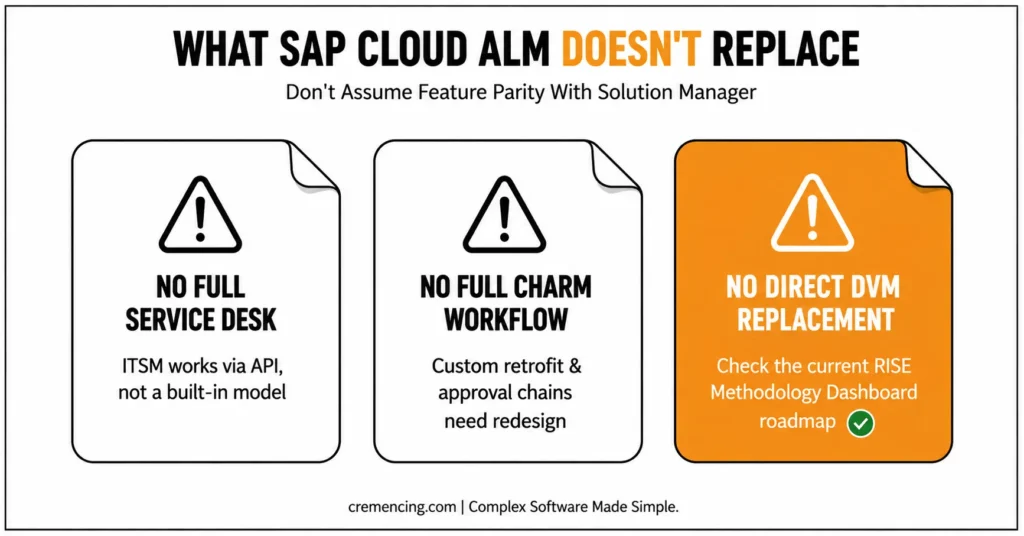
SAP Cloud ALM does not reproduce every Solution Manager capability.
It does not provide a full SolMan-style service desk
SAP Cloud ALM uses ITSM integration APIs to exchange cases with external service-management platforms. SAP’s accepted Community guidance states that it does not provide the same internal ITSM functionality as Solution Manager.
The newer ITSM Adapter API and Service Request API improve integration. They do not automatically turn Cloud ALM into a complete replacement for every SolMan service-desk workflow.
Organisations must define:
- The service-management system of record
- Ticket creation rules
- Alert-to-ticket mappings
- Assignment groups
- Priorities and statuses
- Update and closure behaviour
- SLA measurement
- Audit history
- Support Backbone integration
It does not reproduce every ChaRM workflow
Cloud ALM uses features, change enablement, transport assignment, and deployment orchestration. Solution Manager ChaRM provides comprehensive workflows built around change documents, approvals, transport management, and customer configuration.
Teams with customised ChaRM workflows, retrofit requirements, cross-system transport controls, or special audit reports must test the target design in detail.
It does not provide a direct DVM replacement
SAP Community guidance previously stated that SolMan Data Volume Management was not planned as a direct Cloud ALM feature. Customers were directed to the DVM application in SAP for Me.
SAP has since announced the retirement of that DVM application and a transition toward selected data-related content through the RISE with SAP Methodology Dashboard, accessible through SAP Cloud ALM. SAP notes that not all content will move immediately.
Any DVM migration plan must therefore use the latest SAP roadmap and service guidance rather than an older assumption.
Custom SolMan code will not move into a SaaS product
Custom SolMan ABAP enhancements cannot be copied into SAP Cloud ALM as custom code. Rebuild only the capabilities the new operating model still requires.
Use standard Cloud ALM functions first. Where gaps remain, consider supported APIs, external workflow products, ITSM platforms, reporting tools, or other approved SAP services.
Migration Checklist: Moving from Solution Manager to SAP Cloud ALM
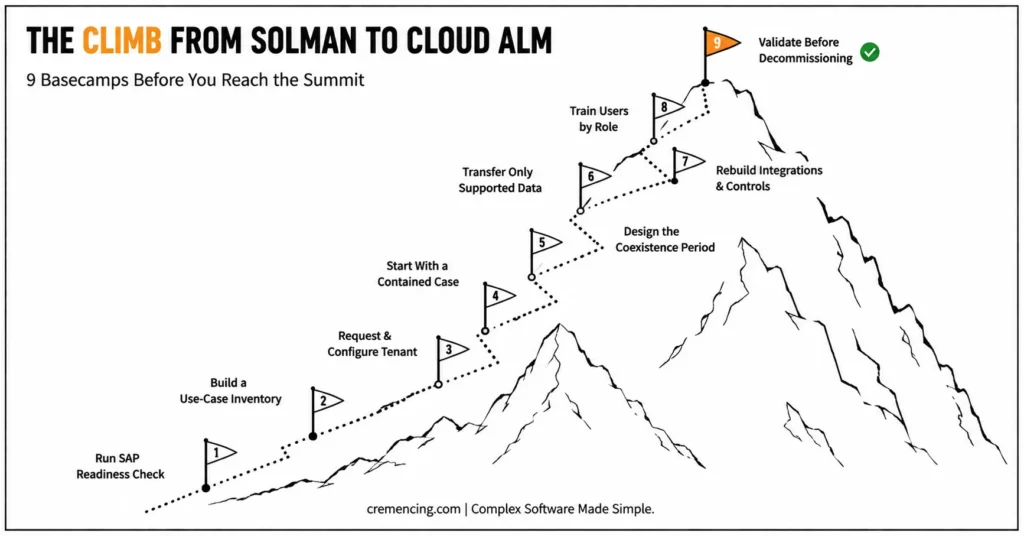
1. Run SAP Readiness Check
Start with SAP Readiness Check for SAP Cloud ALM. SAP recommends it as the first step for identifying the current Solution Manager footprint and transition considerations.
Do not rely only on workshop memory. Many SolMan systems contain active interfaces, scheduled jobs, users, and reports that process owners no longer mention.
2. Build a use-case inventory
Document every productive Solution Manager capability and assign a business owner.
For each use case, choose one destination:
- SAP Cloud ALM
- SAP Focused Run
- External ITSM platform
- SAP for Me or RISE methodology content
- Third-party testing or monitoring of the product
- Archive
- Temporary Solution Manager retention
- Retirement
Include process management, focused build, Test Suite, ChaRM, ITSM, monitoring, job management, DVM, reports, dashboards, custom developments, interfaces, and compliance controls.
3. Request and configure the tenant
Confirm entitlement, customer number, data-centre choice, identity setup, roles, and required capacity.
The standard entitlement provides one tenant per customer number for eligible contracts. Managed-service providers, group companies, or organizations requiring strict environment separation may need an extension or another tenant design.
4. Start with a contained adoption case
Choose a use case that delivers value without depending on the hardest SolMan customization.
Useful starting points include:
- A new S/4HANA implementation
- Manual testing
- Health monitoring
- Integration monitoring
- Business Process Monitoring
- Project and task management
A contained first release lets the team establish identity, authorizations, landscape registration, alert routing, templates, reporting, support ownership, and change governance before wider cutover.
5. Design the coexistence period
Define which platform owns each process during transition. Avoid duplicate requirements, tests, incidents, and deployment records without a clear system of record.
Document:
- Process ownership
- Source of truth
- Integration direction
- Data synchronisation rules
- Reporting responsibility
- User access
- Cutover date
- Decommissioning criteria
A coexistence period is useful only when teams know which platform controls each record.
6. Transfer only supported, valuable data
SAP’s selective data transfer is file-based and selective. It is not continuous synchronization between Solution Manager and Cloud ALM.
Technical prerequisites depend on the Solution Manager support package level. SAP’s current documentation identifies Solution Manager 7.2 SP15 as a minimum for the scenario, with additional restrictions and notes for lower levels than SP19.
Remove duplicates, expired documents, unused tests, obsolete branches, and records with no operational or legal value before transfer.
7. Rebuild integrations and controls
Map the complete target architecture:
- Alert-to-ticket flows
- ITSM integration
- Deployment providers
- Transport management
- Test automation
- Reporting feeds
- APIs and webhooks
- Identity and access control
- Retention policies
- Audit evidence
- Security monitoring
- Support procedures
Validate each control with its process owner, security team, and audit function. Successful LSMW execution does not guarantee successful migration, so SAP data migration should include source-data cleansing, field mapping, validation, reconciliation, and post-load checks.
8. Train users by role
Train project managers, process experts, testers, release managers, Basis administrators, integration teams, service-desk staff, and auditors on their actual tasks.
A generic product demonstration is not enough. Each role should complete realistic scenarios using the target configuration.
9. Validate before decommissioning SolMan
Run parallel validation for an agreed period before retiring a productive Solution Manager scenario.
Confirm:
- Monitoring coverage
- Alert quality
- Ticket creation and updates
- Deployment traceability
- Transport controls
- Test evidence
- Reporting accuracy
- Performance
- Data retention
- Security access
- Operational support procedures
Decommission only after the business owner accepts the target process and retained data remains accessible.
Conclusion
SAP Cloud ALM is the strategic destination for SAP-centered application lifecycle management, but a responsible move starts with process evidence, not product enthusiasm. Use 2026 to adopt SAP Cloud ALM capabilities for new work, move suitable implementation and monitoring scenarios, and design alternatives for SolMan-only functions. Teams that start now can reach 2027 with tested processes instead of a deadline-driven emergency.
The organizations that succeed with this transition won’t be the ones that migrate everything at once out of urgency; they’ll be the ones that treat 2026 as a genuine evaluation and pilot year. That means inventorying which Solution Manager scenarios are actually in active use; identifying which of those have a direct, supported equivalent in Cloud ALM today; and being honest about which capabilities certain deep custom-code analysis functions, highly specialized monitoring setups, or legacy integrations built over years don’t yet have a clean replacement. For those gaps, the responsible move is to design a documented interim approach or alternative tooling, not to assume the gap will close on its own before a deadline arrives.
The transition also needs to be considered alongside your wider SAP ALM roadmap, particularly if Solution Manager is already approaching a planned replacement.
Frequently Asked Questions
1. Does SAP Cloud ALM have ITSM or ticketing functionality?
No. SAP Cloud ALM does not provide the same full internal service-desk model as SAP Solution Manager ITSM. It uses the ITSM Adapter API and related interfaces to exchange cases with external platforms. Plan the ticket system, ownership, status mapping, and alert-routing design before migration.
2. Can SAP Cloud ALM connect to on-premise SAP systems?
Yes. SAP Cloud ALM can connect to supported on-premise SAP products. For ABAP systems, teams commonly register each SID and client through /SDF/ALM_SETUP, subject to current ST-PI and product prerequisites. Check the supported-solutions matrix because SAP Cloud ALM monitoring coverage differs by product and use case.
3. Is SAP Cloud ALM a public-cloud or private-cloud offering?
SAP Cloud ALM is a public-cloud service running on SAP BTP. Customers select an available data-centre location when requesting the tenant, but they do not install a private Cloud ALM stack in their landscape. Managed systems can still include supported private-cloud and on-premise SAP solutions.
4. Does SAP Cloud ALM replace SolMan Data Volume Management?
No direct one-to-one DVM replacement exists inside SAP Cloud ALM. SAP previously directed customers to the DVM app in SAP for Me and is moving selected data-related content toward the RISE with SAP Methodology Dashboard. Check the current roadmap before finalising a data volume management transition.
5. What is SAP Cloud ALM?
SAP Cloud ALM is SAP’s cloud-native application lifecycle management service for implementing and operating supported SAP solutions. It provides project, requirement, task, testing, deployment, monitoring, analytics, and service-delivery capabilities.
6. Is SAP Cloud ALM free for SAP customers?
Eligible customers receive SAP Cloud ALM usage rights through specified SAP support agreements or cloud subscriptions rather than buying a separate base licence. The standard entitlement includes one tenant per customer number and baseline capacity. Additional tenants or resources may require a paid tenant extension.




