
Your SAP Cloud ALM tenant is active. Your landscape still may not be covered.
Teams that connect a system to SAP Cloud ALM and call the migration “done” tend to discover the gap the expensive way — usually during an incident, when a monitored component shows green while the actual business process has already failed. The cost isn’t the tenant setup; it’s the false confidence that “active” means “covered.” Before Solution Manager’s 2027 maintenance deadline forces the decision anyway, it’s worth knowing exactly what Cloud ALM does and doesn’t take over.
SAP Cloud ALM Scope Limits
According to SAP documentation, connecting a system to SAP Cloud ALM does not automatically grant full functional coverage across implementation and operational scenarios. Capability availability depends strictly on the managed product, release version, and specific ST-PI/ST-A/PI framework setup. While Cloud ALM natively governs SAP Activate projects and monitoring across hybrid environments, it is a standardized SaaS product that cannot replicate custom Solution Manager ABAP code, complex ChaRM transport approvals, or deep database administration. For enterprise architecture teams, evaluating workload support against the SAP Cloud ALM Supported Solutions Matrix is essential prior to migrating workloads before Solution Manager’s mainstream maintenance cutoff.
What Is SAP CALM and Why Does It Matter?
SAP CALM is used as a short form of the official name of the product SAP Cloud ALM. SAP provides it as a cloud service for supported implementation, operations, and service delivery scenarios.
The keyword is “supported. Not all project, testing, deployment, monitoring, and analytics functions are activated when a system is connected. The coverage is dependent on product, release, Cloud ALM capability, and the required technical setup. Some teams are hoping to replace all Solution Manager workflows with the SAP CALM tool. Some use it as a simple monitoring dashboard. Both are incorrect.
SAP Cloud ALM can organize SAP Activate projects, scope processes, track requirements and tasks, coordinate testing, plan deployments, monitor systems supported, follow SAP service actions, and integrate external tools via integrators. It’s not the same as SAP Solution Manager or SAP Focused Run, and SAP markets them for different purposes.
A landscape assessment should therefore ask:
- Is the product and release supported?
- Which capability supports the required use case?
- What data and setup does that capability need?
- Which process must remain in another platform?
The right SAP CALM assessment starts with use cases, not product labels.
How SAP Cloud ALM Works Across the Lifecycle
SAP Cloud ALM starts with a business process or service, links that scope to delivery work, validates the result through testing and deployment, and then observes productive behaviour through operations data.
For implementation, it uses projects, roadmaps, processes, requirements, tasks, teams, milestones, tests, defects, features, and deployment plans. These records create traceability from the original business need to release evidence. For operations, the SAP CALM tool uses managed components, metrics, events, alerts, logs, and analytics. The goal is to detect failures, expose the affected context, support analysis, and initiate corrective work.
For service delivery, it records SAP service engagements, results, issues, actions, owners, and due dates. This gives SAP and customer teams a shared follow-up record.
Cloud ALM does not need to replace every specialist product. Test automation can remain external, an ITSM platform can stay the ticket system of record, and enterprise reporting can remain in a corporate analytics platform.
The design must define ownership and data movement. A test result should return with its process and release context. A monitoring alert should not become a ticket with no affected-service information.
That connected model reduces the hand-offs where ownership and status usually disappear.
What SAP Cloud ALM Can Do for Implementation
SAP Cloud ALM for Implementation supports SAP Activate-aligned delivery. Teams can create projects, assign roles, define phases and milestones, plan sprints, organize workstreams, and use roadmap content suited to the implementation approach.
Process scoping gives the project a business structure. Teams can identify processes in scope, prepare fit-to-standard workshops, capture decisions, and link requirements to the processes they change.
Requirements can become user stories and tasks with owners, dates, statuses, teams, and related documents. Project managers can then see which process decisions remain open, which requirements are late, who owns a blocker, and whether testing or a milestone is at risk.
SAP CALM analytics can show requirement status, task completion, test readiness, and deployment information from current lifecycle records instead of manually rebuilt steering slides.
The team must still define completion rules. A completed task does not mean a requirement is tested, and a passed test does not mean deployment approval exists.
Use separate controls for delivery completion, test completion, defect acceptance, and release readiness. The tool exposes status; governance defines what the status means.
What It Can Do for Testing and Deployment
SAP Cloud ALM supports manual testing inside the platform and automated testing through supported integrations and APIs. Teams can prepare test cases, build test plans, record execution, manage defects, and analyse results against the relevant process and project.
A connected automation provider can execute the technical test and return the result. SAP CALM retains the relationship to the process, test plan, requirement, and release.
A release manager should be able to answer:
- Did critical processes pass?
- Which defects remain open?
- Do failed tests block deployment?
- Which feature contains the change?
- Is the release ready?
Features and deployment plans help group implementation items, assess readiness, and coordinate delivery through supported providers and landscape arrangements.
Cloud ALM is not automatically a one-to-one replacement for every customized ChaRM process. Complex approvals, retrofits, cross-system transport controls, or audit reporting require a control-by-control comparison.
Much of that capability comes from the newer cloud-native evolution of the platform.
What SAP Cloud ALM Can Monitor in Production
SAP Cloud ALM for Operations monitors supported business processes, integrations, jobs, applications, services, and user interactions.
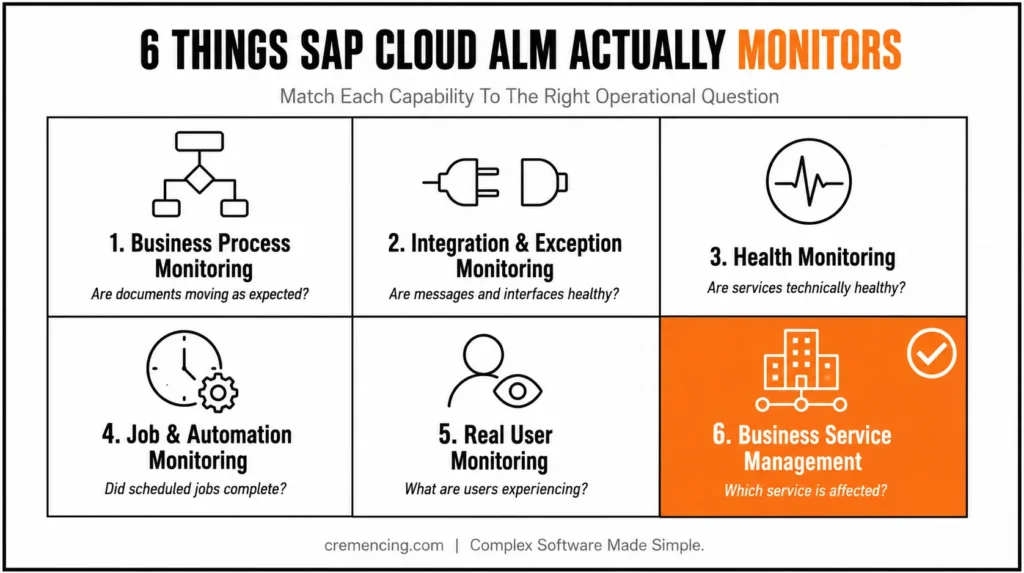
Its main SAP Cloud ALM monitoring capabilities include the following:
| Capability | Operational question |
| Business Process Monitoring | Are business documents and steps moving as expected? |
| Integration and Exception Monitoring | Are messages, interfaces, and exceptions healthy? |
| Health Monitoring | Are supported applications and services technically healthy? |
| Job and Automation Monitoring | Did scheduled and automated processing complete? |
| Real User Monitoring | What errors and response times are users seeing? |
| Business Service Management | Which business service is affected? |
This matters in hybrid landscapes where one process crosses S/4HANA, SAP Integration Suite, BTP extensions, and cloud applications. A component can remain available while the business outcome has already failed. Monitoring value depends on alert design. Too many thresholds create noise; weak business context forces operations teams to investigate from scratch.
A useful design defines the protected process, managed components, expected data, threshold, severity, owner, escalation path, recovery condition, and reporting requirement. The goal is not another dashboard. It is earlier detection with enough context for action.
How It Supports Cloud, Hybrid, and On-Premise Systems
SAP Cloud ALM is not limited to public-cloud products. Supported SAP Business Suite, ECC, S/4HANA, and other on-premise products can participate in relevant implementation and operations scenarios.
For ABAP systems, teams commonly register each SID and client through /SDF/ALM_SETUP. This setup program links the managed system and client to the SAP CALM tenant. Registration does not activate every capability. Basis teams must confirm product support, release prerequisites, ST-PI requirements or corrections, outbound connectivity, credentials, roles, endpoints, and application-specific data collection.
Check support at three levels:
- Product: Is the product and release listed?
- Capability: Does the required function support it?
- Data: Are the required metrics, logs, events, or business objects available?
This prevents the assumption that “connected” means “fully covered.”
Detailed database backup administration, storage analysis, and database-native troubleshooting may still belong in SAP HANA cockpit, native tools, Solution Manager during transition, Focused Run, or another approved platform.
For extensive on-premise estates or high-volume monitoring, Focused Run may remain the stronger fit. It can coexist with SAP CALM when responsibilities are clear.
SAP Solution Manager 7.2 remains in mainstream maintenance through December 31, 2027, extendable to 2030 under SAP’s Extended Maintenance program for on-premise license holders — RISE/cloud-only customers don’t retain that fallback. That timeline is the real driver behind most “phased adoption” decisions referenced throughout this post: it’s not a soft recommendation, it’s a hard maintenance cutoff.
What SAP Cloud ALM for Service Adds
SAP Cloud ALM for Service tracks SAP service engagements and their follow-up. It can show past, current, and upcoming services, record digital results, and manage issues, action items, owners, dates, and status.
This solves a common problem: findings leave a service review as documents or emails, then lose ownership before the next meeting. The capability does not replace enterprise ITSM. It provides a shared record for SAP service outcomes and agreed actions.
Teams should define where each action continues. A finding may become a project task, monitoring change, security activity, or an ITSM case. Without that link, the report remains informative but does not improve the landscape.
APIs, Integrations, Automation, and Joule
SAP Cloud ALM provides APIs and events for projects, tasks, documents, analytics, testing, monitoring, and other lifecycle records.
Common SAP Cloud ALM integration targets include ITSM platforms, test-automation products, reporting tools, collaboration systems, workflow automation, and deployment providers.
An integration should protect a defined control. A monitoring event might create an external ticket while preserving the affected service, severity, and Cloud ALM reference. A test provider might execute cases while Cloud ALM retains process and release context.
Define the system of record, authentication, identifier mapping, update direction, retry behaviour, API limits, and error ownership before connecting tools.
SAP has also introduced Joule with SAP Cloud ALM. Its initial role is navigation and contextual guidance about Cloud ALM functions and processes.
Treat Joule as an assistance layer, not an autonomous project manager or operations engineer. It cannot replace governed data, configured monitoring, accountable owners, or approved decisions.
What SAP Cloud ALM Cannot Replace
SAP Cloud ALM is SAP’s strategic ALM platform, but it is not identical to every existing product.
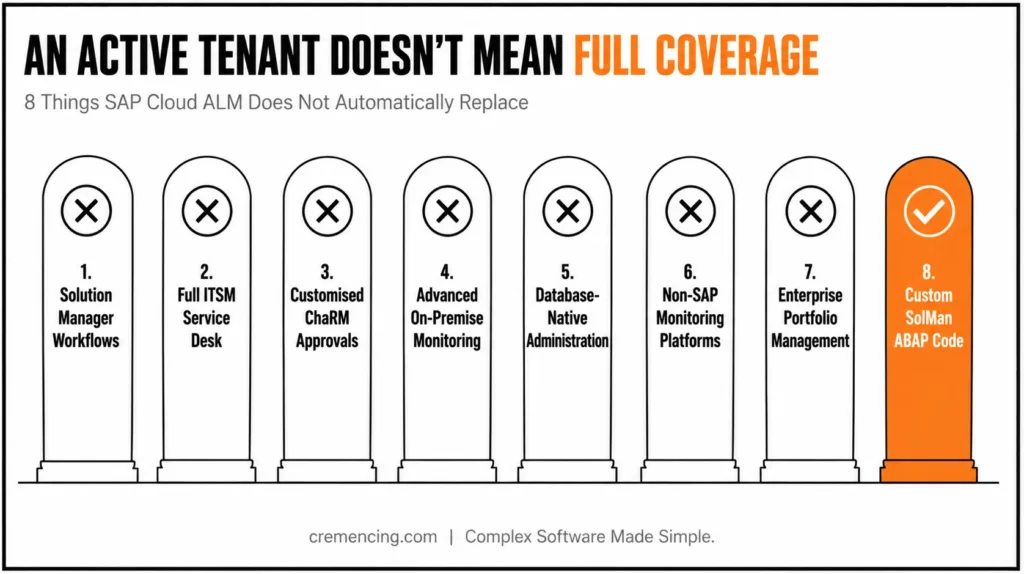
It does not automatically replace the following:
- Every Solution Manager workflow
- A full traditional ITSM service desk
- Every customised ChaRM approval
- All advanced on-premise monitoring
- Deep database-native administration
- Every non-SAP monitoring platform
- Enterprise portfolio management
- Customer-specific SolMan ABAP enhancements
SAP CALM connects with external ITSM systems rather than reproducing every SolMan service-desk process. Advanced technical operations may still justify Focused Run.
Custom Solution Manager code cannot move directly into a SaaS product. Teams must decide whether the business control still matters and then use a standard function, API integration, another SAP service, or an external platform.
The strongest adoption plan is capability-based: move what Cloud ALM handles well, redesign what needs a different model, and retain a source platform only where a documented dependency remains.
SAP CALM Login Explained
There is no single universal public SAP CALM login page for every productive customer.
Users normally open their organization’s tenant URL and authenticate through its configured identity provider or SAP Cloud Identity Services. The user must also exist in the tenant and receive the required roles.
An SAP S-user alone does not grant productive access.
When login fails, check the tenant URL, identity-provider assignment, user provisioning, login-name mapping, role collections, and cached browser identity. The support portal, public demo, learning content, and customer tenant may use different sign-in flows.
How to Access an SAP CALM Demo
SAP provides a public SAP CALM demo landscape with prepared data and role-based access for implementation, operations, and service scenarios.
Use it to inspect navigation, lifecycle objects, dashboards, process relationships, and monitoring applications. Do not treat a shared demo as proof that your exact systems, data, integrations, or authorization model will work identically.
A private evaluation should test one end-to-end scenario:
- Scope one process.
- Create and assign a requirement.
- Prepare and execute a test.
- Plan a deployment.
- Connect one supported system.
- Configure one meaningful alert.
- Confirm ownership and reporting.
That proves more than a feature tour.
How to Read the SAP CALM Roadmap
Read the SAP CALM roadmap alongside current product documentation.
Classify each capability as:
- Available now: Documented and usable
- Recently delivered: Confirmed in “What’s New”
- Planned: Shown in Roadmap Explorer or roadmap communications
Do not build a mandatory production control around a planned item before SAP delivers and documents it. Roadmap timing and scope can change.
Review roadmap areas such as implementation, operations, and business and data transformation, then confirm the release documentation, API changes, setup guides, and supported-solutions matrix.
When SAP Cloud ALM Is the Right Fit
SAP Cloud ALM is a strong starting point for new S/4HANA, cloud, and hybrid initiatives; SAP Activate project governance; and supported process, integration, job, user, or health monitoring.
Use phased adoption when Solution Manager still owns customized ChaRM, ITSM, testing, documentation, or monitoring. A phased design also suits landscapes requiring advanced on-premise monitoring or database administration.
Build a use-case inventory first. For each process, identify the owner, purpose, data, integration, control, retention need, and target platform.
Then adopt one contained scenario, validate it, and expand from evidence.
Conclusion
An active tenant does not prove that SAP Cloud ALM fits every part of your landscape. The real value appears when SAP Cloud ALM connects process scope, delivery work, testing, deployment, monitoring, service actions, and external tools around clear ownership and measurable controls.
For new S/4HANA, cloud, and hybrid initiatives, Cloud ALM is a strong strategic starting point. A focused run, native administration tools, external ITSM, or temporary Solution Manager use can still be valid where deeper or customer-specific requirements remain.
The right decision is neither “move everything” nor “wait until every feature matches.” Map each use case, verify support, test one meaningful end-to-end scenario, and expand only when the target process works. That approach turns Cloud ALM from another dashboard into a practical operating model for controlled change and production stability.
Frequently Asked Questions
1. What is SAP CALM?
SAP CALM is common shorthand for SAP Cloud ALM, SAP’s cloud-based application lifecycle management service. It supports selected implementation, testing, deployment, monitoring, analytics, and service-delivery scenarios. The official product name is SAP Cloud ALM, so use that wording in architecture documents, contracts, and formal project communication.
2. Is SAP CALM the same as SAP Cloud ALM?
Yes. SAP CALM and SAP Cloud ALM usually refer to the same SAP product. “CALM” is an informal abbreviation rather than the formal product name. Pair the abbreviation with SAP Cloud ALM in headings and search content because “CALM” alone can also refer to unrelated products and services.
3. How do I log in to SAP Cloud ALM?
Open the tenant URL supplied for your organization and authenticate through its configured identity provider. There is no single universal productive SAP Cloud ALM login page. Your user must be provisioned in the tenant and assigned the required roles; an SAP S-user by itself does not provide productive access.
4. Is there a free SAP Cloud ALM demo?
Yes. SAP provides a shared SAP Cloud ALM demo landscape with prepared data and role-based users for Implementation, Operations, and Service. Use it to examine navigation and capabilities, but run a private proof of concept before making a landscape decision.
5. Can SAP Cloud ALM monitor on-premise systems?
Yes, supported on-premise SAP systems can connect to SAP Cloud ALM for relevant use cases. For ABAP landscapes, teams commonly register each SID and client through /SDF/ALM_SETUP. Product connection does not guarantee every monitoring capability, so confirm the release, managed component, prerequisites, and supported-solutions matrix first.
6. Can SAP Cloud ALM manage on-premise transports?
SAP Cloud ALM can support deployment orchestration and transports for documented on-premise and private-cloud scenarios. It does not automatically reproduce every customised ChaRM workflow. Before switching, test approvals, transport routes, deployment providers, retrofit needs, audit evidence, exception handling, and the release manager’s required control points.
7. Does SAP Cloud ALM support multi-cloud or non-SAP application monitoring?
SAP Cloud ALM primarily focuses on SAP and SAP-integrated landscapes. While it can monitor certain non-SAP components through supported integrations, it isn’t designed as a general-purpose multi-cloud monitoring platform. Confirm the supported-solutions matrix before relying on it for non-SAP-heavy environments.
8. What happens to Solution Manager once SAP Cloud ALM is adopted?
Solution Manager doesn’t disappear automatically. Many organizations run both in parallel during a phased transition, especially where customized ChaRM, ITSM, or advanced monitoring still depends on Solution Manager. SAP Cloud ALM adoption should follow a use-case-by-use-case migration, not a single cutover.
9. Can SAP Cloud ALM be customized like Solution Manager?
Not in the same way. SAP Cloud ALM is a SaaS product, so deep, customer-specific ABAP enhancements aren’t possible the way they were in Solution Manager. Instead, teams extend functionality through APIs, integrations, and configuration options within supported boundaries.
10. Is SAP Cloud ALM included in the S/4HANA license, or does it cost extra?
SAP Cloud ALM is generally provided as part of SAP’s cloud application lifecycle management offering at no additional license cost for supported scenarios. However, licensing details can vary, so always confirm current entitlements with your SAP account team.





4 Responses