
The transport went into production, but no one can demonstrate that it was done to an approved requirement. That chasm typically begins when users view SAP ALM software as a monitoring dashboard and not the control system for their requirements, tests, releases, deployments, operations, and improvement.
At the end, you will understand the SAP ALM full form, the practical SAP ALM meaning, the difference between Cloud ALM and Solution Manager and Focused Run, and how to create a lifecycle that aligns changes and incidents.
SAP Operations Foundation (SAP OPF) is a component of SAP Application Management. SAP Operations Foundation (SAP OPF) is one of the parts of SAP Application Management.
Strategic SAP ALM Transition
Paragraph SAP Application Lifecycle Management provides the operational framework linking business requirements, test evidence, transport controls, and system observability across cloud and on-premises environments. With mainstream maintenance for SAP Solution Manager 7.2 ending on December 31, 2027, organizations must transition to SAP Cloud ALM as their primary strategic management platform.
Cloud ALM includes implementation and operations capabilities under standard SAP Enterprise Support agreements without requiring separate licensing. However, because Cloud ALM does not support direct data transfer for Solution Manager Change Control Management or Quality Gate Management, IT teams must plan a structured transition.
Organizations should map approval workflows, establish target deployment parameters, and close active change cycles before retiring existing Solution Manager instances.
What Is SAP ALM and Why It Matters?
SAP ALM stands for SAP Application Lifecycle Management. It includes the processes, tools, roles, and services that are required for the management of SAP and related third-party solutions from the initiation and implementation stage to testing, deployment, productive operation, support, optimization, and retirement.
SAP’s definition of application lifecycle management is the practice of gathering business demand, turning requirements into specifications, configuring and documenting applications, deploying change into production, maintaining them in production and optimizing service-level performance.
That definition matters because SAP Application Lifecycle Management is not one transaction code, one monitoring screen, or one product. It is the operating model that links a business requirement to the process design, development object, test evidence, transport, release decision, production service, alert, incident, and corrective action.
SAP currently positions SAP Cloud Application Lifecycle Management as its strategic, cloud-native ALM platform for SAP customers. It supports cloud, hybrid, and on-premises landscapes, with functional areas for implementation, operations, service delivery, and business transformation.
SAP Cloud ALM, Solution Manager, and Focused Run: Licensing and Timelines
SAP Cloud ALM is included for eligible customers through SAP Enterprise Support or Enterprise Support Cloud Edition, subject to the applicable entitlement and fair-use conditions. Customers should confirm their tenant and usage rights in SAP for Me rather than assuming that every connected company or external customer is covered.
SAP Solution Manager 7.2 remains important in many established ECC and SAP S/4HANA estates. Its mainstream maintenance runs until 31 December 2027.
Customers using the optional extended maintenance for SAP Business Suite 7 through 2030 receive restricted extended maintenance for specified Solution Manager capabilities. SAP nevertheless recommends completing the transition to SAP Application Lifecycle Management 2028.
SAP Focused Run serves a different need. It is an on-premises product for service providers and organizations that require high-volume monitoring, analytics, advanced system management, user monitoring, integration monitoring, or configuration and security analytics. SAP Focused Run remains separately licensed, and its maintenance path is independent of SAP Solution Manager.
In short: 2027 is the recommended transition deadline for moving off Solution Manager’s mainstream-maintained functions, while 2030 is the outer limit for organizations using Business Suite 7 extended maintenance to retain a restricted set of Solution Manager capabilities in the meantime.
SAP ALM Goes Beyond Tools and Platforms
The practical meaning of SAP ALM is therefore broader than “use Cloud ALM.” You need lifecycle governance first, followed by the product mix that fits your landscape, operating scale, support contract, regulatory constraints, and monitoring depth. A tool cannot resolve unclear ownership, missing entry criteria, weak testing, undocumented emergency changes, or alerts that no one is required to investigate.
Businesses rely on SAP ALM software because ERP changes are connected. A pricing adjustment may affect sales orders, output, interfaces, billing, tax, revenue recognition, analytics, authorizations, and support procedures. SAP lifecycle management authorizations and traceability are needed to assess that chain before deployment and observe it afterwards.
How does SAP ALM work?
SAP ALM works by connecting lifecycle objects and operational signals across several control loops.
The implementation loop moves from process scope to requirements, tasks, configuration, development, testing, release, and deployment. The operations loop detects health or process problems, analyses their cause, coordinates correction, and uses the result to improve the service.
SAP Application Lifecycle Management documents these areas through implementation capabilities and a Detect–Analyse–Correct–Automate operating cycle.
Process and Requirement Control
The lifecycle should begin with the business process, not the transport request.
In SAP Cloud ALM for Implementation, SAP Activate roadmaps, predefined process content, project tasks, phases, sprints, milestones, requirements, and team assignments provide a controlled project structure. Fit-to-standard workshops use process content to identify gaps and capture requirements instead of beginning with a list of custom developments.
An SAP ALM software requirement should state:
- The expected business outcome
- The affected process
- The requirement owner
- Acceptance criteria
- Priority and target release
- Dependencies
- Data impact
- Security and authorisation impact
- Interface impact
- Important exceptions
User stories and tasks then break the requirement into work that a team can estimate, assign, test, and complete.
Do not create requirements only to satisfy project reporting. A vague entry such as “Improve invoice process” cannot control design or testing. State which invoice scenario must change, what the current result is, what the future result should be, and how the tester will prove that the requirement has been met. For teams weighing tools, our head-to-head comparison breaks down which one fits your landscape.
Test and Quality Control
Testing connects the intended change to evidence.
SAP Cloud ALM for Implementation supports test planning, manual and integrated automated test execution, test assignment, defect handling, and progress tracking. Requirements can move into testing, link to test cases, and proceed towards production after the agreed quality checks pass.
A useful SAP ALM test model separates the following:
- Developer and unit checks
- Functional testing
- Integration testing
- Regression testing
- Security and authorisation testing
- Performance checks
- Business acceptance testing
- Production validation
Not every change requires the same depth. A text correction and a new tax calculation do not carry the same risk.
The change record should therefore show why a particular test scope is sufficient, rather than applying the same checklist mechanically to every transport.
For an ABAP correction, technical completion does not mean that the program activates. The test should confirm authorization behavior, document consistency, error handling, background execution where relevant, performance on realistic data volumes, and the expected business result.
Release, Change, and Deployment Control
SAP Cloud ALM uses features, releases, system groups, deployment plans, and deployment activities to connect completed work with movement through the landscape.
A feature can group transports that deliver one functional unit. A release groups requirements and features intended for a defined production window. System groups represent landscape roles such as development, quality assurance, pre-production, and production.
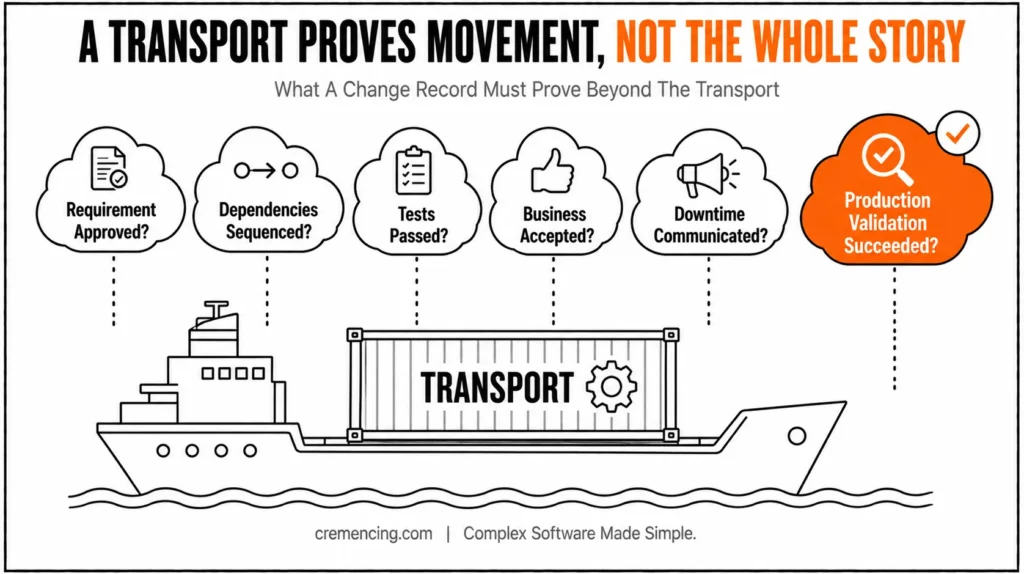
This design prevents a common SAP Application Lifecycle Management failure: treating the transport as the complete change record. A transport proves that technical or configuration objects moved. It does not prove that:
- The requirement was approved
- Dependencies were sequenced
- Tests passed
- Business users accepted the result
- Downtime was communicated
- Interfaces were coordinated
- Production validation succeeded
ECC and SAP S/4HANA on-premise teams may still use change request management in SAP Solution Manager, third-party ITSM platforms, or established transport tools.
During an SAP ALM transition, map the existing approval states, retrofit rules, emergency process, test evidence, transport sequencing, and audit reports before switching platforms. A rushed product replacement can remove controls that users assumed were automatic.
Landscape and Connectivity
SAP Cloud ALM Landscape Management stores information about cloud services, on-premise systems, clients, endpoints, and business services. This landscape information provides the foundation for implementation and operations applications.
For SAP Business Suite 7 and SAP S/4HANA, supported monitoring areas currently include:
- Business Process Monitoring
- Integration and Exception Monitoring
- Real User Monitoring
- Job and Automation Monitoring
- Configuration and Security Analysis
- Health Monitoring
- Transport-related capabilities
- SAP Business Transformation Centre functions
The available scope depends on the connected product, release, technical prerequisites, and configured use case. Connecting an ABAP system does not require SAP Solution Manager or SAP Focused Run as an intermediary.
The exact setup depends on the system and monitoring scenario. For supported SAP Business Suite and SAP S/4HANA systems, SAP documents transaction /SDF/ALM_SETUP, required SAP_BASIS and SAP_UI levels, current ST-PI content, service credentials, and product-specific steps.
Transaction /SDF/ALM_SETUP configures the managed ABAP system for communication and data collection with SAP Cloud ALM. Follow the current setup guide and required SAP Notes. Do not copy service credentials, destinations, certificates, or RFC settings from another landscape without checking the target system and tenant.
Data collection is also use-case specific. SAP states that operations data collection does not begin merely because an SAP Cloud ALM tenant exists. Administrators explicitly connect supported services and configure the required collection processes. This protects security, privacy, network, and data-volume requirements.
Operations and Observability
SAP Cloud ALM for Operations centralizes health, integration, business-process, user, job, exception, and configuration signals for supported products.
Its central event-processing model raises and routes events so operations teams can investigate and resolve issues.
Job & Automation Monitoring collects execution information from supported systems and analyzes current executions against historical behavior and problems such as:
- Cancelled executions
- Delayed starts
- Long runtimes
- Missing expected executions
- Automation exceptions
- Abnormal performance patterns
Operators can drill down from the job definition to its execution history and, where supported, navigate to the source system for further action. Local SAP transactions remain useful.
Transaction SM37 displays background jobs, statuses, steps, logs, scheduling details, and spool links. For ABAP runtime errors, ST22 helps administrators analyse short dumps. Meanwhile, SM21 displays the SAP system log, while SM13 reviews terminated or delayed update requests. When monitoring work processes, SM50 shows processes on the current application server, and SM66 provides a system-wide overview.
These transactions answer local system questions. SAP ALM adds central scope, cross-system context, history, event ownership, alert processing, and lifecycle traceability.
SAP ALM monitoring should follow business impact. A failed background job may be harmless test activity, or it may block invoices, deliveries, bank files, payroll, production planning, or interface messages. Build business services and alert rules around the consequence, not only the colour of a technical metric.
Feedback and Continuous Improvement
The application lifecycle does not end at go-live.
Production monitoring, incidents, support feedback, recurring alerts, failed tests, user behaviour, process delays, and performance problems should create new requirements or improvement tasks.
For example, a job that fails every month should not remain a recurring SM37 activity. The team should identify the root cause, create a requirement, correct the program or operating procedure, test the change, deploy it, and confirm that the failure no longer returns.
This feedback loop is where SAP ALM keeps the application lifecycle on track. It turns operations evidence into governed improvement instead of allowing the same problem to return through manual intervention.
When to Use SAP ALM vs. Alternatives
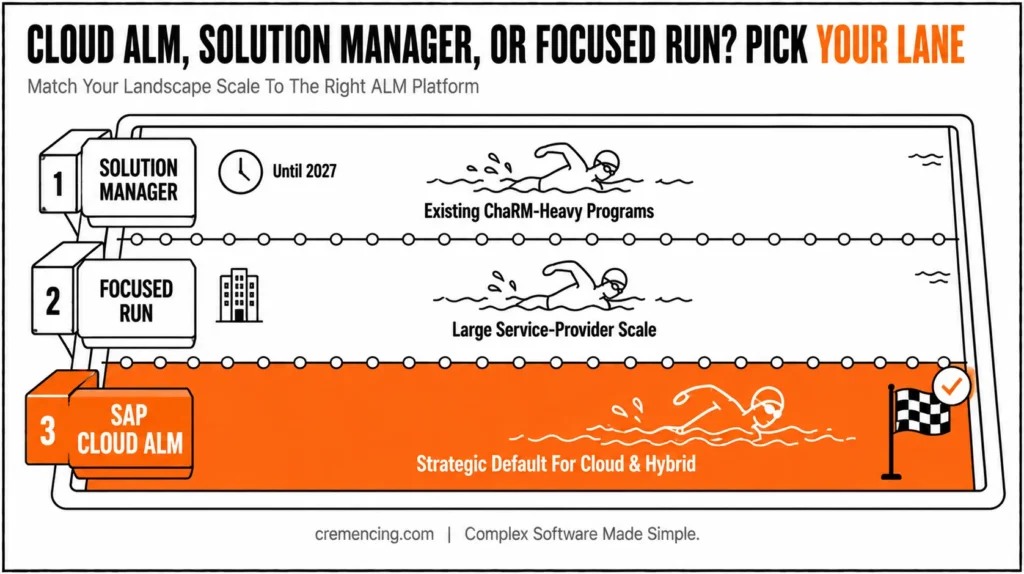
Use SAP Cloud ALM as the default strategic choice when you need standardized implementation and operations capabilities for SAP cloud, hybrid, or supported on-premise solutions without operating another on-premise ALM platform.
It fits organizations using SAP Activate, fit-to-standard, central implementation tracking, testing, deployment traceability, business process monitoring, and supported operations use cases.
Keep SAP Solution Manager temporarily when critical capabilities, integrations, audit controls, or active programs have not yet moved.
Do not interpret extended maintenance as a reason to postpone transition analysis. SAP recommends completing the move before the end of 2027, and the optional post-2027 Solution Manager scope is restricted.
Use SAP Focused Run when scale, service-provider separation, high-volume metrics, advanced user or integration monitoring, and specialized operations analytics justify a separately licensed on-premise product.
SAP positions it for advanced and service-provider use cases, not as the standard choice for every SAP customer. Use a third-party ALM, DevOps, ITSM, observability, or testing platform when it is already the governed enterprise standard and covers SAP requirements without losing essential SAP context.
Integration may be better than replacement. An organization can keep enterprise incident management in ServiceNow or another ITSM platform while using SAP Cloud ALM for SAP implementation and operations events.
Which SAP ALM Path Fits You?
- Cloud/hybrid implementation, no existing Solution Manager investment → SAP Cloud ALM as default
- Heavy active ChaRM programme → Controlled Solution Manager transition, map gaps before switching
- Service-provider or high-volume monitoring needs → SAP Focused Run
- Already standardized on a third-party ITSM/DevOps platform → Integrate, don’t replace
Choosing the Right SAP ALM Tool for Your Business Needs
| Requirement | Best starting point | Avoid this mistake |
| Cloud or hybrid SAP implementation | SAP Cloud ALM for Implementation | Recreating every Solution Manager workflow without checking whether it remains necessary |
| Standard SAP operations monitoring | SAP Cloud ALM for Operations | Depending only on local transactions and email alerts |
| Large service-provider monitoring | SAP Focused Run | Selecting it for a small landscape with standard monitoring needs |
| Existing ChaRM-heavy programme | Controlled Solution Manager transition | Switching products before mapping approvals, retrofit, and audit evidence |
| Enterprise-wide ITSM | Connect SAP Cloud ALM to the corporate ITSM tool | Expecting Cloud ALM to replace every service-desk process |
| Non-SAP software engineering | Existing DevOps and observability platform | Moving unrelated engineering work into an SAP-specific lifecycle product |
| Local troubleshooting | SM37, ST22, SM21, SM50, and related tools | Treating local diagnostics as complete central monitoring |
The correct choice depends on capabilities, not product names.
Build a use-case inventory covering:
- Process management
- Requirements
- Project tasks
- Testing
- Defect handling
- Deployment
- Transport control
- Job monitoring
- Integration monitoring
- Real-user monitoring
- Business-process monitoring
- Health monitoring
- Security analysis
- ITSM
- Reporting
- Audit evidence
Mark what exists today, what must remain, what SAP Cloud ALM supports, and what requires integration or temporary coexistence.
Then assign an exit condition to every temporary platform.
“We will migrate later” is not a transition plan. Define the capability, target date, data-retention requirement, replacement process, owner, dependencies, and evidence required to switch the old component off.
SAP ALM succeeds when the organization can trace a production outcome back to a controlled decision and route operational evidence into the next improvement cycle. The product is important, but the lifecycle discipline is what keeps work on track.
Conclusion
SAP ALM only works when a production outcome can be traced back to an approved requirement — not when a tool sits unused next to a monitoring dashboard. Cloud ALM is SAP’s strategic direction, but the discipline matters more than the product: define ownership, entry criteria, and test depth before choosing which platform enforces them.
Whether you’re still on Solution Manager, mid-transition, or fully on Cloud ALM, the same test applies — can you answer why a change happened, who approved it, what it touched, and how you know it’s working? If not, the gap is process, not tooling.
Frequently Asked Questions
Is SAP Cloud ALM replacing SAP Solution Manager?
SAP Cloud ALM is the platform that SAP is using for ALM. It does not have all the same features as SAP Solution Manager. Organizations need to look at what they’re using SAP Solution Manager for now and compare it to what SAP Cloud ALM can do, including the tools it works with and the other programs it can connect to before they switch. SAP thinks it is a good idea to make the switch before 2028.
Does SAP Cloud ALM require Solution Manager or Focused Run?
No. SAP Cloud ALM does not need SAP Solution Manager or SAP Focused Run to work. SAP Cloud ALM can connect to cloud and on-premises products that SAP supports. It does this through the setup options that SAP has documented.
Does SAP Cloud ALM require an additional license?
Eligible customers do not need an additional license for individual SAP Cloud ALM implementation or operations functions. Usage rights are generally included through qualifying SAP support or cloud agreements. Fair-use conditions and entitlement still apply, so confirm your customer number, tenant rights, users, connected landscapes, and contract terms before rollout.
Does SAP Cloud ALM include ITSM ticketing?
No. SAP Cloud ALM does not provide a complete built-in IT service management desk equivalent to Solution Manager ITSM. It supports integration with external incident-management systems through APIs and event actions. Organizations using Solution Manager ITSM should plan a move to a third-party service desk and preserve incident workflows and audit history.
What is the SAP ALM full form?
The SAP ALM full form is SAP Application Lifecycle Management. The term covers the processes and tools used to manage requirements, implementation, testing, releases, deployment, operations, support, and improvement across SAP and connected applications. SAP ALM is a management discipline, while SAP Cloud ALM is one product that supports it.
What is SAP ALM used for?
SAP ALM software is used to control the full application lifecycle. Teams use it to document processes, manage requirements, assign tasks, coordinate testing, track defects, control releases, monitor business and technical services, investigate alerts, and convert production findings into improvements. Its value comes from traceability across these activities.
Can SAP Cloud ALM and SAP Solution Manager run at the same time during a transition?
Yes. Many organizations run both temporarily while migrating capabilities, provided approval states, transport sequencing, and audit evidence are mapped consistently across both systems to avoid gaps or duplication.
What happens to audit history in Solution Manager after switching to Cloud ALM?
SAP Cloud ALM does not automatically import Change Control Management data from Solution Manager, so organizations should plan how to preserve or archive existing audit history before decommissioning Solution Manager functions.
Does SAP Cloud ALM support ECC systems, or only S/4HANA?
SAP Cloud ALM can connect to supported SAP Business Suite 7 and S/4HANA systems for various monitoring and implementation use cases, though the exact scope depends on the connected product, release, and configured use case.
Who should own the SAP ALM transition project internally?
Ownership typically sits with a Basis or platform team working alongside process owners and IT governance, since the transition touches technical configuration, monitoring setup, and business-process traceability, not just a single technical migration.
References
Application Lifecycle Management




