
The project plan is green. Production says otherwise. An SAP ALM tool should connect scope, delivery, testing, releases, and production health, yet many teams still face gaps across these stages. Testing has open defects, the release team cannot confirm deployment readiness, and operations discovers a failed interface only after users complain. Across ECC 6.0, S/4HANA, cloud, and hybrid landscapes, that disconnect can signal gaps in the ALM tool chain.
By the end, you’ll know the five capabilities that prevent that disconnect and which SAP ALM product fits each operating model.
What Is an SAP ALM Tool and Why Does It Matter?
An SAP ALM tool manages the lifecycle of an SAP solution from initial process design to productive support. It should help teams plan work, control requirements, test changes, coordinate releases, monitor live services, and learn from operational data.
The word “tool” can be misleading because SAP does not offer one product with every ALM function. SAP currently identifies SAP Cloud ALM, SAP Focused Run, and SAP Solution Manager as separate ALM offerings designed for different operational requirements. These products are not functionally equivalent, as SAP explicitly states. For cloud, hybrid, and supported on-premise landscapes, SAP Cloud ALM provides standardized implementation, operations, and service-delivery capabilities.
By contrast, SAP Focused Run targets high-volume monitoring, alerting, analytics, and advanced operations. Meanwhile, SAP Solution Manager supports customer-specific ALM processes for established on-premise and hybrid environments.
A useful SAP ALM tool therefore does more than generate dashboards. It creates traceability between:
- The business process being implemented
- The requirement that changes it
- The tasks assigned to deliver it
- The tests that validate it
- The release that moves it
- The monitoring that confirms it works in production
This connected lifecycle matters because project and operations problems rarely begin in the same system where they become visible. A requirement may be approved without test coverage, a release may move without clear readiness evidence, or an interface may fail after the project team has already declared success.
The right SAP ALM tool exposes those gaps before they become missed milestones, failed cutovers, or production incidents.
How an SAP ALM Tool Works
A connected ALM model starts with process scope. The team identifies which business processes, applications, interfaces, organisational units, and expected outcomes belong to the project or service.
Requirements then describe what must change. Tasks, user stories, documents, and work packages turn those requirements into assigned delivery work.
Tests prove that the process behaves as expected. Features, releases, and deployment plans organise when the approved change moves into the target landscape.
Operations closes the loop. Monitoring applications observe business processes, integrations, background jobs, system health, user experience, and service availability. Alerts and analytics identify where actual production behaviour differs from expected behaviour.
The value comes from relationships between these records:
- A failed test should identify the affected requirement.
- A delayed requirement should show the milestone at risk.
- A deployment should identify its included features.
- A production alert should identify the affected service.
- A defect should show whether it blocks a planned release.
SAP Cloud ALM follows this content-driven model through SAP Activate content, projects, process scopes, requirements, tasks, testing, deployment orchestration, analytics, and operations applications. SAP states that its implementation functionality supports fit-to-standard workshops, testing, deployment activities, project analytics, and traceability from processes through requirements and tasks to production deployment.
A mature SAP ALM tool does not need to become the database for every department. It needs a defined role within a governed toolchain.
Project management, test automation, IT service management, monitoring, and analytics platforms may remain separate. The ALM design must define which tool owns each record and how the required context moves between them.
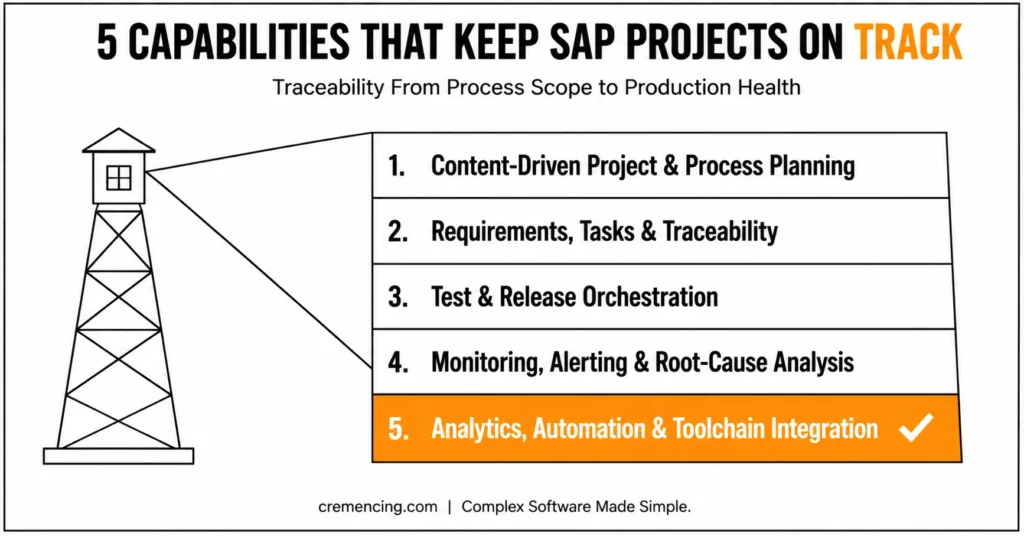
Practical Capability Walkthrough: Five SAP ALM Tool Capabilities
Capability 1: Content-Driven Project and Process Planning
A project loses control early when scope lives in workshop slides, milestones live in spreadsheets, and solution processes live somewhere else.
The first essential SAP ALM tool capability is a project structure tied directly to business-process scope.
SAP Cloud ALM allows implementation teams to create SAP Activate-aligned projects, define phases and milestones, organise teams and workstreams, manage sprints, and scope relevant business processes. Its implementation functionality also supports fit-to-standard workshops and SAP Best Practices content.
This matters because project progress becomes more than a percentage entered before a steering meeting. The plan can reflect actual requirements, tasks, testing activity, deployment status, and unresolved blockers.
A project is on track when:
- Business-process scope has an accountable owner.
- Project phases and milestones match the delivery method.
- Fit-to-standard decisions are recorded against the relevant process.
- Out-of-scope items remain visible.
- Workstreams use one agreed calendar.
- Delayed tasks show which milestone they affect.
This capability also controls scope expansion. When a new requirement appears, the team can determine which business process it changes, who requested it, whether it belongs in the current release, and which additional testing it creates.
Without that connection, scope growth remains hidden until the project runs out of time.
A reliable SAP ALM tool also allows teams to distinguish three different forms of progress:
- Activity progress: People are working on tasks.
- Delivery progress: Requirements are implemented.
- Readiness progress: The solution has passed testing and can move safely.
Those measures are not interchangeable. A project can show high task completion while critical requirements remain untested. These capabilities become clearer once you compare this platform against Solution Manager.
Capability 2: Requirements, Tasks, and End-to-End Traceability
A requirement without an owner is only a wish. A task without process context is only activity.
The second SAP ALM tool capability connects requirements, user stories, tasks, documents, tests, features, and deployment records.
SAP Cloud ALM supports requirements, user stories, teams, workstreams, task hierarchies, project tracking, and traceability across implementation objects. SAP describes its analytics as a way to identify bottlenecks and trace processes, requirements, tasks, tests, and deployment readiness.
Consider a change to credit-block processing.
The business requirement should link to the affected order-to-cash process. Functional and development tasks should identify the responsible team members. Test cases should prove the agreed-upon behavior, while the feature and deployment plan should show when the change will reach production.
That chain answers the questions that usually consume a project meeting:
- Who owns the requirement?
- Which tasks remain open?
- Has the design been approved?
- Is development complete?
- Has the requirement been tested?
- Are defects still blocking release?
- Which deployment contains the change?
- Which milestone is at risk?
Traceability also improves auditability. Instead of reconstructing a decision from emails and spreadsheets, the team can follow the change from process and requirement through delivery, testing, approval, and deployment.
The SAP ALM tool must still operate within clear governance. Teams should define:
- Mandatory requirement fields
- Approval responsibilities
- Status-transition rules
- Ownership requirements
- Due-date rules
- Test-coverage expectations
- Completion criteria
- Release-readiness criteria
An ALM platform cannot correct weak governance when each workstream uses a different definition of “complete.”
Capability 3: Test and Release Orchestration
Testing fails as a control when test cases sit in separate files, automated scripts run without project context, and release managers cannot see whether critical processes passed.
The third SAP ALM tool capability coordinates manual tests, automated tests, defects, test plans, features, releases, and deployments.
SAP Cloud ALM allows teams to prepare and execute manual tests directly. It can also integrate with supported test-automation providers through the public Test Automation API.
Automated execution may start from SAP Cloud ALM, while the connected provider performs the actual test and returns its execution status. Manual and automated cases can remain visible within the same project and process context.
The important word is orchestration.
An SAP ALM tool does not need to execute every technical test itself. It needs to show:
- Which process is being tested
- Which requirement the test validates
- Whether execution passed
- Which defect remains open
- Whether the defect blocks release
- Which deployment contains the change
A controlled release should provide clear answers before the cutover window opens:
- Are all required tests prepared?
- Which tests passed, failed, or remain unexecuted?
- Are high-priority defects still open?
- Has every critical requirement received sufficient test coverage?
- Is the feature ready for deployment?
- Which release and deployment plan include it?
SAP Cloud ALM’s implementation scope includes manual testing, automation-provider integration, defects, analytics, features, deployment plans, and software-delivery orchestration.
This SAP ALM tool capability keeps delivery on track because release decisions use current evidence rather than verbal confirmation.
It also exposes late testing early. When requirements are ready, but test preparation is behind schedule, the project manager can see the next bottleneck before the planned release date.
Capability 4: End-to-End Monitoring, Alerting, and Root-Cause Analysis
A technically available system can still support a broken business process.
An interface may stop, a background job may miss its processing window, or response time may make an application unusable even though the application server remains online.
The fourth SAP ALM tool capability monitors the service from business activity down to the relevant technical component.
SAP Cloud ALM for Operations includes capabilities for business process monitoring, integration and exception monitoring, health monitoring, job and automation monitoring, real-user monitoring, business service management, alert management, and operational analytics across supported products.
What Each Monitoring Application Tracks
Each monitoring application answers a different question:
| Monitoring capability | Operational question |
| Business Process Monitoring | Are business documents and process steps moving as expected? |
| Integration and Exception Monitoring | Are messages and interfaces completing successfully? |
| Health Monitoring | Are applications and services operating within expected technical thresholds? |
| Job and Automation Monitoring | Did scheduled jobs and automated processes run successfully? |
| Real User Monitoring | What errors and response times are users experiencing? |
| Business Service Management | Which business service is affected by a component failure? |
This model reduces the gap between a technical alert and a business decision.
A useful alert should identify the affected service, relevant managed object, severity, detection time, and enough technical context for the support team to begin triage.
Cloud ALM can also connect supported on-premises systems. For ABAP systems, SAP Community guidance confirms that teams run /SDF/ALM_SETUP for each SID and client combination they want to register. Each combination receives a unique landscape identifier.
Coverage still depends on the product and monitoring use case. Teams should check current supported solutions and setup documentation before promising cosupported solutions for an on-premise estate.
For extensive on-premise estates, service provider scenarios, or high-volume advanced monitoring, SAP positions Focused Run as the more suitable or complementary product.
A monitoring capability is successful when the team
- Detects the failure before a user ticket
- Avoids duplicate and low-value alerts
- Routes the issue to the correct owner
- Understands the affected business service
- Confirms recovery through monitoring data
- Uses incident history to improve thresholds and automation
Capability 5: Analytics, Automation, and Toolchain Integration
Project and operations teams often lose time creating status rather than acting on it.
They export task lists, rebuild charts, copy defect counts, assemble release slides, and manually create service tickets from monitoring alerts.
The fifth SAP ALM tool capability turns lifecycle records into current analytics and connects them to the rest of the delivery toolchain.
SAP Cloud ALM provides project tracking, requirements traceability, test analytics, deployment information, monitoring analytics, APIs, and business events. Its API coverage includes implementation and operations processes.
Depending on the interface, teams can:
- Retrieve or update tasks
- Connect test-automation providers
- Extract analytics
- React to monitoring events
- Integrate external ITSM systems
- Build reporting extensions
- Connect workflow and collaboration platforms
- Create specialist project-management extensions
SAP documents built-in or API-based integration patterns involving products such as Tricentis, SAP Analytics Cloud, SAP Build Process Automation, SAP Automation Pilot, ServiceNow, Microsoft Teams, Grafana, and SAP Integration Suite.
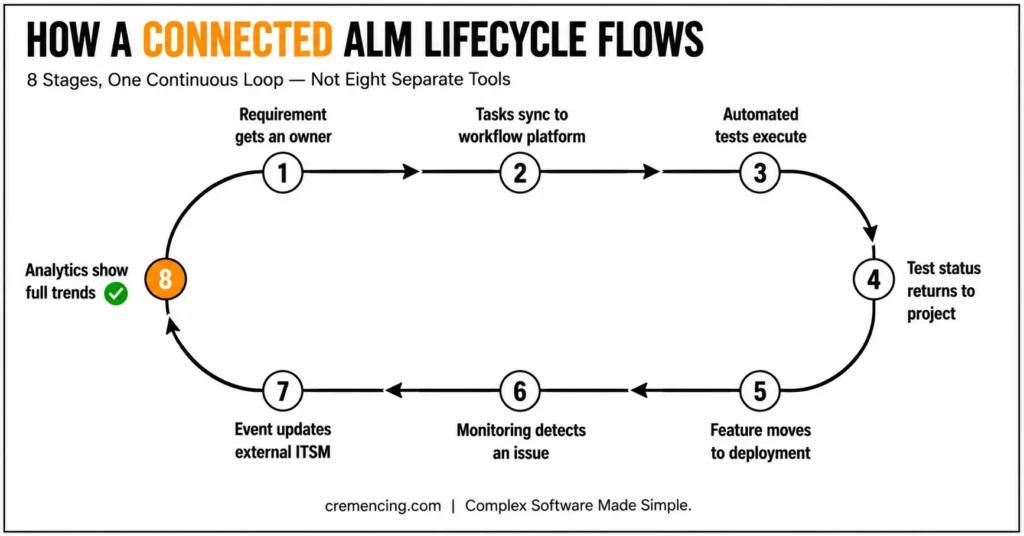
How a Connected Lifecycle Flows in Practice
A practical integrated lifecycle might work like this:
- A requirement enters the SAP ALM tool and receives an owner.
- Tasks synchronize with an approved workflow or collaboration platform.
- A test provider prepares and executes automated tests.
- Test status returns to the project context.
- A feature moves through release and deployment planning.
- Operations monitoring detects a production issue.
- An event creates or updates a case in the external ITSM platform.
- Analytics show project, testing, deployment, and service trends.
This is where governance matters most.
Teams must define the system of record, integration direction, identifier mapping, authentication, error handling, API limits, and responsibility for failed synchronization.
Do not integrate two systems simply because both expose an API. Connect them only when the integration removes duplicate work, preserves required lifecycle context, or strengthens a project or operations control.
Technical note: No ABAP code is included because these capabilities depend on SAP Cloud ALM configuration, supported connectors, REST APIs, and external platforms. An unrelated ABAP report would not demonstrate the five capabilities accurately.
When to Use Each SAP ALM Tool vs Alternatives
| Requirement | Best starting point | Why |
| New S/4HANA cloud or hybrid implementation | SAP Cloud ALM | SAP Activate content, process scope, requirements, testing, features, deployments, and analytics |
| Standardised implementation and operations | SAP Cloud ALM | SAP-operated cloud service with guided implementation and supported monitoring |
| High-volume technical operations | SAP Focused Run | Designed for scalable monitoring, alerting, analytics, and advanced operations |
| Existing customer-specific ChaRM or ITSM | Solution Manager during transition | Mature workflows may require redesign, integration, or phased replacement |
| Enterprise portfolio management | Corporate PPM platform integrated with ALM | SAP ALM should retain SAP lifecycle context without replacing every planning function |
| Enterprise service desk | External ITSM integrated with Cloud ALM | Cloud ALM supports integration but does not replace every service-desk process |
| Multi-technology test execution | Test automation platform plus Cloud ALM | The provider executes tests while ALM preserves process and project traceability |
SAP Cloud ALM is SAP’s strategic next-generation ALM platform. SAP recommends completing the transition from Solution Manager before mainstream maintenance ends on 31 December 2027. It also recommends adding Focused Run where extensive on-premise or advanced monitoring remains necessary.
Do not select an SAP ALM tool from a feature checklist alone.
Start with:
- Productive use cases
- System and data volumes
- Required controls
- Monitoring depth
- Integration ownership
- Audit obligations
- Retention requirements
- Processes that must continue during transition
The strongest design may use more than one platform.
Cloud ALM can govern implementation and supported hybrid operations. Focused Run can handle advanced technical monitoring. An external ITSM platform can remain the case-management system of record.
Common Selection Mistakes
Treating all SAP ALM products as interchangeable
SAP states that Cloud ALM, Focused Run, and Solution Manager do not have functional parity. Selecting one based only on product age or deployment model can leave important operational gaps.
Buying a tool before defining the lifecycle
Teams should first agree how a requirement moves through approval, delivery, testing, deployment, monitoring, and support.
The SAP ALM tool should support that lifecycle. It should not become a substitute for defining it.
Measuring adoption through user accounts
A successful implementation should reduce:
- Unowned requirements
- Overdue tasks
- Late test preparation
- Unclear release readiness
- Duplicate alerts
- Manual status assembly
- Production failures detected by users
The number of registered users does not prove that lifecycle control has improved.
Recreating every historical process
Do not copy every old workflow, report, and custom field into the target platform.
Keep controls that still protect delivery, operations, compliance, or auditability. Retire unused processes rather than reproducing them automatically.
Conclusion
An SAP project does not stay on track simply because tasks are marked complete. Real control comes from connecting process scope, requirements, ownership, testing, release readiness, and production performance in one governed lifecycle. That is the core value of the right SAP ALM tool.
Since it provides a comprehensive view of implementation planning, traceability, testing, deployment, monitoring, analytics, and integration into a connected model, SAP Cloud ALM is the strategic starting point for most new cloud, S/4HANA, and hybrid initiatives. But the right option remains the same as per the landscape. For advanced or high-volume operations, SAP Focused Run is relevant, and if there are processes that have not yet been replaced by established ChaRM, ITSM, or customized processes, then Solution Manager can be left in place temporarily.
The aim is not to be the first to jump on the latest platform. It’s about establishing a lifecycle where teams can discover delays and release dangers, failed processes, and operational issues before they impact their users. Specify the controls, then select the SAP ALM tools which can support such controls effectively.
The goal is not to adopt the newest platform as quickly as possible. It is to create a lifecycle in which teams can identify delays, release risks, failed processes, and operational issues before they affect users. Define those controls first, then choose the SAP ALM tools that can support them reliably.
Frequently Asked Questions
FAQ sourcing note: Four questions below reflect real SAP Community discussions. The remaining questions reflect current official SAP FAQs and common search intent. No relevant SAP ALM question was found under Stack Overflow’s [abap] tag, so an unrelated programming question has not been forced into the article.
1. Can SAP Cloud ALM connect to on-premise SAP systems?
Yes. SAP Cloud ALM can connect to supported on-premise SAP products. For ABAP landscapes, each SID and client combination must be registered separately through /SDF/ALM_SETUP. Coverage varies by product and monitoring capability, so check the current supported-solutions documentation before defining the SAP operations monitoring scope.
2. Can SAP Cloud ALM manage manual and automated testing?
Yes. Teams can prepare and execute manual tests in SAP Cloud ALM and connect supported automation providers through its public Test Automation API. The platform maintains process context, test plans, execution status, defects, and reporting, while the connected provider performs the automated test execution.
3. When should a company use SAP Focused Run?
Use SAP Focused Run when the organisation requires high-volume monitoring, advanced operations analytics, service-provider tenancy, or extensive on-premise system management. SAP positions it as a complementary product alongside Cloud ALM when standard Cloud ALM operations capabilities do not provide the required monitoring scale or depth.
4. Can SAP Cloud ALM manage on-premise transports?
Yes. SAP Community guidance confirms support for deploying transport requests across supported SAP S/4HANA Cloud Private Edition and on-premise landscapes, subject to documented setup prerequisites. Teams should still validate their transport routes, deployment providers, approval controls, and release-management requirements before replacing an established ChaRM process.
5. What is an SAP ALM tool?
An SAP ALM tool manages implementation and operations activities across an SAP solution lifecycle. It can connect process scope, requirements, tasks, tests, releases, deployments, monitoring, analytics, and service follow-up. SAP’s current ALM portfolio includes Cloud ALM, Focused Run, and Solution Manager for different requirements.
6. What is the difference between SAP Cloud ALM and Solution Manager?
SAP Cloud ALM is an SAP-operated cloud service with standardised implementation and operations capabilities. Solution Manager is a customer-operated platform supporting customer-specific ALM processes. They are not functionally identical, so moving between them requires use-case mapping, process redesign, integration planning, and selective transition rather than a conventional technical upgrade.
7. Does SAP Cloud ALM support project management?
Yes. SAP Cloud ALM supports SAP Activate roadmaps, project phases, milestones, sprints, teams, workstreams, tasks, requirements, user stories, analytics, and progress tracking. It focuses on SAP implementation lifecycle control rather than replacing every enterprise portfolio-management or resource-planning function.
8. Is SAP Cloud ALM included in SAP support subscriptions?
Eligible customers receive SAP Cloud ALM usage rights through specified SAP Enterprise Support arrangements, Product Support for Large Enterprises, or qualifying cloud subscriptions. The standard entitlement includes baseline SAP HANA memory and outbound API transfer, while additional tenants or resources may require an extension.
9. Can multiple SAP ALM products be used together in the same landscape?
Yes. Many organizations run SAP Cloud ALM for implementation and standard operations while using Focused Run for high-volume technical monitoring, and keeping Solution Manager active for legacy ChaRM or ITSM processes during a phased transition. The key is defining which platform owns which lifecycle record so data does not conflict or duplicate across systems.
10. What happens to Solution Manager after mainstream maintenance ends in 2027?
After mainstream maintenance ends on December 31, 2027, organizations still running Solution Manager will need to move to extended maintenance (typically at additional cost) or complete their transition to SAP Cloud ALM and, where needed, Focused Run. SAP recommends planning the migration well before the deadline rather than waiting for maintenance to lapse.




