
The right SAP tool is determined less by popularity than by the system you are actually developing against. An ECC 6.0 team, an S/4HANA 2023 on-premises team, and an ABAP Cloud team on SAP BTP can all call themselves “ABAP teams” while using materially different development tools.
That distinction is becoming more important as SAP landscapes shift away from classic ABAP and Gateway development. The move is toward ADT, CDS, RAP, Fiori, and BTP-based extensions instead. SAP’s current tooling spans Eclipse, Visual Studio Code, ABAP Cloud, and BTP services. But feature availability still depends on the backend release and deployment model.
This SAP tools list focuses on that boundary. Instead of simply naming 15 products, it shows where each tool fits, what problem it solves, and when an older tool should remain in the landscape versus when a modern alternative makes more sense.
What Is a SAP Tools List and Why It Matters
A SAP tools list is only useful if it tells you what era each tool belongs to. Most published lists don’t. They mix a 2011 SAP GUI transaction with a 2025 BTP service and never say which one your landscape can actually run. That’s the real problem this format solves not “what tools exist,” but “what tools apply to my system right now?”
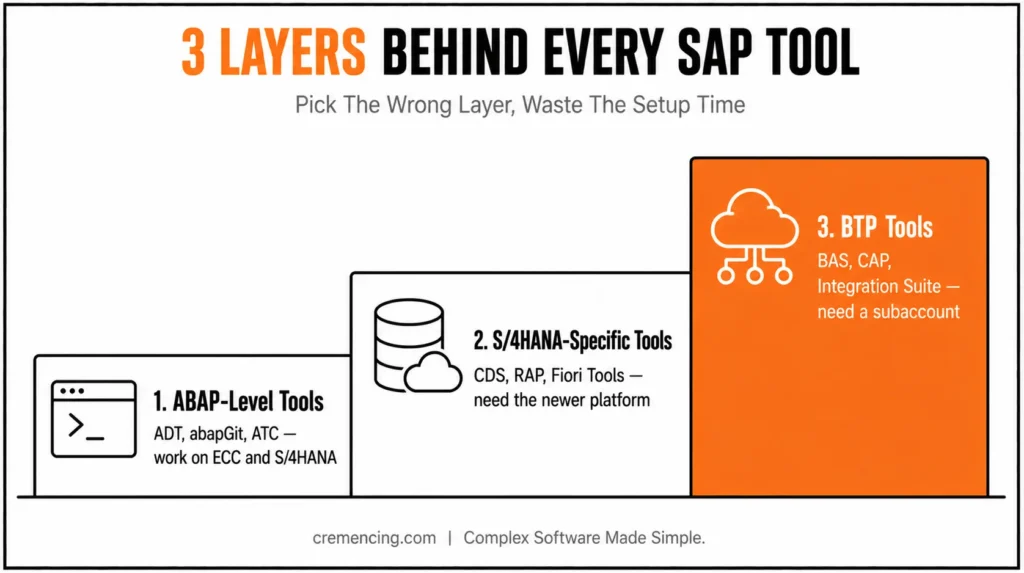
The distinction matters because SAP’s toolchain runs across three layers that don’t share a release calendar. ABAP-level tools (ADT, abapGit, and ATC) work on both ECC and S/4HANA, with some capability gaps between the two. S/4HANA-specific tools (CDS, RAP, Fiori Tools) require the newer ABAP platform underneath. They simply won’t activate on a pure ECC 6.0 stack, no matter how you configure them. BTP tools (BAS, CAP, Integration Suite) need a BTP subaccount entirely separate from your ERP license. That’s a procurement conversation, not a technical one. Picking a tool from the wrong layer wastes setup time before you write a line of code. It’s also the single most common mistake teams make when they follow a generic “top SAP tools” list without checking their own landscape first.
There’s a second reason layer blindness costs time: skills built on one layer don’t always transfer cleanly to the next. A developer who’s fluent in SEGW-based OData generation still has to relearn the RAP annotation model from scratch because the underlying concepts, behavior definitions, projection views, and draft handling don’t exist in the older approach at all. Knowing in advance which of the 15 tools below is a genuine prerequisite for the next one saves you from learning things twice.
How This SAP Tools List Connects Across the Toolchain
Every tool on this list sits in one of two architectures, and knowing which one explains a lot of confusing setup behaviour. The first is the classic client-server model: SAP GUI or Eclipse (via ADT) connects to an ABAP application server over RFC, and the actual processing, including CDS activation and ABAP Unit runs, happens on that server, not on your laptop. This is why ADT feels slower over a VPN than locally: you’re not editing a local file; you’re editing a remote repository object through a network round trip.
The second architecture
is SAP BTP’s multi-cloud services model. BAS, CAP, and Integration Suite don’t talk to one ABAP backend—they run as independent cloud services (on AWS, Azure, or Google Cloud depending on your region) and connect to your ERP system through APIs, not a direct RFC session. That’s why BTP tools need a subaccount and entitlement setup before they’ll do anything, while ADT just needs a logon group.
Where this gets practical: RAP and CDS live in the ABAP-server world but are designed to be called by BTP services, which is the actual bridge SAP built between the two architectures. A CAP application running on BAS doesn’t reach into your ERP database directly; it calls an exposed RAP service, which in turn reads from a CDS view, which runs its calculation on the HANA database layer underneath. That’s three separate tools from three different sections of this list working as one request path, and it’s why “clean core” isn’t just a buzzword: every layer in that path has a defined interface, so an S/4HANA upgrade can change the ABAP server underneath without breaking the BTP extension sitting on top of it.
Understanding that bridge is what separates “I installed a tool” from “I know why it’s structured this way” and it’s the piece competitors skip entirely. It also explains why authorization setup differs so much between layers: ADT and STMS rely on classic ABAP authorization objects tied to your user in the backend. At the same time, BTP services authenticate through OAuth and destination services configured in the BTP cockpit, a completely separate security model your Basis team has to maintain in parallel. Before diving into the SAP tool list, it’s worth understanding why these tools matter. Before diving into the SAP tool list, it’s worth understanding why these tools matter
The 15 Tools — Practical Walkthrough
1. ABAP Development Tools (ADT) for Eclipse.
ADT is SAP’s modern Eclipse-based IDE for ABAP development and is the primary environment for current S/4HANA and ABAP Cloud development. SE80 remains available for classic ABAP Workbench scenarios, but modern capabilities such as CDS, RAP, and newer refactoring workflows are centered on ADT. CDS views, RAP behaviour definitions, and modern refactoring tools exist only in ADT.
If you’re still doing daily development in SE80 on an S/4HANA system, you’re working around a tool SAP has already moved past. One connection setup in ADT can also point to multiple backend systems from different releases, so you’re not locked into a single project window the way SE80 forces you to be.
2. ABAP Development Tools for Visual Studio Code.
SAP shipped an official VS Code extension for ABAP, including a built-in MCP server for AI-assisted workflows. It’s a real second IDE option, not a toy, but it doesn’t yet match ADT’s full refactoring and debugging depth for large classic ABAP codebases. Use it for smaller ABAP Cloud projects where your team already lives in VS Code, and treat it as a complement to ADT rather than a full replacement until SAP closes the remaining feature gaps.
3. abapGit.
” abapGit runs through its own UI report, not as a background job
REPORT z_abapgit_note.
” 1. Import ZABAPGIT_STANDALONE.abap via SE38 (works on ECC 6.0 and S/4HANA)
” 2. Run it, then choose “New Online Repo”
” 3. Paste the GitHub URL of the project you want to pull
” 4. Pull—abapGit deserializes the XML and activates each object locally
4. ABAP Test Cockpit (ATC).
ATC runs static and dynamic checks for performance, security, and code-quality violations before anything reaches production. On S/4HANA, ATC also flags direct table access where a released API should be used instead a check that simply doesn’t exist on ECC-only systems. “S/4HANA API-usage checks require S/4HANA 1909 or later” is the exact scope line to remember here. Run it as a mandatory transport check, not an optional pre-commit step, or it quietly stops being enforced the first time a deadline gets tight.
5. Clean ABAP Checks.
SAP’s Clean ABAP checks plug directly into ATC and ADT’s Quick Fixes, enforcing naming and structure rules across a whole team instead of one developer’s personal habits. Treat it as a rule set riding on top of tools 1 and 4, not a separate application to install. The value compounds over time: a codebase with consistent naming and structure is the difference between a five-minute code review and a thirty-minute one, every single time someone else has to read it. Tools like SolMan rarely work in isolation; many teams also connect ServiceNow to SAP for smoother workflow automation.
Quality, Testing & Transport
6. ABAP Unit.
ABAP Unit is the built-in unit-testing framework, run directly from ADT against test classes stored alongside production code. Combine it with ABAP test doubles to isolate database access, so a red test actually means your logic broke, not that a table happened to be empty in your test client.
7. Transport Management System (STMS).
STMS moves every object above through development, quality, and production in a controlled sequence. None of the other 14 tools on this list matters if the transport landscape behind them is broken. This is the one nobody notices until it fails, usually right before a go-live weekend when there’s no time left to diagnose a broken RFC connection between systems.
Test automation suites that plug into SAP Solution Manager or CloudALM extend regression testing beyond what ABAP Unit covers on its own. Bring these in once manual regression testing becomes the actual bottleneck slowing releases down, not as a day-one purchase. The decision criteria worth checking before buying one: Does it integrate with your existing SolMan or CloudALM instance? Does it handle non-SAP systems in the same test run? Can it scale to the number of test cases your regression suite actually needs?
8. SAP Fiori Tools.
Fiori Tools is the VS Code extension pack for building and previewing Fiori Elements apps, list reports, object pages, and custom UI5 screens. It removes the need to hand-edit every manifest file. This is S/4HANA and BTP territory only; there’s no equivalent for classic ECC Dynpro screens.
That’s exactly the version boundary generic tool lists tend to blur. Expect a real productivity jump on annotation-driven list reports specifically. That’s because Fiori Elements generates most of the UI from the underlying CDS annotations, rather than from hand-coded screen layouts.
9. Core Data Services (CDS) Views.
CDS views define data models directly in the ABAP layer and push calculations down to the HANA database, instead of pulling raw rows into ABAP internal tables first. ABAP CDS development is performed through ADT rather than the classic SE80 development workflow. ADT provides the editors, activation, analysis, and tooling required for modern CDS development.
The performance argument here isn’t theoretical: a join and aggregation are done in a CDS view run once on the database engine, instead of pulling every row into the ABAP layer and looping over it there.
@AbapCatalog.sqlViewName: ‘ZSALESORDERCDS’
@AbapCatalog.compiler.compareFilter: true
” S/4HANA required — CDS activation is not available through SE80
define view ZI_SalesOrderTotal as select from vbak
{
key vbeln as SalesOrder,
netwr as NetValue,
waerk as Currency
}
10. RESTful ABAP Programming Model (RAP).
RAP is SAP’s current standard for building custom Fiori and OData applications on S/4HANA and the BTP ABAP Environment. It replaced SEGW-based OData generation for new development. SEGW itself hasn’t disappeared, but it’s now mainly relevant for maintaining older ECC-based services, not starting new ones.
RAP’s behaviour definitions also bring built-in draft handling and validation logic that SEGW never had natively, which is why migrating an existing SEGW service to RAP is closer to a rebuild than a straight port. Solution Manager alone deserves its own breakdown; see how SolMan strengthens day-to-day SAP operations, but it’s one piece of a much larger toolkit.
11. SAP Business Application Studio (BAS).
BAS is the cloud-based IDE for full-stack BTP development, CAP services, and Fiori front ends and side-by-side extensions without installing anything locally. It’s where tool 11’s RAP services usually get consumed from the extension side, since BAS ships with dev-space templates already wired to generate a CAP project that calls an existing RAP or OData service.
12. SAP Cloud Application Programming Model (CAP).
The OData and REST services are generated from a data model with CAP, rather than you having to code service handlers. The current recommended combination is CAP with RAP, which is known as the clean-core approach and is the pattern for which SAP advocates upgrade stability with CAP. The benefit becomes apparent at the next S/4HANA upgrade cycle, when the BTP extension continues to run without modifying any objects within the ERP core.
13. SAP Integration Suite.
Integration Suite is BTP’s middleware for connecting SAP and non-SAP systems, and it’s the direct replacement for on-premise PI/PO landscapes ahead of their 2027 end-of-maintenance deadline. If PI/PO is still running in your landscape, this is the migration to start planning now, not the year the deadline hits, since integration flow redesign for a mid-sized landscape routinely takes longer than teams expect.
14. SAP Build.
With SAP Build, you can build low-code applications, design workflows, and automate processes in one drag-and-drop toolset. It is not a replacement for ABAP development teams but for functional teams with simple approvals or requests for applications that they have to ship without waiting on a development backlog. Limit it to “beachhead” code logic, and if the app requires complex validation or custom data models, it’s the cue to pass it over to a CAP or RAP developer.
Good gap to close you’ve got the full BTP/ABAP Cloud stack (ADT, RAP, CAP, BAS, Integration Suite, SAP Build) but nothing that explains how those cloud services actually reach back into an on-premises system. That’s the missing piece, and it slots in naturally right after #13 since it’s the thing Integration Suite depends on for hybrid scenarios.
15. SAP Cloud Connector.
Cloud Connector is the reverse-invoke proxy that lets SAP BTP services, Integration Suite, CAP apps on BAS, and side-by-side RAP extensions reach into an on-premises SAP or non-SAP system without opening inbound firewall ports. It sits inside your own network, initiates the connection outward to BTP, and exposes only the specific system IDs and resource paths you whitelist, rather than the whole backend.
This is the detail that turns “clean-core, side-by-side extension” from a diagram into something that actually runs: a CAP service built on tool #12 can call an on-premises RFC or OData endpoint through Cloud Connector without your S/4HANA system ever being directly reachable from the internet. Run one Cloud Connector instance per subaccount at minimum, and treat its access-control list as production configuration, not a one-time setup step; a whitelist that’s too broad quietly defeats the isolation it’s there to provide.
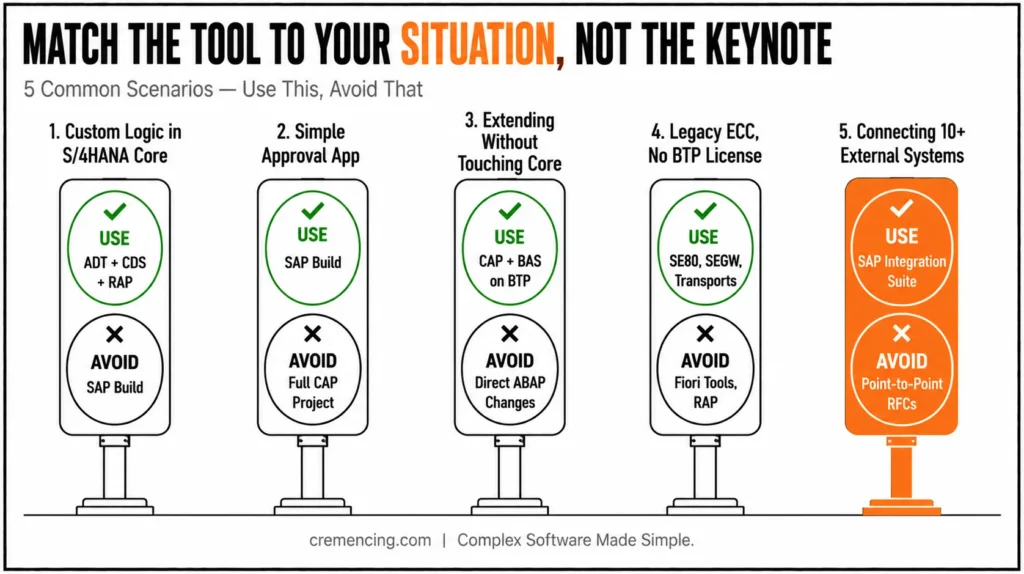
Using This SAP Tools List:
| Situation | Use | Avoid |
| Custom logic inside S/4HANA core | ADT + CDS + RAP | SAP Build — too limited for complex logic |
| Simple approval app, no custom DB logic | SAP Build | Full CAP project — overkill for the scope |
| Extending without touching the ERP core | CAP + BAS on BTP | Direct ABAP changes inside the core system |
| Legacy ECC system, no BTP license yet | SE80, SEGW, classic transports | Fiori Tools, RAP both need S/4HANA or BTP |
| Connecting to 10+ external systems | SAP Integration Suite | Point-to-point custom RFC interfaces |
The pattern across every row is the same: match the tool to the license and release you actually have, not the one in the latest SAP keynote. A SAP tools list only earns “bookmark it” status when it tells you which row you’re standing in today, and that answer usually comes down to two questions: do you already hold a BTP subaccount, and is your ERP core actually on S/4HANA yet? Answer those honestly before picking a tool from anywhere else on this page; it will save a redo later.
Conclusion
The utility of a SAP tools list is truly valuable only if you can help your team determine which tools to use, which ones to learn, and which ones to discontinue. This will vary depending on system landscape, release level, development model, and available licences. Tools developed for ECC 6.0, S/4HANA and SAP BTP cannot be used interchangeably since they are part of different technical layers used for different kinds of development or integration tasks.
ADT, abapGit, ATC, ABAP Unit, and STMS provide the most robust foundation for developers across both ECC and S/4HANA. Together, they cover modern development, code quality, testing, version control, and controlled deployment. As organisations complete the transition to S/4HANA, CDS views, RAP, and SAP Fiori Tools are growing in significance. They’re becoming essential for building data-driven applications and services. Side-by-side development, cloud integration, automation, and clean-core practices make SAP BTP a part of the landscape.
These are not just a list of tools but a real list of tools. They offer a hands-on guide from classic ABAP development to designing applications for S/4HANA and extending them onto SAP BTP. Use the right tools for the right problems; work out the skills in the right order. Knowing the tools is only half the job; understanding what an SAP technical consultant actually does explains who’s expected to run them.
Frequently Asked Questions
1. What’s the most important SAP tool for a new ABAP developer to learn first?
SAP Community for beginners treats ADT fluency as a core early milestone since SE80 is maintenance-only and CDS view work needs ADT.
2. Is SE80 still supported in S/4HANA?
Yes, but maintenance-only. New capabilities CDS, RAP, refactoring ship exclusively through ABAP development tools, so staying SE80-only means falling behind on S/4HANA-specific features over time.
3. Do I need SAP BTP tools if I only work on ECC?
No. BAS, CAP, and Fiori Tools all require S/4HANA or a BTP subaccount. ECC-only teams should focus on SE80, ADT, and abapGit until a BTP migration is actually scheduled.
4. What replaced SEGW for building OData services?
The RESTful ABAP Programming Model. SEGW hasn’t been removed, but SAP Community threads confirm it’s now mainly relevant for maintaining older ECC-based services rather than starting new development.
5. Is abapGit safe to use in a production SAP landscape?
Yes, when scoped correctly. Most teams run abapGit for development and version history, then move objects to production through standard transports rather than pulling repositories directly into a live system.





One Response