

“The request was approved in ServiceNow.” Procurement still entered it again in SAP. On ECC 6.0 and SAP S/4HANA 2025 FPS01, you need more than a working connector: the workflow must define which system owns the transaction, prevent duplicate documents, return SAP errors clearly and keep credentials outside scripts. This tutorial explains how to integrate ServiceNow with SAP through IntegrationHub spokes, SAP APIs, RFC, IDoc, or SAP Integration Suite and then build a controlled request-to-approval-to-SAP process that support teams can test and monitor.
On ECC 6.0 and SAP S/4HANA 2025 FPS01, you need more than a working connector to prevent this. The workflow must define which system owns the transaction, prevent duplicate documents through proper correlation and idempotency checks, return SAP errors clearly instead of collapsing them into a generic failure message, and keep credentials outside scripts and catalogue variables where anyone with edit access could expose them.
A connector that only handles the happy path — request goes in, document comes out — will eventually create exactly the kind of duplicate-entry problem described above, usually during a timeout, a retry, or a status check that nobody built.
This tutorial explains how to integrate ServiceNow with SAP through IntegrationHub spokes, SAP APIs, RFC, IDoc, or SAP Integration Suite, and then walks through building a controlled request-to-approval-to-SAP process: one where system ownership is explicit, duplicate prevention is designed in from the start, and support teams can actually test, monitor, and troubleshoot the integration instead of guessing why a request is stuck.
Architecting ServiceNow SAP Integrations
Integrating ServiceNow with SAP requires establishing clear system ownership and network security boundaries before triggering automated workflows. Organisations can connect ServiceNow to on-premises or cloud SAP systems using direct IntegrationHub Spokes, SAP Integration Suite middleware, or custom REST/OData APIs.
Secure connectivity to on-premises SAP backends relies on the ServiceNow MID Server or SAP Cloud Connector to manage encrypted traffic without opening public inbound ports.
Separating workflow logic from environment credentials using Connection and Credential Aliases ensures secure deployment across landscapes. Furthermore, implementing explicit correlation IDs and pre-retry idempotency lookups prevents duplicate document creation in SAP when network timeouts occur during synchronous processing.
Steps to Integrate ServiceNow With SAP
Organizations can integrate ServiceNow with SAP using several approaches, depending on their landscape, budget, and required level of automation. Most implementations follow a similar sequence: defining the integration scope, selecting the right connector or middleware, mapping data fields between systems, configuring authentication, and testing the workflow before going live.
The exact steps may vary slightly depending on whether you use SAP Cloud Integration, MID Server, REST/SOAP APIs, or a certified ServiceNow SAP connector, but the core process remains consistent across most environments.
Step 1 — Define the Workflow and System of Record
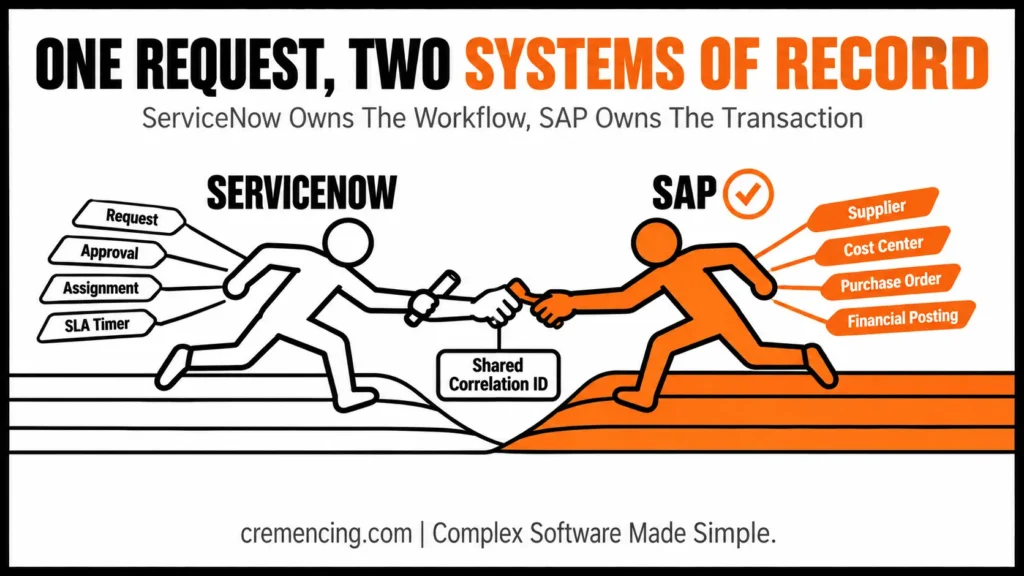
A reliable ServiceNow SAP integration begins with ownership. ServiceNow may own the request, approval, assignment, service-level timer, and user communication, while SAP owns the supplier, cost center, purchase order, invoice, or financial posting.
For this tutorial, use the following process:
- A requester enters procurement data in a ServiceNow catalogue item.
- ServiceNow validates mandatory fields.
- A manager approves or rejects the request.
- ServiceNow validates the cost centre in SAP.
- ServiceNow calls an approved SAP purchase-order operation.
- SAP creates the document and returns its number.
- ServiceNow saves the SAP document number and correlation ID.
- A later flow checks the SAP processing status.
- The request closes only when SAP confirms the target state.
Document which system owns every field. Do not let users maintain supplier names, purchasing organizations, or cost-centre descriptions independently in both systems.
Use a live lookup when users require current SAP master data. Caching is appropriate when the business accepts a defined level of data latency. Full replication should be considered only when search volume, reporting needs, or offline processing justify the additional synchronization controls.
Step 2 — Choose the Integration Pattern
There is no single correct answer for how to integrate ServiceNow with SAP. Select the pattern from transaction type, system location, mapping complexity, volume, and operating ownership.
| Requirement | Recommended starting pattern |
| Supported SAP action inside one ServiceNow flow | IntegrationHub SAP spoke |
| ECC BAPI or remote-enabled function | SAP ECC RFC spoke |
| Standard S/4HANA OData API | SAP S/4HANA OData spoke |
| Asynchronous SAP business document | IDoc spoke or SAP Integration Suite |
| Several SAP systems or complex transformations | SAP Integration Suite |
| Reusable managed enterprise API | Integration Suite and API Management |
| On-premise direct call from ServiceNow | MID Server |
| Integration Suite to on-premise SAP | SAP Cloud Connector |
| Several systems consuming one event | Event-driven integration |
| Unsupported SAP operation | Governed custom API or RFC wrapper |
Direct IntegrationHub Spoke
Use a direct spoke when ServiceNow owns the workflow, and the spoke already provides the required action. ServiceNow publishes SAP ECC RFC, ECC IDoc, S/4HANA RFC, S/4HANA IDoc, S/4HANA OData, and Public Cloud spokes through the ServiceNow Store.
The SAP ECC RFC spoke requires an Integration Hub subscription. Current documentation identifies version 2.9.4, compatibility from ECC 6.0 base through EHP8, and SAP Java Connector 3.0.20 or later.
SAP Integration Suite
Use SAP Integration Suite when the workflow requires complex mapping, several SAP backends, central replay, reusable APIs, content-based routing or one monitored integration layer.
SAP Integration Suite includes a ServiceNow receiver adapter, although adapter availability depends on the selected service plan. SAP Cloud Connector supports controlled communication from SAP Integration Suite to protected on-premise SAP systems. Automating approvals is only half the fix pair it with a proper SAP change management process so transports don’t slip through untested.
Custom REST or OData
Use outbound REST when a supported SAP API exists, but no spoke action meets the requirement. ServiceNow supports basic authentication, OAuth 2.0, and mutual authentication for outbound REST, but mutual TLS through a MID Server has documented limitations for certain REST implementations.
Choose one pattern as the primary integration route. Combining direct spokes, custom scripts, and middleware without ownership rules makes error diagnosis harder.
Step 3 — Integrate ServiceNow With SAP: Prepare the Interface
When you integrate ServiceNow with SAP, prefer a released SAP API, standard BAPI, supported IDoc or existing spoke action. Create a custom remote-enabled function only when the target release does not provide an appropriate standard interface.
For an ECC RFC connection, ServiceNow uses SAP JCo and may execute the action through a MID Server. The SAP communication user should receive only the RFC functions and business operations required by the workflow.
For an on-premise OData V2 service, /IWFND/MAINT_SERVICE is the SAP Gateway transaction used to activate and maintain registered OData services where this architecture applies. In SAP S/4HANA Cloud Public Edition, however, use released APIs and communication arrangements rather than attempting to activate a custom Gateway service through classic transactions.
For a custom RFC fallback, SE37 is the SAP Function Builder transaction used to create, test and maintain function modules. The following read-only remote-enabled function validates whether a cost center exists on the requested date.
Step 4 — Configure Secure Network Connectivity
To integrate ServiceNow with SAP securely, use a ServiceNow MID Server when ServiceNow must reach an SAP endpoint inside a protected customer network. The MID Server runs within that network and executes the integration step without requiring the SAP endpoint to accept unsolicited public access.
To integrate ServiceNow with SAP over RFC, install the required SAP JCo files on the MID Server. Linux and Windows installations use different native libraries, and the documentation requires a MID Server restart after certain spoke upgrades.
Configure:
- SAP application host or message server
- System number
- Client
- Logon language
- Load-balancing group where applicable
- MID Server capability
- MID Server application
- Network port
- SAP communication credentials
A MID Server and SAP Cloud Connector solve different connectivity paths.
Use the MID Server when ServiceNow directly calls an on-premise SAP system. Use SAP Cloud Connector when SAP Integration Suite or another SAP BTP service connects to an on-premise SAP endpoint. Do not use both components in one path unless the architecture genuinely requires both. Each additional hop creates another certificate, log and support boundary.
Step 5 — Create ServiceNow Connections and Credential Aliases
Whenever you integrate ServiceNow with SAP, never store SAP URLs, users or passwords inside Flow Designer steps, scripts or catalogue variables.
When you integrate ServiceNow with SAP, connection and credential aliases separate integration logic from environment-specific connection details. An alias can point to different development, test and production connections without rewriting the flow.
In ServiceNow:
- Open Connections & Credentials.
- Create an SAP credential record.
- Create the SAP connection record.
- Enter the endpoint or RFC connection attributes.
- Select the approved MID Server where required.
- Create or select a connection alias.
- Associate the connection with the alias.
- Test the connection from the non-production environment.
Use separate credentials for development, test, and production. Do not let a development flow call production through a reused alias. Prefer OAuth or certificate-based authentication where the selected SAP API and ServiceNow pattern support it. When basic authentication remains necessary, use a dedicated communication user, rotate its password, and restrict its authorizations.
Step 6 — Integrate ServiceNow With SAP: Build the Flow
To integrate ServiceNow with SAP through an actual workflow, create it in ServiceNow Flow Designer or Workflow Studio.
Use a catalogue-request trigger or a controlled record-state change. Do not start the SAP call from an unrestricted client script because browser actions are easy to repeat and difficult to govern.
Build the flow in this order:
- Confirm that mandatory fields exist.
- Generate a correlation ID.
- Check whether that correlation ID already has an SAP result.
- Request business approval.
- Stop the flow when approval is rejected.
- Validate the cost centre through SAP.
- Call the purchase-order action.
- Parse the SAP return messages.
- Save the SAP document number.
- Set the ServiceNow request to “Awaiting SAP confirmation.”
- Create a technical task when the call fails.
- Record the flow context for support.
Map only the fields required by the SAP operation. Avoid passing the entire ServiceNow record as a generic payload. Store the SAP document number in a dedicated field rather than a work note. Support teams need a searchable reference, not unstructured text.
Step 7 — Map SAP Responses and Correlation IDs
Once you integrate ServiceNow with SAP, expect responses that can contain a document number, warning, informational message, or application error. Treat these differently.
A warning may allow the process to continue. An error should prevent request completion. A technical timeout is not the same as a confirmed SAP rejection.
Create a common response model containing:
- Correlation ID
- ServiceNow request number
- SAP system ID
- SAP document number
- SAP message type
- SAP message class
- SAP message number
- Message text
- Processing timestamp
- Retry status
To integrate ServiceNow with SAP with full traceability, write the same correlation ID to ServiceNow, the middleware message, and the SAP transaction where the interface permits it. This gives support one identifier across all platforms. ServiceNow is one integration among many; see the full list of SAP tools worth standardizing on for the bigger picture.
Do not use the ServiceNow request number as the only idempotency key when one request can create several SAP documents. Define a key that reflects the actual business operation.
Step 8 — Integrate ServiceNow With SAP: Add Duplicate Prevention
Duplicate prevention matters more than automatic retry.
A timeout does not prove that SAP rejected the transaction. SAP may have created the purchase order before the response connection failed.
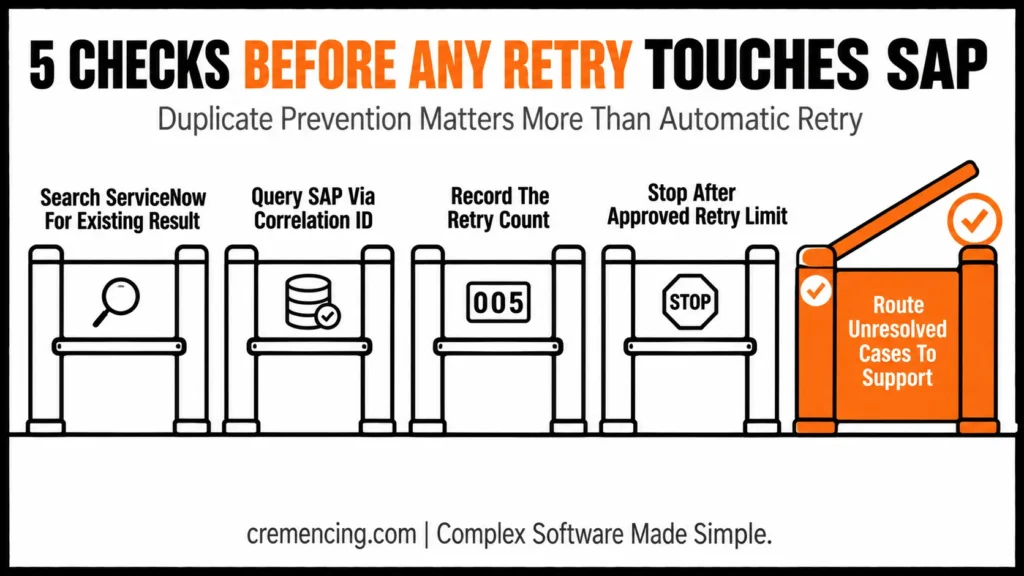
Before retrying a create operation:
- Search ServiceNow for an existing successful result.
- Query SAP using the correlation or external-reference field.
- Retry only when no matching SAP document exists.
- Record the retry count.
- Stop after the approved retry limit.
- Route unresolved cases to technical support.
Classify errors as retryable or non-retryable. Network timeouts, temporary service unavailability, and rate limits may be retryable. Invalid suppliers, closed posting periods, missing cost centers, and rejected authorizations require data or business correction. Use increasing retry intervals rather than repeating the call immediately. Do not retry permanent business errors.
Step 9 — Synchronise the SAP Status
Creating a document is not always the final business outcome. A purchase order may later be released, rejected, changed, blocked or completed.
When you integrate ServiceNow with SAP for ongoing status updates, choose one status synchronization pattern:
- ServiceNow periodically queries SAP.
- SAP sends a callback to ServiceNow.
- SAP Integration Suite publishes an update.
- An IDoc communicates the document status.
- An event broker distributes the state change.
Polling is easier to implement but creates repeated calls. Callbacks and events reduce unnecessary polling but require an inbound ServiceNow API, authentication, retry handling and message monitoring.
Do not close the ServiceNow request merely because SAP returned a number. Close it when SAP reaches the agreed state. For example, “purchase order created” and “purchase order approved for transmission” may be separate outcomes.
Step 10—Transport, Deploy and Monitor the Integration
Separate development, testing and production configuration. Move ServiceNow flows, actions, tables and application records through the organization’s approved application-deployment process. Keep connection and credential records environment-specific.
Move SAP custom objects through the SAP transport landscape. Import dependent function groups, message classes, roles and Gateway objects in the correct order.
Before production deployment, confirm:
- Production alias mapping
- MID Server health
- SAP Cloud Connector status where applicable
- Communication-user authorisations
- Certificate validity
- Firewall rules
- SAP API availability
- Flow activation
- Retry limits
- Monitoring ownership
- Support runbook
- Rollback procedure
Monitor both sides after deployment. In ServiceNow, inspect the Flow Context, integration action output and technical task. In SAP, inspect the applicable RFC, Gateway, IDoc, application log or business-document status.
When SAP Integration Suite sits between the systems, monitor the integration flow and retain enough message context for support without logging sensitive payload values.
Testing and Validation
Test the complete workflow, not only the successful API call.
Functional Tests
Before you integrate ServiceNow with SAP in production, confirm that:
- Approved requests create the expected SAP result.
- Rejected requests do not call SAP.
- Required fields match the business rule.
- The SAP document number returns to ServiceNow.
- The request closes only at the approved SAP state.
Negative Tests
Test:
- Invalid supplier
- Invalid cost centre
- Missing purchasing organisation
- Expired credentials
- Unavailable MID Server
- SAP endpoint outage
- HTTP timeout
- RFC communication failure
- Duplicate submission
- SAP warning
- SAP application error
- Status callback failure
Security Tests
Confirm that the SAP user can execute only the required operation. Remove broad development or administrative access.
Verify that users cannot view passwords, tokens or unmasked financial and personal data through Flow Context records or logs.
Volume Tests
Test realistic line-item counts and daily request volume. Review Integration Hub transaction consumption, SAP response time, MID Server capacity and middleware throughput.
A successful single-record test does not prove that the integration can process the production workload.
Common Issues During Setup
The MID Server Is Up, but SAP Is Unreachable
Check MID Server selection, capabilities, network routes, SAP host, system number, firewall rules and JCo libraries. Confirm that the action actually selected the intended MID Server.
ServiceNow Creates Duplicate SAP Documents
The flow retries after a timeout without checking SAP first. Add an external reference, correlation ID and idempotency lookup before every repeated create operation.
The OData Call Works in a Browser but Fails in ServiceNow
Check the authentication method, CSRF handling, service activation, network route, certificate trust and ServiceNow connection alias. Browser sessions may contain authentication state that the automated workflow does not have.
SAP Returns a Generic Error
Preserve structured SAP return fields instead of combining everything into one text message. Route business errors to the request owner and technical errors to the integration-support team.
Development Works, but Production Fails
Check the production alias, credentials, MID Server, certificates, SAP roles, communication arrangements and imported SAP objects. Do not assume that environment-specific connection records move with application code.
Conclusion
Knowing how to integrate ServiceNow with SAP means more than configuring a spoke. Define system ownership, select the simplest supported integration pattern, secure the connection, preserve SAP return details and design duplicate prevention before enabling retries. ServiceNow should control the request and approval workflow, while SAP remains the authoritative source for ERP transactions and governed master data.
Integrate ServiceNow with SAP to connect IT workflows, streamline business processes, and improve enterprise-wide visibility.
Frequently Asked Questions
1. How Can ServiceNow Integrate With SAP Solution Manager?
ServiceNow can integrate with SAP Solution Manager through APIs, web services or an intermediary integration platform, depending on the process. Define whether the goal is incident synchronization, change records or monitoring alerts. For new designs, also assess SAP Cloud ALM because Solution Manager 7.2 approaches its maintenance transition.
2. How Can SAP Cloud ALM Incidents Be Synchronized With ServiceNow?
Use an approved API-based integration that maps SAP Cloud ALM events or cases to ServiceNow incidents and preserves a common correlation ID. Define ownership, status mapping, and loop prevention. SAP Cloud ALM monitoring should remain the technical event source while ServiceNow controls the service-management workflow.
3. Can SAP Integration Suite Connect to ServiceNow?
Yes. SAP Integration Suite provides a ServiceNow receiver adapter and can also use HTTP-based APIs. It is appropriate when the integration requires mapping, routing, API governance, central monitoring, or access to several SAP systems. Adapter availability depends on the organization’s SAP Integration Suite service plan.
4. When is Event-Driven Integration a good fit for SAP and ServiceNow?
If multiple systems need to respond independently and the producer does not require an immediate response in a synchronous fashion, then event-driven integration should be used. It is suitable for recording incident notifications, status changes, and business events. Use a direct synchronous API if the ServiceNow workflow needs to immediately get an SAP validation or document number.
5. How Do I Connect ServiceNow to SAP?
Start by selecting an IntegrationHub SAP spoke, released SAP API, RFC, IDoc, or SAP Integration Suite pattern. Configure secure connectivity, use connection and credential aliases, build the ServiceNow flow, map SAP return messages, and add correlation IDs, retries, duplicate prevention, and monitoring before production deployment.
6. What’s the safest way to prevent duplicate SAP documents when you integrate ServiceNow with SAP?
Always check for an existing result before retrying a create operation. Search ServiceNow for a prior successful outcome, then query SAP using the correlation or external-reference field. Only retry when no matching SAP document exists, and stop after the approved retry limit rather than retrying indefinitely.
7. Should I use polling or callbacks when I integrate ServiceNow with SAP for status updates?
It depends on your tolerance for delay versus complexity. Polling is easier to implement but creates repeated calls and some lag. Callbacks and events reduce unnecessary polling but require an inbound ServiceNow API, authentication, retry handling, and message monitoring — so choose based on your team’s ability to support the additional infrastructure.
8. What authentication method should I use to integrate ServiceNow with SAP securely?
Prefer OAuth or certificate-based authentication where the selected SAP API and ServiceNow pattern support it. When basic authentication remains necessary, use a dedicated communication user, rotate its password regularly, and restrict its authorizations to only the required operations.
9. Why does an OData call work in a browser but fail when I integrate ServiceNow with SAP through Flow Designer?
This usually points to a difference in authentication context. Check the authentication method, CSRF handling, service activation, network route, certificate trust, and the ServiceNow connection alias, since browser sessions often contain authentication state that the automated workflow doesn’t have.
10. What should I check first if a ServiceNow-to-SAP integration works in development but fails in production?
Start with the production alias, credentials, MID Server, certificates, SAP roles, communication arrangements, and imported SAP objects. Environment-specific connection records don’t automatically move with application code, so this mismatch is one of the most common causes of a dev-to-production failure.




