
Six SAP products can sound like a complete architecture. But if your architecture board cannot name the six problems they solve, you may be building co-not capability.
This is a common problem across ECC 6.0 and SAP S/4HANA 2025. Teams add products for workflow, integration, analytics, extensions, or automation without first checking what the existing SAP stack already provides. The result is overlapping functionality, unnecessary integrations, duplicate tools, and a growing governance burden.
The fix is not to use fewer SAP products by default. It is to define why each product belongs in the stack.
This guide gives you a practical SAP stack model, an ABAP baseline report, and a decision framework to identify what should stay, what should replace existing capabilities, where overlap is acceptable, and what should never be added without a clear architectural case.
What Is a Solution SAP Stack and Why Does It Matter?
A solution SAP stack is the minimalized controlled combination of SAP applications and platform services required to execute, connect, extend, analyze, and govern your business processes. Not copies of the SAP catalogue, which are added to an architecture diagram. The foundation of the solution SAP stack must be business capabilities, transaction ownership, data authority, integration patterns, operational responsibility, and measurable constraints.
In most organizations, SAP S/4HANA or ECC continues to be the system of record for master data and document data for finance, procurement, sales, manufacturing, maintenance, and related master data and document data. SAP S/4HANA Cloud Public Edition offers standardized cloud ERP processes, and SAP S/4HANA Cloud Private Edition 2025 FPS01 offers a more comprehensive range of cloud ERP processes and increased flexibility. In the meantime, SAP releases 2608 documentation for upgrade preparation and Public Edition 2602 as the productive version for customers.
The next layer should only be shown if the core doesn’t own the requirement or shouldn’t. SAP BTP aggregates application development, automation and integration, data and analytics, AI, and foundation services. SAP BTP is useful, but it can lead to an architectural pitfall: You can maintain multiple capabilities and then have to figure out who will build, operate, secure, and pay for them.
A good SAP solution decision, therefore, asks five questions before naming a product:
- Which system owns the business transaction?
- Is the need a standard configuration, an extension, an integration, analytics, or transformation governance?
- Does an existing platform already perform the function?
- Which team will support failures, upgrades, security, and cost control?
- What measurable outcome justifies another product?
Use the answers to simplify the solution SAP stack, not defend a preselected license. Explain the result component by component. That solution, SAP discipline, prevents shelfware.
How do the architecture layers work?
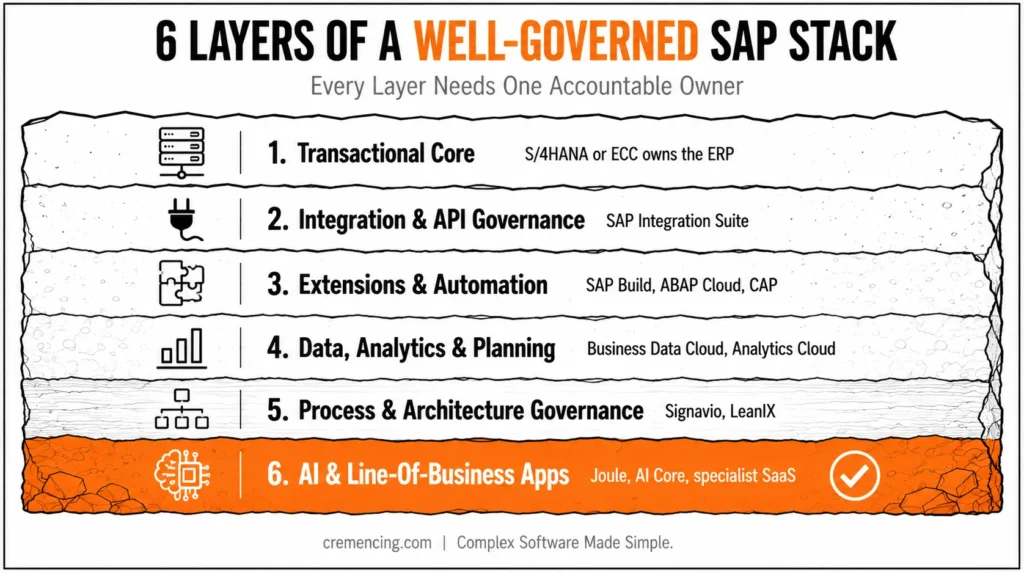
A practical solution SAP stack architecture separates responsibilities into layers. Each layer can contain one SAP product, several products, or no SAP product at all. Give every layer one accountable owner.
Layer 1: The Transactional Core
In a solution SAP stack, place SAP S/4HANA at the center when SAP owns the end-to-end ERP process. Keep standard finance postings, purchase orders, sales documents, production orders, asset records, and inventory movements in the core. For an ECC 6.0 estate, treat ECC as the current core while planning which custom code, interfaces, and business functions must change during the S/4HANA move.
Do not add SAP BTP merely to recreate a standard transaction outside ERP. SAP’s clean-core guidance recommends using standard processes in SAP S/4HANA or line-of-business applications first, then using cloud-compliant extensions for differentiated requirements.
For S/4HANA 2022 and later, SAP supports ABAP Cloud and the cloud extensibility model across public cloud, private cloud, and on-premises scenarios. Private and on-premise customers may still need controlled classic ABAP during transition.
Layer 2: Integration and API Governance
In a solution SAP stack, add SAP Integration Suite when the landscape needs governed integration across SAP and third-party systems, reusable APIs, message transformation, event handling, central monitoring, or partner connectivity.
SAP positions Integration Suite as an integration platform as a service that connects applications, data, processes, events, and AI agents across SAP and non-SAP environments. Its capabilities include cloud integration, API management, eventing, assessment tools, and prebuilt content.
Do not route every local call through middleware. A BTP application can sometimes call a released S/4HANA API directly through Destination Service and Cloud Connector.
Add Integration Suite when you need central policy enforcement, transformation, routing, retries, monitoring, partner protocols, or isolation between producers and consumers. A recent SAP Community implementation makes the same point: direct access can work, while middleware becomes useful for governance, security, monitoring, and error handling.
Layer 3: Extensions, Applications, and Automation
In a solution SAP stack, add SAP Build when the business needs side-by-side applications, workflows, process automation, workspaces, or governed low-code and pro-code development.
SAP Build combines application development, process automation, workspaces, CAP development, and ABAP Cloud-oriented development options. It supports business users and professional developers, so governance must determine who may publish, integrate, and operate each artifact.
Use embedded S/4HANA extensibility for small, tightly coupled changes that fit released extension points. Moreover, use ABAP Cloud for upgrade-stable developer extensions close to the ERP domain.
Use CAP or another BTP runtime when the application needs an independent lifecycle, multi-system access, external users, separate scaling, or non-ABAP services.
Layer 4: Data, Analytics, and Planning
Data, analytics, and planning are the fourth layer. The fourth layer is data, analytics, and planning. Use SAP Business Data Cloud in an SAP solution stack when the organization requires a governed business-data layer that extends across SAP and third-party data, can be reused as data products, is provided with semantic context, and serves as a basis for analytics and AI.
According to SAP, Business Data Cloud is a managed SaaS offering that centralizes and manages SAP data while integrating third-party data.
Include SAP Analytics Cloud if the need is for business intelligence, planning and forecasting, or analytics that are embedded in decisions. SAP Analytics Cloud is a combination of analytics and enterprise planning and can be integrated with SAP and non-SAP sources.
A second data platform should not be created just to generate operational reports that are already provided by S/4HANA embedded analytics. Choose Business Data Cloud or SAP Analytics Cloud for a need to share the data across systems, for planning, for a governed semantic model, or for a larger user base of analysts.
Layer 5: Process and Architecture Governance
In a solution SAP stack, add SAP Signavio when the program must model, analyze, improve, and govern business processes. It belongs before and during transformation, not only after go-live.
Signavio supports process modeling, process intelligence, collaboration, and repeatable improvement methods. In a solution SAP stack, add SAP LeanIX when the organization needs a maintained view of applications, technologies, dependencies, risks, business capabilities, and transformation roadmaps.
SAP LeanIX can manage SAP and third-party landscapes, so it is most useful where application rationalization and architecture decisions continue beyond one S/4HANA project.
Signavio answers, “How should the business process work?” LeanIX answers, “Which applications and technologies support it, and what should change?” Small organizations with a stable landscape may not need both. Large transformation programs often need both disciplines, but they still need owners who keep the repositories current.
Layer 6: AI and Specialist Line-of-Business Applications
In a solution SAP stack, add Joule, embedded SAP Business AI, SAP AI Core, or custom AI services only after defining the decision, action, data source, human control, and failure boundary.
SAP BTP’s AI layer includes AI Foundation services, SAP AI Core, generative AI hub capabilities, and business-data grounding options. Current SAP architecture guidance also supports custom AI agents and applications on BTP.
Do not add AI as a separate architecture box with no process owner. Put it inside a named process, such as invoice extraction, service-case summarisation, demand analysis, or a governed employee assistant.
Add SuccessFactors, Ariba, Concur, Fieldglass, Commerce Cloud, or another specialist SAP application when it becomes the system of record for that domain.
Do not buy a line-of-business suite simply because it integrates with SAP. Buy it when its process depth, regulatory coverage, user population, and operating model beat the capabilities already available in ERP or an existing non-SAP platform.
Practical Code Walkthrough: Inventory the Core First
Before choosing another solution SAP product, confirm what the current SAP system actually is. Architecture workshops often rely on slideware that says “ECC” or “S/4” without listing the installed software components and releases.
A weak solution SAP baseline leads to incorrect assumptions about available APIs, ABAP language versions, Fiori content, add-ons, and upgrade work.
Use transaction SE38, which creates and runs executable ABAP reports, to create report ZSAP_STACK_BASELINE. The report reads table CVERS, identifies S4CORE or SAP_APPL, and prints the components that matter during initial solution SAP stack assessment.
REPORT zsap_stack_baseline.
* This report uses ECC-compatible ABAP syntax.
* No S/4HANA-only syntax is required.
TYPES: BEGIN OF ty_component,
component TYPE cvers-component, ” Software component ID
release TYPE cvers-release, ” Installed release
extrelease TYPE cvers-extrelease, ” Extended release text
END OF ty_component.
DATA: gt_components TYPE STANDARD TABLE OF ty_component,
gs_component TYPE ty_component,
gv_core_type TYPE char30,
gv_core_rel TYPE cvers-release.
PARAMETERS p_all TYPE abap_bool AS CHECKBOX DEFAULT abap_false.
START-OF-SELECTION.
SELECT component
release
extrelease
FROM cvers
INTO TABLE gt_components. ” Read installed component versions
IF sy-subrc <> 0.
MESSAGE ‘No component data found in CVERS’
TYPE ‘E’. ” Stop when baseline data is unavailable
ENDIF.
READ TABLE gt_components
INTO gs_component
WITH KEY component = ‘S4CORE’. ” S4CORE identifies S/4HANA
IF sy-subrc = 0.
gv_core_type = ‘SAP S/4HANA’.
gv_core_rel = gs_component-release.
ELSE.
READ TABLE gt_components
INTO gs_component
WITH KEY component = ‘SAP_APPL’. ” Classic ERP application layer
IF sy-subrc = 0.
gv_core_type = ‘SAP ECC / Business Suite’.
gv_core_rel = gs_component-release.
ELSE.
gv_core_type = ‘Core not identified’.
CLEAR gv_core_rel.
ENDIF.
ENDIF.
WRITE: / ‘Detected core:’, gv_core_type,
/ ‘Core release :’, gv_core_rel,
/ ‘SAP_BASIS :’, sy-saprl. ” Technical platform release
ULINE.
WRITE: / ‘Component’,
25 ‘Release’,
40 ‘Extended Release’.
ULINE.
LOOP AT gt_components INTO gs_component.
IF p_all = abap_true
OR gs_component-component = 'S4CORE'

       OR gs_component-component = 'SAP_APPL'

       OR gs_component-component = 'SAP_BASIS'

       OR gs_component-component = 'SAP_ABA'

       OR gs_component-component CP 'UI*'.
” Limit default output to stack-relevant components
WRITE: / gs_component-component,
25 gs_component-release,
40 gs_component-extrelease.
ENDIF.
ENDLOOP.
Start With the Right SAP Baseline
Run the report first with P_ALL cleared. If it detects S4CORE, use the S/4HANA release to validate clean-core options, released APIs, and supported extension models.
If it detects SAP_APPL, treat the system as an ECC baseline. Include compatibility, custom-code remediation, interface replacement, and migration sequencing in the solution SAP stack decision.
Run it again with P_ALL selected to review installed add-ons. Export the results to the architecture repository and compare them with system data in SAP for Me, maintenance-planner records, and your interface inventory.
The code does not replace discovery tools, but it stops the team from designing against the wrong ERP generation.
The next technical step is to catalogue integrations and custom code. However, use SPAU and SPDD to review modification and adjustment history during upgrades. Use ATC, the ABAP Test Cockpit, to run static checks and S/4HANA-readiness rules.
Use SCMON and SUSG, where available, to gather custom-code usage evidence. Moreover, use ST05, the performance trace transaction, to analyze database, RFC, and other targeted technical activity. Approve each before running broad scans or traces in production. Wide traces can create load and expose sensitive technical details.
When to Use Each SAP Solution vs. an Alternative
A second, smaller reference table would help the existing matrix compare products, but nothing compares to the release/cadence model readers need to know before they can trust any version-specific guidance in the post:
| Landscape type | Release cadence | Where to confirm current release | ABAP dev access (SE38 etc.) |
|---|---|---|---|
| ECC 6.0 | Support-pack driven, no fixed schedule | SPAM / System > Status | Yes, full |
| S/4HANA on-prem / Private Edition | Annual release + FPS (e.g., 2025 FPS01) | SAP for Me, Maintenance Planner | Yes, classic + ABAP Cloud |
| S/4HANA Cloud Public Edition | Quarterly (e.g., 2608) | SAP for Me, Release Assessment tool | No — extension-only, no SE38 |
Solution SAP Stack Pattern 1: Stable ECC 6.0 with Limited Change
Keep ECC as the transaction core. Use the existing strategic integration platform unless a confirmed roadmap justifies SAP Integration Suite.
Add Signavio for process discovery only when an S/4HANA transformation is funded. Add LeanIX when application rationalization covers a large mixed landscape.
Do not build a broad BTP estate simply to appear cloud-ready. Start with one extension, integration, or automation that has a support owner and a measurable result.
Solution SAP Stack Pattern 2: ECC-to-S/4HANA Transformation
Use Signavio to establish process scope and variants. Use LeanIX or the organization’s enterprise-architecture tool to map applications, interfaces, technologies, and retirement decisions.
Keep the target S/4HANA core standard where possible. Use Integration Suite for strategic hybrid integration, and move differentiating extensions toward ABAP Cloud, SAP Build, or CAP according to coupling and lifecycle needs.
This pattern requires a migration roadmap because ECC interfaces and classic ABAP will not disappear on the same date. SAP’s clean-core documentation explicitly recognizes coexistence for private-cloud and on-premise customers, so govern temporary exceptions instead of pretending every custom object can move immediately.
Stack Pattern 3: SAP S/4HANA Cloud Public Edition
Start with fit-to-standard and released integration content. Public Edition should remain the transaction core, while SAP BTP handles side-by-side extensions, automation, integration, and additional application services when the standard scope does not cover a differentiated requirement.
Use Integration Suite when multiple systems, mappings, events, API policies, or operational monitoring justify a middleware layer. Use SAP Build for governed extensions and workflows.
Keep the solution SAP footprint small enough that quarterly change and lifecycle work remain manageable.
Stack Pattern 4: SAP S/4HANA Cloud Private Edition or On-Premise 2025
Use embedded extensibility for tightly coupled changes and ABAP Cloud for upgrade-stable development on released interfaces. Retain classic ABAP only where evidence shows a genuine gap. Document an owner, risk, and retirement condition for each exception.
Add BTP services when they provide independent scaling, external access, multi-system composition, central integration, or cross-domain data. Do not move code out of the core merely to satisfy a slogan. Move it when the new boundary improves upgrade safety, ownership, reuse, security, or operations.
Stack Pattern 5: Data and AI Programme
Do not start with Joule or an agent catalogue. Start with data ownership, semantics, access, quality, retention, and the business action that follows a prediction or generated response.
Use SAP Business Data Cloud when SAP business context and governed data products are central to the program. Add SAP Analytics Cloud for planning and decision workflows.
Add SAP AI Core or agent capabilities when the use case requires custom model access, lifecycle controls, grounding, or integration with business processes. SAP’s 2026 architecture guidance places custom agents and generative AI applications on BTP with governed models and enterprise-data connections.
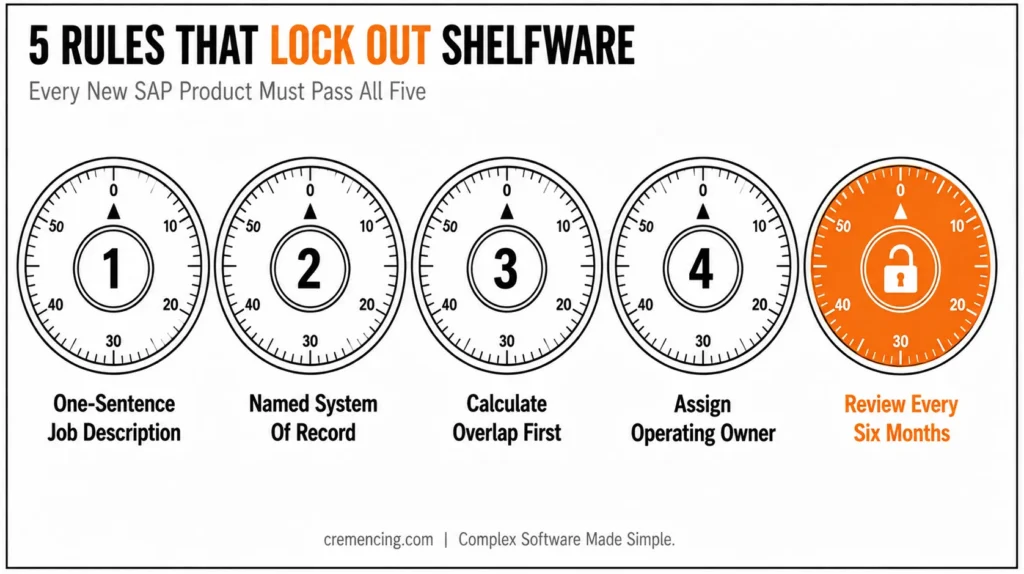
Five Rules That Prevent Shelfware
First, require a one-sentence job description for every solution SAP component. “Integration Suite transforms and monitors cross-system order messages” is acceptable. “BTP supports innovation” is not.
Second, name the system of record for every important business object. Conflicting ownership creates reconciliation work, duplicate controls, and unclear support.
Third, calculate overlap before procurement. Compare workflow, API management, eventing, analytics, planning, low-code, AI, and repository capabilities against products you already operate.
Fourth, assign operating responsibility before design approval. Include monitoring, incident response, identity administration, transport, testing, vendor management, consumption cost, and decommissioning.
licenseFifth, review the stack every six months. Remove pilots that never reached production, retire duplicate interfaces, and challenge products whose usage does not match their licence or support cost.
Conclusion
It is no longer a question of deploying the most number of SAP products to build up the right SAP stack; it is a question of clear ownership of each business capability and only adding the new product when there is a clear need for it. SAP S/4HANA (or ECC, in a transition mode) should continue to be the system of record for core transactions such as finance, procurement, sales, manufacturing, and maintenance. Everything else, from SAP BTP to Integration Suite, Build, Business Data Cloud, Analytics Cloud, Signavio, LeanIX, Joule (AI services), and so on — that is, anything that is not the core — earns its place only if it addresses a specific gap the core can’t solve; if it has a named owner; and if it produces a measurable outcome.
The discipline is embodied in five checks before deploying anything new: Is it a system that is truly already in use? Is there a need that is already being filled by a different platform? Is there any overlap before purchase? Who will be responsible for its operation going forward? And will the stack be reviewed periodically to remove pilots and duplicate tools that failed to deliver value? In addition, a baseline ABAP check (such as a ZSAP_STACK_BASELINE report) before making an architectural decision is a way to make sure that teams are working against the actual generation of ERP and not against assumptions.
Finally, a lean, well-governed SAP stack will mean less shelfware, lower support costs and a more business value-driven approach to SAP architecture, not vendor width.
Frequently Asked Questions
1. PI/PO vs. CPI: Which Should a New SAP Program Use?
Use SAP Integration Suite for a new cloud-oriented integration strategy unless a documented constraint requires another platform. CPI, now called the Cloud Integration capability, is only part of the Integration Suite. Existing PI/PO landscapes need a planned migration based on interfaces, adapters, monitoring, skills, and support dates—not a blind rebuild.
2. Which S/4HANA Extensibility Option Is Best?
The best option depends on coupling and lifecycle. Use in-app extensibility for small standard-adjacent changes, ABAP Cloud for upgrade-stable ERP-domain development, and side-by-side SAP BTP development for independent applications, external users, or multi-system processes. Start with released APIs and clean-core constraints.
3. How Do I Push Data from an On-Premise ERP System to SAP BTP?
Use a released API, business event, IDoc, or another supported interface based on latency and volume. Connect through SAP Cloud Connector where private-network access is required, then use Integration Suite when transformation, routing, retries, event distribution, or central monitoring justify middleware.
4. Should a BTP Application Call S/4HANA Directly or Through Integration Suite?
Use a direct call if the two API connections are at either end, simple to secure and handle errors. Where a central policy, transformation, orchestration, retries, monitoring, and decoupling of the flow are required, use SAP Integration Suite. Ensure that the end user remains anonymous when user-level authorization or auditability is needed, and principal propagation is required.
5. What Is SAP BTP Used For?
SAP BTP supports application development, automation, integration, data, analytics, AI, security, connectivity, and platform operations. It should not replace SAP S/4HANA’s transactional role. Use it when a defined capability belongs outside the ERP core or must span SAP and third-party systems.
6. Is SAP BTP the same as SAP S/4HANA?
No. SAP S/4HANA is an ERP application that runs core business transactions, while SAP BTP is a platform for integration, extensions, data, analytics, automation, AI, and foundation services. A modern SAP technology stack often uses both, but each must retain a clear responsibility.
7. Does SAP BTP replace the need for SAP Solution Manager?
No. Solution Manager (or its successor tooling) handles ALM functions like change control, test management, and monitoring across the landscape; BTP is a development and integration platform. Most landscapes run both, with different owners.
8. What’s the difference between SAP Signavio and SAP Business Process Monitoring?
Signavio models, mines, and governs process design before and during transformation; process monitoring tools track live execution health after go-live. They answer different questions: “how should this work” vs. “is this working right now” and organizations typically need both at different program stages.
9. Can a small SAP shop skip SAP BTP entirely?
Yes, if the five ownership questions in this post don’t surface a gap the ERP core can’t cover. Many stable, single-country ECC or S/4HANA shops run for years without a BTP subscription and only add it when a specific integration or extension need appears.
10. How often should the SAP stack review in “Five Rules That Prevent Shelfware” actually happen?
The post recommends every six months; align it to your existing governance cadence (e.g., quarterly architecture board, or alongside each S/4HANA Cloud Public Edition release cycle) rather than treating it as a standalone calendar event.
References
.




