

A developer inherits a legacy integration script that updates sales order tables directly — no validation, no change documents, no rollback. It works, until it doesn’t: a partial update corrupts pricing data overnight. This is exactly the failure BAPI in SAP ABAP was built to prevent. Instead of touching tables directly, a BAPI routes changes through SAP’s own business logic — validated, logged, and safely reversible when something goes wrong.
Recent Evolution of SAP BAPIs
SAP now embeds Joule AI to automatically suggest modern RAP and OData alternatives for legacy BAPIs. Clean core guidance actively restricts custom BAPI creation in S/4HANA Cloud environments. Developers are replacing classic BAPI calls with released APIs to ensure upgrade-safe integrations.
What Is BAPI in SAP ABAP and Why It Matters
A BAPI, or Business Application Programming Interface, is a standardized SAP interface linked to a business object. In practical ABAP terms, a BAPI is usually exposed as an RFC-enabled function module that can be called by ABAP programs, external systems, middleware, or integration tools.
The power of BAPI in SAP ABAP comes from business validation. A proper BAPI does not just insert rows into database tables. It calls SAP business logic, checks rules, fills return messages, and works with SAP’s transaction model.
That is why a sales order BAPI, material BAPI, purchase order BAPI, or customer BAPI is safer than direct table updates. Direct updates skip validations and change documents, update tasks, number ranges, locks, and business rules. A BAPI gives developers a public contract for changing or reading SAP business objects.
The important BAPI in SAP ABAP tcode list starts with transaction BAPI, which opens the BAPI Explorer. Use SE37, the Function Builder, to inspect and test function modules. Then use SWO1, the Business Object Builder, to inspect business object types in the Business Object Repository. Use SE11, the ABAP Dictionary transaction, to inspect structures and table types used by BAPI parameters.
A developer who understands BAPI does more than call a function. They read parameters, fill structures correctly, check the RETURN table, commit only after success, rollback on errors, and verify the business object after the call.
How BAPI Works — BOR, RFC, Business Logic, and LUW
A BAPI sits between a caller and SAP business logic. The caller may be an ABAP report, an external Java application, middleware, PI/PO, SAP Cloud Integration, or another SAP system. The BAPI receives structured data, performs business checks, and returns messages in a standard return structure such as BAPIRET2.
The Business Object Repository, or BOR, gives BAPIs their business-object context. That matters because a BAPI should represent a business action such as creating a sales order, changing a material, posting a document, or reading customer data. The actual implementation usually runs as an RFC-enabled function module.
RFC means Remote Function Call. If a system enables RFC access for a function module, another system can call it through SAP’s RFC protocol — as long as authorization, connectivity, and destination settings permit. This is one reason BAPIs became a major SAP integration tool. Why Choosing Between User Exits and BAdI
The transaction model is where many bugs start. A BAPI may create or change business data, but the caller often still needs explicit commit handling. For many updated BAPIs, you call BAPI_TRANSACTION_COMMIT after checking that no error exists in the return messages. If errors exist, call BAPI_TRANSACTION_ROLLBACK.
A common mistake is calling multiple update BAPIs in sequence and issuing only one final commit — if an earlier BAPI silently fails, the commit can still save partial, inconsistent data. Always check RETURN after each BAPI call in a multi-BAPI LUW, not just at the end.
BAPI Call Flow: From Caller to Verification
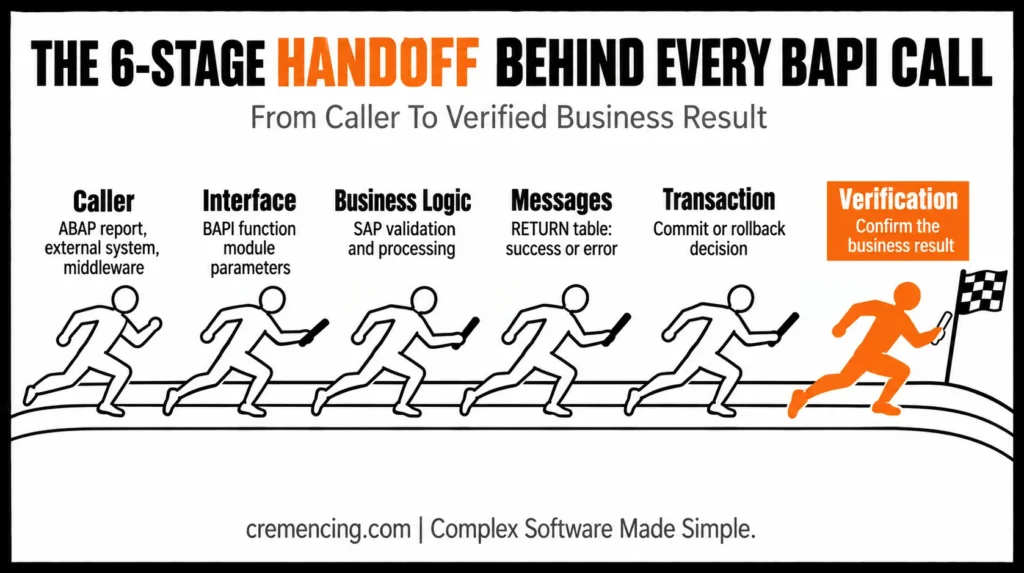
Here is the high-level flow:
| Area | What Happens |
| Caller | ABAP report, external system, middleware, or another SAP system |
| Interface | BAPI function module with import, export, changing, and table parameters |
| Business logic | SAP validation, object processing, update preparation |
| Messages | RETURN table or return structure with success, warning, error, or abort messages |
| Transaction | Commit or rollback controlled by the caller for many update scenarios |
| Verification | Document number, object status, application log, table display, or follow-up BAPI read |
This is why BAPI commit in SAP ABAP and BAPI rollback in SAP ABAP are not optional interview details. They decide whether your integration really saves business data or only appears successful in the debugger.
BAPI Sequence
In a real create/change scenario, replace the read-only demo BAPI with a standard update BAPI such as a sales order, material, purchase order, or business partner BAPI available in your system. Fill its required header, item, partner, and extension structures according to the Function Builder documentation in SE37.
The key rule is simple: check RETURN before commit. Many BAPIs return success, warning, error, and abort messages without raising an ABAP exception. If you skip the return table, you may commit bad data or miss a failed update.
For BAPI in SAP ABAP step-by-step, use this sequence: find the BAPI in transaction BAPI, inspect the function in SE37, check structures in SE11, fill import/table parameters, call the BAPI, scan RETURN, commit or rollback, then verify the object. This sequence is safer than copying a random function call from an old report.
For BAPI extension in SAP ABAP, look for parameters such as EXTENSIONIN and EXTENSIONOUT. These extension structures pass customer fields into or out of certain standard BAPIs. Do not place business logic inside the calling report if a BADI, user exit, or released enhancement point owns that rule better. Learn more about SAP Data Dictionary and why it remains an essential skill for every ABAP developer.
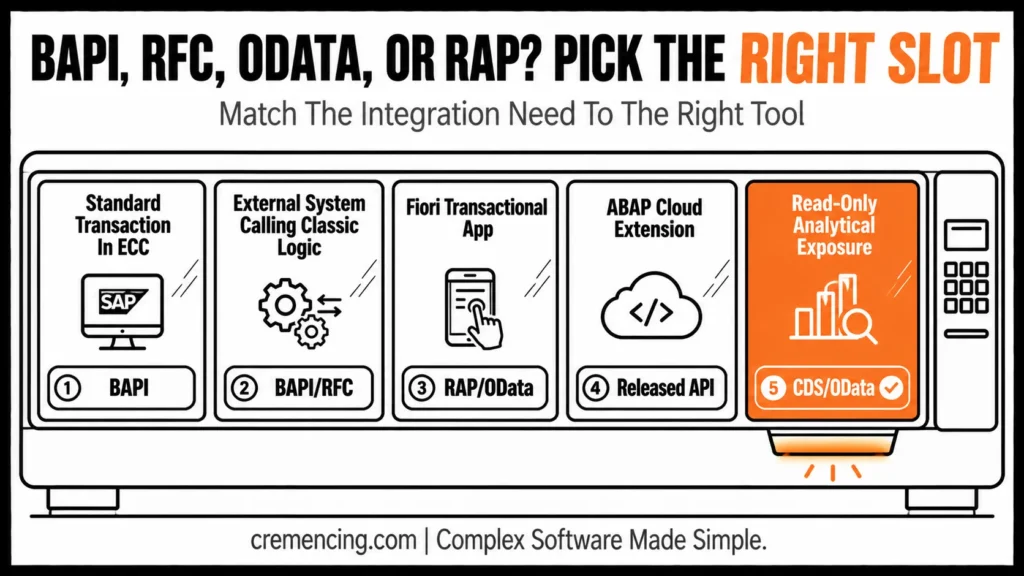
When to Use BAPI vs RFC, OData, RAP, or Released APIs
BAPI is strong, but it is not always the right answer. ECC and S/4HANA on-premise projects still use BAPIs heavily for integration and transactional updates. In ABAP Cloud, clean-core projects should prefer released APIs, RAP, and service-based models where SAP provides them.
| Need | Best Option | Why |
| Standard business transaction in ECC | Standard BAPI | Uses SAP business validation and RFC access |
| Standard business transaction in S/4HANA on-premise | Standard BAPI or released API | Depends on availability and target architecture |
| External system calling classic SAP logic | BAPI/RFC | Mature integration path with structured parameters |
| Fiori transactional application | RAP/OData | Better fit for modern UI and service model |
| ABAP Cloud extension | Released API or RAP | Aligns with clean-core and upgrade-safe rules |
| Read-only analytical exposure | CDS/OData | Better fit for query and projection use cases |
| Custom transactional app | RAP | Better fit for new S/4HANA service design |
| Legacy middleware integration | BAPI/RFC | Common in older PI/PO, RFC adapter, and third-party flows |
Modern SAP Integration Decisions
Use BAPI when SAP already provides a stable business interface and your system release supports it. Avoid creating a custom BAPI when a released API, RAP behaviour, or standard service already solves the same requirement. That is especially important in S/4HANA projects where clean-core decisions affect upgrades.
Use RFC-enabled custom function modules for technical integration only when you own both sides and a business-object BAPI does not fit. Choose OData when the caller needs HTTP-based service access. RAP is the preferred option when you build a new transactional service in modern S/4HANA or ABAP Cloud.
For BAPI creation in SAP ABAP, do not create one just because the requirement says “interface.” Create a custom BAPI only when you need a stable business-object method, remote-enabled access, structured parameters, and a release-worthy contract. In many new S/4HANA scenarios, RAP or released APIs will be the cleaner option.
Conclusion
BAPI in SAP ABAP isn’t just a legacy interface pattern — it’s still the safest bridge between external systems and SAP’s business logic wherever ECC or S/4HANA on-premise landscapes are in play. The difference between a reliable integration and a silent data-corruption bug usually comes down to one habit: checking RETURN before you commit. For new S/4HANA Cloud and ABAP Cloud work, weigh BAPI against RAP and released APIs — but don’t discard it where it’s still the right tool.
Frequently Asked Questions
1. What is BAPI in SAP ABAP?
BAPI in SAP ABAP is a standardised interface used to access SAP business objects through defined methods. Technically, many BAPIs are RFC-enabled function modules. They are used for integration, data creation, changes, reads, and controlled access to SAP business logic.
2. Which t-code is used for BAPI in SAP ABAP?
The main BAPI in SAP ABAP TCode is BAPI, which opens the BAPI Explorer. Use SE37 to inspect or test the underlying function module, SWO1 for Business Object Builder, and SE11 to inspect parameter structures and table types.
3. Why do we use BAPI_TRANSACTION_COMMIT after BAPI?
You use BAPI_TRANSACTION_COMMIT because many update BAPIs prepare changes but do not finalize the SAP Logical Unit of Work by themselves. For bapi commit in sap abap, check the RETURN table first, then commit only when no error or abort message exists.
4. When should I call BAPI_TRANSACTION_ROLLBACK?
Call BAPI_TRANSACTION_ROLLBACK when the BAPI returns an error or abort message before the work has been committed. For bapi rollback in sap abap, remember that rollback does not undo work that was already committed earlier in the same external process.
5. How to create a BAPI in SAP ABAP?
BAPI creation in SAP ABAP usually involves creating structures in SE11, an RFC-enabled function module in SE37, a business object method in SWO1 and releasing the method for external use. Create custom BAPIs only when standard BAPIs, released APIs, or RAP do not fit.
6. What is the BAPI extension in SAP ABAP?
BAPI extension in SAP ABAP usually means passing customer fields through extension parameters such as EXTENSIONIN or EXTENSIONOUT. The exact structure depends on the BAPI. Check SAP documentation and enhancement spots before adding logic in the caller.
7.Can a BAPI be called from outside SAP?
Yes — if RFC-enabled, external systems, middleware, or third-party tools can call a BAPI through SAP’s RFC protocol, subject to authorization and connectivity settings.
8.Does BAPI still matter in S/4HANA Cloud or ABAP Cloud?
Less so — ABAP Cloud and clean-core projects favor released APIs and RAP; BAPIs remain most relevant in ECC and S/4HANA on-premise landscapes.
9.What happens if I forget to check the RETURN table before commit?
You risk committing partial or invalid data — many BAPIs return error/warning messages without raising an ABAP exception, so skipping RETURN checks can mask failures.
10.Is BAPI the same as an RFC function module?
Not exactly — a BAPI is a business-object method, typically implemented as an RFC-enabled function module, but not every RFC-enabled function module qualifies as a BAPI.




