
Introduction
Most organizations implement the SAP Fiori ecosystem with the hope that their user experience will be simplified. However, what they too often face instead is confusion. They have experienced login issues, missing apps, and confusion over whether to be in the launchpad or app library. Understanding the SAP Fiori ecosystem properly is the key to avoiding these problems.
In reality, it is not the interface that is at fault. This is ignorance of the SAP Fiori ecosystem.
A user calls in: they logged into Fiori fine yesterday, but today half their tiles are gone and the ones that remain throw a blank screen. The Basis team checks the backend — services are running. IT checks the role — nothing changed. Three teams, three “it’s not my part” answers, and the ticket sits open for a day because nobody’s looking at the ecosystem as one connected system. That’s the real failure mode behind most Fiori login and missing-app issues — not a broken interface, but a break somewhere in the chain linking login, launchpad, roles, and backend OData services.
SAP Fiori Ecosystem Architecture
According to SAP documentation, the SAP Fiori ecosystem is not merely a frontend user interface, but a multi-tiered architecture that tightly couples client-side UI5 components, SAP Fiori launchpad catalog configurations, and backend OData services. When authentication succeeds via SAP Cloud Identity Services or on-premise Identity Providers, the launchpad dynamically renders app tiles based on user-assigned roles and catalogs.
A failure at any point in this execution chain—such as an unassigned role, an unmaintained target mapping, or an inactive OData service in transaction /IWFND/MAINT_SERVICE—results in missing tiles, blank screens, or authorization errors. Consequently, effective Fiori administration requires evaluating backend connectivity alongside frontend authorization configurations.
What is the SAP Fiori Ecosystem?
Simply put, the SAP Fiori Ecosystem is the entire environment used to run SAP Fiori applications (frontend, backend services, and integration layer).
It includes:
- SAP Fiori launchpad as Entry point
- SAP Fiori apps that users use
- Fiori Apps Library for App Discovery
- Data and logic provided by backend systems
- Authentication and login systems
Together, the ecosystem connects these various components to provide a seamless user experience.
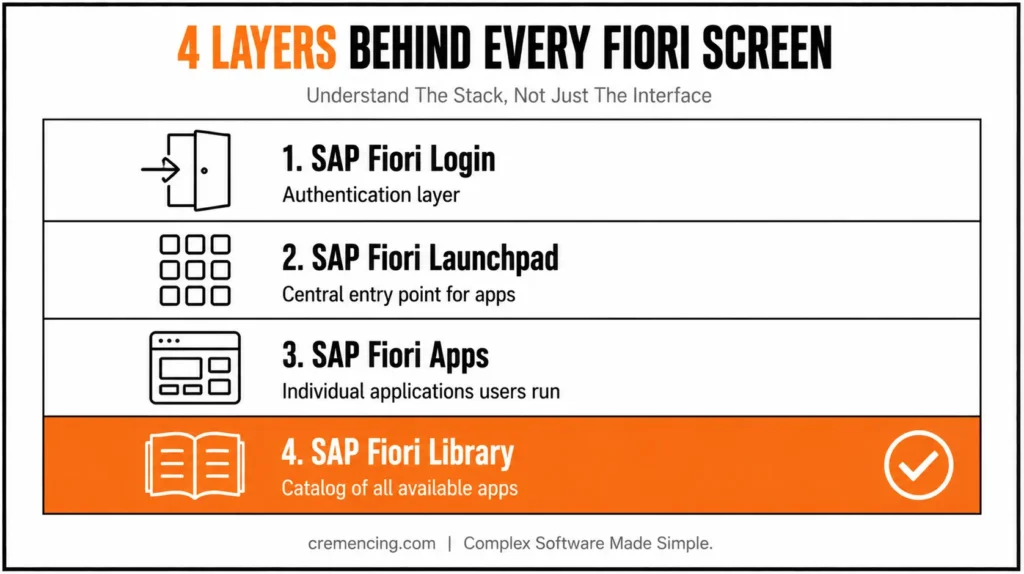
Key Components of the SAP Fiori Ecosystem
- SAP Fiori Launchpad – A central launch point for your apps
- SAP Fiori app: Individual applications accessed by users
- SAP Fiori library: A catalog of all the available apps
- SAP Fiori login: Authentication layer
Technical/Functional Details for SAP Fiori Apps Reference Library
For instance, logging in to SAP Fiori login PSO or SAP Fiori (student portal) still means you are on the same underlying ecosystem.
SAP Fiori Ecosystem — How It Works in a Nutshell
Step-by-Step Understanding of SAP Fiori Ecosystem
Step 1 – User Login and Authentication
First, it starts immediately with SAP Fiori login.
- User enters credentials
- System validates identity
- Roles and authorizations are loaded
If authentication fails, users are denied access to the system.
Step 2 – Load Fiori Launchpad
After login:
- SAP Fiori Launchpad loads
- User-specific roles determine visible apps
- Catalogues and groups are applied
This is where SAP Fiori Launchpad acts as the interface.
Step 3–Get Apps from Catalogues
The system retrieves:
- Assigned apps
- Navigation targets
- App metadata
Apps will not display if roles or catalogues are misconfigured.
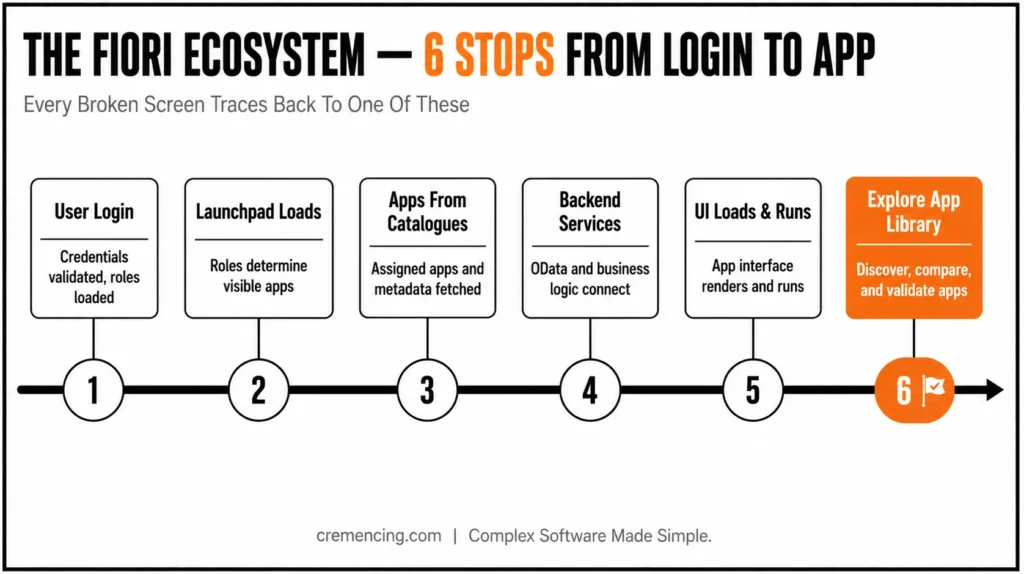
Step 4 − Integrate Backend Services
SAP Fiori apps are dependent on backend services.
- OData services provide data
- The backend systems carry out business logic
Apps have errors if services are down.
Step 5 – Load UI and Run App
The system loads UI5 components:
- The app interface is displayed
- Data is fetched dynamically
- User interactions are processed
This closes the app execution cycle,
Step 6 – Look for References, Explore Apps
SAP Fiori Design Guidelines and policies. The SAP Fiori app library.
- Discover available apps
- Check compatibility
- Understand technical requirements
This is where the SAP Fiori apps reference library comes into play.
Why invest in SAP Fiori Ecosystem – Benefits and ROI
With the proper implementation, SAP Fiori ecosystem provides significant and quantifiable benefits.
Key Benefits
- Increase user productivity by 30–40%
- Simplify navigation across systems
- Reduce training time
- Enable role-based access
Operational Benefits
- Faster application access
- Improved system usability
- Reduced navigation error
Business Impact
- Better decision-making
- Higher system adoption
- Increased efficiency
- Reduced operational costs
The SAP Fiori ecosystem is used differently and produces different outcomes for organizations that have an understanding of it. For a deeper admin-level view, check our SAP Fiori TCodes admin guide for managing launchpad catalogues and error logs.
Errors in the SAP Fiori Ecosystem
This is a common source of problems: misunderstanding the system.
Common Mistakes
We don’t treat Fiori as only the UI layer
- Ignoring backend service dependencies
- Misconfiguring roles and catalogues
- Wrong Use of SAP Fiori App Library
Unless that will also make all apps automatically accessible.
These mistakes lead to:
- Missing apps
- Login issues
- Broken navigation
- Poor user experience
Best Practices
- Align roles with business processes
- Validate backend services
- SAP Fiori library for app selection
- Test user scenarios before deployment
- Monitor system performance
The SAP Fiori app download decisions, for instance, must be based on the actual need to implement and not mere assumptions.
Why Fiori Looks Complicated
The majority of the content discusses the pieces, but not how they fit together. And that’s not the real problem: knowing apps and Launchpad alone. It is thinking about the ecosystem as a whole. When users get stuck despite a correct setup, the issue is often T-code-related; see why users get stuck in Fiori Launchpad access and errors.
What Most Teams Miss
- Login, Launchpad, and app integration
- Dependency on backend services
- Role-based visibility
Advanced Insight
Successful organizations focus on:
- Designing user journeys
- Simplifying navigation
- Aligning frontend with backend
They consider SAP Fiori an ecosystem rather than a tool. This allows for lower complexity with better usability.
Conclusion
In summary, this ecosystem improves SAP Fiori product usability and performance. Essentially, this is how login, launchpad, apps, and the library work together to create a seamless experience.
Unfortunately, the tendency to treat these components as separate entities, rather than as a connected system, is where most issues happen. Consequently, avoiding this complexity lowers user effort. Therefore, by emphasizing structure, roles, and integration, organizations can simplify the entire experience.
Fiori problems rarely have one root cause because Fiori isn’t one system — it’s login, launchpad, catalogues, backend services, and UI5 rendering all depending on each other in sequence. A missing tile could be a role issue, a catalogue issue, or a downed OData service, and troubleshooting any one of them in isolation just wastes time. Treat the ecosystem as a chain: check login, then launchpad configuration, then backend service health, in that order, and most “Fiori is broken” tickets resolve a lot faster than teams expect.
FAQ Section
What is SAP Fiori Launchpad?
It is the main interface to use for access/setup of Fiori applications.
What is the SAP Fiori app library?
It is a repository of information on all the Fiori apps that are available.
How does SAP Fiori login work
It authenticates users and loads the roles that dictate what apps they can access.
What is the SAP Fiori ecosystem?
The SAP Fiori ecosystem is a complete environment that connects apps, the launchpad, backend services, and authentication systems. In other words, it is not just a single tool but a network of components working together. As a result, understanding how these parts interact is essential for a smooth user experience.
Why do users face login issues in the SAP Fiori ecosystem?
Login issues usually occur when authentication or role assignments are not configured correctly. Consequently, users may be denied access even if the system itself is running fine. Therefore, it is important to validate roles and permissions before assuming there is a technical fault.
What is the role of the SAP Fiori Launchpad?
The SAP Fiori Launchpad acts as the central entry point for all apps within the ecosystem. Additionally, it determines which apps are visible based on user roles and catalogues. Because of this, a well-configured launchpad directly improves navigation and reduces confusion.
Why are some Fiori apps missing after login?
This usually happens when catalogues or roles are misconfigured, meaning the assigned apps never load properly. However, it can also occur if backend services are down or unavailable. Either way, checking both configuration and backend connectivity often resolves the issue.
How does the SAP Fiori Apps Library help organizations?
The SAP Fiori Apps Library serves as a reference point to discover available apps and check their technical requirements. For instance, teams can use it to compare compatibility before deployment. In this way, it prevents unnecessary app downloads based on assumptions rather than actual need.
Why should organizations treat SAP Fiori as an ecosystem rather than just a UI tool?
Treating Fiori as only a frontend often leads to overlooked backend dependencies and poor role alignment. On the other hand, viewing it as a complete ecosystem helps teams design better user journeys. Ultimately, this approach leads to lower complexity and higher system adoption.




