

Introduction
A stalled SAP Fiori project doesn’t fail quietly. It shows up as a launchpad nobody opens after week three, a six-figure implementation budget spent on apps that duplicate what the SAP GUI already did fine, and a help desk fielding the same “Where did my transaction go?” ticket for months. However, none of that is a Fiori problem; Fiori itself is stable and well-documented technology.
Instead, it is a project-discipline problem: apps are chosen without a clear business case, roles are configured without input from the people who will use them, and go-live is treated as the finish line rather than the beginning of continuous improvement. As a result, even technically sound Fiori implementations can struggle when business requirements, user roles, and post-go-live ownership are not properly defined.
The gap between organizations that get real ROI from Fiori and those that don’t isn’t technical skill. Ultimately, it comes down to whether the project was built around actual business processes and user roles from day one, or around “deploy the standard app catalogue and see what sticks.” In practice, a disciplined SAP Fiori project follows a structured approach from the beginning.
First, teams define the scope and business requirements. Next, they select the right apps and configure the underlying system. Then, they set up the launchpad and validate the user experience. Finally, they address the post-go-live work that most guides skip entirely. Along the way, this guide highlights the failure points that can appear at each stage of a real enterprise SAP Fiori rollout.
Modernizing Enterprise Workflows with SAP Fiori
In modern S/4HANA enterprise transformations, adopting SAP Fiori acts as a critical strategic enabler rather than a simple visual update, transitioning organizations away from transaction-code-driven legacy GUIs to a role-based operational front-end. Research into real-world implementations reveals that replacing clutter-heavy SAP screens with streamlined transactional apps and real-time analytical dashboards speeds up core task execution by up to 64% while drastically lowering human-error rates.
Furthermore, by providing intuitive, responsive interfaces across desktop and mobile devices, enterprises achieve higher user adoption, lower onboard training overheads, and faster cycle times across key functions like procurement approvals and financial closing. Ultimately, when combined with a Clean Core architecture on the SAP Business Technology Platform (BTP), Fiori modernizes business operations, reduces the total cost of ownership (TCO), and unlocks measurable return on investment across complex operational workflows.
What is SAP Fiori Project and Why Should You Care
SAP Fiori Project is a concept wherein the clients will implement SAP Fiori apps to enhance user experience, automate or optimize processes, and modernize SAP’s legacy systems.
It typically includes:
- Fiori app deployment
- UI/UX transformation
- Role-based access design
- Backend integration and configuration
- Launchpad setup and optimization
SAP Fiori provides a user-centric, design-oriented philosophy and simplified workflows compared to traditional SAP implementations.
Why It Matters
- Improves productivity through intuitive interfaces
- Reduces training time for users
- Enables mobile and responsive access
- SAP for Fiori alignment (aligns SAP systems with modern UX standards)
For enterprises, it’s more than just a refresh of the UI but an evolution in how users interact with their SAP systems. Use SAP Fiori Library to identify relevant apps, check system compatibility, and understand technical requirements
Step-by-Step SAP Fiori Project Implementation
A tailored approach is integral to making it successful.
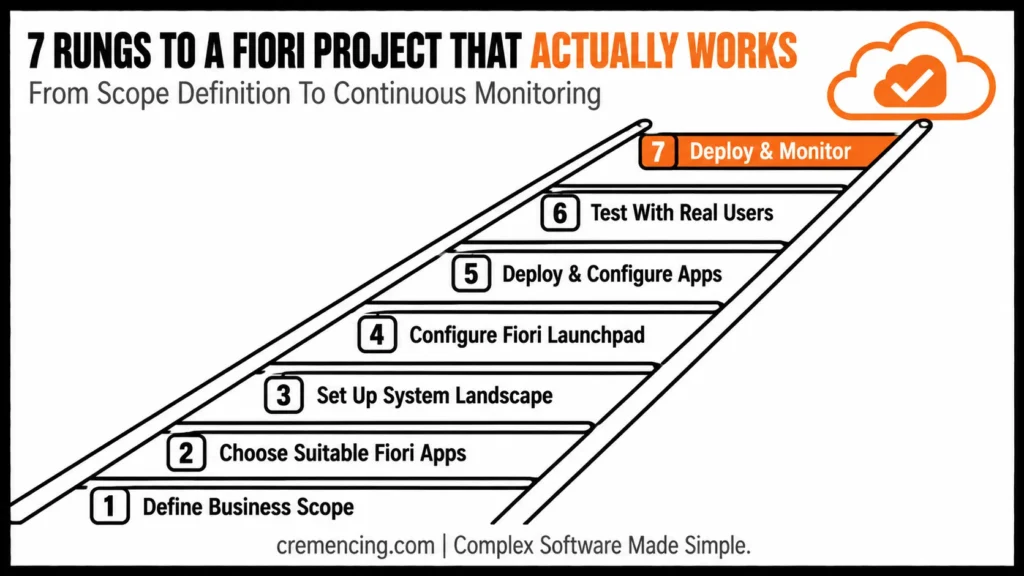
Step 1 –Business Objectives and Scope Definition
Start by identifying:
- Key business processes
- User roles and responsibilities
- Current experience in SAP and pain points
This way, it helps the project provide actual value.
Step 2 – Choose the Suitable Fiori Apps
Use SAP Fiori Library to:
- Identify relevant apps
- Check system compatibility
- Understand technical requirements
Poor adoption can be blamed on choosing the wrong apps.
Step 3 — Set up system landscape
Ensure your system is ready:
- Configure SAP Gateway
- Activate required services
- Configure frontend and backend stuff
A solid base prevents technical issues further down the line.
Fiori Setup by SAP Release
| Aspect | ECC + Fiori Add-on | S/4HANA On-Premise (embedded) | S/4HANA Cloud |
|---|---|---|---|
| Gateway | Separate install/config required | Embedded, requires activation | Embedded and active by default |
| OData service activation | Manual, via /IWFND/MAINT_SERVICE | Manual, via /IWFND/MAINT_SERVICE | Managed by SAP; scoping via Fiori Cloud config |
| Launchpad customization | Full custom catalogs/groups | Full custom catalogs/groups + Spaces & Pages (S/4HANA 2021+) | Spaces & Pages, within SAP-managed extensibility limits |
| Custom app extensions | Classic extensibility | Classic + in-app/key-user extensibility | Key-user and developer extensibility (BTP) only |
| Typical setup effort | Highest — new infrastructure | Medium — activation and role work | Lowest — configuration-only |
Step 4 — Fiori Launchpad Configuration
The Launchpad is the entry point for users.
- Create catalogs and groups
- Assign roles to users
- Customize layout and navigation
A well-designed Launchpad improves usability.
Step 5 – Deploy and Configure Apps
Now deploy apps:
- Activate OData services
- Configure app settings
- Add custom fields if required
Customization becomes important to get aligned with business requirements.
Step 6 — Testing with Real Users
Testing should focus on:
- Business scenarios
- User experience
- Performance
Critical user feedback is the best success.
Step 7 – Deploy and Monitor Your Machine Learning Model
After deployment:
- Monitor usage and performance
- Track user adoption
- Resolve issues quickly
Continuous improvement ensures long-term success. Create catalogs and groups, Assign roles to users, Customize layout and navigation.
Benefits & ROI of Successful SAP Fiori Project
A good SAP Fiori Project brings measurable results:
- 30–60% improvement in user productivity
- 40% reduction in training time
- Faster task completion across workflows
- Increased user adoption rates
- Reduced dependency on SAP GUI
These benefits result in increased efficiency and operational performance within an enterprise environment.
Avoiding Common Mistakes and Learning Best Practices
Common Mistakes
- Focusing only on technical implementation
- Ignoring user experience design
- Trying to choose a bunch of apps at once
- Skipping user testing
- Not aligning with business processes
Best Practices
- Start with high-impact use cases
- Involve business users early
- Use phased implementation
- Monitor adoption continuously
- Optimize based on feedback
Such practices boost both adoption and ROI.
Most SAP Fiori Projects Go Live, But Still Fail
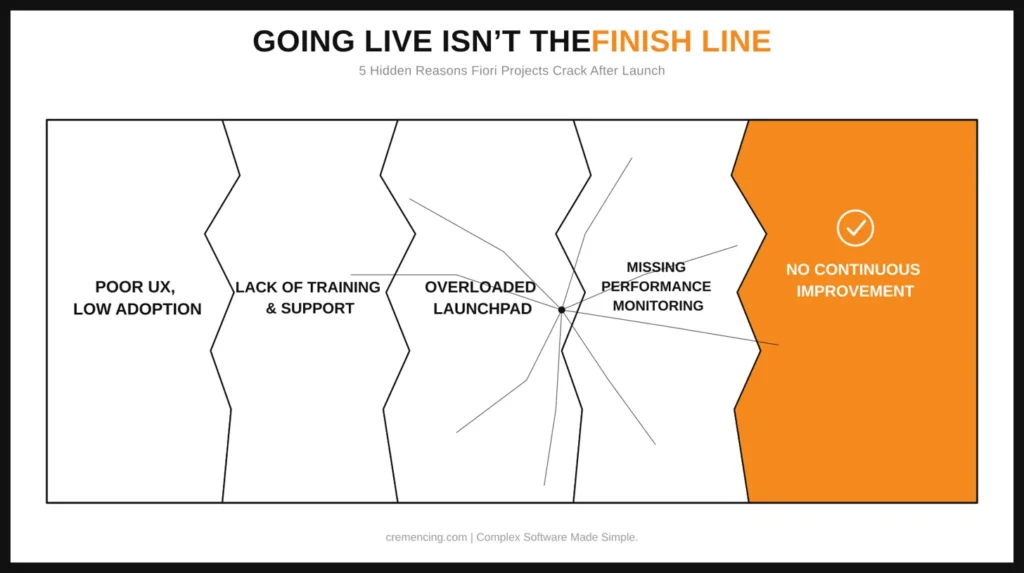
Many guides will talk about implementation, but not post-go-live challenges.
Hidden Issues
- Horrible UX – Low user adoption
- Lack of training and support
- Overloaded Launchpad with unnecessary apps
- Missing performance monitoring
- No continuous improvement strategy
What Actually Works
- Focus on user-centric design
- Provide ongoing training
- Monitor usage analytics
- Continuously optimize apps
What is done after deployment determines success?
Conclusion
A Fiori project succeeds or fails on the same three decisions covered throughout this guide. First, apps should be chosen against real business processes instead of the full standard catalogue. Second, the launchpad and roles should be built around how people actually work rather than around default SAP roles. Finally, someone must own adoption after go-live instead of treating deployment as the finish line.
More importantly, none of this requires exotic technical skill. Instead, it requires the discipline to sequence scope, app selection, and testing correctly. In addition, teams need to keep monitoring usage and user feedback after the project team moves on. As a result, the strongest Fiori implementations are not simply the ones that deploy successfully; they are the ones that continue delivering value after go-live.
Enterprises that treat post-go-live monitoring as part of the project, not an afterthought, are the ones seeing the productivity and adoption gains Fiori is supposed to deliver in the first place. If your Fiori rollout is stalled at any of the seven steps above, that’s usually a sequencing problem, not a technology problem, and it’s fixable.
The deployment of apps alone does not represent a good SAP Fiori project, but rather alters the user experience with the application itself. Without business necessity, planned user experience, these projects are of zero use.
A disciplined approach, identifying the right use cases, and staying in permanent self-improvement can bring organizations visible and sustainable benefits.
Implementation strategies and real-world use cases help you achieve equilibrium in technical and business value, ideally.
FAQ Section
What is an SAP Fiori project?
SAP Fiori apps implement user experience and business process improvement.
Fiori projects can take a couple of months to go live, but that time frame is usually shortened through intensive and rigorous processes.
Why do Fiori projects fail?
For example, bad planning, lack of user-centricity, and weak adoption strategies.
Is it possible to implement Fiori in phases?
It’s definitely better to implement in phases as you have more control and better results.
Does SAP Fiori require a separate license?
Fiori itself doesn’t require a separate license fee on top of the underlying SAP ERP/S4 license, but some Fiori apps require the same use-type entitlement (e.g., a Professional User license) as the transaction they front-end—confirm app-level licensing in the SAP Fiori Apps Reference Library before scoping.
Can SAP Fiori apps be customized for specific business needs?
Yes, via key-user extensibility (adaptation projects, custom fields) for lighter changes or developer extensibility (SAPUI5/Fiori Elements extensions) for deeper customization, with the available approach depending on your release (see comparison table above).
What’s the difference between SAP Fiori and SAP Fiori Elements?
SAP Fiori is the overall UX design language and app suite; Fiori Elements is a framework for building Fiori-compliant apps from OData metadata with minimal custom UI code, commonly used for RAP-based custom apps.
How do you measure Fiori project success after go-live?
Common metrics include Launchpad login frequency, task completion time versus the legacy GUI transaction, ticket volume tied to Fiori apps, and role-level adoption rate, not just “go-live achieved.”
Do all users need training even though Fiori is easier to use?
Some baseline training is still recommended. Fiori reduces navigation complexity, but users still need role-specific guidance on which apps replace which legacy transactions.




