
Introduction
SAP Fiori is not difficult because there are too many technologies to learn. It becomes difficult when those technologies are taught as separate topics with no clear connection between them.
A beginner may learn SAPUI5 from one tutorial, CDS from another, OData from a third, and Fiori Launchpad from a fourth. Each topic can make sense individually, yet the developer still may not understand how a business requirement becomes a working Fiori application.
That is the gap this SAP Fiori tutorial addresses. Instead of treating Fiori as a collection of disconnected tools, it follows the development flow from architecture and backend data to OData, Fiori elements or freestyle SAPUI5, deployment, Launchpad content, and authorization.
The goal is not to memorize every SAP tool or transaction. It is to understand what each layer does, when you need it, and how the layers work together in a real development scenario.
Some tutorials are technical and filled with details that may not relate to the main topic, while others skip vital steps needed to complete an exercise of interest. It confuses, delays learning, and frustrates some people.
Now, the fact is that learning SAP Fiori becomes a smooth-sailing task if you have followed an organized and practical path. You cannot make sense of isolated concepts, but rather how the complete development flow operates.
This guide and the SAP Fiori tutorial for beginners that you will get in it exclusively cover what worked, with practical steps, tools, and the way to approach the SAP Fiori freestyle tutorial style.
What Is SAP Fiori and Why Do Most Tutorials Fail
SAP Fiori is SAP’s design approach and user experience for business applications, centered on role-based, responsive experiences. Depending on the application and architecture, Fiori solutions can use technologies such as SAPUI5, Fiori elements, OData services, ABAP CDS, RAP, CAP, and the SAP Fiori launchpad.
It includes:
- SAPUI5 (frontend framework)
- OData services (data communication)
- ABAP CDS view entities and other data models, where applicable
- Fiori Launchpad (user access layer)
Why Most Tutorials Fail
Here are the reasons why SAP Fiori tutorial content fails:
- Only covers theory or only coding
- It does not provide a complete architectural explanation
- You avoid the neural link/backend + frontend connection
- You are not provided a clear path to learn
Instead, instructions must be contextualized, especially for beginners.
SAP Fiori Tutorial
A typical architecture can be viewed as several connected layers. The user starts from the SAP Fiori launchpad, opens an application, and the frontend communicates with backend services to retrieve or change business data. Depending on the implementation, the backend can use ABAP business logic, RAP, CDS artifacts, or other service technologies.
The important point for a beginner is that SAPUI5 is not the entire Fiori architecture. It is one part of the application experience.
Follow this structured approach instead of random learning.
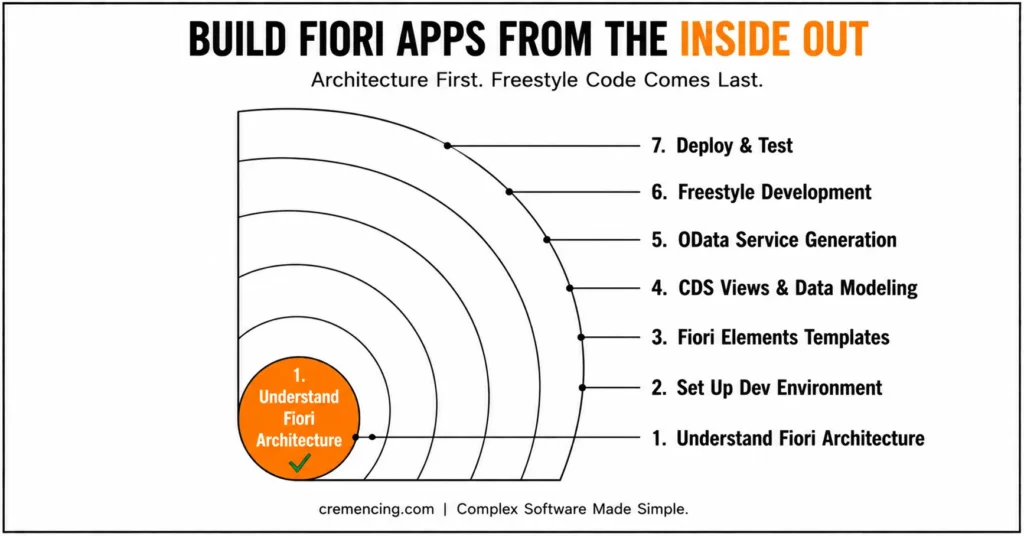
Step 1 – First, understand Fiori Architecture
Before writing any code:
- Get to know how frontend and backend interact
- Dig deeper into OData and CDS views
- Identify how apps are deployed
This builds a strong foundation.
Step 2 — Set up the Development Environment
You need the right tools:
- SAP Business Application Studio
- Access to the SAP system
- Fiori Launchpad configuration
You cannot learn unless you set it up properly.
Step 3 – Begin your Journey with Fiori Elements (Not Freestyle)
Newbies often dive into freestyle development too soon.
Instead:
- Use Fiori Elements templates
- Generate apps from CDS views
- Focus on understanding metadata
This simplifies learning significantly.
| Approach | Best for | Main technology | Coding level | Beginner starting point |
|---|---|---|---|---|
| Fiori elements | Standard business floorplans | OData + annotations | Lower | Recommended starting point |
| Freestyle SAPUI5 | Highly customized UI | SAPUI5 | Higher | Learn after fundamentals |
| RAP + Fiori elements | Modern ABAP/S/4HANA apps | RAP + CDS + OData V4 | Medium–High | Strong modern path |
| CAP + Fiori elements | BTP/cloud applications | CAP + OData | Medium–High | Relevant for BTP |
Step 4 – Learn about CDS Views and Data Modeling
To build apps effectively:
- Create CDS views
- Add annotations
- Understand data exposure
It’s how Fiori development is built.
Step 5 – OData Service Generation
The next step is exposing data:
- Activate the OData service
- Test using Gateway
- Ensure proper entity structure
This connects the backend to the UI.
Step 6 – Patience Moves on Freestyle Development
Now, how to start the SAP Fiori freestyle tutorial learning after we clear the basics?
- Build custom UI using SAPUI5
- Handle events and logic
- Customize layouts
With freestyle, you gotta be good with foundations.
Step 7 — Deploy and Test Application
The final step is deployment:
- Deploy app using BAS
- Configure Launchpad
- Assign roles and catalogs
This completes the development cycle.
Advantages Obtained & ROI through Correct SAP Fiori Tutorial
So, an approach such as using SAP Fiori Tutorial helps justify really good benefits:
- Reduced confusion and rework
- Better understanding of the full architecture
- Transition from beginner to developer quicker
- Improved project readiness
Structured learning gets teams up and running a lot quicker. “If you want the practical build sequence, follow our guide to 7 Steps to Build SAP Fiori Apps from Scratch, which takes the process from business requirement through development and deployment.”
Mistakes and Best Practices
Common Mistakes
- Jumping into freestyle development too soon
- Ignoring backend concepts
- Skipping CDS and OData learning
- Following outdated tutorials
- Not practicing with real examples
Best Practices
- Start with Fiori Elements
- Focus on architecture first
- Practice step-by-step development
- Use official SAP tools
- Do simple ones before complicated ones
These practices result in effective and sustainable learning.
Why Not Just SAP Fiori Tutorial for Beginners PDF
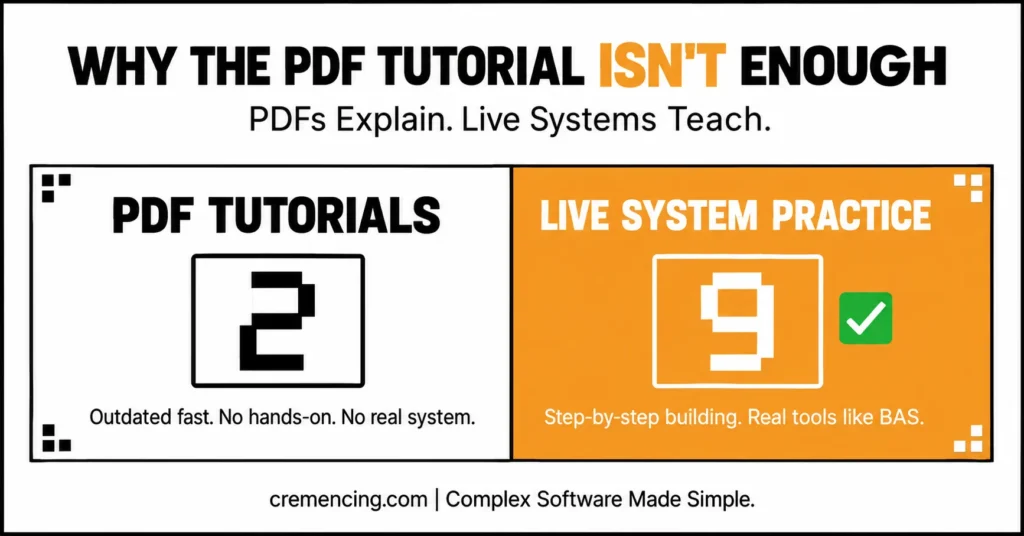
This word – no wonder, many learners dig through the Internet for a SAP Fiori tutorial for beginners PDF and are looking for a complete learning menu. However, PDFs often fail because:
- They become outdated quickly
- They lack hands-on practice
- This is not in any real system setup
- End-to-end development is not addressed by them
What Actually Works Instead
- Interactive learning with real systems
- Step-by-step app building
- Combining theory with practice
- Using live tools like BAS
Fiori is all about practice over theory. For a deeper look at the development environment itself, see our guide to SAP Business Application Studio mistakes that can reduce developer productivity
Conclusion
The most useful SAP Fiori tutorial is not the one that lists the most commands or introduces the largest number of tools. It is the one that shows how the pieces connect.
Start with the architecture. Understand how the frontend communicates with backend services. Learn how OData, metadata, annotations, CDS, and modern backend models fit into the application. Then use Fiori elements to understand metadata-driven development and move into freestyle SAPUI5 when the application requires more control.
A good SAP Fiori Tutorial does not involve doing every factor all at once. It is about sequentially and incrementally building knowledge. This structure is not offered by the majority of guides, which is why most fail.
When you start working with architecture & keeping the freestyle for later stages, then that’s how you go about things, and there is no confusion.
If you are new to it or want to improve your skills, understanding what really works will speed up your learning and building a better application. Learn the Basic Concepts of SAP with our SAP experts, and we will guide you right from the basics to Real Project Implementation. Ask us today for faster learning & no mistakes!
FAQ Section
- What is SAP Fiori Tutorial?
A learning guide that describes how to develop, create, and configure SAP Fiori apps. - Does SAP Fiori have a tough learning curve for freshers?
Without a structure, it can be hard, but with steps, it gets easier. - What about direct development in freestyle Fiori?
No, Freestyle is not recommended for beginners; instead, they should start with Fiori Elements and then proceed with Freestyle. - You can read SAP Fiori PDF tutorials. After that, are you on the right track to learn this technology?
Theory is easy to master with PDFs, but there are no PDFs that help you master practice. - What are the tools needed for doing Fiori development?
SAP Business Application Studio, SAPUI5, CDS views, and OData services. - What is the difference between SAPUI5 and SAP Fiori?
SAPUI5 is a UI development technology used to build web applications, while SAP Fiori describes the broader user experience, design approach, and application experience around SAP business applications. - What is the difference between Fiori elements and freestyle SAPUI5?
Fiori elements provides metadata-driven application floorplans that reduce the amount of custom UI coding. Freestyle SAPUI5 gives developers greater control when an application requires custom interaction or layout. - Do I need to learn ABAP before learning SAP Fiori?
Not necessarily for every Fiori path. However, developers working on S/4HANA applications benefit significantly from understanding ABAP, CDS, OData, and modern development models such as RAP.




