
Introduction
Approval requests wait in inboxes for days, and nobody can say how much that delay costs the business. Procurement, HR and finance teams in SAP ECC 6.0 and S/4HANA landscapes face this problem when approvals still depend on SAP GUI transactions or e-mail. New app rollouts then fail to show value, because teams never defined metrics before go-live.
These SAP Fiori examples cover seven business scenarios, from purchase order approvals to travel expenses, and each one describes the challenge, the Fiori solution and the metric to track. By the end, you will know where SAP Fiori apps fit in your landscape and how to measure their effect.
How SAP Fiori Apps Run on ECC and S/4HANA
SSAP Fiori apps run on SAPUI5 and read business data through OData services. Therefore, the architecture decision affects the effort required for a rollout.
In SAP S/4HANA, most standard apps become available after activating the required ICF services. You also need the required OData services and role content.
In SAP ECC 6.0, organizations typically deploy a separate SAP Gateway and front-end server. This is known as a hub deployment. The system also needs a sufficient support package level. The available range of apps is smaller than in SAP S/4HANA.
Consequently, check each app’s prerequisites in the SAP Fiori Apps Reference Library. Do this before committing to a rollout plan.
Security follows the backend authorization model. Users need the relevant business catalog in their role. They also need authorization for the underlying data.
A tile that appears without data often points to missing authorization. It does not necessarily indicate an app defect. This is why role design deserves more project time than app activation itself.
Purchase Order Approvals
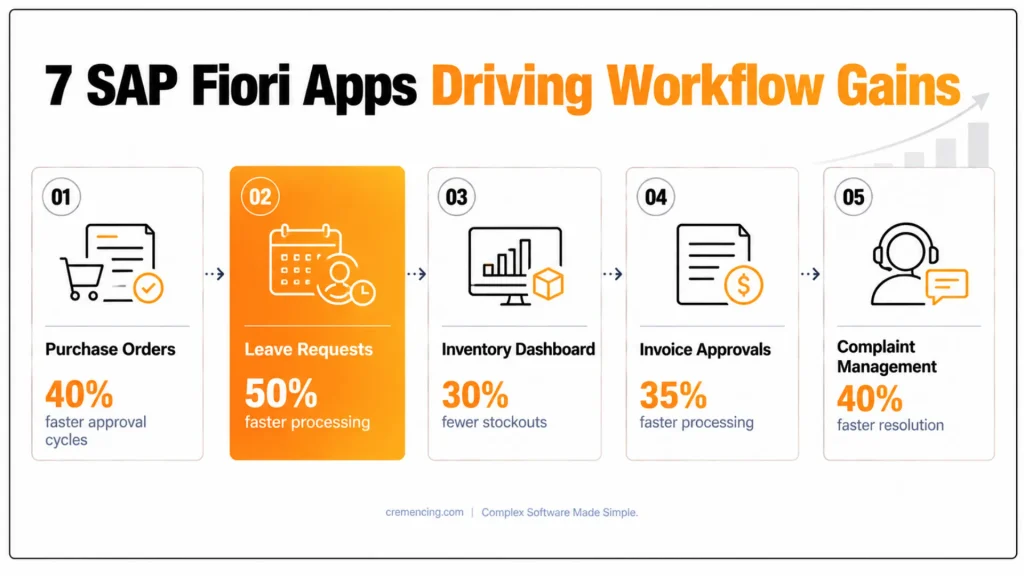
Manual purchase order approvals extend cycle times, because approvers must log in to SAP GUI and search for the pending document. SAP Fiori apps for purchase order approval, such as My Inbox or the dedicated approval apps in the Reference Library, let managers review the item, check the account assignment and approve or reject from a desktop or mobile device. The approval logic still runs in the backend through release strategies or, in S/4HANA, flexible workflow, so the Fiori layer changes access without changing the control concept.
To measure the effect, compare the average time from purchase order creation to final release before and after the rollout. Furthermore, track how many orders remain pending beyond the agreed approval limit, because this number shows which approvers create bottlenecks.
Employee Leave Requests
Leave processing in HR often relies on paper forms or e-mail, which delays approvals and creates inconsistent absence records. The My Leave Requests and Approve Leave Requests apps, which belong to the SAP Fiori HR applications, let employees submit requests and managers decide in the same interface. The data then flows into Time Management and the absence records that payroll uses, and a team calendar helps managers plan coverage before they approve.
Useful metrics include processing time per request, the number of payroll corrections caused by absence data and the share of requests submitted outside the office. Because SAP Fiori mobile applications run through the launchpad in a browser or in SAP Mobile Start, employees can submit requests anywhere your security concept allows external access.
Inventory and Stock Monitoring
Planners who cannot see current stock positions across plants often discover stockouts only after production or delivery has been affected. In SAP S/4HANA, apps such as Manage Stock and Monitor Material Coverage read stock and requirements data through OData services based on CDS views, so users see current figures without running separate reports. Filters and coverage indicators then direct planners to materials that fall below safety stock. In SAP ECC, comparable scenarios usually require custom apps or additional components, so confirm the scope for your release.
Relevant metrics include the frequency of stockouts, inventory accuracy and the time needed to produce a stock report. Since the data comes directly from the backend, these figures also improve the reliability of supply chain decisions.
Invoice and Payment Approvals
Delayed invoice approvals can lead to missed payment terms, lost cash discounts, and compliance risks. SAP Fiori apps for supplier invoice processing can help reduce these delays.
Combined with My Inbox, these apps let finance managers review invoice details. They can also approve invoices directly from the launchpad. Workflow notifications show which items remain open. The approval rules stay in the backend workflow. This keeps the audit trail intact.
To evaluate the results, measure the time between invoice receipt and approval. Also track the share of invoices paid within agreed terms. Cash discounts captured provide another useful measure.
Moreover, the workflow log gives auditors a complete approval record. It shows who approved each invoice and when. Centralized processes reduce manual touchpoints. They can also improve accuracy, compliance, and SLA adherence.
Customer Complaint Management
Service teams that record complaints in spreadsheets or e-mail cannot assign tasks consistently or see the resolution status. Depending on the release and the licensed solution, complaint handling in SAP runs through quality notifications or service processes, and SAP Fiori apps provide the interface for recording, assigning and tracking them. Therefore, check in the Reference Library which complaint-related apps your release includes before you plan this use case.
Suitable metrics include the time to resolution, SLA compliance, the number of repeat complaints and the manual handovers per case. Centralized tracking also reduces the number of manual touchpoints, which improves accuracy and compliance.
Production Order Monitoring
Supervisors often learn about delays only when the shift report arrives. In S/4HANA, apps such as Manage Production Orders provide visibility into order status, material availability, and operation progress, allowing supervisors to respond while the order is still running. The accuracy of this view depends on shop-floor confirmations, which makes a stable confirmation process the most important prerequisite.
Teams should track schedule adherence, order lead time and delays caused by missing material. For additional KPIs or custom tiles, developers can build extensions on SAP BTP, as described in.
Travel Request and Expense Management
Manual travel requests and expense reports create long approval chains and posting errors. SAP Fiori travel apps let employees create requests, attach receipts and submit expense reports, whereas approvers decide through the inbox and the data posts to Travel Management and finance in the backend. Companies that use SAP Concur handle this scenario through the Concur integration instead, so confirm which solution is in scope.
The most useful metrics are the processing time per report, the error rate in expense postings and the share of reports submitted within the policy deadline.
What These SAP Fiori Examples Show
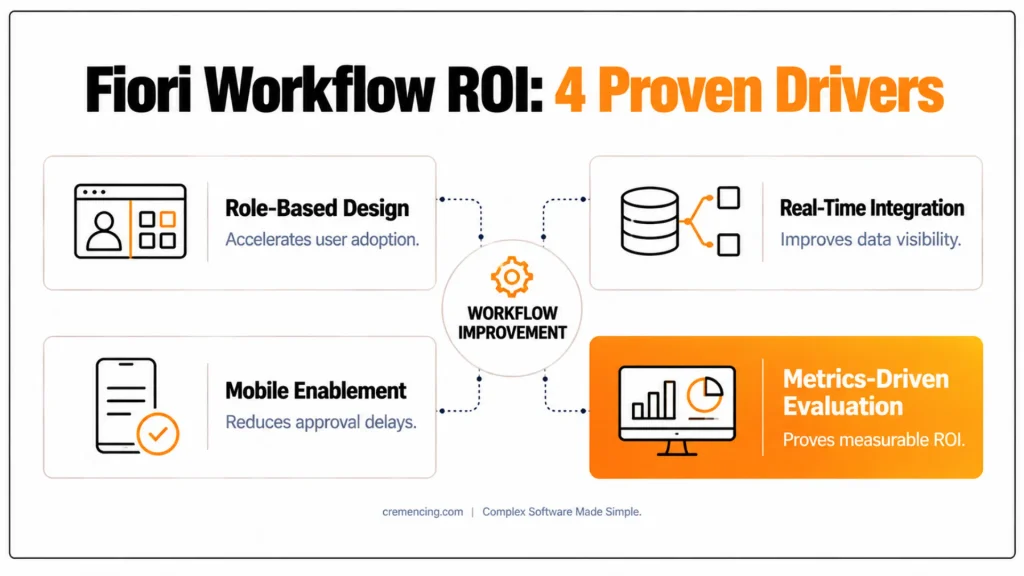
Across all seven scenarios, three factors determine success: role-based design, backend integration and measurement. Role-based catalogs limit the interface to the tasks each user needs, which lowers training effort and raises adoption. Integration through OData services ensures that users see current data from SAP ECC, S/4HANA or connected non-SAP systems, while mobile access reduces approval delays when the security concept supports it. Finally, teams that record baseline metrics before go-live can prove SAP Fiori app ROI later, whereas teams without a baseline can only describe it.
| SAP Fiori example | Backend source | Metric to baseline |
|---|---|---|
| Purchase order approvals | Release strategy or flexible workflow | Creation-to-release time |
| Leave requests | Time Management | Processing time per request |
| Stock monitoring | Stock and requirements data | Stockout frequency |
| Invoice approvals | Invoice workflow | Receipt-to-approval days |
| Complaint management | Quality or service notifications | Time to resolution |
| Production monitoring | Production orders and confirmations | Schedule adherence |
| Travel and expenses | Travel Management | Processing time per report |
Future of SAP Fiori Applications
SAP continues to build Fiori on SAP Fiori elements and SAPUI5, and new extensions increasingly run on SAP BTP, which allows teams to add custom apps without modifying the core. AI assistance such as Joule is being added to the launchpad experience, while predictive scenarios rely on embedded analytics and machine learning in S/4HANA. IoT-based use cases, such as equipment monitoring, require integration through SAP BTP, so they need architecture planning before a pilot. Verify the current roadmap on SAP’s official channels, because release availability changes between SAP S/4HANA versions.
Conclusion
These SAP Fiori examples show that the value of an app comes from the combination of a role-based interface, a stable backend workflow and a measurable baseline. Purchase order approvals, leave requests, invoice processing and production monitoring each remove manual steps, yet teams can prove the result only when they record cycle time and error rates before the rollout.
Looking ahead, SAP continues to develop Fiori through SAP Fiori elements, SAP BTP extensions and AI assistance such as Joule, so apps built on current standards will be easier to extend. Teams that plan for S/4HANA should therefore review the Reference Library per release and prioritize standard apps before they start custom development.
FAQs
What are SAP Fiori examples for business?
SAP Fiori examples are role-based apps that handle specific business tasks, such as purchase order approval, leave requests, stock monitoring and invoice approval. Each app reads data from SAP ECC or S/4HANA through OData services and appears in the Fiori launchpad, which makes the task faster than classic SAP GUI transactions.
Can SAP Fiori apps run on SAP ECC 6.0?
Yes, but ECC needs a Gateway and front-end server setup with sufficient support package levels, and the range of available SAP Fiori apps is smaller than in S/4HANA. Verify the prerequisites for each app in the SAP Fiori Apps Reference Library before you plan a rollout.
How do you measure the ROI of SAP Fiori apps?
Record baseline values before go-live, such as approval cycle time, error rate and support effort, then compare them after the rollout. Combine these figures with launchpad usage data to calculate time savings and error reduction, which gives a defensible SAP Fiori app ROI instead of an estimate.
Can SAP Fiori apps be customized?
Yes. Key users adapt apps through Adapt UI and custom fields, while developers extend or build apps with SAPUI5, SAP Fiori elements and SAP BTP. Choose the lightest option that meets the requirement, because custom code increases upgrade effort for both desktop apps and SAP Fiori mobile applications.
Are SAP Fiori mobile applications safe for approvals?
They can be, provided you secure external access through a reverse proxy, SAP Web Dispatcher or SAP Cloud Connector with a federated identity provider and multi-factor authentication. Backend authorizations still apply, so users approve only documents their role allows, and the audit trail records every decision.
Which industries benefit most from SAP Fiori apps?
Manufacturing, retail, financial services, utilities and logistics often see strong results, because they run high volumes of approvals, stock movements and shop-floor tasks. The benefit depends less on the industry than on process volume, so any company with frequent approval workflows can use these SAP Fiori examples.
What do SAP Fiori HR applications include?
Typical SAP Fiori HR applications cover leave requests, leave approvals, timesheets, employee profile data and payslip display. Availability depends on whether you use SAP HCM in ECC, HCM for S/4HANA or SAP SuccessFactors, so confirm the scope in the Fiori Apps Reference Library before planning.
How long does a SAP Fiori rollout take?
The duration depends on scope, but a pilot with two or three standard apps usually needs less time than a custom build, because most effort goes into role design, authorization and testing. Custom apps and hub deployments on ECC extend the timeline, so plan the schedule by app type and release.




