
If you’re wondering whether to start with SE38 or Eclipse, RAP or classic reports, BAPIs or CDS views, here’s the direct answer: it doesn’t matter which tool you open first, it matters what order you learn the concepts in, and the order most beginners default to is backwards. They start with whatever tutorial or SAP release happens to be popular this year, not with what actually has to come first: data types, dictionary awareness, and internal tables before anything else makes sense.
That’s why so many self-taught learners can recite RAP syntax but freeze the moment sy-subrc shows a non-zero value they weren’t expecting. This path fixes the order: seven steps, each with a checkpoint you run yourself, moving from what ABAP does on the application server through to the point where you’re ready to specialize into ECC, S/4HANA, or ABAP Cloud/RAP based on where you’ll actually work.
What You Need Before Learning ABAP
An SAP system that can execute and write ABAP code is required. Utilize the SAP GUI with SE38, SE11, SE80, SE24, and SE37 for traditional ABAP. SE38 is used to create reports, SE11 is used to display ABAP Dictionary objects, SE80 is used to browse repository objects, SE24 is used to manage classes, and SE37 is used to test function modules.
Use Eclipse, ABAP Development Tools for S/4HANA, and SAP BTP ABAP Environment. Modern ABAP, classes, CDS, and RAP work is supported by ADT. You should also be familiar with some fundamental programming terms like variable, loop, condition, table, method, and database.
Step 1 — Understand What ABAP Does in SAP
The first part of the ABAP learning process is the knowledge of where ABAP is running. The SAP application server, not your laptop, is where ABAP code is run as a local script. Reads, applies rules, calls APIs, writes reports, and extends SAP processes.
For ABAP developers, the reports, function modules, forms, user exits, BADIs, and ALVs are frequently used in ECC 6.0. With S/4HANA on-premise, you continue to use classic code while also using newer models such as classes, newer syntaxes, CDS views, and newer extension models. ABAP Cloud, released APIs, CDS, RAP, and service bindings are your work tools in the SAP BTP ABAP environment.
Don’t start with RAP on day one. Before you can understand RAP, you need to know the following concepts: Data Types, Classes, Internal Tables, Open SQL, Debugging, and SAP Metadata. A beginner student will copy things without knowing what breaks if he skips those topics
Run this first checkpoint when you get system access:
REPORT z_step1_system_check.
DATA lv_user TYPE sy-uname. “Logged-in SAP user
DATA lv_client TYPE sy-mandt. ” Current SAP client
lv_user = sy-uname. ” Read current user from system field
lv_client = sy-mandt. ” Read current client from the system field
WRITE: / ‘ABAP system access works.’. ” Confirms report execution
WRITE: / ‘User:’, lv_user. ” Prints current user
WRITE: / ‘Client:’, lv_client. ” Prints current client
You are ready for Step 2 when you can activate and run this report without asking someone else to execute it for you.
Step 2 — Set Up SAP GUI or Eclipse ADT Access
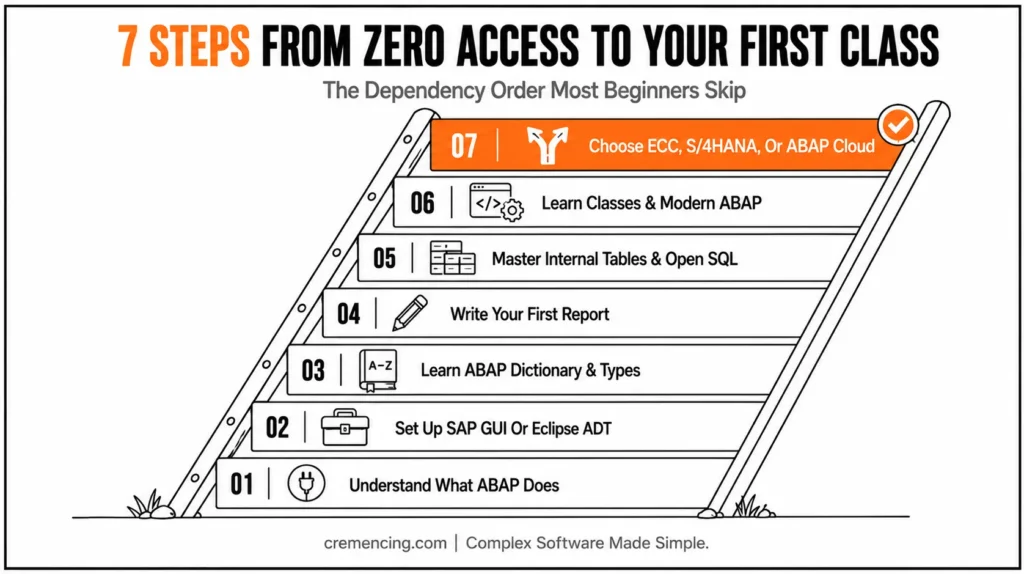
The second step in how to learn ABAP from scratch is choosing the right tool for your target system. SAP GUI remains common in ECC and S/4HANA on-premise support work. Eclipse ADT is the standard tool for modern ABAP development, especially for classes, CDS, RAP, and the SAP BTP ABAP environment.
SE38 is used when you want to create and run a simple executable report in SAP GUI. For dictionary objects, SE11 helps you inspect tables, data elements, domains, and structures. When working with object-oriented development, SE24 is where you manage classes, while SE37 allows you to test function modules in classic SAP systems.
In ADT, create an ABAP project, connect to your system, and create package objects if your authorization allows it. If you only have temporary training access, create local reports or objects in a training package assigned by your system owner.
Use this small program to confirm your editor, activation, and output path:
REPORT z_step2_editor_check.
DATA lv_message TYPE string. ” Dynamic text for output
lv_message = ‘Editor, activation, and execution are working.’. “Test message
WRITE: / lv_message. ” Display the message in the output list
You are ready for Step 3 when you can create a report, activate it, run it, and find it again in your tool. If you cannot do those four actions, do not move into syntax yet. Many new SAP developers struggle with basic ABAP concepts explore these common mistakes and learn the right approach to build stronger programming fundamentals. ABAP Programming Basics Guide
Step 3 — Learn ABAP Dictionary and Data Types
The third step is the ABAP Dictionary because serious ABAP code depends on SAP metadata. The dictionary defines tables, structures, views, data elements, domains, lengths, decimals, and conversion behaviour. Beginners often treat every field as “text or number,” but SAP fields carry more meaning than that.
For example, a customer number may look numeric but use a character-like type. A material number may store leading zeros. A currency amount may require a packed decimal type, not a floating-point type.
In ECC and S/4HANA on-premise, you often inspect transparent tables directly in SE11. In ABAP Cloud, unrestricted direct access to many SAP standard tables is not allowed, but dictionary-based typing and released data models still matter.
Use this checkpoint to practice dictionary-based declarations:
REPORT z_step3_dictionary_types.
DATA lv_carrier_id TYPE scarr-carrid. ” Dictionary field type for carrier ID
DATA lv_carrier_name TYPE scarr-carrname. ” Dictionary field type for carrier name
lv_carrier_id = ‘LH’. ” Demo carrier ID
lv_carrier_name = ‘Lufthansa’. ” Demo carrier name
WRITE: / ‘Carrier ID:’, lv_carrier_id. ” Display typed carrier ID
WRITE: / ‘Carrier Name:’, lv_carrier_name. ” Display typed carrier name
This example uses SCARR, a common demo table in many classic training systems. If your system does not contain it, use any training table your instructor or system owner provides.
You are ready for Step 4 when you can inspect a table field in SE11 and declare an ABAP variable with a matching type.
Step 4 — Write Your First ABAP Report
The fourth step teaches basic syntax. Learn REPORT, DATA, TYPES, constants, IF, CASE, DO, WHILE, LOOP, WRITE, string templates, and simple messages. Do not judge your progress by how many keywords you can name; judge it by whether you can write a small report without copying every line.
This is also where you learn sy-subrc. ABAP sets this system field after many operations. A value of 0 often means success, while other values depend on the statement.
Start with this small report:
REPORT z_step4_basic_report.
DATA lv_quantity TYPE i. ” Integer for countable quantity
DATA lv_price TYPE p DECIMALS 2. ” Packed number for amount-like value
DATA lv_total TYPE p DECIMALS 2. ” Packed number for calculated total
DATA lv_status TYPE char10. ” Fixed-length status text
lv_quantity = 5. ” Assign quantity
lv_price = ‘120.50’. ” Assign unit price
lv_total = lv_quantity * lv_price. ” Calculate total amount
IF lv_total > 500. ” Check calculated amount
lv_status = ‘HIGH’. ” Mark high-value case
ELSE.
lv_status = ‘NORMAL’. ” Mark normal-value case
ENDIF.
WRITE: / ‘Total:’, lv_total. ” Display calculated total
WRITE: / ‘Status:’, lv_status. ” Display status
Expected result: the report prints a total and a status. This teaches you more than a copied “Hello World” because it uses types, calculation, condition logic, and output.
You are ready for Step 5 when you can change the inputs, predict the result, run the report, and explain why the result changed.
Step 5 — Master Internal Tables and Open SQL
The fifth step is the most important part of how to learn ABAP programming correctly. Learn internal tables before Open SQL. A database SELECT often fills an internal table, so you need to understand where the rows go before you read them.
An internal table stores multiple rows in ABAP memory. Learn APPEND, LOOP AT, READ TABLE, field symbols, MODIFY, DELETE, and table keys. Then learn Open SQL: SELECT, SELECT SINGLE, WHERE, joins, and INTO TABLE.
Internal Table
First, learn the internal table:
REPORT z_step5_internal_table.
TYPES: BEGIN OF ty_student,
id TYPE numc5, ” Student ID stored as numeric text
name TYPE char30, ” Student name
END OF ty_student.
DATA lt_students TYPE STANDARD TABLE OF ty_student WITH EMPTY KEY. ” Row collection
DATA ls_student TYPE ty_student. ” Single row
ls_student-id = ‘00001’. ” Assign student ID
ls_student-name = ‘Ayesha’. ” Assign student name
APPEND ls_student TO lt_students. ” Add row to internal table
READ TABLE lt_students INTO ls_student INDEX 1. ” Read first row
IF sy-subrc = 0. ” Check if row was found
WRITE: / ls_student-id, ls_student-name.
ELSE.
WRITE: / ‘No student found at index 1.’.
ENDIF.
Now connect that concept to Open SQL:
REPORT z_step5_open_sql.
SELECT carrid, carrname
FROM scarr
INTO TABLE @DATA(lt_carriers) ” ABAP 7.40+ inline result table
UP TO 10 ROWS. Limit result for beginner testing
IF sy-subrc <> 0. ” Check whether SELECT returned rows
MESSAGE ‘No carrier data found’ TYPE ‘I’.
RETURN. ” Stop if no data exists
ENDIF.
LOOP AT lt_carriers ASSIGNING FIELD-SYMBOL(<carrier>). ” Avoid copying each row
WRITE: / <carrier>-carrid, <carrier>-carrname.
ENDLOOP.
SAP NetWeaver 7.40+ and S/4HANA introduced modern Open SQL syntax that uses @ for host variables. Older ECC systems may still contain traditional syntax without inline declarations. With ABAP Cloud development, use released CDS entities or APIs instead of assuming direct table access.
You are ready for Step 6 when you can fill an internal table, loop over it, read a row, run a SELECT, and check the result.
Step 6 — Learn Classes, Methods, and Modern ABAP
The sixth step moves you beyond report-only programming. Classic ABAP code often uses includes, subroutines, and function modules. Modern ABAP expects classes, methods, interfaces, and object-oriented design.
SE24 is the SAP GUI transaction for creating and maintaining ABAP classes. In ADT, classes appear as repository objects and are easier to edit, test, and navigate. For S/4HANA and ABAP Cloud work, classes are essential.
Start with a local class inside a report:
REPORT z_step6_local_class.
CLASS lcl_total_calculator DEFINITION. ” Local class in this report
PUBLIC SECTION.
METHODS calculate
IMPORTING iv_quantity TYPE i ” Quantity input
iv_price TYPE p DECIMALS 2 ” Price input
RETURNING VALUE(rv_total) TYPE p DECIMALS 2. ” Calculated result
ENDCLASS.
CLASS lcl_total_calculator IMPLEMENTATION.
METHOD calculate.
rv_total = iv_quantity * iv_price. ” Multiply input values
ENDMETHOD.
ENDCLASS.
DATA lo_calculator TYPE REF TO lcl_total_calculator. ” Object reference
DATA lv_total TYPE p DECIMALS 2. ” Result variable
CREATE OBJECT lo_calculator. ” Create class instance
lv_total = lo_calculator->calculate(
iv_quantity = 3
iv_price = ‘150.00’ ). ” Call method with inputs
WRITE: / ‘Calculated total:’, lv_total. ” Expected output: 450.00
After this, learn ABAP 7.40+ syntax: inline declarations, string templates, constructor expressions, table expressions, and line_exists. These appear in modern S/4HANA code and official SAP examples.
REPORT z_step6_modern_syntax.
DATA(lt_numbers) = VALUE STANDARD TABLE OF i(
( 10 )
( 20 )
( 30 )
). ” ABAP 7.40+ constructor expression
DATA(lv_total) = 0. ” Inline-style total variable
LOOP AT lt_numbers INTO DATA(lv_number). ” Inline loop variable
lv_total = lv_total + lv_number. ” Add each row value
ENDLOOP.
WRITE: / |Total value: { lv_total }|. ” String template output
Step 7—Choose ECC, S/4HANA, or ABAP Cloud/RAP Path
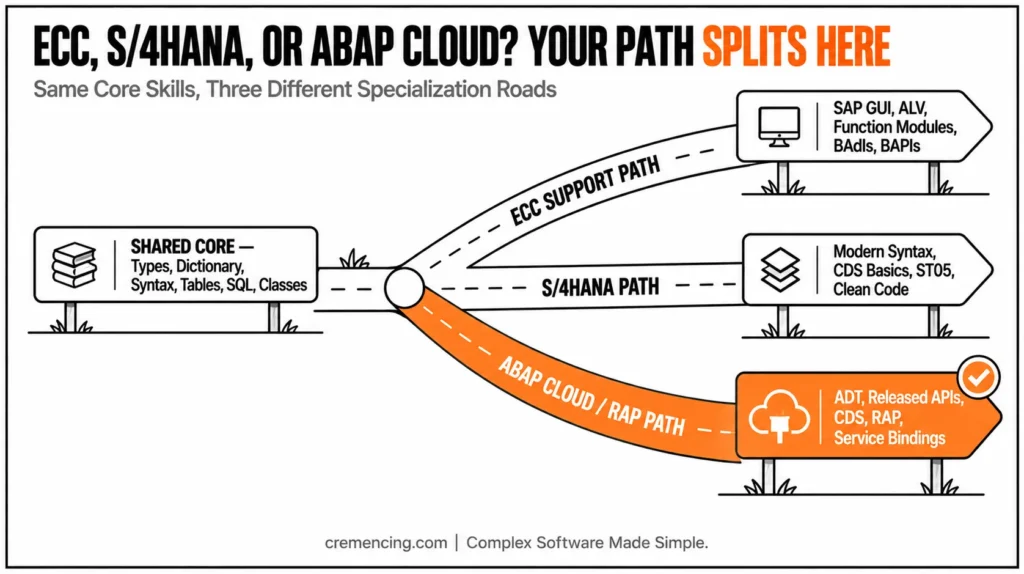
The seventh step is where your learning path splits. Do not learn every advanced topic at once. Choose based on your target system and role.
If your target is ECC support, continue with SAP GUI, reports, ALV, Smart Forms, SAPscripts, function modules, user exits, BADIs, and BAPIs. SE37 matters here because many classic APIs are function modules. SE80 also matters because old custom code often uses includes and function groups.
If your target is S/4HANA on-premise, learn modern syntax, classes, Open SQL, CDS basics, ALV maintenance, performance checks, and clean custom-code adaptation. ST05 is the SQL Trace transaction; use it later to see database calls and identify repeated SELECT patterns. S/4HANA projects often require both old-code reading and new-code writing.
If your target is SAP BTP ABAP Environment or ABAP Cloud, focus on ADT, released APIs, CDS, RAP, service definitions, service bindings, and behavior definitions. Do not assume unrestricted access to SAP standard tables. ABAP Cloud development uses a stricter model so extensions remain upgrade-safe.
Fiori TCode Quick Reference Table
| ECC support | S/4HANA on-premise | SAP BTP ABAP Environment / ABAP Cloud | |
|---|---|---|---|
| Primary tool | SAP GUI (SE38, SE80, SE37) | SAP GUI + Eclipse ADT | Eclipse ADT only |
| Code style | Reports, function modules, user exits, BADIs | Classic + modern (classes, CDS basics, Open SQL) | Classes, RAP, released APIs only |
| Table access | Direct access to most standard tables | Direct access still common, being phased down | Restricted — released CDS entities/APIs only |
| Extension model | BAPIs, user exits, BADIs | BADIs + clean-core custom code guidelines | Behavior definitions, service bindings (upgrade-safe by design) |
| Learn this if | You’re supporting an existing ECC landscape | You’re on a migration or greenfield S/4HANA project | You’re building new, cloud-qualified extensions |
This is the clean answer to how to learn ABAP from scratch: learn the shared core first, then specialize. The shared core is data types, dictionary awareness, syntax, internal tables, Open SQL, classes, and debugging. The specialization is ECC, S/4HANA, or ABAP Cloud.
Testing & Validation
A learning path only works if you validate each step. By the end of Step 1, you should know what ABAP does in SAP and why production changes require controlled transports. Moving into Step 2, you should be able to create, activate, run, and reopen a report.
Step 3 focuses on inspecting a field in SE11 and typing a variable from it. Once you complete Step 4, you should write a basic report with variables, calculations, condition logic, and output. The goal of Step 5 is to fill an internal table, read a row, run a SELECT, check sy-subrc, and loop over results.
Use /h in the SAP GUI command field before running a report to start the debugger. In Eclipse ADT, set a breakpoint and use the Debug perspective. Watch variable values, internal table rows, sy-subrc, and object references after each key statement.
Your beginner milestone is simple: build a report that reads data, stores it in an internal table, validates the result, and outputs the rows. Once you can debug that report without panic, you are no longer just reading tutorials.
7-Step ABAP Learning Cheat Sheet
| Step | Core Tool | You’re ready to move on when… |
|---|---|---|
| 1 | SAP GUI (any) | You can activate and run z_step1_system_check yourself |
| 2 | SE38 or ADT | You can create, activate, run, and re-find a report |
| 3 | SE11 | You can inspect a field and declare a matching variable |
| 4 | SAP GUI/ADT editor | You can write a report with variables, calc, and IF logic |
| 5 | SE38/ADT + SE16 | You can fill a table, run a SELECT, check sy-subrc |
| 6 | SE24 or ADT | You can move logic into a method and read 7.40+ syntax |
| 7 | ADT (or GUI for ECC) | You’ve picked ECC, S/4HANA, or ABAP Cloud/RAP as your path |
Common Issues During Setup
The first issue is no live SAP access. You cannot learn ABAP properly by reading only. Use a company sandbox, training system, SAP BTP ABAP Environment trial, or instructor-provided system.
The second issue is tool mismatch. If your target is ECC support, SAP GUI is still important. If your target is S/4HANA or ABAP Cloud, add Eclipse ADT early.
The third issue is learning advanced topics too early. Delay AMDP, complex BAPIs, BADIs, enhancements, output forms, and RAP until you can write and debug basic reports. These topics make more sense after you understand types, internal tables, SQL, and classes.
The fourth issue is copying old examples without the release context. Old ECC syntax may still run, but S/4HANA projects expect modern ABAP in new development. ABAP Cloud also changes what you can access and which APIs you can use.
Conclusion
The cleanest answer to how to learn ABAP in 2026 is to follow the dependency order: SAP basics, tools, dictionary, syntax, reports, internal tables, Open SQL, classes, and then your target path. Do not learn from random examples without releasing context. A report copied from an ECC system may teach useful syntax, but it may not prepare you for S/4HANA, ABAP Cloud, or RAP-based development.
If you want ECC support, continue with SAP GUI, ALV, function modules, user exits, BADIs, and BAPIs. If you want S/4HANA or ABAP Cloud, move toward ADT, modern ABAP syntax, CDS, RAP, service bindings, and released APIs. The core ABAP skills stay the same, but the tools and extension model change by release.
The best way to learn ABAP from scratch is to prove each step with code. Create a report, declare dictionary-based variables, fill an internal table, run a SELECT, check sy-subrc, build a small class, and debug every result. That practice teaches you how ABAP behaves inside SAP, not just how the syntax looks on a page.
Do not rush into advanced topics too early. BAPIs, BADIs, AMDP, RAP, and performance tuning matter, but they make more sense after you understand data types, internal tables, Open SQL, and classes. Build the shared core first, then specialize based on the SAP system you want to work on.
Frequently Asked Questions
1. What is the best roadmap for a beginner ABAP developer?
The best roadmap is core first, specialization second. Learn SAP basics, ABAP Dictionary, syntax, internal tables, Open SQL, classes, and debugging before RAP or enhancements. This answers how to learn ABAP without jumping into advanced topics too early.
2. How can I start learning ABAP as a complete beginner?
Start with live system access and small executable reports. Use SE38 or ADT, learn data types, then practice internal tables and Open SQL. A beginner who wants to learn ABAP programming should write code from week one.
3. Should I learn ABAP on SAP GUI or Eclipse ADT?
Use both if possible. SAP GUI helps with ECC and classic support work, while Eclipse ADT is important for S/4HANA, CDS, RAP, and SAP BTP ABAP Environment. Your target system decides which tool gets more practice time.
4. Should I learn classic ABAP before RAP?
Yes, learn core ABAP before RAP. You need types, classes, internal tables, Open SQL, and debugging before RAP objects make sense. RAP is a later step for S/4HANA and ABAP Cloud, not the first week of learning.
5. How long does it take to learn ABAP?
A beginner can learn ABAP basics in 6 to 10 weeks with daily practice. Project confidence takes longer because real work includes debugging, SAP tables, transports, enhancements, performance checks, and release rules. The timeline depends on system access and hands-on work.
6. Do I need to know Java or another programming language before learning ABAP?
No. ABAP has its own syntax and runtime model; prior programming exposure to any language helps with concepts like loops and conditions, but isn’t a prerequisite.
7. Is ABAP still worth learning in 2026 with SAP pushing toward low-code and Fiori apps?
Yes — low-code and Fiori apps still rely on ABAP (and increasingly RAP/CDS) underneath for custom logic and data models; the skill has shifted toward ABAP Cloud rather than disappeared.
8. What’s the difference between SE80 and Eclipse ADT for a beginner?
SE80 is SAP GUI’s classic repository browser for reports, function groups, and includes; ADT is the modern Eclipse-based tool required for CDS, RAP, and BTP ABAP Environment work — most new S/4HANA projects expect ADT fluency.
References
Learning Basic ABAP Programming
Learn the Basics of ABAP Programming on SAP BTP




