
SAP introduced ABAP AI capabilities into the ABAP developer workflow through Joule for Developers, ABAP Development Tools for Eclipse, and newer ABAP Cloud-focused tooling. This matters because ABAP development is no longer only about writing reports, function modules, and ALV output by hand. Developers now need faster code explanation, test generation, clean-core checks, and help moving from classic ABAP into S/4HANA and ABAP Cloud patterns.
Yes — ABAP developers should adopt SAP’s AI tooling now, not later. Joule and the ABAP AI SDK already cut the slowest part of development: reading old code, writing boilerplate tests, and guessing at clean-core rules. This isn’t about replacing developer judgment. It’s about using AI to handle the repetitive first pass, so senior review time goes toward architecture, security, and business logic — the parts AI still can’t own.
Serious ABAP developers should adopt ABAP AI capabilities now for explanation, draft generation, unit test creation, and code-review support. Do not use AI as an unchecked transport generator. Use Joule, ABAP AI SDK, and SAP-native tooling to speed up the review loop while keeping architecture, SQL, security, and business logic under human control.
Agentic AI & Next-Gen ABAP Development
SAP has expanded Joule for Developers into an agentic collaborator, automating multi-step tasks across Eclipse ADT and VS Code via an embedded ABAP Model Context Protocol (MCP) server. Meanwhile, the free promotional access for Joule’s capabilities has been extended through September 2026. Developers can also connect legacy S/4HANA Private Edition and on-premise systems to generative foundation models using the ABAP AI SDK.
The table below shows exactly how capabilities change each step of the workflow.
Side-by-Side Comparison
| Feature | Old Way | New Way |
| Code discovery | Read includes, classes, CDS views, and function modules manually | Use Joule explain for ABAP/CDS, then verify in the debugger. |
| First code draft | Developer writes from memory or copies from old programs | Joule can propose ABAP code or completions inside ADT |
| Unit tests | Often skipped or written late | Joule can generate ABAP/CDS unit test drafts for review |
| Legacy understanding | Senior developer explains old logic verbally | AI explanation gives a first pass before manual inspection |
| Clean-core direction | Developer checks rules after code exists | AI-assisted prompts can steer toward ABAP Cloud patterns |
| Runtime AI | Usually handled outside ABAP or through custom integration | ABAP AI SDK can connect ABAP apps to LLMs through SAP-managed AI services |
| Tool context | SAP GUI, SE38, SE80, SE24, SE37 | Eclipse ADT, Joule, ABAP Cloud, CDS, RAP, ATC |
| Review risk | Slow but human-owned | Faster, but generated code can be wrong without review |
| Best fit | ECC maintenance, legacy code reading, low-AI landscape | S/4HANA, ABAP Cloud, RAP, clean-core projects |
| Avoid when | Manual work is too slow for large codebases | AI touches postings, authorizations, secrets, or direct database updates without review |
The key point is not “AI replaces ABAP developers.” The real change is that serious developers now use AI to reduce search time, explain code faster, draft tests earlier, and expose gaps before code review.
Manual ABAP Development and Its Limits
The old ABAP workflow is familiar. A developer receives a ticket, searches for a similar report, copies a block of code, adjusts a SELECT, tests with one example, and waits for functional feedback. In ECC and older S/4HANA on-premise teams, this workflow often works because the codebase contains years of examples.
The limit appears when the same team faces S/4HANA migration, clean-core rules, ABAP Cloud restrictions, and RAP. Old examples may still compile, but they may not match the target architecture. A copied SELECT against a standard table may not be allowed in ABAP Cloud. A function-module pattern may not belong in new ABAP Cloud development. How SAP Developers Build a Long-Term Career in 2026.
The old approach also makes onboarding slow. A junior developer may spend hours reading old includes before understanding a simple pricing rule. A senior developer may explain the same CDS view or BADI implementation again and again.https://cremencing.com/abap-vs-java-which-is-proven-to-dominate-sap-careers/
This example shows the workflow before ABAP AI capabilities were introduced.
Classic Manual Practice
The code is valid for a simple example, but it shows a common issue: business logic sits in the report and has no testable method.
REPORT z_old_discount_report.
DATA lv_net_value TYPE p DECIMALS 2. ” Net value before discount
DATA lv_discount TYPE p DECIMALS 2. ” Calculated discount amount
DATA lv_final TYPE p DECIMALS 2. ” Final value after discount
lv_net_value = ‘1200.00’. ” Demo input value
IF lv_net_value >= 1000. ” Business rule embedded in report
lv_discount = lv_net_value * ‘0.10’. ” 10 per cent discount
ELSE.
lv_discount = 0. ” No discount below threshold
ENDIF.
lv_final = lv_net_value – lv_discount. ” Calculate final amount
WRITE: / ‘Net:’, lv_net_value. Display net value
WRITE: / ‘Discount:’, lv_discount. Display discount
WRITE: / ‘Final:’, lv_final. ” Display final value
This is easy to read, but hard to scale. The rule cannot be tested cleanly without running the report. If another program needs the same calculation, a developer may copy the same block and create a second version of the logic.
Manual review also misses patterns when the system is large. A reviewer may catch bad naming and missing sy-subrc but miss missing ABAP Unit coverage, weak authorization design, or a direct database read that violates a cloud rule.
This is where the old workflow becomes expensive. Developers spend too much time explaining code, writing boilerplate, and searching for examples. They still need judgment, but the slow parts of the workflow can move faster with ABAP AI capabilities. For more on ABAP AI development.
Joule vs ABAP AI SDK
The new workflow starts inside the developer environment. Joule for Developers, ABAP AI capabilities can assist with code completion, explanation, chat, and test generation in supported ABAP development contexts. That changes the first hour of a ticket.
When working with a CDS view, a developer can ask for an explanation instead of reading it line by line, then verify the result manually. For ABAP unit testing, developers can generate a draft test instead of writing everything from a blank screen and review the assertions. While maintaining older reports, a developer can use predictive completion in ADT instead of searching for syntax manually.
The SAP ABAP AI code-generation angle needs careful explanation. Generated code is a draft, not a transportable decision. You still check syntax, run ATC, review SQL, debug behaviour, run unit tests, and confirm business rules with the functional owner.
Testable ABAP: Discount Class + Unit Test Example
Here is the same discount logic moved into a testable class. This is the kind of structure an AI-assisted workflow should encourage, but the developer still owns the design.
CLASS zcl_ai_discount_calc DEFINITION
PUBLIC
FINAL
CREATE PUBLIC.
PUBLIC SECTION.
METHODS calculate_final_value
IMPORTING iv_net_value TYPE p DECIMALS 2 ” Input net value
RETURNING VALUE(rv_final) TYPE p DECIMALS 2. ” Final value after discount
ENDCLASS.
CLASS zcl_ai_discount_calc IMPLEMENTATION.
METHOD calculate_final_value.
DATA lv_discount TYPE p DECIMALS 2. ” Local discount value
IF iv_net_value >= 1000. ” Business threshold
lv_discount = iv_net_value * ‘0.10’. ” 10 per cent discount
ELSE.
lv_discount = 0. ” No discount below threshold
ENDIF.
rv_final = iv_net_value – lv_discount. ” Return final value
ENDMETHOD.
ENDCLASS.
Now add a small ABAP Unit test. Joule can help draft test cases in supported systems, but the developer must confirm expected values.
CLASS ltcl_ai_discount_calc DEFINITION
FINAL
FOR TESTING
DURATION SHORT
RISK LEVEL HARMLESS.
PRIVATE SECTION.
METHODS discount_applied_above_threshold FOR TESTING. ” Test high-value case
METHODS no_discount_below_threshold FOR TESTING. ” Test low-value case
ENDCLASS.
CLASS ltcl_ai_discount_calc IMPLEMENTATION.
METHOD discount_applied_above_threshold.
DATA lo_cut TYPE REF TO zcl_ai_discount_calc. ” Class under test
DATA lv_result TYPE p DECIMALS 2. ” Actual result
CREATE OBJECT lo_cut. ” Create test object
lv_result = lo_cut->calculate_final_value(
iv_net_value = ‘1200.00’ ). ” Execute method
cl_abap_unit_assert=>assert_equals(
act = lv_result
exp = ‘1080.00’ ). ” 1200 minus 10 percent
ENDMETHOD.
METHOD no_discount_below_threshold.
DATA lo_cut TYPE REF TO zcl_ai_discount_calc. ” Class under test
DATA lv_result TYPE p DECIMALS 2. ” Actual result
CREATE OBJECT lo_cut. ” Create test object
lv_result = lo_cut->calculate_final_value(
iv_net_value = ‘900.00’ ). ” Execute method
cl_abap_unit_assert=>assert_equals(
act = lv_result
exp = ‘900.00’ ). ” No discount expected
ENDMETHOD.
ENDCLASS
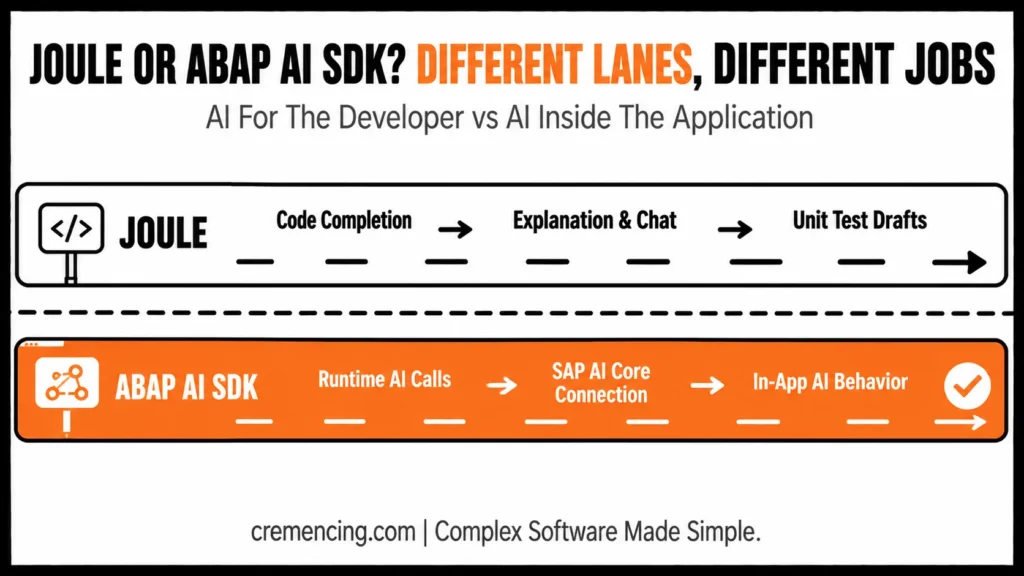
This split is the core of how ABAP AI capabilities are organized today.
| Aspect | Joule | ABAP AI SDK |
|---|---|---|
| Who it serves | Developer | End-user application |
| Runs | Inside ADT | Inside ABAP runtime |
| Output | Suggestions/drafts | Live AI responses |
| Needs review | Always, before transport | Depends on use case |
From AI Assistance to AI Integration
This example shows the real value of ABAP AI capabilities. AI does not need to own the rule. It helps produce explanations, draft structures, and tests so the developer can spend more time reviewing correctness.
The ABAP AI SDK is not the same thing. Joule assists the programmer while they code. The ABAP AI SDK helps an ABAP AI capability call AI capabilities at runtime through SAP-managed AI infrastructure, such as SAP AI Core and the generative AI hub. Use that when your business application itself needs AI features, such as classification, summarization, or controlled text generation.
Do not mix those two use cases. Joule is mainly “AI for the developer.” ABAP AI SDK is “AI inside the ABAP application.” Both matter, but they solve different problems.
For Joule for developers’ private cloud, the private-cloud angle matters because many serious ABAP teams do not run only on public cloud. SAP S/4HANA Cloud Private Edition 2025 expands the practical audience for ABAP AI adoption, especially for teams moving from classic custom code toward ABAP Cloud patterns.
For the best AI for ABAP coding, the safe answer is to use SAP-native Joule, where it is available, because it understands ABAP development context better than generic tools. Generic AI tools can still help explain concepts or draft ideas, but they need stricter review because they do not know your tenant rules, released APIs, ATC checks, or company naming standards.
Explain code → Joule Generate draft → Joule (review required) App needs live AI → ABAP AI SDK Never skip: ATC, ABAP Unit, manual SQL review
Migration Checklist
Use this checklist before introducing ABAP AI capabilities into a real ABAP team.
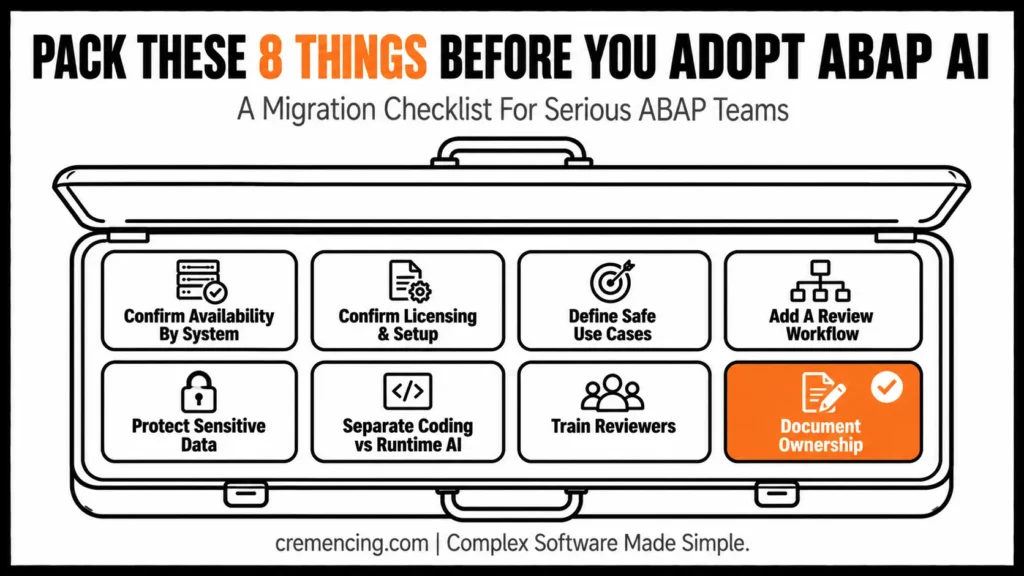
- Confirm availability by system type. Check whether you are on the SAP BTP ABAP environment, SAP S/4HANA Cloud Public Edition, or SAP S/4HANA Cloud Private Edition 2025 and understand which SAP AI tools are supported in your landscape. For classic ECC, expect less direct SAP-native AI support.
- Confirm licensing and setup. Joule for Developers, ABAP AI capabilities may require additional licensing for supported on-stack usage. Do not assume it is active because ADT is installed.
- Define safe use cases. Start with code explanation, CDS explanation, unit test drafts, naming help, and refactoring suggestions. Getting this step right is where most ABAP AI capabilities adoption succeeds or fails. Avoid using generated code directly in financial posting logic, authorisation checks, update tasks, and direct database updates.
- Add a review workflow. Generate or explain with AI, activate in ADT, run ATC, run ABAP Unit, debug the result, inspect Open SQL, review authorisation behaviour, and commit only reviewed code.
- Protect data. Do not paste customer, vendor, employee, payroll, pricing, or secret values into prompts unless your company policy and system setup explicitly allow it.
- Separate coding assistance from runtime AI. Use Joule for developer productivity. Use ABAP AI SDK only when the ABAP application itself needs AI behaviour through SAP-managed AI services.
- Train reviewers. AI-assisted code still needs senior ABAP review, especially for SQL, locking, LUW behavior, update tasks, exception handling, and clean-core compliance.
- Document ownership. A developer, not the AI tool, owns the transport, test evidence, and business correctness.
Add one item specifying rollback ownership: “Define who reverts AI-suggested changes if ATC or ABAP Unit fails post-review — assign this before rollout, not during.
Conclusion
The old ABAP workflow isn’t wrong — it’s just too slow for clean-core and S/4HANA timelines. Joule shortens the review loop; the ABAP AI SDK extends AI into the application itself. Adopt both deliberately: let AI draft and explain, but keep transport, security, and business-rule ownership with your developers.
The right approach is controlled adoption. Use SAP AI capabilities to explain, draft, test, and review faster, but keep SQL design, authorizations, financial logic, update behaviour, architecture, and transports under developer ownership. That is why ABAP AI capabilities matter now: it improves the developer loop without removing the need for senior ABAP judgment.
Frequently Asked Questions
1. What are Joule for Developers’ ABAP AI capabilities?
For Joule Developers, ABAP AI capabilities are SAP generative AI features for ABAP developers, including code completion, ABAP/CDS explanation, unit test generation, and chat. They support development work in ABAP development tools where available. They help you move faster, but you still own the code review.
2. Is Joule an SAP ABAP AI code generator?
Yes, Joule can assist with ABAP code generation and predictive completion in supported environments. Treat it as a draft generator, not an automatic transport creator. Always activate the code, run ATC, run ABAP Unit, debug the result, and review business behaviour manually.
3. What is the difference between Joule and ABAP AI SDK?
Joule helps developers while they write, explain, and test ABAP code. The ABAP AI SDK helps ABAP applications call generative AI services through SAP-managed infrastructure. Use Joule for development productivity and the SDK when the application itself needs AI behaviour.
4. Can Joule explain ABAP and CDS code?
Yes, Joule can explain selected ABAP code and CDS views in supported development environments. This helps with onboarding, legacy-code reading, and CDS review. Still verify the explanation against the code, debugger output, SQL behavior, and business rule owner.
5. What is the best AI for ABAP coding?
The best ai for ABAP coding is usually SAP-native Joule when your system supports it because it works inside the ABAP development context. Generic AI tools can help with explanations and drafts, but they need stricter validation against SAP release rules, APIs, ATC, and project standards.
6. Is Joule for Developers available in a private cloud?
Joule for developers’ private cloud availability is tied to supported SAP S/4HANA Cloud Private Edition releases and licensing. Check current SAP Help and SAP Notes before planning adoption. Private-cloud teams should validate setup, supported features, and ABAP Cloud use cases before rollout.
7. Can ABAP AI capabilities replace ABAP developers?
No, ABAP AI capabilities do not replace ABAP developers. They speed up explanation, draft generation, and unit-test creation. Developers still decide architecture, business rules, authorization logic, SQL design, exception handling, and transport ownership.
8. Can AI generate correct ABAP code from a prompt?
AI can generate useful ABAP drafts, but correctness depends on syntax, release level, available APIs, table model, and business context. Treat generated ABAP as untrusted until it activates, passes tests, and behaves correctly in the debugger. ABAP Cloud adds extra restrictions around released APIs.
9.Does Joule work with classic ECC systems?
No — Joule for Developers targets ABAP Cloud, BTP ABAP Environment, and current S/4HANA releases; ECC support is limited or indirect.
10. What data should never be pasted into Joule prompts?
Customer, payroll, vendor, and pricing data — unless company policy and system setup explicitly permit it.




