
SAP PAM (Product Availability Matrix) plays an important role in SAP upgrade planning by helping technical teams identify product compatibility requirements before implementation. The official SAP Support Portal provides product release and compatibility information that helps technical teams identify these requirements before beginning an upgrade.
The official SAP Support Portal provides product release and compatibility information that helps technical teams identify these requirements before beginning an upgrade.
However, choosing a supported target release is only one part of upgrade planning. Organizations must also understand maintenance coverage, valid upgrade paths, platform dependencies, and compatibility restrictions.
For SAP Basis administrators, technical architects, and project managers, these checks help establish whether an intended upgrade is technically appropriate.
Furthermore, identifying compatibility issues early allows teams to review infrastructure decisions, upgrade schedules, and related system requirements before production activities begin.
This guide explains five essential SAP PAM checks, how to perform them, and why they matter when preparing for an SAP ERP or SAP S/4HANA upgrade.
What Is SAP PAM and Why Is It Important?
SAP PAM, or the SAP Product Availability Matrix, is an official SAP resource containing product availability, release, maintenance, and technical compatibility information.
SAP publishes details about software product versions and their supported technical environments.
The matrix provides information concerning:
- Product releases and availability
- Release types and current status
- Mainstream and applicable extended maintenance periods
- Supported upgrade paths
- Operating system and database platforms
- Related product versions and prerequisites
- Relevant support packages and software dependencies
Consequently, SAP PAM helps administrators determine whether the planned software environment meets published SAP requirements.
For example, an organization planning an SAP S/4HANA upgrade must establish whether its target release supports the intended database and operating system versions.
However, PAM does not independently validate every custom application, external interface, or installed add-on.
Teams must address these additional requirements through appropriate planning tools and technical assessment.
What Information Can You Find in SAP PAM?
| Information Category | What SAP PAM Provides | Why It Matters |
| Product releases | Available SAP product versions | Identifies the intended target |
| Release status | Published availability information | Clarifies product availability |
| Maintenance | Relevant maintenance periods | Supports lifecycle planning |
| Upgrade paths | Supported source-to-target routes | Helps establish upgrade feasibility |
| Database support | Supported database platforms | Identifies database requirements |
| Operating systems | Supported OS environments | Helps validate platform compatibility |
| Product dependencies | Related versions and prerequisites | Supports dependency assessment |
| Support packages | Relevant release and package information | Supports maintenance planning |
Together, these details establish the initial technical boundaries of an SAP upgrade.
How to Access the SAP Product Availability Matrix
Users can access SAP PAM through the SAP Support Portal.
Official access:Visit the official SAP resource
According to SAP’s learning documentation, accessing the complete Product Availability Matrix requires an authorized S-user account.
Step 1: Open the SAP Support Portal
Navigate to the official Product Availability Matrix page.
Then sign in using the relevant SAP credentials.
Once authenticated, open the PAM application.
Step 2: Search for an SAP Product
Use the product search function to locate the required software release.
For example, SAP’s Help Portal demonstrates searching for ERP 6.0 and selecting a specific enhancement package.
Additionally, the PAM interface provides options for viewing available product versions and filtering search results.
Step 3: Select the Correct Product Version
Choose the exact software product release from the results.
The product details provide general release information and access to relevant technical tabs.
However, administrators should avoid treating different enhancement packages or product versions as interchangeable.
Step 4: Review Maintenance and Technical Information
Examine the relevant release plan, supported upgrade paths, and platform information.
Furthermore, review related product versions and any prerequisites shown for the selected release.
Administrators should check these details against the organization’s actual system landscape.
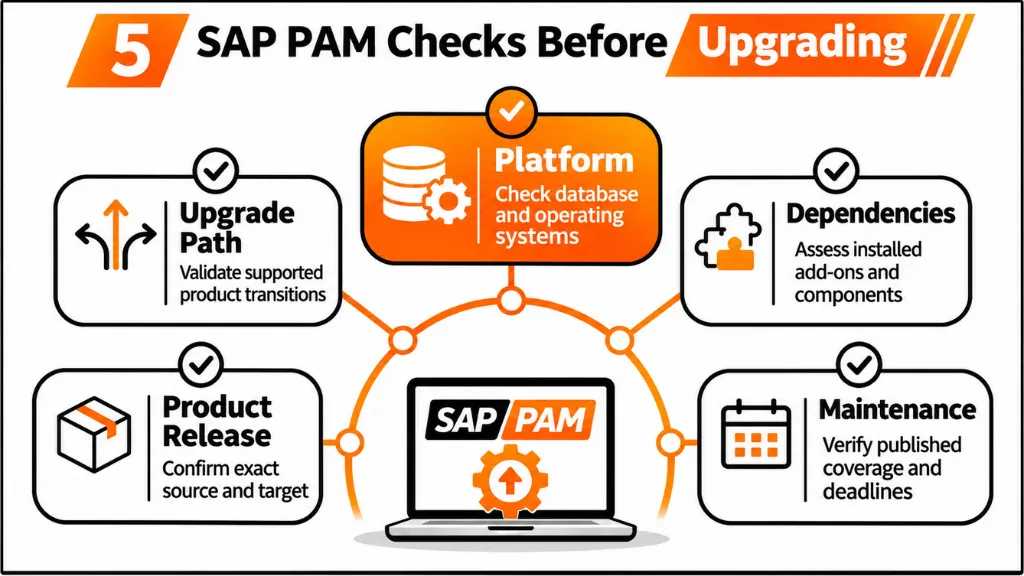
SAP PAM Check 1: Confirm the Exact Product and Target Release
The first step in SAP upgrade planning is identifying the correct source and target product releases.
A broad product description is not sufficient for a compatibility assessment.
For example, SAP ERP 6.0 may refer to different enhancement package levels, each with its own technical requirements.
Similarly, administrators must evaluate individual SAP S/4HANA releases against their applicable compatibility information.
Identify the Existing SAP Environment
Administrators should establish the software products and components installed in the current environment.
For SAP GUI-based systems, relevant system information can be reviewed through System → Status.
The assessment should include the installed SAP product, software components, database, and relevant add-ons.
Additionally, technical teams should identify any components that may influence the planned maintenance activity.
Search the Correct Software Product Version
SAP PAM organizes compatibility information around software product versions.
Therefore, selecting the correct version is essential.
Searching for a general product name without identifying the installed release can lead to incorrect planning assumptions.
For example, an administrator should distinguish between an SAP ERP enhancement package and an SAP S/4HANA product release.
The search result should be matched with the actual installed environment before conclusions are documented.
Why Exact Release Identification Matters
Different product releases may have different maintenance periods, supported platforms, and upgrade options.
Consequently, an incorrect starting assumption can affect later decisions about infrastructure and project schedules.
Essential check: Confirm the exact source product, installed release, and intended target release before evaluating compatibility.
SAP PAM Check 2: Verify Maintenance Coverage and Support Deadlines
SAP software maintenance is another important consideration during upgrade planning.
A system may continue operating even when its current release no longer receives mainstream maintenance.
However, operational availability should not be confused with continued support under SAP’s applicable maintenance strategy.
SAP PAM provides published maintenance information for relevant software releases.
Understand SAP Maintenance Categories
SAP maintenance conditions depend on the product and release.
Mainstream maintenance provides support according to the applicable product maintenance policy.
Some products may also qualify for extended maintenance arrangements.
Meanwhile, other releases may be subject to customer-specific maintenance conditions.
These arrangements can differ in scope, availability, and commercial requirements.
Therefore, administrators should review both the published product maintenance information and their organization’s applicable support agreement.
SAP ERP Maintenance Planning
Organizations operating SAP ERP 6.0 need to consider the maintenance schedule when planning modernization.
The supplied upgrade-planning material identifies December 31, 2027, as the mainstream maintenance end date for eligible SAP Business Suite 7 core applications.
Optional extended maintenance may apply through the end of 2030 under specified conditions.
However, maintenance eligibility can vary according to product and enhancement package.
An organization should not assume every SAP ECC environment has identical maintenance coverage.
Use Maintenance Dates in Project Planning
Maintenance information can influence when an upgrade should be planned.
For example, a system approaching the end of its applicable maintenance period may require additional attention to project timing.
Nevertheless, choosing a target release solely because of a deadline can introduce compatibility problems.
The proposed system must still satisfy its technical requirements.
Essential check: Verify the maintenance status of the exact product release and confirm applicable support conditions before approving an upgrade schedule.
SAP PAM Check 3: Validate the Supported Upgrade Path
Not every SAP product release supports every possible direct upgrade route.
Supported paths depend on the source software, target release, and applicable technical requirements.
SAP PAM provides information about available upgrade paths and related product versions.
Consequently, teams can assess whether their proposed upgrade route is supported before beginning detailed technical planning.
Direct Upgrades and Product Conversions
An upgrade between releases of the same SAP product is not necessarily equivalent to a conversion between different product families.
For example, moving from SAP ECC to SAP S/4HANA involves system conversion requirements.
Upgrading an existing SAP S/4HANA system to a newer release follows a different technical scenario.
Therefore, the implementation team must identify the correct upgrade or conversion approach.
Review Supported Source and Target Releases
Within SAP PAM, administrators can examine relevant product versions and available upgrade paths.
The objective is to confirm whether the proposed source-to-target combination is supported.
Additionally, technical teams should review the current SAP upgrade documentation associated with the selected products.
The presence of an available target release does not automatically mean every older system can upgrade to it directly.
Account for Intermediate Technical Requirements
Some scenarios may require additional technical preparation before the intended target release can be reached.
These requirements can affect the implementation sequence and overall project plan.
Furthermore, an upgrade route that is technically supported may still involve substantial application or infrastructure work.
Essential check: Confirm the supported source-to-target upgrade path and any required intermediate activities before selecting an upgrade procedure.
SAP PAM Check 4: Review Database and Operating System Compatibility
Database and operating system compatibility can determine whether an SAP upgrade is technically feasible.
A target SAP release may require platform versions that differ from the existing infrastructure.
Therefore, the compatibility assessment should consider the complete software environment rather than individual products in isolation.
Verify Supported Database Platforms
SAP PAM provides technical release information identifying supported database platforms for relevant products.
Administrators should review the database requirements associated with the selected target release.
However, identifying a supported database family is not always enough.
The specific database release and applicable technical restrictions may require further verification.
Confirm Operating System Compatibility
SAP PAM also provides information about supported operating system environments.
For example, the SAP Help Portal describes checking an SAP ERP 6.0 enhancement package against specific operating system and database combinations.
An operating system supported by the existing SAP installation may not satisfy the target release requirements.
Consequently, retaining existing infrastructure without checking compatibility can create upgrade risks.
SAP S/4HANA and SAP HANA Compatibility
SAP S/4HANA uses SAP HANA as its database platform.
However, SAP HANA itself has release, revision, and infrastructure requirements.
Administrators must confirm the compatibility of the selected SAP S/4HANA release with the intended SAP HANA environment.
Furthermore, hardware certification and sizing requirements may need separate assessment.
PAM provides important product compatibility information but does not replace detailed infrastructure validation.
SAP Workloads on Microsoft Azure
For SAP workloads deployed on Microsoft Azure, platform compatibility requires additional attention.
Microsoft’s SAP workload planning checklist explains that software combinations must satisfy both SAP and Azure support requirements.
A database or operating system release supported by an SAP product may not automatically be supported on every Azure virtual machine.
Therefore, technical teams should check the relevant Microsoft guidance, SAP Product Availability Matrix, and applicable SAP Notes.
The supplied Microsoft documentation identifies SAP Notes 1928533 and 2015553 among the relevant support references.
Essential check: Verify the complete SAP application, database, operating system, and infrastructure combination before finalizing the target architecture.
SAP PAM Check 5: Examine Add-Ons, Dependencies, and Related Components
SAP environments frequently contain multiple software components beyond the principal ERP product.
These may include industry-specific add-ons, third-party extensions, integrations, and custom developments.
Although the core SAP application may support an intended upgrade, another installed component can introduce compatibility restrictions.
Check Installed SAP and Third-Party Add-Ons
An organization may operate an SAP system with additional software developed by SAP or another vendor.
The upgrade team must determine whether these add-ons support the proposed target release.
Furthermore, vendor-specific compatibility requirements may need to be reviewed separately.
A supported SAP application release should not be treated as proof that every installed extension is also supported.
Review Related Product Versions and Prerequisites
SAP PAM contains information about related software versions and prerequisites.
These details help technical teams identify relevant product relationships.
However, the actual installed system may require more detailed dependency analysis than the general product listing provides.
SAP Maintenance Planner supports this additional planning by evaluating the registered SAP environment and relevant technical changes.
Examine External Interfaces
An SAP upgrade may also affect applications connected to the ERP environment.
For example, an external warehouse system may depend on a particular integration interface.
Even when the SAP product upgrade is supported, the connected application may need testing or modification.
Therefore, integration teams should review relevant interfaces and verify their expected behavior.
Review Custom Development Separately
Custom ABAP programs and other developments may require adaptation during SAP modernization.
SAP Readiness Check and ABAP Test Cockpit can support relevant assessment activities in SAP S/4HANA transition scenarios.
However, these tools perform different functions from the Product Availability Matrix.
PAM addresses product availability and compatibility, while custom-code analysis examines the organization’s developed applications.
Essential check: Confirm add-on support, installed component dependencies, relevant interfaces, and custom development requirements before considering the environment upgrade-ready.
SAP PAM vs. SAP Maintenance Planner: What Is the Difference?
SAP PAM and SAP Maintenance Planner both contribute to software maintenance planning.
However, they serve distinct purposes.
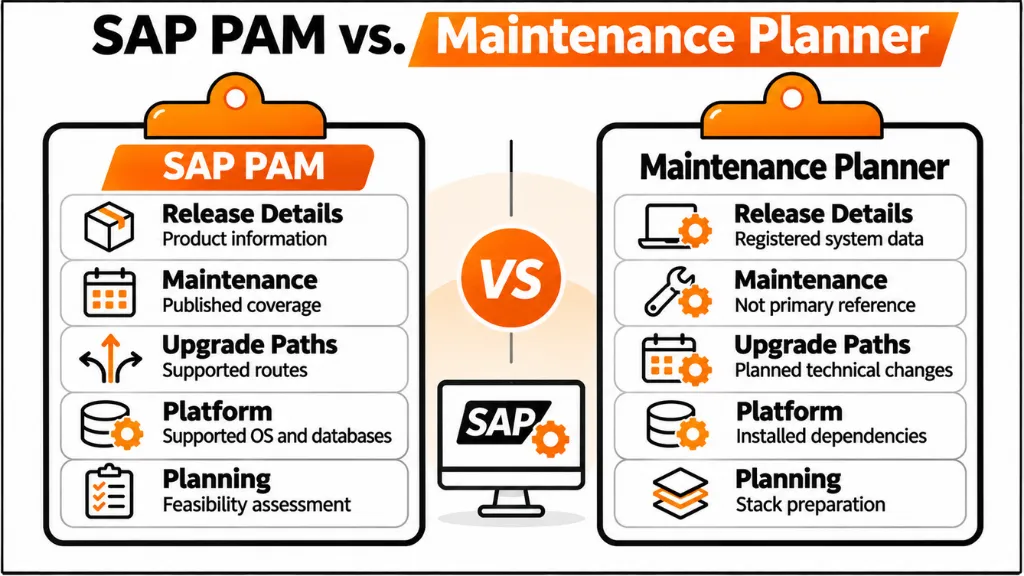
SAP PAM provides published product release, maintenance, upgrade-path, and platform compatibility information.
Meanwhile, SAP Maintenance Planner supports planning technical changes involving the software components installed in a registered SAP environment.
Table 2: SAP PAM vs. SAP Maintenance Planner
| Planning Area | SAP PAM | SAP Maintenance Planner | Primary Purpose |
| Product releases | Provides release information | Uses relevant product information | Release identification |
| Maintenance | Shows published maintenance coverage | Supports planning activities | Lifecycle decisions |
| Upgrade paths | Provides supported product paths | Plans applicable technical changes | Upgrade feasibility |
| Platform compatibility | Shows supported OS and DB platforms | Considers system dependencies | Technical planning |
| Installed components | Does not inventory the customer system | Uses registered system information | Dependency assessment |
| Support packages | Provides relevant release information | Supports maintenance planning | Software change preparation |
These tools should be considered complementary.
For example, an organization may identify a supported target release through PAM but discover additional component requirements during Maintenance Planner analysis.
Consequently, using both tools helps distinguish general product compatibility from the requirements of the actual installed system.
Turning SAP PAM Findings Into an Upgrade Decision
A Product Availability Matrix review should produce clear technical findings rather than an unorganized collection of product information.
The upgrade team should identify what has been confirmed, which conditions remain unresolved, and who is responsible for further investigation.
Document the Five Compatibility Checks
A useful review record should cover:
- Exact source and target product releases
- Applicable maintenance coverage
- Supported upgrade path
- Database and operating system compatibility
- Add-ons, related components, and other dependencies
Each finding should be associated with the relevant SAP product information and review date.
Additionally, unresolved issues should be identified before the project proceeds to final planning.
Example: SAP S/4HANA Upgrade Assessment
In a typical project scenario, a company may be planning an upgrade from SAP S/4HANA 2023 to SAP S/4HANA 2025.
The technical team would begin by identifying both product versions in SAP PAM.
Next, administrators would review published maintenance information and the supported upgrade route.
They would then examine database, operating system, and relevant component requirements.
Finally, the installed environment would be assessed through Maintenance Planner and additional technical checks.
This example illustrates a planning sequence, not confirmation that any particular installed system is ready for the upgrade.
What Happens When a Compatibility Check Fails?
An unsupported platform or dependency should trigger further technical evaluation.
For example, an operating system may require an upgrade before the target SAP application can be implemented.
Similarly, an add-on that does not support the chosen target release may require vendor coordination or a revised technical plan.
Therefore, unresolved compatibility assumptions should be addressed before production execution.
Why PAM Alone Is Not Enough
SAP PAM confirms important published compatibility information.
However, it does not guarantee the success of an actual upgrade.
Technical teams must still assess installed components, custom developments, integrations, authorizations, and recovery procedures.
Furthermore, business testing is required to verify that important operational processes continue functioning correctly.
The Product Availability Matrix should therefore form part of a broader upgrade assessment rather than serve as the only approval criterion.
Recent SAP PAM Guidance and Upgrade Planning Resources
SAP Learning: Product Availability and Maintenance Planning
SAP Learning explains the role of the Product Availability Matrix in software maintenance.
Its guidance describes checking release availability, support packages, product dependencies, and technical platform information.
Furthermore, it explains how Maintenance Planner uses PAM compatibility information during planned maintenance activities.
GeeksforGeeks: SAP PAM Overview — July 23, 2025
The July 2025 GeeksforGeeks article describes the Product Availability Matrix, including its search capabilities, maintenance information, compatibility data, and role in system planning.
It also discusses the importance of reviewing supported platforms and maintenance timelines.
Microsoft: SAP on Azure Deployment Checklist — February 2, 2026
Microsoft’s February 2026 documentation provides guidance for planning SAP workloads on Azure.
The checklist emphasizes verifying SAP product versions, database releases, operating systems, and infrastructure support requirements.
Additionally, it identifies SAP PAM as one of the resources used during technical compatibility assessment.
These are dated guidance resources from the supplied material, not evidence of a newly announced SAP PAM feature release.
Frequently Asked Questions About SAP PAM
1. What is SAP PAM used for?
SAP PAM is used to review official SAP software availability and technical compatibility information. It provides details about product releases, maintenance periods, upgrade paths, and supported operating system and database platforms. SAP Basis administrators and technical architects use this information when planning installations, upgrades, and maintenance activities. Furthermore, PAM helps organizations identify product-specific constraints before making infrastructure decisions. However, it does not independently verify custom developments or every component installed in a customer’s SAP environment.
2. How can I access the SAP Product Availability Matrix?
The SAP Product Availability Matrix can be accessed through the SAP Support Portal at https://support.sap.com/pam. According to SAP Learning, full access requires an authorized S-user ID and password. After signing in, users can search for the required SAP product and select its relevant release. The product details provide availability, maintenance, and technical information. Additionally, administrators can review related product versions and supported platforms. The selected release should match the organization’s actual installed or planned software environment.
3. Does SAP PAM show supported database versions?
SAP PAM provides technical release information concerning supported database platforms for relevant SAP products. Administrators can select the required product version and review its database compatibility information. However, additional technical documentation may be needed to confirm specific database revisions, infrastructure conditions, or SAP HANA requirements. Therefore, teams should assess the entire supported combination rather than checking only the database product name. This is particularly important when planning an SAP S/4HANA upgrade or a change to the underlying infrastructure.
4. What is the difference between SAP PAM and SAP Maintenance Planner?
SAP PAM provides official release availability, maintenance periods, supported upgrade paths, and platform compatibility information. SAP Maintenance Planner supports planning technical changes for registered SAP systems and considers relevant installed software information. Consequently, PAM is useful for understanding product-level compatibility, while Maintenance Planner helps prepare changes for a specific system landscape. These tools complement each other rather than performing identical functions. Administrators should use the relevant SAP maintenance documentation alongside both tools when planning upgrades.
5. Can SAP PAM confirm whether an upgrade will succeed?
No. SAP PAM can establish whether certain product releases, upgrade routes, and technical platforms are supported, but it cannot guarantee a successful upgrade. An actual system may contain unsupported add-ons, incompatible interfaces, or custom developments requiring modification. Furthermore, technical compatibility does not prove that all business processes will function correctly after the upgrade. Organizations must combine PAM information with Maintenance Planner, relevant upgrade documentation, technical checks, business testing, and suitable operational recovery procedures.
6. How often should SAP teams review PAM during an upgrade?
SAP teams should review PAM during initial upgrade planning and again when finalizing the target system and technical procedure. Additional reviews may be necessary when the project changes its intended release, infrastructure, or upgrade schedule. SAP Learning notes that PAM is typically updated quarterly, with additional updates possible when needed. Therefore, an earlier compatibility assessment should not automatically be treated as current indefinitely. Administrators should record their review dates and confirm important requirements before production execution.
7. Does SAP PAM provide maintenance end dates?
SAP PAM provides maintenance information for relevant SAP software product releases, including published maintenance durations and lifecycle details. Administrators can use this information to understand when a selected product approaches the end of mainstream maintenance. However, additional maintenance arrangements may depend on the product and applicable support terms. Consequently, the maintenance date displayed for a product should be evaluated alongside the organization’s support agreement. Different enhancement packages and product releases may have different maintenance conditions.
8. Can SAP PAM identify supported upgrade paths?
Yes. SAP PAM provides information about supported upgrade paths for relevant product releases. Administrators can review available source and target relationships to understand which technical upgrade routes SAP publishes. However, the actual installed environment may have additional requirements involving components, add-ons, and platform dependencies. Therefore, PAM findings should be considered alongside Maintenance Planner and the relevant SAP upgrade guides. A published target release does not mean every older installation supports an identical direct upgrade procedure.
9. Is SAP PAM sufficient for planning SAP systems on Microsoft Azure?
No. SAP PAM provides important software compatibility information, but SAP systems running on Microsoft Azure must also satisfy the relevant Azure infrastructure requirements. Microsoft’s SAP workload planning documentation identifies supported product releases, operating systems, database versions, and Azure virtual machine requirements as important checks. Furthermore, it refers to relevant SAP Notes and platform-specific documentation. Organizations should verify support from both SAP and Microsoft rather than assuming every SAP-supported software combination is automatically suitable for Azure deployment.
10. What should SAP administrators check before upgrading SAP S/4HANA?
Before upgrading SAP S/4HANA, administrators should confirm the exact installed and target product releases. Next, they should review maintenance coverage, supported upgrade paths, and database and operating system compatibility. Additionally, they must consider installed add-ons, software dependencies, custom developments, and connected applications. SAP Maintenance Planner and other relevant tools can support detailed technical planning. However, final readiness also depends on appropriate testing, migration preparation, operational procedures, and validation of essential business processes.
Conclusion
Reviewing SAP PAM before an ERP upgrade helps organizations identify compatibility requirements while there is still an opportunity to adjust technical plans.
The five essential checks cover product releases, maintenance periods, supported upgrade paths, database and operating system combinations, and related software dependencies.
Together, these checks establish whether the proposed target environment satisfies important SAP product requirements.
However, a supported software combination does not automatically guarantee successful implementation.
Administrators must also consider the installed system, connected applications, technical dependencies, and business readiness.
Therefore, SAP PAM should be used together with Maintenance Planner, relevant SAP documentation, and project-specific validation.
The objective is straightforward: confirm the supported upgrade requirements before committing to technical execution.
References
- SAP Help Portal. Product Availability Matrix. Official information concerning SAP product releases, maintenance, supported platforms, and upgrade paths.
- SAP Learning. Explaining the SAP Product Availability. Introducing SAP ABAP Platform Fundamentals.
- SAP Support Portal. Product Availability Matrix. Official SAP product availability resource.
- GeeksforGeeks. Product Availability Matrix (PAM) in SAP: Introduction, Uses, Elements and Advantages. July 23, 2025.
- SAP Community. Product Availability Matrix. October 21, 2021.
- Microsoft Learn. SAP Workload Planning and Deployment Checklist. Updated February 2, 2026.
- Supplied research draft. Planning an SAP Upgrade? 5 Product Availability Matrix Checks That Matter. October 27, 2026.