
Introduction
SAP Cloud Transport Management plays an important role in controlling how development artifacts and application-specific content move across SAP Business Technology Platform (SAP BTP) environments. However, moving a transport request from development to production does not automatically guarantee that the complete application will work correctly.
Additionally, a transport may contain the correct package or application content but still depend on an API, destination, authorization, integration flow, or configuration that has not reached the target environment.
Similarly, incorrect sequencing, missing dependencies, and environment-specific settings can create problems during import.
Therefore, teams should consider these issues before proceeding with the transport process.
Moreover, Official SAP documentation provides a centralized way to manage transport requests, model transport landscapes, control imports, and maintain visibility into transport activities. It supports different content types, including Multitarget Application archives (MTAs), application-specific content, and BTP ABAP references, depending on the supported integration.
This guide explains six checks to perform before moving changes across BTP environments. It also covers SAP Integration Suite configuration, Content Agent connectivity, transport routes, import troubleshooting, and hybrid SAP release governance.
SAP Cloud Transport Management: 6 Checks at a Glance
- Verify transport sequence and downgrade protection.
- Review cross-reference and dependency requirements.
- Confirm transport sequencing and prerequisite changes.
- Validate roles, authorizations, and security.
- Check code quality and technical validation.
- Verify target nodes, destinations, and connection health.
What Is SAP Cloud Transport Management?
SAP Cloud Transport Management service enables organizations to manage software deliverables between environments and accounts across SAP BTP. Additionally, it supports the movement of development artifacts and application-specific content across different runtimes.
In addition, the service also provides transport visibility and an audit trail, helping teams identify who performed transport-related actions and when changes reached production.
Another important capability is the separation of responsibilities. For example, developers can initiate transports from supported development tools, while central operations teams manage imports into test and production environments.
Furthermore, SAP Cloud Transport Management can also model complex transport landscapes, including multiple transport nodes and routes. In addition, it can complement continuous integration and continuous delivery (CI/CD) approaches by providing controlled transport execution.
However, the service does not replace the development processes of individual applications. Therefore, each application must be configured according to its transport integration requirements.
Why SAP Cloud Transport Management Needs Pre-Transport Checks
Also, transporting changes without checking dependencies can introduce problems that are difficult to identify after deployment.
For example, an Integration Suite package may depend on a destination that exists only in the development environment. Similarly, a BTP application may depend on an API or backend change that has not reached production.
Therefore, the following risks make pre-transport checks important:
- Firstly, incorrect transport order can overwrite newer objects or introduce inconsistent versions.
- Secondly, missing dependencies can cause import failures or broken application functionality.
- Additionally, environment-specific destinations and URLs may not work in the target environment.
- Furthermore, missing permissions can prevent transport initiation or import execution.
- Moreover, technical validation may identify problems before the change reaches production.
- Finally, incorrect target-node configuration can interrupt transport execution.
Therefore, transport validation should cover both the individual transport request and the wider application or business change.
Check 1: SAP Cloud Transport Management Downgrade Protection and Transport Sequence
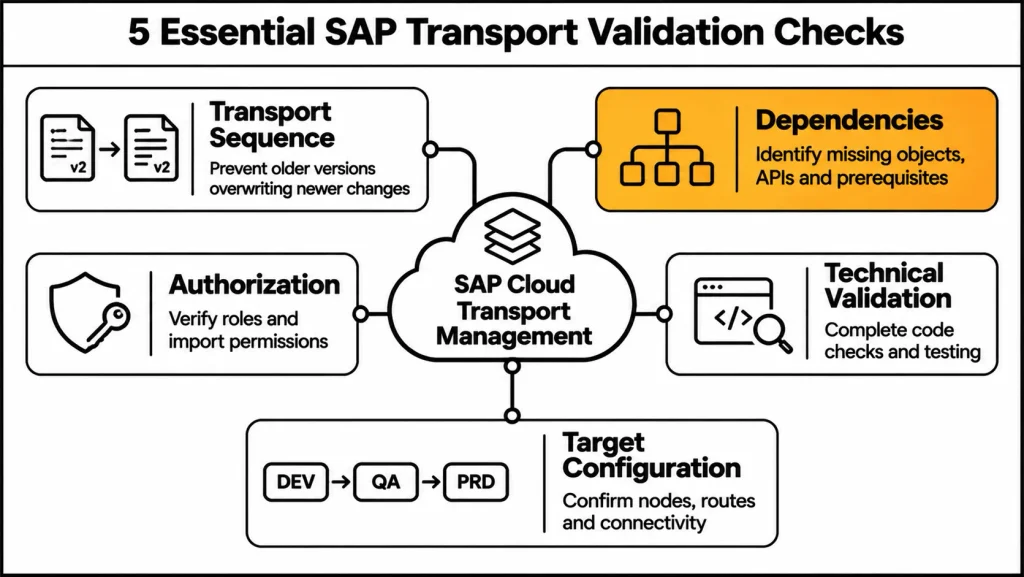
Additionally, Transport sequence is one of the first areas to verify before moving changes across BTP environments.
Furthermore, when multiple developers work on different changes, the transport order can affect the final object version in the target environment.The scope and prerequisites of the checks depend on the transport integration and supported scenario.
Moreover, Consider a scenario where Developer A changes an object, and Developer B modifies the same object afterward. Consequently, if Developer B’s version reaches the target first, importing Developer A’s older version afterward may introduce a downgrade.
Why Transport Order Matters
In addition, Transport sequencing helps teams identify the correct order for moving changes into target environments.
Therefore, before importing, verify:
- Firstly, whether the target already contains a newer version of the affected object.
- Secondly, whether another transport contains a related change.
- Additionally, whether a prerequisite transport must arrive first.
- Furthermore, whether the planned import could overwrite existing content.
- Finally, whether the release sequence matches the approved deployment plan.
SAP Cloud ALM Transport Checks
Furthermore, SAP Cloud ALM Transport Checks include Downgrade Protection and Cross Reference checks for supported CTS-managed ABAP transport scenarios. These checks should not be presented as universal automatic checks for every SAP BTP content type.
The scope and prerequisites of the checks depend on the transport integration and supported scenario.
Rev-Trac Transport Sequencing and Protection
Also, Rev-Trac provides additional transport sequencing and change-control capabilities for SAP landscapes.
Its capabilities include:
- Extended locking.
- Overtake protection.
- Overwrite protection.
- Transport dependencies.
- Cross-change dependency enforcement.
Additionally, these capabilities help prevent changes from being migrated in an incorrect order. However, they are Rev-Trac-specific capabilities and should not be confused with standard SAP Cloud Transport Management functionality.
Check 2: SAP Cloud Transport Management Cross-Reference and Dependency Analysis
Moreover, Cross-reference and dependency analysis helps identify whether a transport relies on objects or components that must be available before deployment.
In addition, A transport can be technically complete while still depending on another change that has not reached the target environment.
Identify Dependencies Before Import
Check the following areas:
- Related integration packages and integration flows.
- APIs and backend services.
- Application configuration and destinations.
- Required roles and authorizations.
- Dependent transport requests.
- Cross-system dependencies.
- Environment-specific references.
For example, an SAP ECC change may need to reach its target system before teams can migrate a related SAP BW change.
If the BW change depends on the ECC change, importing BW first may result in errors or broken functionality.
Rev-Trac Cross-Change Dependencies
Additionally, Rev-Trac provides transport dependencies across Rev-Trac Requests.
Furthermore, these dependencies can prevent teams from migrating a dependent change before its prerequisite change and related transports have reached the required status.
Moreover, for cross-system dependencies, Rev-Trac supports source-specific migration and prerequisite request status checks.
Also, A single Rev-Trac change can manage transports and target-system migrations for multiple environments.
Alternatively, teams can use separate dependent Rev-Trac Requests to enforce prerequisite status before production migration approval.
Additionally, these mechanisms help coordinate cross-application and cross-system changes without implying that CTMS itself enforces the same Rev-Trac-specific controls.
Check 3: SAP Cloud Transport Management Transport Sequencing and Prerequisites
Moreover, Transport sequencing is closely related to dependency analysis, but it focuses on the actual order in which changes move through the landscape.
The dependency review identifies which changes teams need to prepare in advance. Sequencing determines when each related transport should move.
Validate the Transport Sequence
Before moving changes, confirm:
- The required prerequisite changes are available in the target environment.
- The transport requests follow the approved migration sequence.
- Related application and configuration changes are included.
- Cross-system dependencies have been considered.
- Import approval is available where required.
- The planned release order is consistent with testing and business validation.
Example: Dependent SAP Changes
Two developers are working on separate changes.
Developer B’s change depends on Developer A’s change. If Developer B’s change progresses to the target system before Developer A’s change arrives, it can lead to import errors or broken functionality.
This is why teams should review transport sequencing before the import window rather than after an issue appears in production.
Table 1: Transport Validation Checks
| Validation Area | What to Verify | Risk if Missed |
|---|---|---|
| Downgrade protection | Confirm whether an older object version could overwrite a newer one | Object downgrade or inconsistent version |
| Cross-reference | Identify related objects and dependencies | Missing prerequisite or broken functionality |
| Transport sequence | Confirm the approved migration order | Incorrect deployment sequence |
| Authorization | Verify transport and import permissions | Transport or import execution failure |
| Technical validation | Review available checks and test evidence | Errors discovered after deployment |
| Target configuration | Verify node, route, destination, and connectivity | Failed import or unavailable target content |
Check 4: SAP Cloud Transport Management Roles, Authorizations, and Security
In addition, Transport execution requires appropriate permissions in the source application and transport management environment.
Furthermore, A user who can create or transport content in SAP Integration Suite may not automatically have the permissions needed to import the transport into the target environment.
SAP Integration Suite Role Configuration
For SAP Integration Suite content transport, SAP requires the following role collection:
WorkspacePackagesTransport
Assign this role collection in the development subaccount according to the relevant transport scenario.
Additionally, users may need other Integration Suite role collections to access the tenant and its integration capabilities, depending on their responsibilities:
- PI_Integration_Developer
- PI_Administrator
- PI_Business_Expert
- PI_Read_Only
After you assign role collections, sign out and sign in again or refresh the session to activate the updated permissions.
SAP Cloud Transport Management Import Permissions
Also, the user performing imports must have the required CTMS import permissions.
For the Integration Suite transport scenario covered here, the importing user needs the ImportOperator role.
Also verify that:
- Developers have permissions appropriate to their responsibilities.
- Import operators can access the required target-node import queues.
- Landscape administrators can maintain transport nodes and routes.
- Credentials are maintained securely.
- Service keys and OAuth credentials are not unnecessarily shared.
- Access is reviewed when responsibilities change.
Check 5: SAP Cloud Transport Management Code Quality and Technical Validation
Additionally, teams should complete code quality checks and technical validation before a transport reaches the production environment.
Although CTMS manages transport movement, teams should not treat it as a universal code-quality or application-testing engine.
Technical validation depends on the application and development process.
What Should Be Checked?
Before transport:
- Run available static checks and code-quality validation.
- Review ATC findings where applicable to ABAP development.
- Validate application-specific configuration.
- Check integration package dependencies.
- Confirm required APIs and destinations.
- Review test evidence.
- Confirm that the application meets technical and business acceptance criteria.
Separate Transport Success from Application Success
Moreover, A successful transport import confirms that the transport action completed according to the target application’s import process.
It does not automatically prove that:
- The business process works correctly.
- All external systems are available.
- User roles are correctly assigned.
- Environment-specific configuration is valid.
- Integration flows can communicate with every required endpoint.
Therefore, production validation should include application and business-process checks after transport execution.
Check 6: SAP Cloud Transport Management Target Nodes, Routes, and Connection Health
The final pre-transport check is target configuration and connectivity.
In addition, Incorrect transport nodes, destinations, routes, or authentication settings can prevent content from reaching the intended environment.
Verify Transport Nodes
Furthermore, SAP Cloud Transport Management uses transport nodes to represent the source and target environments in a transport landscape.
Before transport, confirm:
- The source node represents the correct development environment.
- The target node represents the intended QA or production environment.
- Node configuration matches the associated application.
- The required destinations are configured.
- The transport route connects the correct source and target nodes.
- The target import queue is available.
Verify Transport Routes
Also, Transport routes connect transport nodes and define the movement path between environments.
For example:
DEV → QA → PRD
A two-tier landscape may use:
DEV → PRD
A route should be created only after the relevant nodes have been configured.
Additionally, SAP Cloud Transport Management allows teams to use the same transport node as a source node for multiple routes. However, teams can use the same node only once as the target node of a transport route.
Verify Destination Connectivity
Check destination configuration and authentication before initiating the transport.
For Integration Suite transport scenarios, verify the relevant destinations, OAuth credentials, token service URL, and source-system configuration.
Moreover, A destination that appears configured in the cockpit may still fail if its credentials or authentication details do not match the required service key.
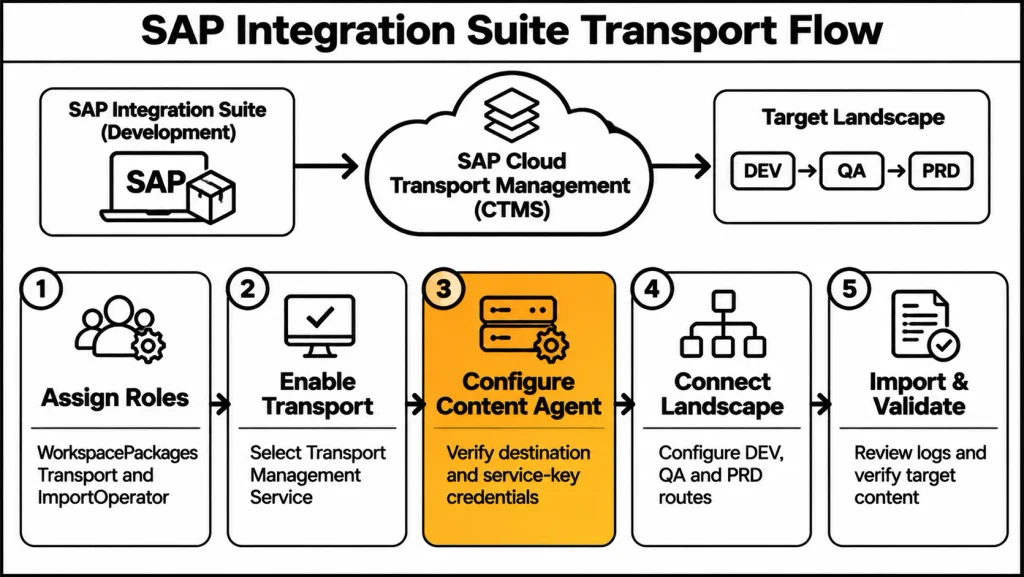
SAP Integration Suite and Cloud Transport Management Setup
In addition, the following section covers the practical setup required to transport SAP Integration Suite content through SAP Cloud Transport Management.
Step 1: Assign the Required Transport Role
In the development subaccount:
- Open SAP BTP Cockpit.
- Navigate to the relevant subaccount.
- Open Role Collections.
- Assign WorkspacePackagesTransport.
- Assign other Integration Suite role collections according to the user’s responsibilities.
- Refresh the user session or sign out and sign in again.
Furthermore, the WorkspacePackagesTransport role is a required prerequisite for the Integration Suite transport option.
Step 2: Enable Transport Management Service
Open SAP Integration Suite.
Navigate to:
Settings → Integrations → Transport
Then:
- Choose Edit.
- Set Transport Mode to Transport Management Service.
- Save the configuration.
- Choose Check Configuration.
If the transport option is disabled, first verify that the required role collection has been assigned.
Step 3: Configure Content Agent Service
Open the Content Agent UI.
Navigate to the Cloud Transport Management Service configuration and verify the destination:
TransportManagementService
Check the following:
- Destination status is Connected.
- Client ID matches the relevant service key.
- Client secret is correct.
- Token service URL is correct.
- Source transport node is configured correctly.
Also, A mismatch between the client ID maintained in the destination and the CTMS service key can cause the Content Agent to remain disconnected even when the destination appears configured.
Step 4: Configure the Transport Landscape
Additionally, for SAP Integration Suite, the landscape requires source and target transport nodes and the relevant destinations.
Moreover, the SAP Help configuration describes destinations for the Content Agent Service, source Integration Suite tenant, Cloud Transport Management, and target Integration Suite tenant.
Configure the source node name to match the sourceSystemId property in the relevant CTMS destination.
Create the transport route between the source and target nodes.
For example:
DEV → QA → PRD
Step 5: Transport a Small Package First
Before transporting a large integration package:
- Select a small test package.
- Use a simple iFlow for the initial test.
- Choose Transport.
- Enter transport comments.
- Confirm the transport request is created in CTMS.
- Check the target import queue.
- Import the test request.
- Review the transport action logs.
- Verify the package in the target Integration Suite tenant.
In addition, this test confirms that the source configuration, destination, route, and target import process are working together.
Step 6: Import the Transport into the Target Environment
In SAP Cloud Transport Management:
- Open Landscape Visualization.
- Select the target node.
- Open the node’s import queue.
- Select the required transport request.
- Choose Import.
- Approve the import if approval is required.
- Start the import.
- Review the Transport Action Logs.
- Confirm the content is available in the target Integration Suite tenant.
For the target Content Agent, verify the relevant configuration, including CAS_on_target, where applicable to the setup.
| Configuration | Required Verification |
|---|---|
| Role collection | WorkspacePackagesTransport assigned |
| Transport Mode | Transport Management Service |
| Configuration check | Check Configuration completed |
| Content Agent | Correct destination and Connected status |
| CTMS destination | Correct service key credentials |
| Source node | Matches sourceSystemId |
| Target node | Correct target Integration Suite tenant |
| Transport route | Correct source-to-target route |
| Import authorization | ImportOperator assigned |
| Test transport | Small package successfully imported |
| Import logs | Transport Action Logs reviewed |
| Target content | Package verified in target tenant |
Table 2: SAP Integration Suite Transport Configuration Checklist
SAP Cloud Transport Management Destination Configuration: Common Issues
Furthermore, Destination and authentication problems are among the important areas to investigate when transport configuration does not work as expected.
Transport Mode Is Disabled
Possible cause: The required WorkspacePackagesTransport role collection is missing.
Resolution:
- Assign the required role collection.
- Refresh the user session.
- Reopen Integration Suite transport settings.
- Check whether Transport Mode can now be selected.
Integration Suite Does Not Show the Integrations Section
Possible cause: The user lacks the standard Integration Suite role collections required to access the relevant tenant functionality.
Resolution:
- Verify the user’s Integration Suite role collections.
- Assign the required roles according to the user’s responsibilities.
- Refresh the session.
- Recheck tenant access.
Failed to Fetch Auth Token
An error such as:
Failed to fetch auth token (Destination Name: ContentAssemblyService)
may indicate a mismatch in the OAuth configuration.
Compare the destination configuration with the relevant service key:
- Client ID.
- Client secret.
- Token URL.
- Authentication endpoint.
- Required /oauth/token suffix.
Also, the token URL should match the authentication service URL from the service key, with the required token endpoint path.
Content Agent Is Not Connected
Additionally, A Content Agent may remain disconnected even when the cockpit destination appears correct.
Check whether:
- The client ID matches the CTMS service key.
- The client secret is correct.
- The token URL is correct.
- The source node is configured correctly.
- The destination is using the intended credentials.
Do not assume that a successful destination configuration alone proves Content Agent connectivity.
SAP Cloud Transport Management Import Statuses and Troubleshooting
After initiating an import, review the import queue and Transport Action Logs.
Moreover, the status of a transport request provides important information about whether the request is ready for import, failed, or requires further attention.
Initial
An Initial transport request is available in the import queue and has not yet been successfully imported.
Review the request and its prerequisites before proceeding.
Fatal
A Fatal status indicates an import problem that requires investigation.
Review the import action logs and identify the underlying error before attempting another import.
Repeatable
In addition, A Repeatable status indicates that the transport can be imported again according to the transport process.
Before repeating an import, verify the impact on existing target content and the intended transport sequence.
Succeeded
A Succeeded status indicates that the import action completed successfully.
However, application-level testing and business validation should still be performed.
Troubleshooting Sequence
When an import fails:
- Open the target-node import queue.
- Select the relevant transport request.
- Review its status.
- Open Transport Action Logs.
- Identify the error or failed action.
- Verify destination and authentication configuration.
- Check transport dependencies and target configuration.
- Correct the underlying issue.
- Retry the import where appropriate.
- Verify the transported content in the target application.
SAP Cloud Transport Management and Environment-Specific Configuration
Not every application configuration should be treated as transportable content.
Furthermore, Some values are specific to the environment and may require separate maintenance after import.
Examples include:
- Environment-specific application URLs.
- API endpoints.
- Destination configuration.
- Backend system references.
- External integration settings.
- Administrative settings.
- User-specific personalization.
Also, For SAP Build Work Zone, transported content can include sites, pages, content, roles, groups, themes, and layouts, depending on the supported transport scenario.
However, user-specific personalization and certain environment-specific or administrative configurations may not be transported.
Important Target-System Checks
After import:
- Confirm application URLs point to the correct target environment.
- Review external integration endpoints.
- Verify role assignments.
- Check environment-specific configuration.
- Confirm content federation settings where applicable.
- Validate backend and API connections.
Additionally, hardcoded development references can cause failures when content is imported into production.
SAP Cloud Transport Management for SAP Build Work Zone: Practical Example
Moreover, SAP Cloud Transport Management can also be used to transport SAP Build Work Zone standard edition content between environments.
A typical two-tier landscape may include:
DEV → PRD
For a three-tier landscape:
DEV → QA → PRD
Configure Work Zone Instances
In both development and production subaccounts:
- Subscribe to SAP Build Work Zone, standard edition.
- Create the relevant instances.
- Generate service keys.
- Record the required service-key details.
- For a three-tier landscape, include the QA environment.
Subscribe to Cloud Transport Management
In the source subaccount, typically DEV:
- Subscribe to SAP Cloud Transport Management.
- Create the service instance.
- Generate the CTMS service key.
The CTMS service can be hosted in a central administrative subaccount according to the organization’s landscape and access-control requirements.
Configure CTMS Destinations
Create a destination named:
ctms_destination
Example configuration:
| Field | Value |
|---|---|
| Name | ctms_destination |
| Type | HTTP |
| Proxy Type | Internet |
| Authentication | OAuth2ClientCredentials |
| URL | URI from CTMS service key |
| Client ID | Client ID from CTMS service key |
| Client Secret | Client secret from CTMS service key |
| Token Service URL | Authentication URL + /oauth/token |
| Additional Property | node-name |
The node-name property must correspond to the relevant transport node.
For example:
- DEV destination: node-name = DEV
- PRD destination: node-name = PRD
Configure Work Zone Destinations
In the CTMS-hosted subaccount, create destinations for the DEV and PRD Work Zone applications.
For the Work Zone destination:
| Field | Value |
|---|---|
| Name | DEV or PRD |
| Type | HTTP |
| Proxy Type | Internet |
| Authentication | OAuth2ClientCredentials |
| URL | Work Zone portal service URL + /cdm_import_service |
| Client ID | Work Zone service-key client ID |
| Client Secret | Work Zone service-key client secret |
| Token Service URL | UAA URL from the service key |
Repeat the configuration using the PRD service-key details for the production destination.
Create Transport Nodes and Routes
In SAP Cloud Transport Management:
- Create the DEV transport node.
- Create the PRD transport node.
- Ensure node names match the configured destination properties.
- Create the DEV-to-PRD transport route.
- Verify the landscape visualization.
Transport Work Zone Content
In DEV Work Zone:
- Create a sample site.
- Add associated application content.
- Assign the relevant roles and groups.
- Choose Transport Site to transport the complete site and its associated content.
- Alternatively, select individual objects in Content Manager and transport them separately.
The transport request should appear in the CTMS system.
Import Work Zone Content
In CTMS:
- Open Landscape Visualization.
- Select the PRD node.
- Open the PRD import queue.
- Select the transport request.
- Choose Import Selected.
- Approve and start the import where required.
- Review Transport Action Logs.
- Verify the site and its content in PRD Work Zone.
Work Zone Transport Limitations
The following points should be considered:
- User-specific personalization may not be transported.
- Some dynamic or environment-specific configurations may require manual adjustment.
- URLs and API endpoints may differ between DEV and PRD.
- In addition, Existing content with matching names or IDs may create overwrite or conflict risks.
- Large content structures may require careful transport planning.
- Content federation requires consistent provider or package names across landscape tiers.
SAP Cloud Transport Management and Hybrid SAP Release Governance
Furthermore, SAP Clean Core encourages organizations to reduce invasive S/4HANA customization and use approved extension approaches, including side-by-side development on SAP BTP.
However, Clean Core does not remove the need for coordinated change management.
For example, a business feature may depend on:
- Firstly, an on-premises ABAP change.
- Secondly, a BTP application.
- Additionally, integration content.
- Furthermore, configuration.
- Moreover, APIs.
- Also, data changes.
- Finally, non-SAP components.
Consequently, if these components move through separate processes without coordination, the technical landscape may remain modular while the release process becomes fragmented.
Why BTP and On-Premise Transports Must Be Coordinated
Cloud and on-premise teams may plan in different backlogs.
Approvals may cover one component but not the complete business change.
Testing may validate individual artifacts while missing the end-to-end process.
Deployment windows and rollback procedures may be coordinated manually.
Also, Audit evidence may be distributed across tools, transport services, and email.
Additionally, A release can become partially deployed when one technical path succeeds and another fails.
How Unified SAP Transport Governance Works
Moreover, Unified governance means evaluating a complete business change even when its components use different transport services.
Therefore, the enterprise release model should connect:
- Firstly, on-premise transports.
- Secondly, BTP artifacts.
- Additionally, integration content.
- Furthermore, testing.
- Moreover, approvals.
- Also, dependencies.
- Next, deployment sequence.
- Subsequently, execution status.
- Then, business validation.
- Finally, audit evidence.
SAP Cloud Transport Management remains responsible for its supported transport execution. Meanwhile, on-premise SAP changes continue through their appropriate native transport mechanisms.
In addition, The shared governance model coordinates the technical paths rather than replacing them.
End-to-End Hybrid Release Flow
A practical hybrid release process includes the following steps:
- Define the business outcome. Create one parent release or change record with scope, owner, priority, risk, and acceptance criteria.
- Identify technical components. Link on-premise transports, BTP artifacts, integration content, configuration, and non-SAP dependencies.
- Plan deployment sequence. Define prerequisites, order, timing, validation, and rollback for each environment.
- Apply approvals. Ensure approvers can see business impact, technical scope, test evidence, dependencies, and residual risk.
- Validate transport paths. Use the appropriate native controls for ABAP, configuration, BTP artifacts, and integration content.
- Execute coordinated deployment. Move components according to the approved sequence and release window.
- Synchronize status. Maintain one view of successful, failed, pending, or rolled-back components.
- Confirm the business process. Validate the end-to-end outcome rather than only individual transport actions.
How Enterprise Tools Support Hybrid Governance
Furthermore, Enterprise tools such as Jira, Azure DevOps, and ServiceNow can provide a shared system of engagement for business change and release coordination.
SAP Cloud ALM can provide SAP implementation and operational context.
Also, Enterprise transport governance solutions such as CoreALM can connect hybrid release context to SAP transport management through integrations with Jira, Azure DevOps, and ServiceNow.
The key principle is to maintain a shared release record while preserving platform-native transport execution.
Benefits of One Hybrid Release Model
- Clean Core traceability: Every extension remains connected to the business reason and S/4HANA dependency it supports.
- Fewer partial deployments: Related cloud and on-premises components move through one coordinated release decision.
- Earlier dependency visibility: Teams identify missing APIs, roles, destinations, and prerequisites before production.
- Stronger audit evidence: Scope, approvals, tests, transport actions, exceptions, and outcomes remain connected.
- Faster recovery: Deployment order and rollback responsibilities are known before the release starts.
- Scalable innovation: BTP teams can move quickly without creating a separate governance process.
SAP Cloud Transport Management: Final Pre-Transport Checklist
Before moving changes across BTP environments, verify the following:
- Firstly, the transport sequence has been reviewed.
- Secondly, downgrade risks have been considered.
- Additionally, dependencies and cross-references have been identified.
- Furthermore, prerequisite transports are available.
- Moreover, required roles and authorizations are assigned.
- Also, technical checks and testing are complete.
- Next, source and target nodes are correct.
- Similarly, transport routes are configured.
- In addition, destinations and authentication are verified.
- Likewise, environment-specific settings are reviewed.
- Subsequently, import approval is available where required.
- Afterward, Transport Action Logs are reviewed after import.
- Then, target application content is validated.
- Furthermore, business-process validation is completed.
- Finally, release evidence is retained.
Frequently Asked Questions
1. What is SAP Cloud Transport Management?
SAP Cloud Transport Management is a service for managing transports of development artifacts and application-specific content across SAP BTP environments and supported runtimes.
2. Why is SAP Cloud Transport Management important?
Moreover, cross-reference and dependency analysis help teams identify whether a transport relies on objects or components that must be available before deployment.
3. Does SAP Cloud Transport Management automatically prevent every transport downgrade?
No. Downgrade protection and cross-reference checks depend on the supported transport scenario. Furthermore, SAP Cloud ALM Transport Checks cover specific CTS-managed ABAP scenarios and should not be assumed to apply universally to all BTP content.
4. What is the WorkspacePackagesTransport role?
WorkspacePackagesTransport is a required role collection for the SAP Integration Suite content transport scenario described in this guide. Additionally, it enables the relevant transport functionality when assigned appropriately.
5. Why is Transport Mode disabled in SAP Integration Suite?
A missing or incorrectly assigned WorkspacePackagesTransport role collection is one possible cause. Therefore, refresh the session after role assignment and verify the tenant’s transport configuration.
6. What is the purpose of Content Agent Service?
Content Agent Service supports transport integration between supported SAP applications and SAP Cloud Transport Management. However, its configuration and capabilities depend on the application and transport scenario.
7. Why does Content Agent show Not Connected?
Possible causes include incorrect client ID, client secret, token URL, or source-node configuration. Therefore, compare the destination settings with the relevant service key and verify the connection again.
8. What should be checked when a CTMS import fails?
First, review the import queue status and Transport Action Logs. Then, verify authentication, destination configuration, dependencies, target configuration, and the transport sequence before retrying.
9. Does a successful transport import mean the application is working?
No. A successful import confirms completion of the transport action. However, application configuration, integration connectivity, authorization, and business-process validation must still be checked.
10. Can SAP Cloud Transport Management coordinate BTP and on-premise SAP changes?
SAP Cloud Transport Management handles supported transport execution for its content types. Additionally, a shared enterprise release process can coordinate BTP and on-premise changes through common scope, approvals, dependencies, testing, sequencing, and audit evidence without replacing native transport services.SAP Cloud Transport Management handles supported transport execution for its content types. Additionally, a shared enterprise release process can coordinate BTP and on-premise changes through common scope, approvals, dependencies, testing, sequencing, and audit evidence without replacing native transport services.
Conclusion
SAP Cloud Transport Management provides an important foundation for controlled movement of development artifacts and application-specific content across BTP environments. However, successful transport execution depends on more than selecting an import request and moving it to the target system.
Moreover, the six checks in this guide help teams review transport sequence, dependencies, prerequisites, authorization, technical validation, and target configuration before deployment. Additionally, correct Integration Suite roles, Content Agent connectivity, destination settings, transport nodes, and routes are equally important for reliable transport execution.
Finally, organizations using SAP BTP alongside on-premises SAP systems should connect their technical transport paths through a shared release governance model. As a result, this keeps dependencies visible, approvals coordinated, and business validation connected to the complete change.
The objective is not simply to move transports successfully. Instead, it is to deliver complete, tested, and controlled business changes across the SAP landscape.
Technical Source References
- SAP Help Portal: SAP Cloud Transport Management – Service overview, landscape, imports, and supported content types.
- SAP Help Portal: Content Transport Using Cloud Transport Management – Integration Suite transport prerequisites and procedure.
- SAP Help Portal: Creating HTTP Destinations and Transport Route – Integration Suite transport landscape configuration.
- SAP Help Portal: Create Transport Routes – CTMS transport route configuration.
- SAP Help Portal: SAP Cloud ALM Transport Checks – supported downgrade protection and cross-reference scenarios.
- SAP Community: SAP Cloud Transport Management System Setup for Transporting SAP Build Work Zone Objects – practical Work Zone transport setup.
- Rev-Trac material supplied for this article – transport sequencing, overtake/overwrite protection, and cross-change dependencies.
- CoreALM material supplied for this article – hybrid BTP and on-premises release governance.