
Introduction
Could your SAP HANA database recover after an outage without losing critical business data? The answer depends on more than whether a backup completed successfully. Therefore, SAP HANA backup and recovery requires valid data backups, accessible log backups, a consistent backup catalog, and a recovery process that can reach the required point in time.
For example, an outage may result from storage failure, a damaged log area, a logical database error, or an unexpected system shutdown. Although SAP HANA uses savepoints and log replay to restore database consistency, administrators still need to verify that the required recovery resources are available.
Furthermore, a successful recovery also does not automatically mean that the entire SAP application is ready for business operations. Therefore, administrators must separately check database services, tenant databases, application connections, and important business transactions.
Additionally, this article explains seven practical checks to help assess whether your SAP HANA database can recover after an outage.
Why SAP HANA Backup and Recovery Needs More Than a Successful Backup
SAP HANA supports recovery using data backups, log backups, and, where applicable, data snapshots. Furthermore, the recovery option determines which resources are required.
For example, recovery to the most recent state uses the latest data backup, subsequent log backups, and log information still available in the log area. Similarly, point-in-time recovery uses the data backup and log resources needed to reach the selected timestamp.
Consequently, if required log backups are missing, the intended recovery point may no longer be reachable. Therefore, backup completion status alone is not enough to establish recovery readiness. <Cite refs={[“turn328695search5″,”turn328695search9”]}/>
7 Checks for SAP HANA Backup and Recovery After an Outage
1. Verify the Latest Data and Log Backup Status
Start by checking whether the required data and log backups exist and whether the system completed them successfully.
SAP HANA supports backup creation through SAP HANA Cockpit, SAP HANA Studio, and SQL statements. The supplied SAP Help material provides the following example for creating a full data backup:
BACKUP DATA USING FILE (‘<name of backup>’);
Review the backup catalog to identify the latest completed data backup and the subsequent log backups. Confirm that their locations are accessible to the recovery environment.
A backup that exists only on an inaccessible storage location cannot support the intended recovery.
If you have copied or moved backups, check their integrity again.
What to verify:
- The latest required data backup is available.
- Subsequent log backups are present.
- Backup destinations are accessible.
- Backup operations have not failed.
- The backup catalog records the expected backup history.
SAP recommends regular data backups and the availability of subsequent log backups for recovery. <Cite refs={[“turn328695search5″,”turn328695search6”]}/>
2. Check Backup Integrity Before Starting Recovery
A backup file may exist without being usable. This can happen if backup files are moved, copied, or changed after creation.
SAP HANA provides the hdbbackupcheck tool to check the integrity of file-based backups and backups created using third-party backup tools.
It can be useful when you transfer backups to another storage location.
For example:
hdbbackupcheck -v <Backup file>
The command displays backup header information. The integrity-check procedure described in SAP Help uses the tool to detect errors in individual backup parts.
Keep in mind that hdbbackupcheck does not support storage snapshots. Snapshot-based backup validation must follow the applicable storage and SAP HANA procedures.
What to verify:
- The backup file has not been altered.
- Backup parts are available.
- The backup ID and file information are consistent.
- The integrity check does not report errors.
- The selected validation method supports the backup type.
SAP recommends manual integrity checks when backups may have changed, such as after moving them to another storage location. <Cite refs={[“turn328695search1″,”turn718507search1”]}/>
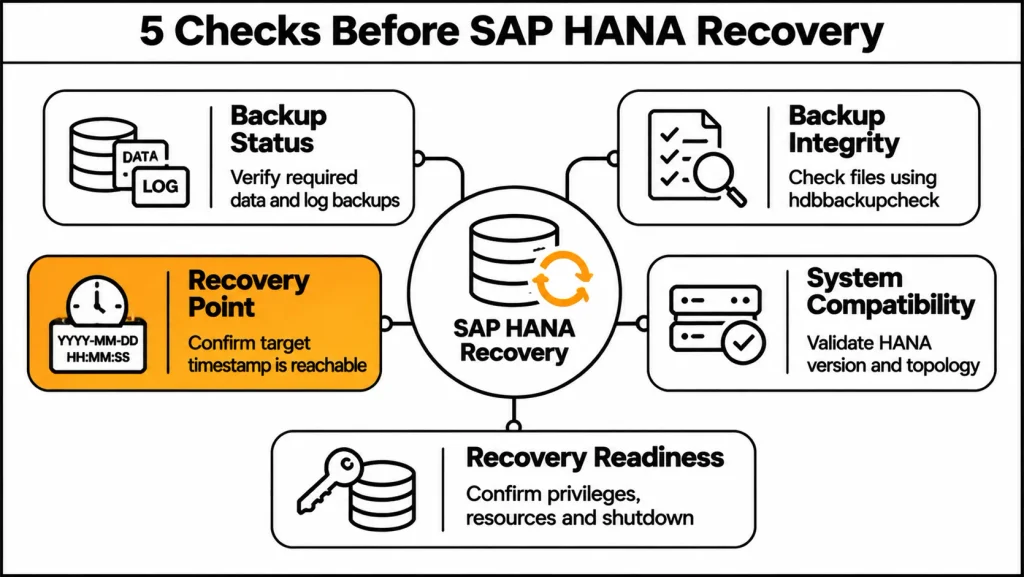
3. Confirm That the Required Recovery Point Is Reachable
Next, the next check is whether SAP HANA can recover to the intended timestamp.
However, a complete data backup does not necessarily allow recovery to every later point in time. Furthermore, recovery beyond the data backup timestamp depends on the availability of the required log backups and log information.
Additionally, SAP HANA Platform 2.0 SPS 08 documents the Python tool hdbrecovercheck.py. Specifically, it can check whether the resources needed for recovery to a specified point in time exist and are accessible.
For example:
python python_support/hdbrecovercheck.py checkPointInTimeReachable \
-c <backup catalog path> \
–database <database name> \
-t “YYYY-MM-DD HH:MM:SS” \
-v
The example is a template. Replace the database name, catalog path, and timestamp with values from the actual system.
The tool can help identify inaccessible backup paths, missing recovery resources, or a point in time that the system cannot reach. It does not recognize data snapshots and does not support system copy or system replication.
What to verify:
- The required recovery timestamp is defined.
- Data and log backup paths are correct.
- The backup catalog is accessible.
- Required backup resources exist.
- The selected recovery point is reachable.
This check is especially important before a planned recovery because it can identify resource problems before the recovery process begins. <Cite refs={[“turn328695search0″,”turn718507search0”]}/>
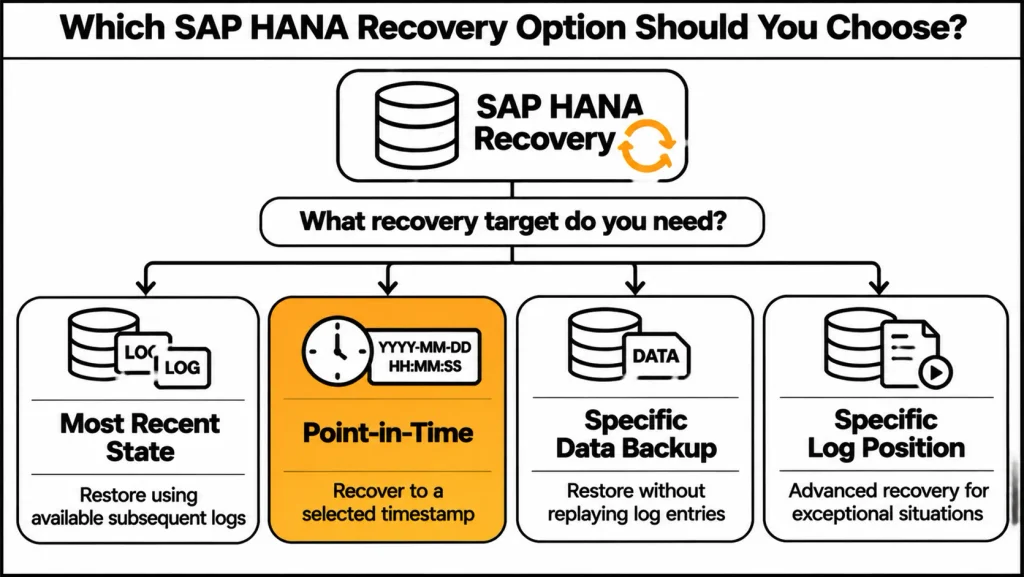
4. Select the Correct Recovery Type
SAP HANA offers different recovery options. Selecting the wrong option can affect how much data is restored and which log entries are replayed.
The primary recovery types include:
- Recover to the most recent state: Restores the database as close as possible to the current time using the latest data backup, subsequent log backups, and available log area.
- Recover to a specific point in time: Restores the database to a selected timestamp. This option can be useful after a logical error.
- Recover to a specific data backup: Restores the database using the selected data backup without replaying log entries from the log backups or log area.
- Recover to a specific log position: An advanced option for exceptional recovery situations.
For a logical error, point-in-time recovery may be appropriate if the required backups and logs are available. However, changes made after the selected recovery timestamp will not remain in the recovered database.
What to verify:
- The outage cause is understood.
- The target recovery timestamp is appropriate.
- The required data and log backups are available.
- The business impact of losing later changes is understood.
- The selected recovery type matches the recovery objective.
The recovery options and their resource requirements are described in SAP’s database recovery documentation. <Cite refs={[“turn328695search9″,”turn718507search9”]}/>
5. Validate the SAP HANA Version and System Topology
Recovery onto a different system requires careful compatibility checks.
SAP documents that a database cannot be recovered to a target SAP HANA software version lower than the version used to create the backup. The recovery target must use the same software version or a higher one, subject to applicable update-path restrictions.
System topology is another important factor. A source system with multiple indexservers may not be recoverable onto a target with a different service layout without the required adjustments.
For example, a recovery from a multi-node system to a single-node system can fail if the source and target service configurations do not match the recovery requirements.
What to verify:
- The target SAP HANA software version is compatible.
- The source and target service topology is appropriate.
- The number and type of required services are considered.
- Tenant database recovery is planned through the relevant system database.
- Any topology-specific restrictions are reviewed.
Do not assume that a backup from one SAP HANA system can be restored to every other system without preparation. <Cite refs={[“turn328695search2″,”turn328695search3”]}/>
6. Confirm Database Shutdown, Privileges, and Recovery Resources
SAP HANA recovery requires the database to be shut down. Consequently, during the recovery process, end users and applications cannot access the database.
Additionally, the user performing the recovery must also have the required authorization. Specifically, SAP’s recovery documentation identifies the BACKUP ADMIN system privilege as a requirement for performing recovery.
Therefore, before starting, verify the backup catalog, data backup location, log backup location, and any third-party backup tool access.
Furthermore, for file-based backups, shared backup storage can support availability checks across the database nodes. However, if required backup resources are inaccessible, recovery may fail after it has already started.
What to verify:
- The database is shut down as required.
- The recovery user has the required privilege.
- Backup catalog access is available.
- Data and log backup locations are correct.
- Storage and third-party backup resources are accessible.
If you are performing the recovery on another HANA instance, carefully check the backup and log directory paths.<Cite refs={[“turn328695search2″,”turn328695search9″,”turn718507search4”]}/>
7. Validate Database Services and SAP Application Connectivity After Recovery
After the recovery completes, first, check whether the database and its services have returned to their expected operating state.
Furthermore, for multitenant database container environments, administrators should check tenant databases individually.However, a recovered system database does not automatically prove that every tenant is ready for application use.
Then validate application connectivity. SAP NetWeaver or SAP S/4HANA application instances should be able to establish database connections. Critical business transactions and interfaces should also be tested.
For example, a functional validation might include creating a sales order using VA01 or posting a goods movement using MIGO. These are examples of application-level checks; the appropriate tests depend on the business process and system scope.
What to verify:
- The database has started successfully.
- Required HANA services are active.
- Tenant databases are available.
- Application servers can connect to the database.
- Critical business transactions work as expected.
- Reporting and interfaces have been validated.
After database recovery, administrators should perform application and business validation before considering the system fully operational.
SAP HANA Backup and Recovery: Recovery Option Comparison
| Recovery Option | Main Purpose | Required Resources | Important Consideration |
| Most recent state | Recover as close as possible to the current time | Data backup, subsequent log backups, log area | Depends on available recovery resources |
| Point-in-time | Recover to a selected timestamp | Data backup, required log backups, log area | Later changes may be lost |
| Specific data backup | Recover using a selected data backup | Selected data backup | Log entries are not replayed |
| Specific log position | Advanced recovery in exceptional cases | Recovery resources for the selected log position | Requires careful technical assessment |
| Tenant recovery | Recover a tenant database | Applicable tenant backup resources | Managed through the relevant system database |
Recovery requirements depend on the chosen option and system configuration. <Cite refs={[“turn328695search9″,”turn328695search2”]}/>
SAP HANA Backup and Recovery: Practical Readiness Checklist
| Check | What to Review | Tool or Location | Expected Result |
| Data backup | Latest required backup | SAP HANA Cockpit / backup catalog | Backup available |
| Log backup | Required log sequence | Backup catalog | Required logs accessible |
| Backup integrity | Backup file integrity | hdbbackupcheck | No reported errors |
| Recovery point | Timestamp reachability | hdbrecovercheck.py | Target point reachable |
| Recovery type | Correct recovery option | Recovery wizard | Option matches objective |
| Compatibility | Version and topology | HANA system configuration | Target meets requirements |
| Post-recovery | Services and application tests | HANA monitoring / SAP application | System validated |
Common SAP HANA Recovery Problems to Investigate
Recovery Fails Because Required Backup Files Are Missing
A recovery may fail if the data or log backup paths are incorrect or if required files are not accessible.
Review the backup catalog and confirm that the correct directories have been specified.
If a third-party tool stores backups, verify their availability through the relevant backup interface.
Recovery Cannot Reach the Required Point in Time
A selected recovery timestamp may be unreachable when required log backups are missing or inaccessible.
Use hdbrecovercheck.py to check the required resources and investigate the backup paths or catalog entries. If the target point cannot be reached, a different recovery point may need to be considered. <Cite refs={[“turn328695search0”]}/>
Recovery Fails Because the Target System Has a Different Topology
A source and target system with mismatched services may prevent recovery from completing.
Compare the source and target service layouts. Review the relevant SAP documentation and applicable SAP Notes before attempting a topology change. <Cite refs={[“turn328695search2”]}/>
Recovery Is Slow or Fails During Log Replay
Corrupt log backups, backup catalog growth, or other recovery-related conditions can affect recovery performance.
SAP Knowledge Base Article 3694999 describes cases where recovery can fail or become very slow when log backups are corrupt or backup catalog growth affects recovery. Investigate the recovery traces and backup logs rather than assuming that adding memory alone will resolve the issue. <Cite refs={[“turn328695search11”]}/>
Recent Developments in SAP HANA Backup and Recovery
SAP HANA Platform 2.0 SPS 08: Recoverability Checks
SAP HANA Platform 2.0 SPS 08 documentation includes hdbrecovercheck.py, which can check backup resource availability and whether recovery to a specified point in time is possible. It also supports consistency checks at volume, page, and service levels, subject to its documented restrictions.
Source: SAP Help Portal — Check Recoverability <Cite refs={[“turn328695search0”]}/>
SAP KBA 3694999: Recovery Failures and Slow Recovery
SAP KBA 3694999 describes recovery failures or slow recovery associated with corrupt log backups and backup catalog growth. Reported symptoms include recovery errors, invalid log segment information, Backint errors, and out-of-memory dumps.
Source: SAP Support Knowledge Base Article 3694999 <Cite refs={[“turn328695search11”]}/>
Frequently Asked Questions
Note: The following questions are based on the SAP Help Portal content supplied for this article. They have not been verified as exact Google People Also Ask wording.
Q1: Can SAP HANA recover to a higher software version?
SAP HANA can recover data and log backups to a target database running the same or a higher software version, subject to applicable version and update-path restrictions. Recovery to a lower software version is not supported. Before recovery, verify the source and target revisions and consult the relevant SAP Notes if the recovery involves a software update or a different maintenance revision.
Q2: What is required to recover an SAP HANA database?
You need at least one full data backup or supported data snapshot. Depending on the recovery target, you may also need subsequent log backups and log information. The recovery resources must be accessible through the file system or the applicable third-party backup tool. The database must be shut down for the recovery process, and the recovery user must have the required privileges.
Q3: What is point-in-time recovery in SAP HANA?
Point-in-time recovery restores an SAP HANA database to a specified timestamp. It uses a suitable data backup from before the target time, the required log backups, and log information available in the log area. This option can help recover from a logical error. However, changes made after the selected timestamp will not be present in the recovered database.
Q4: What is the difference between recovering to the most recent state and a specific data backup?
Firstly, recovering to the most recent state restores the database as close as possible to the current time using the latest suitable data backup and subsequent log information. In contrast, recovering to a specific data backup uses only the selected data backup.
Furthermore, this option does not replay log entries from the log backups or log area, so the resulting database reflects the selected backup rather than later changes.
Q5: How can I check the integrity of an SAP HANA backup?
SAP HANA provides the hdbbackupcheck tool for manually checking the integrity of file-based backups and backups created through third-party backup tools.
The tool is particularly useful if you have copied or moved a backup to another storage location. SAP HANA also performs automatic integrity checks during backup and recovery, although storage snapshots have separate considerations and hdbbackupcheck does not support them.
Q6: What does hdbrecovercheck.py do?
The hdbrecovercheck.py tool checks whether the system has the resources required for recovery to a specified point in time and whether it can access them. It can also check backup consistency at volume, page, and service levels. It helps administrators assess whether a selected recovery target is reachable before starting recovery. The tool does not recognize data snapshots and does not support system copy or system replication.
Q7: Can SAP HANA be recovered from a multi-node system to a single-node system?
Recovery between systems with different topologies can have restrictions. The source and target service layouts must meet the applicable recovery requirements. For example, differences in indexserver or statistics server configuration may cause recovery issues. Administrators should compare the source and target topology and review the relevant SAP documentation and Notes before proceeding.
Q8: Does SAP HANA recovery require database downtime?
Yes. SAP HANA recovery requires the database to be shut down. During recovery, end users and applications cannot access the database. After a successful recovery, the database is restarted as part of the recovery process. The total downtime depends on the recovery scenario, backup resources, database size, and processing requirements.
Q9: What should I do if SAP HANA recovery fails?
Start by reviewing the backup log and recovery trace files to identify the cause. Check whether the required data and log backups are accessible, whether the backup catalog is correct, and whether the recovery target is reachable. If the problem involves corrupt log backups, mismatched topology, or a failed service shutdown, consult the applicable SAP Knowledge Base Articles and SAP Notes rather than repeating recovery without investigation.
Q10: Can SAP HANA recover a tenant database separately?
In a multi-tenant database container environment, administrators can recover tenant databases through the relevant system database using the supported tenant recovery procedure. They must select the required tenant backup resources and recovery options. After recovery, verify that the tenant database is running and that application connections and business functions are working as expected.
Conclusion
An SAP HANA database may recover after an outage, but recovery readiness depends on the availability and integrity of the required backup resources.
A completed backup alone does not guarantee that the system can reach a particular recovery timestamp.
The seven checks in this article cover backup status, backup integrity, recovery-point reachability, recovery selection, system compatibility, recovery prerequisites, and post-recovery validation.
For SAP HANA administrators, the most useful step is to validate the recovery resources before an outage occurs.
Tools such as hdbbackupcheck and hdbrecovercheck.py, along with SAP HANA Cockpit and the backup catalog, can help identify issues before administrators need to perform recovery.
Technical Sources
- SAP Help Portal — SAP HANA Backup and Recovery: https://help.sap.com/docs/SAP_HANA_PLATFORM/4fe29514fd584807ac9f2a04f6754767
- SAP Help Portal — Check Recoverability (hdbrecovercheck): https://help.sap.com/docs/SAP_HANA_PLATFORM/6b94445c94ae495c83a19646e7c3fd56/c40ec3d777fd4c12a82b1b458ff2def2.html
- SAP Help Portal — Checking the Integrity of Backups: https://help.sap.com/docs/SAP_HANA_ONE/1c837b3899834ddcbae140cc3e7c7bdd/77522ef1e3cb4d799bab33e0aeb9c93b.html
- SAP Help Portal — Performing Database Recovery: https://learning.sap.com/courses/sap-hana-installation-and-administration/performing-database-recovery_ffd2b2a4-99f4-4631-9793-8ce64ad1802c
- SAP Help Portal — Planning Your Backup and Recovery Strategy: https://help.sap.com/docs/SAP_HANA_PLATFORM/6b94445c94ae495c83a19646e7c3fd56/ef085cd5949c40b788bba8fd3c65743e.html
- SAP Support KBA 3694999 — Recovery fails or becomes very slow when log backups are corrupt or backup catalog growth affects recovery: https://userapps.support.sap.com/sap/support/knowledge/en/3694999