
Introduction
A mid-size manufacturer budgets twelve weeks for its ECC-to-S/4HANA data migration. It takes twenty-six — not because the target system was wrong, but because nobody caught duplicate customer master records, mismatched material classifications, and three years of unarchived transaction history until testing was already underway. Every week of that overrun means delayed go-live, extended dual-system costs, and a project team fielding the same question from leadership: “why is data taking longer than the actual system build?”
That gap between planned and actual timeline is almost always a data migration problem, not a technical one — and it’s avoidable with the right sequence. This guide walks through the seven steps that matter, how to actually choose between SAP Migration Cockpit, SAP Data Services, and SLT rather than picking one by default, and the mistakes that turn a twelve-week migration into a twenty-six-week one.
Strategic Overview of SAP ECC to S/4HANA Data Migration
Migrating legacy data from SAP ECC to S/4HANA is fundamentally a structural transformation, not a simple database export. Because S/4HANA streamlines relational tables into simplified models—most notably consolidating legacy Master Data (KNA1, LFA1) into the Business Partner (BP) model and financial postings (BKPF, BSEG) into the Universal Journal (ACDOCA)—data structures must be cleansed, transformed, and validated prior to target system loading.
General SAP ECC to S/4HANA Data Migration Description
SAP ECC to S/4HANA Data Migration is the migration or transformation of business data from a legacy SAP ECC system onto the S/4HANA platform.
In other words, this is not a simple data transfer; it takes some converting to happen between:It contributes to what is called the migration scope.
Cleansing of data
Transformation of data
Validation of data
Alignment with new data structures
Why SAP S/4HANA Data Migration is Critical?
Firstly, it ensures that data in the new system is accurate
Enables real-time analytics
Supports business continuity
Types of SAP S/4HANA Data Migration Approaches
Complete Data Migration: Transfer all historical data
Selective Migration: Move selective data only
Fresh Setup (New Implementation): New data load
Naturally, this will depend on the requirements of the business and the complexity of the systems.
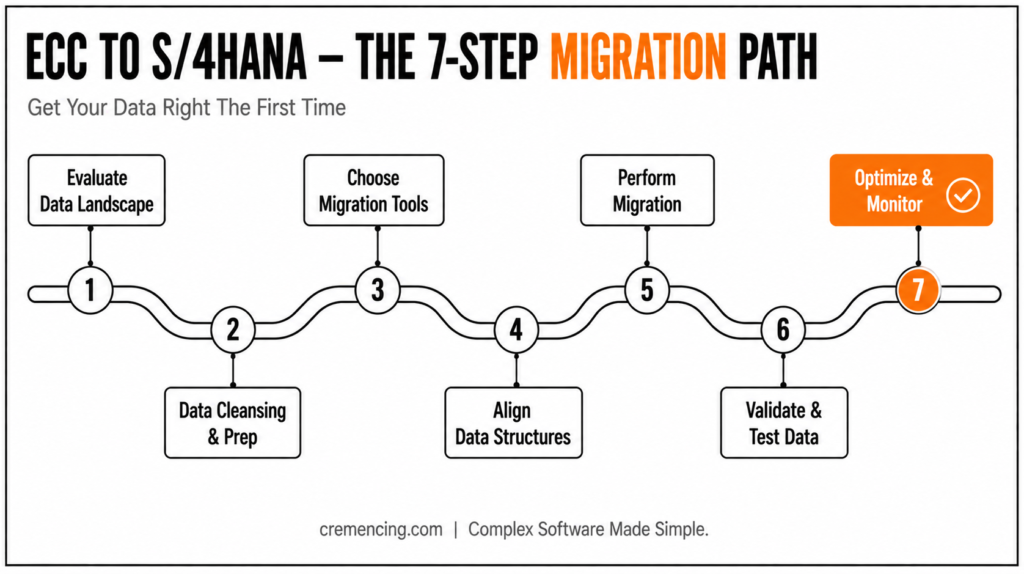
Step 1 – Evaluate Your Data Landscape for S/4HANA Migration
First, you should start with your data.
Identify:
Sources of data
Volume of data
Quality issues in data
Ultimately, it contributes to what is called the migration scope.Testing ensures accuracy.
Step 2: Data Cleaning and Preparation
This is essential.
Tasks include:
- First, removing duplicates
- Next, archiving outdated data
- Finally, standardizing formatsExtract data from ECC
As a result, clean data helps deliver better post-migration performance.
Step 3: Choose the Right SAP S/4HANA Migration Tools
Choosing the optimal tools is essential.
Some of the SAP ECC to S4HANA migration tools are:
- SAP Migration Cockpit
- SAP Data Services
- LVM (Landscape Transformation)
Choose tools based on:
- Data complexity
- Project size
- Integration requirements
SAP LT Replication Server (SLT), not “LVM,” is the tool typically used for real-time data replication and system consolidation scenarios — distinct from SAP Migration Cockpit, which now handles most standard object-based migration through pre-delivered and custom migration objects (managed via the Migration Object Modeler, or LTMOM). Confirm which access point applies to your release: SAP Migration Cockpit is available through the Fiori “Migrate Your Data” app in current S/4HANA releases.
| Migration Tool | Best For | Key Strength | Consideration |
|---|---|---|---|
| SAP Migration Cockpit | Standard, structured data migration | Pre-built templates, native S/4HANA integration | Limited flexibility for highly custom data |
| SAP Data Services | Complex, large-scale data transformation | Powerful ETL capabilities, handles multiple data sources | Requires more setup and technical expertise |
| SAP LTMC (Landscape Transformation) | System consolidation and selective migration | Enables selective data transfer without full system migration | Best suited for advanced/complex landscapes |
Step 4: Align Data Structure for Merging with S/4 HANA
The data model is made simple in S/4HANA.
You must:
- Map legacy data fields
- Adjust data structures
- Align business objects
Consequently, this step allows for compatibility with the new system
Step 5 — Perform Data Migration
Run the migration process.
Key steps:
- First, extract data from ECC
- Then, transform data
- Finally, load data into S/4HANA
Therefore, controlling this step is important to not lose data.
Step 6 – Validate and Test Data
Above all, testing ensures accuracy.A blog, for the most part, provides the tools but does not teach you how to choose them.
Focus on:
- Data completeness
- Data consistency
- Business process validation
Step 7- Optimization and Tracking Step
After migration:
Monitor system performance
- Fix data issues
- Optimize workflows
- Ultimately, continuous monitoring ensures long-term success.Business outcomes are enabled faster by the prioritization of data migration in organizations.
A successful SAP ECC to SAP S/4HANA data migration is measured value.
SAP ECC to S/4HANA Data Migration — 7 Steps at a Glance
- Evaluate data landscape (sources, volume, quality)
- Clean and prepare data (dedupe, archive, standardize)
- Choose the right tool (Migration Cockpit / Data Services / SLT)
- Align data structures to S/4HANA’s simplified data model
- Extract, transform, load
- Validate and test (completeness, consistency, business process)
- Monitor and optimize post-migration
Operational Benefits
Improved Data Accuracy for More Reliable InsightsFaster
Processing Speeds to Boost Efficiency
Simplified Data Management for Easier Operations
Financial ROI
Specifically, reduced data storage costs
Lower maintenance expenses
Faster reporting and analytics
Strategic Benefits
Better decision-making
Real-time insights
Future-ready data architecture
In short, business outcomes are enabled faster by the prioritization of data migration in organizations.
Mistakes & Best Practices
Common Mistakes
For instance, skipping data cleansing
Choosing the wrong migration tools
Underestimating data complexity
Lack of testing
Ignoring business validation
Best Practices
Start data preparation early
Utilize tested SAP ECC to S4HANA migration tools
Perform multiple testing cycles
Involve business users
Monitor data post-migration
Selecting the Right SAP S/4HANA Data Migration Tools
A blog, for the most part, provides the tools but does not teach you how to choose them.
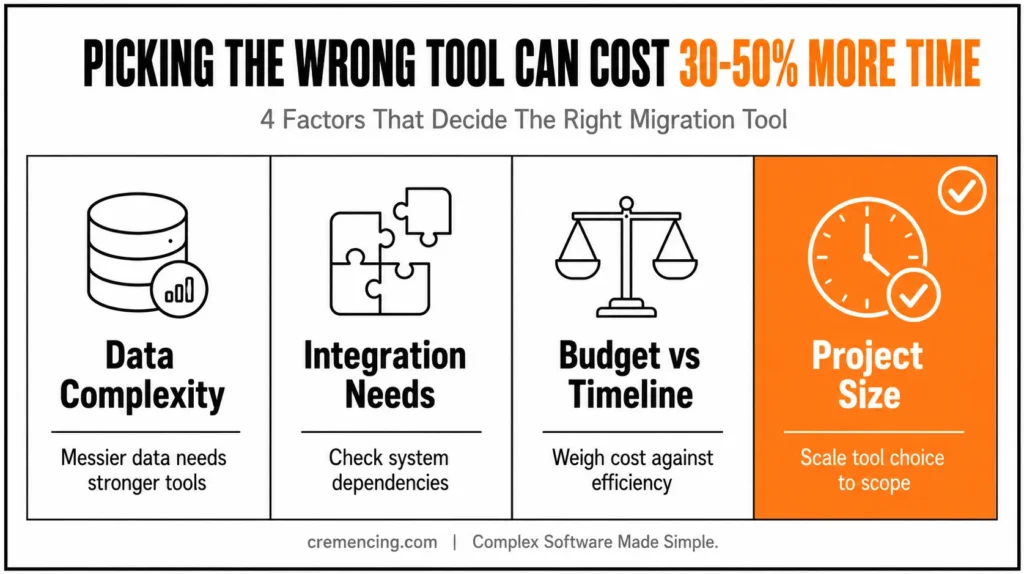
Key Factors to Consider
- Data Evils: Wicked tools are needed for wicked data
- Complexity: Unlike simpler transformations, even automated advanced solutions require more complex tools
- Integration Needs: Consider system dependencies
- Finally, Budget and Timeline – Establish the cost vs efficiency
Real Insight
In fact, migration time can increase by 30 – 50% when the wrong tool is used.
Example
For example, here’s how one company cut migration time by 40%:
- Switching to SAP Migration Cockpit
- Automating data validation
- Reducing manual intervention
Conclusion
The migrations that stay on schedule aren’t the ones with the most sophisticated tooling — they’re the ones that treat data quality as a Step 1 problem, not a Step 6 discovery. Duplicate records, unarchived history, and mismatched classifications don’t get easier to fix once they’re already loaded into a test system; they get more expensive, because now they’re tangled up with validation cycles and business-user sign-off instead of sitting cleanly in the source system where they’re simpler to correct.
The seven steps above work in sequence for a reason: evaluate before you clean, clean before you pick a tool, and validate before you optimize. Organizations that follow that order — and pick SAP Migration Cockpit, SAP Data Services, or SLT based on the actual scenario rather than by default — are the ones whose ECC-to-S/4HANA migration finishes in the timeline it started with.
FAQ
1.What is the difference between SAP Migration Cockpit and SAP Data Services?
SAP Migration Cockpit is designed for standard, object-based migration with pre-built templates and native S/4HANA integration, making it well-suited for structured data with defined migration objects. SAP Data Services offers broader ETL (extract, transform, load) capabilities for complex transformations across multiple source systems, but requires more setup and technical expertise to configure correctly.
2. Should data migration be tested in a sandbox before the production cutover?
Yes — running migration cycles in a non-production sandbox or quality system allows teams to validate data completeness, catch transformation errors, and measure actual migration runtime before committing to a production cutover window. Skipping this step is one of the most common causes of extended go-live downtime.
3. Who should be involved in an ECC to S/4HANA data migration project beyond the technical team?
Effective migrations typically involve business process owners and data stewards alongside the technical migration team, since business users are often best positioned to validate data accuracy and flag records that look technically correct but are functionally wrong (e.g., an active customer record that should have been archived years ago).
4. What are the most common SAP data migration tools used for ECC to S/4HANA?
The most widely used tools are SAP Migration Cockpit, SAP Data Services, and LTMC (Landscape Transformation). Additionally, some organizations also use third-party tools depending on data complexity and project scale.
5. Why is data cleansing important before migration?
It helps avoid errors, boosts efficiency, and identifies problems before they carry over into the new system. As a result, businesses experience fewer post-migration issues and smoother system performance.
6. Does data migration take a long time to complete?
Generally speaking, timeframes range from a few weeks to several months, depending on data size and complexity. However, proper planning during the early stages can significantly reduce delays.
7. What is the difference between selective and complete data migration?
Complete data migration transfers all historical data, whereas selective migration moves only the data that is relevant to current business needs. Therefore, the right approach depends on business requirements and system complexity.
8. Can poor tool selection affect migration timelines?
Yes, in fact, migration time can increase by 30–50% when the wrong tool is used. Consequently, evaluating tools based on data complexity, integration needs, and budget is essential before starting the project.
9. What role does testing play in a successful data migration?
Testing ensures data completeness, consistency, and business process validation. Moreover, running multiple testing cycles before go-live helps catch errors early, thereby reducing risk during the actual cutover.
10. What happens after the data migration is completed?
Once migration is complete, organizations must monitor system performance, fix any data issues, and optimize workflows. Ultimately, continuous monitoring ensures long-term data accuracy and business continuity.




