
Introduction
Many SAP teams can open the Fiori launchpad, but few can explain which SAP Fiori services sit behind each tile. As a result, a missing tile, a slow app, or an authorization error turns into a long support ticket. Every SAP Fiori app combines a front-end component with a back-end OData service, so administrators must understand both layers. Most guides describe the apps and skip the transaction codes, roles, and monitoring that keep them working. Teams usually notice the gap after go-live, when business users request new apps for the right roles. This article explains five practical uses of SAP Fiori services for SAP consultants, Basis administrators, and IT managers.
What SAP Fiori Services Are and Why They Matter
SAP Fiori services is a practical label for the back-end and launchpad services that power SAP Fiori apps. Each app includes front-end components, such as the user interface, and back-end components, such as OData services. These services read and change business data.
The SAP Fiori launchpad also uses dedicated services. For example, page builder services support catalogs and pages, while the interoperability service supports navigation. A tile that fails to appear or an app that loads slowly can therefore have a cause in either layer.
These services influence what users can do in business processes. A sales order service, for example, determines which fields users can read and change. Launchpad configuration determines which users can access the app.
SAP Fiori services therefore connect user experience, authorization, and business logic. The teams that maintain these services can influence both productivity and system risk.
SAP Fiori services also run across different technology stacks. In SAP S/4HANA, apps can use OData services based on CDS views or the ABAP RESTful Application Programming Model. Some launchpad apps also use technologies such as Web Dynpro.
Teams should identify the technology behind each app before planning activation, testing, and monitoring.
The business value appears in daily operations. Finance teams can approve bank account changes in real time. Sales teams can update orders without switching systems. HR teams can handle leave requests in one place. These changes reduce manual steps and limit data errors that can affect downstream processes.
How SAP Fiori Services Work Across the Architecture
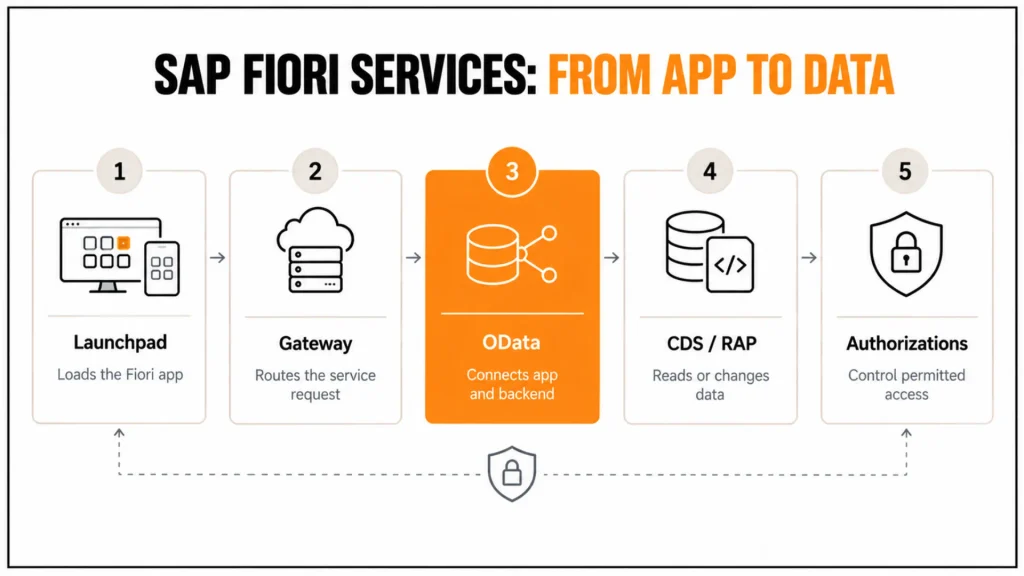
A request starts in the browser. The SAP Fiori launchpad loads the app and calls the OData service through the SAP Gateway layer. Gateway then routes the call to the back end. CDS views or RAP business objects read or change the data under the user’s authorizations. The response returns to the app, which displays the result in a role-based screen.
Embedded and Hub Deployment Models
Two deployment models exist: embedded and hub. In the embedded model, which SAP S/4HANA commonly uses, front-end server components run in the same system as the back end.
In the hub model, a separate front-end server connects to one or more back-end systems. SAP ECC landscapes typically use a separate front-end server. The required front-end components do not exist in the ECC core.
Security Across Both Layers
Security follows the same layered structure. Business roles control which catalogs and apps a user can see. Back-end authorization objects control which data the user can read or change.
A visible tile does not guarantee access. Correct authorizations do not make a tile appear either. Both layers therefore need testing.
Administration by SAP S/4HANA Edition
The edition also affects the administration model. SAP S/4HANA Cloud Public Edition typically does not provide SAP GUI access. Administrators therefore work with launchpad apps instead of Tcodes.
On-premise and private cloud systems still support SAP GUI and Tcodes. The next section covers these Tcodes in more detail.
Five Practical Uses of SAP Fiori Services
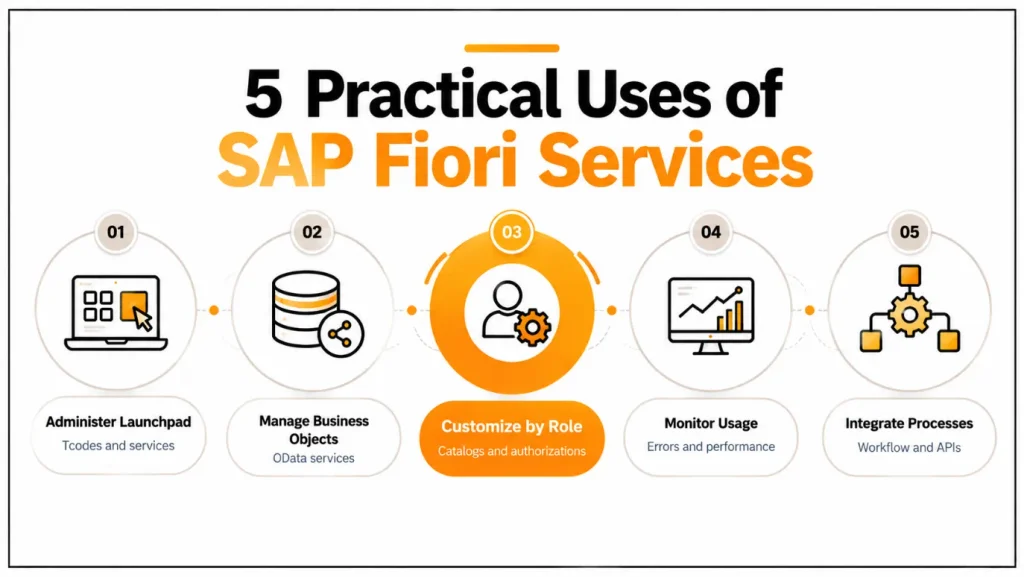
The five uses below follow a typical administration path, from opening the launchpad to integrating services into processes. Each use includes a technical explanation and a business example.
1. Open and Administer the Launchpad Through SAP Fiori Tcodes
Transaction codes, often written as T-codes or Tcodes, remain useful in SAP Fiori landscapes because administrators still use them to open, configure, and troubleshoot the launchpad and its services. The Tcode /UI2/FLP opens the SAP Fiori launchpad from SAP GUI. Moreover, /UI2/FLPD_CUST and /UI2/FLPD_CONF open the launchpad for client-specific and cross-client configuration. In addition, /UI2/FLPCM_CUST and /UI2/FLPCM_CONF open the launchpad content manager for catalogs and groups, which controls which tiles reach which users. For services, /IWFND/MAINT_SERVICE registers and activates OData services, while /IWFND/ERROR_LOG and /UI2/GW_ERR_LOG show Gateway errors.
The table summarizes the Tcodes that administrators use most often.
| Tcode | Purpose | Typical User |
|---|---|---|
| /UI2/FLP | Opens the SAP Fiori launchpad from SAP GUI | Administrators, key users |
| /UI2/FLPD_CUST | Launchpad designer, client-specific customizing | Launchpad administrators |
| /UI2/FLPD_CONF | Launchpad designer, cross-client configuration | Launchpad administrators |
| /UI2/FLPCM_CUST | Launchpad content manager for catalogs and groups | Launchpad administrators |
| /IWFND/MAINT_SERVICE | Registers and activates OData services | Basis administrators, developers |
| /IWFND/ERROR_LOG | Shows Gateway errors | Basis and support teams |
Tcodes also help users who prefer familiar navigation, because the launchpad can start classic transactions as tiles. As a result, power users reach both SAP GUI transactions and SAP Fiori apps from one entry point. Moreover, administrators can check content with /UI2/FLC and /UI2/FLP_INTENTCHECK before a release, which helps prevent broken navigation after a transport. For example, a support team that starts with /IWFND/ERROR_LOG can often tell within minutes whether a failed app has a service problem or an authorization problem, so it routes the ticket to the right team.
2. Work With Business Objects Through SAP Fiori Services
SAP Fiori services expose business objects such as sales orders, purchase orders, invoices, bank accounts, and employee records to user apps.
For example, the Manage Sales Orders app reads and changes sales order data through an OData service. The Manage Bank Accounts app lets finance teams maintain bank account master data without using a classic transaction.
The service applies the same business logic as the back end. Users therefore follow the same rules in the app and the transaction. The SAP Fiori apps reference library lists the OData service and required roles for each standard app. Teams can check these requirements before activation.
Approval-based objects add a workflow dimension. Supplier invoices and leave requests can create tasks in My Inbox. Finance and HR teams can then make decisions in real time. This can reduce manual errors.
However, the speed gain depends on data quality. Incomplete master data can stop an invoice or leave request before it reaches the approver.
Developers can use the same approach for custom business objects. A RAP business object with a CDS-based OData service can provide draft handling, validation, and authorization checks. This allows a custom app to follow the same controls as a standard app.
Extensions can also remain upgrade-safe when they use released interfaces and follow SAP’s extensibility guidelines.
3. Customize SAP Fiori Services by Role
SAP Fiori Services and Business Data
SAP Fiori services expose business objects such as sales orders, purchase orders, invoices, bank accounts, and employee records to the apps that users work with. For example, the Manage Sales Orders app reads and changes sales order data through an OData service, while the Manage Bank Accounts app lets finance teams maintain bank account master data without a classic transaction. Because the service applies the same business logic as the back end, users see the same rules in the app as in the transaction.
Roles, Catalogs, and Authorizations
SAP lists the OData service and required roles for each standard app, so teams can check them before activation. Not every employee needs every service, so role-based customization protects both usability and security. In the launchpad, business catalogs group apps, and business roles assign these catalogs to users, while spaces and pages arrange the apps into a start page for each role. In addition, authorization roles in PFCG restrict which OData services a user can start and which data the user can read or change in the back end.
The result is a focused workspace for each team. For example, HR sees employee records and leave requests, finance sees invoices and bank accounts, and IT sees configuration and monitoring apps, and none of them sees the other groups’ apps by default. However, hiding a tile is not a security control by itself, because a user who knows the service URL could still call it, so the back-end authorizations must also restrict access.
| Business Role | Typical Apps | Back-End Restriction | Business Benefit |
|---|---|---|---|
| HR specialist | Employee records, leave request apps | No access to finance postings | Protects sensitive personal data |
| Finance clerk | Supplier invoice and bank account apps | No access to HR master data | Focuses the workflow and limits fraud risk |
| IT administrator | Launchpad configuration and monitoring apps | No access to payroll data | Central control without business data exposure |
Moreover, the role design should keep creation and approval of the same document apart, because this supports.
4. Monitor Service Usage and Errors
Monitoring answers three questions, namely which services fail, which apps run slowly, and which apps nobody uses. For failures, /IWFND/ERROR_LOG and /UI2/GW_ERR_LOG list Gateway errors, and the application log (SLG1) adds back-end detail. For performance, SAP Cloud ALM offers Real User Monitoring, while the SQL trace (ST05) shows how a service call reaches the database.
However, usage tracking is harder than most teams expect. On-premises systems have no standard SAP report that lists the most used SAP Fiori apps, and SAP KBA 3203036 and SAP Note 2629143 describe how to gather usage statistics. Therefore, teams often combine the OData metering report /IWFND/R_METERING_VIEW, a launchpad plugin that logs app starts, and SAP Cloud ALM data.
For classic transactions, workload statistics (ST03N) already show how often users run each Tcode, and this data helps decide which transactions to replace with SAP Fiori apps first. For example, an app that nobody uses can leave the launchpad, a heavily used app with frequent errors gets a service review, and a group with low usage gets targeted training. As a result, IT moves from guessing to evidence when it plans adoption.
5. Integrate SAP Fiori Services Into Business Processes
SAP Fiori services work best when they sit inside end-to-end processes and not beside them. In a sales scenario, for example, a sales order that a user releases in an app can start the follow-on delivery process and notify logistics through workflow or events. In finance, an approved supplier invoice moves on to posting and notifies accounting, and in HR, an approved leave request updates the absence record without a second entry.
Workflow connects these steps. SAP flexible workflow in SAP S/4HANA routes approvals to My Inbox, and SAP Build Process Automation adds cross-system steps, while exchanges data with external systems through released APIs. Moreover, each step leaves an audit trail, which helps teams enforce company policies and meet audit requirements.
Integration also needs ownership. Every interface should have an owner, monitoring, and a retry rule, and service activation should follow the same transport path as other changes, because a manually activated service in production is hard to reproduce after a system copy. Consequently, teams reduce manual steps and the risk of errors without hiding failures.
Validation and Best Practices
Each use above needs a baseline and a check. For example, teams can measure the time to resolve Fiori support tickets, the number of Gateway errors per week, the share of users who start apps from the launchpad, and the number of tiles that nobody uses. Moreover, a test with real user profiles in a quality system catches missing catalog assignments and authorization gaps before users find them.
Changes to launchpad content and service activation should follow the transport path from development to production, so every system carries the same configuration. In addition, a quarterly review of roles, catalogs, and unused tiles keeps the launchpad aligned with how people work, and a named owner for each business role prevents the slow growth of oversized roles.
Documentation closes the loop. A simple register that lists each app, its OData service, its catalog, its role, and its owner shortens every later investigation, because the support team starts with the full picture instead of rebuilding it from logs.
Common Mistakes
The most frequent mistake is to hide a tile and treat that as security, because the back-end authorization remains open. Another is to activate OData services directly in production, so development, quality, and production systems drift apart and errors become hard to reproduce. Teams also copy standard roles without cleanup, which gives users hundreds of tiles and recreates the navigation problem of SAP GUI.
Finally, many teams collect no usage data until a complaint arrives, so they cannot say which apps matter. In addition, they test only with administrator profiles, which hides missing catalog assignments and authorization gaps. Testing with real role profiles and reviewing usage each quarter avoids both problems.
2. Work With Business Objects Through SAP Fiori Services
SAP Fiori services expose business objects such as sales orders, purchase orders, invoices, bank accounts, and employee records to the apps that users work with. For example, the Manage Sales Orders app reads and changes sales order data through an OData service, and the Manage Bank Accounts app lets finance teams maintain bank account master data without a classic transaction. Because the service applies the same business logic as the back end, users see the same rules in the app as in the transaction. The lists the OData service and the required roles for each standard app, so teams can check them before activation.
Conclusion
SAP Fiori services connect apps to business objects, roles, and processes, so administrators who understand both the front end and the OData layer resolve problems faster. The five uses in this article cover Tcodes for administration, business objects for daily transactions, role-based customization for security, monitoring for evidence, and integration for end-to-end processes. Teams that document these layers and test them with real roles reduce support effort and manual errors.
Looking ahead, SAP continues to extend SAP Fiori with spaces and pages, embedded AI assistance such as Joule, and cloud-based monitoring through SAP Cloud ALM, so a clean service and role design makes these capabilities easier to adopt. Cremencing.com supports teams with [INTERNAL LINK: SAP custom development → SAP Custom Development (https://cremencing.com/sap-custom-development/)] for custom business objects, SAP Fiori apps, and integrations that stay upgrade-safe.
FAQs
1. What are SAP Fiori services?
SAP Fiori services are the back-end OData services and launchpad services that power SAP Fiori apps. The OData service reads and changes business data, while launchpad services deliver catalogs, pages, and navigation. Together they connect the user interface to business objects, roles, and processes in SAP S/4HANA and SAP ECC.
2. Which Tcode opens the SAP Fiori launchpad?
The Tcode /UI2/FLP opens the SAP Fiori launchpad from SAP GUI. Administrators also use /UI2/FLPD_CUST and /UI2/FLPD_CONF for the launchpad designer, /UI2/FLPCM_CUST for the content manager, and /IWFND/MAINT_SERVICE to activate OData services, which together cover most day-to-day SAP Fiori services administration.
3. How do you restrict SAP Fiori services by role?
Assign business catalogs and business roles in the launchpad to control which apps users see, and restrict the OData services and data in the back end through authorization roles in PFCG. Hiding a tile is not enough, so both layers need testing with real user profiles before go-live.
4. How do you monitor SAP Fiori app usage?
On-premise systems have no standard SAP report for app usage, so teams combine the OData metering report, a launchpad plugin that logs app starts, and workload statistics for classic transactions. SAP Cloud ALM adds Real User Monitoring. SAP KBA 3203036 and SAP Note 2629143 describe how to gather usage statistics.
5. Where do you find OData service errors for SAP Fiori apps?
Use /IWFND/ERROR_LOG or /UI2/GW_ERR_LOG to review SAP Gateway errors, and check the application log in SLG1 for back-end details. A SQL trace in ST05 helps when a service responds slowly. Start with these tools before changing roles, because they show whether a service error or an authorization check caused the failure.
6. Can SAP Fiori services run on SAP ECC?
Yes, in many cases. SAP ECC systems can run selected SAP Fiori apps through a separate front-end server that connects to the ECC back end. However, newer apps, embedded analytics, and some business objects exist only in SAP S/4HANA, so teams should check app availability in the SAP Fiori apps reference library first.
7. How do SAP Fiori services support business processes?
SAP Fiori services connect user actions to follow-on steps. An approval in My Inbox can post a document and notify the next team through flexible workflow, SAP Build Process Automation, or events, while SAP Integration Suite connects external systems. This reduces manual steps and keeps an audit trail for each decision.
8. When do SAP Fiori services need custom development?
Teams need custom development when no standard app or OData service covers a business object or rule. Teams build a RAP business object with a CDS-based service and an SAP Fiori elements app, and they use released interfaces so the extension survives upgrades. Configuration and role design should come first.
References
https://community.sap.com/t5/technology-q-a/required-fiori-usage-statistics/qaq-p/14376889




