

AMDP earns the “high-performance” claim only when SQLScript replaces expensive ABAP-side work with a single database round trip not simply because the code happens to execute inside SAP HANA. This ABAP AMDP tutorial proves that distinction with a working example on SAP’s /DMO/FLIGHT sample data: an ABAP baseline that pulls every detail row to the application server before aggregating, an AMDP version that groups and ranks the same data inside SQLScript, and a profiler-based comparison that tells you which implementation actually wins on your system.
If you’re an ABAP developer or SAP technical lead evaluating whether a slow report is a code-pushdown candidate, you’ll leave with a repeatable measurement method, not just AMDP syntax, for SAP S/4HANA on-premise 1909+ or the SAP BTP ABAP environment.
If you’re on SAP S/4HANA on-premise 1909 or higher (or the SAP BTP ABAP environment), you’ll come out with a working class, a repeatable test method, and a rule for knowing when AMDP is worth the added database-specific dependency and when it isn’t.
ABAP AMDP Tutorial
Use current ABAP development tools in Eclipse. SAP supports AMDP source editing in ADT because the SQLScript implementation sits inside a method of a global ABAP class; SAP GUI can display the source, but it does not provide the supported editing workflow for AMDP implementations.
This ABAP AMDP Tutorial uses SAP’s /DMO/FLIGHT table. Import the ABAP Flight Reference Scenario when those objects are not already available in your development system. SAP’s official AMDP performance tutorial uses the same sample package and supports the SAP BTP ABAP environment or SAP S/4HANA on-premise 1909 and higher.
You also need permission to create and activate a global class, execute it through the ABAP Console, use the ABAP Debugger, and create profiler traces. Create a package such as ZAMDP_TUTORIAL and assign it to a transport request.
The example ranks each carrier’s connections by total occupied seats. The old implementation reads individual flight rows and aggregates them in ABAP; the AMDP version filters, groups, and ranks the data inside SAP HANA before returning the reduced result.
This section is technically strong, but I’d make one important correction: the ranking logic described as “dense rank” is not actually dense rank. If totals are 100, 100, 80, the current logic produces ranks 1, 1, 2, which is dense rank, so the implementation itself is correct; the wording around sorting and ranking is fine.
For a polished tutorial, I would also tighten the explanation and make the baseline purpose clearer
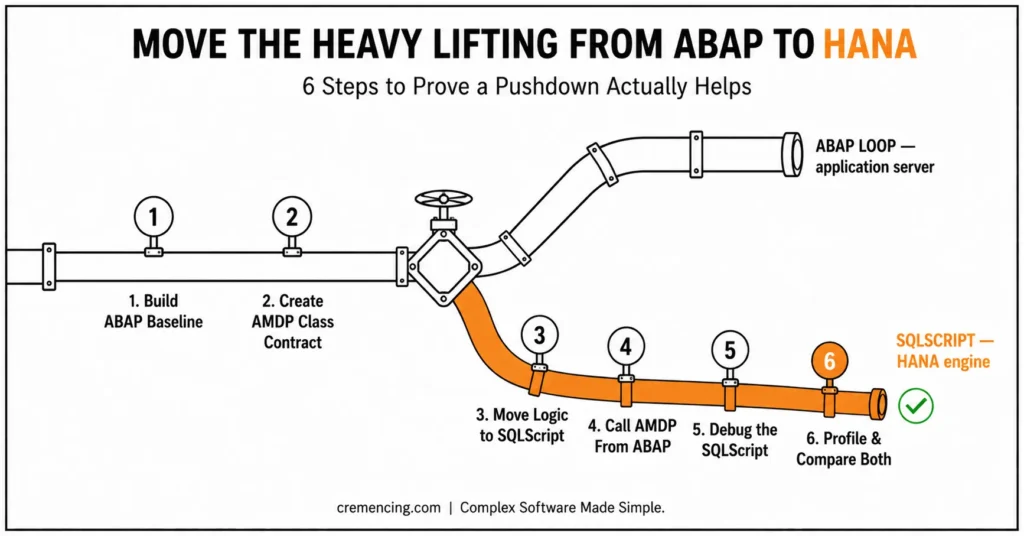
Step 1 — Build the ABAP Performance Baseline
A useful ABAP AMDP tutorial needs a measurable baseline. Without one, code pushdown becomes an assumption rather than a performance comparison.
Create the global class ZCL_AMDP_FLIGHT_RANK. It implements a class which lets you run from the ABAP Console, andIF_AMDP_MARKER_HDB, which enables HANA AMDP methods.
The class defines a common result structure containing the carrier, connection, total occupied seats, flight count, and traffic rank. Both implementations return this same structure, making their results and performance directly comparable.
Requirement: SAP S/4HANA 1909 or later
Your get_ranked_abap method provides the application-server baseline. It first retrieves every matching flight record, aggregates the records in a hashed internal table, sorts the aggregated data, and then calculates a dense rank for each connection within its carrier.
The important performance characteristic is where the processing occurs. The database returns all matching detail rows to the ABAP application server. ABAP then performs the grouping, counting, sorting, and ranking.
That makes this implementation deliberately inefficient for large workloads. It gives you a useful baseline for measuring what changes when the same processing moves into SAP HANA through AMDP.
Do not assume that AMDP will always be faster
For a date range that returns only a handful of records, procedure-call overhead and database-side processing can outweigh the benefit of reducing application-server processing. AMDP becomes particularly valuable when processing is data-intensive, when large result sets would otherwise move between SAP HANA and the application server, or when you need database-specific capabilities.
Step 2 — Create the AMDP Class Contract
The marker interface does not execute anything by itself. It tells the ABAP runtime that the global class can contain methods implemented as SAP HANA database procedures.
An AMDP procedure still uses an ordinary ABAP method signature. ABAP callers pass typed values and receive typed tables, while the implementation after BY DATABASE PROCEDURE uses SQLScript rather than ABAP syntax. SAP manages the generated HANA procedure and its lifecycle when you activate, transport, or delete the class.
The method in this ABAP AMDP Tutorial receives the client explicitly. That parameter matters because the native SQLScript statement does not simply inherit every ABAP SQL client-handling rule.
It also receives a date range, so SAP HANA can remove unwanted records before grouping. Early filtering reduces the rows entering later aggregation and ranking operations. AMDP is closely tied to the ABAP Cloud model. If you’re unsure which approach fits your project, see ABAP Cloud vs Classic ABAP: what most developers get wrong first.
The table named in the procedure must appear after USING. SAP validates these dependencies during class activation and uses the dependency list to manage the generated database artifact. The official SAP tutorial states that referenced ABAP tables, views, and called AMDP procedures must appear in this clause.
Step 3 — Move the Aggregation Into SQLScript
Implement GET_RANKED_AMDP with BY DATABASE PROCEDURE FOR HDB LANGUAGE SQLSCRIPT. Add OPTIONS READ-ONLY because this method retrieves and calculates data without changing database records.
The SQLScript uses two set operations. The first groups detailed flights by carrier and connection; the second applies DENSE_RANK() within each carrier.
” S/4HANA 1909+ required
METHOD get_ranked_amdp
BY DATABASE PROCEDURE
FOR HDB
LANGUAGE SQLSCRIPT
OPTIONS READ-ONLY
USING /dmo/flight.
— Filter and aggregate before data leaves SAP HANA
lt_aggregate =
SELECT
flight.carrier_id AS carrier_id,
flight.connection_id AS connection_id,
SUM( flight.seats_occupied ) AS total_seats,
CAST( COUNT( * ) AS INTEGER ) AS flight_count
FROM “/DMO/FLIGHT” AS flight
WHERE flight.client = :iv_client
AND flight.flight_date BETWEEN
:iv_date_from AND :iv_date_to
GROUP BY
flight.carrier_id,
flight.connection_id;
— Rank connections independently inside each carrier
et_result =
SELECT
aggregate.carrier_id AS carrier_id,
aggregate.connection_id AS connection_id,
aggregate.total_seats AS total_seats,
aggregate.flight_count AS flight_count,
CAST(
DENSE_RANK( ) OVER (
PARTITION BY aggregate.carrier_id
ORDER BY aggregate.total_seats DESC
)
AS INTEGER
) AS traffic_rank
FROM :lt_aggregate AS aggregate
ORDER BY
aggregate.carrier_id,
traffic_rank,
aggregate.connection_id;
ENDMETHOD.
The colon before an input or local table variable is SQLScript syntax. Do not place a colon before “/DMO/FLIGHT”. That name represents a database object declared in the USING list.
AMDP go/no-go checklist
| Question | If yes |
|---|---|
| Is the data volume moved to ABAP large relative to the result? | Push down with AMDP |
| Does the logic need a HANA-only function (window functions, advanced string/geo ops)? | AMDP or CDS table function |
| Is this a simple filter, join, or aggregation ABAP SQL already handles? | Stay in ABAP SQL / CDS views. |
| Will the result feed a CDS view as a data source? | CDS table function implemented with AMDP |
| Do you have a correctness baseline (existing ABAP logic) to compare against? | Build one before optimizing |
| Have you profiled both versions at production-representative volume? | Only then decide to keep the AMDP |
The client condition is not optional. /DMO/FLIGHT is client-dependent, and native SQLScript reads the database representation directly. Explicit client filtering prevents the AMDP from mixing records belonging to other clients.
The important change in this ABAP AMDP tutorial is not replacing ABAP syntax with SQLScript syntax. It is reducing the data returned to ABAP: the database sends one ranked row per connection instead of every individual flight row. Explore the ABAP RAP Model Tutorial.
Step 4 — Call the AMDP From ABAP
An AMDP procedure method is called through normal ABAP method-call syntax. The runtime creates or updates the generated HANA procedure when needed and maps the ABAP parameters to its database interface.
Add the console method below. It executes the ABAP baseline, calls the AMDP, sorts both outputs consistently, and compares them before displaying the result.
” S/4HANA 1909+ required
METHOD if_oo_adt_classrun~main.
DATA lt_abap_result TYPE ty_result_table.

    DATA lt_amdp_result TYPE ty_result_table.

    DATA lv_date_from TYPE /dmo/flight_date
VALUE ‘00010101’.
DATA lv_date_to TYPE /dmo/flight_date
VALUE ‘99991231’.
” Run the original application-server implementation
lt_abap_result = get_ranked_abap(
iv_date_from = lv_date_from
iv_date_to = lv_date_to ).
TRY.
” Run the HANA SQLScript implementation
get_ranked_amdp(
EXPORTING
iv_client = sy-mandt
iv_date_from = lv_date_from
iv_date_to = lv_date_to
IMPORTING
et_result = lt_amdp_result ).
CATCH cx_amdp_execution_error INTO DATA(lx_amdp).
” Return the database-procedure error to the console
out->write( lx_amdp->get_longtext( ) ).
RETURN.
ENDTRY.
SORT lt_abap_result BY
carrier_id
traffic_rank
connection_id.
SORT lt_amdp_result BY
carrier_id
traffic_rank
connection_id.
IF lt_abap_result = lt_amdp_result.
out->write( ‘ABAP and AMDP results match.’ ).
ELSE.
out->write( ‘Result mismatch: inspect both tables.’ ).
ENDIF.
out->write(
EXPORTING
data = lt_amdp_result
name = ‘RANKED_CONNECTIONS’ ).
ENDMETHOD.
ENDCLASS.
Activate the class with Ctrl+F3 and run it as an ABAP Console application with F9. A successful run should print the confirmation message followed by ranked connections.
The comparison is essential. Faster code that changes totals, ties, date boundaries, or client selection is not an optimization.
In production code, replace the console output with an ABAP Unit test or a repeatable regression test. SAP also provides test support for AMDP-related CDS table-function scenarios, but the direct result comparison is sufficient for this first ABAP AMDP Tutorial.
Step 5—Debug the SQLScript
A regular ABAP breakpoint stops before and after the AMDP call, but it does not automatically step through SQLScript running in SAP HANA. The AMDP Debugger is a separate debugger designed for database procedures and CDS table-function implementations.
Open GET_RANKED_AMDP in ADT. Right-click the editor ruler beside an executable SQLScript line and choose “Activate AMDP Debugger,” or place an AMDP breakpoint so ADT activates it implicitly.
You need standard ABAP debugging authorization, but SAP states that no separate database user is required. The debugger must be active for the current ABAP project before the procedure can stop, step, or expose variable values.
Place one breakpoint on the first SELECT and another on the final assignment to et_result. Run the class again.
Inspect iv_client, the date parameters, lt_aggregate, and et_result. This confirms whether filtering, grouping, and ranking produce the expected intermediate rows before the result returns to ABAP.
Breakpoint colours indicate status. A green breakpoint is active and confirmed; blue is pending while the debug procedure is prepared, and grey means the AMDP Debugger is inactive. Conditional AMDP breakpoints are available in newer releases, including SAP S/4HANA 2021 FPS00 and later.
Step 6 — Profile and Compare Both Versions
The title of this ABAP AMDP tutorial promises high-performance HANA code, but the code must earn that description. Use the profiler instead of relying on the number of lines or the location of the calculation.
Right-click the class and choose Profile As → ABAP Application (Console). First profile the baseline execution with normal ABAP profiling settings.
Create a second trace with AMDP trace → Enable AMDP trace selected. Open the ABAP Traces view, refresh it, open the trace, and select the ABAP Managed Database Procedures tab.
The AMDP Profiler reports procedure calls and the SQL statements executed on SAP HANA. It shows the time consumed by procedure calls and individual SQL operations, allowing you to identify whether aggregation, sorting, or another statement dominates runtime. The profiler is supported from Application Server ABAP 7.54 SP00, which corresponds to the SAP S/4HANA 1909 tutorial baseline.
Compare these points:
- Total elapsed time for the complete class run.
- Time spent inside the ABAP aggregation loop.
- Time spent in the AMDP procedure.
- Number of rows selected from /DMO/FLIGHT.
- Number of rows returned by the AMDP.
- First-run compilation effects versus repeated execution.
- Result equality for the same client and date range.
Run both versions several times with the same filters. The first AMDP execution can include procedure generation or compilation effects that do not represent steady-state execution.
Also test more than one data volume. A full date range may favour code pushdown, while a narrow range may show no meaningful benefit. The correct conclusion may be that modern ABAP SQL or a CDS view solves the requirement with less database-specific code. SAP’s own AMDP example warns that simple tasks achievable in ABAP SQL do not automatically justify an AMDP procedure.
Testing and Validation
A complete ABAP AMDP tutorial tests correctness before speed. Use the same client, date range, source data, sorting rules, and ranking definition for both implementations.
Start with the broad date range used in the console method. Both tables should have the same row count and identical values for every carrier and connection. Next, test a range that returns no flights. Both methods should return empty tables without raising an exception.
Create or locate connections with equal occupied-seat totals. Confirm that both versions assign the same dense rank and that the next distinct total receives the next consecutive rank.
Test one carrier only by temporarily adding a carrier parameter to both methods. This makes it easier to inspect intermediate totals manually.
Check client isolation. The ABAP SQL baseline handles the logon client automatically, while the AMDP applies flight. client = :iv_client. Removing that condition can produce different row counts or data from unintended clients.
Test the lower and upper date boundaries. Both implementations use an inclusive BETWEEN, so records on iv_date_from and iv_date_to must appear.
Finally, profile a small range and a large range. Record the result volume, database time, ABAP time, and total elapsed time in a review table before deciding whether to keep the AMDP.
A performance result from a development system with a tiny sample is not sufficient evidence for production. Re-run the measurement with representative volume and realistic filter selectivity.
AMDP Performance Tips
The main rule in this ABAP AMDP tutorial is simple: push down expensive data processing, not every line of ABAP.
Filter Before Aggregating
Apply selective conditions in the first database statement. Filtering after a large intermediate result wastes memory and processing in both the database and the application layer.
Return Only the Required Columns
Avoid SELECT *. Wide table parameters increase memory use and the amount of data copied between procedure steps or returned to ABAP.
Prefer Set Operations
Use grouped selects, joins, window functions, and SQLScript table expressions instead of row-by-row loops. The ranking operation in this example is defensible because it combines aggregation and a partitioned window calculation before data transfer.
Do Not Call an AMDP Inside an ABAP Loop
One call per business object can replace one large data transfer with hundreds of smaller database round trips. Pass a suitable input table or redesign the query so one procedure handles the required set.
Profile the SQL Statements
An AMDP can still contain an expensive join, non-selective filter, unnecessary DISTINCT, or large intermediate table. The AMDP Profiler displays the SQL statements and procedure calls that consume runtime, so inspect the trace rather than treating the procedure as a single black box.
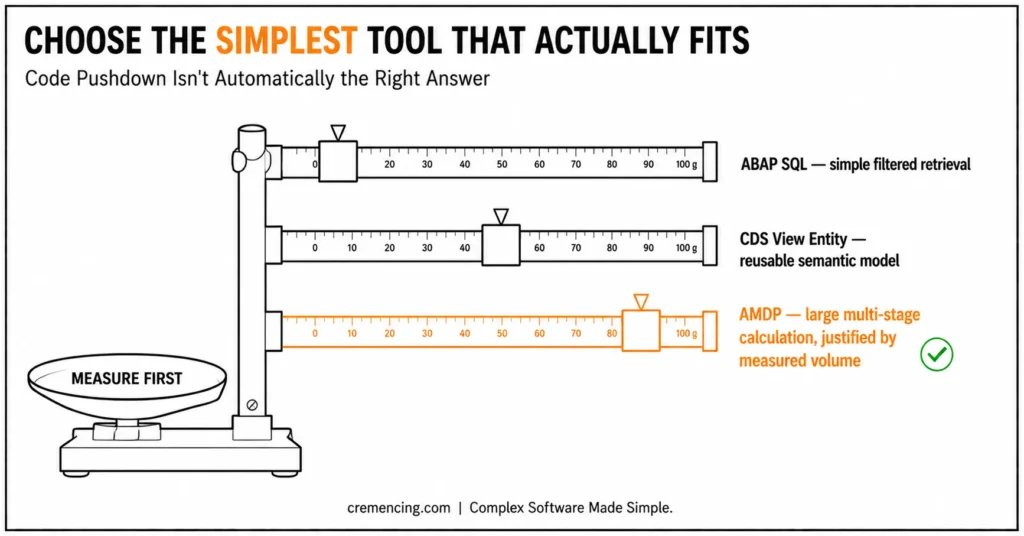
Choose the Simplest Suitable Tool
| Requirement | Preferred first option |
| Simple filtered retrieval or aggregation | ABAP SQL |
| Reusable semantic model and associations | CDS view entity |
| HANA function unavailable in ABAP SQL or CDS | AMDP or CDS table function |
| Large multi-stage calculation with repeated data transfer | AMDP |
| Database-independent implementation required | ABAP SQL |
| Result must serve as a CDS data source | CDS table function implemented with AMDP |
CDS table functions connect CDS consumption with AMDP-based SQLScript. SAP recommends them when calculations or HANA-native operations cannot be expressed through the available CDS query model.
AMDP ties the method to the specified database type—in this case, HDB. That dependency is acceptable when HANA-specific functionality or measured processing volume justifies it.
Conclusion
The result that matters in this ABAP AMDP tutorial isn’t the SQLScript itself; it’s the discipline of never trusting a database procedure until it’s been measured against a correctness baseline and a profiler trace. The AMDP version here wins because it returns one ranked row per connection instead of every individual flight record, and that’s a genuine reduction in data crossing the ABAP/HANA boundary.
But the tutorial’s harder lesson is the one most AMDP write-ups skip: build the ABAP implementation first, keep both versions returning an identical result contract, and let the AMDP Profiler, not intuition about where code “should” run decide whether the SQLScript procedure earns its keep. Apply that same sequence (baseline, compare, profile, decide) to your own candidate report before reaching for it, and you’ll avoid the common failure mode: an AMDP that’s faster on a ten-row development sample and indistinguishable from ABAP SQL at production volume.
Frequently Asked Questions
1. How can AMDP performance be improved?
Improve AMDP performance by filtering early, returning fewer columns, avoiding row-by-row processing, and reducing large table parameters. Use the AMDP Profiler to identify the exact SQL statement or procedure call consuming time. Do not rewrite SQLScript blindly when the trace points to poor selectivity or excessive output.
2. Can an AMDP function be called directly from an ABAP program?
A normal AMDP procedure can be called through ABAP method syntax. An AMDP function that implements a CDS table function is normally consumed through that CDS table function rather than treated as a general-purpose callable method. This distinction matters when designing an AMDP example for CDS consumption.
3. Can I use variables and IF statements in AMDP SQLScript?
Yes. SQLScript in ABAP supports scalar variables, table variables, and procedural statements such as IF, subject to the SQLScript and AMDP restrictions of your release. Prefix variables with a colon when they are used as values inside SQL statements. Prefer set-based expressions when they replace avoidable procedural loops.
4. How do I pass parameters to a CDS table function?
Declare the parameters in the CDS table function and map them when consuming the entity. A CDS view can pass constants or supported session values such as the current client; it cannot always pass a field from the left side of a join as a table-function parameter.
5. What is AMDP in SAP ABAP?
ABAP Managed Database Procedures let an ABAP class contain methods implemented in SAP HANA SQLScript. The ABAP runtime manages the generated database procedure and its lifecycle, while normal ABAP callers use the method interface. AMDP is intended for justified database-side calculations, not as a mandatory replacement for ABAP SQL.
6. How do I create an AMDP class in ABAP?
Create a global class in ADT, implement IF_AMDP_MARKER_HDB, declare a typed method, and implement it BY DATABASE PROCEDURE FOR HDB LANGUAGE SQLSCRIPT. Add OPTIONS READ-ONLY for read-only processing and list every referenced ABAP-managed database object after USING.
The right decision is therefore based on measured runtime, transferred data volume, maintainability, and release compatibility, not on code pushdown alone.
7. What’s the difference between an AMDP and a CDS table function?
An AMDP is a class method implemented in SQLScript; a CDS table function is a CDS artifact that is implemented by an AMDP method behind the scenes. You call an AMDP directly from ABAP. A CDS table function is instead consumed through CDS as a data source in a CDS view or exposed via OData and typically isn’t called as a standalone method.
8. Can an AMDP procedure write data, not just read it?
Yes AMDP supports read-write procedures, but this tutorial uses OPTIONS READ-ONLY because the example only retrieves and calculates data. A write-capable AMDP drops that option and takes on transactional responsibilities (commit handling, lock objects) that a read-only reporting procedure like this one doesn’t need.
9. Why does an AMDP fail to activate with an authorization or dependency error in a new system?
The most common cause is a table or view referenced inside the SQLScript body that isn’t listed in the USING clause — SAP validates every referenced object against that list at activation. The second most common cause is a missing HANA-side authorization for generating the underlying database procedure, which is a Basis/authorization-team task, not a coding fix.
10. Does AMDP behave the same way in SAP BTP ABAP Environment as in S/4HANA on-premise?
The method-level mechanics (marker interface, BY DATABASE PROCEDURE FOR HDB, USING, colon-prefixed variables) are the same, since both run on SAP HANA. What differs is scope: BTP ABAP Environment enforces stricter ABAP Cloud restrictions on which database objects you’re allowed to reference in the USING clause.





One Response