

“No more memory available to add rows to an internal table.” Your background job has stopped, and ST22 shows TSV_TNEW_PAGE_ALLOC_FAILED. In ECC 6.0 or SAP S/4HANA 2025, the negative reaction is to increase a heap parameter before checking whether one internal table consumed the session quota, several processes exhausted extended memory, or the program loaded far more data than the business process required. This ABAP Memory Issue Fix shows how to identify the actual memory owner, reduce peak allocation, process data in bounded packages, and prove that the dump will not return.
Root Cause Taxonomy & Memory Allocation Layers
When an ABAP process terminates with a memory-related dump, identifying the specific allocation layer is critical. Increasing instance-level heap memory profile parameters (abap/heap_area_dia or abap/heap_area_nondia) without analyzing the consumer often masks structural memory leaks or unsustainable data volume patterns.
Why This ABAP Memory Issue Fix Matters
An ABAP memory error occurs when a work process cannot obtain another required block of memory. The failing statement may be an APPEND, SELECT, SORT, string operation, table copy, or framework call, but that source line is often only where the allocation finally failed—not where the underlying memory growth began.
The most common runtime error is TSV_TNEW_PAGE_ALLOC_FAILED. Related errors include TSV_TNEW_BLOCKS_NO_ROLL_MEMORY, TSV_TNEW_OCCURS_NO_ROLL_MEMORY, SYSTEM_NO_ROLL, SYSTEM_NO_MEMORY, and DBIF_RSQL_NO_MEMORY.
These errors do not all indicate the same root cause. A correct ABAP memory issue fix must distinguish among four main situations.
| Root Cause | Typical Evidence | Where to Look First |
|---|---|---|
| One internal session reached its quota | Repeatable dump at similar data volume, one large table | ST22 (program, table size) |
| Application server ran short of shared memory | Failure varies by concurrent load, program alone looks fine | ST02, work-process monitoring, OS stats |
| Program selected/retained too much data | Wide rows, broad SELECT *, duplicate tables | Code review — row width and count |
| Database or shared-object layer exhausted memory | DBIF_RSQL_NO_MEMORY, database-side error | HANA-specific memory monitoring |
One internal session reached its quota
A single report may create a very large internal table, retain duplicate datasets, build deep strings, or keep temporary objects referenced after their work has finished. The process eventually reaches an extended-memory or heap-memory limit.
Typical evidence includes one program with a large table, a wide row structure, and a repeatable dump at roughly the same data volume.
The application server ran short of shared memory
Several work processes may consume the available extended-memory pool at the same time. Your program can then fail even if its own memory use would normally be acceptable.
In this case, ST22, transaction ST02, work-process monitoring, and operating-system statistics must be reviewed together. A code change in one report may not solve a host-wide capacity or concurrency problem.
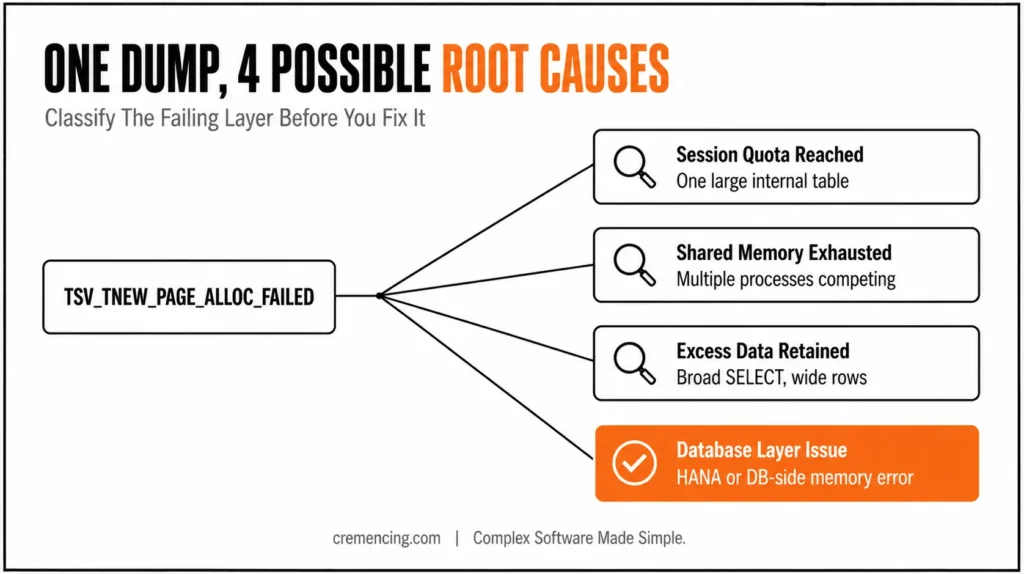
The program selected or retained too much data
Broad SELECT * statements, weak selection conditions, duplicate internal tables, repeated table copies, and unbounded string construction increase peak memory. A million narrow rows may be manageable, while the same number of rows containing strings, nested tables, or large character fields may not be.
Row width matters as much as row count. Sorting and modifying a large table can also create temporary memory requirements beyond the table’s visible size.
The database, shared objects, or another component exhausted memory
DBIF_RSQL_NO_MEMORY or a database-side error can indicate a different layer from an ABAP session allocation. SAP HANA memory analysis uses database-specific monitoring for the column store, row store, caches, and database services.
Do not assume that every SAP memory issue belongs to HANA, and do not assume that every runtime error can be solved through ABAP code. Classify the failing layer before making changes.
Step-by-Step ABAP Memory Issue Fix
Step 1: Read the complete dump in ST22
Transaction ST22 lists and analyzes ABAP runtime errors. Open the relevant dump and record the following information before restarting the program:
- Runtime error name.
- Program, include, and source line.
- User and work-process type.
- Transaction or background job.
- Internal table or object named in the dump.
- Table row width and row count.
- Number of additional rows or bytes requested.
- Extended-memory and heap-memory values.
- Active variant and selection range.
- Other recent dumps from the same program.
Do not focus only on the final APPEND. Trace backwards to find where the table was filled, copied, sorted, or retained.
A dump showing several million rows with a width of hundreds of bytes points toward data-volume or structure design. A dump with moderate program use but severe system-wide memory pressure requires wider Basis analysis.
Step 2: Reduce rows and columns before changing memory parameters
Start with the business requirement. Check whether the user selected an unrestricted date range, company code, plant, sales organization, document type, or status.
The following pattern creates unnecessary memory pressure:
DATA:
lt_orders TYPE STANDARD TABLE OF vbak,
ls_order TYPE vbak.
” Costly: retrieves every field for every qualifying sales order
SELECT *
FROM vbak
INTO TABLE lt_orders.
” Too late: rejected records already occupy ABAP memory
DELETE lt_orders WHERE erdat < p_date.
Move valid filters to the database and select only the fields required by the process:
TYPES:
BEGIN OF ty_order,
vbeln TYPE vbak-vbeln,
kunnr TYPE vbak-kunnr,
erdat TYPE vbak-erdat,
netwr TYPE vbak-netwr,
waerk TYPE vbak-waerk,
END OF ty_order.
DATA:
lt_orders TYPE STANDARD TABLE OF ty_order,
ls_order TYPE ty_order.
” Better: controls both row count and row width
SELECT vbeln
kunnr
erdat
netwr
waerk
FROM vbak
INTO TABLE lt_orders
WHERE erdat >= p_date
AND vkorg IN s_vkorg.
This change reduces transfer volume and the memory needed for the result table. It does not guarantee a safe result if the conditions still return millions of rows, so measure the production-scale volume.
Read our full performance tuning checklist.
Step 3: Process large datasets in bounded packages
When the process genuinely needs a large result set, do not retain every row until the end. Fetch one package, complete its work, persist or export the result, and release the package before continuing.
TYPES:
BEGIN OF ty_item,
vbeln TYPE vbap-vbeln,
posnr TYPE vbap-posnr,
matnr TYPE vbap-matnr,
kwmeng TYPE vbap-kwmeng,
END OF ty_item.
DATA:
lt_package TYPE STANDARD TABLE OF ty_item,
lv_count TYPE i.
” Fetches a controlled number of rows per package
SELECT vbeln
posnr
matnr
kwmeng
FROM vbap
INTO TABLE lt_package
WHERE vbeln IN s_vbeln
PACKAGE SIZE 5000.
” Process this package before the next one is fetched
PERFORM process_item_package
USING lt_package
CHANGING lv_count.
” Release the completed package body
FREE lt_package.
ENDSELECT.
PACKAGE SIZE 5000 is an example, not a universal setting. Test the package size according to row width, processing logic, database time, and acceptable peak memory.
Package processing fails as a memory strategy when the program appends every package into another global table. That design simply moves the unbounded allocation to a different variable.
Step 4: Use an explicit cursor when the workflow requires tighter control
An explicit database cursor can help when the program must coordinate package fetching with commits, external output, or a longer processing sequence. Handle the cursor carefully because a database commit can close it unless the cursor was opened with suitable hold behavior.
DATA:
lv_cursor TYPE cursor,
lt_package TYPE STANDARD TABLE OF ty_item.
” Opens one database cursor for controlled package fetching
OPEN CURSOR WITH HOLD lv_cursor FOR
SELECT vbeln
posnr
matnr
kwmeng
FROM vbap
WHERE vbeln IN s_vbeln.
DO.
” Fetch only one bounded package into ABAP memory
FETCH NEXT CURSOR lv_cursor
INTO TABLE lt_package
PACKAGE SIZE 5000.
IF sy-subrc <> 0.
EXIT. ” No further rows remain
ENDIF.
PERFORM process_item_package
USING lt_package
CHANGING lv_count.
FREE lt_package. ” Completed data is no longer retained
ENDDO.
CLOSE CURSOR lv_cursor.
Do not create a separate permanent internal table for each fetch. The purpose of cursor processing is to keep peak allocation bounded.
Step 5: Eliminate Table Copies as Part of Your ABAP Memory Dump Fix
Memory can double or triple when code copies the same dataset into several tables for filtering, sorting, or output preparation.
Watch for patterns such as:
- Assignment of one large internal table to another.
- APPEND LINES OF into an accumulating result table.
- Passing large tables by value.
- Building a second table only to remove a few columns.
- Retaining both raw file content and parsed records.
- Sorting duplicate datasets differently.
- Keeping global caches after their final use.
Prefer field symbols or references when they avoid a full copy and remain technically appropriate. Pass large internal tables through reference or CHANGING parameters when the method contract permits it.
Local scope also helps. Temporary tables declared inside a method become eligible for release when the method ends, provided no surviving references retain them. To read more about memory issues that stem from inefficient selects.
CLASS lcl_processor DEFINITION.
PUBLIC SECTION.
CLASS-METHODS process_orders
IMPORTING
iv_date TYPE vbak-erdat.
ENDCLASS.
CLASS lcl_processor IMPLEMENTATION.
METHOD process_orders.
DATA lt_local_orders TYPE STANDARD TABLE OF ty_order.
” Temporary working data remains local to this method
SELECT vbeln
kunnr
erdat
netwr
waerk
FROM vbak
INTO TABLE lt_local_orders
WHERE erdat >= iv_date.
PERFORM write_order_output USING lt_local_orders.
” Memory becomes releasable when local scope ends
ENDMETHOD.
ENDCLASS.
Step 6: Use DELETE, CLEAR, and FREE correctly
These operations are not interchangeable:
- DELETE itab removes selected rows.
- CLEAR itab initializes the table so it can be reused.
- FREE itab initializes the table and releases its allocated body more completely.
- FREE MEMORY ID deletes an exported ABAP memory cluster; it does not free an ordinary internal table.
Use FREE after a large table has completed its purpose and will not be refilled immediately. Repeatedly freeing and rebuilding the same working table can add allocation overhead, so reuse a bounded package table where appropriate.
Also check for references. Freeing one internal table does not release objects that remain reachable through another reference, object attribute, shared cache, or copied table.
Step 7: Replace ABAP-side aggregation with database-side aggregation
Do not load detailed records solely to calculate a total or count. Ask the database to return the smaller result.
TYPES:
BEGIN OF ty_customer_total,
kunnr TYPE vbak-kunnr,
amount TYPE vbak-netwr,
END OF ty_customer_total.
DATA lt_totals TYPE STANDARD TABLE OF ty_customer_total.
” Better: aggregates before data reaches the application server
SELECT kunnr
SUM( netwr )
FROM vbak
INTO TABLE lt_totals
WHERE erdat IN s_date
GROUP BY kunnr.
Confirm currency semantics before aggregating amount fields. Grouping values stored in different currencies without including or converting the currency key produces an incorrect business result.
Step 8: Compare memory snapshots
Transaction S_MEMORY_INSPECTOR compares memory snapshots and identifies objects that grow or remain referenced. Take snapshots at matching logical points:
- Start the program and reach a stable state.
- Capture snapshot T0.
- Process one package or one business unit.
- Capture snapshot T1 at the same program point.
- Compare T1 against T0.
- Review the largest growth objects and their reference paths.
Use the ranking list to identify large tables and objects. Use the dominator view to find which parent object prevents other allocations from being released.
The ABAP Debugger can also display an internal table’s current memory use. Inspect row count, row width, table category, keys, and deep components.
This step is essential to confirm your ABAP Memory Issue Fix is actually working as intended.
Step 9: Escalate to Basis When the ABAP Memory Issue Fix Needs System-Level Support
Basis review is required when the dump indicates global extended-memory exhaustion, operating-system pressure, swap activity, or a legitimate workload reaching configured process limits.
Provide:
- The ST22 dump.
- Program and variant.
- Peak table size.
- Dialog or background process.
- Extended and heap memory values.
- Concurrent workload evidence.
- ST02 memory statistics.
- ST06 operating-system memory and swap.
- Relevant SM50, SM66, SM04, or STAD observations.
- Before-and-after code measurements.
Do not recommend increasing abap/heap_area_dia, abap/heap_area_nondia, or related limits without checking host capacity and global workload. A larger quota can let one process consume memory needed by other users.
ABAP Memory Issue Fix — 9 Steps at a Glance
- Read the complete dump in ST22
- Reduce rows and columns before touching memory parameters
- Process large datasets in bounded packages
- Use an explicit cursor when tighter control is needed
- Eliminate table copies
- Use DELETE, CLEAR, and FREE correctly (not interchangeably)
- Replace ABAP-side aggregation with database-side aggregation
- Compare memory snapshots (S_MEMORY_INSPECTOR)
- Escalate to Basis with full evidence when it’s system-level
How to Verify Your ABAP Memory Issue Fix
A valid ABAP Memory Issue Fix must prove that peak allocation fell without changing the business result.
Run the original production-scale variant in a controlled environment and compare:
- Maximum package size.
- Maximum internal-table row count.
- Approximate or measured table memory.
- Total runtime.
- Database time and SQL executions.
- Number of processed records.
- Document totals and amounts.
- Output file size.
- Dialog or background behavior.
- New dumps in ST22.
Use S_MEMORY_INSPECTOR snapshots before and after the corrected processing block. The second snapshot should not show continuous growth after each completed package.
Transaction STAD shows statistics for completed business transactions, including resource consumption. Transaction SM04 helps inspect active user sessions, while ST02 shows SAP memory and buffer statistics.
ST06 monitors host-level resources such as physical memory and swap. If ABAP peak memory decreases but the application server still approaches operating-system limits under concurrent workload, Basis must continue the capacity analysis.
Validate functionality as carefully as memory. Confirm row counts, totals, currencies, units, duplicates, authorization behavior, and restart logic.
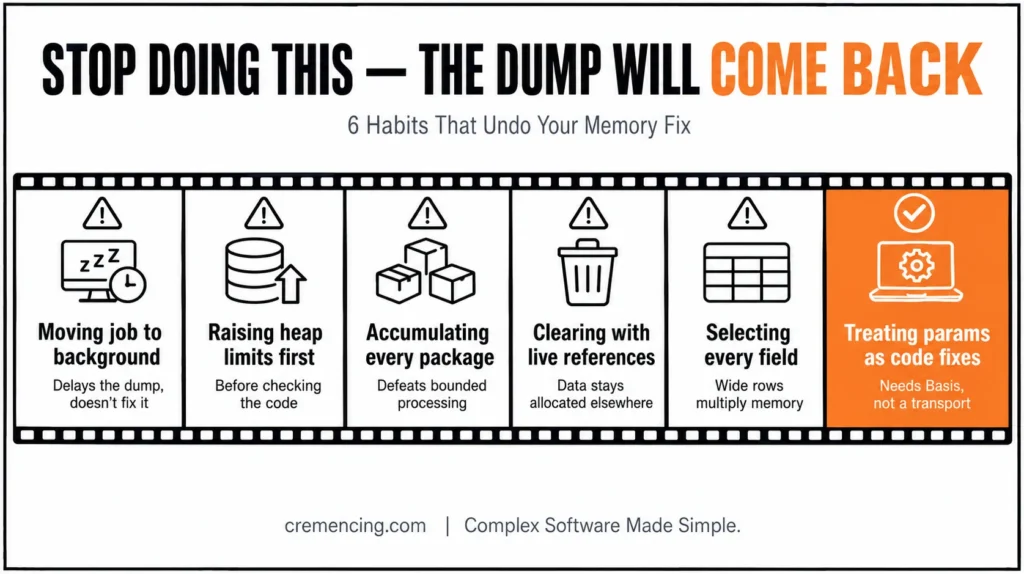
Mistakes That Undo Your ABAP Memory Issue Fix
Moving the report to background and calling it fixed
Background work processes may have higher memory limits than dialog processes. That can delay the dump, but it does not correct unbounded internal-table growth.
Use background execution for long-running workloads, not as a substitute for bounded memory design.
Increasing heap limits before reviewing the code
A larger quota may allow one run to finish while increasing risk for other processes. Confirm whether the workload is legitimate and whether the program retains unnecessary data first.
Processing packages but accumulating every result
Fetching 5,000 rows at a time does not help when every package is appended to one final table. Persist, transmit, or summarize completed results and release the package.
Using CLEAR while another reference keeps the data alive
Objects can remain allocated through class attributes, shared caches, references, copied tables, or caller-owned parameters. Use Memory Inspector to find the retaining path instead of assuming the visible variable is the only owner.
Selecting every field for convenience
Wide row structures multiply memory consumption across the database result, internal tables, copies, sorts, and output structures. Define purpose-specific types and retain only fields that the process actually needs.
Treating parameter changes as transportable code fixes
Profile parameters affect the SAP instance or system. They require Basis analysis, change control, capacity validation, and monitoring—not an ABAP transport.
Conclusion: Making Your ABAP Memory Issue Fix Last
A dependable ABAP Memory Issue Fix begins with evidence, not a larger heap parameter. Read the complete ST22 dump, identify the program and memory owner, and determine whether one internal session reached its quota or the entire application server experienced memory pressure. That distinction decides whether the main response belongs in ABAP code, workload control, system configuration, or a combination of all three.
For developer-owned problems, reduce peak allocation rather than merely moving it. Restrict data at the database, select narrow structures, process large volumes in bounded packages, remove unnecessary table copies, keep temporary data in local scope, and release completed objects when they are no longer required. Use S_MEMORY_INSPECTOR and the Debugger to confirm that memory does not continue growing after each completed package or business unit.
For system-wide problems, give Basis a complete technical record: dump values, program and variant, work-process type, memory snapshots, concurrent workload, ST02 statistics, and ST06 host data. Parameter changes should follow capacity analysis and controlled testing, because allowing one process to consume more memory can reduce stability for the rest of the system.
The final test is not simply that the program finishes once. A successful ABAP memory issue fix lowers peak memory under production-scale volume, preserves totals and business output, survives concurrent workload, and prevents the same dump from returning. That evidence-based approach turns an emergency restart into a lasting improvement in ABAP memory management.
Frequently Asked Questions
1. How can I avoid TSV_TNEW_PAGE_ALLOC_FAILED?
Source: SAP Community
Reduce peak allocation by restricting selected rows and columns, processing large results in packages, removing duplicate tables, and releasing completed data. For a lasting ABAP memory issue fix, inspect ST22 first and ask Basis to review parameters only after identifying whether the problem is process-specific or system-wide.
2. Does PACKAGE SIZE solve an ABAP memory issue?
It helps only when each package is processed and released before the next package is fetched. If the program appends every package to another growing table, the SAP ABAP memory issue remains because the full dataset still accumulates in application-server memory.
3. What is the difference between CLEAR, REFRESH, and FREE?
CLEAR initializes an internal table for reuse, while FREE also releases the allocated table body more completely. REFRESH is older table-clearing syntax. For effective ABAP memory management, use FREE when a large table is finished and will not immediately be filled again.
4. How do I find which ABAP object consumes memory?
Use ST22 for the dump context, the ABAP debugger for table-level memory, and S_MEMORY_INSPECTOR for snapshot comparison. These tools help locate the table, string, object graph, or retained reference responsible for an ABAP out-of-memory condition.
5. How do I fix TSV_TNEW_PAGE_ALLOC_FAILED in SAP?
First identify the memory owner in ST22, then reduce data volume, narrow row structures, remove duplicate copies, and process records in bounded packages. If the ABAP memory dump reflects global extended-memory or operating-system pressure, provide the evidence to Basis for system-level analysis.
6. What causes an ABAP memory dump?
An ABAP memory error occurs when a work process cannot obtain another required memory block. Common causes include oversized internal tables, broad selections, duplicate datasets, deep strings, individual process quotas, global extended-memory exhaustion, operating-system pressure, or a separate database-memory failure.
7. How do I free memory from an internal table in ABAP?
Use a FREE iTab after the table has completed its purpose and no surviving reference requires its data. For reliable ABAP memory management, also remove copies and object references; freeing one variable cannot release the same dataset when another table or reference still owns it.
8. How can I process a huge result without loading every row into memory?
Fetch a bounded package through SELECT … PACKAGE SIZE or an explicit cursor, complete the package’s work, persist the output, and release the table before continuing. Do not create one permanent internal table per fetch, because that recreates the original ABAP out-of-memory problem.
9. Should I always increase heap memory parameters when a dump occurs?
No — increasing heap parameters without analysis often masks the real problem instead of solving it. Therefore, always review the ST22 dump first to confirm whether the issue is process-specific or system-wide before touching any profile parameter.
10. Can background jobs avoid ABAP memory dumps entirely?
Not necessarily. Although background work processes often have higher memory limits than dialog processes, this only delays the dump rather than fixing the root cause. Consequently, unbounded internal-table growth will eventually trigger the same error, even in background mode.
References
https://userapps.support.sap.com/sap/support/knowledge/en/2180736





One Response