Introduction
By 2026, most enterprise SAP landscapes aren’t running one integration pattern — they’re running four or five simultaneously: IDoc for legacy ECC processes that never got migrated, OData for newer S/4HANA-native scenarios, SFTP for batch file exchange with partners who haven’t modernized, and REST/HTTP for everything cloud-native. Choosing the right SAP Integration Suite adapters for each scenario is where most integration teams go wrong — not by picking the wrong adapter, but by picking one as a default and forcing every scenario through it, which is how point-to-point integration debt piles up in the first place.
Ask five SAP integration architects which adapter to use for a given scenario, and you’ll often get five different answers — not because the adapters are unclear, but because most teams never built a decision framework in the first place.
By 2026, a typical S/4HANA landscape is running IDoc for legacy ECC processes that never migrated, OData for S/4HANA-native scenarios, SFTP for batch exchange with partners who haven’t modernized, and REST/HTTP for cloud-native services — often all four at once. SAP Integration Suite gives enterprises the adapters to handle each case; what’s missing from most guides is the logic for choosing between them, combining them across hybrid on-prem/cloud landscapes, and knowing when real-time integration is actually the wrong call. That’s what this guide covers.
S/4HANA Adapter Selection Strategy
According to SAP documentation, selecting adapters within SAP Integration Suite depends on system architecture, data velocity requirements, and protocol capabilities rather than relying on a single default channel. For modern SAP S/4HANA scenarios, native OData and REST HTTP adapters handle real-time API communication, while the S/4HANA Cloud adapter streamlines connectivity to SAP business objects and events.
Conversely, asynchronous bulk processing and legacy system integration require SFTP or IDoc adapters, with on-premise systems utilizing SAP Cloud Connector to ensure mutual TLS security without opening inbound firewall ports. Selecting the optimal adapter prevents technical debt, reduces operational overhead, and ensures compliance with SAP Clean Core integration guidelines.
Architectural Shift in Enterprise Integration
Recent industry analyses indicate that enterprise adoption of SAP Business Technology Platform (BTP) for integration has expanded to 64% of organizations. Gartner research highlights SAP Integration Suite as a Leader in the 2026 Magic Quadrant for Integration Platform as a Service (iPaaS), driven by AI-assisted integration mappings, Edge Integration Cell runtimes, and event-driven architectures. Furthermore, studies show that enterprises migrating to S/4HANA via SAP Integration Suite achieve up to a 70% reduction in development overhead costs while processing real-time events up to 40% faster compared to legacy middleware. Consequently, establishing a standardized adapter selection strategy has become essential for maintaining a Clean Core architecture.
What Are SAP Integration Suite Adapters in 2026?
SAP Integration Suite is a cloud-based integration platform offered by SAP, and it supports the seamless integration between SAP and non-SAP systems.
What are Adapters?
SAP Integration Suite is a cloud-based integration platform provided by SAP, Integration Suite and it is used to seamlessly integrate SAP and non-SAP systems.
Adapters enable two different protocols and formats to communicate between the SAP systems.
| Adapter Type | Use Case |
| S/4HANA Cloud Adapter | Core ERP integration |
| HTTP / HTTPS Adapter | API-based integration |
| SOAP Adapter | Legacy enterprise systems |
| OData Adapter | SAP API communication |
| SFTP Adapter | File-based data exchange |
| IDoc Adapter | Traditional SAP ECC integration |
Adapters facilitate the secure and reliable flow of data between systems, effectively translating between them like a translator.
SAP Integration Suite — Adapter Selection at a Glance
- Real-time API integration → HTTP/HTTPS Adapter
- SAP-to-SAP data exchange (modern) → OData Adapter
- SAP-to-SAP data exchange (legacy/ECC-heavy) → IDoc Adapter
- Batch file transfer → SFTP Adapter
- Legacy non-SAP systems → SOAP Adapter
- Core ERP/S/4HANA Cloud native scenarios → S/4HANA Cloud Adapter
S/4HANA Systems – Step-by-Step Integration Approach
The enterprises use a structured methodology to choose the SAP Integration Suite adapters.
Step 1 – Identify integration scenario
Understand business requirements:
Data sync (real-time or batch)
Type of system (SAP or non-SAP)
Business process criticality
Example:
Finance → real-time posting
Sync Employees from HR to Batch.
Step 2 – Analyze System Landscape
Map systems involved:
The core ERP SAP S/4HANA is available to choose from.
Third-party CRM systems
Legacy databases
Cloud applications
This will dictate the kind of integration that is needed – API, file, or event.
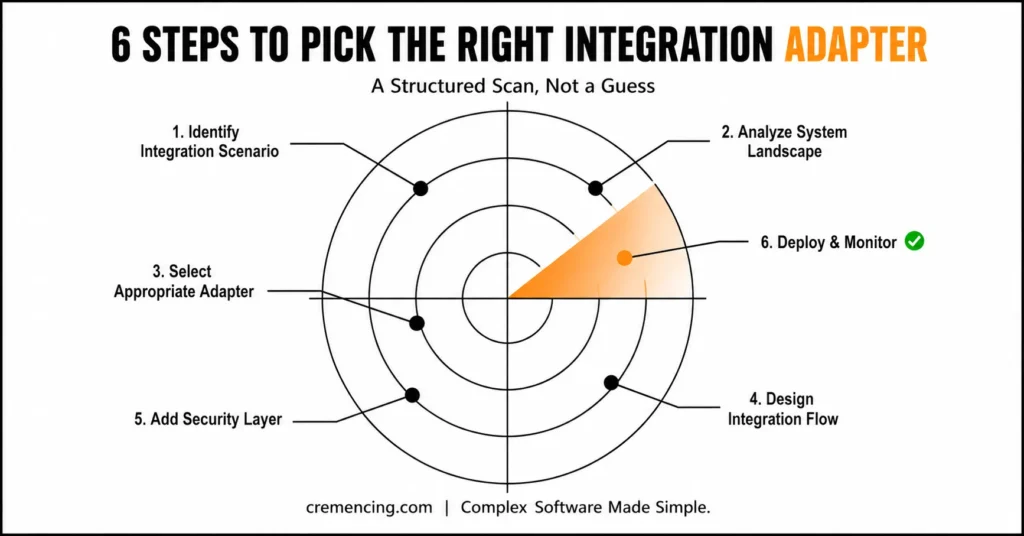
Step 3 – Select Appropriate Adapter
Select according to the technical need:
REST API’s – http Adapter
IDoc or OData Adapter → SAP systems
File transfers → SFTP Adapter
Legacy systems → SOAP Adapter
| Factor | Real-time (HTTP/OData) | Batch (SFTP/IDoc) |
|---|---|---|
| Business criticality | High, immediate impact | Tolerates delay |
| Data volume | Low–medium per transaction | High-volume, bulk |
| Partner readiness | Supports API | File exchange only |
| Failure handling | Needs instant retry/alert | Reprocess next batch window |
Step 4 – Design Integration Flow
Make use of SAP Integration Suite tools:
iFlow (integration flow design)
Message mapping
Data transformation rules
In SAP Integration Suite’s Cloud Integration (CPI) capability, this means building the iFlow with explicit sender/receiver channels, applying message mapping (graphical or Groovy/JavaScript script-based for complex transformations), and defining exception subprocesses so failures are caught and logged rather than silently dropped — a common gap in early-stage iFlow designs.
Step 5 – Add Security Layer
Security considerations include:
OAuth 2.0 authentication
Certificate-based communication
Secure token exchange
For S/4HANA Cloud scenarios, OAuth 2.0 client credentials flow is the standard for system-to-system auth; for on-prem connectivity, certificate-based mutual TLS through SAP Cloud Connector is typically required alongside it. Getting this sequenced correctly — security configured before go-live testing, not after — avoids a common late-stage rework cycle.
Step 6 – Deploy & Monitor
After deployment:
Use the SAP Cloud Integration dashboard to monitor.
Monitor mistakes and statistics
Maximise throughput and latency
SAP Integration Suite Adapters benefits & ROI:
The utilization of the correct adapters adds to the efficiency of enterprises to a great extent.
Key Benefits:
Faster system-to-system communication
Reduced integration failures
Lower maintenance costs
Real-time data synchronization
Enhanced scale in a hybrid environment
ROI Impact Table:
| Area | Improvement |
| Integration Speed | +45% faster deployment |
| Maintenance Cost | -30% reduction |
| System Downtime | -40% fewer failures |
| Data Accuracy | +50% improvement |
SAP Integration Suite cuts down the integration complexities in multi-system landscapes.
Common pitfalls and best practices
Common Mistakes:
Adaptors without architecture analysis
Overusing point-to-point integrations
Ignores SAP security configurations for Web services and BSP applications.
Not planning for scalability
Bad error handling by iFlows
Best Practices:
- Implement an API-based integration approach
- In favor of event-driven architecture, if possible
- Consolidate adapters across the enterprise to common standards
- Implement monitoring dashboards
- Create integration flows that can be reused
What Competitors are Missing in 2026
Most articles focus only on listing adapters. They lack enterprise decision logic.
Missing Areas:
1. Enterprise Decision Framework
The decision for selecting adapters based on business priority by the CTOs
Performance vs cost considerations
2. Hybrid Integration Strategy
Combining on-premise + cloud systems
Migration path for SAP BTP integration.
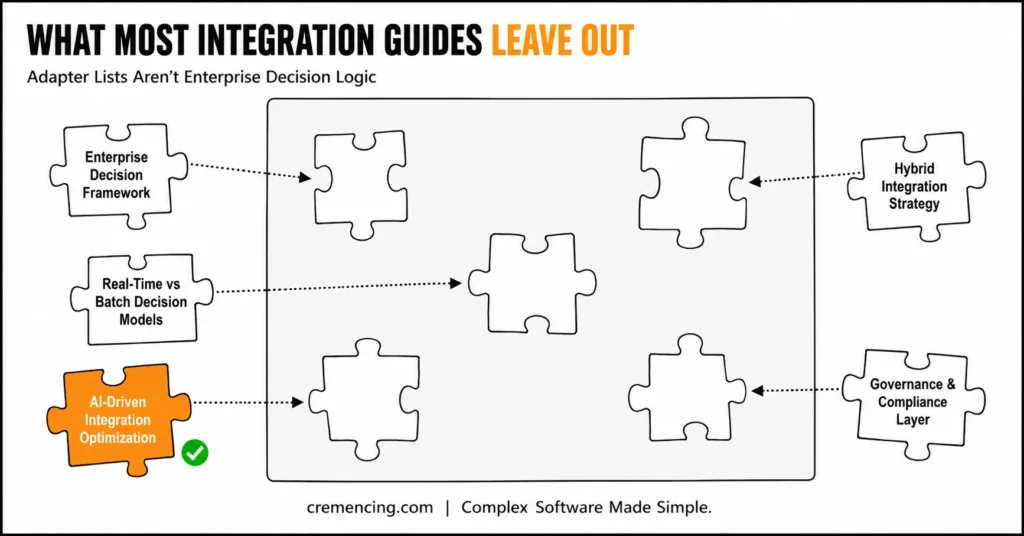
3. Decision Models: Real-time or Batch
When NOT to use real-time integration
Performance impact analysis
4. Governance & Compliance Layer
Data residency rules
Enterprise audit requirements
5. Integration Optimization using AI
Predictive failure detection
Intelligent integration flow routing
That is the difference between enterprise integration theory and practice. Explore more why IDoc still matters despite new adapters
Conclusion
Picking the right SAP Integration Suite adapters from the table above takes five minutes. Building the decision framework behind it — one that accounts for hybrid on-prem/cloud landscapes, knows when real-time integration is the wrong call, and has governance and monitoring built in from day one — is what actually separates a scalable integration architecture from a growing pile of point-to-point connections that someone inherits in three years.
That’s the gap this guide set out to close: not another adapter list, but the enterprise decision logic — hybrid strategy, real-time vs. batch tradeoffs, governance, and where AI-driven monitoring is heading — that most SAP Integration Suite guides skip entirely. Organizations that build integration strategy around that framework, using SAP Integration Suite and SAP BTP together, are the ones still scaling cleanly when the next system lands on their landscape.
FAQ
What is a SAP Integration Suite?
Essentially, it is a platform used to link SAP and non-SAP systems across cloud and hybrid environments. In other words, it acts as a bridge that connects different applications, regardless of where they are hosted.
What are the SAP adapters?
Simply put, adapters are the components that enable communication between different systems and protocols. Therefore, they play a crucial role in ensuring smooth and reliable data exchange across platforms.
Which is the best adapter to S/4HANA?
Generally, the OData adapter or IDoc adapter is used, depending on the specific integration scenario. However, the right choice often depends on factors such as data volume, system compatibility, and real-time requirements.
Is SAP Integration Suite a cloud-based solution?
Yes, indeed, it is deployed on SAP Business Technology Platform (SAP BTP). As a result, organizations benefit from scalability, flexibility, and reduced infrastructure management.
Is SAP Integration Suite able to support real-time integration?
Yes, in fact, it enables real-time integration based on APIs, using HTTP and event-driven patterns. Consequently, businesses can achieve faster data synchronization and more responsive system interactions.
Does SAP Integration Suite require coding knowledge?
Generally, no extensive coding knowledge is required, since it offers pre-built templates and a visual interface for building integrations. However, having basic technical understanding can certainly help when configuring more complex scenarios. Therefore, both technical and non-technical users can work with it effectively.
Can SAP Integration Suite handle integrations with third-party cloud applications?
Yes, in fact, it supports integration with a wide range of third-party cloud and on-premise applications beyond just SAP systems. Additionally, it provides pre-built connectors and adapters to simplify these integrations. As a result, businesses can unify data across their entire application landscape.
How does SAP Integration Suite ensure data security during integration?
Typically, it uses encryption, secure authentication protocols, and role-based access controls to protect data in transit and at rest. Furthermore, it complies with industry security standards to safeguard sensitive business information. Consequently, organizations can integrate systems with confidence, knowing their data remains secure.
What is the difference between SAP Integration Suite and traditional middleware?
Unlike traditional middleware, SAP Integration Suite is cloud-native and specifically optimized for SAP and hybrid landscapes. Moreover, it offers pre-built content and simplified configuration, reducing implementation time significantly. Ultimately, this makes it a more agile and scalable option compared to legacy middleware solutions.
Is SAP Integration Suite suitable for small and medium-sized businesses?
Yes, since it offers flexible, pay-as-you-go pricing models, it can be scaled according to business size and integration needs. Moreover, smaller businesses benefit from faster deployment and reduced dependency on large IT teams. Therefore, it remains a viable option for organizations of varying sizes, not just large enterprises.