

Introduction
SAP Fiori best practices help developers build enterprise applications that are easier to use, faster to navigate, and simpler to maintain. However, even technically functional Fiori apps can create problems when developers overlook navigation, responsive layouts, accessibility, data loading, or unnecessary customization.
A SAP Fiori application can work correctly at the backend level and still frustrate users. Crowded screens slow down routine tasks, excessive data requests make pages feel sluggish, and inconsistent UI patterns make applications harder to understand. These issues become even more important when the application must support different devices, accessibility requirements, and long-term SAP upgrades.
In this guide, we examine nine common SAP Fiori UI mistakes and explain how to fix them. The focus is not simply on making an application look better. Instead, these SAP Fiori best practices focus on creating interfaces that are predictable, responsive, accessible, and easier to maintain in real enterprise environments.
How are you to define SAP Fiori Development Guidelines?
SAP Fiori development guidelines are a set of best practices that provide guidance to ensure that SAP Fiori applications have a consistent user experience and performance.
These guidelines focus on:
- User-centric design
- Consistent UI patterns
- Responsive layouts
- Efficient data handling
Key Principles of Fiori Design
Simplicity: Interface around a single purpose
Consistency: Use standard UI patterns
Responsivity: Since an application will work on a large variety of devices
Performance: Optimize loading and interactions
By adhering to these principles, we can have a better user experience and better adoption.
Deployment Step-by-Step of SAP Fiori Development Guidelines
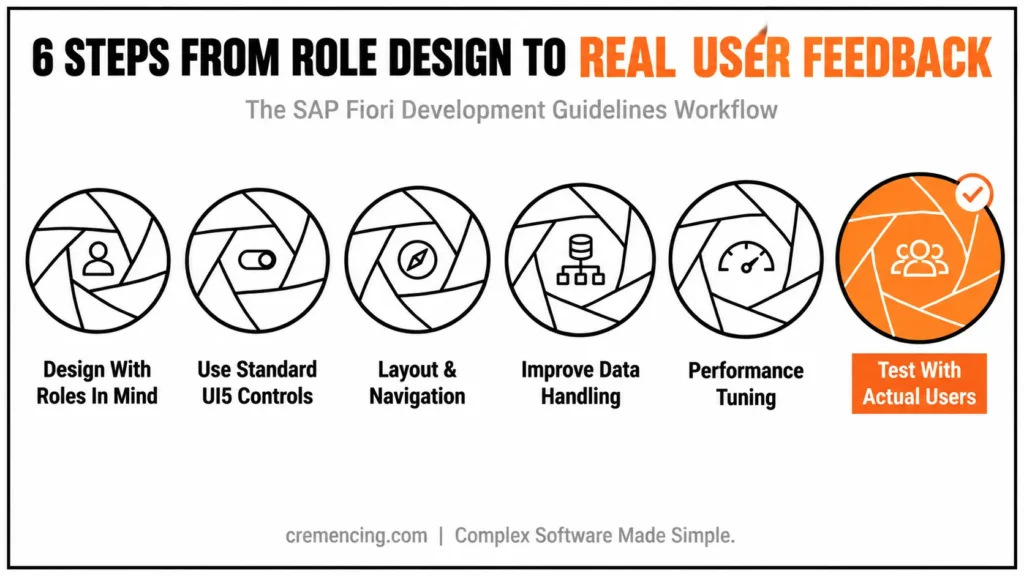
Step 1 – Create With Roles in Mind
Following SAP Fiori best practices from the beginning helps developers avoid UI problems that become more expensive to fix after deployment.
Fiori apps are role-based.
Focus on:
- What the user needs
- What tasks do they perform
- What data do they require
Avoid overloading the interface.
Step 2 – Use Basic UI5 Controls
Choose the Right UI Development Approach
Using standard SAPUI5 controls is only part of the decision. Developers should first determine whether the application can use SAP Fiori elements, the flexible programming model, or whether it genuinely requires freestyle SAPUI5.
SAP Fiori elements provides predefined plans and metadata-driven UI patterns for common application scenarios. The flexible programming model is useful when a standard Fiori elements application needs targeted custom behavior. Freestyle SAPUI5 provides greater control when the business scenario cannot be covered effectively by standard patterns.
Therefore, do not start by building every screen from scratch. First ask:
- Can a standard Fiori elements floorplan cover the workflow?
- Does the application only need a few custom actions or sections?
- Does the use case genuinely require a fully custom UI?
- Can an existing SAPUI5 control handle the requirement before a custom control is introduced?
This approach reduces unnecessary custom code while keeping the application closer to SAP’s supported UX patterns. SAP also warns that custom controls introduce additional responsibilities for accessibility, globalization, performance, maintenance, and documentation.
Steps 3 – Layout & Navigation
Ensure:
- Clear navigation paths
- Minimal clicks to complete tasks
- Logical grouping of elements
Step 4 – SAP Fiori Best Practices for Data Performance
A responsive-looking interface can still feel slow when it requests more backend data than the user actually needs. Therefore, performance tuning should examine the complete data path from the UI binding to the service response.
For OData V4 applications, use $select to request only the properties required by the current UI. Use $expand deliberately when related data is genuinely needed, because combining more data into one request creates a trade-off between fewer round trips and larger payloads. SAP’s SAPUI5 performance guidance specifically highlights this balance.
For example, a list showing customer name, status, and country does not necessarily need every property exposed by the service. Reducing the response to the fields required by the current view can reduce unnecessary payload and processing.
Also check:
- Whether tables load more records than users need initially
- Whether bindings trigger unnecessary requests
- Whether related entities are expanded without a clear UI requirement
- Whether filtering and sorting are handled efficiently by the service
- Whether large controls render more data than the current screen requires
The goal is not simply to use pagination or lazy loading everywhere. Instead, measure the request pattern and choose the data-loading strategy that fits the application’s workflow. Developers should first determine whether the application can use SAP Fiori elements, the flexible programming model, or freestyle SAPUI5.
Step 5—Performance Tuning
Applying SAP Fiori best practices to data loading means looking beyond the screen and examining the requests, payloads, bindings, and backend response.
Reduce:
- Unnecessary API calls
- Large data loads
- Heavy UI rendering
Step 6 — Testing with Actual Users
User feedback reveals real issues.
Conduct:
- Usability testing
- Feedback sessions
- Iterative improvements
Advantages & Returns on Investment
Follow these SAP Fiori development guidelines, and you will certainly reap the benefits.
User Experience Benefits
- Faster task completion
- Improved usability
- Higher user satisfaction
Performance Benefits
- Faster load times
- Reduced system strain
- Improved responsiveness
Business ROI
- Increased user adoption
- Reduced support costs
- Improved productivity
| Development approach | Best fit | Main advantage | Main risk |
|---|---|---|---|
| SAP Fiori elements | Standard transactional and analytical patterns | Consistent UI with less custom code | Less freedom for unusual UX |
| Flexible Programming Model | Standard Fiori app with targeted custom requirements | Combines standard patterns with controlled extensions | Requires careful extension design |
| Freestyle SAPUI5 | Complex or highly specialized UI requirements | Maximum UI and interaction control | More development and maintenance effort |
Following Fiori design and performance practices can reduce unnecessary interaction steps, improve task clarity, and make applications easier to maintain. The measurable business impact should be validated through application-specific usability and performance testing. For OData V4 applications, use $select to request only the properties required by the current UI.
9 SAP Fiori UI Mistakes and Their Solutions
1. Overloading the Interface
Reasoning: A housing UI should not have 1 item, and put any unnecessary clutter anywhere else
2. Ignoring Standard Design Patterns
SAP tip: Use SAP Fiori design best practices
3. Poor Navigation Structure
Solution: Use clear and consistent navigation
4. Slow Performance
Bug fix: Efficient data loading and API calls
5. Lack of Responsiveness
Fix: Test across multiple devices
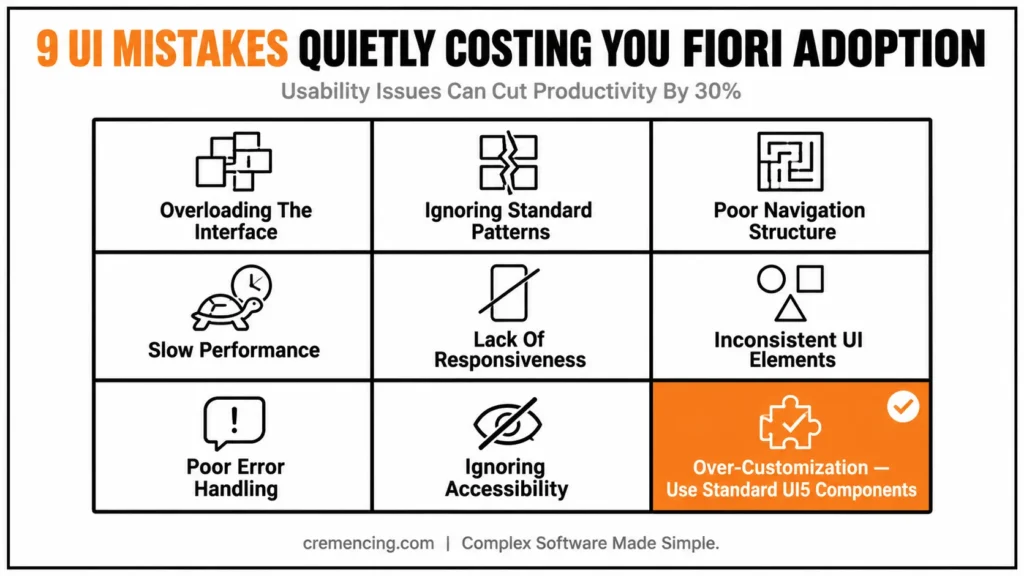
6. Inconsistent UI Elements
Fix: Maintain uniform design
7. Poor Error Handling
Fix: Provide clear error messages
8. Ignoring Accessibility
Fix: Follow accessibility standards
9. SAP Fiori UI Best Practices for Customization
Solution: Use common UI5 Components
Hidden Costs of Poor UI
- Reduced employee productivity
- Increased training time
- Higher support tickets
- Lower system adoption
Real Insight
Over time, UI issues start costing way more than various technical issues.
Example
A business may improve task efficiency by redesigning a crowded screen, removing unnecessary steps, and making navigation more predictable. The actual improvement should be measured using task-completion time, error rates, and user feedback.
- Redesigning UI
- Simplifying workflows
- Improving navigation
The same production mindset applies when a Fiori application depends on backend integrations and downstream services.
Conclusion
SAP Fiori development guidelines are a critical component in building applications that are efficient, responsive, and user-friendly. If UI best practices are neglected, the result is not just a poor user experience but also lower adoption, inconsistent workflows, and increased maintenance costs.
If developers learn to reduce the risks of common UI mistakes, follow proven strategies, and apply the right Fiori design patterns, they can create quality Fiori apps that deliver valuable business solutions. Moreover, choosing the right SAPUI5 controls, optimizing data loading, improving navigation, and designing for accessibility can make applications easier to use and maintain.
At the same time, developers should avoid unnecessary customization when standard Fiori capabilities can meet the business requirements. Before moving a production application, teams should also test responsive behaviour, performance, error handling, keyboard navigation, and realistic data volumes. These checks can identify usability and technical issues before they affect end users.
Ultimately, strong SAP Fiori development is about more than creating an attractive interface. It requires a balance between user experience, application performance, accessibility, maintainability, and business requirements. By applying these SAP Fiori development guidelines throughout the development lifecycle, teams can build applications that provide a more consistent user experience and remain easier to support as business needs evolve.
FAQs
What are SAP Fiori Development Guidelines?
These are the best practices for building user-friendly, more efficient Fiori applications.
What is the importance of UI guidelines to SAP Fiori?
They enhance usability, performance, and user engagement.
How to Avoid Common Fiori UI Errors?
Excessive UI, bad navigation, and lack of responsiveness.
Are SAP Fiori guidelines valid for all the apps?
Yes, they allow for uniformity in all Fiori applications.
Should I use SAP Fiori elements or freestyle SAPUI5?
Use SAP Fiori elements when standard floorplans and metadata-driven patterns fit the business process. Consider freestyle SAPUI5 when the application requires interaction patterns that standard templates cannot adequately support. The flexible programming model provides a middle option for targeted customization.
How can I improve SAP Fiori application performance?
Start by measuring network requests, payload sizes, rendering behavior, and binding activity. For OData V4, request only the properties needed by the UI where appropriate and carefully evaluate $select.
How do I make a SAP Fiori app responsive?
Use responsive or adaptive layouts according to the application’s use case. Test the application across desktop, tablet, and smartphone form factors, including browser zoom and different content lengths.
Are custom SAPUI5 controls recommended?
Use custom controls only when existing SAPUI5 controls cannot satisfy the requirement. Custom controls introduce additional responsibilities for accessibility, globalization, performance, maintenance, and documentation.





5 Responses