

Introduction
Choosing an SAP Cloud Integration pattern is not simply a matter of picking the pattern that sounds most reusable. Instead, the right design starts with the behavior the business process actually requires: an immediate response, asynchronous processing, data transformation, content-based routing, multi-step orchestration, controlled API exposure, or structured exception handling.
This distinction matters for SAP integration developers working across S/4HANA, SAP and non-SAP applications, APIs, and hybrid landscapes. For example, a synchronous request may require a Request Reply step, whereas a process that does not need an immediate response may be better suited to asynchronous communication. Similarly, a message containing different business conditions may require content-based routing, while a payload moving between incompatible structures may require transformation. In addition, processes involving multiple dependent steps may benefit from orchestration, and explicit exception handling can help manage failures more predictably.
SAP Cloud Integration is a capability within SAP Integration Suite, which supports integration across cloud, on-premise, and hybrid environments. Furthermore, SAP Integration Suite includes complementary capabilities such as API Management, Event Mesh, Integration Advisor, and Open Connectors.
What is Cloud Integration?
Cloud integration refers to the linking of different cloud-based and on-premise systems to be joined together for sharing data and hosting cloud apps in a seamless manner.
It ensures:
- Real-time data flow between systems
- Automation of business processes
- Centralized data management
What is SAP Cloud Platform Integration?
SAP Cloud Platform Integration, which is now SAP Integration Suite, provides cloud-based middleware that can:
- Connect SAP and non-SAP systems
- Build, manage, and monitor integrations
- Enable API-based and event-driven communication
You can think of that as the “bridge” between each application in your IT landscape.
SAP Cloud Integration Patterns
| Pattern | Best Fit | Typical Cloud Integration Approach | Main Design Question |
|---|---|---|---|
| Request Reply | Immediate response required | Request Reply + receiver adapter | Does the caller need the response now? |
| Message Transformation | Different source/target structures | Message Mapping/transformation steps | How should the payload be transformed? |
| Content-Based Routing | Different processing paths | Router | Which message field determines the route? |
| Orchestration | Multiple dependent steps | Sequential integration flow/process logic | Which steps depend on earlier results? |
| Asynchronous Messaging | No immediate response required | Asynchronous messaging approach | Can sender and receiver operate independently? |
| Exception Handling | Processing failures | Exception Subprocess | What should happen when processing fails? |
| API-led Integration | Reusable controlled API exposure | Cloud Integration + API Management | How will the API be secured and governed? |
SAP describes cloud integration as supporting message transformation, routing, orchestration, and reliable processing, while API management adds API security, traffic management, and lifecycle governance. For organizations modernizing their SAP application lifecycle management alongside integration, understanding how Cloud ALM fits into the broader SAP landscape can help connect integration operations with delivery processes.
The Mechanics of Cloud Integration
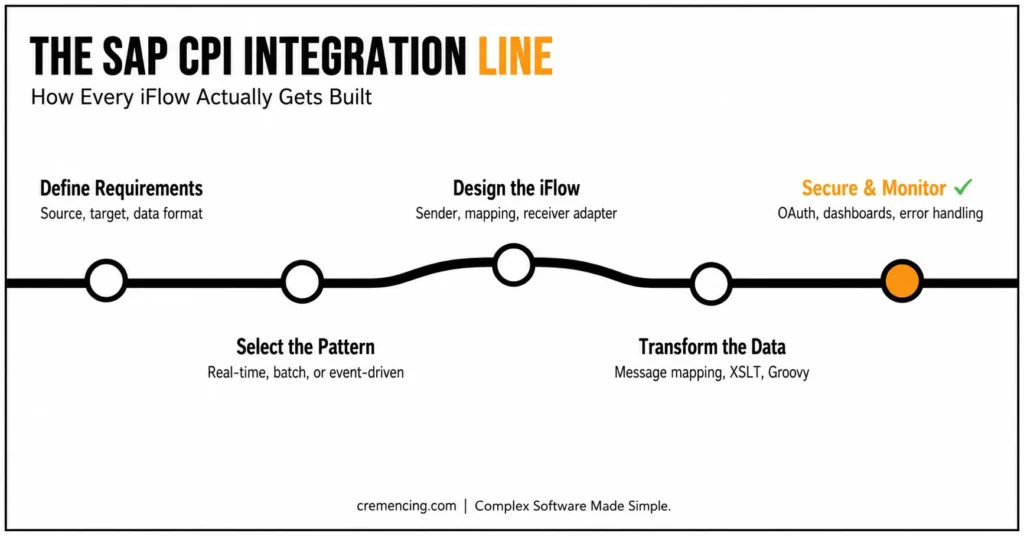
Step 1 – Understand the Integration Requirements
Start by defining:
Source and target systems
Data formats (XML, JSON, IDoc)
Business use case — real-time or batch
Step 2 — Select an Integration Pattern
Choose a pattern according to your use case:
Real-time sync → Request-Reply
Large data → Batch processing
Event triggers → Event-driven
Step 3 – Integrate into your design in SAP CPI
Create an iFlow including:
Sender adapter (API, SFTP, etc.)
Processing steps (mapping, routing)
Receiver adapter
Step 4 – Reference the Data Transformation
Use:
Message Mapping
XSLT or Groovy scripts
Step 5—Add security & monitoring
OAuth / Basic Auth
Message monitoring dashboards
Error handling mechanisms
7 SAP CPI Patterns for Cloud Integration You Use in Real Projects
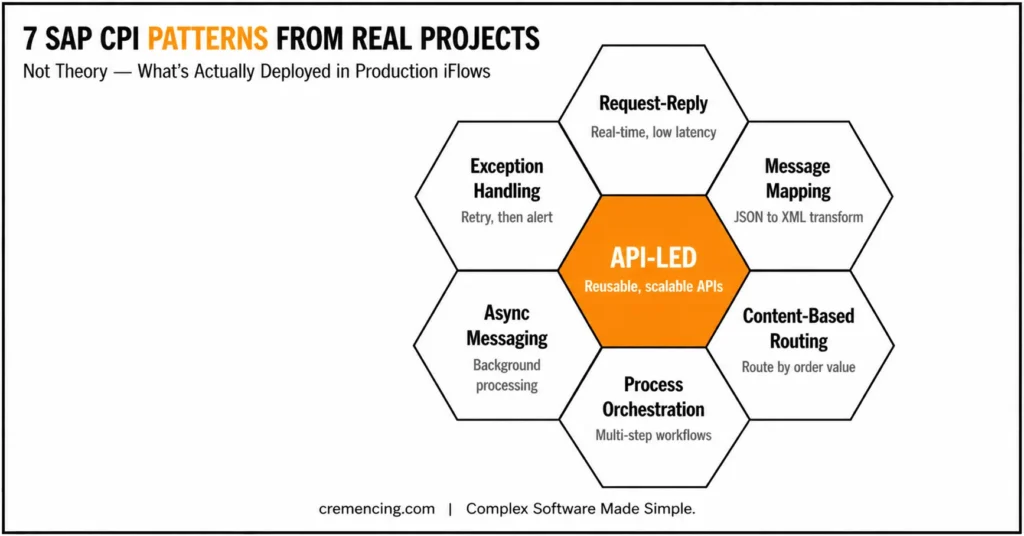
1) Request-Reply Pattern
Case Scenario: Reading data in real time (like customer info)
Example:
Request from Salesforce → SAP S/4HANA response in milliseconds
Strategy Tip:
Best used when having a low latency is very important
2) Message Mapping Pattern
Use case: Transforming data formats
Example:
External API JSON → SAP backend XML
Why it matters:
Systems never speak the same data language.
3) Content-Based Routing
Example: Sending messages to different paths based on conditions
Example:
For orders over $10,000 → Finance system
Standard processing for orders < $10,000
4) Process Integration (Orchestration)
Use case: Multi-step workflows
Example:
Order → Validation → Payment→ Instant Delivery
This pattern orchestrates services one after another.
5) Asynchronous Messaging Pattern
Use case: Background processing
Example:
Large invoice uploads run without blocking users
6) Exception Handling Pattern
Use case: Managing failures
Example:
Message → Failed → Retry → Alert email
Best practice:
Build error paths, not just happy paths.
7) API-Led Integration Pattern
Use case: Reusable APIs
Example:
One API serves multiple applications
Benefits:
Scalability
Reusability
Faster development
If your integration architecture is part of a broader SAP BTP strategy, the choice of Cloud Integration, APIs, events, and other BTP capabilities should be considered together rather than as isolated tools.
Advantages of Cloud Integration & Return On Investment
Having a well-developed cloud integration strategy provides tangible outcomes:
Operational Benefits
Manual data entry cost savings of 40–60%
Real-time visibility across systems
Faster decision-making
Financial ROI
Lower integration maintenance costs
Reduced system downtime
Improved customer experience
Technical Advantages
Scalable architecture
Faster deployment cycles
Improved system reliability
Common Mistakes & How to Avoid Them
Mistakes to Avoid
Overcomplicating integration flows
Ignoring error handling
Choosing the wrong integration pattern
Poor documentation
Best Practices
Keep iFlows simple and modular
Use reusable components
Monitor integrations proactively
Stick with a cloud integration reference zoning
Real Life SAP CPI Performance Improvement Tips
And this is one the majority of blogs fail to cover: performance optimization.
Key Optimization Techniques
Use parallel processing where possible
Minimize message size
Avoid unnecessary mappings
Use streaming for large payloads
Example
For example, a retail company has improved processing time by 35% through:
Switching to asynchronous processing
Optimizing message size
This is the stage that separates successful projects to fail. For S/4HANA projects, integration design should also account for the application’s APIs, deployment model, and the way SAP and non-SAP systems exchange business data.
Conclusion
Cloud integration is not an option anymore- it is the backbone of an integrated digital ecosystem. When you know and use the correct integration patterns, mainly in the SAP CPI space, it allows designing scalable, effective, and robust systems.
Choosing an SAP Cloud Integration pattern should start with the behavior your business process requires, not with the integration feature that happens to be familiar to the development team.
Use Request Reply when the caller needs a synchronous response. Meanwhile, asynchronous messaging is better suited to processes that can continue without waiting. Use transformation when systems exchange different structures, routing when message content determines the path, and orchestration when several dependent steps must work together. Likewise, build explicit exception handling rather than designing only for the successful path. SAP’s current documentation supports exception subprocesses as the mechanism for handling integration exceptions.
More importantly, remember that Cloud Integration is only one capability within SAP Integration Suite. API Management, Event Mesh, Integration Advisor, Open Connectors, and other capabilities address different integration requirements.
FAQ
What is SAP Cloud Integration?
SAP Cloud Integration is a capability within SAP Integration Suite that supports end-to-end process integration across cloud-based and on-premise applications through message exchange.
Is SAP CPI the same as SAP Integration Suite?
Not exactly. SAP Integration Suite is the broader integration platform, while Cloud Integration is one of its capabilities. “CPI” is commonly used as shorthand based on the older SAP Cloud Platform Integration terminology.
What are the main SAP Cloud Integration patterns?
The patterns discussed here are Request Reply, message transformation, content-based routing, orchestration, asynchronous messaging, exception handling, and API-led Integration. However, these should be treated as practical design patterns rather than assuming SAP defines exactly these seven as one official fixed list.
What is content-based routing in SAP Cloud Integration?
Content-based routing sends messages through different processing paths according to conditions evaluated against message content.
What is the difference between synchronous and asynchronous integration?
In synchronous integration, the calling process waits for a response. In asynchronous integration, the sender can continue without waiting for the receiver to complete the processing.
How does SAP Cloud Integration handle exceptions?
Cloud Integration can use an Exception Subprocess to catch and handle processing exceptions. Different end-event options can be used depending on whether the integration should return a custom message, mark processing as failed, or escalate the issue.
Is API Management part of SAP Integration Suite?
Yes. API Management is a separate capability within SAP Integration Suite and complements Cloud Integration by providing API security, traffic management, publishing, monitoring, and lifecycle governance.
Can SAP Cloud Integration connect SAP and non-SAP systems?
Yes. Cloud Integration supports integration across cloud and on-premise landscapes and can connect SAP and non-SAP applications through available adapters and integration mechanisms.
How can I improve SAP Cloud Integration performance?
Start by measuring the actual bottleneck rather than applying generic optimization rules. Review payload size, transformation complexity, unnecessary processing steps, synchronous dependencies, concurrency, and receiver performance. Then, validate changes through representative performance testing.
Can one SAP integration flow use multiple patterns?
Yes. For example, one flow can combine message transformation, content-based routing, synchronous receiver calls, and exception handling. Complex integrations often require several patterns working together rather than one pattern in isolation. SAP’s current Cloud Integration documentation provides examples of combining subprocesses, routing, and exception handling.
Resources
SAP Integration Suite Overview




