

Introduction
Many developers take weeks learning SAP Fiori only to be stuck with slower development, broken setups, and convoluted workflows. Often, the real problem comes down to BAS vs Eclipse — choosing the wrong tool rather than lacking coding ability.
Meanwhile, the incorrect SAP Fiori development tools can be time-consuming, add extra undesired complexity, and make even the simplest of tasks an arduous task. Regardless, It does not matter whether we are novice or veteran; Often, many of us continue to use setups created lovingly by our predecessors without first asking ourselves at any point: How much is it impacting my productivity?
Therefore, This Guide will take you through the details of the real difference between BAS vs Eclipse, which SAP Fiori development environment actually exists in this modern project, and how to avoid mistakes. Ultimately, at the end, you will know exactly which setup to use and how you can optimize your development workflow.
What is SAP Fiori development tools?
Essentially, SAP Fiori development tools are tools and environments you may use to create, test, and deploy SAP Fiori applications — with BAS vs Eclipse being the two most debated options.
Specifically, these tools allow developers to:
First, create UI5-based applications
Second, connect to backend systems through OData
Then, debug and test applications
Finally, deploy apps to SAP systems
Common SAP Fiori Development Tools: BAS vs Eclipse and More
Specifically, BAS is more useful for cloud-based project SAP Business Application Studio (BAS) — a cloud-based development environment
Meanwhile, eclipse IDE: still a classic on-premise development tool
SAP Web IDE (Legacy) – old cloud tool (deprecated)
Understanding the Development Environment: BAS vs Eclipse
Naturally, your SAP Fiori development environment, it will determine:
Speed of development
Ease of setup
Integration capabilities
In the debate of BAS vs Eclipse, Consequently, selecting the correct environment is a crucial aspect of efficiency.
How to Select Between BAS vs Eclipse for Your SAP Fiori Projects?
Step 1 — Get Your Project Requirements
First, Start by identifying:
Project size and complexity
Cloud vs on-premise setup
Integration requirements
Example:
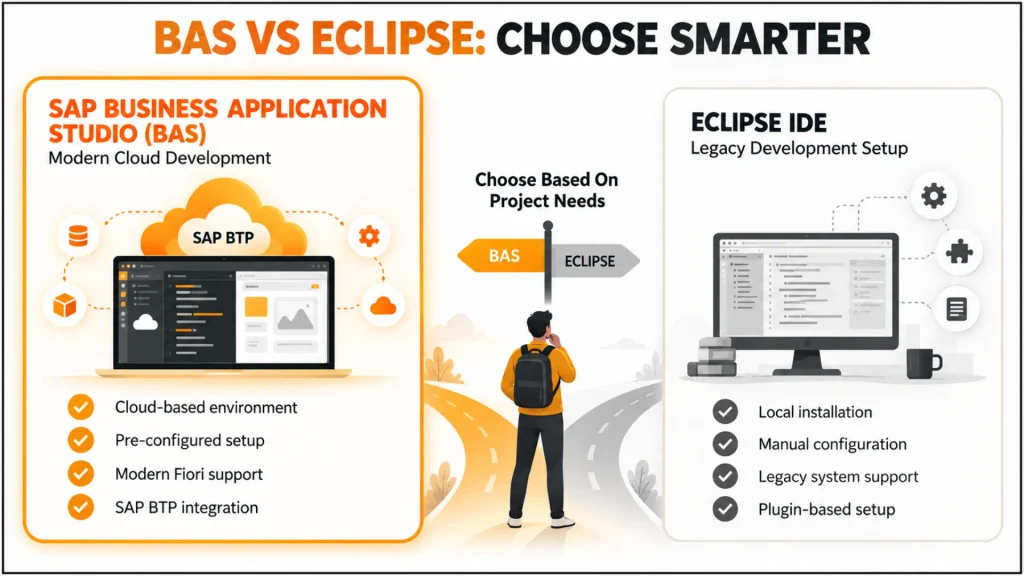
In most BAS vs Eclipse comparisons, BAS proves more useful for cloud-based projects.
Step 2 — BAS vs Eclipse Comparison
SAP Business Application Studio (BAS)
Cloud-based
Pre-configured environment
Integrated Fiori tools
Overall, it’s easy to scale
Eclipse IDE
In contrast, local installation required
Moreover, complex setup
Limited modern UI5 support
Better for legacy systems
Key Insight
Naturally, bas is for new SAP designs; SAP Fiori development eclipse setups are mainly used for legacy systems.
| Feature | BAS | Eclipse |
|---|---|---|
| Deployment Type | Cloud-based | Local installation |
| Setup Time | Minimal (pre-configured) | High (manual configuration) |
| UI5/Fiori Support | Full modern support | Limited |
| Best Suited For | New cloud projects | Legacy on-premise systems |
| Scalability | Easy to scale | Harder to scale |
| Integration with SAP BTP | Native | Requires plugins |
Step 3 – Properly Set Up BAS (Winning the BAS vs Eclipse Setup Game)
To begin, optimise BAS by:
Create a Fiori dev space
Enable required extensions
Connect to backend systems
As a result, Consequently, This ensures smooth development, further reinforcing BAS’s edge in the BAS vs Eclipse debate.
Step 4 – Avoid Setup Mistakes
OftenEnsure proper integr developers:
Use incorrect configurations
Ignore tool updates
Mix old and new tools
This leads to performance issues, which is a common pitfall when developers overlook thisdistinction.
Step 5 — Optimize Your Workflows
Next, Improve efficiency by:
Using templates
Automating tasks
Leveraging built-in debugging tools
Step 6– Integrate with SAP systems
Additionally, ensure proper integration with:
OData services
Backend SAP systems
APIs
Ultimately, this makes your apps functional.
Step 7: Leverage SAP Fiori Development Portal the Right Way
Moreover, the SAP Fiori development portal is the helper for you:
Manage apps
Deploy applications
Monitor performance
Overall, using it correctly improves productivity.
Pros & ROI: BAS vs Eclipse Impact on Productivity
Choosing correctly between these will improve productivity and results directly.
Productivity Benefits
Faster development cycles
Reduced setup time
Easier debugging
Performance Benefits
Better app performance
Fewer errors
Improved scalability
Business ROI
Reduced development costs
Faster project delivery
Higher developer efficiency
In fact, using optimised tools, developers can be 30–40% more productive.”
Common Mistakes & Best Practices in the BAS vs Eclipse Debate
Common Mistakes
Using Eclipse for modern projects
Ignoring BAS capabilities
Poor environment setup
Not updating tools
Mixing multiple environments unnecessarily
Best Conventions
Use BAS for new projects
Keep tools updated
Standardize your development environment
Follow SAP recommended practices
Continuously optimize workflows
Why BAS vs Eclipse Tool Choice Matters for Developer Growth
Many blogs compare BAS vs Eclipse, but the long-game review of how tool choice affects growth is missing
Key Insight
Ultimately, your tools determine the speed at which you learn and develop
What Most Developers Miss
Notably, modern tools improve learning speed
Better tools reduce frustration
Efficient environments build confidence
Real Example
How Switching Sides in this Debate Increased One Developer’s Productivity By 40%:
Switching from Eclipse to BAS
Using built-in tools
Simplifying workflow
Conclusion: BAS vs Eclipse — The Final Verdict
Overall, this makes the BAS vs Eclipse decision clear. When comparing BAS vs Eclipse, most SAP developers assume both tools offer the same value, but that is far from true. Selecting the appropriate SAP Fiori development tools is a more than just a technical decision but also affects your productivity, learning curve, and success in the projects.
This makes it apparent that BAS is the modern option while Eclipse is more suitable for legacy systems. Ultimately, Ultimately, Knowing the differences and optimizing your setup will prevent some basic errors, which in turn help you exponentially improve your development flow.
FAQ
What is SAP Fiori Development Tools? (BAS vs Eclipse Basics)
Simply put, they are aids for constructing and maintaining SAP Fiori Applications.
BAS vs Eclipse — Which Tool is Better
Generally, BAS is better for modern development, while eclipse used for legacy systems.
How to find the SAP Fiori development environment?
Simply put, it is the environment used to develop, test and deploy Fiori apps.
What is SAP Fiori Development Portal?
Essentially, it is used for managing and deploying Fiori apps.
Can beginners use BAS easily?
Generally, BAS is a product that a modern dev would use.
Is BAS free to use?
Typically, BAS typically requires an SAP BTP subaccount, which may involve licensing costs depending on your setup.
Does Eclipse still get SAP updates?
Yes, but updates for modern Fiori and UI5 features are slower compared to BAS.
Can I migrate projects from Eclipse to BAS?
Generally, Yes most ABAP and Fiori projects can be migrated, though some manual reconfiguration is often needed.
Is internet connectivity required for BAS?
Yes, since BAS is cloud-based, a stable internet connection is required to access your dev space.
Which tool is better for team collaboration?
Overall, BAS generally offers easier collaboration since dev spaces can be shared and accessed remotely.
Do I need to install anything to use BAS?
Actually, no BAS runs entirely in the browser, unlike Eclipse which requires local installation.





One Response