

Your ECC report finishes in 40 seconds. After moving to SAP S/4HANA 2025, it takes five minutes.
You open ST05 and find one query reading 2.4 million rows, a SELECT SINGLE running 68,000 times, and a SELECT * returning 170 columns when the program uses only six. The problem is not SAP HANA; it is uncontrolled row count, excessive execution frequency, poor field projection, and unnecessary memory consumption.
By the end of this guide, you’ll know how to correct ABAP SELECT performance and prove the improvement with trace evidence instead of assuming the database will fix inefficient code.
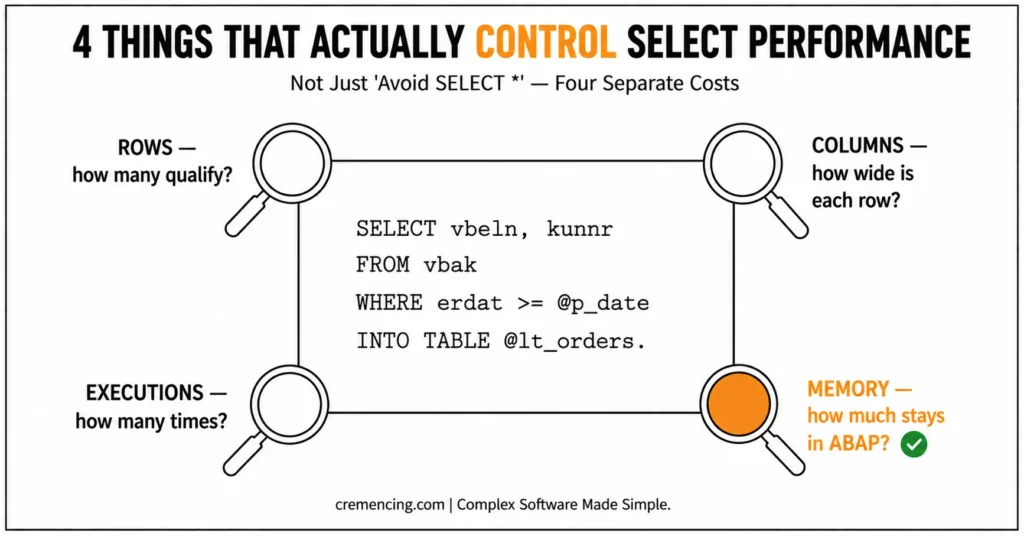
Good ABAP SELECT performance depends on four controls: the number of rows selected, the number of columns transferred, the number of times the statement executes, and the amount of data retained in ABAP memory. Replacing SELECT * with a short field list can reduce row width, conversion work, transfer volume, and memory consumption.
It will not fix a query that still returns millions of rows or executes once for every loop iteration. Measure the original program with ST05 and SAT, correct the highest proven cost, and compare the same business result afterwards.
SELECT Performance Comparison
| Area | Costly approach | Better approach |
| Field selection | Retrieve every column with SELECT * | Select only fields required by the operation |
| Row selection | Read broadly and filter in ABAP | Use selective database-side conditions |
| Repeated access | Run SELECT SINGLE inside a loop | Prefetch data with a join or set-based query |
| One-row selection | Use SELECT SINGLE for every scenario | Choose based on key and ordering semantics |
| Large datasets | Load the complete result into memory | Aggregate, restrict, or process in packages |
| Diagnosis | Change code after reading it | Capture ST05 and SAT evidence first |
| S/4HANA assumption | Expect HANA to correct broad SQL | Control projection, cardinality, and calls |
| Direct-table access | Continue ECC data access unchanged | Check supported S/4HANA data models |
| Verification | Compare elapsed time once | Compare calls, rows, time, memory, and output |
| Result structures | Select into a large application structure | Define a narrow purpose-specific type |
ABAP SELECT Performance Mistakes
Mistake 1: Treating SELECT as the only problem
SELECT * retrieves every database field exposed by the source. If the table contains 150 columns and the program displays five, the database interface still transfers and maps the unused columns.
However, column count is only one dimension of ABAP SELECT performance. A five-column query returning four million rows may cost more than a complete-row query returning one record by primary key.
Always separate these questions:
- How many rows qualify?
- How wide is each result row?
- How many times does the statement execute?
- How much of the result remains in ABAP memory?
Mistake 2: Replacing the asterisk but keeping a weak filter
The following code avoids SELECT *, but it can still retrieve an unreasonable number of records:
TYPES:
BEGIN OF ty_sales_order,
vbeln TYPE vbak-vbeln,
kunnr TYPE vbak-kunnr,
erdat TYPE vbak-erdat,
END OF ty_sales_order.
DATA lt_sales_orders TYPE STANDARD TABLE OF ty_sales_order.
” Costly: the condition may still return several years of data
SELECT vbeln,
kunnr,
erdat
FROM vbak
WHERE auart = ‘OR’
INTO TABLE @lt_sales_orders.
The projection is narrow, but the predicate may remain unselective. The database still has to identify, construct, and transfer every qualifying row.
Use a business-relevant date, organization, status, or key restriction. Do not invent a filter only to improve runtime; the condition must remain functionally correct.
Mistake 3: Reading broad data and filtering in ABAP
This pattern sends unnecessary data to the application server:
DATA lt_orders TYPE STANDARD TABLE OF vbak.
” Costly: broad database result
SELECT *
FROM vbak
INTO TABLE @lt_orders.
” Too late: rejected rows have already been transferred
DELETE lt_orders WHERE erdat < p_date.
Move valid conditions into the SQL statement:
TYPES:
BEGIN OF ty_order_result,
vbeln TYPE vbak-vbeln,
kunnr TYPE vbak-kunnr,
erdat TYPE vbak-erdat,
netwr TYPE vbak-netwr,
waerk TYPE vbak-waerk,
END OF ty_order_result.
DATA lt_orders TYPE STANDARD TABLE OF ty_order_result.
” Better: control rows and columns at the database
SELECT vbeln,
kunnr,
erdat,
netwr,
waerk
FROM vbak
WHERE erdat >= @p_date
INTO TABLE @lt_orders.
A dedicated type also documents the exact data contract used by the report.
Mistake 4: Executing SELECT SINGLE * inside a loop
One primary-key lookup may be cheap. Executing the same lookup tens of thousands of times creates an N+1 access pattern.
TYPES:
BEGIN OF ty_item,
matnr TYPE vbap-matnr,
maktx TYPE makt-maktx,
END OF ty_item.
DATA:
lt_items TYPE STANDARD TABLE OF ty_item,
ls_item TYPE ty_item.
LOOP AT lt_items INTO ls_item.
” Costly: one SQL execution for each loop pass
SELECT SINGLE *
FROM makt
WHERE matnr = @ls_item-matnr
AND spras = @sy-langu
INTO @DATA(ls_text).
ls_item-maktx = ls_text-maktx.
MODIFY lt_items FROM ls_item.
ENDLOOP.
The issue combines repeated database calls, full-row retrieval, duplicate material lookups, and no reuse of earlier results. ST05, which records SQL executions and their source positions, will usually show the same statement repeated with different material numbers.
Many of these SELECT mistakes come down to choosing the wrong access pattern in the first place — see our breakdown of FOR ALL ENTRIES vs. Inner Join for how that decision compounds the problem.
Mistake 5: Assuming one-row output means low database cost
SELECT SINGLE returns at most one row, but the database may still examine many records before locating that row. A condition that does not use a selective key or suitable access path can remain expensive.
| Decision factor | INNER JOIN | FOR ALL ENTRIES |
|---|---|---|
| Data source | Database sources | Database table + ABAP internal table |
| Best starting point | Clear DB relationship | Driver data already exists in ABAP |
| Database filtering | Performed through SQL join | Driven by internal-table values |
| Empty driver risk | No equivalent FAE issue | Must check IS NOT INITIAL |
| Duplicate driver values | Not applicable in the same way | Review and reduce unnecessary duplicates |
| Buffered tables | Join can bypass buffering | Can be advantageous for buffered-table scenarios |
| Performance decision | Validate with ST05 | Validate with ST05 |
| Universal winner? | No | No |
The syntax does not guarantee the following:
- Primary-key access.
- Index access.
- Deterministic row choice.
- Low execution count.
- Low total runtime.
For ABAP SELECT SINGLE performance, inspect the predicate, key coverage, access path, and call frequency.
Mistake 6: Using SELECT SINGLE when the row must be ordered
Use SELECT SINGLE when a complete key identifies the record or when any matching row is acceptable. It does not express “latest,” “oldest,” or “highest.”
When the business rule requires a specific row, use ordered one-row selection:
DATA:
lv_vbeln TYPE vbak-vbeln,
lv_erdat TYPE vbak-erdat.
” Correct when the latest order is required
SELECT vbeln,
erdat
FROM vbak
WHERE kunnr = @p_kunnr
ORDER BY erdat DESCENDING,
vbeln DESCENDING
INTO (@lv_vbeln, @lv_erdat)
UP TO 1 ROWS.
ENDSELECT.
The choice between SELECT SINGLE and UP TO 1 ROWS is mainly semantic. Replacing one with the other does not automatically improve performance.
Mistake 7: Believing HANA makes broad selection harmless
SAP HANA can execute many database operations efficiently, but it cannot remove the cost of returning unused columns to ABAP. It also cannot eliminate the network and runtime cost of 60,000 repeated queries.
Broad Open SQL can still create:
- Large database intermediate results.
- Excessive transferred data.
- High application-server memory use.
- Expensive structure mapping.
- Repeated round trips.
- Large CDS join results.
SAP ABAP SELECT performance still requires deliberate projection and filtering in S/4HANA. Read more common SELECT mistakes that hurt performance.
Mistake 8: Loading every row into one internal table
An efficient SQL statement can still exhaust ABAP memory when it returns ten million rows. The program may fail during result materialization, sorting, copying, or later aggregation.
Before loading the data, ask whether the consumer needs every record. Database-side SUM, COUNT, grouping, stronger filters, or package processing may reduce the memory requirement.
Mistake 9: Recommending an index from the source code alone
A secondary index can help with frequent and selective access, but it also adds storage and maintenance cost to writes. The same index may provide no benefit when the data distribution is weak or the optimizer already uses a suitable path.
Use the ST05 execution plan, production data distribution, execution frequency, and existing indexes before proposing a database change.
Mistake 10: Changing field projection without regression testing
Removing fields can break later logic even when the program compiles. A downstream calculation may depend on a currency, unit, status, key, or authorization-related field that is no longer populated.
A faster SELECT that changes totals or document selection is a defect. Performance and correctness must be verified together.
Faster and Safer SELECT Code
1. Establish a measurable baseline
Run the same program, user, variant, date range, and data volume before changing the code. Record:
- Total runtime.
- Database time.
- ABAP processing time.
- SQL execution count.
- Rows selected and transferred.
- Memory consumption.
- Final record count and totals.
Transaction ST05 analyzes SQL activity. Transaction SAT measures ABAP runtime, call hierarchy, and memory-related processing.
Use both when the source of the delay is unclear.
2. Select only the required columns
A field list reduces row width and makes the program’s data requirements explicit:
TYPES:
BEGIN OF ty_material,
matnr TYPE mara-matnr,
mtart TYPE mara-mtart,
matkl TYPE mara-matkl,
meins TYPE mara-meins,
END OF ty_material.
DATA lt_materials TYPE STANDARD TABLE OF ty_material.
” Better: only fields used by the application are transferred
SELECT matnr,
mtart,
matkl,
meins
FROM mara
WHERE matnr IN @s_matnr
INTO TABLE @lt_materials.
Do not remove required key, currency, unit, or relationship fields solely to make the list shorter.
SELECT * can be acceptable when the program genuinely needs the complete row and the result set is tightly controlled. Intentional projection is the goal—not a ritual ban.
3. Replace repeated reads with set-based access
When related data comes from database tables, a join can often replace repeated SELECT SINGLE calls:
TYPES:
BEGIN OF ty_item_text,
vbeln TYPE vbap-vbeln,
posnr TYPE vbap-posnr,
matnr TYPE vbap-matnr,
maktx TYPE makt-maktx,
END OF ty_item_text.
DATA lt_item_texts TYPE STANDARD TABLE OF ty_item_text.
” Better: one set-based request instead of one text read per item
SELECT item~vbeln,
item~posnr,
item~matnr,
text~maktx
FROM vbap AS item
LEFT OUTER JOIN makt AS text
ON text~matnr = item~matnr
AND text~spras = @sy-langu
WHERE item~vbeln IN @s_vbeln
INTO TABLE @lt_item_texts.
This reduces database execution count and lets the optimizer plan one relationship. Confirm that join cardinality does not multiply records unexpectedly.
[INTERNAL LINK: JOIN and FOR ALL ENTRIES guide → Choosing Set-Based Access in ABAP]
4. Cache driver-based lookups when a join is not suitable
If the driver values already exist in ABAP memory, prefetch required records and store them in an indexed internal table:
TYPES:
BEGIN OF ty_material_text,
matnr TYPE makt-matnr,
maktx TYPE makt-maktx,
END OF ty_material_text.
DATA lt_material_texts TYPE HASHED TABLE OF ty_material_text
WITH UNIQUE KEY matnr.
IF lt_items IS NOT INITIAL.
” Prefetch each required material text before the processing loop
SELECT matnr,
maktx
FROM makt
FOR ALL ENTRIES IN @lt_items
WHERE matnr = @lt_items-matnr
AND spras = @sy-langu
INTO TABLE @lt_material_texts.
ENDIF.
LOOP AT lt_items ASSIGNING FIELD-SYMBOL(<ls_item>).
” Exact full-key lookup reuses the prefetched result
READ TABLE lt_material_texts
WITH TABLE KEY matnr = <ls_item>-matnr
ASSIGNING FIELD-SYMBOL(<ls_text>).
IF sy-subrc = 0.
<ls_item>-maktx = <ls_text>-maktx.
ENDIF.
ENDLOOP.
Guard FOR ALL ENTRIES against an empty driver and remove duplicate keys when the input can contain repeated materials.
5. Process large results in controlled packages
When the business process genuinely requires a large result, process smaller packages instead of retaining every row:
TYPES:
BEGIN OF ty_plant_material,
matnr TYPE marc-matnr,
werks TYPE marc-werks,
dispo TYPE marc-dispo,
END OF ty_plant_material.
DATA lt_package TYPE STANDARD TABLE OF ty_plant_material.
” Each SELECT loop pass returns a controlled package
SELECT matnr,
werks,
dispo
FROM marc
WHERE werks IN @s_werks
INTO TABLE @lt_package
PACKAGE SIZE 5000.
” Process and persist one package before reading the next
PERFORM process_package USING lt_package.
CLEAR lt_package. ” Release references before the next package
ENDSELECT.
Avoid opening additional database cursors carelessly inside the package loop. Package processing controls memory; it does not correct an unnecessarily broad business selection.
6. Use SELECT SINGLE according to business semantics
For a full-key lookup, SELECT SINGLE communicates intent clearly:
DATA:
lv_mtart TYPE mara-mtart,
lv_matkl TYPE mara-matkl.
” Full primary-key lookup for one material
SELECT SINGLE mtart,
matkl
FROM mara
WHERE matnr = @p_matnr
INTO (@lv_mtart, @lv_matkl).
For an existence check, retrieve only a small field or literal supported by your release. Do not retrieve the complete row when the application only needs to know whether it exists.
For an ordered result, use UP TO 1 ROWS with an explicit ORDER BY.
7. Read the correct ST05 values
Do not stop after finding the slowest average statement. Inspect:
- Execution count: exposes repeated access.
- Total duration: shows business impact.
- Average duration: identifies individually expensive calls.
- Records: shows selectivity and transfer volume.
- Identical statements: exposes N+1 patterns.
- Parameters: confirms the actual key values.
- Source location: connects SQL to ABAP code.
- Buffer information: shows whether access used or bypassed buffering.
A statement taking one millisecond may appear harmless until the summary shows 80,000 executions.
8. Reassess direct-table access in S/4HANA
A syntactically correct ECC SELECT may access an outdated or changed application model after conversion. Check whether SAP provides a released interface view, API, or application service.
For example:
” S/4HANA 1909+ required: use a released interface view where applicable
SELECT FROM I_SalesOrder
FIELDS SalesOrder,
SoldToParty,
CreationDate,
TotalNetAmount,
TransactionCurrency
WHERE CreationDate IN @s_date
INTO TABLE @DATA(lt_sales_orders).
A released model can provide a more stable contract, but it is not automatically faster. Analyze generated SQL, filter propagation, associations, and result cardinality.
9. Verify the corrected business result
Compare more than elapsed time. Confirm:
- Record count.
- Document keys.
- Currency and unit handling.
- Totals and subtotals.
- Duplicate behavior.
- Authorization results.
- Empty and boundary cases.
- Background and dialog variants.
Then compare the new ST05 and SAT measurements with the baseline.
[INTERNAL LINK: ST05 trace interpretation → Reading SQL Execution Counts, Rows, and Runtime]
ECC to S/4HANA SELECT Migration Checklist
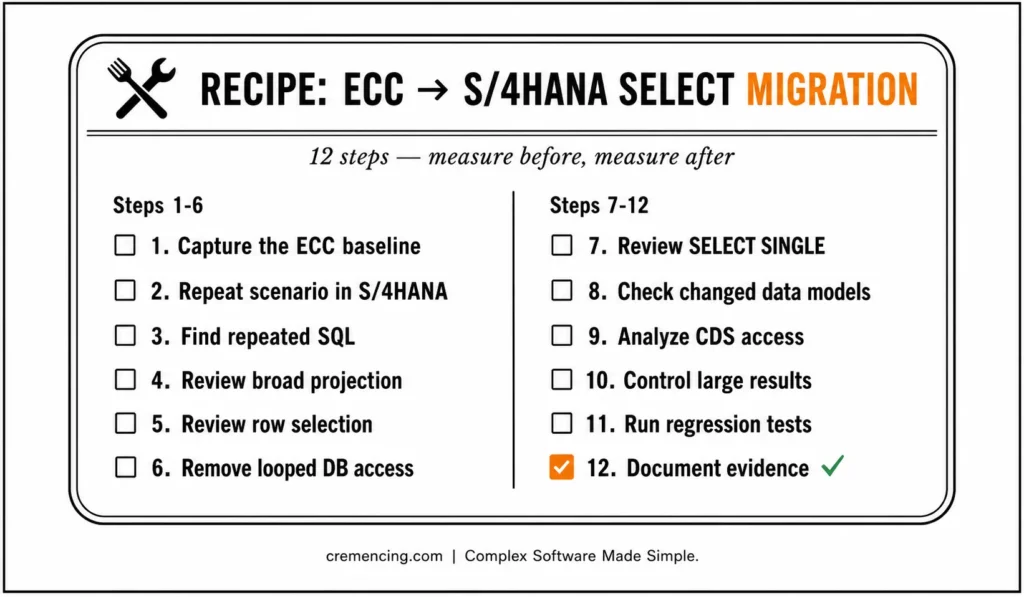
- Capture the ECC baseline. Record runtime, SQL executions, transferred rows, memory, and output totals.
- Repeat the same scenario in S/4HANA. Use comparable data, user roles, and variants.
- Find repeated SQL. Summarize identical statements in ST05.
- Review broad projection. Replace unnecessary SELECT * statements with intentional field lists.
- Review row selection. Move valid restrictions into the database.
- Remove looped database access. Test joins, guarded FOR ALL ENTRIES, or prefetched lookups.
- Review SELECT SINGLE. Confirm key coverage, ordering requirements, and call frequency.
- Check changed data models. Identify compatibility views or obsolete direct-table logic.
- Analyze CDS access. Check filter propagation, join cardinality, and intermediate result size.
- Control large results. Use aggregation, stronger selection, or package processing.
- Run regression tests. Verify totals, currencies, units, keys, and duplicates.
- Document evidence. Record the original and final runtime, calls, rows, and memory.
Conclusion
Strong ABAP SELECT performance does not come from banning one piece of syntax. SELECT * can waste transfer and memory, but a weak WHERE clause, repeated SELECT SINGLE, poor access path, or oversized result set may create a much larger cost. Treat rows, columns, execution count, and retained memory as separate parts of the same performance problem.
Start every optimization with a repeatable baseline and the correct diagnostic tool. Use ST05 to identify repeated statements, execution totals, parameters, and transferred records; use SAT when ABAP processing or memory may be responsible. Once the dominant cost is clear, apply the smallest technically correct change—narrow the field list, strengthen the selection, remove looped access, process data in packages, or move suitable operations into a set-based design.
Finally, verify both performance and business correctness. Compare runtime, database calls, selected rows, memory use, totals, currencies, units, duplicates, and authorisation behaviour. That process produces defensible SAP ABAP SELECT performance improvements across ECC and S/4HANA and prevents the common mistake of declaring code faster merely because its syntax looks newer.
Frequently Asked Questions
1. Does SELECT * always affect ABAP performance?
SELECT * can increase transfer, conversion, copying, and memory costs when the program uses only a few fields. The size of the impact depends on row count, table width, field types, repeated execution, and database behaviour, so ABAP performance decisions should follow trace evidence rather than syntax alone.
2. Is SELECT SINGLE faster than UP TO 1 ROWS?
Neither form is universally faster on modern databases. For ABAP SELECT SINGLE performance, use SELECT SINGLE when a full key identifies the row or any matching row is acceptable; use UP TO 1 ROWS with ORDER BY when the business rule requires a defined first row.
3. Does SAP HANA automatically improve a poorly written SELECT?
No. HANA may reduce database processing time, but it cannot remove unnecessary transfer, repeated round trips, broad result sets, or application-server memory use. Good SAP ABAP SELECT performance still requires selective predicates, controlled projection, suitable execution frequency, and measured verification.
4. Why is a SELECT SINGLE without key fields slow?
A non-key predicate may force the database to inspect many records before returning one row. For ABAP SELECT SINGLE performance, inspect key coverage, available indexes, predicate selectivity, execution plan, and call count instead of changing the statement mechanically.
5. Is SELECT * bad for performance in ABAP?
It is wasteful when the program needs only a small subset of fields, especially on wide tables or large result sets. The best ABAP SELECT performance rule is to select the columns required by the business operation while also controlling row count and execution frequency.
References
Source: ABAP Performance and Tuning — https://help.sap.com/docs/SUPPORT_CONTENT/abap/3353523595.html
Source: Optimizing Access to Queries — https://help.sap.com/docs/ABAP_PLATFORM_NEW/40d2cb3a4f9249d58e9bbc95f4dbaff8/4e56dbc52bd54f48e10000000a42189e.html
Source: Difference Between SELECT SINGLE and UP TO 1 ROWS — https://help.sap.com/docs/SUPPORT_CONTENT/home/3361892517.html
Source: Tuning and Optimizing ABAP Developments — https://help.sap.com/docs/SUPPORT_CONTENT/abap/3353524097.html
Source: Summarizing SQL Trace Lists — https://help.sap.com/docs/ABAP_PLATFORM_NEW/ba879a6e2ea04d9bb94c7ccd7cdac446/680666413284001de10000000a155106.html




