

Most ABAP performance interview questions sound simple until the interviewer asks what you would measure before changing the code. A report that ran in 38 seconds on ECC can behave very differently after an S/4HANA migration, not because HANA makes ABAP irrelevant, but because inefficient database access, repeated SQL executions, internal table processing, and poorly designed CDS models can still dominate rmodeling.untime.
Strong ABAP performance interview questions do not reward memorized rules. Start with a reproducible baseline, determine whether the cost sits in SQL, ABAP processing, memory, or repeated calls, and then choose the smallest code change that fixes the measured bottleneck. A JOIN is not automatically faster than FOR ALL ENTRIES. A hashed table is not automatically better than a sorted table, and SAP HANA does not protect inefficient code from excessive round trips or oversized intermediate results.
Performance Comparison
| Interview area | Costly or incomplete answer | Stronger answer |
| Starting an investigation | “I review the source code.” | Reproduce the issue and capture a baseline before changing code. |
| ST05 versus SAT | “Both are performance tools.” | Use ST05 for SQL evidence and SAT for ABAP runtime and memory. |
| performance interview questions | performance interview questions | performance interview questions |
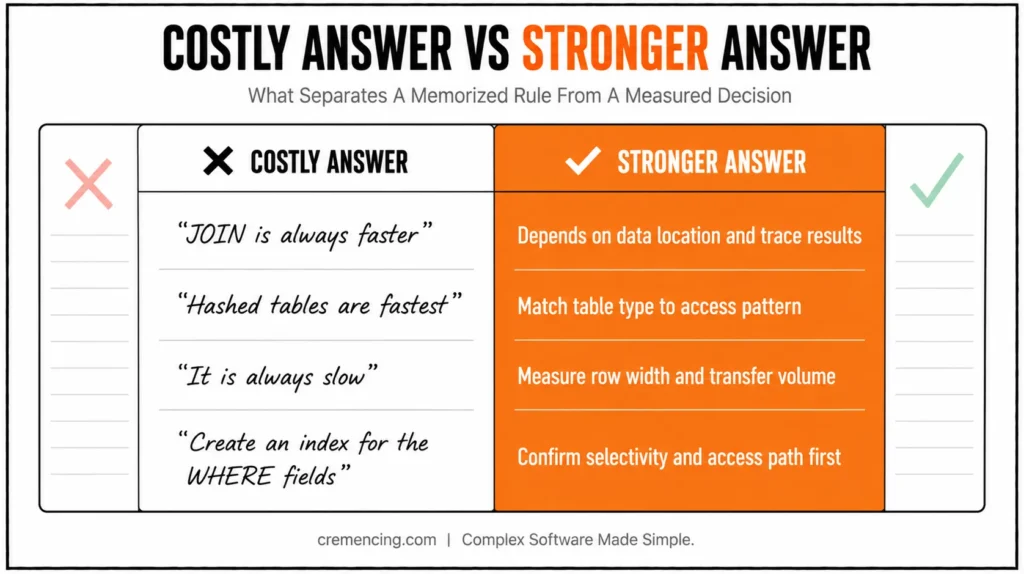
| SELECT * | “It is always slow.” | Select required columns and measure data transfer, row width, and access path. |
| JOIN versus FOR ALL ENTRIES | “JOIN is always faster.” | Choose according to data location, semantics, buffering, driver size, and trace results. |
| Internal-table type | “Hashed tables are fastest.” | Match standard, sorted, hashed, or secondary-key access to the actual read pattern. |
| Secondary indexes | “Create an index for the WHERE fields.” | Confirm selectivity, current access path, write cost, and system-wide impact first. |
| Code pushdown | “Move everything to CDS or AMDP.” | Push suitable set operations while controlling filters, cardinality, and intermediate results. |
| ATC | “A clean ATC run proves performance.” | Combine static findings with productive runtime data from SQL Monitor. |
| Optimization result | “The code is cleaner now.” | Show before-and-after runtime, calls, transferred rows, memory, and regression results. |
Why the Old Approach Costs More
The first 12 ABAP performance interview questions expose answers that sound reasonable but can create expensive production defects.
1. How do you begin investigating a slow ABAP program?
A costly answer starts by rewriting suspicious code. A strong investigation first records the program, transaction, user, variant, data volume, execution mode, system load, and baseline runtime.
Reproduce the same case before and after the change. Without a stable baseline, you cannot prove that the code change caused the improvement.
2. What is the difference between ST05 and SAT?
Transaction ST05 records SQL activity, including statement executions, duration, transferred rows, parameters, and source-code positions. Use it when database access or repeated SQL appears responsible for the delay.
Transaction SAT performs ABAP runtime analysis. Use it to identify expensive methods, function modules, loops, internal-table operations, memory consumption, and call hierarchy.
3. When should you use SQL Monitor instead of ST05?
Use SQL Monitor when you need productive SQL usage across a longer period rather than one controlled test. It can reveal statements that execute frequently under real business variants that your development test did not reproduce.
Use ST05 for detailed analysis of one user or execution. Use SQL Monitor data with ATC or transaction SWLT to prioritize static findings that affect productive code.
4. Which ST05 evidence exposes an N+1 query?
Look for the same SQL statement repeated many times with changing key values. The average duration may look small, but the execution count and total duration reveal the cost.
Also inspect transferred rows and the ABAP source location. A one-millisecond statement executed 50,000 times still consumes about 50 seconds before network, parsing, and application processing costs.
5. How do you create a reliable performance baseline?
Run the same user, variant, data range, and system conditions several times. Record total response time, database time, ABAP time, memory, SQL executions, selected rows, and the result count.
Separate cold-cache and warmed-cache runs where that difference matters. The business output must remain identical after optimization.
6. Why is SELECT inside a loop expensive?
It can create one database round trip for every loop pass. The total cost includes repeated statement execution, communication, authorization handling, and data transfer.
The following pattern creates an N+1 query when many sales orders reference customers:
TYPES:
BEGIN OF ty_order,
vbeln TYPE vbak-vbeln,
kunnr TYPE vbak-kunnr,
name1 TYPE kna1-name1,
END OF ty_order.
DATA:
lt_orders TYPE STANDARD TABLE OF ty_order,
ls_order TYPE ty_order.
SELECT vbeln,
kunnr
FROM vbak
WHERE erdat IN @s_erdat
INTO CORRESPONDING FIELDS OF TABLE @lt_orders.
LOOP AT lt_orders INTO ls_order.
” Costly: one database call for every order
SELECT SINGLE name1
FROM kna1
WHERE kunnr = @ls_order-kunnr
INTO @ls_order-name1.
MODIFY lt_orders FROM ls_order.
ENDLOOP.
Do not reject every database operation inside a loop without evidence. A tiny, buffered lookup executed twice may not justify a more complex redesign, but a trace with thousands of repeated calls clearly does.
7. Is SELECT * always a performance problem?
No. The actual cost depends on row width, number of selected rows, network transfer, table design, and whether every column is required.
It becomes costly when a wide table returns large volumes, and the program uses only a few fields. Select explicit columns to reduce transferred data and make the business requirement visible in the source.
8. How do unselective predicates affect database performance?
An unselective predicate matches a large percentage of the table, so an index may provide little advantage over another access path. Conditions that omit leading index fields can also prevent efficient index use. Check the actual execution plan and data distribution. A field that looks selective in development may contain a very different distribution in production.
One of the most common culprits is choosing the wrong data access pattern see our full breakdown of FOR ALL ENTRIES vs. Inner Join and which one is actually killing your report performance.
9. Should you use SELECT SINGLE or UP TO 1 ROWS?
Choose according to semantics, not a performance slogan. Use SELECT SINGLE when the full key identifies one row or when any matching row is acceptable.
Use UP TO 1 ROWS with ORDER BY when the business rule requires the first row according to a defined sequence. Neither statement fixes the cost of executing one read thousands of times inside a loop.
10. When should you propose a secondary database index?
Propose one only after the trace and execution plan show an expensive, frequent, selective access that existing indexes do not support. Review data distribution, update frequency, storage, and all programs that write to the table.
An index can speed reads while making inserts, updates, and deletes more expensive. Coordinate the decision with Basis and database specialists.
11. Which is faster: a JOIN or FOR ALL ENTRIES?
An inner join is usually the first design to test when both datasets originate in database tables and the relationship can be expressed in one SQL statement. It allows the database optimizer to choose an access plan and avoids transferring the first result set to ABAP.
FOR ALL ENTRIES solves a different problem when the driver values already exist in ABAP memory. The correct answer to ABAP FOR ALL ENTRIES vs JOIN depends on semantics, driver size, buffering, selectivity, duplicate handling, and measured SQL behavior.
12. What happens when the FOR ALL ENTRIES driver table is empty?
The driver condition is ignored, which can cause the database statement to retrieve every row matching the remaining conditions. On a large transactional table, that mistake can create long runtimes and severe memory pressure.
Always check that the driver table is not initial:
DATA lt_customer_keys TYPE SORTED TABLE OF kna1-kunnr
WITH UNIQUE KEY table_line.
” Driver keys are collected before the database read
lt_customer_keys = VALUE #(
( ‘0000100001’ )
( ‘0000100002’ )
).
IF lt_customer_keys IS NOT INITIAL.
SELECT kunnr,
name1
FROM kna1
FOR ALL ENTRIES IN @lt_customer_keys
WHERE kunnr = @lt_customer_keys-table_line
INTO TABLE @DATA(lt_customers).
ENDIF.
A unique sorted driver table also prevents unnecessary duplicate keys from entering the statement.
From Guesswork to Trace-Driven Answers
These 13 ABAP performance interview questions test whether you can replace blanket rules with measured decisions and production-safe code.
13. Why should duplicate FOR ALL ENTRIES keys be removed?
Duplicate driver keys add unnecessary comparison values and can increase the work needed to split or process the resulting SQL conditions. The result set also follows duplicate-elimination behavior, which can hide differences between source rows.
Use a sorted table with a unique key or sort and delete adjacent duplicates before executing the statement. Then verify that the selected columns preserve the required business uniqueness.
14. Why can a large driver table make FOR ALL ENTRIES expensive?
The database interface may split a large driver set into multiple statements or blocks. That increases SQL executions, transferred literals, parsing work, and result-merging effort.
Use ST05 to see how many statements were generated. For very large sets, test a join, subquery, CDS model, common table expression on supported releases, or another set-based design.
15. When is FOR ALL ENTRIES still the correct design?
Use it when the filtering values already exist in ABAP memory and cannot be represented naturally as a database table or subquery. It can also be relevant when accessing a buffered table where a join would bypass the buffer.
Guard against an empty driver, remove duplicate keys, keep the driver reasonably sized, and measure the generated SQL.
16. How do you choose between standard, sorted, and hashed tables?
A standard table works best for append-heavy processing and sequential reads. Ordered processing, range access, and logarithmic key lookup call for a sorted table instead. For frequent exact lookups using the complete unique key, a hashed table is the right choice, though hash maintenance consumes memory and insertion effort, so it isn’t automatically the best option for small or sequential datasets.
17. How do you remove an expensive nested loop?
Build an indexed internal table for the lookup side, then replace the inner scan with a keyed read. The correct key must match the fields used in the relationship.
TYPES:
BEGIN OF ty_customer,
kunnr TYPE kna1-kunnr,
name1 TYPE kna1-name1,
END OF ty_customer.
DATA:
lt_customer_hash TYPE HASHED TABLE OF ty_customer
WITH UNIQUE KEY kunnr,
ls_customer TYPE ty_customer.
” Load lookup data once before processing the orders
SELECT kunnr,
name1
FROM kna1
FOR ALL ENTRIES IN @lt_orders
WHERE kunnr = @lt_orders-kunnr
INTO TABLE @lt_customer_hash.
LOOP AT lt_orders ASSIGNING FIELD-SYMBOL(<ls_order>).
” Constant-time full-key lookup for each order
READ TABLE lt_customer_hash
WITH TABLE KEY kunnr = <ls_order>-kunnr
INTO ls_customer.
IF sy-subrc = 0.
<ls_order>-name1 = ls_customer-name1.
ENDIF.
ENDLOOP.
The example still requires an initial check for lt_orders before the FOR ALL ENTRIES statement.
18. When do secondary internal-table keys help?
They help when one table supports several repeated access patterns. A secondary sorted or hashed key can avoid building duplicate helper tables and reduce repeated linear scans.
Secondary keys consume memory and add maintenance cost when rows are inserted, changed, or deleted. Use them only when repeated reads justify that cost.
19. How to process millions of rows without running out of memory?
Use database-level filtering to select only the required data columns and process data in packages instead of loading the entire result into one internal table. Dispose of each package after processing.
Check if the requirement really requires handling row-by-row with ABAP. Aggregation, grouping,, and filtering can be placed in Open SQL or in CDS or in another operation performed on the database.
20. Is there any need for ABAP performance tuning after putting SAP HANA into place?
While No. HANA lowers the expense on many analytical and set-based operations, it can’t compensate for 70,000 database round trips, unnecessary data movement, poor filters, or bloated intermediate results from a CDS.
SAP ABAP performance tuning will still be required in S/4HANA environments. The emphasis moves from basic SQL access to coding pushdown, join cardinality, and filter propagation in CDS modelling.
| Symptom | First evidence to inspect | Typical direction |
|---|---|---|
| Thousands of repeated SQL calls | ST05 / SQL Monitor | Set-based access, JOIN, guarded FAE or prefetched data |
| High ABAP runtime | SAT | Loops, methods, internal tables, conversions |
| Large SQL result set | ST05 / execution analysis | Filters, selected columns, access path |
| High productive SQL frequency | SQL Monitor | Prioritize frequently executed statements |
| Static performance finding | ATC + runtime data | Validate whether it matters in production |
| Slow CDS model | SQL analysis + execution plan | Filters, joins, cardinality, intermediate results |
| S/4HANA migration regression | ECC/S/4 baseline comparison | Data model, SQL plan, custom code, CDS behavior |
| High memory consumption | SAT / runtime analysis | Internal-table size, result volume, package processing |
ECC to S/4HANA Performance Migration Checklist
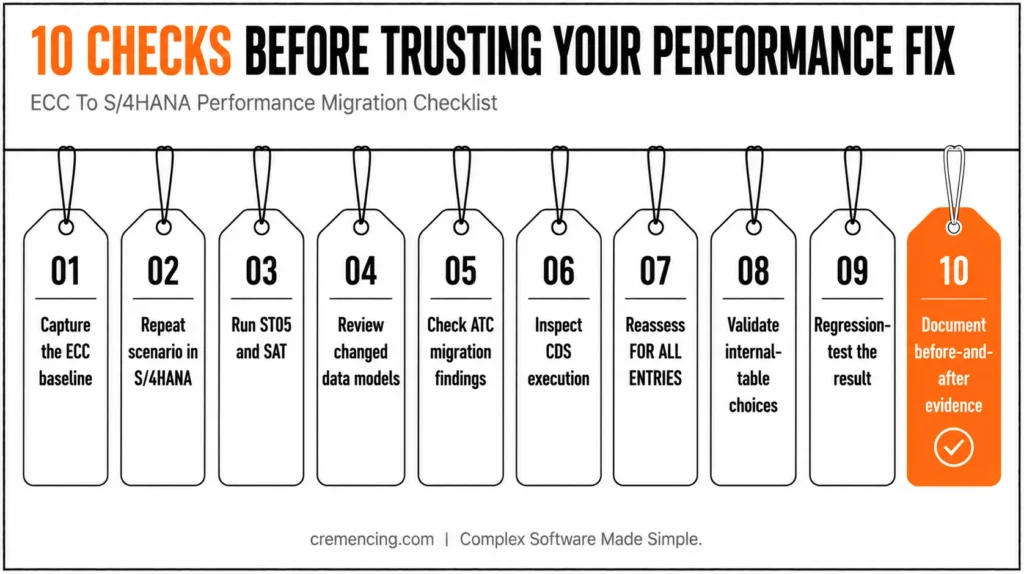
Use this checklist before claiming that an ECC performance fix remains correct in SAP S/4HANA:
- Capture the ECC baseline. Record runtime, database time, SQL calls, selected rows, memory, and business output.
- Repeat the same scenario in S/4HANA. Keep user, variant, data range, and execution mode comparable.
- Run ST05 and SAT. Identify whether the new cost sits in SQL, ABAP processing, or repeated framework calls.
- Review changed data models. Check whether direct table access now resolves through compatibility views or outdated application structures.
- Check ATC migration findings. Prioritize findings that affect frequently executed productive objects.
- Inspect CDS execution. Verify filter propagation, join cardinality, row multiplication, and unused associations.
- Reassess FOR ALL ENTRIES. Compare it with a join or supported S/4HANA model using actual trace data.
- Validate internal-table choices. Data volumes may have changed enough to make an old standard-table design expensive.
- Regression-test the result. Confirm totals, authorization behavior, currencies, units, duplicates, and document counts.
- Document before- and after evidence. State the measured improvement and remaining limits.
Conclusion
The strongest ABAP performance interview questions are designed to test how you investigate a problem, not how many optimization rules you can repeat. A capable ABAP developer begins with a reproducible baseline, identifies whether the delay comes from database access, ABAP processing, memory consumption, or repeated executions, and then selects the appropriate tool, such as ST05, SAT, SQL Monitor, or ATC.
Don’t say “always” or “never,” as in “A join is always faster,” “Hashed tables are always best,” or “SAP HANA will fix inefficient code. The choice of the right solution will be based on the volume of the data, how it is accessed, the design of the tables, the behavior of the database, the release context, and the business requirement. A SELECT with a loop, an unguarded FOR ALL ENTRIES, an inappropriate key field in an internal table, or an overlayered CDS model can all be expensive, but only at runtime can it be determined which one should be fixed first.
Explain in an interview the initial symptom, the method used to measure it, the technical cause of the symptom, the chosen correction, and the successful outcome. A good answer concludes with tangible results, like fewer SQL executions, less memory consumption, faster runtimes, and no change in business results. That’s the way one can demonstrate real ABAP performance-tuning experience, not just coding conventions.
Frequently Asked Questions
1. Which performs better: a join or FOR ALL ENTRIES?
A join is usually the first option when both datasets originate in the database, but neither technique wins every case. For ABAP performance optimization, compare data location, buffering, driver size, duplicate behaviour, selectivity, generated SQL calls, and ST05 results before choosing.
2. What precautions should you take with FOR ALL entries?
Check that the driver table is not initial, remove duplicate keys, select fields that preserve result uniqueness, and measure large drivers. Good ABAP performance tuning interview questions also expect you to explain the full-read risk and why the database interface may split large drivers into several statements.
3. When should you use standard, sorted, or hashed internal tables?
Use standard tables for sequential access, sorted tables for ordered or range access, and hashed tables for repeated exact full-key lookups. In SAP ABAP performance tuning interview questions, mention insertion cost, memory, partial-key requirements, and secondary keys instead of saying that hashed tables are always fastest.
4. How do you avoid a database selection inside a loop?
Load the required data before the loop using a join, guarded FOR ALL ENTRIES, or another set-based query, then perform keyed internal-table reads. For ABAP performance tuning, verify the change with ST05 and compare execution count, total SQL time, and transferred rows.
5. What is performance tuning in SAP ABAP?
ABAP performance tuning is the measured process of locating and reducing unnecessary database, application-server, memory, and communication costs while preserving the business result. Strong ABAP performance interview questions and answers include a baseline, analysis tool, code change, measured improvement, and regression evidence.
6. Which is better: FOR ALL ENTRIES or a join?
Start with a join when related data comes from database sources and can be combined correctly in one statement. Use FOR ALL ENTRIES when the driver values already exist in ABAP memory. The ABAP FOR ALL ENTRIES vs JOIN decision must follow semantics and trace evidence.
7. What should you check when ABAP becomes slower after an S/4HANA migration?
Start with comparable ECC and S/4HANA baselines. Then compare SQL execution, data volume, execution plans, custom-code findings, CDS behavior, filters, joins and internal-table processing. Do not assume that the migration or HANA itself is the cause without trace evidence.
8. What makes an ABAP performance interview answer strong?
A strong answer connects five things: the original symptom, the measurement method, the technical bottleneck, the correction and the measured result. Saying that code was “optimized” is weaker than demonstrating fewer SQL executions, lower runtime, lower memory consumption or reduced data transfer without changing the business result.




