

If an ABAP report slows down after a data-volume increase, the first question should not be “Is FOR ALL ENTRIES faster than INNER JOIN?” It should be “Where is the database work actually happening, and what data is driving it?”
That distinction matters to ABAP developers working on both ECC and S/4HANA systems. INNER JOIN and FOR ALL ENTRIES can solve similar data-retrieval requirements, but they start from different inputs: a JOIN relates database sources, while FAE uses values already held in an ABAP internal table.
SAP’s own performance guidance generally recommends trying JOINs first, while recognizing that FOR ALL ENTRIES can be appropriate when the required driver data already exists in an internal table.
So there is no safe rule that says one construct always wins. The real performance decision depends on data volume, selectivity, join relationships, driver-table contents, database access paths, and the actual SQL generated at runtime.
This guide breaks down that decision using ABAP examples, the failure modes that can turn FAE into a performance problem, and the ST05/SAT checks you should run before declaring either approach faster.
FOR ALL ENTRIES vs. INNER JOIN: Which Is Faster?
Selecting between FOR ALL ENTRIES (FAE) and INNER JOIN in Open SQL determines whether set operations are processed natively by the database host or managed via application server orchestration. SAP documentation specifies that an INNER JOIN pushes relational operations directly to the database engine, allowing the query optimizer to evaluate join paths and return target data in a single round trip.
Conversely, FAE acts as an application-side processing mechanism: the ABAP engine partitions the driving internal table into dynamic block queries and implicitly forces duplicate row elimination akin to a DISTINCT operation. While FAE is required when processing buffered tables or combining pre-transformed internal data, it INNER JOIN remains the standard performance choice for database-bound relational queries. Crucially, it FAE carries operational risk, as passing an empty driving internal table bypasses the join restriction and triggers an unintended full database table scan.
Why This Happens in SAP ABAP Systems
The confusion around SAP ABAP inner join vs. FOR ALL ENTRIES exists because ABAP hides SQL translation details.
INNER JOIN execution
When you use INNER JOIN:
- SAP sends one SQL statement
- The database optimiser decides the join order
- Indexes are used automatically
- The result is returned as a single dataset
This is pure database execution.
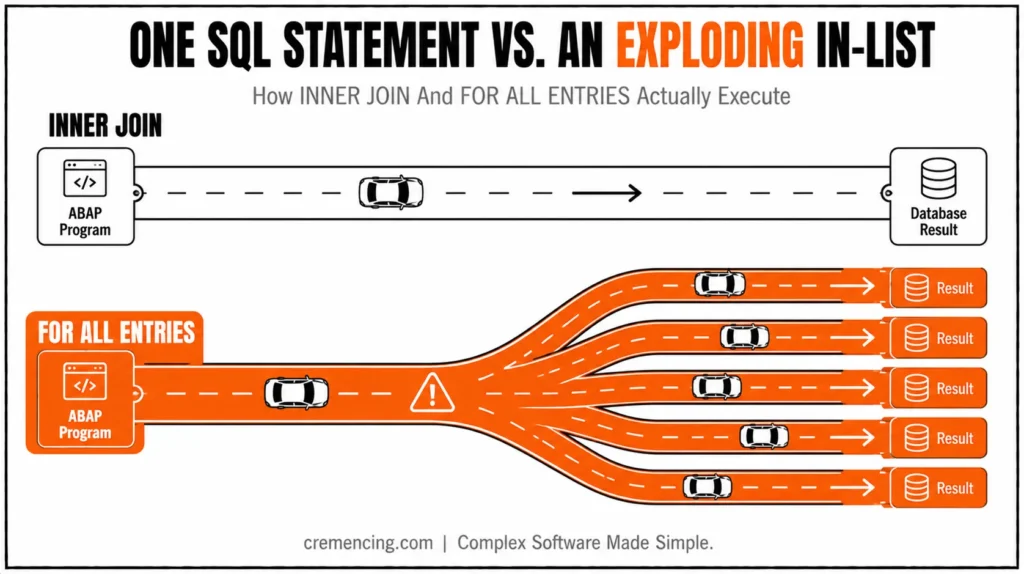
FOR ALL ENTRIES: execution
FAE is not a real SQL join. SAP internally:
- Reads the driver’s internal table
- Extracts key values
- Builds a dynamic WHERE condition
- Sends SQL as:
- IN list (best case), OR
- Multiple OR conditions (worst case)
Moreover, SAP Help explicitly notes that JOIN is generally preferred because FAE behavior depends on the system and can degrade into multiple SQL executions.
The real problem competitors never explain
Most blogs stop at:
“JOIN is database-level, FAE is internal table-based.”
But the real issue is deeper:
- FAE can explode into large IN-lists
- Duplicate keys multiply SQL size
- Some systems convert FAE into OR chains
- Execution plan changes based on dataset size
That is why two identical programs behave differently in production.
INNER JOIN vs. FAE
| Situation | Start with | Why | Validate with |
|---|---|---|---|
| Two DB tables have a clear relationship | INNER JOIN | Lets the database evaluate the relationship and predicates together | ST05 + execution plan |
| Driver values already exist in an ABAP internal table | FOR ALL ENTRIES | Avoids rebuilding a database relationship when the driver set came from prior ABAP logic | ST05 |
| FAE driver table can be empty | FAE + IS NOT INITIAL guard | Prevents the WHERE condition from being ignored | Code review + ATC |
| Driver table contains many repeated keys | Reduce to relevant/distinct keys | Can reduce unnecessary driver values | ST05 before/after |
| Simple reusable S/4HANA data model | Consider CDS | Useful when semantic reuse/service/analytical modeling is required | ATC + SQL/runtime analysis |
| Performance difference is unclear | Do not guess | Database behaviour is workload and system dependent | ST05 + SAT |
| JOIN produces unexpected row multiplication | Review join cardinality | One-to-many relationships can increase result volume | ST05 + result-count validation |
When the driver data is already in an internal table, the next performance question is how efficiently that table is searched, sorted, or deduplicated.
Step-by-Step Fix (Decision Logic + Code)
To properly solve the difference between JOIN and FOR ALL ENTRIES in ABAP, you don’t memorize rules; you follow execution logic.
Step 1—Use INNER JOIN when both sources are DB tables
Use JOIN when:
- No intermediate ABAP processing is needed
- Both datasets exist in database tables
DATA: lt_result TYPE TABLE OF vbap.
SELECT v~vbeln,
v~posnr,
b~erdat
INTO TABLE @lt_result
FROM vbap AS v
INNER JOIN vbak AS b
ON v~vbeln = b~vbeln
WHERE b~auart = ‘OR’.
Why this is better:
- Single SQL execution
- No ABAP memory transfer for filtering
- Database optimizer handles join strategy
Step 2 — Use FOR ALL ENTRIES only when required
DATA: lt_vbak TYPE TABLE OF vbak,
lt_vbap TYPE TABLE OF vbap.
SELECT * FROM vbak INTO TABLE @lt_vbak.
IF lt_vbak IS NOT INITIAL.
SELECT vbeln, posnr
INTO TABLE @lt_vbap
FROM vbap
FOR ALL ENTRIES IN @lt_vbak
WHERE vbeln = @lt_vbak-vbeln.
ENDIF.
Why it works:
- Uses internal ABAP dataset as filter
- Converts values into SQL IN-condition
Step 3 — Clean the driver table (critical fix)
SORT lt_vbak BY vbeln.
DELETE ADJACENT DUPLICATES FROM lt_vbak COMPARING vbeln.
Why this matters:
- Reduces IN-list size
- Prevents SQL explosion
- Improves DB parsing time
Step 4 — S/4HANA rule (modern systems)
In S/4HANA:
- Prefer CDS views over both patterns
- Push joins to database layer
- Avoid ABAP-side joins for large reporting
This is the modern evolution of ABAP for all-entries vs inner-join design thinking. For the specific coding patterns that trigger these questions in the first place, see our breakdown of ABAP performance interview questions that expose costly coding mistakes.
How to Verify Using ST05 and SAT
Most tutorials stop after writing code. That is where real debugging starts.
ST05 (SQL Trace)
Check:
- Number of SQL statements executed
- Whether FAE became IN-list or OR chain
- Database time per query
SAP confirms ST05 is the primary tool for SQL trace-based optimization
SAT (Runtime Analysis)
Check:
- ABAP processing time vs DB time
- Loop overhead after data fetch
- Internal table processing cost
Debug validation checklist
- Internal table size before FAE
- Duplicate key count
- Join cardinality behavior
Without this step, you are guessing performance.
Mistakes That Break Performance Again
1. Using FOR ALL ENTRIES without empty check
Leads to full table scans.
2. Not removing duplicates
Creates massive IN-lists.
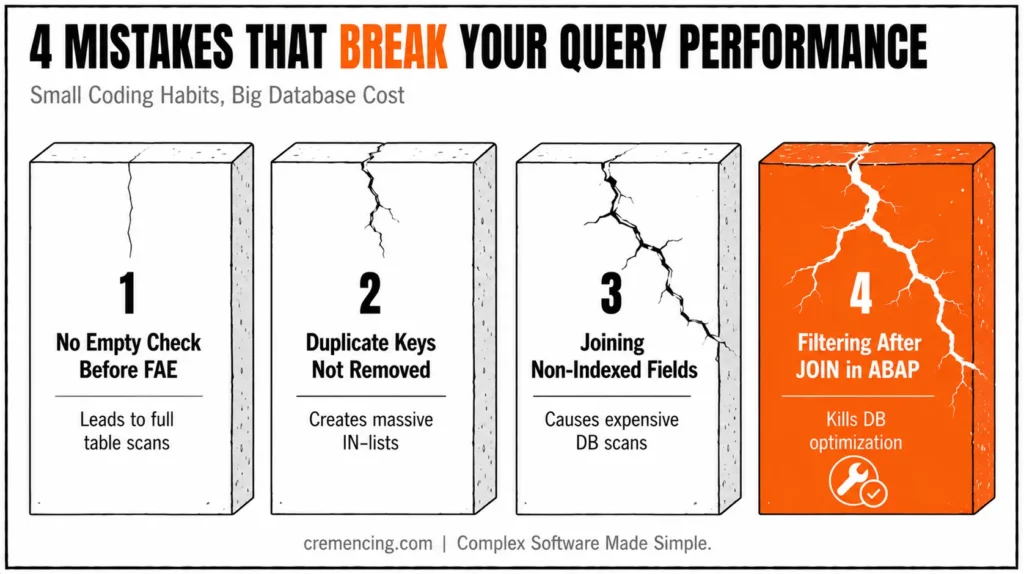
3. Joining non-indexed fields
Causes expensive DB scans.
4. Filtering after JOIN in ABAP
Kills DB optimization benefits.
Performance issues are not always visible immediately, moreover developers often need strong ABAP debugging techniques to identify slow queries and hidden bottlenecks.
Conclusion
The real meaning of “ABAP FOR ALL ENTRIES vs. INNER JOIN” is not simply a syntax comparison. Instead, it is an execution architecture decision that directly affects database load, response time, and scalability in both ECC and S/4HANA systems.
With an INNER JOIN, the database evaluates the relationship between the tables. However, this does not guarantee a fixed execution plan or predictable runtime. Instead, actual performance depends on factors such as query predicates, join cardinality, available access paths, database statistics, the database platform, and the overall workload.
FOR ALL ENTRIES. Performance can vary significantly depending on the dataset size, the amount of duplication, and the system configuration because the resulting database access depends on the contents of the internal table at runtime. For example, the statement may be converted into an IN-list query in some cases, while in other situations, it may expand into multiple OR conditions. As a result, parsing and execution can become more expensive. This distinction is not merely a theoretical one in actual production systems. With SAP HANA, developers can improve application speed through SAP HANA performance optimization approaches like moving data-intensive operations closer to the database.
In real production systems, this difference is not theoretical. It shows up as sudden slowdowns, expensive SQL traces in ST05, and unexpected database load during peak business hours. That is why relying on “rules like JOIN is faster” without understanding execution behaviour often leads to incorrect design decisions.
Frequently Asked Questions
1. What is difference between JOIN and FOR ALL ENTRIES in ABAP?
INNER JOIN executes at database level, while FOR ALL ENTRIES uses ABAP internal tables to generate dynamic SQL conditions.
2. Which is faster: INNER JOIN or FOR ALL ENTRIES?
INNER JOIN is usually faster because it uses a single optimized database execution plan.
3. When should I use FOR ALL ENTRIES?
Only when you already have an internal table that cannot be converted into a JOIN.
4. What is SAP ABAP INNER JOIN vs FOR ALL ENTRIES?
JOIN merges tables in database, FAE merges ABAP-driven filter conditions into SQL.
5. Can FOR ALL ENTRIES cause performance issues?
Yes, due to IN-list explosion or OR-chain generation depending on system behavior.
6. Can FOR ALL ENTRIES be replaced with JOIN?
Yes, if both datasets exist in database without intermediate ABAP processing.
7. What is best alternative in S/4HANA?
CDS views with associations or HANA pushdown logic.




