

SAP teams often reach a point where the standard Joule experience cannot handle a company-specific business process. The gap becomes clear when users need AI assistance that understands custom workflows, business rules, or data spread across SAP and non-SAP systems. SAP Joule Studio addresses this requirement by providing an environment for creating and managing custom AI agents, applications, workflows, and Joule Skills.
sits within the broader SAP Business AI and SAP Build ecosystem, allowing developers and business teams to connect AI capabilities with enterprise processes. This guide explains what SAP Joule Studio does, how its architecture works, where Joule Skills and AI agents fit, and what organizations should consider before implementing it.
What Is SAP Joule Studio?
SAP Joule Studio is an SAP development environment designed to help organizations create, extend, deploy, and manage AI-driven experiences for business processes. SAP announced the newer Joule Studio offering at SAP Sapphire in May 2026 as a fully managed environment for developing the lifecycle of AI agents, applications, and workflows. SAP positions it within the SAP Business AI Platform, with a focus on grounding AI behaviour in enterprise data, processes, and business semantics.
For an SAP customer, the important point is that Joule Studio is not simply another chatbot configuration tool. Its purpose is to connect AI reasoning and interaction with actual business processes. Depending on the use case, an agent can work with SAP applications, APIs, documents, external services, and other agents to perform or coordinate multiple steps.
This distinction matters because conventional automation usually follows predefined logic. An AI agent can instead interpret a business request, determine which capabilities it needs, invoke appropriate tools, and coordinate a process based on the available context. SAP describes the newer Joule Studio agent builder as supporting agents that can plan, reason, interact with documents, invoke APIs, and work across SAP and non-SAP systems.
It is also important to understand the product naming because SAP has previously offered the Joule Studio, classic edition within SAP Build. The classic edition provides capabilities for creating Joule Skills and agents through a low-code/no-code environment and has its own technical architecture and documentation. SAP’s current developer resources now cover both the newer Joule Studio experience and classic-edition learning materials. Before building anything, make sure you know how to configure SAP Joule on BTP correctly.
Why SAP Introduced Joule Studio
Standard AI assistants are useful when the required functionality already exists in the underlying product. However, enterprise processes frequently contain customer-specific rules, custom applications, external systems, approval paths, and exceptions that standard capabilities cannot fully represent.
Consider a procurement process where a purchasing manager asks an assistant to identify delayed purchase orders and determine which suppliers require follow-up. A basic conversational interface might retrieve information, but a business-specific agent could potentially combine purchase-order data, supplier information, delivery status, business rules, and follow-up actions into one orchestrated process.
This is where SAP Joule Studio becomes relevant. Instead of treating AI as a separate interface, organizations can connect AI capabilities with existing business processes and enterprise services. SAP describes Joule Studio as supporting agents that are grounded in live business data, end-to-end processes, and business semantics across the SAP landscape.
The approach also fits SAP’s broader clean-core direction. Rather than modifying the core ERP application to add every new intelligent interaction, organizations can build extensions around supported APIs, services, and application capabilities. The exact architecture depends on the scenario, but the general objective is to keep business logic and extensions outside the ERP core where appropriate.
How SAP Joule Studio Works
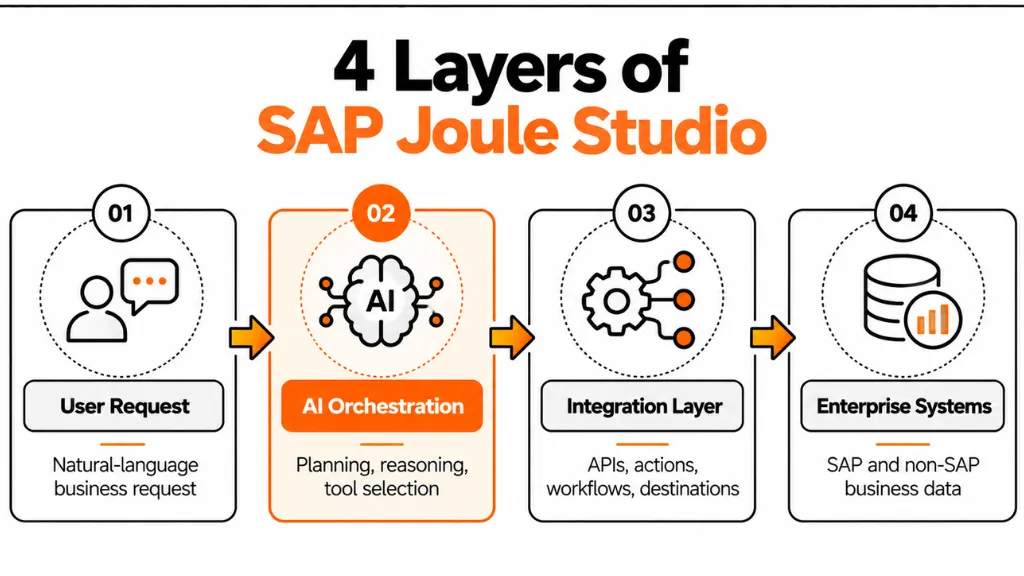
The easiest way to understand SAP Joule Studio is to separate the development process into several layers: the user request, AI reasoning, capabilities or tools, enterprise services, and the systems that ultimately hold the business data.
A user might ask Joule a natural-language question such as, “Show me delayed shipments for customer X and identify orders that require action.” The AI layer interprets the intent and determines which available capability or tool can provide the required information.
The configured agent then invokes the relevant actions. These actions can connect to SAP applications, APIs, workflows, documents, or external services depending on the architecture. The resulting data is returned to the agent, which can then use the information to generate a response or continue the workflow.
The newer Joule Studio product tour describes a development flow in which developers define an agent’s instructions and expertise, provide planning and reasoning capabilities, configure tools or Model Context Protocol servers, connect SAP and non-SAP systems through existing SAP Build actions, and then test and deploy the resulting agent. Good results also depend on writing SAP Joule prompts that are clear and specific.
Intent and Context
An AI agent needs more than a language model. It needs business context that defines what it is responsible for, which tools it can use, what data it can access, and what actions it is allowed to perform.
For example, an HR-related agent should not receive unrestricted access to every employee record simply because it can technically connect to an HR system. The agent should operate within defined business permissions and should only access information required for its assigned process.
Tools and Actions
Tools provide the connection between an AI agent and actual business operations. Depending on the scenario, a tool can retrieve information, call an API, initiate a workflow, interact with a document, or perform another supported operation.
This is an important architectural boundary. The language model should not directly manipulate an SAP database. Instead, the agent should work through supported interfaces, APIs, actions, workflows, and services that enforce the required business and security controls.
Orchestration
Some business requests require multiple operations. An agent may need to retrieve data from one system, validate it against another source, apply business context, and then initiate an action.
Joule Studio is designed for these more complex scenarios. SAP’s current product documentation describes agents that can coordinate multi-step processes across SAP and non-SAP systems, while the developer learning catalog includes tutorials covering agent orchestration and multiple skills.
SAP Joule Studio Architecture
A typical SAP Joule Studio architecture can be understood as a set of connected layers rather than a single application.
At the user layer, employees interact with Joule using natural language. The request is interpreted by the Joule experience and passed to the appropriate custom agent, skill, or capability.
The orchestration layer determines how the request should be handled. For an agentic scenario, this can involve planning, reasoning, tool selection, and coordination of multiple capabilities.
The integration layer connects those capabilities with enterprise systems. SAP Build actions, APIs, destinations, workflows, and other supported integration mechanisms can provide access to SAP and non-SAP applications. The actual configuration depends on the target system and the type of operation being performed.
At the backend layer, systems such as SAP S/4HANA, SAP SuccessFactors, SAP Ariba, or external applications provide the required business data and transactions. SAP’s Joule Skills learning path specifically describes connections to SAP backends such as S/4HANA, SuccessFactors, and Ariba.
Where SAP BTP Fits
SAP BTP is important because it provides many of the services used to extend SAP applications, integrate systems, manage destinations, expose APIs, and implement application logic.
For classic Joule Studio scenarios, SAP’s architecture documentation identifies an SAP BTP account with the appropriate SAP Build entitlement as a prerequisite for creating Joule Skills.
This means SAP teams should not view Joule Studio as an isolated AI product. The implementation often involves the same architectural considerations found in other BTP extension projects, including identity, destinations, APIs, authorization, environment separation, monitoring, and lifecycle management. For real examples of what agents can do, see these AI use cases in SAP finance.
Joule Skills vs AI Agents
Joule Skills and AI agents serve related but different purposes.
A Joule Skill is generally suited to a defined business capability or task. For example, a skill could retrieve employee information, check a shipment, or perform a specific business operation. SAP’s developer resources include examples for tracking shipments and creating or updating shipment information.
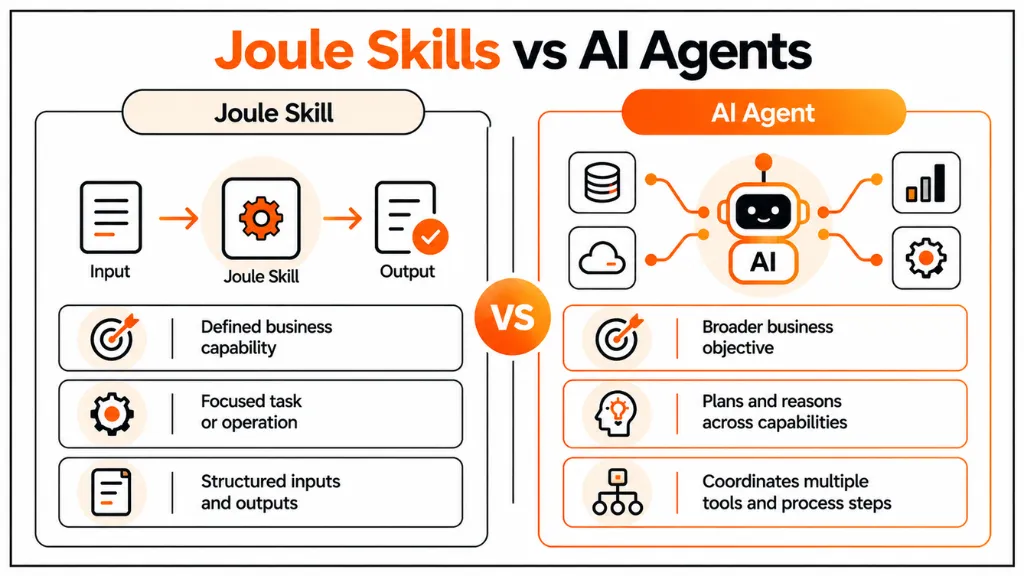
An AI agent operates at a broader level. Instead of executing one narrowly defined capability, an agent can determine which capabilities it needs and coordinate several actions to achieve a business objective.
| Area | Joule Skill | AI Agent |
| Primary purpose | Execute a defined business capability | Coordinate a broader business objective |
| Logic | More structured and task-oriented | Can involve planning and reasoning |
| Typical scope | One task or capability | Multiple skills, tools, and process steps |
| Example | Check shipment status | Investigate delayed shipments and coordinate follow-up |
| Complexity | Lower | Higher |
The distinction is useful when deciding what to build. Not every AI requirement needs an autonomous agent. If a business requirement has predictable inputs, outputs, and actions, a skill or deterministic workflow may be more appropriate.
What Can You Build With Joule Studio?
SAP Joule Studio can support several categories of enterprise use cases.
Custom Business Assistants
Organizations can create assistants focused on specific business roles or processes. A sales representative, procurement specialist, service manager, or HR professional may need a different set of information and capabilities.
Rather than exposing every possible enterprise function, the assistant can be designed around the processes relevant to that role.
Cross-System Workflows
A major use case is connecting processes that span multiple applications. For example, a business process may begin in SAP S/4HANA, require information from a third-party logistics system, and finish by initiating an approval workflow.
The value comes from orchestrating those steps through supported integrations rather than forcing users to manually move between applications.
Transactional Processes
Joule already supports transactional capabilities in several SAP areas, including finance, sales, procurement, asset management, and supply chain. Custom development becomes useful when the standard Joule capabilities do not cover a customer’s specific process.
Document-Based Processes
Joule Studio’s agent capabilities can also support scenarios involving documents. An agent may need to interpret information from a document and combine it with enterprise data before determining the next action.
For example, an accounts-payable process could involve extracting information from a supplier document, checking corresponding purchasing information, identifying exceptions, and routing the case for human review.
SAP Joule Studio and SAP BTP
Organizations planning SAP Joule Studio projects should evaluate the BTP landscape before starting development.
The first consideration is entitlement and environment setup. Depending on whether the organization is using the newer Joule Studio offering or classic edition, the provisioning and commercial model can differ. SAP’s official resources should therefore be checked against the customer’s current contract and tenant configuration rather than relying on older Joule Studio setup guides.
The second consideration is integration. APIs, destinations, authentication, and service availability determine whether an agent can actually perform the intended operation. A well-designed conversational experience cannot compensate for an unavailable or poorly designed backend interface.
The third consideration is authorization. The agent should operate within the user’s business permissions and the technical permissions configured for the connected services. This becomes particularly important when the agent can perform write operations such as creating, changing, approving, or releasing business objects.
A Practical Business Example
Consider an organization that wants to help procurement teams investigate delayed purchase orders.
The user asks Joule to identify delayed orders for a particular supplier. The agent determines that it needs purchase-order information, delivery status, and supplier data. It then invokes the configured capabilities that provide this information.
After retrieving the results, the agent can present the relevant purchase orders and explain which deliveries require attention. If the business process allows further action, the agent could invoke another supported capability to update information or initiate an approval or workflow.
The architecture separates the conversational layer from the underlying business transactions. SAP systems continue to own the business data and transactional logic, while Joule Studio provides the AI-driven interaction and orchestration layer.
This approach is particularly useful when organizations want to improve user interaction without moving core business logic into an AI model.
Implementation Considerations
A successful SAP Joule Studio implementation starts with the business process rather than the AI technology.
First, identify a process with a clear business outcome. A use case such as “help users work faster” is too broad to implement effectively. A better definition would be “help procurement managers identify delayed purchase orders and determine which orders require follow-up.”
Next, identify the required data and actions. Document which SAP and non-SAP systems contain the information, which APIs or services expose it, and which actions the agent is permitted to perform.
Security should be designed before the agent reaches production. Review authentication, authorization, data exposure, destination configuration, and user roles. Particular attention is required for agents that perform write operations because an incorrect action can affect operational data.
Testing should also cover more than successful conversations. Test incomplete requests, ambiguous language, missing data, authorization failures, API errors, unexpected values, and attempts to perform actions outside the agent’s intended scope.
Finally, establish lifecycle management. AI agents are software assets and require controlled development, testing, deployment, versioning, monitoring, and change management. Organizations should apply the same governance discipline used for other enterprise extensions.
Common Mistakes to Avoid
Building an Agent Before Defining the Process
Starting with the question “What can AI do?” often produces an unfocused implementation. Begin with a measurable business process and determine whether an agent actually provides value compared with a workflow, application extension, or conventional automation.
Giving the Agent Too Many Capabilities
An agent with unrestricted access to dozens of tools becomes harder to govern and test. Limit capabilities to the actions required for the defined business scenario.
Ignoring Existing SAP Capabilities
Before building a custom Joule Skill or agent, check whether SAP already provides the required standard capability. SAP continues to expand Joule capabilities across business functions, so custom development should address a genuine functional gap.
Treating AI Output as Automatically Correct
Generative AI can produce inaccurate or incomplete responses. SAP itself advises users to verify important information before acting on Joule responses. Production implementations should therefore include appropriate validation, business controls, and human review where the process requires it.
Conclusion
SAP Joule Studio provides a development environment for connecting AI agents and Joule Skills with real enterprise processes, data, applications, and workflows. Its importance lies in moving beyond simple conversational assistance toward controlled orchestration of business activities across SAP and non-SAP systems. For SAP architects and developers, the implementation should therefore focus on process design, integration, authorization, testing, and lifecycle governance rather than treating AI as a standalone interface.
The 2026 Joule Studio direction also reflects SAP’s broader investment in agentic AI and the SAP Business AI Platform. As these capabilities mature, organizations will need to distinguish between standard Joule functionality, focused Joule Skills, deterministic automation, and AI agents that can coordinate multiple business actions. That distinction will help teams select the right architecture while keeping enterprise data, security, and business controls at the center of the implementation.
FAQs
1. What is SAP Joule Studio used for?
SAP Joule Studio is used to create and manage custom AI agents, applications, workflows, and Joule Skills for enterprise processes. It extends the standard Joule experience by connecting AI-driven interactions with business data, APIs, applications, and workflows across SAP and non-SAP environments.
2. Is SAP Joule Studio part of SAP BTP?
SAP Joule Studio is closely connected to the SAP BTP and SAP Build ecosystem. BTP provides many of the integration, identity, extension, and application services required for enterprise scenarios. However, the exact provisioning and commercial model depends on the current Joule Studio offering and customer entitlement.
3. What are Joule Skills?
Joule Skills are defined business capabilities that extend what users can accomplish through Joule. They can connect to SAP and non-SAP systems and execute specific tasks or retrieve business information. Skills are particularly useful when a process has clearly defined inputs, outputs, actions, and business rules.
4. What is the difference between Joule Skills and AI agents?
Joule Skills generally represent focused capabilities, while AI agents can coordinate multiple capabilities to achieve a broader objective. An agent may determine which skills, tools, APIs, or workflows are required for a request. Therefore, a skill is often a building block that an agent can use.
5. Can SAP Joule Studio connect to non-SAP systems?
Yes. SAP positions Joule Studio for scenarios that span SAP and non-SAP systems. Depending on the implementation, integrations can use APIs, SAP Build actions, destinations, workflows, or supported external tool mechanisms. The technical integration design determines how data and transactions move between the systems.
6. Do I need SAP S/4HANA to use Joule Studio?
No, SAP Joule Studio is not limited to SAP S/4HANA. However, S/4HANA is an important target environment for many enterprise use cases because agents can interact with business processes and data exposed through supported services. Other SAP products and non-SAP applications can also participate in the architecture.
7. Is SAP Joule Studio suitable for beginners?
SAP Joule Studio can be approached by beginners through SAP’s guided learning resources, but production implementation requires knowledge of enterprise integration, authorization, APIs, SAP BTP, and business processes. Developers should understand the underlying architecture before deploying agents that access or change business data.
8. What is the Joule Studio agent builder?
The Joule Studio agent builder is the capability used to create AI agents that can reason about business requests, use configured tools, and coordinate multi-step processes. SAP describes it as supporting agents that can work across SAP and non-SAP systems, interact with documents, and invoke APIs or other tools.





5 Responses