
Introduction
ERP comes with varying meanings across finance, sales, operations, and IT. This impedes the work of workshops, implementation planning, and migration projects. SAP ERP is simple to understand. SAP ERP is enterprise resource planning software that is connected to typical business processes by sharing common data.
In SAP ERP, some of the functions that are supported include finance, procurement, sales, manufacturing, inventory, maintenance, and HR. Companies can execute related processes in one unified system in place instead of having separate systems for each department.
This article will help you understand what SAP ERP is, what it does, how it works, the modules that it provides, and how it is different from SAP S/4HANA. It also addresses typical transaction flows and the maintenance period that is relevant to companies still using SAP ERP 6.0.
SAP ERP is a set of programs that manages an organization’s resources, and SAP provides them. It links finance, procurement, manufacturing, sales, inventory, and HR into one business using common business data.
What is meant by SAP ERP, and what are its objects?
SAP ERP is an enterprise resource planning system that is unified in a single platform to connect business processes. Known as SAP ECC, SAP ERP 6.0 includes Financial Accounting, Controlling, Materials Management, Sales, Production, Quality, Plant Maintenance, and HRM.
The key word is “integration.” One business transaction may entail other related transactions. A goods receipt, for instance, can update inventory, as well as generate the accounting document necessary for financial processing.
The common process model minimizes re-entry of information across departments. It also provides teams with a single point of transaction data.
SAP ERP is the product category, and SAP is the company that manufactures the software. Other ERP vendors, such as Oracle and Microsoft, ricu ebbuc ERP platforms.
What is SAP ERP?
SAP is an acronym for Systems, Applications, and Products in Data Processing. ERP is short for Enterprise Resource Planning. So, SAP ERP is SAP’s software to manage all the business resources and processes that are interconnected.
The ERP suite by SAP has gone through multiple iterations. SAP R/2 was based on mainframes, and SAP R/3 was the introduction of the client-server architecture, which is often associated with classic SAP environments. Later, SAP launched ERP 6.0, and SAP S/4HANA was the new-generation ERP platform.
How Does SAP ERP Work?
Shared master data, shared transaction data, shared configuration, and shared organizational structures are all used to link business processes in SAP ERP.
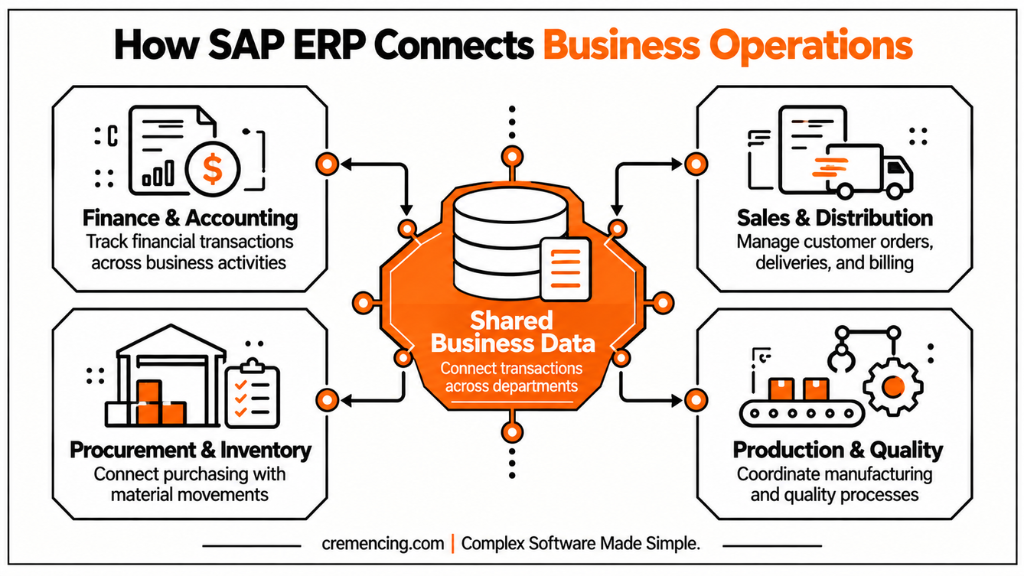
SAP runs the business logic when a user creates a business transaction or posts it and updates the related records. This information can then be accessed by other processes without it having to be entered again manually.
Shared Data and Real-Time Transactions
SAP ERP uses a central database architecture for its business applications. In a classic SAP ERP environment, application servers process business logic while the database stores master and transactional data.
For example, a goods receipt can create both a material document and an accounting document. The relationship between those documents allows users to trace the movement of material and its financial impact.
This integration is one of the defining characteristics of SAP ERP.
Organizational Units Connect Business Processes
SAP ERP uses organizational structures to represent how a company operates.
Important organizational units include:
- Client — the highest-level organizational structure in an SAP system.
- Company code—represents a legal entity for financial reporting.
- Plant — represents a manufacturing, distribution, or operational location.
- Storage location — identifies where inventory is stored within a plant.
- Sales organization—represents the organizational structure responsible for sales.
These structures connect business processes. For example, a plant can be assigned to a company code, allowing logistics transactions to create corresponding financial postings.
Poor organizational design can create significant problems later because changing these structures after implementation can require extensive data and process adjustments.
What Are the Main SAP ERP Modules?
SAP ERP consists of functional areas that support different business processes while sharing common data.
| Module | Full Name | Main Function |
| FI | Financial Accounting | General ledger, payables, receivables, assets |
| CO | Controlling | Cost centers, profit centers, internal costing |
| MM | Materials Management | Procurement, inventory, invoice verification |
| SD | Sales and Distribution | Orders, delivery, billing, pricing |
| PP | Production Planning | Production planning and manufacturing |
| QM | Quality Management | Inspections and quality notifications |
| PM | Plant Maintenance | Equipment and maintenance processes |
| HCM | Human Capital Management | Personnel, time, and payroll |
Companies do not necessarily implement every module. A distributor may rely heavily on FI, CO, MM, and SD, while a manufacturer may also use PP, QM, and PM.
The key point is that these modules do not operate as isolated applications. They exchange master and transactional data as business processes move across organizational boundaries.
SAP ERP Software Architecture
Classic SAP ERP uses a three-tier architecture consisting of the presentation, application, and database layers.
Presentation Layer
The presentation layer is the layer that users communicate with SAP. SAP GUI offers the familiar desktop interface and offers the option to work with transactions via transaction codes like VA01 for sales orders.
Depending on the installed SAP Gateway and Fiori architecture, businesses can access ERP functions through web-based interfaces and SAP Fiori applications.
In classic SAP ERP deployments, the SAP NetWeaver Application Server ABAP environment is located in the application layer. It executes business logic, coordinates user requests, background jobs, database operations, database updates, and database locking.
Each work process handles specific tasks. Dialog work processes handle interactive requests, while background work processes run scheduled jobs. The enqueue service manages logical locks, and update processes execute database updates. ABAP developers can extend the system using custom programs, BAdIs, user exits, enhancement points, and other extension mechanisms.
Database Layer
SAP master data, transactional data, configuration, and application tables are stored in the database layer. SAP ERP 6.0 was able to run on several databases. It could also be installed as SAP Business Suite (SAP HANA). In contrast to SAP S/4HANA, SAP HANA is required for SAP S/4HANA.
Application Layer
The application layer contains the SAP NetWeaver Application Server ABAP environment in classic SAP ERP deployments. It processes business logic and coordinates user requests, background jobs, database operations, updates, and locking.
Different work processes perform different responsibilities. Dialogue work processes handle interactive requests, while background processes execute scheduled jobs. Update processes handle database updates, while the enqueue service manages logical locks.
ABAP developers can extend SAP ERP through custom programs, BAdIs, user exits, enhancement points, and other extension mechanisms.
Database Layer
The database layer stores SAP master data, transactional data, configuration, and application tables.
SAP ERP 6.0 supported multiple database platforms. It could also run on SAP HANA as SAP Business Suite powered by SAP HANA.
SAP ERP Integration
External systems connect through integration technologies such as:
- IDocs
- RFCs
- BAPIs
- Web services
- APIs
- Middleware platforms
In hybrid environments, SAP Integration Suite on SAP BTP can provide integration capabilities between SAP ERP and cloud applications.
Integration design matters because it determines how systems exchange data, which system manages each data set, and how teams handle failures.
What is the advantage of SAP ERP?
SAP ERP helps businesses connect processes across departments instead of managing each department through a separate system.
Operational Benefits
Shared business data: Departments share connected transaction and master data.
Process integration: One process in one module can start related processes in another module.
Financial visibility: Finance transactions can be accounted for.
Inventory control: The procurement, goods movements, and inventory records continue to be linked.
Auditability: SAP documents provide relationships that provide traceability of business transactions.
Business and Compliance Benefits
The support of country-specific requirements, organizational structure, language, and currency makes SAP ERP suitable for use by multinational organizations.
Role-based authorization is another benefit, as businesses can restrict access based on the user’s position. This can assist in meeting segregation-of-duties and internal-audit controls. However, businesses only achieve these benefits when they manage the system effectively. Poor master data, weak authorization controls, excessive customization, and inconsistent processes can limit the platform’s overall value.
What Challenges Does SAP ERP Bring?
SAP ERP is powerful, but it is also complex.
Implementation requires detailed process design, organizational modeling, master-data preparation, testing, security configuration, and user training.
Custom development creates another long-term consideration. Many mature ECC environments contain years of custom ABAP code. Before an SAP S/4HANA transition, organizations should analyze that code and identify objects that require remediation or redesign.
The ABAP Test Cockpit (ATC) can support custom-code analysis for SAP S/4HANA readiness.
The architecture also creates integration dependencies. External applications may depend on IDocs, RFCs, BAPIs, custom interfaces, or middleware. Those dependencies must be assessed during modernization.
Practical SAP ERP Examples
Procure-to-Pay
Procure-to-Pay starts with a purchasing requirement and ends with supplier payment.
A typical SAP ERP flow is:
- Create a purchase requisition using ME51N.
- Create a purchase order using ME21N.
- Post the goods receipt using MIGO.
- Enter the supplier invoice using MIRO.
- Execute the payment process through FI.
The goods receipt updates inventory and creates the corresponding accounting impact. Invoice verification then iluhe the purchase order, receipt, and invoice.
Finally, the payment process clears the vendor’s open item. Also explore the difference between SAP ERP and Oracle ERP.
Order-to-Cash
Order-to-cash begins with customer demand and ends with payment.
A typical process includes:
- Create the sales order.
- Perform availability and pricing checks.
- Create the outbound delivery.
- Post goods issue.
- Create the billing document.
- Record the customer payment.
SD manages the sales and delivery process, while FI records the associated financial transactions. This illustrates the main value of SAP ERP integration: one business process crosses multiple functional areas without requiring separate systems for each step.
What Is the Difference Between SAP ERP and SAP S/4HANA?
SAP ERP 6.0 and SAP S/4HANA represent two different generations of enterprise resource planning software.
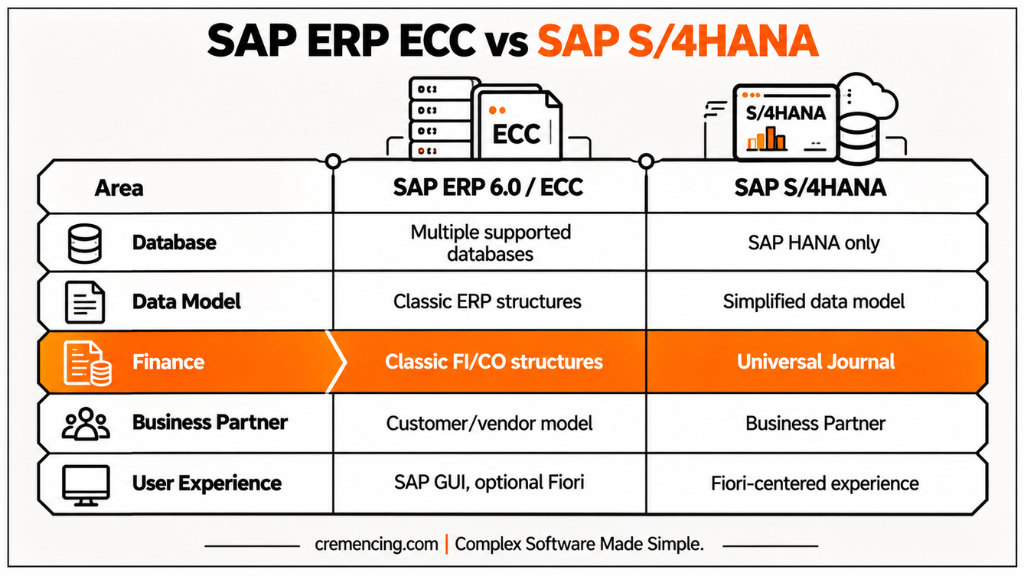
The earlier version, commonly known as ECC, belongs to SAP’s classic ERP suite. Its successor, S/4HANA, uses the SAP HANA database and introduces a more modern architecture.
| Area | SAP ERP 6.0 / ECC | SAP S/4HANA |
| Database | Multiple supported databases | SAP HANA only |
| Data model | Classic ERP data model | Simplified data model |
| Finance | Separate classic FI/CO structures | Universal Journal |
| Business partner | Customer/vendor model | Business Partner |
| User experience | SAP GUI with optional Fiori | Fiori-centred experience |
| Deployment | Primarily on-premises | On-premises and cloud editions |
| Strategic direction | Mature legacy platform | SAP’s current ERP platform |
The differences go beyond the database. SAP S/4HANA changes data structures, application architecture, user experience, extensibility, and the way organizations approach custom development.
What Does the SAP ERP Maintenance Deadline Mean?
The maintenance date depends on the SAP ERP 6.0 enhancement package.
Mainstream maintenance for SAP ERP 6.0, enhancement package 6, 7, or 8 is valid until December 31, 2027, with the option of extended maintenance through December 31, 2030. Other enhancement package levels have different maintenance statuses.
Thus, companies need to verify the exact SAP ERP release and package of enhancements before considering 2027 as their system’s individual support deadline.
SAP S/4HANA is released in a different model. Since the release of 2023, SAP has adopted a release cycle of two years with 7 years of mainstream maintenance per release.
Which Migration Path is the right one for an SAP ERP System?
When an organization decides to move from SAP ERP to SAP S/4HANA, it will consider the following options:
- System conversion — convert an existing SAP ERP system, without changing the majority of the configuration or data.
- New implementation — create a new SAP S/4HANA system and reimagine processes.
- Selected data transition — migrate selected data and business models to a new environment.
The right way will be different based on the existing system, custom coding, data quality, business processes, integrations, and the desired transformations.
Before starting in detail, an SAP Readiness Check can assist in identifying which items should be considered for simplification, which items require custom code, and others that need to be considered for a transition to SAP.
Conclusion
SAP ERP is actually an enterprise system that integrates everything in your company, including finance, procurement, sales, manufacturing, inventory, maintenance, and so on, with shared data.
SAP ERP 6.0 and ECC are significant as a large number of companies continue to rely on the processes, custom ABAP, integrations, and historical data. For companies that are continuing to use SAP ERP releases that are eligible for SAP S/4HANA, however, the platform’s maintenance schedule has made planning with SAP S/4HANA more critical than ever before.
Review the actual system release, enhancement package, custom code, interfaces, master data, and business processes prior to planning a transition. It is better to start this technical evaluation than to assume that any SAP ERP environment is the same.
Frequently Asked Questions
What is the full form of SAP ERP?
SAP stands for “Systems, Applications, and Products in Data Processing,” while ERP stands for “Enterprise Resource Planning.” SAP ERP refers to SAP’s enterprise resource planning software.
Is SAP an ERP system?
SAP refers to the company, and ERP refers to a grouping of business software. SAP ERP products such as SAP ERP 6.0 and SAP S/4HANA, and other enterprise technologies are offered by SAP.
What is the purpose of the SAP ERP Software?
The SAP ERP software manages related business processes like finance, procurement, sales, inventory, manufacturing, maintenance and human resources.
What are the essential SAP ERP modules?
The main modules are FI, CO, MM, SD, PP, QM, PM and HCM. They serve various business activities, yet also share information with other business areas.
Does SAP ERP support the year 2026?
SAP ERP 6.0 EHP6 to EHP8 are covered under mainstream service until December 31 2027, with extended maintenance till December 31 2030. There are different maintenance statuses for earlier enhancement packages.
Is SAP ERP cloud-based?
Classic SAP ERP 6.0 is mainly an on-premises ERP platform (you can choose to place it on third-party infrastructure). Today, SAP’s cloud ERP focus is on SAP S/4HANA Cloud.
How long does it take to implement an SAP ERP system?
How long it will take to implement will vary significantly based on scope, internal organization, data migration, integrations, data testing, and process redesign. A small deployment will take much less time than a multinational SAP program, so it is wrong to assume that one implementation timeline is a standard for all deployments.