

Introduction
Approvals wait in inboxes for days while teams re-enter the same data across three applications. Default configurations often cause these delays. Teams may not revisit them after go-live, leaving SAP productivity apps underused.
In SAP S/4HANA and SAP ECC landscapes, teams can use SAP Fiori, SAP Build Process Automation, and SAP Integration Suite to improve these workflows. Targeted changes to approval routing, launchpad layout, and notification settings can reduce delays without new development.
In this blog, we’ll explore 10 practical SAP app tweaks that make teams more productive. We’ll also examine how small changes can deliver significant improvements.
You’ll Learn:
- How to optimise SAP apps for diurnal operations
- Tips for perfecting workflow effectiveness
- Ways to reduce time wasted on repetitive tasks
Why SAP Productivity Apps Underperform in Daily Operations
SAP productivity apps is a practical label for SAP applications and services that reduce manual effort in daily work. For example, these include SAP Fiori apps and the launchpad. They also include workflow and automation services in SAP Build Process Automation. In addition, embedded analytics and integration through SAP Integration Suite are part of this group.
Together, these tools run across SAP S/4HANA, SAP ECC with an SAP Fiori front-end server, and SAP BTP. However, their value depends on proper configuration, not installation alone.
In many cases, underperformance follows a one-time rollout. For instance, teams may copy role templates from a project template. They may also design approval chains around the organization chart instead of transaction risk. At the same time, notification settings often remain at their default values.
As a result, teams may experience delayed approvals and repeated manual data entry between applications. They may also have limited visibility into task status and KPIs. Over time, these problems can develop gradually. Consequently, teams may accept them as normal system behavior.
However, available options depend on the system landscape. For example, SAP S/4HANA includes flexible workflow and embedded analytics. It also supports spaces and pages in the SAP Fiori launchpad.
By comparison, SAP ECC systems can run many SAP Fiori apps through a front-end server. In addition, they can connect to SAP BTP services through SAP Cloud Connector. However, many newer apps require SAP S/4HANA.
Looking ahead, SAP ECC 6.0 mainstream maintenance is currently scheduled to end in 2027. Therefore, organizations that optimize their productivity apps now can also prepare for a later S/4HANA transition. Furthermore, they can reuse role and workflow designs as part of that transition.
10 Practical Tweaks for SAP Productivity Apps
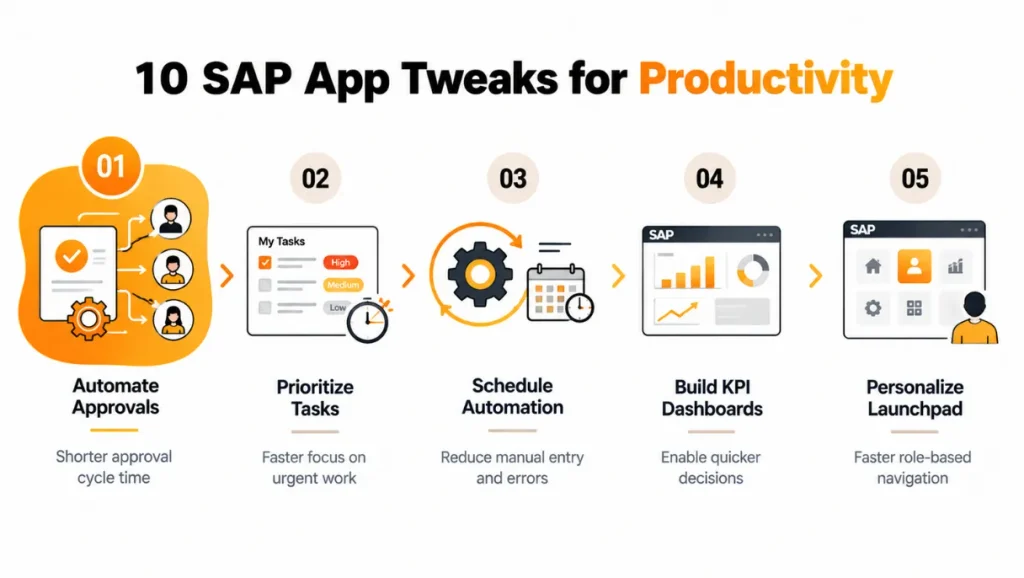
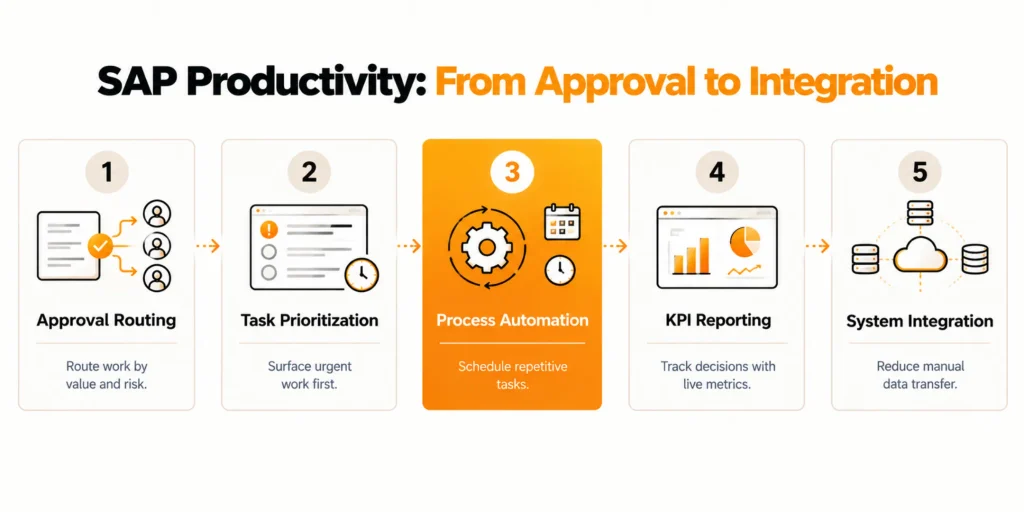
The tweaks below follow the way a typical task moves through a team, from approval and prioritization to automation, reporting, and integration. The table summarizes each tweak, the SAP component involved, and the main benefit.
| # | Tweak | SAP Component | Main Benefit |
|---|---|---|---|
| 1 | Automate repetitive approvals | Flexible workflow, SAP Build Process Automation | Shorter approval cycle time |
| 2 | Prioritize high-value tasks | SAP Fiori task apps, My Inbox | Faster focus on urgent work |
| 3 | Schedule routine automation | SAP Build Process Automation (RPA) | Less manual entry and fewer errors |
| 4 | Enable employee self-service | SAP Fiori self-service apps, SAP SuccessFactors | Lower HR administrative load |
| 5 | Build KPI dashboards | Embedded analytics, SAP Analytics Cloud | Quicker decisions |
| 6 | Consolidate alerts | SAP Fiori launchpad notifications | Fewer missed tasks |
| 7 | Track project milestones | SAP Project System (PS) | Earlier schedule-risk signals |
| 8 | Personalize launchpad layout | Spaces and pages | Faster navigation |
| 9 | Connect applications | SAP Integration Suite | Less manual data transfer |
| 10 | Track hours per task | CATS, My Timesheet | Better resource allocation |
Each tweak is simple but largely effective in perfecting platoon productivity.
How These SAP Productivity Apps Tweaks Help Brigades
1. Automate Repetitive Approvals in Workflow Management
1. Route Approvals Based on Value and Risk
Approval delays usually come from routing rules that send every request to the same approver. These rules often ignore value, risk, or category.
In SAP S/4HANA, flexible workflow lets process owners define conditions for objects such as purchase requisitions and supplier invoices. Teams can approve low-value requests automatically or route them to a single approver. Higher-value items can follow a multi-step approval path.
2. Extend Workflows Across Systems
For scenarios that span multiple systems, teams can use SAP Build Process Automation on SAP BTP. It succeeds SAP Workflow Management and provides forms, decision logic, and process visibility. SAP ECC landscapes can also use this service through SAP Cloud Connector.
3. Prevent Approval Tasks From Stalling
Escalation and substitution rules deserve the same attention as routing. Deadlines can reassign tasks after a defined period. Substitution settings can also handle planned absences. Together, these settings prevent requests from stalling in unattended inboxes
2. Customize SAP Fiori Task Apps for High-Priority Work
SAP Fiori task apps such as My Inbox consolidate work items from multiple systems. However, the default configuration gives every task equal weight.
Process owners can configure priority, due-date sorting, and filters. These settings can place overdue and high-value items first. Process owners can also add dynamic tiles with item counts to the launchpad home page. Users can then see their workload without opening the app.
These changes use role-level launchpad configuration. They do not require custom code.
Mobile access also matters for distributed teams that approve requests outside the office. SAP Mobile Start provides launchpad content on mobile devices. Approvers can act on requests from their phones instead of waiting until they return to a desktop.
This setup can reduce idle time during weekends and travel days.
3. Schedule Routine Automation in SAP Build Process Automation
SAP Build Process Automation includes robotic process automation capabilities. These bots can handle repetitive, rule-based tasks such as invoice data entry, master data uploads, and report downloads.
Teams can start bots through a schedule, API call, or process trigger. Bots can then perform work overnight instead of consuming daytime hours.
UI-based bots depend on screen structure and can break when interfaces change. Teams should therefore prefer standard APIs or BAPIs when an interface exists. They should reserve UI automation for systems that lack suitable interfaces.
Error handling determines whether automation reduces effort or creates a new support queue. Each bot should write exceptions to a monitored queue and have a clear owner. Bots should also run under dedicated technical users with only the authorizations required for each task.
This approach protects the system and gives auditors a traceable record of automated postings.
4. Enable Employee Self-Service for HR Requests
Employee self-service moves routine HR transactions from HR administrators to employees who own the data. Examples include leave requests, working-time corrections, payslip display, and address changes.
SAP offers these scenarios through SAP Fiori apps such as My Leave Requests and My Paystubs. SAP SuccessFactors provides equivalent services for organizations that run HR in the cloud.
Each employee-completed transaction removes a manual entry step. It also reduces the risk of data-quality errors. The employee submitting the request usually knows the correct values.
Adoption depends more on approval design than on the apps themselves. If leave requests go to the wrong manager, employees may return to email. Teams should therefore validate the organizational structure and manager assignments in HR master data. They should complete this validation before the self-service apps go live.
5. Build Dashboards for Key Metrics in Reporting and Analytics
Teams lose time when staff manually compile spreadsheets to track status information. To address this issue, SAP S/4HANA provides embedded analytics through CDS-based analytical queries. These results can then appear in SAP Fiori as KPI tiles and analytical list pages.
For broader reporting needs, SAP Analytics Cloud can extend these views across systems. A useful dashboard should present five to seven metrics. These metrics should match the decisions the team actually makes. Examples include open purchase order value, overdue deliveries, and invoice backlog.
Thresholds can also help teams identify issues quickly. A tile can change from green to red when a metric requires action.
Teams should agree on metric definitions before building the dashboard. Different calculations for backlog or delays can lead to disputes over the numbers. The same CDS views should feed every dashboard. This ensures that team leads and finance teams see consistent figures.
6. Consolidate Alerts in the Launchpad Notification Area
The SAP Fiori launchpad notification area collects actionable notifications from connected applications. Users can approve or reject requests directly from the notification area without opening the source app.
Notification fatigue becomes a risk when applications send every event. Administrators should review notification types and keep only alerts that require action or signal a deadline. Users can also adjust their own notification settings. A short guideline can explain which notifications users should keep. This helps prevent users from ignoring all alerts.
In landscapes with several backend systems, teams can route notifications through the launchpad. Approvers can then monitor one list instead of checking several system inboxes.
This approach can reduce missed tasks. It also makes notification volume more visible and helps teams identify low-value alerts for removal.
7. Track Milestones in SAP Project System
SAP Project System (PS) structures projects through work breakdown structures, networks, and milestones, and milestone tracking gives project managers an early indicator of schedule risk. Milestones linked to billing plans, network activities, or deliverable dates make progress measurable, and milestone trend analysis shows how forecast dates have moved between reviews. Teams that define milestones only at project start usually find that status reporting depends on manual updates, which delays the signal.
SAP Fiori project control apps and PS reporting in SAP S/4HANA present milestone status and cost against plan, so the project team can review progress in a weekly meeting without separate presentations. The most useful configuration decision is which milestones are reportable to management, since a long list of internal milestones hides the few that determine the delivery date.
8. Personalize Launchpad Tiles and Layout by Role
A launchpad that exposes hundreds of tiles to every user forces people to search for the apps they use daily. SAP Fiori launchpad personalization starts with spaces and pages, which SAP recommends in current SAP S/4HANA releases, and which allow administrators to build role-based pages containing the tiles, KPI cards, and links that one job function needs. Users can then add personal favorites without altering the role-based design, which preserves consistency across the team.
Role-based layout depends on a clean catalog and role concept, because a tile appears only when the user’s authorization role includes the matching catalog content. Reviewing app usage data each quarter and removing unused tiles keeps the layout aligned with real behavior.
9. Connect Applications Through SAP Integration Suite
Manual data transfer between applications is a common source of rework and errors, particularly when procurement, finance, and service teams each maintain separate systems on SAP BTP provides prebuilt integration content, API management, and adapters for IDoc, OData, SOAP, and other protocols, so teams can connect applications without building each interface from scratch. Standard integration packages from SAP Business Accelerator Hub should be evaluated first, with custom integration flows reserved for requirements that the standard content does not cover.
7-Step SAP Event Mesh Tutorial for Real-Time S/4HANA & SAP BTP Integration reduces polling and delay by publishing business events from SAP S/4HANA to subscribers when a change occurs, instead of running scheduled extracts. Each interface should have a named owner, monitoring, and a retry strategy, since an unmonitored integration flow converts a manual task into an invisible failure.
10. Track Hours per Task in SAP Time Management
Time recording links effort to the objects that carry cost, such as projects, network activities, and internal orders, which is why it supports resource planning as well as payroll. Employees can record hours through the Cross-Application Timesheet (CATS) or the My Timesheet SAP Fiori app, and approvals can follow a workflow similar to leave requests. When hours are booked to WBS elements or orders, managers can compare planned and actual effort and identify team members who are consistently over- or under-allocated.
Simple rules improve data quality, including default values for recurring assignments, time-entry reminders, and a weekly cutoff for approval. These controls reduce corrections at period end and give planners reliable data for the next staffing decision.
Validation and Best Practices
Each tweak should start with a measurable baseline, such as average approval time, the number of manual postings per week, or HR ticket volume, so teams can demonstrate the improvement after rollout. Workflow instance reports, launchpad usage data, and bot execution logs provide most of this information without additional tooling.
Teams should test changes to launchpad content, roles, and workflow definitions in a quality system and transport them through the standard landscape, starting with a pilot team before wider rollout. Security requires the same discipline: teams must check role changes for segregation-of-duties conflicts, use dedicated technical users with minimum authorizations for bots and integration flows, and store credentials in the SAP Credential Store on SAP BTP instead of in scripts.
A named owner for each configuration area prevents the drift that can make productivity gains disappear within a year. A quarterly review of launchpad layouts, notification types, workflow rules, and integration monitoring is usually sufficient, and teams can schedule it alongside the regular SAP release or support pack cycle.
Common Mistakes
The most frequent mistake is automating a process that is already inefficient, because a bot or workflow that follows a poorly designed approval chain repeats the same delays at higher speed. Process owners should simplify the steps first and automate afterward. A related error is using UI-based robotic automation where a stable API exists, which creates maintenance work every time a screen changes.
Teams also over-customize launchpad layouts for individual preferences instead of job roles, which makes support and onboarding harder, and they enable every available notification, which trains users to ignore the list. Finally, many organizations skip communication and training, so employees keep using email and spreadsheet routines beside the new configuration and the expected time savings do not appear.
Conclusion
SAP productivity apps deliver measurable gains when teams configure approval routing, launchpad design, notification settings, and integrations around how each team actually works. The ten tweaks in this article address the areas where default settings most often cause delays. Applying them in sequence, starting with approvals and launchpad layout and followed by automation, analytics, and integration, gives SAP teams a controlled way to reduce manual rework without waiting for new development projects.
As SAP extends Joule and SAP Build capabilities into more business applications, teams that already maintain clean role design, clear process ownership, and reliable integrations will adopt these features faster.
FAQs
Q1: What are SAP productivity apps?
SAP productivity apps are the SAP Fiori apps, workflow and automation services, embedded analytics, and integration tools that reduce manual work in daily operations. They run on SAP S/4HANA, SAP ECC with a front-end server, and SAP BTP, and they deliver results mainly through correct role-based configuration.
Q2: Which SAP apps improve team productivity the most?
Approval workflows, My Inbox, role-based launchpad pages, and process automation usually deliver the fastest gains because they remove waiting time and manual entry. Embedded analytics and SAP Integration Suite add value once those basics are stable. The best starting point is the process with the longest measured delay in the team.
Q3: How does SAP Fiori launchpad personalization improve productivity?
SAP Fiori launchpad personalization shows each role only the tiles, KPI cards, and pages needed for its tasks, which reduces search and navigation time. Administrators design role-based spaces and pages, and users add personal favorites on top. This keeps the layout consistent for support while allowing individual preferences.
Q4: What is the difference between SAP Workflow Management and SAP Build Process Automation?
SAP Build Process Automation is the successor offering on SAP BTP that combines workflow, process automation, and robotic process automation capabilities, whereas SAP Workflow Management focused on workflow and business rules. New SAP workflow automation projects should start with SAP Build Process Automation, and existing scenarios should be reviewed against SAP’s current guidance.
Q5: Can SAP productivity apps be used on SAP ECC?
Yes, within limits. SAP ECC systems can run selected SAP Fiori apps through a front-end server and can connect to SAP BTP services such as SAP Build Process Automation through SAP Cloud Connector. Several newer apps and embedded analytics features require SAP S/4HANA, so the app catalog should be checked before planning.
Q6: How do you measure the impact of SAP productivity app tweaks?
Measure a baseline before each change and compare it after rollout, using metrics such as approval cycle time, manual postings per week, HR ticket volume, and launchpad usage. Workflow instance reports and bot execution logs provide most of the data, and a four to six week comparison is usually enough to show a trend for SAP team productivity
Q7: When does SAP custom development become necessary instead of configuration?
Teams need SAP custom development when standard configuration cannot express a team-specific rule, screen, or integration, such as a multi-criteria approval path or a specialized Fiori app. Teams should first exhaust standard configuration options, then use released APIs and side-by-side development on SAP BTP for custom extensions to protect upgrade capability.
Q8: How often should launchpad layouts and workflow rules be reviewed?
A quarterly review is a practical interval for launchpad layouts, notification types, workflow rules, and integration monitoring. Aligning the review with SAP release or support pack cycles keeps changes testable, and checking usage data first helps remove unused tiles and outdated approval steps from SAP Fiori launchpad personalization settings.




