

Introduction
SAP Fiori Launchpad Designer is an essential tool for SAP administrators and developers, allowing them to design, configure, and handle the Fiori launchpad tiles, groups, catalogues, and navigation targets. With the SAP T-code for Fiori Launchpad Designer, users can improve Fiori app rollout, boost user productivity, and deliver unified brand experiences to users across different SAP applications.
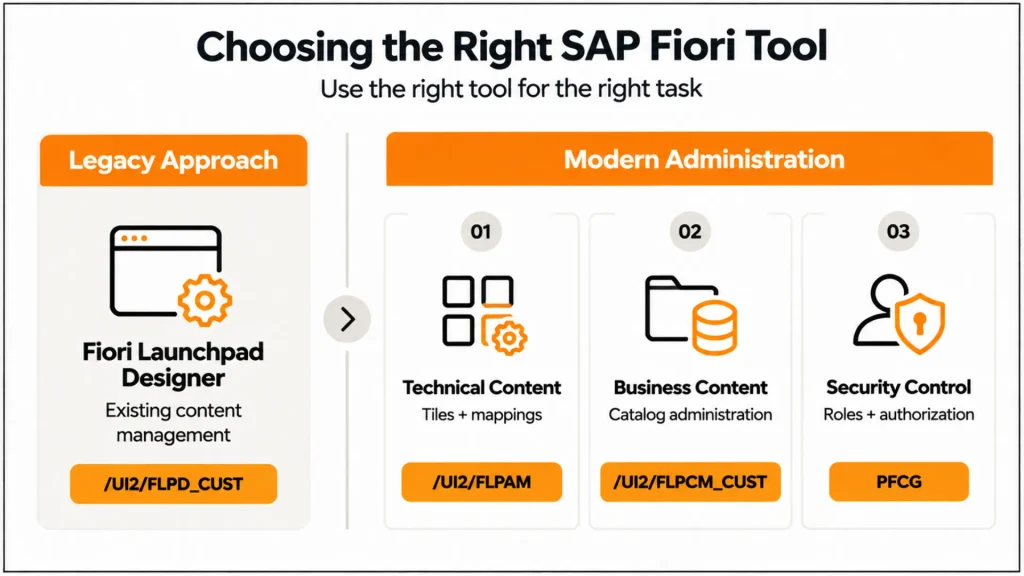
That distinction matters for SAP administrators, Basis teams, and Fiori developers maintaining S/4HANA environments. A TCode may still open successfully while the recommended way of performing the underlying task has changed. This article, therefore, focuses on what the major Fiori Launchpad TCodes actually do, where it /UI2/FLPD_CUST still fits, which newer tools should be used instead, and how to troubleshoot the configuration issues that commonly prevent users from seeing or launching the right applications.
TCode for Fiori Launchpad Designer
TCode: /UI2/FLPD_CUST
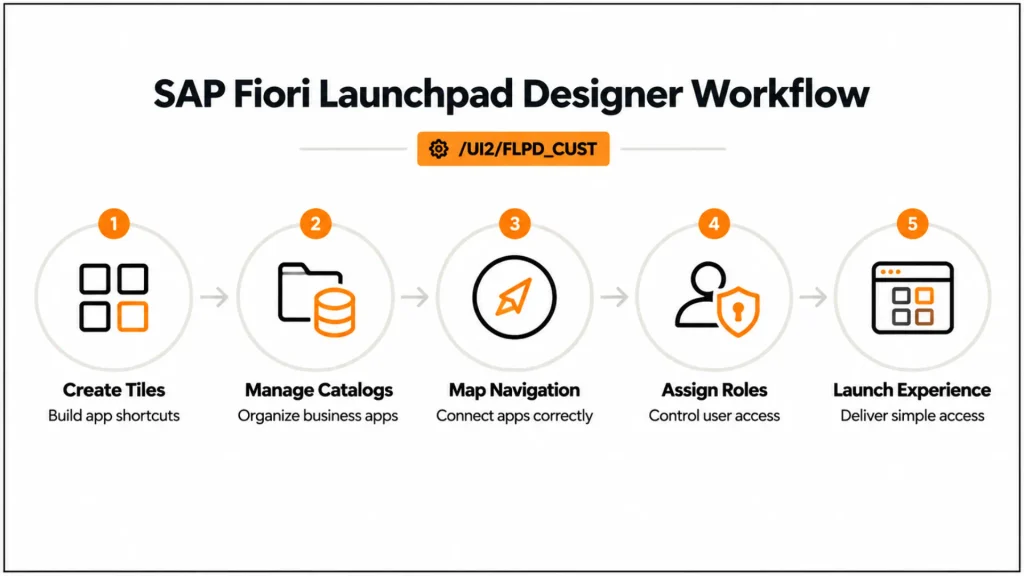
The standard starting point for Fiori Launchpad Designer. This T-code enables administrators to:
- Organize tiles and groups
- Configure catalogues and target mappings
- Associate tiles with roles and users
- Modifying navigation behaviour for Fiori app
This T-code can be effectively utilized for role-based access, enhanced navigation, and productive deployment of the app. Misconfiguration, however, may cause low adoption and user annoyance.
Pre-Conditions for Using Fiori Launchpad Designer TCode
Prerequisites for TCode to use with Fiori Launchpad Designer: Make sure that the following items are properly configured:
- SAP Fiori Front-End Server (FES) – This is where all of your Fiori apps and tiles are deployed.
- SAP Gateway Configuration – Is required for back-end connectivity.
- Authorization Roles – Users need to have authorization to be able to use Launchpad Designer and adjust tiles, groups, and catalogs.
- Browser Settings – Fiori Designer is supported in HTML5 browsers only.
- Transport Management – Requests related to transport should be scheduled for shifting development changes into QA and PRD environments.
Expert Tip:
Be sure to test any modification in a dev/test copy of the workflow before putting into production.
SAPUI5-based Fiori Launchpad Designer functionalities
Here are the important capabilities of Fiori Launchpad Designer:
Capability:
The SAPUI5-based Fiori Launchpad Designer provides administrators with a centralized way to configure and manage the Fiori Launchpad experience. It allows organizations to organize applications into catalogues, groups, and spaces, assign relevant content to users and roles, and control how applications appear on the launchpad.
Administrators can also configure tiles, navigation targets, and application properties to create a consistent user experience. Additionally, role-based configuration helps ensure that users see only the applications and functions relevant to their responsibilities, improving both usability and security.
Key Benefits of Fiori Launchpad Designer TCode
With the TCode called Fiori Launchpad Designer, specialists:
- Generate Tiles and Groups – Collate apps to a specific centralized location suitable for the role.
- Catalog Management – Organize tiles into catalogs according to user roles.
- Define Target Mappings – Link a set of tiles to Fiori apps, transactions, or even external URLs.
- Role-based – Give users the visibility to apps they need based on their job function.
- Preview and Testing Tiles: Verify navigation and app behavior before releasing.
Key Functionalities Overview
| Functionality | Purpose | Best Practice |
| Tile Creation | Display apps on Launchpad | Use descriptive titles & icons |
| Catalog Management | Group apps logically | Assign catalogs per role |
| Target Mapping | Connect tiles to apps | Validate navigation paths |
| Role Assignment | Control access | Follow SAP security guidelines |
| Preview | Test UX before deployment | Test across devices |
Expert Advice on How to Use TCode for Fiori Launchpad Designer
Standardize Tile Naming Conventions
- Provide tiles with good, easy-to-understand names.
- Use a function or module reference instead for uniformity.
Role-Based Grouping
- Don’t organize tiles by what I think is best, however by what roles users play in the group.
- Reduces clutter and increases the chances of adoption.
Use Custom Icons and Descriptions
- Make it user-friendly by applying significant icons.
- Include hover texts or short explanations.
Leverage Target Mapping Efficiently
- Be sure to pilot mappings with some sample users.
- Pass the right params to backend apps.
Plan Transport Requests
- Prepare tiles, catalogs, role assignments in SPS / LCM in TRs that make sense.
- Steer clear of problems as you go to production.
Monitor Performance
- Track Launchpad performance metrics.
- Optimize heavy tiles or slow responding apps for better user experience.
Document Changes
- Keep a log of tile, group & catalog settings.
- Supports troubleshooting and audits.
Sample Use Cases in TCode for Fiori Launchpad Designer
a. Finance and Accounting Apps
Example: Invoice approval apps
Advantage: It’s faster, and there are fewer mistakes.
b. Human Resources Apps
Example: Leave requests and approvals
Benefit: HR processes simplified with higher transparency
c. Apps for Procurement and Supply Chain
Example: Purchase order dashboards
Advantage: Faster purchase cycle and better reporting
d. Sales and Customer Support Apps
Example: Sales order tracking tiles
Pros: Get live sales and better customer service
Professional Insight:
Every module for a particular industry has taken advantage of role-based tiles to simplify and maximize productivity.
| Tool / TCode | Primary purpose | Current status | Best use |
|---|---|---|---|
/UI2/FLPD_CUST | Launchpad Designer | Deprecated features | Maintain relevant existing/legacy content |
/UI2/FLPAM | Launchpad App Manager | Current | Technical catalogs, tiles and target mappings |
/UI2/FLPCM_CUST | Launchpad Content Manager | Current | Business catalogs |
PFCG | Role maintenance | Current | Authorization roles and assignments |
/UI2/FLP | Launchpad access | Current | Launch SAP Fiori Launchpad |
SICF | ICF service administration | Current | Relevant HTTP service activation/configuration |
Deployment And Operation Best Practices
Start Small, Scale Gradually
First, start with the most important apps before growing your catalog coverage.
Align Tiles to Business Processes
Tile maps and groups onto key workflows for impact measurement.
Regularly Review and Update Tiles
- Archive the apps you don’t use to lessen clutter.
- Update apps in response to new SAP releases or business changes.
Leverage Analytics for Usage Insights
- Keep track of which tiles mare ost often used.
- Adjust assignments to improve productivity.
Ensure Mobile Compatibility
Test your tiles on tablets and smartphones to enter both on the couch or in line at the bank.
Real-World Insights from SAP Experts
Expert Quote 1:
“Fiori Launchpad Designer isn’t just a UI design tool–it’s a UX process improvement platform. Moreover, by accurately merging tiles and catalogs, approval cycles can be reduced by as much as 30%.” – SAP Fiori Consultant
Expert Quote 2:
” The vast majority of adoption failures suffer from lame role-based design. Use TCode /UI2/FLPD_CUST with governance and try to keep this consistent across landscapes.” – SAP Basis Administrator
Example Implementation:
A retail organization utilized TCode with Fiori Launchpad Designer to consolidate inventory and sales dashboards. Result: 25% faster decision-making and fewer reporting errors.
If your team is dealing with several Fiori transaction codes rather than Launchpad Designer alone, map each TCode to the task it actually performs before changing the configuration
With SAP BTP and custom app integration
- Leverage SAP BTP to develop custom tiles or extend Fiori applications.
- Connect to OData services for real-time connectivity.
- Leverage CAP (Cloud Application Programming) for implementing industry-specific extensions.
Professional Insight:
Fiori Launchpad Designer with Tcode and SAP BTP extensions empowers customers to create custom applications without touching core systems for scale and compliance.
Common Challenges and Mitigation
| Challenge | Mitigation |
| Misconfigured target mapping | Validate mappings with test users |
| Unauthorized access | Regularly audit roles & authorizations |
| Cluttered Launchpad | Role-based grouping & periodic cleanup |
| Slow performance | Optimise heavy-weight applications and watch the logs |
| Transport conflicts | Carefully schedule plan requests and test in the QA. |
Tangible Gains from Proficient Use of TCode on Fiori Launchpad Designer
- Enhanced Workflow – If nothing else, faster approvals and less manual work.
- Higher User Adoption – Structured tiles mean users can use the application!
- Fewer mistakes occur—Because of correct target mappings, there are fewer navigation errors.
- Running Visibility – Live visibility based on dashboards.
- State-of-the-Art Infrastructure – Enables scale across the globe for multi-SAP landscape deployments.
Example ROI Metrics
| KPI | Pre-Designer Optimization | Post-Designer Optimization | Improvement |
| Approval Cycle Time | 10 days | 6 days | -40% |
| HR Processing Time | 5 days | 2.5 days | -50% |
| User Adoption Rate | 60% | 85% | +25% |
| Error Rate | 6% | 2% | -66% |
Conclusion
Strategically using TCode for Fiori Launchpad Designer, organizations can make the most out of SAP Fiori applications deployment, workflow optimization, and use adoption. You follow advice from experts and use best practices like role-based grouping, correct target mapping, utilizing SAP BTP extensions to gain measurable business benefit, and limited operational impact.
For SAP administrators, the practical approach is to identify what you are trying to change before choosing the TCode. Use the appropriate current tool for new technical or business-catalog administration, treat legacy Launchpad Designer content carefully, validate target mappings and authorizations, and test changes before transporting them across the landscape. That approach reduces the risk of following an older Fiori configuration procedure simply because its transaction code still works.
Cremencing Solutions specializes in reskinning Fiori Launchpad, consulting, designing, and deploying solutions for clients to adhere and align their business to the technology solution for maximum efficiency, adoption & ROI.
For more insights, read our blog on 7 Proven SAP Fiori Applications
FAQs
Q1. What is the TCode For Fiori Launchpad Designer?
It is /UI2/FLPD_CUST, which is a floorplan to develop and manage tiles, catalog,s and groups similar to SAP Fiori Launchpad.
Q2. Is it possible to manipulate tiles for various user roles?
Yes, role-specific requests can direct tiles and catalogs.
Q3. Can I use Fiori Launchpad Designer with or without SAP BTP?
No, BTP is non-mandatory, but you can develop a custom extension and cloud deployment.
Q4. How can I drive strong Fiori Launchpad apps user take-up?
Leverage role-based tiles, easy-to-understand icons, and training sessions for quick adoption.
Q5. What are the most advantageous benefits of using TCode for Fiori Launchpad Designer?
Sectors such as finance, HR, manufacturing, retail, logistics, and service are experiencing concrete improvements in work
Q6. What is /UI2/FLPCM_CUST used for?
It launches the Launchpad Content Manager in the customizing scope and is used for business-catalog administration.
Q7. What is the difference between a tile and a target mapping?
A tile provides the visual entry point, while the target mapping defines the navigation target associated with an intent such as a semantic object and action.
Q8. Why is a Fiori tile missing for a user?
Check the relevant catalog, authorization role, spaces/pages assignment, target mapping and application authorization. Do not assume that creating a tile alone grants the user access.
Q9. Should new Fiori Launchpad layouts use groups?
For current implementations, SAP recommends spaces and pages rather than the deprecated classic home-page/group model.
Q10. Can Launchpad Designer still be used in modern S/4HANA?
Yes, certain legacy/existing-content tasks can still involve it, but teams should not treat it as the default tool for new catalog, tile and target-mapping administration.




