
Introduction
SAP Fiori Launchpad TCodes help SAP administrators manage roles, Launchpad content, services, and troubleshooting tasks across ABAP-based Fiori environments. A missing app, authorization error, inactive service, or incorrect target mapping can quickly turn a routine Launchpad issue into a deeper configuration problem. Knowing which transaction or administration tool to use first helps administrators diagnose the issue without changing unrelated settings.
That is where the right SAP Fiori Launchpad T-codes matter. PFCG, SICF, ST22, SM37, and other transactions still have a place in ABAP-based Fiori administration, but they do different jobs. More importantly, current S/4HANA releases have moved several launchpad content-management tasks away from the classic launchpad designer toward tools such as the launchpad app manager and launchpad content manager.
Understanding SAP Fiori Launchpad
SAP Fiori Launchpad is the role-based entry point through which users access applications and launchpad content.
Launchpad – SAP Fiori Launchpad provides a role-based interface for SAP applications, helping users personalize navigation and access the apps relevant to their business roles.
Transaction codes remain important administrative entry points in ABAP-based Fiori landscapes, but Launchpad configuration also depends on authorization roles, catalogues, spaces and pages, services, and dedicated Launchpad administration tools.
Essential TCodes for Configuration
To set up SAP Fiori Launchpad correctly, the TCodes play a significant role. However, these provide granular control of user management and app access.
Key Configuration TCodes:
- PFCG – Maintain user roles and authorizations
- SU01 – User Maintenance Profiles (Maintain individual user accounts)
- SU10 – Mass user maintenance for bulk operations
Primarily, with T-codes, these controls tighten up security, reduce overhead during the hire process, and deliver a role-based experience for the user.
Optimizing Launchpad Transactions
Optimization is very important after you have the basics set up. Well-optimised Launchpads are faster and smarter to use.
Three Optimization Best Practices:
- Target Mapping: Apps must be well-positioned in user launchpads.
- Analyze User Feedback: Always improve based on real usage.
- Enable SAML Logon: Get enterprise-class single sign-on support to ensure secure, seamless access.
The Role of Admin Transactions
The Admin T-codes are useful for checking the health of the system, depending on which actions you have to perform.
Critical Admin TCodes:
- ST22 – Checking short dumps for technical errors
- SM37 – Monitor background jobs
- AL08/SM04 – Record user logons and avoid unauthorized access
Integrating these into operational practices enhances stability and security.
Advanced SAP Fiori Launchpad TCodes
Moreover, administrators have advanced T-codes available for finer control beyond the basics.
- SE93 – Create and maintain custom transaction codes
- SICF – Maintain and activate Internet Communication Framework (ICF) services required by SAP Fiori and SAPUI5 applications.
- SPRO – Configuration (project-related configuration)
/UI2/FLPAM for Launchpad app and technical catalogue administration; /UI2/FLPCM_CUST for business catalogue administration, and /UI2/FLC for Launchpad content consistency checks.
Benchmarking Against Competitors
As per SAP Community Guides and technical documents, enterprises have reported 30% reduced downtime based on a structured TCode strategy. Comparisons with other SAP implementations allow for best practices to be followed and a quicker path to an optimized deployment.
Tables & Reference Summary
| TCode | Function |
| PFCG | Role Management |
| SU01 | Individual User Maintenance |
| SU10 | Bulk User Maintenance |
| ST22 | Dump Analysis |
| SM37 | Job Monitoring |
| SE93 | Create Custom Transaction Codes |
| SICF | Maintain ICF Nodes |
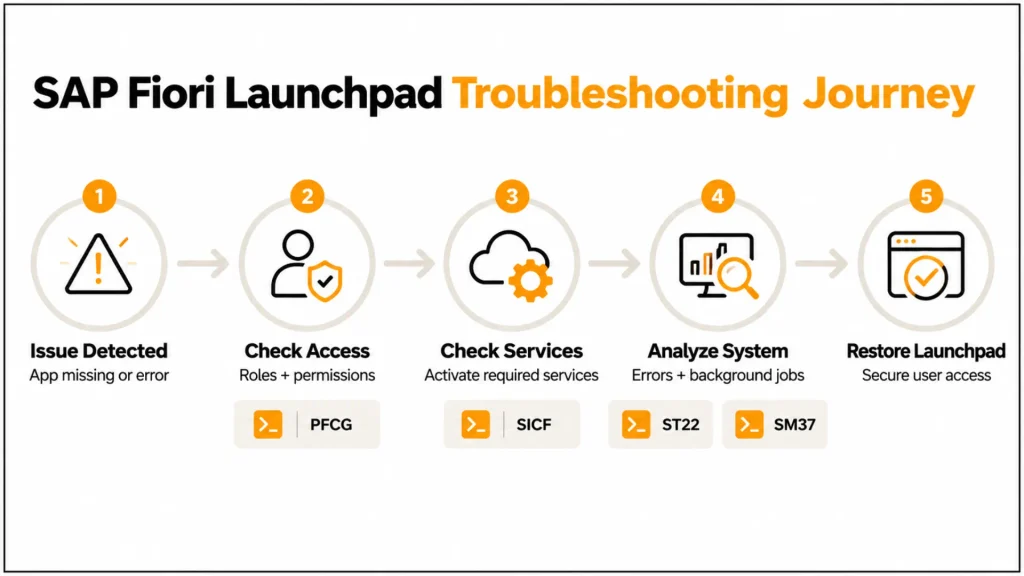
Troubleshooting SAP Fiori Launchpad Issues
Common challenges include:
- Apps not showing up on Launchpad – Typically because of broken target mapping.
- Authorization errors – Misconfiguration of PFCG roles.
- Slow Transaction – Can be improved with caching and monitoring of performance using ST22/SM37.
Therefore, these issues can be rapidly addressed if administrators apply the T-codes methodically.
SAP Fiori TCode Display: Step-by-Step Guide (SAPUI5 Best Practices)
- Standardize TCode usage across teams.
- Write down all configuration and admin changes.
- Train on governance of role assignment.
- Keep Launchpad settings up-to-date with SAP security patches.
Security and Compliance with TCodes
In conclusion, managing SAP system T-codes for the Fiori Launchpad is a security issue. Transaction codes like PFCG and SU01 not only define what a user needs to do but also what line an auditor should take.
Similarly, constant consultation with access logs via SM04 or AL08 minimizes the risk of unauthorized access to Fiori.
Examples by Industry: Understanding SAP Fiori Launchpad
The SAP Fiori Launchpad is the home page for all users of an SAP system. It organizes applications, activities, and analyses through a GUID-based interface.
Wikipedia has the following:
Launchpad – The Launchpad is heavily targeted to improve user experience across all SAP modules, providing a consumer-grade design to achieve this and personalize navigation.
Its success is reliant not only on the UI design but also on the effective use of Transaction Codes (TCodes) that govern configuration, security, and administration.
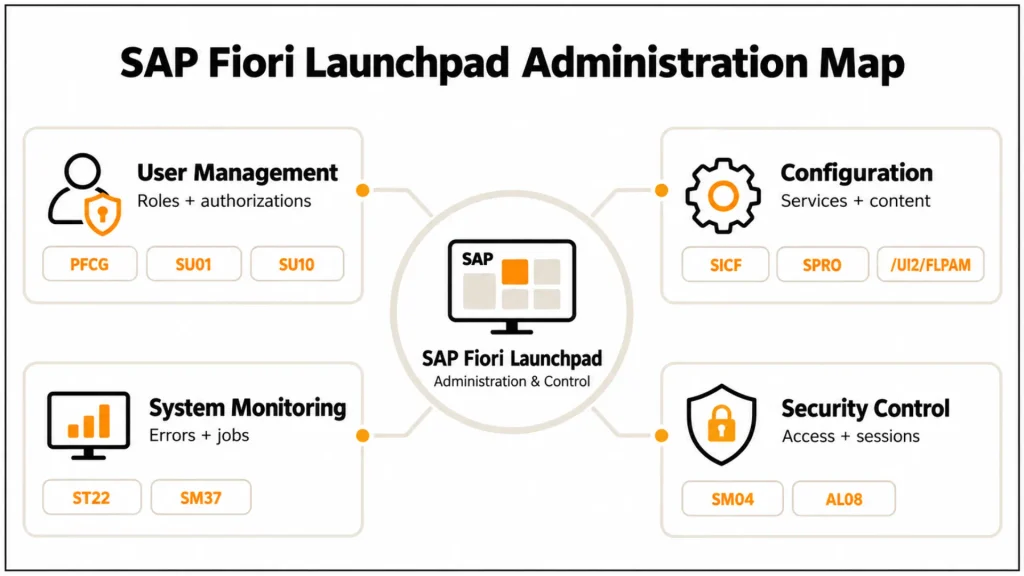
Essential TCodes for Configuration
To set up SAP Fiori Launchpad correctly, the TCodes play a significant role. These provide granular control of user management and app access.
Key Configuration TCodes:
- PFCG – Maintain user roles and authorizations
- SU01 – User Maintenance Profiles (Maintain individual user accounts)
- SU10 – Mass user maintenance for bulk operations
Moreover, with TCodes, these controls tighten security, reduce overhead during the hiring process, and deliver a role-based experience for users. If you are still working with the classic Launchpad Designer, review our breakdown of the SAP Fiori Launchpad Designer TCode before changing legacy catalogue or group configurations.
Optimizing Launchpad Transactions
Optimization is very important after you have the basics set up. Well-optimised Launchpads are faster and smarter to use.
Three Optimization Best Practices:
- Target Mapping: Apps must be well-positioned in user Launchpads.
- Analyze User Feedback: Always improve based on real usage.
- Enable SAML Logon: Get enterprise-class single sign-on support to ensure secure, seamless access.
The Role of Admin Transactions
The Admin T-codes are useful for checking the health of the system, depending on which actions you have to perform.
Critical Admin TCodes:
- ST22 – Checking short dump for technical errors
- SM37 – Monitor background jobs
- AL08/SM04 – Record logon of users and avoid unauthorized access
Integrating these into operational practices enhances stability and security.
Advanced SAP Fiori Launchpad TCodes
In addition to the basics, administrators have advanced TCodes available for finer control.
- SE93 – Create and maintain custom transaction codes
- SICF – ICF nodes for OData services activation maintained
- SPRO – Configuration (project-related configuration)
| Problem or Task | Primary Tool/T-Code | What to Check |
|---|---|---|
| Assign Launchpad content to a role | PFCG | Catalogues, spaces, pages, authorizations |
| Manage technical Launchpad content | /UI2/FLPAM | Technical catalogues, tiles, target mappings |
| Maintain business catalogs | /UI2/FLPCM_CUST | Catalog content and role assignments |
| Check Launchpad content consistency | /UI2/FLC | Content and configuration inconsistencies |
| Check orphaned Launchpad content | /UI2/FLC1 | Orphaned catalogs/groups where applicable |
| Activate ICF services | SICF | Required Launchpad/UI5 ICF nodes |
| Analyze ABAP short dumps | ST22 | Runtime errors and dumps |
| Monitor background jobs | SM37 | Jobs related to the affected process |
| Review active users/sessions | SM04 / AL08 | Current logged-on users and sessions |
| Configure broader SAP settings | SPRO | Relevant SAP Customizing activities |
The exact tools available depend on the SAP release and architecture. Current SAP documentation places /UI2/FLPAM, it/UI2/FLC within the modern Launchpad administration toolset. These are the ones needed to build up a specified launchpad.
For a broader implementation sequence covering roles, OData services, and Launchpad configuration, see our SAP Fiori Launchpad setup walkthrough.
Benchmarking Against Competitors
As per SAP Community Guides and technical documents, enterprises have reported 30% reduced downtime based on a structured TCode strategy.
Comparisons with other SAP implementations allow for best practices to be followed and a quicker path to an optimized deployment.
Tables & Reference Summary
| TCode | Function |
| PFCG | Role Management |
| SU01 | Individual User Maintenance |
| SU10 | Bulk User Maintenance |
| ST22 | Dump Analysis |
| SM37 | Job Monitoring |
| SE93 | Create Custom Transaction Codes |
| SICF | Maintain ICF Nodes |
Troubleshooting SAP Fiori Launchpad Issues
Common challenges include:
- Apps not showing up on Launchpad – Typically because of broken target mapping.
- Authorization errors – Misconfiguration of PFCG roles.
- Slow Transaction – Can be improved with caching and monitoring of performance using ST22/SM37.
These can be rapidly addressed if administrators apply the TCodes methodically.
SAP Fiori TCode Display: Step-by-Step Guide (SAPUI5 Best Practices)
- Standardize TCode usage across teams.
- Write down all configuration and admin changes.
- Train on governance of role assignment.
- Keep Launchpad settings up-to-date with SAP security patches.
Further Insights: Security and Compliance with TCodes
Managing SAP system TCodes for the Fiori Launchpad also requires careful attention to security and access control.
Transaction codes such as PFCG and SU01 support role and user administration, helping organizations control which users can access specific SAP functions and Launchpad content. Likewise, SM04 and AL08 allow administrators to review active user sessions, which can support routine access monitoring and security investigations.
Additionally, organizations should document changes to TCodes, roles, and authorizations as part of their internal IT governance and audit processes. However, specific documentation requirements vary by industry, organization, and applicable regulations, so administrators should verify the requirements that apply to their environment.
Examples by Industry:
- Retail: PFCG and SU10 integrate seasonal staff during Christmas.
- Finance: SM37 optimizes financial closing procedures by regularly monitoring background tasks.
- Manufacturing: ST22 helps diagnose and ensure zero production shutdown.
Conclusion
Ideal for SAP administrators, consultants, and developers. With configuration TCodes (e.g., PFCG, SU01) and admin TCodes (e.g., ST22, SM37), you can make your SAP environment secure, scalable, and user-friendly.
Knowledge of these TCodes not only makes your daily job easy but also prepares companies to adapt to new features in SAP Fiori and SAP BTP.Organizations can harness the complete power of SAP Fiori Launchpad and ensure an end-to-end delightful user experience through controlled governance and proactive optimization
FAQs
1. What is SAP Fiori Launchpad?
SAP Fiori Launchpad is a centralized role model that serves as an entry point for SAP applications.
2. How can I leverage SAP Fiori Launchpad Transaction Codes?
Begin by using PFCG, SU01, and SU10 for configuration and ST22, SM37, and AL08 for administration.
3. Why are configuration proficiencies important?
They allow access management and ensure apps are administered only to authorized users.
4. Which administration TCodes are most important?
ST22 for troubleshooting, SM37 for background jobs, and SM04 for session control.
5. Is it possible to personalize the Launchpad through TCodes?
Yes, you can customize and maintain services as per business requirements through SE93 and SICF.
6. How do you manage TCode?
Adhere to governance models, normalize use, and monitor performance on a regular basis.
7. How are TCodes used for compliance in a SAP landscape?
They ensure traceability and governance by controlling user access and tracking system changes.
8. What T-code is used to manage SAP Fiori Launchpad roles?
PFCG is used to maintain authorization roles and assign relevant Launchpad content such as catalogs and spaces to roles.
9. What is /UI2/FLPAM used for?
/UI2/FLPAM opens the SAP Fiori Launchpad App Manager, which is used for relevant technical Launchpad content administration, including technical catalogs, tiles, and target mappings.
10. What is /UI2/FLPCM_CUST used for?
/UI2/FLPCM_CUST opens the client-specific Launchpad Content Manager, which administrators can use to maintain business catalogs and inspect Launchpad content and related issues.




