

Introduction
The mistake most organizations make with SAP Fiori isn’t a technical one; it’s assuming that deploying apps is the project. It isn’t. The moment a Fiori Launchpad hub crosses a few dozen apps without a deliberate catalogue structure behind them, users can’t find what they need, admins can’t explain why one person sees an app another person doesn’t, and every new app request turns into a support ticket instead of a self-service tile.
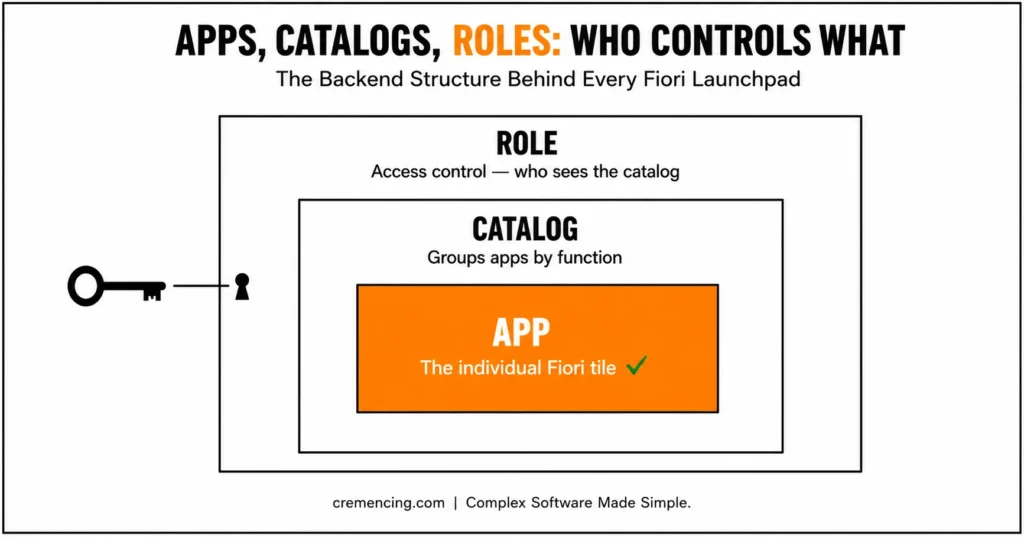
The SAP Fiori apps catalogue is the layer that prevents that: the backend structure that decides which apps exist, how they’re grouped, and who gets access, sitting underneath the Launchpad’s visual layer rather than being the Launchpad itself. This guide walks through how catalogues, roles, and groups (or Spaces and pages, depending on your release) actually fit together and the classification steps that keep that structure from collapsing back into clutter as your app count grows.
The SAP Fiori Apps Catalogue functions as the essential backend framework for structuring, securing, and deploying user applications within an enterprise SAP landscape. By logically grouping transactional, analytical, and fact-sheet applications based on functional roles rather than deploying unorganized software pools, organizations streamline authorization management via PFCG roles.
Aligning catalogue structures directly with business process maps drastically reduces system clutter on the launchpad. Ultimately, this strategic classification model improves app discoverability, speeds up task execution by 30–40%, and drives overall end-user adoption.
What is the SAP Fiori apps catalog?
The SAP Fiori apps reference library is an organized list of the SAP Fiori apps that are classified by functionality, business roles, or use cases.
It is the backend layer that manages:
- Which apps are available
- How apps are grouped
- How users access apps
The catalogue describes the logical structure behind apps (unlike Launchpad, which is a visual display of apps).
Key Components
- Catalogues: Group of apps by function
- Groups: Collections of apps given to users
- Roles: Access catalogues and apps
Every SAP Fiori app is linked to a catalogue, and this catalogue is again mapped to a role. In addition
this is the layout that identifies how the launchpad looks for users.
And even the best apps become inaccessible without catalogue management.
| Element | What it controls | Where it’s maintained | Model |
|---|---|---|---|
| Catalog | Which apps/tiles exist and what they point to (OData service, target mapping) | Launchpad Designer (/UI2/FLPD_CUST//UI2/FLPD_CONF) or S/4HANA admin apps | Both classic and Spaces models |
| Role | Which catalogs a user can access | PFCG | Both classic and Spaces models |
| Group | How apps are visually arranged for a user | Launchpad Designer (classic) | Classic Fiori Launchpad / ECC Gateway hub |
| Space & Page | How apps are visually arranged for a user (modern equivalent of Groups) | S/4HANA launchpad admin apps | S/4HANA 2020+ |
Classification and Management of SAP Fiori Apps
You can also ensure a structured and scalable Fiori application architecture by understanding how to manage it step by step
Step 1: Identify Roles In Your Business
Start by defining user roles:
- Finance users
- Procurement teams
- HR staff
Each role should represent real business responsibilities. It is the basis of app categorization.
Step 2: Map Business Processes to Apps
Assign apps based on processes:
- Transactional apps for operations
- Analytical apps for reporting
- Approval apps for workflows
Avoid grouping apps randomly. In addition, there should be a clear purpose for each app.
Step 3: Create Catalogs
Organize apps using catalogue structure:
- Group apps by function
- Avoid overly large catalogues
- Maintain clear naming conventions
This step guarantees clarity and scalability.
Step 4: Assign Catalogues to Roles
Link catalogues to user roles:
- Use role management tools
- Ensure correct authorization
- Validate access
This way, only relevant apps show up for the users.
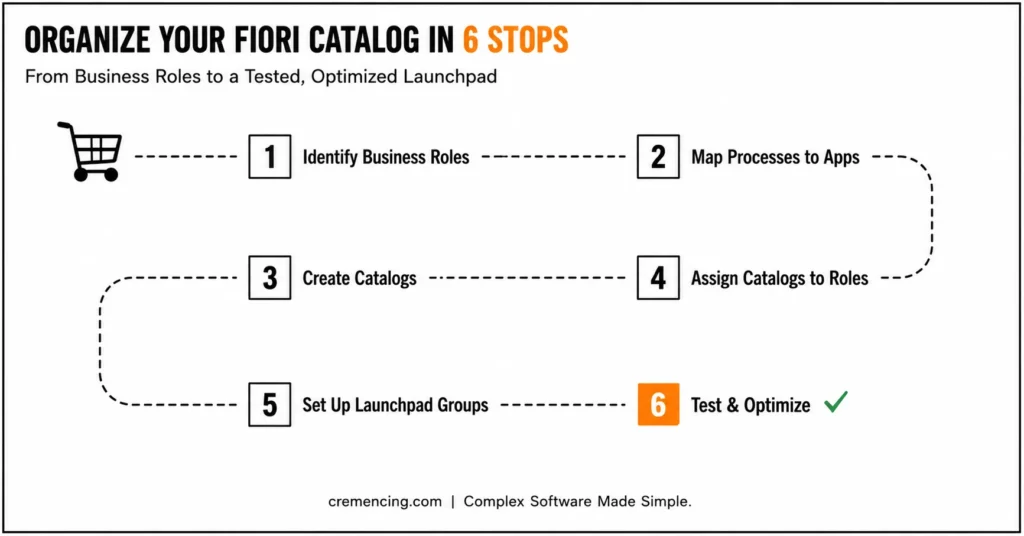
Step 5: Set Up Launchpad Groups
Groups control how apps appear:
- Arrange apps for easy navigation
- Prioritize frequently used apps
- Avoid clutter
Also, this improves user experience.
Step 6: Test And Optimize
After setup:
- Test with real users
- Validate navigation flow
- Optimize based on feedback
Therefore, this ensures the system works in real scenarios.”
Proper SAP Fiori Apps Management Benefits and ROI
If Fiori applications are managed properly, Because of this you can get measurable improvements.
Key Benefits
- Speed up app lookup time by 30–40%
- Improve user productivity
- Simplify navigation
- Reduce training requirements
Operational Benefits
- Better control over app access
- Faster onboarding for new users
- Reduced support issues
Business Impact
- Higher system adoption
- Improved process efficiency
- Faster decision-making
Top Mistakes to Avoid in SAP Fiori Apps Management
This leads to poor design of the catalogue, and many organizations fall prey.
Common Mistakes
- Creating large, unstructured catalogs
- Checking for system issues with your apps.
- Ignoring business roles
- Using inconsistent naming conventions
- Not testing user experience
Also these mistakes lead to:
- Confusing navigation
- Low user adoption
- Increased support requests
Best Practices
- Use role-based design
- Keep catalogs simple and focused
- Regularly review and update catalogs
- Align the app structure with the business processes
- Monitor usage and optimize
Proper management ensures long-term success. Most people don’t know this about Fiori. Also, we are teaching them.
Why Most Fiori Implementations Fail in App Organization
Nestled within the depths of most how-tos is a lesson on creating catalogs, but they rarely detail how to do so strategically. The technical setup isn’t the real problem. Also, it is structured.
What Most Teams Miss
- Aligning catalogs with business workflows
- Designing for user experience
- Planning for scalability
Key Insight
Successful organizations focus on:
- Business-driven catalog design
- Continuous optimization
- Simplified user journeys
They view SAP Fiori apps as a part of the system rather than simply individual tools.
Conclusion
Catalog management isn’t a one-time setup task; it’s the structural layer that decides whether your Fiori Launchpad scales cleanly to 50 apps or collapses into the exact clutter this post opened with. The six steps here define roles, map processes to apps, build focused catalogues, assign them correctly, organize the user-facing layer, and test with real people to work out whether that last layer is a classic group or a modern space and page, because the underlying logic (app → catalog → role) hasn’t changed even where the presentation has.
Well, SAP Fiori apps can sometimes make or break your entire experience with SAP, and you definitely want to manage them properly for an overall efficient and usable environment. Because of this, the SAP Fiori apps catalogue allows you to establish the framework needed for structuring the apps, therefore controlling access, and improving user experience.
The organizations that get this right don’t treat catalogue design as a basic afterthought; they treat it as part of how the business actually works, revisited as roles and app counts grow rather than configured once and left alone. If you’re not sure whether your system is still running the classic Groups model or has moved to Spaces & Pages, that’s the first thing worth checking before your next catalog change the answer changes which admin tools you should actually be opening.
FAQ Section
What is the SAP Fiori apps catalog?
Business catalogues allow you to manage access to SAP Fiori applications in a structured way by using a collection of apps.
Assignment of SAP Fiori apps to users
Apps get assigned based on catalogues and roles.
What is the difference between a catalog and a group?
A catalogue dictates what apps a user can access, while a group controls the look and feel of these apps.
Why are apps missing in Fiori?
This usually happens because roles or catalogues were not assigned correctly.
What’s the difference between the classic Fiori Launchpad and Spaces & Pages?
The classic model organizes apps into groups assigned through catalogues and roles. Spaces & Pages, introduced with S/4HANA 2020, replace Groups as the user-facing organizing layer, while catalogues and role assignment work the same way underneath.
Can one app belong to more than one catalogue?
Yes, the same app/tile can be included in multiple catalogues so it’s accessible to more than one business role without duplicating the underlying OData service or target mapping.
Why do some users see duplicate tiles in their launchpad?
This usually happens when the same app is assigned through more than one role or catalogue the user has and no de-duplication step was applied at the group/page level.




