
Introduction
Most developers assume SAP Fiori development is difficult because the technology is complex. It isn’t…It isn’t. UI5, OData, and the Fiori launchpad are well-documented, well-supported tools; the difficulty beginners run into has almost nothing to do with the technology itself.
Many developers start building Fiori screens right away without first understanding how UI5 communicates with OData or how a Fiori application works from end to end. As a result, they may complete several tutorials and build simple apps, but struggle when a real project requires them to troubleshoot a binding error or extend a backend service. Without a clear understanding of the underlying architecture, moving from tutorial projects to real-world development can quickly become frustrating.
This guide takes a different approach. First, it highlights the common mistakes that slow down beginners. Next, it provides a practical 7-step learning path designed to build your understanding in the right order. Finally, it explains what to focus on after learning the basics, helping you spend less time repeating tutorials and more time developing skills that apply to real-world SAP Fiori projects.
The hype starts, and many developers get through the basics of learning SAP Fiori development but hit a wall in no time. They go through the tutorials, create trivial apps, and still have no idea how all that works. This leads to heaps of frustration, slow progress, and never-ending confusion about topics such as UI5, OData, and Fiori architecture
From Code to Metadata
A primary hurdle for novice SAP Fiori developers is treating the framework like conventional frontend platforms by manually constructing custom XML views and JavaScript controllers for every interface. Official SAP guidelines advocate an “elements-first,” metadata-driven architecture.
By defining UI floorplans, layout structures, and field-level metadata directly within backend Core Data Services (CDS) views or CAP models via OData annotations, teams significantly reduce custom codebase volume while maintaining native SAP User Experience standards. When custom extensions are required, modern development environments leverage the Flexible Programming Model for OData V4, allowing developers to integrate custom SAPUI5 views into standardized Fiori Elements applications without creating long-term maintenance overhead.
What is SAP Fiori Development?
SAP Fiori development focuses on developing a modern user interface and experience application with the help of SAP technologies such as UI5, OData services, and SAP Business Application Studio (BAS). Fiori apps are different from traditional SAP GUI interfaces: Responsive & Mobile-Ready
- Role-based and user-centric
- Designed for a better user experience
Fundamentals of SAP Fiori Development
- What is SAP UI5: A JavaScript framework for building UI
- OData Services: Backend communication layer
- Fiori launchpad: Central access point provided for the apps
- BAS or Eclipse: Development environments
- Key to mastering Fiori is understanding how these components work together.
SAP Fiori Development: How to Learn Faster
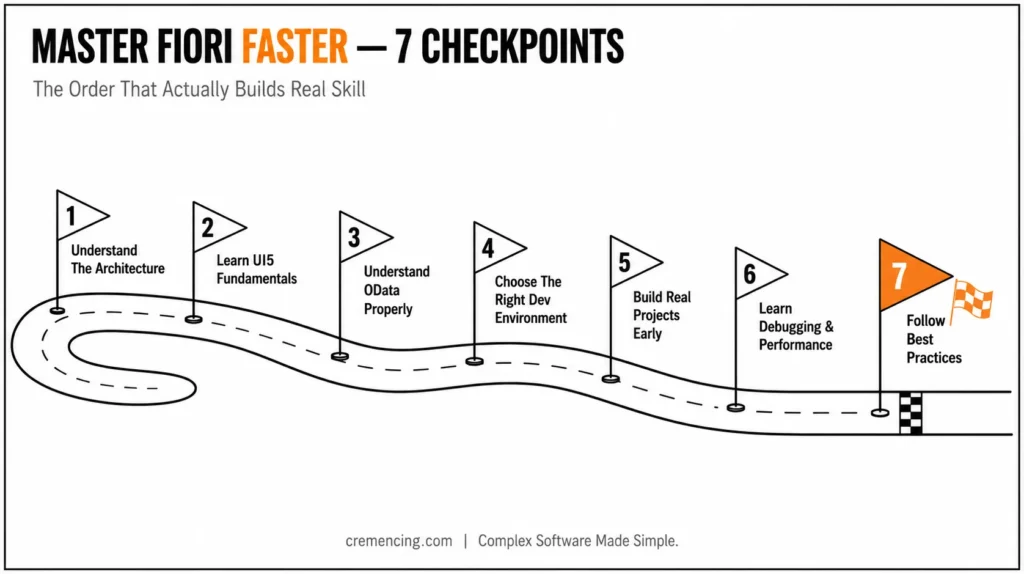
Step 1 – Get to know the Architecture
The common thing about beginners is that they go into coding directly.
Instead:
- Understanding How UI5 Talks With OData
- Understand frontend vs backend roles
- Study the Fiori app structure. This builds a strong foundation.
Step 2 — Learn your UI5 Fundamentals
Fiori development is based on UI5.
Key areas:
- Controls and layouts
- Data binding
- MVC architecture
It is UI5 clarity that makes sense; otherwise, everything looks like confusion.
Step 3 – Understand OData the Right Way
Most people who are starting out think of OData as just another black box. An OData V2 or V4 service publishes entity sets representing behind-the-scenes business objects: Knowledge of the OData service metadata document ($metadata) makes the difference between developers who can troubleshoot OData binding problems and those who cannot.
The first thing to check when a UI5 list binding is empty is whether the syntax of the $expand or filter in the entity set corresponds to the syntax supported by the service. Take the time to carefully read a service’s metadata before writing any UI code against it, and recognize that a service-layer error (such as wrong entity/property name, unsupported query option) is not the same as a UI5 binding error (such as wrong path, missing model) — and requires very different fixes!
OData connects the frontend and backend.
Focus on:
- CRUD operations
- Service creation
- Data handling
Skipping this creates major gaps later.
Step 4— Select an Appropriate Development Environment
Choose tools wisely:
- BAS (recommended) for cloud-based development
- Eclipse for legacy setups
- The wrong setup causes execution glitches.
| SAP Business Application Studio (BAS) | Eclipse (ABAP Development Tools) | |
|---|---|---|
| Best for | Cloud/S/4HANA Cloud, RAP/CAP development | On-prem ABAP-heavy or legacy extension work |
| Setup | Browser-based, no local install | Local install, JDK + ADT plugin required |
| Typical use case | New Fiori elements apps, freestyle UI5, RAP business objects | Classic BAdIs, function modules, ABAP-side debugging |
| Learning curve | Lower for frontend-first developers | Lower for developers already fluent in ABAP tooling |
Step 5– Building real projects earlier
Avoid only following tutorials.
Instead:
- Create small real-world apps
- Solve actual business problems
- Practice debugging
This accelerates learning significantly.
Step 6 – Learn Basic Debugging and Performance Optimization
Many beginners ignore debugging.
Learn:
- Browser developer tools
- Network requests
- Performance tuning
This is where the true expertise returns.
Step 7– Once It’s Game Time, Always Follow Best Practices
Adopt:
- Clean code structure
- Reusable components
- Standard naming conventions
- Good habits prevent future issues.
Fiori Learning Path — Quick Reference
- Architecture first (UI5 ↔ OData ↔ backend roles)
- UI5 fundamentals (controls, data binding, MVC)
- OData mechanics (metadata, CRUD, query options)
- Environment choice (BAS vs. Eclipse — see table above)
- Build real apps, not just tutorials
- Debugging + performance tuning (browser dev tools, network tab)
- Best practices (clean structure, reusable components, naming)
The Benefits & ROI of Learning SAP Fiori Development
SAP Fiori is extremely beneficial for both the prospects of your business and career development.
Career Benefits
- High demand for Fiori developers
- Competitive salaries
- Opportunities in global SAP projects
Productivity Benefits
- Faster app development
- Better user experience
- Reduced development errors
Business Impact
- Improved system usability
- Increased user adoption
- Faster decision-making
- Learning Fiori at an early stage gives developers a head start.
Top 5 SAP Learning Mistakes
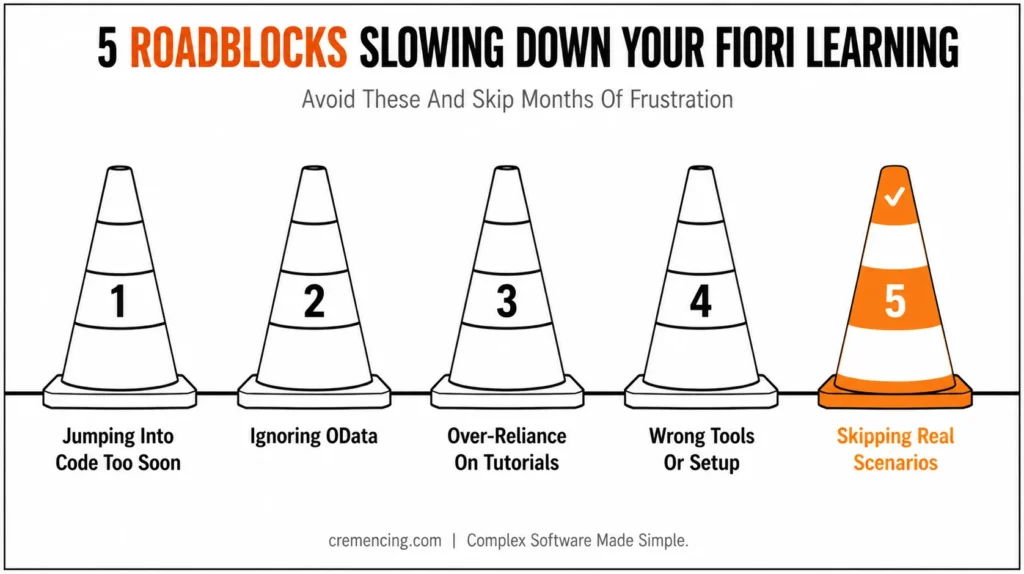
Mistake 1: Jumping Into Programming Before Learning the Fundamentals
It causes ambiguity and bad structure.
Mistake 2: Ignoring OData
Separating the frontend from the backend.
Mistake 3: Over-Reliance on Tutorials
Limits problem-solving ability.
Mistake 4: Incorrect tools or setup
It is slow development and an unnecessary headache.
Mistake #5: Not Training on Real Situations
Prevents practical understanding.
SAP Fiori Development Best Practices
- Learn concepts before coding
- Build projects consistently
- Use official SAP resources
- Focus on debugging skills
What You Should Learn After the Fiori Development Basics
| No. | Key Challenge | What You Need to Learn |
|---|---|---|
| 01 | Error Management in Production | How to identify, handle, and troubleshoot errors in a live production environment |
| 02 | App Performance Optimization | How to improve app speed, responsiveness, and overall performance |
| 03 | Complex Backend Integration | How to integrate Fiori applications with complex backend systems and services |
| 04 | Large-Scale Application Management | How to structure, maintain, and manage large-scale Fiori applications efficiently |
Example
- One developer boosted productivity by 50% after:
- Moving from tutorials to real projects
- Learning debugging early
- Understanding system architecture
Conclusion
Fiori is not hard to develop due to the framework; it’s hard when the basics are forgotten. These five errors (]
skipping architecture fundamentals, the need to ignore OData, the reliance on tutorials, choosing the wrong tooling, and steering clear of real projects) all come down to the same thing: building before you understand how the pieces fit together.
The answer is not more tutorials; it’s the order: Architecture first, UI5 fundamentals second, OData mechanics third, and real projects, real debugging. Those who do the same things in the same order make the transition from “I can copy a tutorial” to “I can extend and fix a production app” more quickly than those who do not, because they are not re-learning what they have missed out on each new project.
Proper Approach simplifies SAP Fiori development. It is not because it is very complex; instead, in most of the case beginner fails due to taking the wrong path to learn.
If you take this philosophy of getting the right fundamentals, building real projects, having a basic understanding of architecture, and so on, then you will conquer Fiori faster than 80% of developers. Learn from typical mistakes, apply proven steps to be successful in any process, and keep enhancing your capabilities.
FAQ
What is SAP Fiori development?
This is a modern SAP application development tool based on UI5, OData, and Fiori design cognitively.
How hard is it to learn SAP Fiori?
It can be the most difficult at first, but a systematic process makes it easy
Tools used for development in SAP Fiori?
Some common tools are SAP Business Application Studio and Eclipse.
How long does it take to learn SAP Fiori?
After some months of constant practice, you can learn such basic skills.
What skills do you need for SAP Fiori development?
UI5, ODATA, JavaScript, and SAP architecture
Is SAP Fiori development the same as UI5 development?
Not exactly. UI5 is the frontend framework Fiori apps are built with, but Fiori also includes the design guidelines, launchpad, and OData integration layer around it.
Do I need to know ABAP to build Fiori apps?
Not for the frontend itself, but backend OData service development (especially in RAP) typically does require ABAP knowledge.
What’s the difference between BAS and SAP Web IDE?
Web IDE has been phased out in favor of BAS for cloud-based Fiori/UI5 development.
Can I learn Fiori development without access to an SAP system?
Partially, UI5 fundamentals can be practiced against public demo OData services, but real Fiori/OData integration requires a backend.
How is Fiori development different from classic SAP GUI development?
Fiori is role-based, responsive, and decoupled from the backend via OData, whereas GUI transactions are backend-bound and screen-based rather than app-based.




