
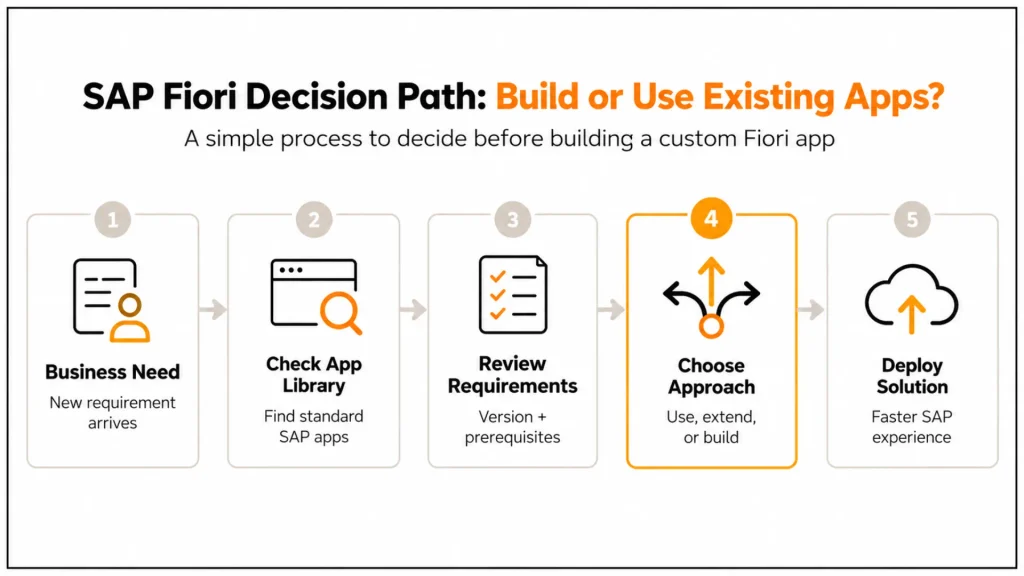
If an SAP team needs a standard Fiori application, the first question should not be “How do we build it?” It should be “Does SAP already provide it, and what does implementation require?” That distinction matters because the SAP Fiori Apps Reference Library and the SAP Fiori Design System solve very different problems.
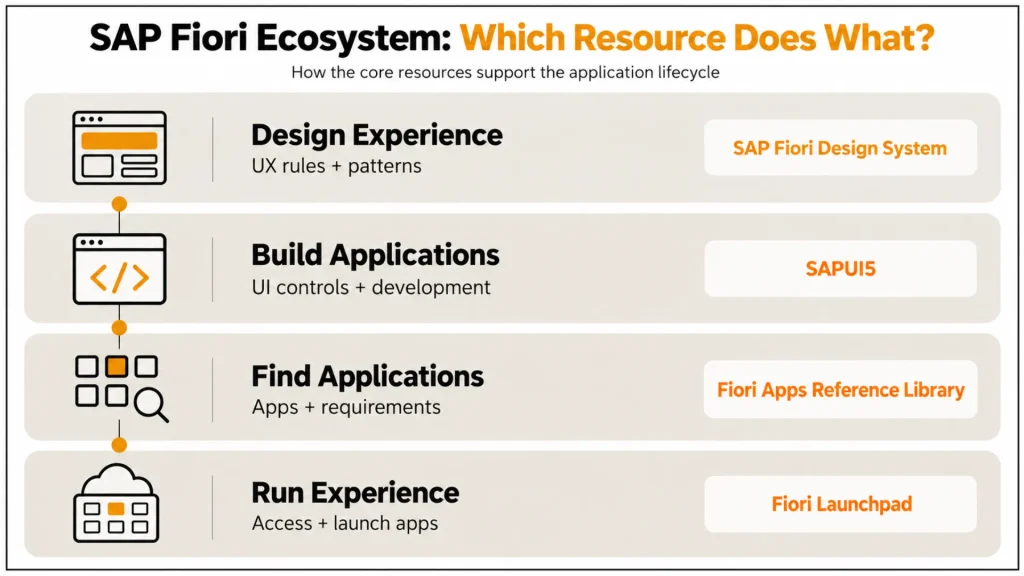
The Apps Reference Library helps consultants, architects, and administrators explore available applications, review product versions and technical prerequisites, and plan implementation. The Fiori Design System, meanwhile, provides the design language and guidance used to create consistent SAP experiences, while SAPUI5 provides the development framework for building web interfaces.
This distinction is especially important in S/4HANA projects, where choosing a delivered application, extending an existing one, or developing a custom Fiori app can lead to very different implementation and maintenance decisions. This article breaks down what each resource actually does, where it fits in the Fiori architecture, and how technical teams should use them during application selection and implementation.
Understanding SAP Fiori Library
Use SAP Fiori Design System when discussing design principles, patterns, components, accessibility, and UX guidance. Use SAP Fiori Apps Reference Library when discussing standard apps, technical requirements, configuration, prerequisites, app versions, and implementation planning.
- Design Systems: a fine line between clarity, responsiveness, and consistency on any device.
- Core Library: A collection of UI5 controls and templates, out of the box, to speed up development.
- Development Resources: Documentation, samples, and patterns to help you get started on your development journey.
The Fiori Library guarantees that all applications will follow SAP’s design language, leading to faster adoption and less training for the end user. For a deeper look at the technologies behind custom Fiori applications, see our breakdown of SAP Fiori development with UI5, JavaScript, and OData.
The SAP App Library
The SAP Fiori Apps Reference Library is SAP’s central resource for exploring available Fiori apps, reviewing technical and functional information, checking prerequisites, and planning implementation.
- Built-In Apps: Introducing a variety of pre-made apps for business.
- Implementation Hierarchy: The SAP Fiori Apps Reference Library contains app information across supported SAP product versions and provides implementation-related data that can be used when planning Fiori deployments.
- Resource Efficient: Reduces time and cost associated with developing applications from scratch.
The App Library eliminates development overhead for enterprises; they can now focus on customizing and extending existing apps instead of building everything from the ground up. For additional implementation context, consultants can refer to the official SAP Fiori documentation for release-specific guidance and technical resources.
Features Comparison: SAP Fiori Library vs App Library
| Resource | Primary purpose | What teams use it for | Typical technical audience |
|---|---|---|---|
| SAP Fiori Design System | UX and design standards | Patterns, components, interaction, accessibility and consistent design | UX designers, Fiori developers |
| SAPUI5 | UI development framework | Controls, layouts, models, data binding and application development | Fiori/UI developers |
| SAP Fiori Apps Reference Library | App discovery and implementation planning | App availability, versions, prerequisites, configuration and implementation information | SAP consultants, architects, administrators |
| SAP Fiori Launchpad | Application access/runtime experience | Launching and organizing applications for users | Administrators, consultants, end users |
Critical Information for the SAP Ecosystem
To achieve the most from these libraries, both should ideally be used in conjunction with other SAP assets:
- Fiori Resources: Items we need for responsive, accessible apps.
- GitHub Fiori Showcase: Apps and controls for hands-on use.
- SAP Help: Deep technical knowledge and recommendations for embedding.
Navigating the Fiori Design System
Contemporary SAP applications are built with the help of the SAP Fiori Design System. Following these guidelines will ensure that the app experience is consistent across devices. It contains typography, design fundamentals, interaction patterns, and accessibility techniques. By adjusting the design system, you will make the product more user-friendly and help to increase productivity by reducing cognitive strain on end users.
Best Practices and Expert Tips
No SAP source is provided for this industry-specific recommendation. Either provide a documented example or rewrite it as a clearly labeled hypothetical scenario.
- Start with Fiori Library: Build apps using design principles for a uniform feel
- App Library Use: Build applications once and adopt quickly.
- Lifelong Learning: Further discover GitHub resources and participate in SAP community discussions.
- Agile Principles: Gradually work the risk out with incremental enhancements and speed up shipping.
Extended Insights: Practical Use Cases
Use Case 1: Fiori Library in Custom Development
A manufacturing firm wanted to develop a role-specific dashboard for the plant managers. Leveraging the SAP Fiori Library, we created a consistent interface made up of UI5 components that would encourage rapid acceptance by operators with minimal training.
Case 2: SAP App Library Accelerates Deployment
A finance team added a prebuilt invoicing app from the app library. Rather than building everything from the ground up, they customized the workflow and plugged it into their ERP system to slash months off of development time.
Case 3: Best of Both for Hybrids
Retail businesses use the App Library for HR, finance, and standard functions and the Fiori Library for customer-facing custom apps. This equilibrium satisfies design rules while meeting business needs.
Future of SAP Libraries
As SAP accelerates its investment in SAP S/4HANA Cloud and SAP Business Technology Platform (BTP), both component and application libraries will continue to mature rapidly. Expect to see expanded low-code/no-code capabilities, AI-driven design recommendations, and tighter integration with prebuilt applications across the user-centric SAP Fiori ecosystem. When selecting the right Fiori application, teams can use the SAP Fiori Apps Reference Library to review app details, technical requirements, and implementation information.
Conclusion
The key takeaway is that SAP Fiori Design System, SAPUI5, SAP Fiori Apps Reference Library, and SAP Fiori Launchpad should not be treated as interchangeable “libraries.” They operate at different points in the Fiori application lifecycle.
For an S/4HANA implementation team, that distinction changes the decision process. Instead of starting custom development because a business requirement exists, first verify the standard-app landscape, confirm the exact product release, review the implementation requirements, and only then decide whether configuration, extension, or custom development is appropriate. SAP’s own documentation supports this discovery-to-planning workflow through the Apps Reference Library and its integration with related planning resources.
We differentiate on where we stand with the SAP Fiori Library vs. the SAP app library! So, you could say the Fiori Library takes care of a consistent design with all the UI assets you need, and the App Library clears your mind, fulfilling digital needs in no time.
FAQs:
What is the SAP Fiori Library, and why does it matter?
The SAP Fiori Library offers all relevant UI floorplans, patterns, and controls along with corresponding design guidelines, such as information about accessibility or interaction on touch devices. It powers scalable, usable applications.
What is unique about SAP App Library compared to SAP Fiori Library?
While Fiori Library is for UI/UX design standards and reusable parts, the App Library provides business applications out of the box, which you can deploy or personalize in less time.
Is it possible to use SAP Fiori Library together with SAP App Library?
Yes. Customers usually develop custom UIs using SAP Fiori Library and deploy standard applications via SAP App Library. This balance allows consistency within design and faster time-to-value.
Should beginners use SAP Fiori Library or App Library?
The SAP App Library works best for those just starting. If you’re new to Fiori, the library with pre-built apps can help with real-world use cases. Once comfortable, you can explore the SAP Fiori Library for custom design and advanced development.
What does SAP Fiori Library vs App Library use for its implementation?
Among others, you will find the SAP Fiori Design System, showcased in GitHub, and documentation from official channels. They serve as a kind of “coding cookbook” for using both libraries.
Is SAP Fiori Apps Reference Library used for custom app development?
It can help teams determine whether an SAP-delivered app already addresses a requirement. Custom development itself is performed using technologies such as SAPUI5, Fiori elements, and relevant backend services.
Does the SAP Fiori Apps Reference Library show previous app versions?
Yes. SAP documents that the library provides data for previous app versions, which can be useful when assessing existing landscapes and upgrades.
Can the SAP Fiori Apps Reference Library help with implementation planning?
Yes. SAP documents implementation and configuration information, aggregation capabilities, prerequisites, and integration with Maintenance Planner.





One Response