very unplanned Saturday-morning downtime on your SAP Cloud maintenance schedule costs far more than four hours. You pay for it in Monday postmortems, missed cutover windows, and team hours spent rebuilding half-finished batch chains.
None of this is actually unplanned. SAP publishes maintenance calendars for S/4HANA Cloud, Public Edition and SAP BTP ABAP Environment months in advance. These region-specific schedules live inside the Cloud Availability Center.
The schedule isn’t hidden. The real issue is that Basis and development teams rarely wire these dates into their daily workflows.
This guide gives you the exact path to that calendar. You will learn how to set up push notifications for updates. Finally, we will build a small ABAP-based check to stop background jobs or cutovers from running during known maintenance windows.
Proactive Management of SAP Cloud Maintenance Schedule and Tenant Upgrades
SAP Cloud maintenance and upgrade schedules vary significantly across product editions, tenant types, and deployment regions. Rather than relying on static documents, organizations must monitor tenant-specific schedules through the Cloud Availability Center within SAP for Me, where SAP publishes major upgrade windows in UTC for solutions like SAP S/4HANA Cloud, Public Edition, and SAP BTP ABAP Environment.
Major upgrades can involve planned downtime of up to 24 hours, alongside weekly or monthly technical maintenance windows. Because release dates frequently differ between Test, Development, and Production systems within the same landscape, IT teams should subscribe to Cloud System Notification Subscriptions (CSNS) to automate real-time downtime alerts and align background job scheduling and change freezes accordingly.
Step 1: Find Your SAP Cloud Maintenance Schedule in the Cloud Availability Center
Most teams assume ‘maintenance schedule’ means one PDF. However, it doesn’t.SAP publishes separate calendars per cloud service and per landscape type (1-system, 2-system, 3-system). The dates differ by region and by whether your tenant is Test, Starter, Development, or Production. SAP lists maintenance and major upgrade windows for its cloud services with start times and maximum scheduled downtime duration per region, in UTC.
Go to SAP for Me → Systems & Provisioning → Cloud Availability Centre. Filter by your cloud service (for example, ‘SAP S/4HANA Cloud, Public Edition’ or ‘SAP BTP ABAP Environment’) and solution area. As a result, this shows the actual dated calendar for the current and next release cycle, not a generic table.
For the SAP BTP ABAP environment specifically, the system can use up to four hours of downtime on any weekend for SAP HANA Cloud updates and hotfix collections. On top of that, 2026 has four major upgrade windows, each bringing up to 24 hours of potential unavailability. Treat every published window as if it will be fully used; plan around the worst case, not the best case.
For the SAP BTP ABAP environment specifically, the system can use a downtime of up to four hours on potentially any weekend to apply SAP HANA Cloud updates and hotfix collections, and 2026 has four major upgrade windows, bringing up to 24 hours of potential unavailability each.
ABAP Sample Lookup Report for SAP Cloud Maintenance Schedule
" Report: Z_CHECK_MAINTENANCE_LOOKUP

" Purpose: quick reference note for developers—no live API call exists

" for the Cloud Availability Centre, so this just centralizes the manual ci

" links your team should bookmark instead of re-searching them.

REPORT z_check_maintenance_lookup.

WRITE: / 'Maintenance schedule sources (bookmark these)."

WRITE: / '1. SAP for Me > Cloud Availability Center (per-tenant calendar)'.

WRITE: / '2. SAP Note 2825498 (S/4HANA Cloud Public Edition standard windows)'.

WRITE: / '3. Your Customer Number Central Component (CCC) upgrade PDF'.

" S/4HANA 2023+ and BTP ABAP Environment both list windows in UTC —

" convert before communicating internally; see Step 3.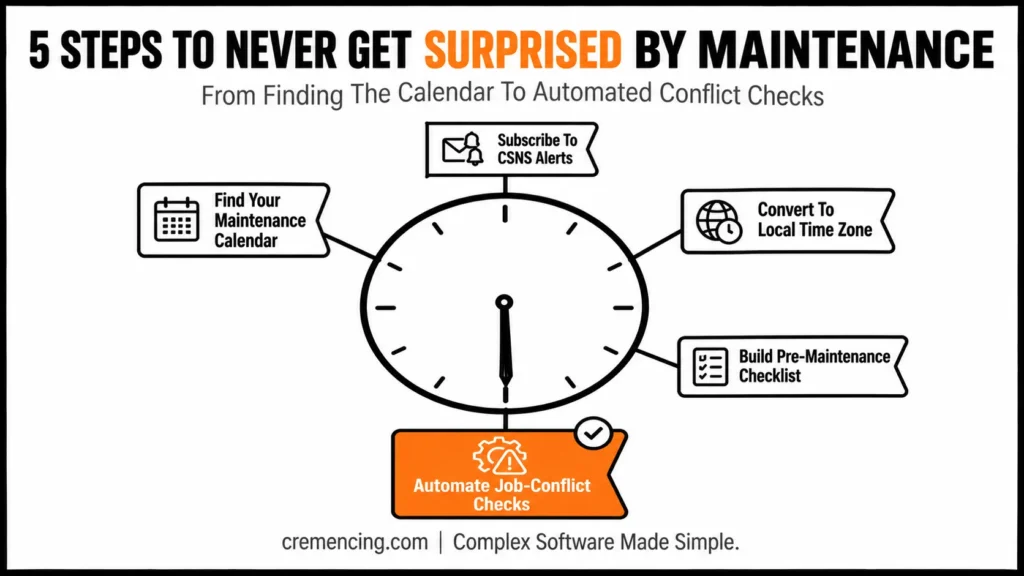
The Cloud Availability Center calendar is per-tenant, not per-customer — a Test system on a given cloud service can show a different upgrade date than the Production tenant sharing the same three-system landscape. When you filter by cloud service, also filter by the specific system ID before reading the date off the page; teams that bookmark the calendar at the cloud-service level often end up applying the Test-tenant date to a Production change freeze by mistake.
Step 2: Get Notified Before the Maintenance Window Hits (CSNS)
Waiting to check the maintenance schedule manually is how teams get surprised. SAP has a subscription mechanism specifically for this. Customers can register for Cloud System Notification Subscriptions (CSNS) in SAP for Me to receive important information about planned and unplanned downtimes.
Register the distribution list your Basis team actually monitors, not one person’s inbox. Upgrade and downtime notifications go out well ahead of the scheduled weekend if that one person is on leave; your team loses the notice.
For S/4HANA Cloud, Public Edition, notification timing follows the release stage. SAP notifies each customer by email four weeks before the test system upgrade. Quality and production-adjacent upgrades get roughly six weeks of advance notice. Put both dates on your change calendar the day you receive the notice, not the day of the window.
Sample notification logging class
" Class: ZCL_MAINTENANCE_NOTICE_LOG

" Purpose: log every maintenance notification email as a Z-table entry,

" so Basis has an auditable trail instead of relying on inbox search.

CLASS zcl_maintenance_notice_log DEFINITION PUBLIC.

  PUBLIC SECTION.

    METHODS: log_notice

      IMPORTING

        iv_system      TYPE string   " e.g. 'PRD - S/4HANA Cloud PE'

        iv_window_date TYPE d        " scheduled maintenance date

        iv_notice_date TYPE d        " date the email arrived

        iv_window_type TYPE string.  " 'WEEKLY' or 'MAJOR_UPGRADE'

ENDCLASS.

CLASS zcl_maintenance_notice_log IMPLEMENTATION.

  METHOD log_notice.

    DATA(ls_entry) = VALUE zmaint_log( system      = iv_system

                                        window_date = iv_window_date

                                        notice_date = iv_notice_date

                                        window_type = iv_window_type

                                        created_by  = sy-uname

                                        created_at  = sy-datum ).

    INSERT zmaint_log FROM ls_entry.

    Create the custom Z-table zmaint_log via SE11 first, but note that S/4HANA Cloud restricts direct SE11 access, so use an ABAP Cloud CDS-based table definition instead. " S/4HANA Cloud 2023+ required

  ENDMETHOD.

ENDCLASS.
Step 3 — Convert Your Maintenance Schedule to the Right Time Zone
This is where most disruption complaints against the SAP cloud maintenance schedule actually come from- not the downtime itself, but the mismatch between the UTC published and the local business hours someone assumed it meant. Time zones in the maintenance schedule refer to the location of the primary data center hosting the system, not the customer’s location. SAP also provides a converter tool for checking region start times against UTC+0.
Before you communicate a window internally, identify your tenant’s hosting data center; it’s visible in SAP for Me under system details. Then find that region’s row in the published table, and convert it to the time zone your business users actually operate in. Do this conversion once, put it in the recurring calendar invite, and never re-derive it from memory; daylight saving shifts alone cause repeat mistakes here.
Sample time-zone conversion function
" Function module wrapper: Z_CONVERT_MAINT_WINDOW_TZ

" Purpose: convert a published UTC maintenance start time into a local

"display string for change-calendar entries. Uses standard CONVERT

"TIME STAMP logic—no custom time zone math, to avoid DST bugs.

FUNCTION z_convert_maint_window_tz.

*  IMPORTING VALUE(IV_UTC_DATE) TYPE D

*            VALUE(IV_UTC_TIME) TYPE T

*            VALUE(IV_TARGET_TZONE) TYPE TZNZONE

* EXPORTING VALUE (EV_LOCAL_DATE) TYPE D

*            VALUE(EV_LOCAL_TIME) TYPE T

  DATA: lv_timestamp TYPE timestamp.

  CONVERT DATE iv_utc_date TIME iv_utc_time

          INTO TIME STAMP lv_timestamp TIME ZONE 'UTC'.

  CONVERT TIME STAMP lv_timestamp TIME ZONE iv_target_tzone

          INTO DATE ev_local_date TIME ev_local_time.

ENDFUNCTION.


Step 4 — Build a Pre-Maintenance Checklist in ABAP


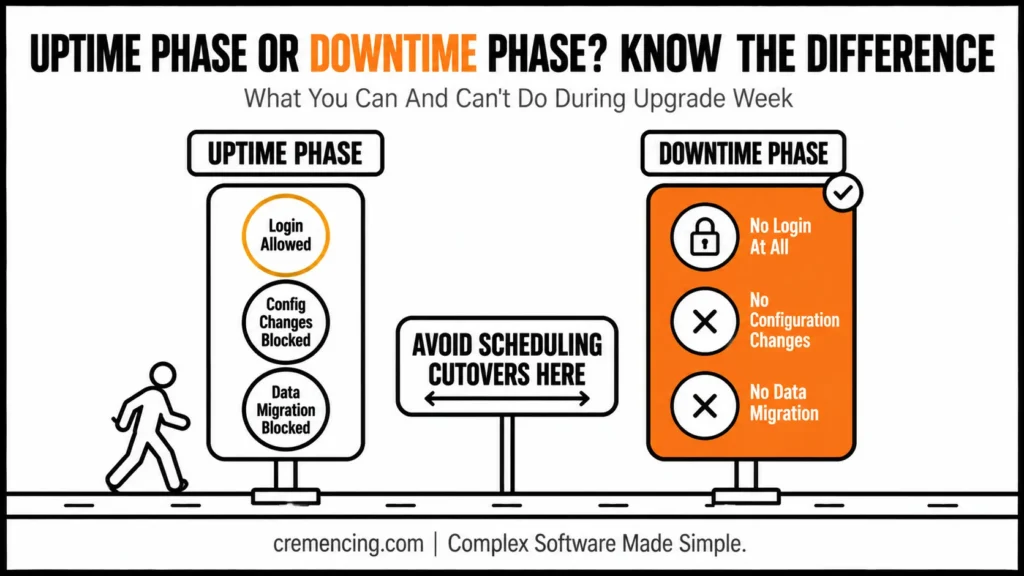
Once the maintenance window date is confirmed, the risk shifts from 'will it go down' to 'what breaks when it does. During the system upgrade week, SAP splits the system into two phases. In the uptime phase, users can log on, but the system blocks certain activities like data migration.

The downtime phase allows no logon at all. A checklist that only covers the downtime phase misses the uptime restrictions. That's exactly where teams get caught  trying to run a mass data load mid-upgrade week and hitting a block they didn't expect.

Build a short report that developers and key users can run the week before any published window. This way, the restriction is visible in the system itself not buried in an email from six weeks ago.

Sample pre-maintenance check report

"Report: Z_PRE_MAINTENANCE_CHECK

"Purpose: warn users/developers if today falls inside a known

"Upgrade week, based on entries logged via ZCL_MAINTENANCE_NOTICE_LOG.

REPORT z_pre_maintenance_check.

SELECT SINGLE * FROM zmaint_log

  INTO @DATA(ls_upcoming)

  WHERE window_date BETWEEN @sy-datum AND @(sy-datum + 7 )

  ORDER BY window_date ASCENDING.

IF sy-subrc = 0.

  IF ls_upcoming-window_type = 'MAJOR_UPGRADE'.

    " Upgrade week: uptime phase blocks config changes and data migration

    MESSAGE |Upgrade window on { ls_upcoming-window_date DATE = USER }| &&

            | — avoid data migration and config changes this week.|

            TYPE 'W'.

  ELSE.

    MESSAGE |Weekly maintenance on { ls_upcoming-window_date DATE = USER }| &&

            | — expect full downtime during the published window.|

            TYPE 'I'.

  ENDIF.

ENDIF.
Two conditions this check should flag every time: any scheduled background job with a start time inside the window, and any planned Fiori launch, cutover, or user training session in the same 24 hours. Both are avoidable once they’re visible.
Step 5 — Automate a Job-Conflict Check Before Every Maintenance Window
A single missed background job during a downtime window doesn’t just fail; in fact, it can leave a batch chain half-completed, which is worse than not running at all. Rather than manually scanning SM37 before every window, wrap the check in a scheduled report that runs a few days ahead and reports conflicts directly to the job owner.
Sample conflict-check report
" Report: Z_JOB_MAINTENANCE_CONFLICT_CHECK

" Purpose: scan scheduled background jobs (SM37 data) for any start

" time that falls inside a known upcoming maintenance window.

REPORT z_job_maintenance_conflict_check.

DATA: lt_jobs TYPE STANDARD TABLE OF tbtco.

SELECT SINGLE * FROM zmaint_log

  INTO @DATA(ls_window)

  WHERE window_date BETWEEN @sy-datum AND @( sy-datum + 14 )

  ORDER BY window_date ASCENDING.

CHECK sy-subrc = 0.

SELECT * FROM tbtco

  INTO TABLE @lt_jobs

  WHERE sdlstrtdt = @ls_window-window_date

    AND status    = 'S'.  " Scheduled jobs only

LOOP AT lt_jobs INTO DATA(ls_job).

  " In production, resolve job owner and send via CL_BCS instead of WRITE

  WRITE: / 'Conflict:', ls_job-jobname, 'owned by', ls_job-sdluname,

           'starts', ls_job-sdlstrttm, 'during maintenance window'.

ENDLOOP.
Schedule this report itself as a background job, seven and two days before every logged maintenance window. That gives job owners enough lead time to reschedule without turning it into a fire drill the morning of.
| Task | Where | Lead time |
|---|---|---|
| Check per-tenant calendar | SAP for Me → Cloud Availability Center | Ongoing |
| Register CSNS to team distro | SAP for Me → notification settings | Before go-live |
| Test-system upgrade notice | Email (per CSNS) | [NEEDS SME VERIFICATION — confirm exact weeks] |
| Quality/Production upgrade notice | Email (per CSNS) | [NEEDS SME VERIFICATION — confirm exact weeks] |
| Job-conflict scan | Scheduled Z-report against SM37/TBTCO | 7 and 2 days before window |
| Time zone conversion | Data center region row → business-user local time | Once, saved in recurring invite |
Common SAP Cloud Maintenance Schedule Setup Issues
These are the most common mistakes teams make when they first start tracking the SAP cloud maintenance schedule. Re-register CSNS under a shared mailbox, not an individual’s SAP for Me user profile.
Time zone conversion uses the customer’s local time instead of the data center’s. The data center hosting the system always anchors the published schedule hosting the system. Re-verify which region hosts your specific tenant before converting.
Z-table log goes stale because nobody updates it after the initial rollout. Assign the CSNS-to-zmaint_log entry as an explicit Basis task in the maintenance schedule notification-handling process, not an afterthought
Teams miss uptime-phase restrictions because the checklist only checks for full downtime. The upgrade week has a distinct uptime phase where login works but activities like data migration are blocked—make sure your checklist flags the whole upgrade week, not just the downtime hours.
Conclusion
The gap this guide closes isn’t information SAP already publishes; it’s all of it. It’s that the calendar lives in one place, the notification lives in another, and the thing that actually breaks (a batch job or a cutover landing inside a window) only shows up if someone cross-references both by hand, every single cycle.
Registering CSNS against a shared mailbox and running a small job-conflict check before every published window turns that cross-referencing into something the system does for you instead of something a person has to remember. The teams that stop getting paged for maintenance aren’t the ones with a better memory for dates; they’re the ones who made the calendar someone else’s problem to track.
Frequently Asked Questions
1. Why is my SAP S/4HANA Cloud system showing a maintenance screen with no warning?
It’s likely a scheduled window you weren’t subscribed to. SAP maintains standard weekly maintenance windows by region for S/4HANA Public Cloud systems. If your team isn’t registered for CSNS, you can miss the advance email notice entirely.
2. How far in advance does SAP notify customers before an upgrade?
It depends on the system stage and the maintenance schedule notification cadence. SAP notifies customers roughly four weeks before the test system upgrade, with earlier stages getting notice first in a three-system landscape.
3. What is the Cloud Availability Center?
It’s the section inside SAP for Me where your per-tenant SAP cloud maintenance schedule and cloud service documents live, filterable by cloud service and solution area—the authoritative source instead of a static PDF.
4. Can I do data migration during the S/4HANA Cloud upgrade week?
Not during the uptime phase. The maintenance window for the upgrade splits into uptime (login allowed, activities restricted) and downtime (no login), and data migration is blocked in the uptime phase.
5. How long can the SAP BTP ABAP environment be down for maintenance?
Potentially up to four hours on any given weekend for weekly maintenance and up to 24 hours during each of the four major upgrade windows scheduled per year.
6. Does every published maintenance window actually cause downtime?
Not always. SAP only uses weekly maintenance windows in exceptional cases, and maintenance activities don’t necessarily result in downtime, but you should still plan as if they will, since you won’t know in advance which ones apply.
7. Where do I find the maintenance schedule for my specific landscape type?
Landscape-specific documents exist for 1-system, 2-system, and 3-system setups, published as dated PDFs and linked from the Cloud Availability Centre.
8. My system is showing a maintenance/sorry screen outside any window I have on my calendar. What do I do?
Open a ticket against SAP support component XX-S4C-OPR-INC. There are several possible causes for an out-of-window outage, and SAP support needs to investigate the specific tenant rather than you guessing from the published calendar alone.
9. Is the HANA database upgrade the same event as the S/4HANA major upgrade, or a separate window?
It’s a separate, earlier window. A mandatory HANA database upgrade is applied roughly four weeks before the major upgrade, so that the major upgrade itself can then proceed. Put both dates on the change calendar, not just the one you were originally notified about.
10. What happens if I don’t manually upgrade my SAP BTP HANA Cloud instance before it goes out of maintenance?
SAP will apply a forced upgrade for you during a scheduled major upgrade window, with advance notice. SAP HANA Cloud automatically upgrades instances running on out-of-maintenance versions during a scheduled major upgrade window, and notifies customers in advance of this forced upgrade.
But don’t treat that as a safety net: SAP doesn’t guarantee an out-of-maintenance instance is upgraded at the very next major upgrade window, so relying on the forced upgrade to stay current can leave you exposed longer than expected.