
A Friday-night change ticket says, “Upgrade SAP HANA and confirm the application is available before business opens.” The command itself may be one line, but the real work sits around it: compatibility checks, backup proof, replication order, component alignment, downtime control, and post-upgrade evidence.
SAP HANA Application Lifecycle Management helps Basis administrators manage the complete lifecycle of SAP HANA systems, from initial setup and upgrades to ongoing maintenance and retirement. A well-planned lifecycle approach reduces upgrade risks, minimizes downtime, and keeps SAP HANA environments stable and secure.
This playbook covers SAP HANA 2.0 SPS 08 and focuses on the database-platform update that Basis teams execute with HDBLCM. SAP’s current lifecycle-management documentation separates application-content management from database-platform installation and updating.
SAP HANA 2.0 SPS 08 remains the current production-recommended release, with its latest revision, Rev 89.04, published on July 29, 2026. SAP has also changed its documentation strategy for SPS 08 — instead of one bulk update, individual guides are now republished on an ongoing basis whenever revisions are necessary.
Additionally, since SPS 03, HDBLCM has included automatic signature verification for update media, reinforcing the authenticity checks already covered in this playbook’s media-preparation step.
Post-Upgrade Failure Patterns in Enterprise Systems
The most common IT failures occur immediately following hardware or software upgrades. Inadequate data migration validation causes up to 38% of major system transformation failures. Human error during change windows remains a primary contributor to unplanned enterprise downtime. Structured quality assurance and automated testing cut implementation budget overruns significantly.
First, Separate SAP HANA ALM from HDBLCM
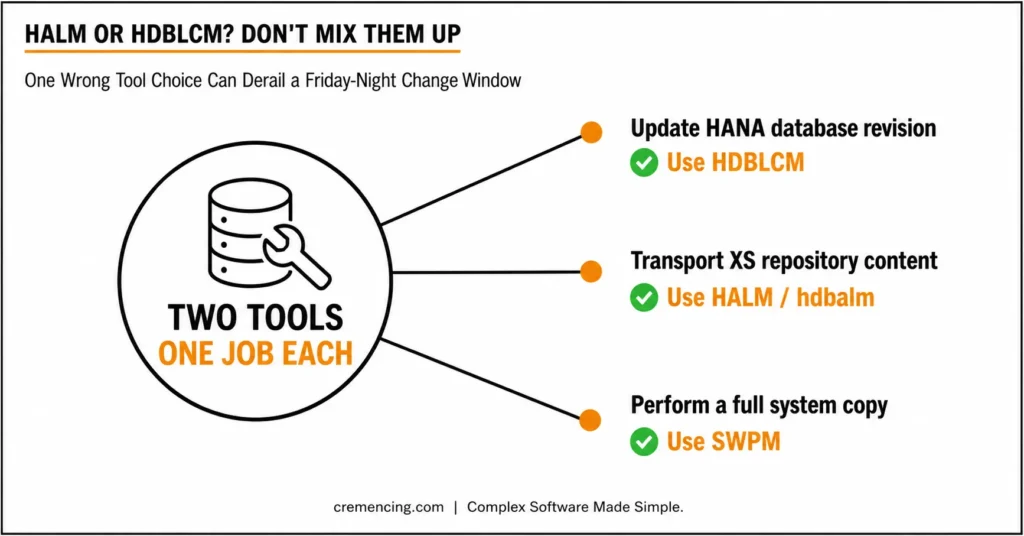
SAP uses lifecycle management as an umbrella term for two different jobs.
SAP HANA application lifecycle management manages HANA-native application content across modeling, development, transport, assembly, installation, and update phases. It includes packages, delivery units, products, transport routes, change tracking, lifecycle roles, and the hdbalm command-line tool.
Platform lifecycle management handles the SAP HANA database software itself. HDBLCM installs or updates the server, client, XS components, application function libraries, smart data access components, and other supported options.
For a database revision or support package stack update, HDBLCM is the tool that matters.
That distinction prevents a common ticket error: opening the HALM application interface to perform a database revision update. Use HALM for application products and repository content. Use installation media or a resident HDBLCM for the database platform and installed components.
| Task | Correct Tool | Do Not Use |
| Update the HANA database revision | HDBLCM from installation media | HALM application interface |
| Add or update AFL, client, XSA, or SDA | HDBLCM, following the component guide | Manual file replacement |
| Transport XS classic repository content | SAP HANA application lifecycle management or hdbalm | HDBLCM |
| Perform an SAP system copy | SWPM and the relevant system-copy procedure | HDBLCM alone |
| Upgrade the ABAP application stack | SUM, including DMO where applicable | HDBLCM as a SUM replacement |
However, HDBLCM is not a general SAP system-copy tool. However, SAP Community guidance confirms that system migration or copying still requires SWPM and the corresponding export, import, backup, or recovery procedure.
Prerequisites for SAP HANA Application Lifecycle Management Upgrades
Treat the upgrade as a controlled recovery exercise, not a software-copy task.
Before the change window, first confirm the following:
- Source and target HANA revisions.
- Supported update path.
- Operating-system support.
- SAP Host Agent status.
- Available file-system space.
- Valid license status.
- SYSTEMDB and tenant status.
- Installed optional components.
- Backup destination capacity.
- Replication topology.
- Recovery ownership.
- Application stop and start sequence.
Additionally, you also need adminDo not begin SAP HANA application lifecycle management with a downloaded SAR file credentials, database administrator credentials, read and execute access to the extracted media, and a tested connection to every HANA host. Furthermore, SAP’s HDBLCM prerequisites require a completed system backup.. SAP also warns that an ordinary HANA update causes business downtime.
Additionally, create one evidence folder for command output, screenshots, backup IDs, start and finish times, errors, decisions, and validation results. This turns SAP HANA application lifecycle management from an operator activity into an auditable change record. Every HANA upgrade should be planned against your SAP cloud maintenance schedule to avoid conflicting with other system changes.
Step 1 — Define the SAP HANA Application Lifecycle Management Target
First, Do not begin SAP HANA application lifecycle management with a downloaded SAR file.
Instead, begin with a signed target containing:
- Exact SAP HANA revision.
- Required database components.
- Optional-component revisions.
- Operating-system compatibility.
- Application-stack compatibility.
- Replication topology.
- Downtime approach.
- Approved rollback decision point.
Before making any changes, record the current database and service states.
— Run from SYSTEMDB to capture database status.
SELECT DATABASE_NAME,
ACTIVE_STATUS,
ACTIVE_STATUS_DETAILS
FROM SYS.M_DATABASES
ORDER BY DATABASE_NAME;
# Run as <sid>adm to capture the current HANA version.
HDB version
# Capture running HANA services and processes.
HDB info
For example, for an SAP S/4HANA or SAP BW/4HANA system, coordinate the database target with the application-upgrade plan.
However, HDBLCM updates the database platform; it does not replace SUM for the ABAP application stack. Put this boundary in the change ticket so no one assumes that a successful database update means the complete business-system upgrade is finished.
Step 2 — Protect SAP HANA Application Lifecycle Management with Recovery Proof
A green backup job from last week is not sufficient evidence for SAP HANA application lifecycle management.
First, complete a fresh data backup according to your recovery standard. Then, verify its successful backup-catalogue entry, confirm log-backup continuity, and check that the destination has enough capacity.
The SAP HANA SQL reference defines BACKUP DATA as the statement used to create a complete or delta backup for the selected database.
— Example only: adapt the prefix to your backup policy.
BACKUP DATA USING FILE (‘PRE_HANA_UPGRADE_FULL’);
In a multiple-container system, complete the required backup for SYSTEMDB and every tenant, or follow the approved Backint procedure.
However, the rollback plan must distinguish between two failure types.
If HDBLCM stops before changing the active software, the team may be able to correct the cause and resume. If the database has moved to the target revision and rollback becomes necessary, follow the SAP-supported software restoration and database-recovery procedure.
Do not assume that restoring only a data backup will reverse the installed database binaries.
Document:
- Who restores the software layer.
- Who restores or recovers the databases.
- Where the required media is stored.
- Which error or failed test triggers rollback.
- Who authorizes the rollback.
- How much recovery time remains in the window.
Run that decision through a tabletop review before production.
Step 3 — Prepare SAP HANA Application Lifecycle Management Media
For SAP HANA application lifecycle management, download the correct database revision and all required matching components from SAP’s software distribution channel.
Extract the archives with SAPCAR. HDBLCM expects officially signed SAP components, with signature information produced during extraction.
Do not mix unrelated revisions in one staging directory.
SAP requires dependencies such as Application Function Libraries to remain aligned with the supported database revision. A component at the wrong level may be rejected, omitted, or left unchanged during the update.
Check both the installation-media HDBLCM and the resident tool.
# Installation-media path; adapt it to your directory.
cd /software/SAP_HANA_DATABASE
./hdblcm –version
# Resident HDBLCM path.
cd /hana/shared/<SID>/hdblcm
./hdblcm –version
The installation-media HDBLCM installs or updates the HANA server and core components. The resident HDBLCM performs system-specific administration and can add or update supported components.
Do not copy an arbitrary HDBLCM executable into the resident directory. SAP states that an HDBLCM version added to an existing installation must match the installed HANA system version.
Step 4 — Control Replication During SAP HANA Application Lifecycle Management
In a system-replication landscape, update the secondary site before the primary.
SAP requires the secondary system to remain at the same or a higher HANA version than the primary during the update sequence. After updating the secondary, verify replication and service synchronization before updating the primary.
— Confirm the aggregated replication state.
SELECT SOURCE_DATABASE_NAME,
TARGET_DATABASE_NAME,
REPLICATION_STATUS
FROM SYS.M_DATABASE_REPLICAS
ORDER BY SOURCE_DATABASE_NAME;
# Run as <sid>adm on each site.
hdbnsutil -sr_state
SAP’s replication monitoring views expose replication status and backlog information that can be used during post-update validation.
A normal secondary-first update can still include business downtime. Near-zero-downtime procedures require a specifically designed system-replication process; do not describe an ordinary sequential update as zero downtime.
Before the window, agree on:
- Application shutdown.
- Cluster maintenance mode.
- Automatic takeover controls.
- Fencing behaviour.
- Site upgrade order.
- Planned takeover.
- Replication re-registration.
- Application restart.
- Final decision owner.
Step 5—Run the SAP HANA Application Lifecycle Management Update
Stop or quiesce the application layer according to the approved runbook. Confirm that prohibited workloads, batch jobs, interfaces, and maintenance operations are no longer active.
Start the update from the extracted installation medium.
# Change to the extracted SAP HANA media directory.
cd /software/SAP_HANA_DATABASE
# Start the interactive update.
./hdblcm –action=update
SAP documents the command-line interface as a supported method for updating all SAP HANA platform components.
When component packages are stored in separate directories, provide their path through the documented component-directory parameter.
./hdblcm \
–action=update \
–component_dirs=/software/HANA_COMPONENTS
Review every detected component before confirming the update.
If HDBLCM does not display an expected component, cancel the process and correct the media, path, permission, or compatibility problem. Do not continue with the assumption that the missing component can always be patched separately.
HDBLCM supports standard and optimized execution modes. SAP documents standard and optimized as available update-execution values, with the optimized option using a phased approach where supported.
# Use only when the approved runbook requires standard mode.
./hdblcm \
–action=update \
–update_execution_mode=standard
Choose the execution mode only after confirming that the selected components and landscape design support it.
Step 6 — Validate SAP HANA Application Lifecycle Management Results
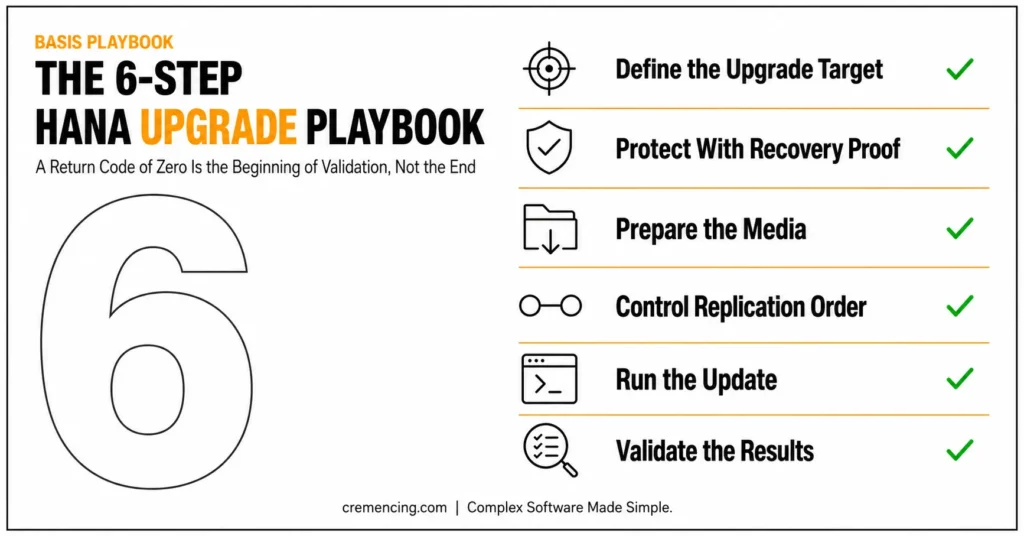
However, a return code of zero is the beginning of validation, not the end.
Capture the installed version, confirm that SYSTEMDB and all required tenants are active, verify HANA services, review HDBLCM logs, and check database alerts before releasing the system to the application team.
Confirm the installed HANA revision.
HDB version
Confirm expected HANA processes are running.
HDB info
Confirm database states after the update.
SELECT DATABASE_NAME,
ACTIVE_STATUS,
ACTIVE_STATUS_DETAILS
FROM SYS.M_DATABASES
ORDER BY DATABASE_NAME;
For replicated systems, confirm that replication has returned to the approved state and that any backlog is reducing.
Check:
- Database and tenant availability.
- Replication status.
- Installed component versions.
- License validity.
- Backup scheduling.
- Alert status.
- Monitoring connectivity.
- Certificates.
- Interfaces.
- Workload-management settings.
- Updated optional components.
The application team should execute a predefined smoke test:
- Log on to the application.
- Run one read-only transaction.
- Perform one controlled update transaction.
- Test one critical interface.
- Run one scheduled or batch process.
- Execute one business-critical report.
- Confirm printing or output services where applicable.
Attach the results to the change evidence.
SAP HANA Application Lifecycle Management Validation Checklist
Success means more than “the database started.”
The acceptance record should show:
- Approved target revision installed.
- SYSTEMDB active.
- Required tenants active.
- Expected HANA services running.
- Valid database license.
- Replication active and synchronized.
- No unresolved critical alerts.
- Backup scheduling operational.
- Monitoring connections restored.
- Application logon successful.
- Interfaces operational.
- Business smoke tests completed.
- Restarted background jobs monitored.
- Business owner approval recorded.
Compare post-upgrade results with the baseline captured in Step 1.
Investigate missing services, changed component levels, new alerts, or replication backlog before handing the system back. Keep the maintenance bridge open until the business owner accepts the application test. Restart paused jobs and interfaces in a controlled order. Monitor their first execution cycle and record the final handover time.
Common SAP HANA Application Lifecycle Management Issues
HDBLCM Cannot Find the Update Media
Check:
- Extracted directory structure.
- SIGNATURE.SMF.
- File permissions.
- Correct processor architecture.
- Component-directory path.
- Complete extraction.
- Supported component revision.
SAP KBA 3469115 specifically addresses situations where HDBLCM cannot find SAP HANA upgrade media. Do not bypass signature validation just to proceed with the update.
Resident HDBLCM Does Not Recognize the Instance
Confirm that you are using the resident tool for the correct SID and that its version matches the installed system.
SAP KBA 3208789 documents how to check the resident HDBLCM version. Review the HDBLCM trace and log files before replacing or copying executables.
An Optional Component Remains at the Old Revision
Confirm that matching media was staged and selected.
Database, AFL, XSA, SDA, client, and other component dependencies must follow the supported component matrix. HDBLCM can only update components it detects in the supplied media.
Replication Does Not Return to ACTIVE
Do not release the application.
Review:
- Service-level replication state.
- Source and target versions.
- Network connectivity.
- Replication backlog.
- Registration status.
- Cluster controls.
- HDBLCM completion logs.
Conclusion
The upgrade of SAP HANA application lifecycle management is successful if things are done before and after the actual command is executed. The update itself to the HDBLCM is often the easiest part the hard part is separating out the platform updates and the application content management, staging the media that has been verified, securing the system with sound backups, replicating the media correctly, and checking it against a solid baseline.
Basis teams that approach every upgrade as a controlled and evidence-driven change, instead of simply a software install, are less likely to have some of the most common pitfalls: mismatched components, incomplete rollback plans, and replication that fails to get back to a healthy state.
A successful update does not just mean a database that starts; it means a system in which SYSTEMDB and tenants are running, replication is in sync, business smoke tests pass,, and it is completely documented for audit and handover.
The four steps of target definition, backups, media preparation, careful replication control, careful media execution, and thorough validation will turn a high-risk change window into a predictable and repeatable process that your team can rely on each time.
Frequently Asked Questions
1. Can the HANA secondary site be upgraded while system replication is active?
Yes, SAP’s documented sequence updates the secondary site before the primary, provided the landscape meets the stated prerequisites. After updating the secondary, confirm that replication services are active and synchronized before proceeding. Use the specific system-replication upgrade guide for scale-out, cluster, or reduced-downtime designs.
2. How do you roll back an SAP HANA revision after an upgrade?
First, you need a software-and-database recovery plan rather than only a data backup. Restoring a database backup does not automatically replace the upgraded HANA binaries. Document the supported software restoration process, database recovery steps, media location, recovery owner, and rollback trigger before starting the production update.
3. Why does resident HDBLCM fail to detect the HANA update media?
Typically, The usual causes are an incorrect component-directory path, incomplete extraction, missing signature metadata, unsupported media, wrong architecture, permissions, or a resident HDBLCM mismatch. Review the detection logs and verify the resident tool’s version before changing files or bypassing any package checks.
4. Can HDBLCM perform an SAP HANA system copy?
No. however, HDBLCM installs, updates, reconfigures, or performs other supported platform-lifecycle tasks, but it does not replace the full SAP system-copy process. Use SWPM and the relevant backup, recovery, export, or import procedure for cloning or migrating the complete SAP application system.
5. What is SAP HANA application lifecycle management?
SAP HANA application lifecycle management manages HANA-native application content from product modeling and development through transport, assembly, installation, and updating. It is not the same as updating the HANA database revision with HDBLCM.
6. What does HDBLCM do in SAP HANA?
HDBLCM installs and updates SAP HANA platform components and performs supported configuration tasks. It is available through command-line, graphical, and web-based interfaces. The installation-media tool handles server installation or updating, while the resident version performs system-specific administration and component-management tasks.
Is a return code of zero from HDBLCM enough to confirm a successful upgrade?
No. A zero return code confirms the command completed, but validation requires more: checking that SYSTEMDB and all tenants are active, confirming expected HANA services are running, reviewing HDBLCM logs, checking database alerts, and — for replicated systems — confirming replication has returned to a healthy state before releasing the system to the application team.
What’s the difference between the installation-media HDBLCM and the resident HDBLCM?
The installation-media HDBLCM (run from the extracted SAP HANA media directory) installs or updates the HANA server and core components. The resident HDBLCM (installed under /hana/shared/<SID>/hdblcm) performs system-specific administration and can add or update supported components on an already-installed system. A resident HDBLCM version added to an existing installation must match the installed HANA system version.
What should be documented before starting a production HANA update?
An evidence folder covering command output, screenshots, backup IDs, start and finish times, errors, decisions made, and validation results. This turns the update into an auditable change record rather than an informal operator task, and it gives the team a baseline to compare post-upgrade results against.
Does HDBLCM handle the ABAP application-stack upgrade as well as the database?
No. HDBLCM updates the database platform only. It does not replace SUM (Software Update Manager) for the ABAP application stack. For an SAP S/4HANA or SAP BW/4HANA system, the database target must be coordinated with the separate application-upgrade plan — a completed database update does not mean the full business-system upgrade is finished.