SAP Cloud ALM does not eliminate SAP transport management risk simply because a transport appears approved or scheduled. That assumption is exactly where many release controls break down.
For SAP Basis teams, ABAP developers, release managers, and IT leaders running ECC on supported ABAP releases, S/4HANA, or S/4HANA Cloud Private Edition, the real question is not whether Cloud ALM can display a transport. It is whether the business change, transport bundle, test evidence, approval state, deployment schedule, and technical execution all agree before production.
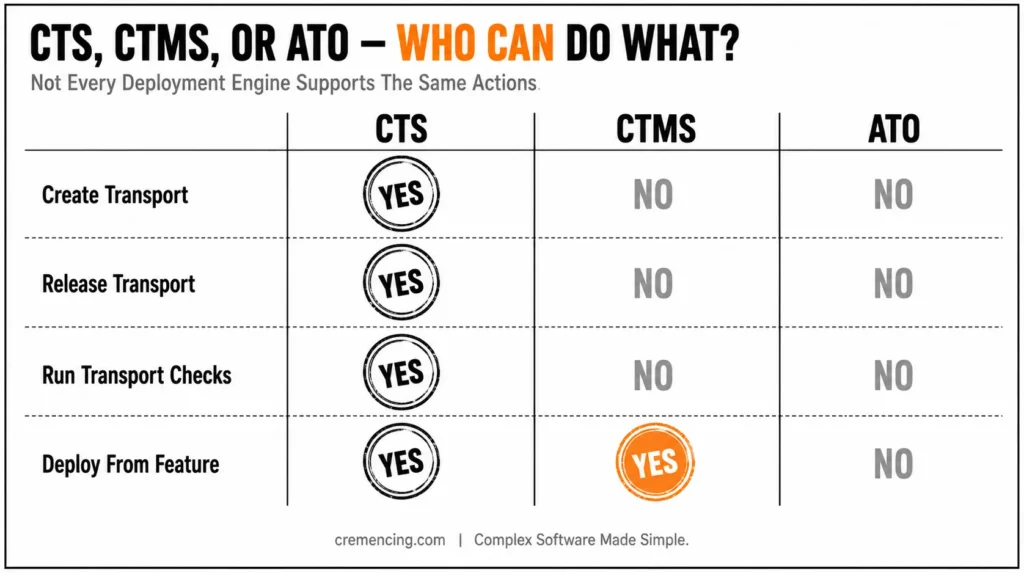
SAP Cloud ALM helps close that governance gap by orchestrating supported deployment technologies such as CTS, CTMS, and ATO. However, each technology has different capabilities, and the managed system remains responsible for the underlying technical transport operation. This guide shows where Cloud ALM reduces release risk, where CTS/TMS or another deployment engine remains authoritative, and which technical checks should happen before the production window opens.
Why SAP Releases Still Go Wrong Before Go-Live
Release risk grows when technical transport execution and project readiness live in separate places. CTS and TMS know the transport requests and import queues. Test tools know execution results. Project plans know milestones. Spreadsheets and chat threads often hold the final approval. None of those sources alone can prove that the complete change bundle is tested, approved, sequenced, and ready for the production window.
SAP CALM transport management addresses that gap by placing a governance layer above the deployment engines. SAP Cloud ALM does not replace CTS, TMS, Cloud Transport Management Service, or the Adaptation Transport Organizer. It connects features and releases to those technologies, then controls readiness, scheduling, deployment visibility, and history while the managed system performs the actual create, release, or import operation.
Why Transport Traceability Matters When Releases Fail
That distinction matters during incident analysis. If a production import fails, SAP Cloud ALM can show the affected feature, release, deployment event, and related transport. The Basis team still checks the TMS queue, import logs, return codes, background jobs, RFC connectivity, and target-system conditions. SAP CALM transport management improves control and traceability; it does not move ABAP objects without the underlying transport engine.
The second cause is weak change containment. A transport request may contain several objects, but business readiness normally exists at a broader level: a requirement, user story, feature, test scope, release, and responsible owner. SAP Cloud ALM uses the feature as the main change container. A feature can link requirements, user stories, project tasks, releases, responsible users, transports, transport references, and technical change documentation. Teams can then bundle related features into the same release.
The third cause is uncontrolled interpretation. A team may see ten transports on a screen and assume the displayed sort order is the production import order. For CTS transports, the TMS import queue or buffer remains authoritative, and users cannot manually rearrange that order in the Features app. A safe release process must therefore combine SAP Cloud ALM governance with direct technical verification in the managed system.
Pre-Go-Live Risks and SAP Cloud ALM Controls
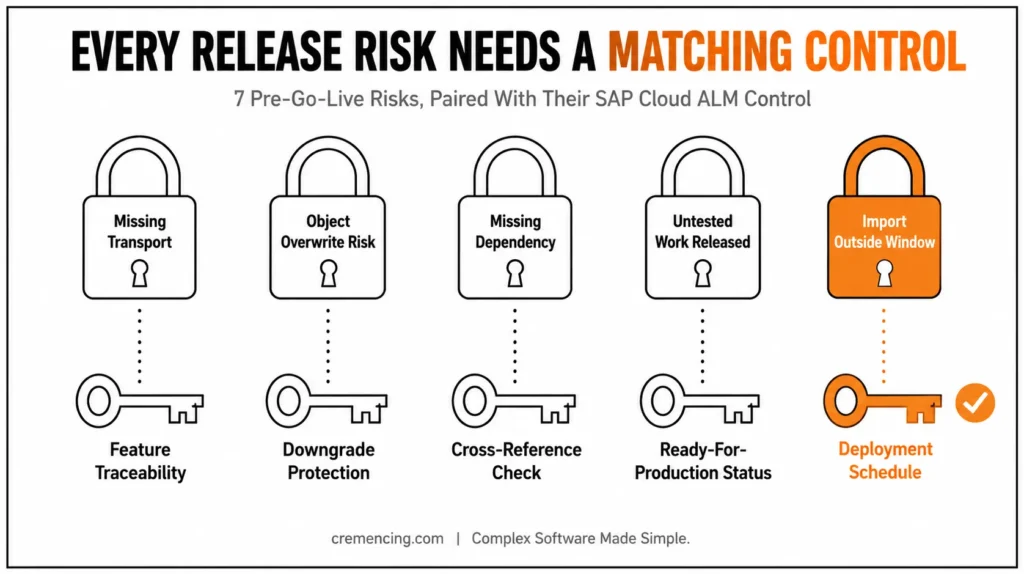
| Pre-go-live risk | SAP Cloud ALM control | Remaining responsibility |
| A transport is missing from the release | Feature Traceability and Transport Analysis | Confirm all changes are assigned to the correct feature and release |
| An older object could overwrite a newer version | Downgrade Protection | Resolve sequence conflicts in the CTS-managed bundle |
| A referenced object is absent | Cross-Reference Check | Add the missing dependency or remove the invalid reference |
| Untested work reaches production | Successfully Tested and Ready for Production statuses | Maintain honest test evidence and approval ownership |
| The import starts outside the window | Deployment schedule | Validate system availability, jobs, and cutover timing |
| The wrong person deploys | Separate test and production deployment roles | Align managed-system authorisations |
| Several projects share the wrong release scope | Deployment plans and release assignments | Name an owner and freeze the final scope |
| Audit evidence is incomplete | Feature history and transport traceability | Reference manual or external imports correctly |
These controls reduce uncertainty before go-live, but they only work when teams maintain the feature, release, test, and transport relationships correctly.
Step-by-Step Fix
Step 1: Define the Transport Technology Before Designing the Control
Start by identifying the deployment engine for each landscape path. For on-premise ABAP systems, SAP S/4HANA, and SAP S/4HANA Cloud Private Edition, SAP Cloud ALM can integrate with CTS. For supported cloud content, it can work with SAP Cloud Transport Management service. SAP S/4HANA Cloud Public Edition uses ATO-based processes for supported content.
Do not describe these paths as identical. The available actions differ:
| Check | Where to verify | What it proves |
|---|---|---|
| Feature status | Cloud ALM Features | Business approval state |
| Transport assignment | Feature / Transport Analysis | Change-to-transport relationship |
| Transport route | STMS/TMS | Technical route |
| Downgrade Protection | Cloud ALM Transport Checks | Potential version/sequence conflict |
| Cross-Reference Check | Cloud ALM Transport Checks | Missing/version-inconsistent references |
| Import execution | Managed-system job / STMS | Technical deployment result |
| Job failure | SM37 / job log | Background execution problem |
| Final audit trail | Cloud ALM + TMS | Governance + technical evidence |
SAP Cloud ALM also does not support CTS+ in the same model. If your release combines ABAP and cloud content, document which deployment engine owns each artifact before you define the go-live runbook.
Step 2: Use Features as Controlled Release Containers
Create one feature for a coherent business or technical change. Assign the responsible owner, project, release, requirements, user stories, and transports. Avoid one oversized feature that covers unrelated workstreams because it makes testing, approval, rollback, and audit evidence harder to isolate.
A good feature answers five questions without opening another spreadsheet:
- What business change are we deploying?
- Which transport requests implement it?
- Which tests prove it works?
- Which release and production window own it?
- Who approves and deploys it?
Use transport references when the transport was created outside SAP Cloud ALM but still belongs to the controlled release. The goal is not to force every activity into one screen. The goal is to make the full production bundle visible and attributable. If your organization is deciding how Cloud ALM should coexist with legacy SAP change management, compare the platform capabilities in our guide to SAP ALM vs Solution Manager
Step 3: Move Features Through Real Readiness Gates
Use status changes as release gates, not progress decoration. A typical flow moves from implementation to testing, then to Successfully Tested, and finally to Ready for Production. The exact project workflow and responsibilities must remain clear to every workstream.
For mass deployment, SAP Cloud ALM requires the selected features to be Ready for Production and their transports to be ready for import into the production system. Feature Traceability helps identify transports that do not meet that condition.
Do not approve a feature because a meeting ended without objections. Require test execution evidence, resolved critical defects, complete transport assignment, confirmed dependencies, and a named rollback owner. SAP Cloud ALM can expose the gate, but your release policy defines the evidence needed to pass it.
One governance detail is especially important in 2026: the Features API can update selected statuses, but it cannot perform the transition from Successfully Tested to Ready for Production. SAP requires that approval in the Features app. This prevents external automation from silently completing the final production-approval step.
Step 4: Run Transport Checks Against the Final Bundle
Run Downgrade Protection and Cross-Reference Check for CTS-managed transports before the release window. Downgrade Protection detects version and sequence conflicts that could allow an older object version to overwrite a newer one. Cross-Reference The check identifies referenced objects that are missing from the target system or the planned import bundle.
Rerun the checks after any scope change. A result from Monday may no longer be valid after another workstream adds a transport on Wednesday. Treat every late transport addition as a reason to repeat the technical checks and the release review.
You can also run checks at the deployment schedule level for a bundle of features. This is useful when several features share one production window. Resolve warnings and errors before deployment, and record the accepted exceptions with an owner and business reason.
Remember the scope limitation: import checks focus on the production stage rather than every intermediate test system. Do not assume that a green production-oriented check proves the quality-system import was complete or correct. Transport management is just one piece of what SAP Cloud ALM can really do for your landscape.
Step 5: Validate Transport Metadata in the Managed ABAP System
SAP CALM transport management should remain the governance view, but ABAP and Basis teams still need a direct technical check. Transaction SE09 displays Workbench transport requests, while SE10 provides the broader Transport Organizer view. Transaction STMS manages transport routes, import queues, and imports across the landscape.
For a read-only cross-check, you can run a small executable report in SE38, which creates and executes ABAP reports. The example below reads transport headers from table E070 and descriptions from E07T. It does not release or import anything.
REPORT zcheck_release_transports.
TABLES e070.
SELECT-OPTIONS s_trkorr FOR e070-trkorr.
TYPES:
BEGIN OF ty_transport,
trkorr TYPE e070-trkorr,
trfunction TYPE e070-trfunction,
trstatus TYPE e070-trstatus,
as4user TYPE e070-as4user,
as4date TYPE e070-as4date,
as4time TYPE e070-as4time,
as4text TYPE e07t-as4text,
END OF ty_transport.
DATA:
lt_transport TYPE STANDARD TABLE OF ty_transport,
lo_alv TYPE REF TO cl_salv_table.
SELECT
a~trkorr,
a~trfunction,
a~trstatus,
a~as4user,
a~as4date,
a~as4time,
b~as4text
FROM e070 AS a
LEFT OUTER JOIN e07t AS b
ON b~trkorr = a~trkorr
AND b~langu = @sy-langu
WHERE a~trkorr IN @s_trkorr
INTO TABLE @lt_transport.
IF lt_transport IS INITIAL.
MESSAGE ‘No matching transport requests found’ TYPE ‘S’.
RETURN.
ENDIF.
cl_salv_table=>factory(
IMPORTING
r_salv_table = lo_alv
CHANGING
t_table = lt_transport ).
lo_alv->display( ).
Use this report only as an additional verification aid. Compare the request ID, owner, status, date, and description with the feature and release in SAP Cloud ALM. Then use STMS to confirm the target queue and technical import sequence.
Step 6: Control the Deployment Plan and Production Window
A deployment plan links projects, system groups, releases, and production schedules. One plan can serve several projects, which helps coordinate a shared go-live. It can also widen the deployment scope unexpectedly when teams assign another project without a final ownership review.
Assign one deployment-plan owner. Freeze release scope before the final checks. Review every included feature, transport, target node, and responsible workstream. Separate the role that deploys to test from the role that deploys to production.
In the Deployment app, select the deployment plan, production target, release, start time, and eligible feature statuses. At the scheduled time, the connected managed-system import job processes the selected transport subset. SAP Cloud ALM writes deployment activity to feature history, while Feature Traceability and Transport Analysis support follow-up.
Step 7: Prepare the Failure Path Before Go-Live
Do not stop at the happy path. Define who checks STMS return codes, who analyses failed imports, who decides whether to continue, and who communicates business impact. Transaction SM37 displays background jobs and their logs, so Basis teams should use it when the managed-system import job does not run or ends unexpectedly.
Define rollback at the feature level where possible. Some changes can be backed out with a corrective transfer; others require forward fixes, manual configuration reversal, data repair, or business-process controls. SAP Cloud ALM can preserve the change history, but it cannot invent a safe rollback after the failure starts.
How to Verify the Fix
Verify the release at three levels.
First, check governance in SAP Cloud ALM. Every production feature should have the correct release, owner, status, test evidence, and transport assignment. Run Feature Traceability and confirm that no transport remains unassigned, unreleased, or not ready for the production target.
Second, check technical readiness in the managed systems. Use SE09 or SE10 to inspect transport status and ownership. Use STMS to verify the target import queue, dependencies, and actual sequence. Do not use the visual order in SAP Cloud ALM as proof of execution order because TMS remains authoritative for CTS imports.
Third, check deployment execution. Use the Deployment app and feature history to confirm the scheduled action and result. If the import fails or never starts, use SM37 to inspect the import job, then review STMS logs and return codes. SAP Cloud ALM orchestrates the action, while the managed system records the technical failure details.
A release is ready only when the governance view and technical view agree.
Mistakes That Bring It Back
Treating SAP Cloud ALM as the transport engine: SAP CALM transport management does not replace CTS, TMS, CTMS, or ATO. When teams ignore the underlying technology, they miss queue order, job errors, authorisation failures, and unsupported deployment paths.
Using statuses without evidence: Manually setting a feature to Successfully Tested does not prove testing occurred. Link the approval to completed test execution, defect status, transport completeness, and a named decision owner.
Skipping checks after late scope changes: Downgrade Protection and Cross-Reference results can become outdated when the transport bundle changes. Rerun them after every late addition, removal, or replacement.
Sharing deployment plans without governance: A plan used by several projects can introduce unexpected features and transports into the release scope. Assign an owner, freeze the bundle, and review every project before scheduling production.
Assuming Cloud ALM replaces ChaRM completely: SAP Cloud ALM provides feature approval, role-based deployment, transport checks, and traceability, but it does not provide every ChaRM-style custom workflow or CSOL capability.
Ignoring manual changes: Configuration performed directly in production, emergency fixes, and externally imported transports can sit outside the controlled feature flow. Reference them explicitly or the audit history will remain incomplete.
Conclusion
SAP CALM transport management minimizes go-live risk by integrating business change, tests, approval, transport checks, release scope, scheduling, and deployment history into one traceable workflow. Teams don’t have to go searching for their status updates across disconnected systems, spreadsheets, and emails; they have one place to see what’s moving, who signed it off, and if it is ready for production.
However, it’s imperative to understand what Cloud ALM is and what it’s not. It is not intended to automate CTS, TMS, CTMS, or ATO or release responsibility that lies with your Basis and change management teams. Cloud ALM does not run transports, does not move objects among systems, and does not replace the technical checks that are done at the system level by TMS and CTS. It’s not a replacement for these tools; it is above these tools as a governance and visibility layer.
This is important, as sometimes teams think that after the transport is marked as “approved” or “scheduled” in Cloud ALM, the job is complete. It isn’t. What is actually imported, how, and the results, is still the source of truth of the technical queue in the managed system. A transport can appear complete within Cloud ALM’s dashboard and yet not be completed or appear “stuck” in the TMS if a lock, a missing dependency, or a sequencing conflict occurs that Cloud ALM is not aware of.
When it comes to getting the layering right, Cloud ALM for governance, TMS/CTS for execution, and a disciplined recheck habit after every change, you have a significantly diminished opportunity for last-minute surprises at go-live.
Frequently Asked Questions
1. How are transport requests and approvals managed in SAP Cloud ALM?
SAP Cloud ALM manages them through features, releases, statuses, roles, deployment plans, and links to the underlying deployment tool. SAP Cloud ALM Change and Deployment Management provides the governance layer, while CTS, CTMS, or ATO performs the supported technical action. Custom approval needs may still require an external process.
2. Does SAP Cloud ALM support on-premise ABAP transports?
Yes. SAP Cloud ALM transport management supports CTS integration for suitable on-premise ABAP landscapes, including supported SAP NetWeaver AS ABAP, SAP S/4HANA on-premise, and SAP S/4HANA Cloud Private Edition scenarios. The managed system must meet the setup, connectivity, authorization, and release prerequisites.
3. Can SAP Cloud ALM manage ECC transport requests?
Yes, when the ECC system meets the supported ABAP and integration requirements. SAP Cloud ALM can provide feature-based governance, transport assignment, CTS actions, traceability, and deployment control. Confirm the exact managed-system prerequisites before treating an older ECC landscape as ready for SAP Cloud ALM transport management.
4. Can Transport Checks Run Against the Test System?
Not in the same way as the production-stage import checks described in the current setup. SAP Cloud ALM transport checks focus on the planned production bundle. Teams must still validate quality-system imports through CTS/TMS logs, test execution, defect closure, and the managed-system technical evidence.
5. What Is the Difference Between SAP Cloud ALM and CTMS?
SAP Cloud ALM governs the release, feature, approval, schedule, and traceability. SAP Cloud Transport Management service moves supported cloud content through configured transport nodes. In a combined model, SAP Cloud ALM can orchestrate CTMS deployments, but it does not become the cloud-content transport engine.
6. Can SAP Cloud ALM Create and Release Transports?
It can create and release supported CTS transports from the feature workflow when the managed ABAP system is configured correctly. The same actions are not available for every deployment technology. For CTMS and ATO, SAP CALM transport management works with released transport artefacts and supported deployment behaviour.
7. Does SAP Cloud ALM replace STMS for CTS transports?
No. SAP Cloud ALM orchestrates supported deployment actions, while CTS/TMS remains the underlying transport technology for supported ABAP landscapes. Transport routes and technical execution remain tied to the managed TMS landscape.
8. Which SAP systems can use Cloud ALM CTS transport management?
SAP documents CTS integration for SAP S/4HANA on-premise, SAP S/4HANA Cloud Private Edition, and supported SAP NetWeaver AS ABAP systems, including ECC systems that meet the supported ABAP and integration prerequisites. SAP currently documents ABAP 7.40+ as the relevant platform baseline.