
Here’s what most modularisation guides get wrong: they treat ‘split your code into methods’ as the whole answer, then move on. But splitting code badly — a FORM routine that changes ten global variables, or an include shared across unrelated programs — can make a report harder to maintain than one long block, not easier. The real skill isn’t knowing that modularisation exists; it’s knowing which technique — include, macro, FORM, function module, or class method — fits a specific report, release, and team standard. That’s the gap most beginner tutorials skip, and it’s what turns a technically ‘modularised’ program into one a support developer can actually trust.
Object-Oriented ABAP Modularization Strategy
According to SAP documentation, effective ABAP modularization requires selecting techniques based on scope and architecture rather than merely splitting source code into physical files. While legacy techniques such as includes only organize source text, and FORM subroutines risk global data side effects, object-oriented class methods enforce strict parameter encapsulation and explicit variable scope. In modern SAP S/4HANA systems and ABAP Cloud development, local or global class methods are the preferred approach to separate data validation, database selection, business logic calculations, and user interface rendering into single-responsibility units. Refactoring monolithic procedural code into class methods reduces side-effect risks, simplifies automated unit testing, and ensures long-term software maintainability across system upgrades.
What Is Modularization in ABAP and Why It Matters
Modularization in ABAP means splitting one large program into smaller processing units that each handle one clear task. You divide validation, data selection, calculation, formatting, and output into separate modules rather than keeping all logic in START-OF-SELECTION. Includes, macros, subroutines with FORM, function modules, and class methods are the primary ABAP modularization methods. Each technique has a different purpose. consists of split source code. Subroutines split local procedural logic. Function modules provide support for reusable global procedures. Class methods support modern object-oriented design.
The business value is simple. When a finance report breaks after a new company code rollout, the support developer should not read 2,000 lines to find one validation rule. When an SD report needs one new output column, the developer should not risk changing database selection, tax calculation, and ALV formatting together.
Good code modularisation in SAP ABAP reduces side effects. A method named validate_selection should validate input only. Similarly, get_customer_items should be limited to fetching data. And display_alv should only handle output. Many beginner tutorials define modularisation but stop there. In real projects, the bigger skill is choosing the right modularisation style for the release, team standard, and object type.
How It Works
ABAP programs execute through processing blocks. Common examples include event blocks such as INITIALIZATION, AT SELECTION-SCREEN, and START-OF-SELECTION, plus procedures such as subroutines, function modules, and methods. Modularization in ABAP works by moving logic out of one event block into reusable or clearly named procedure blocks.ABAP programs execute through processing blocks. Common examples include event blocks such as INITIALIZATION, AT SELECTION-SCREEN, and START-OF-SELECTION, plus procedures such as subroutines, function modules, and methods. Modularization works by moving logic out of one event block into reusable or clearly named procedure blocks.
In classic executable reports, developers often used includes and FORM routines. This still exists in ECC and many S/4HANA custom systems because old reports remain active for years. You will see includes such as top include for declarations, selection-screen include, form include, and output include.
One practical signal for when modularisation has gone wrong: if fixing one bug requires opening more than two or three includes or FORMs to trace a single field’s value, the split was organisational, not functional — the logic is still coupled, just spread across files instead of one block.
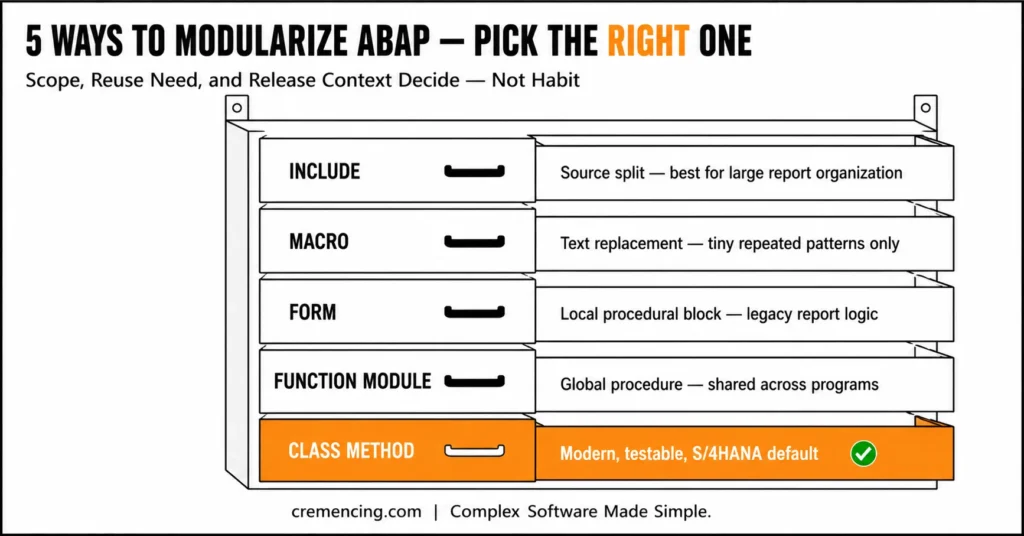
Modularization in ABAP: Quick Comparison of Techniques
Use this quick revision table when preparing modularization techniques in SAP ABAP PPT notes or interview notes:
| Technique | Scope | Best Use | Main Risk |
| Include | Source split | Large report organization | Hidden global dependency |
| Macro | Text replacement | Tiny repeated statement pattern | Hard debugging |
| FORM | Local procedural block | Legacy report logic | Global data side effects |
| Function Module | Global procedure | Shared procedural logic | Function group coupling |
| Class Method | Local/global OO block | Modern maintainable design | Needs OO discipline |
Practical Code Walkthrough
The easiest way to understand modularization techniques in SAP ABAP with examples is to refactor a messy report.
Here is the type of report you often inherit in support. It validates input, selects data, calculates totals, and writes output inside one block.
REPORT zcustomer_open_items_messy.
PARAMETERS: p_bukrs TYPE bukrs OBLIGATORY,
p_kunnr TYPE kunnr.
TYPES: BEGIN OF ty_item,
bukrs TYPE bsid-bukrs,
kunnr TYPE bsid-kunnr,
belnr TYPE bsid-belnr,
gjahr TYPE bsid-gjahr,
wrbtr TYPE bsid-wrbtr,
END OF ty_item.
DATA: lt_items TYPE STANDARD TABLE OF ty_item,
ls_item TYPE ty_item,
lv_total TYPE bsid-wrbtr.
START-OF-SELECTION.
IF p_bukrs IS INITIAL.
MESSAGE ‘Company code is required’ TYPE ‘E’. ” Stop report when mandatory input is missing
ENDIF.
SELECT bukrs, kunnr, belnr, gjahr, wrbtr
FROM bsid
INTO TABLE @lt_items
WHERE bukrs = @p_bukrs
AND kunnr = @p_kunnr. ” Reads customer open items for selection input
LOOP AT lt_items INTO ls_item.
lv_total = lv_total + ls_item-wrbtr. ” Calculates total open amount
ENDLOOP.
WRITE: / ‘Company Code:’, p_bukrs.
WRITE: / ‘Customer:’, p_kunnr.
WRITE: / ‘Total Amount:’, lv_total.
LOOP AT lt_items INTO ls_item.
WRITE: / ls_item-belnr, ls_item-gjahr, ls_item-wrbtr. ” Displays document details
ENDLOOP.
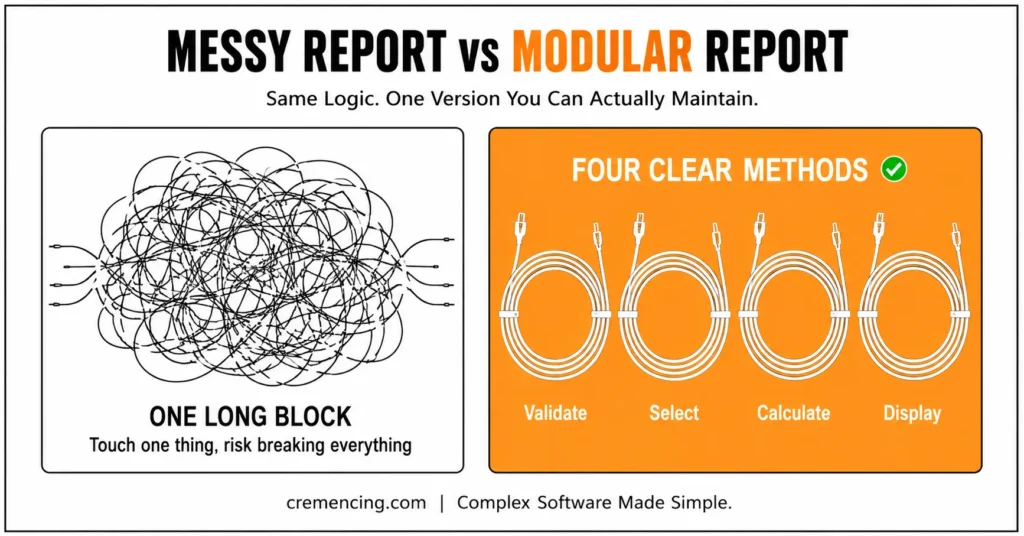
This program works, but it is hard to maintain. If the SELECT changes, the developer touches the same area as validation and output. If ALV replaces WRITE output later, the whole block grows again.
Now refactor the same report with class-based modularization. This version keeps each responsibility separate and makes future changes safer.
Refactored Example: Class-Based Modularization in ABAP
REPORT zcustomer_open_items_modular.
PARAMETERS: p_bukrs TYPE bukrs OBLIGATORY,
p_kunnr TYPE kunnr.
TYPES: BEGIN OF ty_item,
bukrs TYPE bsid-bukrs,
kunnr TYPE bsid-kunnr,
belnr TYPE bsid-belnr,
gjahr TYPE bsid-gjahr,
wrbtr TYPE bsid-wrbtr,
END OF ty_item.
TYPES ty_t_item TYPE STANDARD TABLE OF ty_item WITH EMPTY KEY.
CLASS lcl_report DEFINITION.
PUBLIC SECTION.
METHODS run. ” Main entry method for the report flow
PRIVATE SECTION.
DATA mt_items TYPE ty_t_item. ” Stores selected customer open items
DATA mv_total TYPE bsid-wrbtr. ” Stores calculated total amount
METHODS validate_input. ” Checks selection-screen values
METHODS get_open_items. ” Reads data from database
METHODS calculate_total. ” Calculates total amount
METHODS display_output. ” Displays final report output
ENDCLASS.
CLASS lcl_report IMPLEMENTATION.
METHOD run.
validate_input( ). ” Keep report sequence clear
get_open_items( ). ” Database access stays in one method
calculate_total( ). ” Calculation stays separate from SELECT
display_output( ). ” Output can later move to ALV without changing SELECT
ENDMETHOD.
METHOD validate_input.
IF p_bukrs IS INITIAL.
MESSAGE ‘Company code is required’ TYPE ‘E’. ” Validation belongs before database access
ENDIF.
ENDMETHOD.
METHOD get_open_items.
SELECT bukrs, kunnr, belnr, gjahr, wrbtr
FROM bsid
INTO TABLE @mt_items
WHERE bukrs = @p_bukrs
AND kunnr = @p_kunnr. ” Restrict data at database level
ENDMETHOD.
METHOD calculate_total.
DATA ls_item TYPE ty_item.
CLEAR mv_total.
LOOP AT mt_items INTO ls_item.
mv_total = mv_total + ls_item-wrbtr. ” Single calculation responsibility
ENDLOOP.
ENDMETHOD.
METHOD display_output.
DATA ls_item TYPE ty_item.
WRITE: / ‘Company Code:’, p_bukrs.
WRITE: / ‘Customer:’, p_kunnr.
WRITE: / ‘Total Amount:’, mv_total.
LOOP AT mt_items INTO ls_item.
WRITE: / ls_item-belnr, ls_item-gjahr, ls_item-wrbtr. ” Output logic is isolated
ENDLOOP.
ENDMETHOD.
ENDCLASS.
START-OF-SELECTION.
DATA lo_report TYPE REF TO lcl_report.
CREATE OBJECT lo_report. ” Create local report controller
lo_report->run( ). ” Execute report through one public method
Legacy Example: Modularization in ABAP Using FORM Routines
This is better code modularization in SAP ABAP because the report flow is visible in four method calls. A new developer can understand the program by reading run. Then they can jump into the exact method they need.
If you maintain older ECC code, you may still use FORM routines. Use them carefully and pass data through parameters where possible.
FORM calculate_total
USING it_items TYPE ty_t_item
CHANGING cv_total TYPE bsid-wrbtr.
DATA ls_item TYPE ty_item.
CLEAR cv_total.
LOOP AT it_items INTO ls_item.
cv_total = cv_total + ls_item-wrbtr. ” Calculate total from passed table only
ENDLOOP.
ENDFORM.
This FORM is acceptable in a legacy report because it avoids changing hidden global totals. The important rule is simple: do not let every subroutine read and change every global variable.
When to Use It vs. Alternatives
Modularization techniques in SAP ABAP are not equal choices. Choose the technique based on scope, reuse need, release context, and team standard.
| Requirement | Better Choice | Avoid |
| Split one long report into sections | Includes or local class methods | One 2,000-line report block |
| Refactor old ECC procedural logic | FORM with clear parameters | FORM changing many globals |
| Reuse logic across many programs | Function module or global class | Copy-paste include |
| Build new S/4HANA application logic | Class method | New macro-heavy procedural code |
| Repeat tiny statement pattern | Macro only if very small | Macro with business logic |
| Prepare interview answer | Compare all techniques | Saying “all are same” |
Use includes when one report has grown too large and your team wants separate source sections such as declarations, selection screen, forms, and output. Do not use includes as a shared library across many unrelated programs. That makes changes hard to control.
Use FORM routines when you maintain old procedural code and a full rewrite is not approved. Keep each FORM small, name it by action, and pass values through USING, CHANGING, and TABLES only when needed.
Choosing Between Function Modules, Class Methods, and Macros
Use function modules when several programs need the same procedural service and your system already supports that design. Function modules work well for stable APIs inside classic SAP systems, but they are heavier than local methods for one report. Use class methods when writing new code in S/4HANA or modern ECC projects. They support cleaner design, clearer parameters, and better long-term maintenance. OOPS ABAP Tutorial
Use macros rarely. A macro performs source-code replacement and can make debugging harder. Keep business logic out of macros. The senior rule is this: modularization should reduce mental load. If the developer needs to open ten includes to understand one calculation, the design is not clean.
A useful litmus test for any modularization decision: can you name what a unit does in one sentence without using ‘and’? validate_and_fetch_customer is a sign the split happened too late — validation and data access should already be two separate units by that point.
Conclusion
Modularization in ABAP turns messy programs into maintainable code by separating validation, selection, calculation, formatting, and output into clear units. Instead of placing every rule inside one long START-OF-SELECTION block, move each responsibility into a named module that explains what it does before a developer even opens the code.
Includes work best for source-code organization, not as shared reusable libraries. FORM routines should be used carefully when maintaining older ECC procedural reports. Function modules become necessary when stable global procedural reuse is required. Class methods, on the other hand, are the right choice for modern SAP development, especially in S/4HANA projects where clean structure, clear parameters, and long-term maintainability matter.
The real value of modularization is not just shorter code. It reduces risk during support fixes, makes debugging faster, helps new developers understand the program flow, and keeps future changes isolated. When a requirement changes, the developer should know exactly whether to update validation, database selection, calculation, or output logic.
Good modularization also improves technical reviews. A reviewer can check whether each method has one responsibility, whether parameters are clear, whether global data is controlled, and whether business logic is hidden inside includes or macros. That makes the code easier to test, easier to extend, and safer to transport.
The best ABAP design is the one a support developer can understand quickly and change safely. If your program needs ten minutes just to find where one field is calculated, it needs refactoring. Start small: split validation, data selection, calculation, and display logic first. That one habit will make your ABAP programs cleaner, safer, and easier to maintain.
Frequently Asked Questions
1. What is modularization in ABAP?
Modularization in ABAP is the practice of splitting a large ABAP program into smaller units such as includes, subroutines, function modules, and methods. The goal is easier reading, testing, debugging, and maintenance. It is also spelled modularisation in ABAP in some search results.
2. What are the modularization techniques in ABAP?
The main modularization techniques in ABAP are include programs, macros, subroutines, function modules, and class methods. Includes organize source code, subroutines split local procedural logic, function modules support global reuse, and methods support modern object-oriented design.
3. What is the difference between include and subroutine in ABAP?
An include splits source code, while a subroutine creates a callable processing block. Include modularization in SAP ABAP helps organize one large program, but it does not create a truly reusable procedure. A FORM routine can accept parameters and execute when called.
4. Are FORM routines obsolete in modern ABAP?
FORM routines are still seen in legacy ECC and custom reports, but new development should usually prefer methods. The Stack Overflow ABAP discussion around modern replacements for FORM points toward class methods as the better modern option. [INTERNAL LINK: FORM vs method in ABAP → Modern Replacement for FORM in ABAP]
5. When should I use function modules?
Use function modules when several programs need stable, global procedural logic. Function modules belong to function groups and can be called from different programs. For new local report logic, a class method is usually cleaner than creating a function module.
6. What are modularization techniques in SAP ABAP with examples?
Examples include moving input checks into validate_input, database access into get_data, calculations into calculate_total, and display logic into display_output. These modularization techniques in SAP ABAP with examples help developers change one part without breaking the whole report.
7. What should I include in modularization techniques in SAP ABAP interview questions?
Interview answers should cover includes, macros, subroutines, function modules, and methods, then explain when each one fits. Strong answers mention maintainability, reusability, parameter passing, global data risks, and modern class-based design in S/4HANA. [INTERNAL LINK: ABAP interview questions → Modularization Techniques in SAP ABAP Interview Questions]
8. Can I prepare modularization techniques in SAP ABAP PPT notes from this topic?
Yes, use a PPT-style summary with definition, benefits, syntax, comparison table, and one before/after example. For modularization techniques in SAP ABAP PPT notes, include one slide comparing include, FORM, function module, and class method.
9. Is include modularization the same as object-oriented modularization in ABAP?
No. Includes only split source code physically; they don’t create encapsulated, testable units the way class methods do. A program can be “modularized” into includes and still have all its logic tightly coupled through global data.
10. Does modularization in ABAP affect performance?
Not meaningfully on its own — splitting logic into methods or FORMs has negligible runtime overhead in ABAP. The performance-relevant decisions (SELECT design, internal table access) stay the same regardless of modularization style; modularization is a maintainability improvement, not a performance one.




